1
The Buildroot user manual
i
The Buildroot user manual
The Buildroot user manual
ii
Contents
I
Getting started
1
1
About Buildroot
2
2
System requirements
3
2.1
Mandatory packages . . . . . . . . . . . . . . . . . . . . . . . . . . . . . . . . . . . . . . . . . . . . . . . . .
3
2.2
Optional packages . . . . . . . . . . . . . . . . . . . . . . . . . . . . . . . . . . . . . . . . . . . . . . . . . . .
4
3
Getting Buildroot
5
4
Buildroot quick start
6
5
Community resources
8
II
6
User guide
9
Buildroot configuration
6.1
10
Cross-compilation toolchain . . . . . . . . . . . . . . . . . . . . . . . . . . . . . . . . . . . . . . . . . . . . . 10
6.1.1
Internal toolchain backend . . . . . . . . . . . . . . . . . . . . . . . . . . . . . . . . . . . . . . . . . . 11
6.1.2
External toolchain backend . . . . . . . . . . . . . . . . . . . . . . . . . . . . . . . . . . . . . . . . . . 11
6.1.2.1
External toolchain wrapper . . . . . . . . . . . . . . . . . . . . . . . . . . . . . . . . . . . . 12
6.2
/dev management . . . . . . . . . . . . . . . . . . . . . . . . . . . . . . . . . . . . . . . . . . . . . . . . . . . 13
6.3
init system . . . . . . . . . . . . . . . . . . . . . . . . . . . . . . . . . . . . . . . . . . . . . . . . . . . . . . . 13
7
Configuration of other components
15
8
General Buildroot usage
16
8.1
make tips . . . . . . . . . . . . . . . . . . . . . . . . . . . . . . . . . . . . . . . . . . . . . . . . . . . . . . . 16
8.2
Understanding when a full rebuild is necessary . . . . . . . . . . . . . . . . . . . . . . . . . . . . . . . . . . . 17
8.3
Understanding how to rebuild packages . . . . . . . . . . . . . . . . . . . . . . . . . . . . . . . . . . . . . . . 18
8.4
Offline builds . . . . . . . . . . . . . . . . . . . . . . . . . . . . . . . . . . . . . . . . . . . . . . . . . . . . . 18
8.5
Building out-of-tree . . . . . . . . . . . . . . . . . . . . . . . . . . . . . . . . . . . . . . . . . . . . . . . . . . 18
The Buildroot user manual
iii
8.6
Environment variables . . . . . . . . . . . . . . . . . . . . . . . . . . . . . . . . . . . . . . . . . . . . . . . . 19
8.7
Dealing efficiently with filesystem images . . . . . . . . . . . . . . . . . . . . . . . . . . . . . . . . . . . . . . 19
8.8
Graphing the dependencies between packages . . . . . . . . . . . . . . . . . . . . . . . . . . . . . . . . . . . . 20
8.9
Graphing the build duration . . . . . . . . . . . . . . . . . . . . . . . . . . . . . . . . . . . . . . . . . . . . . . 21
8.10 Graphing the filesystem size contribution of packages . . . . . . . . . . . . . . . . . . . . . . . . . . . . . . . . 21
8.11 Integration with Eclipse . . . . . . . . . . . . . . . . . . . . . . . . . . . . . . . . . . . . . . . . . . . . . . . . 22
8.12 Advanced usage . . . . . . . . . . . . . . . . . . . . . . . . . . . . . . . . . . . . . . . . . . . . . . . . . . . . 22
8.12.1 Using the generated toolchain outside Buildroot . . . . . . . . . . . . . . . . . . . . . . . . . . . . . . . 22
8.12.2 Using gdb in Buildroot . . . . . . . . . . . . . . . . . . . . . . . . . . . . . . . . . . . . . . . . . . . 22
8.12.3 Using ccache in Buildroot . . . . . . . . . . . . . . . . . . . . . . . . . . . . . . . . . . . . . . . . . 23
8.12.4 Location of downloaded packages . . . . . . . . . . . . . . . . . . . . . . . . . . . . . . . . . . . . . . 23
8.12.5 Package-specific make targets . . . . . . . . . . . . . . . . . . . . . . . . . . . . . . . . . . . . . . . . 24
8.12.6 Using Buildroot during development . . . . . . . . . . . . . . . . . . . . . . . . . . . . . . . . . . . . . 24
9
Project-specific customization
9.1
26
Recommended directory structure . . . . . . . . . . . . . . . . . . . . . . . . . . . . . . . . . . . . . . . . . . 26
9.1.1
Implementing layered customizations . . . . . . . . . . . . . . . . . . . . . . . . . . . . . . . . . . . . 27
9.2
Keeping customizations outside of Buildroot . . . . . . . . . . . . . . . . . . . . . . . . . . . . . . . . . . . . . 28
9.3
Storing the Buildroot configuration . . . . . . . . . . . . . . . . . . . . . . . . . . . . . . . . . . . . . . . . . . 29
9.4
Storing the configuration of other components . . . . . . . . . . . . . . . . . . . . . . . . . . . . . . . . . . . . 29
9.5
Customizing the generated target filesystem . . . . . . . . . . . . . . . . . . . . . . . . . . . . . . . . . . . . . 30
9.5.1
Setting file permissions and ownership and adding custom devices nodes . . . . . . . . . . . . . . . . . 31
9.6
Adding custom user accounts . . . . . . . . . . . . . . . . . . . . . . . . . . . . . . . . . . . . . . . . . . . . . 31
9.7
Customization after the images have been created . . . . . . . . . . . . . . . . . . . . . . . . . . . . . . . . . . 31
9.8
Adding project-specific patches . . . . . . . . . . . . . . . . . . . . . . . . . . . . . . . . . . . . . . . . . . . . 32
9.9
Adding project-specific packages . . . . . . . . . . . . . . . . . . . . . . . . . . . . . . . . . . . . . . . . . . . 32
9.10 Quick guide to storing your project-specific customizations . . . . . . . . . . . . . . . . . . . . . . . . . . . . . 33
10 Frequently Asked Questions & Troubleshooting
35
10.1 The boot hangs after Starting network. . . . . . . . . . . . . . . . . . . . . . . . . . . . . . . . . . . . . . . . . . 35
10.2 Why is there no compiler on the target? . . . . . . . . . . . . . . . . . . . . . . . . . . . . . . . . . . . . . . . 35
10.3 Why are there no development files on the target? . . . . . . . . . . . . . . . . . . . . . . . . . . . . . . . . . . 36
10.4 Why is there no documentation on the target? . . . . . . . . . . . . . . . . . . . . . . . . . . . . . . . . . . . . 36
10.5 Why are some packages not visible in the Buildroot config menu? . . . . . . . . . . . . . . . . . . . . . . . . . 36
10.6 Why not use the target directory as a chroot directory? . . . . . . . . . . . . . . . . . . . . . . . . . . . . . . . 36
10.7 Why doesn’t Buildroot generate binary packages (.deb, .ipkg. . . )? . . . . . . . . . . . . . . . . . . . . . . . . . 36
10.8 How to speed-up the build process? . . . . . . . . . . . . . . . . . . . . . . . . . . . . . . . . . . . . . . . . . 37
11 Known issues
39
The Buildroot user manual
12 Legal notice and licensing
iv
40
12.1 Complying with open source licenses . . . . . . . . . . . . . . . . . . . . . . . . . . . . . . . . . . . . . . . . 40
12.2 License abbreviations . . . . . . . . . . . . . . . . . . . . . . . . . . . . . . . . . . . . . . . . . . . . . . . . . 41
12.3 Complying with the Buildroot license . . . . . . . . . . . . . . . . . . . . . . . . . . . . . . . . . . . . . . . . 41
13 Beyond Buildroot
42
13.1 Boot the generated images . . . . . . . . . . . . . . . . . . . . . . . . . . . . . . . . . . . . . . . . . . . . . . 42
13.1.1 NFS boot . . . . . . . . . . . . . . . . . . . . . . . . . . . . . . . . . . . . . . . . . . . . . . . . . . . 42
13.1.2 Live CD . . . . . . . . . . . . . . . . . . . . . . . . . . . . . . . . . . . . . . . . . . . . . . . . . . . . 42
13.2 Chroot . . . . . . . . . . . . . . . . . . . . . . . . . . . . . . . . . . . . . . . . . . . . . . . . . . . . . . . . . 42
III
Developer guide
43
14 How Buildroot works
44
15 Coding style
45
15.1 Config.in file . . . . . . . . . . . . . . . . . . . . . . . . . . . . . . . . . . . . . . . . . . . . . . . . . . . 45
15.2 The .mk file . . . . . . . . . . . . . . . . . . . . . . . . . . . . . . . . . . . . . . . . . . . . . . . . . . . . . . 45
15.3 The documentation . . . . . . . . . . . . . . . . . . . . . . . . . . . . . . . . . . . . . . . . . . . . . . . . . . 47
16 Adding support for a particular board
48
17 Adding new packages to Buildroot
49
17.1 Package directory . . . . . . . . . . . . . . . . . . . . . . . . . . . . . . . . . . . . . . . . . . . . . . . . . . . 49
17.2 Config files . . . . . . . . . . . . . . . . . . . . . . . . . . . . . . . . . . . . . . . . . . . . . . . . . . . . . . 49
17.2.1 Config.in file . . . . . . . . . . . . . . . . . . . . . . . . . . . . . . . . . . . . . . . . . . . . . . . 49
17.2.2 Config.in.host file . . . . . . . . . . . . . . . . . . . . . . . . . . . . . . . . . . . . . . . . . . . 50
17.2.3 Choosing depends on or select . . . . . . . . . . . . . . . . . . . . . . . . . . . . . . . . . . . . 50
17.2.4 Dependencies on target and toolchain options . . . . . . . . . . . . . . . . . . . . . . . . . . . . . . . . 51
17.2.5 Dependencies on a Linux kernel built by buildroot . . . . . . . . . . . . . . . . . . . . . . . . . . . . . 53
17.2.6 Dependencies on udev /dev management . . . . . . . . . . . . . . . . . . . . . . . . . . . . . . . . . . 53
17.2.7 Dependencies on features provided by virtual packages . . . . . . . . . . . . . . . . . . . . . . . . . . . 54
17.3 The .mk file . . . . . . . . . . . . . . . . . . . . . . . . . . . . . . . . . . . . . . . . . . . . . . . . . . . . . . 54
17.4 The .hash file . . . . . . . . . . . . . . . . . . . . . . . . . . . . . . . . . . . . . . . . . . . . . . . . . . . . 54
17.5 Infrastructure for packages with specific build systems . . . . . . . . . . . . . . . . . . . . . . . . . . . . . . . 55
17.5.1 generic-package tutorial . . . . . . . . . . . . . . . . . . . . . . . . . . . . . . . . . . . . . . . . 56
17.5.2 generic-package reference . . . . . . . . . . . . . . . . . . . . . . . . . . . . . . . . . . . . . . . 57
17.6 Infrastructure for autotools-based packages . . . . . . . . . . . . . . . . . . . . . . . . . . . . . . . . . . . . . 61
17.6.1 autotools-package tutorial . . . . . . . . . . . . . . . . . . . . . . . . . . . . . . . . . . . . . . 61
17.6.2 autotools-package reference . . . . . . . . . . . . . . . . . . . . . . . . . . . . . . . . . . . . . 62
17.7 Infrastructure for CMake-based packages . . . . . . . . . . . . . . . . . . . . . . . . . . . . . . . . . . . . . . 63
The Buildroot user manual
v
17.7.1 cmake-package tutorial . . . . . . . . . . . . . . . . . . . . . . . . . . . . . . . . . . . . . . . . . . 63
17.7.2 cmake-package reference . . . . . . . . . . . . . . . . . . . . . . . . . . . . . . . . . . . . . . . . 64
17.8 Infrastructure for Python packages . . . . . . . . . . . . . . . . . . . . . . . . . . . . . . . . . . . . . . . . . . 65
17.8.1 python-package tutorial . . . . . . . . . . . . . . . . . . . . . . . . . . . . . . . . . . . . . . . . . 65
17.8.2 python-package reference . . . . . . . . . . . . . . . . . . . . . . . . . . . . . . . . . . . . . . . . 66
17.9 Infrastructure for LuaRocks-based packages . . . . . . . . . . . . . . . . . . . . . . . . . . . . . . . . . . . . . 67
17.9.1 luarocks-package tutorial . . . . . . . . . . . . . . . . . . . . . . . . . . . . . . . . . . . . . . . 67
17.9.2 luarocks-package reference . . . . . . . . . . . . . . . . . . . . . . . . . . . . . . . . . . . . . . 67
17.10Infrastructure for Perl/CPAN packages . . . . . . . . . . . . . . . . . . . . . . . . . . . . . . . . . . . . . . . . 68
17.10.1 perl-package tutorial . . . . . . . . . . . . . . . . . . . . . . . . . . . . . . . . . . . . . . . . . . 68
17.10.2 perl-package reference . . . . . . . . . . . . . . . . . . . . . . . . . . . . . . . . . . . . . . . . . 69
17.11Infrastructure for virtual packages . . . . . . . . . . . . . . . . . . . . . . . . . . . . . . . . . . . . . . . . . . 69
17.11.1 virtual-package tutorial . . . . . . . . . . . . . . . . . . . . . . . . . . . . . . . . . . . . . . . . 69
17.11.2 Virtual package’s Config.in file . . . . . . . . . . . . . . . . . . . . . . . . . . . . . . . . . . . . . 70
17.11.3 Virtual package’s .mk file . . . . . . . . . . . . . . . . . . . . . . . . . . . . . . . . . . . . . . . . . . 70
17.11.4 Provider’s Config.in file . . . . . . . . . . . . . . . . . . . . . . . . . . . . . . . . . . . . . . . . . 70
17.11.5 Provider’s .mk file . . . . . . . . . . . . . . . . . . . . . . . . . . . . . . . . . . . . . . . . . . . . . . 70
17.11.6 Notes on depending on a virtual package . . . . . . . . . . . . . . . . . . . . . . . . . . . . . . . . . . 71
17.11.7 Notes on depending on a specific provider . . . . . . . . . . . . . . . . . . . . . . . . . . . . . . . . . . 71
17.12Infrastructure for packages using kconfig for configuration files . . . . . . . . . . . . . . . . . . . . . . . . . . . 71
17.13Infrastructure for rebar-based packages . . . . . . . . . . . . . . . . . . . . . . . . . . . . . . . . . . . . . . . . 72
17.13.1 rebar-package tutorial . . . . . . . . . . . . . . . . . . . . . . . . . . . . . . . . . . . . . . . . . . 72
17.13.2 rebar-package reference . . . . . . . . . . . . . . . . . . . . . . . . . . . . . . . . . . . . . . . . 73
17.14Infrastructure for packages building kernel modules . . . . . . . . . . . . . . . . . . . . . . . . . . . . . . . . . 73
17.14.1 kernel-module tutorial . . . . . . . . . . . . . . . . . . . . . . . . . . . . . . . . . . . . . . . . . . 73
17.14.2 kernel-module reference . . . . . . . . . . . . . . . . . . . . . . . . . . . . . . . . . . . . . . . . 74
17.15Infrastructure for asciidoc documents . . . . . . . . . . . . . . . . . . . . . . . . . . . . . . . . . . . . . . . . 75
17.15.1 asciidoc-document tutorial . . . . . . . . . . . . . . . . . . . . . . . . . . . . . . . . . . . . . . 76
17.15.2 asciidoc-document reference . . . . . . . . . . . . . . . . . . . . . . . . . . . . . . . . . . . . . 76
17.16Infrastructure specific to the Linux kernel package . . . . . . . . . . . . . . . . . . . . . . . . . . . . . . . . . . 77
17.16.1 linux-kernel-tools . . . . . . . . . . . . . . . . . . . . . . . . . . . . . . . . . . . . . . . . . . . . . . . 77
17.16.2 linux-kernel-extensions . . . . . . . . . . . . . . . . . . . . . . . . . . . . . . . . . . . . . . . . . . . . 78
17.17Hooks available in the various build steps . . . . . . . . . . . . . . . . . . . . . . . . . . . . . . . . . . . . . . 79
17.17.1 Using the POST_RSYNC hook . . . . . . . . . . . . . . . . . . . . . . . . . . . . . . . . . . . . . . . . 80
17.18Gettext integration and interaction with packages . . . . . . . . . . . . . . . . . . . . . . . . . . . . . . . . . . 80
17.19Tips and tricks . . . . . . . . . . . . . . . . . . . . . . . . . . . . . . . . . . . . . . . . . . . . . . . . . . . . . 81
17.19.1 Package name, config entry name and makefile variable relationship . . . . . . . . . . . . . . . . . . . . 81
17.19.2 How to add a package from GitHub . . . . . . . . . . . . . . . . . . . . . . . . . . . . . . . . . . . . . 81
17.20Conclusion . . . . . . . . . . . . . . . . . . . . . . . . . . . . . . . . . . . . . . . . . . . . . . . . . . . . . . 82
The Buildroot user manual
18 Patching a package
vi
83
18.1 Providing patches . . . . . . . . . . . . . . . . . . . . . . . . . . . . . . . . . . . . . . . . . . . . . . . . . . . 83
18.1.1 Downloaded . . . . . . . . . . . . . . . . . . . . . . . . . . . . . . . . . . . . . . . . . . . . . . . . . 83
18.1.2 Within Buildroot . . . . . . . . . . . . . . . . . . . . . . . . . . . . . . . . . . . . . . . . . . . . . . . 83
18.1.3 Global patch directory . . . . . . . . . . . . . . . . . . . . . . . . . . . . . . . . . . . . . . . . . . . . 83
18.2 How patches are applied . . . . . . . . . . . . . . . . . . . . . . . . . . . . . . . . . . . . . . . . . . . . . . . 84
18.3 Format and licensing of the package patches . . . . . . . . . . . . . . . . . . . . . . . . . . . . . . . . . . . . . 84
18.4 Integrating patches found on the Web . . . . . . . . . . . . . . . . . . . . . . . . . . . . . . . . . . . . . . . . 85
19 Download infrastructure
86
20 Debugging Buildroot
87
21 Contributing to Buildroot
88
21.1 Reproducing, analyzing and fixing bugs . . . . . . . . . . . . . . . . . . . . . . . . . . . . . . . . . . . . . . . 88
21.2 Analyzing and fixing autobuild failures . . . . . . . . . . . . . . . . . . . . . . . . . . . . . . . . . . . . . . . . 88
21.3 Reviewing and testing patches . . . . . . . . . . . . . . . . . . . . . . . . . . . . . . . . . . . . . . . . . . . . 89
21.3.1 Applying Patches from Patchwork . . . . . . . . . . . . . . . . . . . . . . . . . . . . . . . . . . . . . . 90
21.4 Work on items from the TODO list . . . . . . . . . . . . . . . . . . . . . . . . . . . . . . . . . . . . . . . . . . 90
21.5 Submitting patches . . . . . . . . . . . . . . . . . . . . . . . . . . . . . . . . . . . . . . . . . . . . . . . . . . 90
21.5.1 Cover letter . . . . . . . . . . . . . . . . . . . . . . . . . . . . . . . . . . . . . . . . . . . . . . . . . . 91
21.5.2 Patch revision changelog . . . . . . . . . . . . . . . . . . . . . . . . . . . . . . . . . . . . . . . . . . . 91
21.6 Reporting issues/bugs or getting help . . . . . . . . . . . . . . . . . . . . . . . . . . . . . . . . . . . . . . . . . 92
IV
Appendix
93
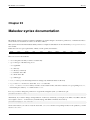
22 Makedev syntax documentation
94
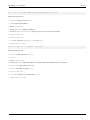
23 Makeusers syntax documentation
96
24 List of target packages available in Buildroot
98
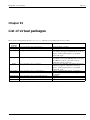
25 List of virtual packages
129
26 List of host utilities available in Buildroot
130
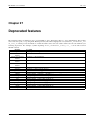
27 Deprecated features
131
The Buildroot user manual
vii
Buildroot 2015.11 manual generated on 2015-11-30 22:16:01 UTC from git revision 3f90e53
The Buildroot manual is written by the Buildroot developers. It is licensed under the GNU General Public License, version 2.
Refer to the COPYING file in the Buildroot sources for the full text of this license.
Copyright © 2004-2014 The Buildroot developers
logo.png
The Buildroot user manual
1 / 131
Part I
Getting started
The Buildroot user manual
2 / 131
Chapter 1
About Buildroot
Buildroot is a tool that simplifies and automates the process of building a complete Linux system for an embedded system, using
cross-compilation.
In order to achieve this, Buildroot is able to generate a cross-compilation toolchain, a root filesystem, a Linux kernel image and a
bootloader for your target. Buildroot can be used for any combination of these options, independently (you can for example use
an existing cross-compilation toolchain, and build only your root filesystem with Buildroot).
Buildroot is useful mainly for people working with embedded systems. Embedded systems often use processors that are not
the regular x86 processors everyone is used to having in his PC. They can be PowerPC processors, MIPS processors, ARM
processors, etc.
Buildroot supports numerous processors and their variants; it also comes with default configurations for several boards available
off-the-shelf. Besides this, a number of third-party projects are based on, or develop their BSP 1 or SDK 2 on top of Buildroot.
1
2
BSP: Board Support Package
SDK: Software Development Kit
The Buildroot user manual
3 / 131
Chapter 2
System requirements
Buildroot is designed to run on Linux systems.
While Buildroot itself will build most host packages it needs for the compilation, certain standard Linux utilities are expected
to be already installed on the host system. Below you will find an overview of the mandatory and optional packages (note that
package names may vary between distributions).
2.1
Mandatory packages
• Build tools:
– which
– sed
– make (version 3.81 or any later)
– binutils
– build-essential (only for Debian based systems)
– gcc (version 2.95 or any later)
– g++ (version 2.95 or any later)
– bash
– patch
– gzip
– bzip2
– perl (version 5.8.7 or any later)
– tar
– cpio
– python (version 2.6 or any later)
– unzip
– rsync
• Source fetching tools:
– wget
The Buildroot user manual
2.2
4 / 131
Optional packages
• Configuration interface dependencies:
For these libraries, you need to install both runtime and development data, which in many distributions are packaged separately.
The development packages typically have a -dev or -devel suffix.
– ncurses5 to use the menuconfig interface
– qt4 to use the xconfig interface
– glib2, gtk2 and glade2 to use the gconfig interface
• Source fetching tools:
In the official tree, most of the package sources are retrieved using wget from ftp, http or https locations. A few packages are
only available through a version control system. Moreover, Buildroot is capable of downloading sources via other tools, like
rsync or scp (refer to Chapter 19 for more details). If you enable packages using any of these methods, you will need to
install the corresponding tool on the host system:
– bazaar
– cvs
– git
– mercurial
– rsync
– scp
– subversion
• Java-related packages, if the Java Classpath needs to be built for the target system:
– The javac compiler
– The jar tool
• Documentation generation tools:
– asciidoc, version 8.6.3 or higher
– w3m
– python with the argparse module (automatically present in 2.7+ and 3.2+)
– dblatex (required for the pdf manual only)
• Graph generation tools:
– graphviz to use graph-depends and <pkg>-graph-depends
– python-matplotlib to use graph-build
The Buildroot user manual
5 / 131
Chapter 3
Getting Buildroot
Buildroot releases are made every 3 months, in February, May, August and November. Release numbers are in the format
YYYY.MM, so for example 2013.02, 2014.08.
Release tarballs are available at http://buildroot.org/downloads/.
If you want to follow development, you can use the daily snapshots or make a clone of the Git repository. Refer to the Download
page of the Buildroot website for more details.
The Buildroot user manual
6 / 131
Chapter 4
Buildroot quick start
Important: you can and should build everything as a normal user. There is no need to be root to configure and use Buildroot.
By running all commands as a regular user, you protect your system against packages behaving badly during compilation and
installation.
The first step when using Buildroot is to create a configuration. Buildroot has a nice configuration tool similar to the one you can
find in the Linux kernel or in BusyBox.
From the buildroot directory, run
$ make menuconfig
for the original curses-based configurator, or
$ make nconfig
for the new curses-based configurator, or
$ make xconfig
for the Qt-based configurator, or
$ make gconfig
for the GTK-based configurator.
All of these "make" commands will need to build a configuration utility (including the interface), so you may need to install
"development" packages for relevant libraries used by the configuration utilities. Refer to Chapter 2 for more details, specifically
the optional requirements Section 2.2 to get the dependencies of your favorite interface.
For each menu entry in the configuration tool, you can find associated help that describes the purpose of the entry. Refer to
Chapter 6 for details on some specific configuration aspects.
Once everything is configured, the configuration tool generates a .config file that contains the entire configuration. This file
will be read by the top-level Makefile.
To start the build process, simply run:
$ make
You should never use make -jN with Buildroot: top-level parallel make is currently not supported. Instead, use the BR2_JL
EVEL option to tell Buildroot to run the compilation of each individual package with make -jN.
The make command will generally perform the following steps:
• download source files (as required);
The Buildroot user manual
7 / 131
• configure, build and install the cross-compilation toolchain, or simply import an external toolchain;
• configure, build and install selected target packages;
• build a kernel image, if selected;
• build a bootloader image, if selected;
• create a root filesystem in selected formats.
Buildroot output is stored in a single directory, output/. This directory contains several subdirectories:
• images/ where all the images (kernel image, bootloader and root filesystem images) are stored. These are the files you need
to put on your target system.
• build/ where all the components are built (this includes tools needed by Buildroot on the host and packages compiled for
the target). This directory contains one subdirectory for each of these components.
• staging/ which contains a hierarchy similar to a root filesystem hierarchy. This directory contains the headers and libraries
of the cross-compilation toolchain and all the userspace packages selected for the target. However, this directory is not intended
to be the root filesystem for the target: it contains a lot of development files, unstripped binaries and libraries that make it far
too big for an embedded system. These development files are used to compile libraries and applications for the target that
depend on other libraries.
• target/ which contains almost the complete root filesystem for the target: everything needed is present except the device
files in /dev/ (Buildroot can’t create them because Buildroot doesn’t run as root and doesn’t want to run as root). Also, it
doesn’t have the correct permissions (e.g. setuid for the busybox binary). Therefore, this directory should not be used on
your target. Instead, you should use one of the images built in the images/ directory. If you need an extracted image of
the root filesystem for booting over NFS, then use the tarball image generated in images/ and extract it as root. Compared
to staging/, target/ contains only the files and libraries needed to run the selected target applications: the development
files (headers, etc.) are not present, the binaries are stripped.
• host/ contains the installation of tools compiled for the host that are needed for the proper execution of Buildroot, including
the cross-compilation toolchain.
These commands, make menuconfig|nconfig|gconfig|xconfig and make, are the basic ones that allow to easily
and quickly generate images fitting your needs, with all the features and applications you enabled.
More details about the "make" command usage are given in Section 8.1.
The Buildroot user manual
8 / 131
Chapter 5
Community resources
Like any open source project, Buildroot has different ways to share information in its community and outside.
Each of those ways may interest you if you are looking for some help, want to understand Buildroot or contribute to the project.
Mailing List
Buildroot has a mailing list for discussion and development. It is the main method of interaction for Buildroot users and
developers.
Only subscribers to the Buildroot mailing list are allowed to post to this list. You can subscribe via the mailing list info
page.
Mails that are sent to the mailing list are also available in the mailing list archives and via Gmane, at gmane.comp.
lib.uclibc.buildroot. Please search the mailing list archives before asking questions, since there is a good chance
someone else has asked the same question before.
IRC
The Buildroot IRC channel #buildroot is hosted on Freenode. It is a useful place to ask quick questions or discuss on
certain topics.
When asking for help on IRC, share relevant logs or pieces of code using a code sharing website, such as http://code.bulix.org.
Note that for certain questions, posting to the mailing list may be better as it will reach more people, both developers and
users.
Bug tracker
Bugs in Buildroot can be reported via the mailing list or alternatively via the Buildroot bugtracker. Please refer to Section 21.6 before creating a bug report.
Wiki
The Buildroot wiki page is hosted on the eLinux wiki. It contains some useful links, an overview of past and upcoming
events, and a TODO list.
Patchwork
Patchwork is a web-based patch tracking system designed to facilitate the contribution and management of contributions to
an open-source project. Patches that have been sent to a mailing list are ’caught’ by the system, and appear on a web page.
Any comments posted that reference the patch are appended to the patch page too. For more information on Patchwork
see http://jk.ozlabs.org/projects/patchwork/.
Buildroot’s Patchwork website is mainly for use by Buildroot’s maintainer to ensure patches aren’t missed. It is also used
by Buildroot patch reviewers (see also Section 21.3.1). However, since the website exposes patches and their corresponding
review comments in a clean and concise web interface, it can be useful for all Buildroot developers.
The Buildroot patch management interface is available at http://patchwork.buildroot.org.
The Buildroot user manual
9 / 131
Part II
User guide
The Buildroot user manual
10 / 131
Chapter 6
Buildroot configuration
All the configuration options in make *config have a help text providing details about the option.
The make *config commands also offer a search tool. Read the help message in the different frontend menus to know how
to use it:
• in menuconfig, the search tool is called by pressing /;
• in xconfig, the search tool is called by pressing Ctrl + f.
The result of the search shows the help message of the matching items. In menuconfig, numbers in the left column provide a
shortcut to the corresponding entry. Just type this number to directly jump to the entry, or to the containing menu in case the
entry is not selectable due to a missing dependency.
Although the menu structure and the help text of the entries should be sufficiently self-explanatory, a number of topics require
additional explanation that cannot easily be covered in the help text and are therefore covered in the following sections.
6.1
Cross-compilation toolchain
A compilation toolchain is the set of tools that allows you to compile code for your system. It consists of a compiler (in our case,
gcc), binary utils like assembler and linker (in our case, binutils) and a C standard library (for example GNU Libc, uClibc).
The system installed on your development station certainly already has a compilation toolchain that you can use to compile an
application that runs on your system. If you’re using a PC, your compilation toolchain runs on an x86 processor and generates
code for an x86 processor. Under most Linux systems, the compilation toolchain uses the GNU libc (glibc) as the C standard
library. This compilation toolchain is called the "host compilation toolchain". The machine on which it is running, and on which
you’re working, is called the "host system" 1 .
The compilation toolchain is provided by your distribution, and Buildroot has nothing to do with it (other than using it to build a
cross-compilation toolchain and other tools that are run on the development host).
As said above, the compilation toolchain that comes with your system runs on and generates code for the processor in your host
system. As your embedded system has a different processor, you need a cross-compilation toolchain - a compilation toolchain
that runs on your host system but generates code for your target system (and target processor). For example, if your host system
uses x86 and your target system uses ARM, the regular compilation toolchain on your host runs on x86 and generates code for
x86, while the cross-compilation toolchain runs on x86 and generates code for ARM.
Buildroot provides two solutions for the cross-compilation toolchain:
• The internal toolchain backend, called Buildroot toolchain in the configuration interface.
1 This terminology differs from what is used by GNU configure, where the host is the machine on which the application will run (which is usually the same
as target)
The Buildroot user manual
11 / 131
• The external toolchain backend, called External toolchain in the configuration interface.
The choice between these two solutions is done using the Toolchain Type option in the Toolchain menu. Once one
solution has been chosen, a number of configuration options appear, they are detailed in the following sections.
6.1.1
Internal toolchain backend
The internal toolchain backend is the backend where Buildroot builds by itself a cross-compilation toolchain, before building the
userspace applications and libraries for your target embedded system.
This backend supports several C libraries: uClibc, the glibc and eglibc.
Once you have selected this backend, a number of options appear. The most important ones allow to:
• Change the version of the Linux kernel headers used to build the toolchain. This item deserves a few explanations. In the
process of building a cross-compilation toolchain, the C library is being built. This library provides the interface between
userspace applications and the Linux kernel. In order to know how to "talk" to the Linux kernel, the C library needs to have
access to the Linux kernel headers (i.e. the .h files from the kernel), which define the interface between userspace and the
kernel (system calls, data structures, etc.). Since this interface is backward compatible, the version of the Linux kernel headers
used to build your toolchain do not need to match exactly the version of the Linux kernel you intend to run on your embedded
system. They only need to have a version equal or older to the version of the Linux kernel you intend to run. If you use
kernel headers that are more recent than the Linux kernel you run on your embedded system, then the C library might be using
interfaces that are not provided by your Linux kernel.
• Change the version of the GCC compiler, binutils and the C library.
• Select a number of toolchain options (uClibc only): whether the toolchain should have RPC support (used mainly for NFS),
wide-char support, locale support (for internationalization), C++ support or thread support. Depending on which options you
choose, the number of userspace applications and libraries visible in Buildroot menus will change: many applications and
libraries require certain toolchain options to be enabled. Most packages show a comment when a certain toolchain option is
required to be able to enable those packages. If needed, you can further refine the uClibc configuration by running make
uclibc-menuconfig. Note however that all packages in Buildroot are tested against the default uClibc configuration
bundled in Buildroot: if you deviate from this configuration by removing features from uClibc, some packages may no longer
build.
It is worth noting that whenever one of those options is modified, then the entire toolchain and system must be rebuilt. See
Section 8.2.
Advantages of this backend:
• Well integrated with Buildroot
• Fast, only builds what’s necessary
Drawbacks of this backend:
• Rebuilding the toolchain is needed when doing make clean, which takes time. If you’re trying to reduce your build time,
consider using the External toolchain backend.
6.1.2
External toolchain backend
The external toolchain backend allows to use existing pre-built cross-compilation toolchains. Buildroot knows about a number
of well-known cross-compilation toolchains (from Linaro for ARM, Sourcery CodeBench for ARM, x86, x86-64, PowerPC,
MIPS and SuperH, Blackfin toolchains from Analog Devices, etc.) and is capable of downloading them automatically, or it can
be pointed to a custom toolchain, either available for download or installed locally.
Then, you have three solutions to use an external toolchain:
The Buildroot user manual
12 / 131
• Use a predefined external toolchain profile, and let Buildroot download, extract and install the toolchain. Buildroot already
knows about a few CodeSourcery, Linaro, Blackfin and Xilinx toolchains. Just select the toolchain profile in Toolchain
from the available ones. This is definitely the easiest solution.
• Use a predefined external toolchain profile, but instead of having Buildroot download and extract the toolchain, you can tell
Buildroot where your toolchain is already installed on your system. Just select the toolchain profile in Toolchain through
the available ones, unselect Download toolchain automatically, and fill the Toolchain path text entry with
the path to your cross-compiling toolchain.
• Use a completely custom external toolchain. This is particularly useful for toolchains generated using crosstool-NG or with
Buildroot itself. To do this, select the Custom toolchain solution in the Toolchain list. You need to fill the Toolch
ain path, Toolchain prefix and External toolchain C library options. Then, you have to tell Buildroot
what your external toolchain supports. If your external toolchain uses the glibc library, you only have to tell whether your
toolchain supports C++ or not and whether it has built-in RPC support. If your external toolchain uses the uClibc library, then
you have to tell Buildroot if it supports RPC, wide-char, locale, program invocation, threads and C++. At the beginning of the
execution, Buildroot will tell you if the selected options do not match the toolchain configuration.
Our external toolchain support has been tested with toolchains from CodeSourcery and Linaro, toolchains generated by crosstoolNG, and toolchains generated by Buildroot itself. In general, all toolchains that support the sysroot feature should work. If not,
do not hesitate to contact the developers.
We do not support toolchains or SDK generated by OpenEmbedded or Yocto, because these toolchains are not pure toolchains (i.e.
just the compiler, binutils, the C and C++ libraries). Instead these toolchains come with a very large set of pre-compiled libraries
and programs. Therefore, Buildroot cannot import the sysroot of the toolchain, as it would contain hundreds of megabytes of
pre-compiled libraries that are normally built by Buildroot.
We also do not support using the distribution toolchain (i.e. the gcc/binutils/C library installed by your distribution) as the
toolchain to build software for the target. This is because your distribution toolchain is not a "pure" toolchain (i.e. only with the
C/C++ library), so we cannot import it properly into the Buildroot build environment. So even if you are building a system for a
x86 or x86_64 target, you have to generate a cross-compilation toolchain with Buildroot or crosstool-NG.
If you want to generate a custom toolchain for your project, that can be used as an external toolchain in Buildroot, our recommendation is definitely to build it with crosstool-NG. We recommend to build the toolchain separately from Buildroot, and then
import it in Buildroot using the external toolchain backend.
Advantages of this backend:
• Allows to use well-known and well-tested cross-compilation toolchains.
• Avoids the build time of the cross-compilation toolchain, which is often very significant in the overall build time of an embedded Linux system.
• Not limited to uClibc: glibc and eglibc toolchains are supported.
Drawbacks of this backend:
• If your pre-built external toolchain has a bug, may be hard to get a fix from the toolchain vendor, unless you build your external
toolchain by yourself using Crosstool-NG.
6.1.2.1
External toolchain wrapper
When using an external toolchain, Buildroot generates a wrapper program, that transparently passes the appropriate options
(according to the configuration) to the external toolchain programs. In case you need to debug this wrapper to check exactly what
arguments are passed, you can set the environment variable BR2_DEBUG_WRAPPER to either one of:
• 0, empty or not set: no debug
• 1: trace all arguments on a single line
• 2: trace one argument per line
The Buildroot user manual
6.2
13 / 131
/dev management
On a Linux system, the /dev directory contains special files, called device files, that allow userspace applications to access the
hardware devices managed by the Linux kernel. Without these device files, your userspace applications would not be able to use
the hardware devices, even if they are properly recognized by the Linux kernel.
Under System configuration, /dev management, Buildroot offers four different solutions to handle the /dev directory :
• The first solution is Static using device table. This is the old classical way of handling device files in Linux. With this method,
the device files are persistently stored in the root filesystem (i.e. they persist across reboots), and there is nothing that will
automatically create and remove those device files when hardware devices are added or removed from the system. Buildroot
therefore creates a standard set of device files using a device table, the default one being stored in system/device_table
_dev.txt in the Buildroot source code. This file is processed when Buildroot generates the final root filesystem image, and
the device files are therefore not visible in the output/target directory. The BR2_ROOTFS_STATIC_DEVICE_TABLE
option allows to change the default device table used by Buildroot, or to add an additional device table, so that additional device
files are created by Buildroot during the build. So, if you use this method, and a device file is missing in your system, you
can for example create a board/<yourcompany>/<yourproject>/device_table_dev.txt file that contains the
description of your additional device files, and then you can set BR2_ROOTFS_STATIC_DEVICE_TABLE to system/dev
ice_table_dev.txt board/<yourcompany>/<yourproject>/device_table_dev.txt. For more details
about the format of the device table file, see Chapter 22.
• The second solution is Dynamic using devtmpfs only. devtmpfs is a virtual filesystem inside the Linux kernel that has been
introduced in kernel 2.6.32 (if you use an older kernel, it is not possible to use this option). When mounted in /dev, this
virtual filesystem will automatically make device files appear and disappear as hardware devices are added and removed from
the system. This filesystem is not persistent across reboots: it is filled dynamically by the kernel. Using devtmpfs requires
the following kernel configuration options to be enabled: CONFIG_DEVTMPFS and CONFIG_DEVTMPFS_MOUNT. When
Buildroot is in charge of building the Linux kernel for your embedded device, it makes sure that those two options are enabled.
However, if you build your Linux kernel outside of Buildroot, then it is your responsibility to enable those two options (if you
fail to do so, your Buildroot system will not boot).
• The third solution is Dynamic using devtmpfs + mdev. This method also relies on the devtmpfs virtual filesystem detailed
above (so the requirement to have CONFIG_DEVTMPFS and CONFIG_DEVTMPFS_MOUNT enabled in the kernel configuration still apply), but adds the mdev userspace utility on top of it. mdev is a program part of BusyBox that the kernel will call
every time a device is added or removed. Thanks to the /etc/mdev.conf configuration file, mdev can be configured to
for example, set specific permissions or ownership on a device file, call a script or application whenever a device appears or
disappear, etc. Basically, it allows userspace to react on device addition and removal events. mdev can for example be used to
automatically load kernel modules when devices appear on the system. mdev is also important if you have devices that require
a firmware, as it will be responsible for pushing the firmware contents to the kernel. mdev is a lightweight implementation
(with fewer features) of udev. For more details about mdev and the syntax of its configuration file, see http://git.busybox.net/busybox/tree/docs/mdev.txt.
• The fourth solution is Dynamic using devtmpfs + eudev. This method also relies on the devtmpfs virtual filesystem detailed
above, but adds the eudev userspace daemon on top of it. eudev is a daemon that runs in the background, and gets called
by the kernel when a device gets added or removed from the system. It is a more heavyweight solution than mdev, but
provides higher flexibility. eudev is a standalone version of udev, the original userspace daemon used in most desktop Linux
distributions, which is now part of Systemd. For more details, see http://en.wikipedia.org/wiki/Udev.
The Buildroot developers recommendation is to start with the Dynamic using devtmpfs only solution, until you have the need
for userspace to be notified when devices are added/removed, or if firmwares are needed, in which case Dynamic using devtmpfs
+ mdev is usually a good solution.
Note that if systemd is chosen as init system, /dev management will be performed by the udev program provided by systemd.
6.3
init system
The init program is the first userspace program started by the kernel (it carries the PID number 1), and is responsible for starting
the userspace services and programs (for example: web server, graphical applications, other network servers, etc.).
The Buildroot user manual
14 / 131
Buildroot allows to use three different types of init systems, which can be chosen from System configuration, Init
system:
• The first solution is BusyBox. Amongst many programs, BusyBox has an implementation of a basic init program, which
is sufficient for most embedded systems. Enabling the BR2_INIT_BUSYBOX will ensure BusyBox will build and install its
init program. This is the default solution in Buildroot. The BusyBox init program will read the /etc/inittab file
at boot to know what to do. The syntax of this file can be found in http://git.busybox.net/busybox/tree/examples/inittab (note
that BusyBox inittab syntax is special: do not use a random inittab documentation from the Internet to learn about
BusyBox inittab). The default inittab in Buildroot is stored in system/skeleton/etc/inittab. Apart from
mounting a few important filesystems, the main job the default inittab does is to start the /etc/init.d/rcS shell script,
and start a getty program (which provides a login prompt).
• The second solution is systemV. This solution uses the old traditional sysvinit program, packed in Buildroot in package/
sysvinit. This was the solution used in most desktop Linux distributions, until they switched to more recent alternatives
such as Upstart or Systemd. sysvinit also works with an inittab file (which has a slightly different syntax than the one
from BusyBox). The default inittab installed with this init solution is located in package/sysvinit/inittab.
• The third solution is systemd. systemd is the new generation init system for Linux. It does far more than traditional init
programs: aggressive parallelization capabilities, uses socket and D-Bus activation for starting services, offers on-demand
starting of daemons, keeps track of processes using Linux control groups, supports snapshotting and restoring of the system
state, etc. systemd will be useful on relatively complex embedded systems, for example the ones requiring D-Bus and
services communicating between each other. It is worth noting that systemd brings a fairly big number of large dependencies:
dbus, udev and more. For more details about systemd, see http://www.freedesktop.org/wiki/Software/systemd.
The solution recommended by Buildroot developers is to use the BusyBox init as it is sufficient for most embedded systems.
systemd can be used for more complex situations.
The Buildroot user manual
15 / 131
Chapter 7
Configuration of other components
Before attempting to modify any of the components below, make sure you have already configured Buildroot itself, and have
enabled the corresponding package.
BusyBox
If you already have a BusyBox configuration file, you can directly specify this file in the Buildroot configuration, using
BR2_PACKAGE_BUSYBOX_CONFIG. Otherwise, Buildroot will start from a default BusyBox configuration file.
To make subsequent changes to the configuration, use make busybox-menuconfig to open the BusyBox configuration editor.
It is also possible to specify a BusyBox configuration file through an environment variable, although this is not recommended. Refer to Section 8.6 for more details.
uClibc
Configuration of uClibc is done in the same way as for BusyBox. The configuration variable to specify an existing
configuration file is BR2_UCLIBC_CONFIG. The command to make subsequent changes is make uclibc-menucon
fig.
Linux kernel
If you already have a kernel configuration file, you can directly specify this file in the Buildroot configuration, using
BR2_LINUX_KERNEL_USE_CUSTOM_CONFIG.
If you do not yet have a kernel configuration file, you can either start by specifying a defconfig in the Buildroot configuration, using BR2_LINUX_KERNEL_USE_DEFCONFIG, or start by creating an empty file and specifying it as custom
configuration file, using BR2_LINUX_KERNEL_USE_CUSTOM_CONFIG.
To make subsequent changes to the configuration, use make linux-menuconfig to open the Linux configuration
editor.
Barebox
Configuration of Barebox is done in the same way as for the Linux kernel. The corresponding configuration variables
are BR2_TARGET_BAREBOX_USE_CUSTOM_CONFIG and BR2_TARGET_BAREBOX_USE_DEFCONFIG. To open
the configuration editor, use make barebox-menuconfig.
U-Boot
Configuration of U-Boot (version 2015.04 or newer) is done in the same way as for the Linux kernel. The corresponding
configuration variables are BR2_TARGET_UBOOT_USE_CUSTOM_CONFIG and BR2_TARGET_UBOOT_USE_DEFCO
NFIG. To open the configuration editor, use make uboot-menuconfig.
The Buildroot user manual
16 / 131
Chapter 8
General Buildroot usage
8.1 make tips
This is a collection of tips that help you make the most of Buildroot.
Display all commands executed by make:
$ make V=1 <target>
Display the list of boards with a defconfig:
$ make list-defconfigs
Display all available targets:
$ make help
Not all targets are always available, some settings in the .config file may hide some targets:
• busybox-menuconfig only works when busybox is enabled;
• linux-menuconfig and linux-savedefconfig only work when linux is enabled;
• uclibc-menuconfig is only available when the uClibc C library is selected in the internal toolchain backend;
• barebox-menuconfig and barebox-savedefconfig only work when the barebox bootloader is enabled.
• uboot-menuconfig and uboot-savedefconfig only work when the U-Boot bootloader is enabled.
Cleaning: Explicit cleaning is required when any of the architecture or toolchain configuration options are changed.
To delete all build products (including build directories, host, staging and target trees, the images and the toolchain):
$ make clean
Generating the manual: The present manual sources are located in the docs/manual directory. To generate the manual:
$ make manual-clean
$ make manual
The manual outputs will be generated in output/docs/manual.
N OTES
• A few tools are required to build the documentation (see: Section 2.2).
The Buildroot user manual
17 / 131
Resetting Buildroot for a new target: To delete all build products as well as the configuration:
$ make distclean
Notes If ccache is enabled, running make clean or distclean does not empty the compiler cache used by Buildroot. To
delete it, refer to Section 8.12.3.
8.2
Understanding when a full rebuild is necessary
Buildroot does not attempt to detect what parts of the system should be rebuilt when the system configuration is changed through
make menuconfig, make xconfig or one of the other configuration tools. In some cases, Buildroot should rebuild the
entire system, in some cases, only a specific subset of packages. But detecting this in a completely reliable manner is very
difficult, and therefore the Buildroot developers have decided to simply not attempt to do this.
Instead, it is the responsibility of the user to know when a full rebuild is necessary. As a hint, here are a few rules of thumb that
can help you understand how to work with Buildroot:
• When the target architecture configuration is changed, a complete rebuild is needed. Changing the architecture variant, the
binary format or the floating point strategy for example has an impact on the entire system.
• When the toolchain configuration is changed, a complete rebuild generally is needed. Changing the toolchain configuration
often involves changing the compiler version, the type of C library or its configuration, or some other fundamental configuration
item, and these changes have an impact on the entire system.
• When an additional package is added to the configuration, a full rebuild is not necessarily needed. Buildroot will detect that
this package has never been built, and will build it. However, if this package is a library that can optionally be used by packages
that have already been built, Buildroot will not automatically rebuild those. Either you know which packages should be rebuilt,
and you can rebuild them manually, or you should do a full rebuild. For example, let’s suppose you have built a system with
the ctorrent package, but without openssl. Your system works, but you realize you would like to have SSL support in
ctorrent, so you enable the openssl package in Buildroot configuration and restart the build. Buildroot will detect that
openssl should be built and will be build it, but it will not detect that ctorrent should be rebuilt to benefit from openssl
to add OpenSSL support. You will either have to do a full rebuild, or rebuild ctorrent itself.
• When a package is removed from the configuration, Buildroot does not do anything special. It does not remove the files
installed by this package from the target root filesystem or from the toolchain sysroot. A full rebuild is needed to get rid of
this package. However, generally you don’t necessarily need this package to be removed right now: you can wait for the next
lunch break to restart the build from scratch.
• When the sub-options of a package are changed, the package is not automatically rebuilt. After making such changes, rebuilding only this package is often sufficient, unless enabling the package sub-option adds some features to the package that are
useful for another package which has already been built. Again, Buildroot does not track when a package should be rebuilt:
once a package has been built, it is never rebuilt unless explicitly told to do so.
• When a change to the root filesystem skeleton is made, a full rebuild is needed. However, when changes to the root filesystem
overlay, a post-build script or a post-image script are made, there is no need for a full rebuild: a simple make invocation will
take the changes into account.
Generally speaking, when you’re facing a build error and you’re unsure of the potential consequences of the configuration changes
you’ve made, do a full rebuild. If you get the same build error, then you are sure that the error is not related to partial rebuilds
of packages, and if this error occurs with packages from the official Buildroot, do not hesitate to report the problem! As your
experience with Buildroot progresses, you will progressively learn when a full rebuild is really necessary, and you will save more
and more time.
For reference, a full rebuild is achieved by running:
$ make clean all
The Buildroot user manual
8.3
18 / 131
Understanding how to rebuild packages
One of the most common questions asked by Buildroot users is how to rebuild a given package or how to remove a package
without rebuilding everything from scratch.
Removing a package is unsupported by Buildroot without rebuilding from scratch. This is because Buildroot doesn’t keep track
of which package installs what files in the output/staging and output/target directories, or which package would be
compiled differently depending on the availability of another package.
The easiest way to rebuild a single package from scratch is to remove its build directory in output/build. Buildroot will
then re-extract, re-configure, re-compile and re-install this package from scratch. You can ask buildroot to do this with the make
<package>-dirclean command.
On the other hand, if you only want to restart the build process of a package from its compilation step, you can run make
<package>-rebuild, followed by make or make <package>. It will restart the compilation and installation of the
package, but not from scratch: it basically re-executes make and make install inside the package, so it will only rebuild
files that changed.
If you want to restart the build process of a package from its configuration step, you can run make <package>-reconfig
ure, followed by make or make <package>. It will restart the configuration, compilation and installation of the package.
Internally, Buildroot creates so-called stamp files to keep track of which build steps have been completed for each package. They
are stored in the package build directory, output/build/<package>-<version>/ and are named .stamp_<stepname>. The commands detailed above simply manipulate these stamp files to force Buildroot to restart a specific set of steps of
a package build process.
Further details about package special make targets are explained in Section 8.12.5.
8.4
Offline builds
If you intend to do an offline build and just want to download all sources that you previously selected in the configurator
(menuconfig, nconfig, xconfig or gconfig), then issue:
$ make source
You can now disconnect or copy the content of your dl directory to the build-host.
8.5
Building out-of-tree
As default, everything built by Buildroot is stored in the directory output in the Buildroot tree.
Buildroot also supports building out of tree with a syntax similar to the Linux kernel. To use it, add O=<directory> to the
make command line:
$ make O=/tmp/build
Or:
$ cd /tmp/build; make O=$PWD -C path/to/buildroot
All the output files will be located under /tmp/build. If the O path does not exist, Buildroot will create it.
Note: the O path can be either an absolute or a relative path, but if it’s passed as a relative path, it is important to note that it is
interpreted relative to the main Buildroot source directory, not the current working directory.
When using out-of-tree builds, the Buildroot .config and temporary files are also stored in the output directory. This means
that you can safely run multiple builds in parallel using the same source tree as long as they use unique output directories.
For ease of use, Buildroot generates a Makefile wrapper in the output directory - so after the first run, you no longer need to pass
O=<...> and -C <...>, simply run (in the output directory):
$ make <target>
The Buildroot user manual
8.6
19 / 131
Environment variables
Buildroot also honors some environment variables, when they are passed to make or set in the environment:
• HOSTCXX, the host C++ compiler to use
• HOSTCC, the host C compiler to use
• UCLIBC_CONFIG_FILE=<path/to/.config>, path to the uClibc configuration file, used to compile uClibc, if an internal toolchain is being built.
Note that the uClibc configuration file can also be set from the configuration interface, so through the Buildroot .config file;
this is the recommended way of setting it.
• BUSYBOX_CONFIG_FILE=<path/to/.config>, path to the BusyBox configuration file.
Note that the BusyBox configuration file can also be set from the configuration interface, so through the Buildroot .config
file; this is the recommended way of setting it.
• BR2_CCACHE_DIR to override the directory where Buildroot stores the cached files when using ccache.
• BR2_DL_DIR to override the directory in which Buildroot stores/retrieves downloaded files
Note that the Buildroot download directory can also be set from the configuration interface, so through the Buildroot .config
file; this is the recommended way of setting it.
• BR2_GRAPH_ALT, if set and non-empty, to use an alternate color-scheme in build-time graphs
• BR2_GRAPH_OUT to set the filetype of generated graphs, either pdf (the default), or png.
• BR2_GRAPH_DEPS_OPTS to pass extra options to the dependency graph; see [?simpara] for the accepted options
• BR2_GRAPH_DOT_OPTS is passed verbatim as options to the dot utility to draw the dependency graph.
An example that uses config files located in the toplevel directory and in your $HOME:
$ make UCLIBC_CONFIG_FILE=uClibc.config BUSYBOX_CONFIG_FILE=$HOME/bb.config
If you want to use a compiler other than the default gcc or g++ for building helper-binaries on your host, then do
$ make HOSTCXX=g++-4.3-HEAD HOSTCC=gcc-4.3-HEAD
8.7
Dealing efficiently with filesystem images
Filesystem images can get pretty big, depending on the filesystem you choose, the number of packages, whether you provisioned
free space. . . Yet, some locations in the filesystems images may just be empty (e.g. a long run of zeroes); such a file is called a
sparse file.
Most tools can handle sparse files efficiently, and will only store or write those parts of a sparse file that are not empty.
For example:
• tar accepts the -S option to tell it to only store non-zero blocks of sparse files:
– tar cf archive.tar -S [files...] will efficiently store sparse files in a tarball
– tar xf archive.tar -S will efficiently store sparse files extracted from a tarball
• cp accepts the --sparse=WHEN option (WHEN is one of auto, never or always):
The Buildroot user manual
20 / 131
– cp --sparse=always source.file dest.file will make dest.file a sparse file if source.file has
long runs of zeroes
Other tools may have similar options. Please consult their respective man pages.
You can use sparse files if you need to store the filesystem images (e.g. to transfer from one machine to another), or if you need
to send them (e.g. to the Q&A team).
Note however that flashing a filesystem image to a device while using the sparse mode of dd may result in a broken filesystem
(e.g. the block bitmap of an ext2 filesystem may be corrupted; or, if you have sparse files in your filesystem, those parts may not
be all-zeroes when read back). You should only use sparse files when handling files on the build machine, not when transferring
them to an actual device that will be used on the target.
8.8
Graphing the dependencies between packages
One of Buildroot’s jobs is to know the dependencies between packages, and make sure they are built in the right order. These
dependencies can sometimes be quite complicated, and for a given system, it is often not easy to understand why such or such
package was brought into the build by Buildroot.
In order to help understanding the dependencies, and therefore better understand what is the role of the different components in
your embedded Linux system, Buildroot is capable of generating dependency graphs.
To generate a dependency graph of the full system you have compiled, simply run:
make graph-depends
You will find the generated graph in output/graphs/graph-depends.pdf.
If your system is quite large, the dependency graph may be too complex and difficult to read. It is therefore possible to generate
the dependency graph just for a given package:
make <pkg>-graph-depends
You will find the generated graph in output/graph/<pkg>-graph-depends.pdf.
Note that the dependency graphs are generated using the dot tool from the Graphviz project, which you must have installed on
your system to use this feature. In most distributions, it is available as the graphviz package.
By default, the dependency graphs are generated in the PDF format. However, by passing the BR2_GRAPH_OUT environment
variable, you can switch to other output formats, such as PNG, PostScript or SVG. All formats supported by the -T option of the
dot tool are supported.
BR2_GRAPH_OUT=svg make graph-depends
The graph-depends behaviour can be controlled by setting options in the BR2_GRAPH_DEPS_OPTS environment variable.
The accepted options are:
• --depth N, -d N, to limit the dependency depth to N levels. The default, 0, means no limit.
• --stop-on PKG, -s PKG, to stop the graph on the package PKG. PKG can be an actual package name, a glob, or the
keyword virtual (to stop on virtual packages). The package is still present on the graph, but its dependencies are not.
• --exclude PKG, -x PKG, like --stop-on, but also omits PKG from the graph.
• --transitive, --no-transitive, to draw (or not) the transitive dependencies. The default is to not draw transitive
dependencies.
• --colours R,T,H, the comma-separated list of colours to draw the root package (R), the target packages (T) and the host
packages (H). Defaults to: lightblue,grey,gainsboro
BR2_GRAPH_DEPS_OPTS=’-d 3 --no-transitive --colours=red,green,blue’ make graph-depends
The Buildroot user manual
8.9
21 / 131
Graphing the build duration
When the build of a system takes a long time, it is sometimes useful to be able to understand which packages are the longest to
build, to see if anything can be done to speed up the build. In order to help such build time analysis, Buildroot collects the build
time of each step of each package, and allows to generate graphs from this data.
To generate the build time graph after a build, run:
make graph-build
This will generate a set of files in output/graphs :
• build.hist-build.pdf, a histogram of the build time for each package, ordered in the build order.
• build.hist-duration.pdf, a histogram of the build time for each package, ordered by duration (longest first)
• build.hist-name.pdf, a histogram of the build time for each package, order by package name.
• build.pie-packages.pdf, a pie chart of the build time per package
• build.pie-steps.pdf, a pie chart of the global time spent in each step of the packages build process.
This graph-build target requires the Python Matplotlib and Numpy libraries to be installed (python-matplotlib and
python-numpy on most distributions), and also the argparse module if you’re using a Python version older than 2.7 (pyt
hon-argparse on most distributions).
By default, the output format for the graph is PDF, but a different format can be selected using the BR2_GRAPH_OUT environment variable. The only other format supported is PNG:
BR2_GRAPH_OUT=png make graph-build
8.10
Graphing the filesystem size contribution of packages
When your target system grows, it is sometimes useful to understand how much each Buildroot package is contributing to the
overall root filesystem size. To help with such an analysis, Buildroot collects data about files installed by each package and using
this data, generates a graph and CSVs files detailing the size contribution of the different packages.
To generate these data after a build, run:
make graph-size
This will generate:
• output/graphs/graph-size.pdf, a pie chart of the contribution of each package to the overall root filesystem size
• output/graphs/package-size-stats.csv, a CSV file giving the size contribution of each package to the overall
root filesystem size
• output/graphs/file-size-stats.csv, a CSV file giving the size contribution of each installed file to the package
it belongs, and to the overall filesystem size.
This size-stats target requires the Python Matplotlib library to be installed (python-matplotlib on most distributions),
and also the argpase module if you’re using a Python version older than 2.7 (python-argparse on most distributions).
Just like for the duration graph, a BR2_GRAPH_OUT environment is supported to adjust the output file format. See [?simpara]
for details about this environment variable.
Note The collected filesystem size data is only meaningful after a complete clean rebuild. Be sure to run make clean all
before using make size-stats.
The Buildroot user manual
8.11
22 / 131
Integration with Eclipse
While a part of the embedded Linux developers like classical text editors like Vim or Emacs, and command-line based interfaces,
a number of other embedded Linux developers like richer graphical interfaces to do their development work. Eclipse being one
of the most popular Integrated Development Environment, Buildroot integrates with Eclipse in order to ease the development
work of Eclipse users.
Our integration with Eclipse simplifies the compilation, remote execution and remote debugging of applications and libraries
that are built on top of a Buildroot system. It does not integrate the Buildroot configuration and build processes themselves with
Eclipse. Therefore, the typical usage model of our Eclipse integration would be:
• Configure your Buildroot system with make menuconfig, make xconfig or any other configuration interface provided
with Buildroot.
• Build your Buildroot system by running make.
• Start Eclipse to develop, execute and debug your own custom applications and libraries, that will rely on the libraries built and
installed by Buildroot.
The Buildroot Eclipse integration installation process and usage is described in detail at https://github.com/mbats/eclipse-buildrootbundle/wiki.
8.12
Advanced usage
8.12.1
Using the generated toolchain outside Buildroot
You may want to compile, for your target, your own programs or other software that are not packaged in Buildroot. In order to
do this you can use the toolchain that was generated by Buildroot.
The toolchain generated by Buildroot is located by default in output/host/. The simplest way to use it is to add out
put/host/usr/bin/ to your PATH environment variable and then to use ARCH-linux-gcc, ARCH-linux-objdump,
ARCH-linux-ld, etc.
It is possible to relocate the toolchain - but then --sysroot must be passed every time the compiler is called to tell where the
libraries and header files are.
It is also possible to generate the Buildroot toolchain in a directory other than output/host by using the Build options
→ Host dir option. This could be useful if the toolchain must be shared with other users.
8.12.2
Using gdb in Buildroot
Buildroot allows to do cross-debugging, where the debugger runs on the build machine and communicates with gdbserver on
the target to control the execution of the program.
To achieve this:
• If you are using an internal toolchain (built by Buildroot), you must enable BR2_PACKAGE_HOST_GDB, BR2_PACKAGE
_GDB and BR2_PACKAGE_GDB_SERVER. This ensures that both the cross gdb and gdbserver get built, and that gdbserver
gets installed to your target.
• If you are using an external toolchain, you should enable BR2_TOOLCHAIN_EXTERNAL_GDB_SERVER_COPY, which will
copy the gdbserver included with the external toolchain to the target. If your external toolchain does not have a cross gdb or
gdbserver, it is also possible to let Buildroot build them, by enabling the same options as for the internal toolchain backend.
Now, to start debugging a program called foo, you should run on the target:
gdbserver :2345 foo
The Buildroot user manual
23 / 131
This will cause gdbserver to listen on TCP port 2345 for a connection from the cross gdb.
Then, on the host, you should start the cross gdb using the following command line:
<buildroot>/output/host/usr/bin/<tuple>-gdb -x <buildroot>/output/staging/usr/share/ ←buildroot/gdbinit foo
Of course, foo must be available in the current directory, built with debugging symbols. Typically you start this command from
the directory where foo is built (and not from output/target/ as the binaries in that directory are stripped).
The <buildroot>/output/staging/usr/share/buildroot/gdbinit file will tell the cross gdb where to find the
libraries of the target.
Finally, to connect to the target from the cross gdb:
(gdb) target remote <target ip address>:2345
8.12.3
Using ccache in Buildroot
ccache is a compiler cache. It stores the object files resulting from each compilation process, and is able to skip future compilation
of the same source file (with same compiler and same arguments) by using the pre-existing object files. When doing almost
identical builds from scratch a number of times, it can nicely speed up the build process.
ccache support is integrated in Buildroot. You just have to enable Enable compiler cache in Build options. This
will automatically build ccache and use it for every host and target compilation.
The cache is located in $HOME/.buildroot-ccache. It is stored outside of Buildroot output directory so that it can be
shared by separate Buildroot builds. If you want to get rid of the cache, simply remove this directory.
You can get statistics on the cache (its size, number of hits, misses, etc.) by running make ccache-stats.
The make target ccache-options and the CCACHE_OPTIONS variable provide more generic access to the ccache. For
example
# set cache limit size
make CCACHE_OPTIONS="--max-size=5G" ccache-options
# zero statistics counters
make CCACHE_OPTIONS="--zero-stats" ccache-options
ccache makes a hash of the source files and of the compiler options. If a compiler option is different, the cached object file
will not be used. Many compiler options, however, contain an absolute path to the staging directory. Because of this, building in
a different output directory would lead to many cache misses.
To avoid this issue, buildroot has the Use relative paths option (BR2_CCACHE_USE_BASEDIR). This will rewrite all
absolute paths that point inside the output directory into relative paths. Thus, changing the output directory no longer leads to
cache misses.
A disadvantage of the relative paths is that they also end up to be relative paths in the object file. Therefore, for example, the
debugger will no longer find the file, unless you cd to the output directory first.
See the ccache manual’s section on "Compiling in different directories" for more details about this rewriting of absolute paths.
8.12.4
Location of downloaded packages
The various tarballs that are downloaded by Buildroot are all stored in BR2_DL_DIR, which by default is the dl directory. If
you want to keep a complete version of Buildroot which is known to be working with the associated tarballs, you can make a
copy of this directory. This will allow you to regenerate the toolchain and the target filesystem with exactly the same versions.
If you maintain several Buildroot trees, it might be better to have a shared download location. This can be achieved by pointing the
BR2_DL_DIR environment variable to a directory. If this is set, then the value of BR2_DL_DIR in the Buildroot configuration
is overridden. The following line should be added to <~/.bashrc>.
The Buildroot user manual
24 / 131
export BR2_DL_DIR=<shared download location>
The download location can also be set in the .config file, with the BR2_DL_DIR option. Unlike most options in the .config
file, this value is overridden by the BR2_DL_DIR environment variable.
8.12.5
Package-specific make targets
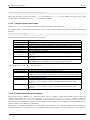
Running make <package> builds and installs that particular package and its dependencies.
For packages relying on the Buildroot infrastructure, there are numerous special make targets that can be called independently
like this:
make <package>-<target>
The package build targets are (in the order they are executed):
command/target
source
depends
extract
patch
configure
build
installstaging
install-target
install
Description
Fetch the source (download the tarball, clone the source repository, etc)
Build and install all dependencies required to build the package
Put the source in the package build directory (extract the tarball, copy the source, etc)
Apply the patches, if any
Run the configure commands, if any
Run the compilation commands
target package: Run the installation of the package in the staging directory, if
necessary
target package: Run the installation of the package in the target directory, if
necessary
target package: Run the 2 previous installation commands
host package: Run the installation of the package in the host directory
Additionally, there are some other useful make targets:
command/target
show-depends
graph-depends
dirclean
reinstall
rebuild
reconfigure
8.12.6
Description
Displays the dependencies required to build the package
Generate a dependency graph of the package, in the context of the current Buildroot
configuration. See this section [?simpara] for more details about dependency graphs.
Remove the whole package build directory
Re-run the install commands
Re-run the compilation commands - this only makes sense when using the
OVERRIDE_SRCDIR feature or when you modified a file directly in the build
directory
Re-run the configure commands, then rebuild - this only makes sense when using the
OVERRIDE_SRCDIR feature or when you modified a file directly in the build
directory
Using Buildroot during development
The normal operation of Buildroot is to download a tarball, extract it, configure, compile and install the software component
found inside this tarball. The source code is extracted in output/build/<package>-<version>, which is a temporary
directory: whenever make clean is used, this directory is entirely removed, and re-recreated at the next make invocation.
Even when a Git or Subversion repository is used as the input for the package source code, Buildroot creates a tarball out of it,
and then behaves as it normally does with tarballs.
This behavior is well-suited when Buildroot is used mainly as an integration tool, to build and integrate all the components of
an embedded Linux system. However, if one uses Buildroot during the development of certain components of the system, this
The Buildroot user manual
25 / 131
behavior is not very convenient: one would instead like to make a small change to the source code of one package, and be able
to quickly rebuild the system with Buildroot.
Making changes directly in output/build/<package>-<version> is not an appropriate solution, because this directory
is removed on make clean.
Therefore, Buildroot provides a specific mechanism for this use case: the <pkg>_OVERRIDE_SRCDIR mechanism. Buildroot
reads an override file, which allows the user to tell Buildroot the location of the source for certain packages. By default this
override file is named local.mk and located in the top directory of the Buildroot source tree, but a different location can be
specified through the BR2_PACKAGE_OVERRIDE_FILE configuration option.
In this override file, Buildroot expects to find lines of the form:
<pkg1>_OVERRIDE_SRCDIR = /path/to/pkg1/sources
<pkg2>_OVERRIDE_SRCDIR = /path/to/pkg2/sources
For example:
LINUX_OVERRIDE_SRCDIR = /home/bob/linux/
BUSYBOX_OVERRIDE_SRCDIR = /home/bob/busybox/
When Buildroot finds that for a given package, an <pkg>_OVERRIDE_SRCDIR has been defined, it will no longer attempt
to download, extract and patch the package. Instead, it will directly use the source code available in in the specified directory
and make clean will not touch this directory. This allows to point Buildroot to your own directories, that can be managed by
Git, Subversion, or any other version control system. To achieve this, Buildroot will use rsync to copy the source code of the
component from the specified <pkg>_OVERRIDE_SRCDIR to output/build/<package>-custom/.
This mechanism is best used in conjunction with the make <pkg>-rebuild and make <pkg>-reconfigure targets.
A make <pkg>-rebuild all sequence will rsync the source code from <pkg>_OVERRIDE_SRCDIR to output/
build/<package>-custom (thanks to rsync, only the modified files are copied), and restart the build process of just this
package.
In the example of the linux package above, the developer can then make a source code change in /home/bob/linux and
then run:
make linux-rebuild all
and in a matter of seconds gets the updated Linux kernel image in output/images. Similarly, a change can be made to the
BusyBox source code in /home/bob/busybox, and after:
make busybox-rebuild all
the root filesystem image in output/images contains the updated BusyBox.
The Buildroot user manual
26 / 131
Chapter 9
Project-specific customization
Typical actions you may need to perform for a given project are:
• configuring Buildroot (including build options and toolchain, bootloader, kernel, package and filesystem image type selection)
• configuring other components, like the Linux kernel and BusyBox
• customizing the generated target filesystem
– adding or overwriting files on the target filesystem (using BR2_ROOTFS_OVERLAY)
– modifying or deleting files on the target filesystem (using BR2_ROOTFS_POST_BUILD_SCRIPT)
– running arbitrary commands prior to generating the filesystem image (using BR2_ROOTFS_POST_BUILD_SCRIPT)
– setting file permissions and ownership (using BR2_ROOTFS_DEVICE_TABLE)
– adding custom devices nodes (using BR2_ROOTFS_STATIC_DEVICE_TABLE)
• adding custom user accounts (using BR2_ROOTFS_USERS_TABLES)
• running arbitrary commands after generating the filesystem image (using BR2_ROOTFS_POST_IMAGE_SCRIPT)
• adding project-specific patches to some packages (using BR2_GLOBAL_PATCH_DIR)
• adding project-specific packages
An important note regarding such project-specific customizations: please carefully consider which changes are indeed projectspecific and which changes are also useful to developers outside your project. The Buildroot community highly recommends
and encourages the upstreaming of improvements, packages and board support to the official Buildroot project. Of course, it is
sometimes not possible or desirable to upstream because the changes are highly specific or proprietary.
This chapter describes how to make such project-specific customizations in Buildroot and how to store them in a way that you
can build the same image in a reproducible way, even after running make clean. By following the recommended strategy, you
can even use the same Buildroot tree to build multiple distinct projects!
9.1
Recommended directory structure
When customizing Buildroot for your project, you will be creating one or more project-specific files that need to be stored
somewhere. While most of these files could be placed in any location as their path is to be specified in the Buildroot configuration,
the Buildroot developers recommend a specific directory structure which is described in this section.
Orthogonal to this directory structure, you can choose where you place this structure itself: either inside the Buildroot tree, or
outside of it using BR2_EXTERNAL. Both options are valid, the choice is up to you.
The Buildroot user manual
+-|
|
|
|
|
|
|
|
|
|
|
|
|
|
|
|
+-|
|
+-|
|
|
|
|
|
|
|
|
|
+-+--
27 / 131
board/
+-- <company>/
+-- <boardname>/
+-- linux.config
+-- busybox.config
+-- <other configuration files>
+-- post_build.sh
+-- post_image.sh
+-- rootfs_overlay/
|
+-- etc/
|
+-- <some file>
+-- patches/
+-- foo/
|
+-- <some patch>
+-- libbar/
+-- <some other patches>
configs/
+-- <boardname>_defconfig
package/
+-- <company>/
+-- Config.in (if not using BR2_EXTERNAL)
+-- <company>.mk (if not using BR2_EXTERNAL)
+-- package1/
|
+-- Config.in
|
+-- package1.mk
+-- package2/
+-- Config.in
+-- package2.mk
Config.in (if using BR2_EXTERNAL)
external.mk (if using BR2_EXTERNAL)
Details on the files shown above are given further in this chapter.
Note: if you choose to place this structure outside of the Buildroot tree using BR2_EXTERNAL, the <company> and possibly
<boardname> components may be superfluous and can be left out.
9.1.1
Implementing layered customizations
It is quite common for a user to have several related projects that partly need the same customizations. Instead of duplicating
these customizations for each project, it is recommended to use a layered customization approach, as explained in this section.
Almost all of the customization methods available in Buildroot, like post-build scripts and root filesystem overlays, accept a
space-separated list of items. The specified items are always treated in order, from left to right. By creating more than one
such item, one for the common customizations and another one for the really project-specific customizations, you can avoid
unnecessary duplication. Each layer is typically embodied by a separate directory inside board/<company>/. Depending on
your projects, you could even introduce more than two layers.
An example directory structure for where a user has two customization layers common and fooboard is:
+-- board/
+-- <company>/
+-- common/
|
+-- post_build.sh
|
+-- rootfs_overlay/
|
|
+-- ...
|
+-- patches/
|
+-- ...
|
The Buildroot user manual
28 / 131
+-- fooboard/
+-- linux.config
+-- busybox.config
+-- <other configuration files>
+-- post_build.sh
+-- rootfs_overlay/
|
+-- ...
+-- patches/
+-- ...
For example, if the user has the BR2_GLOBAL_PATCH_DIR configuration option set as:
BR2_GLOBAL_PATCH_DIR="board/<company>/common/patches board/<company>/fooboard/patches"
then first the patches from the common layer would be applied, followed by the patches from the fooboard layer.
9.2
Keeping customizations outside of Buildroot
As already briefly mentioned in Section 9.1, you can place project-specific customizations in two locations:
• directly within the Buildroot tree, typically maintaining them using branches in a version control system so that upgrading to
a newer Buildroot release is easy.
• outside of the Buildroot tree, using the BR2_EXTERNAL mechanism. This mechanism allows to keep package recipes, board
support and configuration files outside of the Buildroot tree, while still having them nicely integrated in the build logic. This
section explains how to use BR2_EXTERNAL.
BR2_EXTERNAL is an environment variable that can be used to point to a directory that contains Buildroot customizations. It
can be passed to any Buildroot make invocation. It is automatically saved in the hidden .br-external file in the output
directory. Thanks to this, there is no need to pass BR2_EXTERNAL at every make invocation. It can however be changed at any
time by passing a new value, and can be removed by passing an empty value.
Note The BR2_EXTERNAL path can be either an absolute or a relative path, but if it’s passed as a relative path, it is important to
note that it is interpreted relative to the main Buildroot source directory, not to the Buildroot output directory.
Some examples:
buildroot/ $ make BR2_EXTERNAL=/path/to/foobar menuconfig
From now on, external definitions from the /path/to/foobar directory will be used:
buildroot/ $ make
buildroot/ $ make legal-info
We can switch to another external definitions directory at any time:
buildroot/ $ make BR2_EXTERNAL=/where/we/have/barfoo xconfig
Or disable the usage of external definitions:
buildroot/ $ make BR2_EXTERNAL= xconfig
BR2_EXTERNAL allows three different things:
• One can store all the board-specific configuration files there, such as the kernel configuration, the root filesystem overlay, or
any other configuration file for which Buildroot allows to set its location. The BR2_EXTERNAL value is available within the
Buildroot configuration using $(BR2_EXTERNAL). As an example, one could set the BR2_ROOTFS_OVERLAY Buildroot
option to $(BR2_EXTERNAL)/board/<boardname>/overlay/ (to specify a root filesystem overlay), or the BR2_LI
NUX_KERNEL_CUSTOM_CONFIG_FILE Buildroot option to $(BR2_EXTERNAL)/board/<boardname>/kernel.
config (to specify the location of the kernel configuration file).
The Buildroot user manual
29 / 131
• One can store package recipes (i.e. Config.in and <packagename>.mk), or even custom configuration options and make
logic. Buildroot automatically includes $(BR2_EXTERNAL)/Config.in to make it appear in the top-level configuration
menu, and includes $(BR2_EXTERNAL)/external.mk with the rest of the makefile logic.
Note Providing Config.in and external.mk is mandatory, but they can be empty.
The main usage of this is to store package recipes. The recommended way to do this is to write a $(BR2_EXTERNAL)/
Config.in file that looks like:
source "$BR2_EXTERNAL/package/package1/Config.in"
source "$BR2_EXTERNAL/package/package2/Config.in"
Then, have a $(BR2_EXTERNAL)/external.mk file that looks like:
include $(sort $(wildcard $(BR2_EXTERNAL)/package/*/*.mk))
And then in $(BR2_EXTERNAL)/package/package1 and $(BR2_EXTERNAL)/package/package2 create normal Buildroot package recipes, as explained in Chapter 17. If you prefer, you can also group the packages in subdirectories
called <boardname> and adapt the above paths accordingly.
• One can store Buildroot defconfigs in the configs subdirectory of $(BR2_EXTERNAL). Buildroot will automatically show
them in the output of make list-defconfigs and allow them to be loaded with the normal make <name>_defcon
fig command. They will be visible under the User-provided configs’ label in the make list-defconfigs output.
9.3
Storing the Buildroot configuration
The Buildroot configuration can be stored using the command make savedefconfig.
This strips the Buildroot configuration down by removing configuration options that are at their default value. The result is stored
in a file called defconfig. If you want to save it in another place, change the BR2_DEFCONFIG option in the Buildroot
configuration itself, or call make with make savedefconfig BR2_DEFCONFIG=<path-to-defconfig>.
The recommended place to store this defconfig is configs/<boardname>_defconfig. If you follow this recommendation, the configuration will be listed in make help and can be set again by running make <boardname>_defconfig.
Alternatively, you can copy the file to any other place and rebuild with make defconfig BR2_DEFCONFIG=<path-todefconfig-file>.
9.4
Storing the configuration of other components
The configuration files for BusyBox, the Linux kernel, Barebox, U-Boot and uClibc should be stored as well if changed. For
each of these components, a Buildroot configuration option exists to point to an input configuration file, e.g. BR2_LINUX_KER
NEL_CUSTOM_CONFIG_FILE. To store their configuration, set these configuration options to a path where you want to save
the configuration files, and then use the helper targets described below to actually store the configuration.
As explained in Section 9.1, the recommended path to store these configuration files is board/<company>/<boardname>/
foo.config.
Make sure that you create a configuration file before changing the BR2_LINUX_KERNEL_CUSTOM_CONFIG_FILE etc. options. Otherwise, Buildroot will try to access this config file, which doesn’t exist yet, and will fail. You can create the configuration file by running make linux-menuconfig etc.
Buildroot provides a few helper targets to make the saving of configuration files easier.
• make linux-update-defconfig saves the linux configuration to the path specified by BR2_LINUX_KERNEL_CUST
OM_CONFIG_FILE. It simplifies the config file by removing default values. However, this only works with kernels starting
from 2.6.33. For earlier kernels, use make linux-update-config.
• make busybox-update-config saves the busybox configuration to the path specified by BR2_PACKAGE_BUSYBOX_
CONFIG.
The Buildroot user manual
30 / 131
• make uclibc-update-config saves the uClibc configuration to the path specified by BR2_UCLIBC_CONFIG.
• make barebox-update-defconfig saves the barebox configuration to the path specified by BR2_TARGET_BAREBO
X_CUSTOM_CONFIG_FILE.
• make uboot-update-defconfig saves the U-Boot configuration to the path specified by BR2_TARGET_UBOOT_CU
STOM_CONFIG_FILE.
• For at91bootstrap3, no helper exists so you have to copy the config file manually to BR2_TARGET_AT91BOOTSTRAP3_CU
STOM_CONFIG_FILE.
9.5
Customizing the generated target filesystem
Besides changing the configuration through make *config, there are a few other ways to customize the resulting target
filesystem.
The two recommended methods, which can co-exist, are root filesystem overlay(s) and post build script(s).
Root filesystem overlays (BR2_ROOTFS_OVERLAY)
A filesystem overlay is a tree of files that is copied directly over the target filesystem after it has been built. To enable this
feature, set config option BR2_ROOTFS_OVERLAY (in the System configuration menu) to the root of the overlay.
You can even specify multiple overlays, space-separated. If you specify a relative path, it will be relative to the root of the
Buildroot tree. Hidden directories of version control systems, like .git, .svn, .hg, etc., files called .empty and files
ending in ~ are excluded from the copy.
As shown in Section 9.1, the recommended path for this overlay is board/<company>/<boardname>/rootfsoverlay.
Post-build scripts (BR2_ROOTFS_POST_BUILD_SCRIPT)
Post-build scripts are shell scripts called after Buildroot builds all the selected software, but before the rootfs images are
assembled. To enable this feature, specify a space-separated list of post-build scripts in config option BR2_ROOTFS_PO
ST_BUILD_SCRIPT (in the System configuration menu). If you specify a relative path, it will be relative to the
root of the Buildroot tree.
Using post-build scripts, you can remove or modify any file in your target filesystem. You should, however, use this feature
with care. Whenever you find that a certain package generates wrong or unneeded files, you should fix that package rather
than work around it with some post-build cleanup scripts.
As shown in Section 9.1, the recommended path for this script is board/<company>/<boardname>/post_bu
ild.sh.
The post-build scripts are run with the main Buildroot tree as current working directory. The path to the target filesystem is
passed as the first argument to each script. If the config option BR2_ROOTFS_POST_SCRIPT_ARGS is not empty, these
arguments will be passed to the script too. All the scripts will be passed the exact same set of arguments, it is not possible
to pass different sets of arguments to each script.
In addition, you may also use these environment variables:
• BR2_CONFIG: the path to the Buildroot .config file
• HOST_DIR, STAGING_DIR, TARGET_DIR: see Section 17.5.2
• BUILD_DIR: the directory where packages are extracted and built
• BINARIES_DIR: the place where all binary files (aka images) are stored
• BASE_DIR: the base output directory
Below two more methods of customizing the target filesystem are described, but they are not recommended.
Direct modification of the target filesystem
For temporary modifications, you can modify the target filesystem directly and rebuild the image. The target filesystem is
available under output/target/. After making your changes, run make to rebuild the target filesystem image.
The Buildroot user manual
31 / 131
This method allows you to do anything to the target filesystem, but if you need to clean your Buildroot tree using make
clean, these changes will be lost. Such cleaning is necessary in several cases, refer to Section 8.2 for details. This
solution is therefore only useful for quick tests: changes do not survive the make clean command. Once you have
validated your changes, you should make sure that they will persist after a make clean, using a root filesystem overlay
or a post-build script.
Custom target skeleton (BR2_ROOTFS_SKELETON_CUSTOM)
The root filesystem image is created from a target skeleton, on top of which all packages install their files. The skeleton
is copied to the target directory output/target before any package is built and installed. The default target skeleton
provides the standard Unix filesystem layout and some basic init scripts and configuration files.
If the default skeleton (available under system/skeleton) does not match your needs, you would typically use a root
filesystem overlay or post-build script to adapt it. However, if the default skeleton is entirely different than what you need,
using a custom skeleton may be more suitable.
To enable this feature, enable config option BR2_ROOTFS_SKELETON_CUSTOM and set BR2_ROOTFS_SKELETON_C
USTOM_PATH to the path of your custom skeleton. Both options are available in the System configuration menu.
If you specify a relative path, it will be relative to the root of the Buildroot tree.
This method is not recommended because it duplicates the entire skeleton, which prevents taking advantage of the fixes or
improvements brought to the default skeleton in later Buildroot releases.
9.5.1
Setting file permissions and ownership and adding custom devices nodes
Sometimes it is needed to set specific permissions or ownership on files or device nodes. For example, certain files may need
to be owned by root. Since the post-build scripts are not run as root, you cannot do such changes from there unless you use an
explicit fakeroot from the post-build script.
Instead, Buildroot provides support for so-called permission tables. To use this feature, set config option BR2_ROOTFS_DEVI
CE_TABLE to a space-separated list of permission tables, regular text files following the makedev syntax Chapter 22.
If you are using a static device table (i.e. not using devtmpfs, mdev, or (e)udev) then you can add device nodes using the
same syntax, in so-called device tables. To use this feature, set config option BR2_ROOTFS_STATIC_DEVICE_TABLE to a
space-separated list of device tables.
As shown in Section 9.1, the recommended location for such files is board/<company>/<boardname>/.
It should be noted that if the specific permissions or device nodes are related to a specific application, you should set variables
FOO_PERMISSIONS and FOO_DEVICES in the package’s .mk file instead (see Section 17.5.2).
9.6
Adding custom user accounts
Sometimes it is needed to add specific users in the target system. To cover this requirement, Buildroot provides support for
so-called users tables. To use this feature, set config option BR2_ROOTFS_USERS_TABLES to a space-separated list of users
tables, regular text files following the makeusers syntax Chapter 23.
As shown in Section 9.1, the recommended location for such files is board/<company>/<boardname>/.
It should be noted that if the custom users are related to a specific application, you should set variable FOO_USERS in the
package’s .mk file instead (see Section 17.5.2).
9.7
Customization after the images have been created
While post-build scripts (Section 9.5) are run before building the filesystem image, kernel and bootloader, post-image scripts
can be used to perform some specific actions after all images have been created.
Post-image scripts can for example be used to automatically extract your root filesystem tarball in a location exported by your
NFS server, or to create a special firmware image that bundles your root filesystem and kernel image, or any other custom action
required for your project.
The Buildroot user manual
32 / 131
To enable this feature, specify a space-separated list of post-image scripts in config option BR2_ROOTFS_POST_IMAGE_SC
RIPT (in the System configuration menu). If you specify a relative path, it will be relative to the root of the Buildroot
tree.
Just like post-build scripts, post-image scripts are run with the main Buildroot tree as current working directory. The path to the
images output directory is passed as the first argument to each script. If the config option BR2_ROOTFS_POST_SCRIPT_A
RGS is not empty, these arguments will be passed to the script too. All the scripts will be passed the exact same set of arguments,
it is not possible to pass different sets of arguments to each script.
Again just like for the post-build scripts, the scripts have access to the environment variables BR2_CONFIG, HOST_DIR,
STAGING_DIR, TARGET_DIR, BUILD_DIR, BINARIES_DIR and BASE_DIR.
The post-image scripts will be executed as the user that executes Buildroot, which should normally not be the root user. Therefore,
any action requiring root permissions in one of these scripts will require special handling (usage of fakeroot or sudo), which is
left to the script developer.
9.8
Adding project-specific patches
It is sometimes useful to apply extra patches to packages - on top of those provided in Buildroot. This might be used to support
custom features in a project, for example, or when working on a new architecture.
The BR2_GLOBAL_PATCH_DIR configuration option can be used to specify a space separated list of one or more directories
containing package patches.
For a specific version <packageversion> of a specific package <packagename>, patches are applied from BR2_GLOBA
L_PATCH_DIR as follows:
1. For every directory - <global-patch-dir> - that exists in BR2_GLOBAL_PATCH_DIR, a <package-patchdir> will be determined as follows:
• <global-patch-dir>/<packagename>/<packageversion>/ if the directory exists.
• Otherwise, <global-patch-dir>/<packagename> if the directory exists.
2. Patches will then be applied from a <package-patch-dir> as follows:
• If a series file exists in the package directory, then patches are applied according to the series file;
• Otherwise, patch files matching *.patch are applied in alphabetical order. So, to ensure they are applied in the
right order, it is highly recommended to name the patch files like this: <number>-<description>.patch, where
<number> refers to the apply order.
For information about how patches are applied for a package, see Section 18.2
The BR2_GLOBAL_PATCH_DIR option is the preferred method for specifying a custom patch directory for packages. It can
be used to specify a patch directory for any package in buildroot. It should also be used in place of the custom patch directory
options that are available for packages such as U-Boot and Barebox. By doing this, it will allow a user to manage their patches
from one top-level directory.
The exception to BR2_GLOBAL_PATCH_DIR being the preferred method for specifying custom patches is BR2_LINUX_KER
NEL_PATCH. BR2_LINUX_KERNEL_PATCH should be used to specify kernel patches that are available at an URL. Note: BR2
_LINUX_KERNEL_PATCH specifies kernel patches that are applied after patches available in BR2_GLOBAL_PATCH_DIR, as
it is done from a post-patch hook of the Linux package.
9.9
Adding project-specific packages
In general, any new package should be added directly in the package directory and submitted to the Buildroot upstream project.
How to add packages to Buildroot in general is explained in full detail in Chapter 17 and will not be repeated here. However,
The Buildroot user manual
33 / 131
your project may need some proprietary packages that cannot be upstreamed. This section will explain how you can keep such
project-specific packages in a project-specific directory.
As shown in Section 9.1, the recommended location for project-specific packages is package/<company>/. If you are using
the BR2_EXTERNAL feature (see Section 9.2) the recommended location is $(BR2_EXTERNAL)/package/.
However, Buildroot will not be aware of the packages in this location, unless we perform some additional steps. As explained
in Chapter 17, a package in Buildroot basically consists of two files: a .mk file (describing how to build the package) and a
Config.in file (describing the configuration options for this package).
Buildroot will automatically include the .mk files in first-level subdirectories of the package directory (using the pattern
package/*/*.mk). If we want Buildroot to include .mk files from deeper subdirectories (like package/<company>/pac
kage1/) then we simply have to add a .mk file in a first-level subdirectory that includes these additional .mk files. Therefore,
create a file package/<company>/<company>.mk with following contents (assuming you have only one extra directory
level below package/<company>/):
include $(sort $(wildcard package/<company>/*/*.mk))
If you are using BR2_EXTERNAL, create a file $(BR2_EXTERNAL)/external.mk with following contents (again assuming
only one extra level):
include $(sort $(wildcard $(BR2_EXTERNAL)/package/*/*.mk))
For the Config.in files, create a file package/<company>/Config.in that includes the Config.in files of all your
packages. An exhaustive list has to be provided since wildcards are not supported in the source command of kconfig. For
example:
source "package/<company>/package1/Config.in"
source "package/<company>/package2/Config.in"
Include this new file package/<company>/Config.in from package/Config.in, preferably in a company-specific
menu to make merges with future Buildroot versions easier.
If you are using BR2_EXTERNAL, create a file $(BR2_EXTERNAL)/Config.in with similar contents:
source "$BR2_EXTERNAL/package/package1/Config.in"
source "$BR2_EXTERNAL/package/package2/Config.in"
You do not have to add an include for this $(BR2_EXTERNAL)/Config.in file as it is included automatically.
9.10
Quick guide to storing your project-specific customizations
Earlier in this chapter, the different methods for making project-specific customizations have been described. This section will
now summarize all this by providing step-by-step instructions to storing your project-specific customizations. Clearly, the steps
that are not relevant to your project can be skipped.
1. make menuconfig to configure toolchain, packages and kernel.
2. make linux-menuconfig to update the kernel config, similar for other configuration like busybox, uclibc, . . .
3. mkdir -p board/<manufacturer>/<boardname>
4. Set the following options to board/<manufacturer>/<boardname>/<package>.config (as far as they are
relevant):
• BR2_LINUX_KERNEL_CUSTOM_CONFIG_FILE
• BR2_PACKAGE_BUSYBOX_CONFIG
• BR2_UCLIBC_CONFIG
• BR2_TARGET_AT91BOOTSTRAP3_CUSTOM_CONFIG_FILE
The Buildroot user manual
34 / 131
• BR2_TARGET_BAREBOX_CUSTOM_CONFIG_FILE
• BR2_TARGET_UBOOT_CUSTOM_CONFIG_FILE
5. Write the configuration files:
• make linux-update-defconfig
• make busybox-update-config
• make uclibc-update-config
• cp <output>/build/at91bootstrap3-*/.config board/<manufacturer>/<boardname>/at91
bootstrap3.config
• make barebox-update-defconfig
• make uboot-update-defconfig
6. Create board/<manufacturer>/<boardname>/rootfs-overlay/ and fill it with additional files you need on
your rootfs, e.g. board/<manufacturer>/<boardname>/rootfs-overlay/etc/inittab. Set BR2_ROO
TFS_OVERLAY to board/<manufacturer>/<boardname>/rootfs-overlay.
7. Create a post-build script board/<manufacturer>/<boardname>/post_build.sh. Set BR2_ROOTFS_POS
T_BUILD_SCRIPT to board/<manufacturer>/<boardname>/post_build.sh
8. If additional setuid permissions have to be set or device nodes have to be created, create board/<manufacturer>/
<boardname>/device_table.txt and add that path to BR2_ROOTFS_DEVICE_TABLE.
9. If additional user accounts have to be created, create board/<manufacturer>/<boardname>/users_table.
txt and add that path to BR2_ROOTFS_USERS_TABLES.
10. To add custom patches to certain packages, set BR2_GLOBAL_PATCH_DIR to board/<manufacturer>/<board
name>/patches/ and add your patches for each package in a subdirectory named after the package. Each patch should
be called <packagename>-<num>-<description>.patch.
11. Specifically for the Linux kernel, there also exists the option BR2_LINUX_KERNEL_PATCH with as main advantage
that it can also download patches from a URL. If you do not need this, BR2_GLOBAL_PATCH_DIR is preferred. UBoot, Barebox, at91bootstrap and at91bootstrap3 also have separate options, but these do not provide any advantage over
BR2_GLOBAL_PATCH_DIR and will likely be removed in the future.
12. If you need to add project-specific packages, create package/<manufacturer>/ and place your packages in that
directory. Create an overall <manufacturer>.mk file that includes the .mk files of all your packages. Create an
overall Config.in file that sources the Config.in files of all your packages. Include this Config.in file from
Buildroot’s package/Config.in file.
13. make savedefconfig to save the buildroot configuration.
14. cp defconfig configs/<boardname>_defconfig
The Buildroot user manual
35 / 131
Chapter 10
Frequently Asked Questions & Troubleshooting
10.1
The boot hangs after Starting network. . .
If the boot process seems to hang after the following messages (messages not necessarily exactly similar, depending on the list
of packages selected):
Freeing init memory: 3972K
Initializing random number generator... done.
Starting network...
Starting dropbear sshd: generating rsa key... generating dsa key... OK
then it means that your system is running, but didn’t start a shell on the serial console. In order to have the system start a shell on
your serial console, you have to go into the Buildroot configuration, in System configuration, modify Run a getty
(login prompt) after boot and set the appropriate port and baud rate in the getty options submenu. This will
automatically tune the /etc/inittab file of the generated system so that a shell starts on the correct serial port.
10.2
Why is there no compiler on the target?
It has been decided that support for the native compiler on the target would be stopped from the Buildroot-2012.11 release
because:
• this feature was neither maintained nor tested, and often broken;
• this feature was only available for Buildroot toolchains;
• Buildroot mostly targets small or very small target hardware with limited resource onboard (CPU, ram, mass-storage), for
which compiling on the target does not make much sense;
• Buildroot aims at easing the cross-compilation, making native compilation on the target unnecessary.
If you need a compiler on your target anyway, then Buildroot is not suitable for your purpose. In such case, you need a real
distribution and you should opt for something like:
• openembedded
• yocto
• emdebian
• Fedora
• openSUSE ARM
• Arch Linux ARM
• ...
The Buildroot user manual
10.3
36 / 131
Why are there no development files on the target?
Since there is no compiler available on the target (see Section 10.2), it does not make sense to waste space with headers or static
libraries.
Therefore, those files are always removed from the target since the Buildroot-2012.11 release.
10.4
Why is there no documentation on the target?
Because Buildroot mostly targets small or very small target hardware with limited resource onboard (CPU, ram, mass-storage),
it does not make sense to waste space with the documentation data.
If you need documentation data on your target anyway, then Buildroot is not suitable for your purpose, and you should look for
a real distribution (see: Section 10.2).
10.5
Why are some packages not visible in the Buildroot config menu?
If a package exists in the Buildroot tree and does not appear in the config menu, this most likely means that some of the package’s
dependencies are not met.
To know more about the dependencies of a package, search for the package symbol in the config menu (see Section 8.1).
Then, you may have to recursively enable several options (which correspond to the unmet dependencies) to finally be able to
select the package.
If the package is not visible due to some unmet toolchain options, then you should certainly run a full rebuild (see Section 8.1
for more explanations).
10.6
Why not use the target directory as a chroot directory?
There are plenty of reasons to not use the target directory a chroot one, among these:
• file ownerships, modes and permissions are not correctly set in the target directory;
• device nodes are not created in the target directory.
For these reasons, commands run through chroot, using the target directory as the new root, will most likely fail.
If you want to run the target filesystem inside a chroot, or as an NFS root, then use the tarball image generated in images/ and
extract it as root.
10.7
Why doesn’t Buildroot generate binary packages (.deb, .ipkg. . . )?
One feature that is often discussed on the Buildroot list is the general topic of "package management". To summarize, the idea
would be to add some tracking of which Buildroot package installs what files, with the goals of:
• being able to remove files installed by a package when this package gets unselected from the menuconfig;
• being able to generate binary packages (ipk or other format) that can be installed on the target without re-generating a new root
filesystem image.
In general, most people think it is easy to do: just track which package installed what and remove it when the package is
unselected. However, it is much more complicated than that:
The Buildroot user manual
37 / 131
• It is not only about the target/ directory, but also the sysroot in host/usr/<tuple>/sysroot and the host/ directory itself. All files installed in those directories by various packages must be tracked.
• When a package is unselected from the configuration, it is not sufficient to remove just the files it installed. One must also
remove all its reverse dependencies (i.e. packages relying on it) and rebuild all those packages. For example, package A
depends optionally on the OpenSSL library. Both are selected, and Buildroot is built. Package A is built with crypto support
using OpenSSL. Later on, OpenSSL gets unselected from the configuration, but package A remains (since OpenSSL is an
optional dependency, this is possible.) If only OpenSSL files are removed, then the files installed by package A are broken:
they use a library that is no longer present on the target. Although this is technically doable, it adds a lot of complexity to
Buildroot, which goes against the simplicity we try to stick to.
• In addition to the previous problem, there is the case where the optional dependency is not even known to Buildroot. For
example, package A in version 1.0 never used OpenSSL, but in version 2.0 it automatically uses OpenSSL if available. If the
Buildroot .mk file hasn’t been updated to take this into account, then package A will not be part of the reverse dependencies of
OpenSSL and will not be removed and rebuilt when OpenSSL is removed. For sure, the .mk file of package A should be fixed
to mention this optional dependency, but in the mean time, you can have non-reproducible behaviors.
• The request is to also allow changes in the menuconfig to be applied on the output directory without having to rebuild everything
from scratch. However, this is very difficult to achieve in a reliable way: what happens when the suboptions of a package are
changed (we would have to detect this, and rebuild the package from scratch and potentially all its reverse dependencies), what
happens if toolchain options are changed, etc. At the moment, what Buildroot does is clear and simple so its behaviour is very
reliable and it is easy to support users. If configuration changes done in menuconfig are applied after the next make, then it
has to work correctly and properly in all situations, and not have some bizarre corner cases. The risk is to get bug reports
like "I have enabled package A, B and C, then ran make, then disabled package C and enabled package D and ran make, then
re-enabled package C and enabled package E and then there is a build failure". Or worse "I did some configuration, then built,
then did some changes, built, some more changes, built, some more changes, built, and now it fails, but I don’t remember all
the changes I did and in which order". This will be impossible to support.
For all these reasons, the conclusion is that adding tracking of installed files to remove them when the package is unselected, or
to generate a repository of binary packages, is something that is very hard to achieve reliably and will add a lot of complexity.
On this matter, the Buildroot developers make this position statement:
• Buildroot strives to make it easy to generate a root filesystem (hence the name, by the way.) That is what we want to make
Buildroot good at: building root filesystems.
• Buildroot is not meant to be a distribution (or rather, a distribution generator.) It is the opinion of most Buildroot developers
that this is not a goal we should pursue. We believe that there are other tools better suited to generate a distro than Buildroot
is. For example, Open Embedded, or openWRT, are such tools.
• We prefer to push Buildroot in a direction that makes it easy (or even easier) to generate complete root filesystems. This is
what makes Buildroot stands out in the crowd (among other things, of course!)
• We believe that for most embedded Linux systems, binary packages are not necessary, and potentially harmful. When binary
packages are used, it means that the system can be partially upgraded, which creates an enormous number of possible combinations of package versions that should be tested before doing the upgrade on the embedded device. On the other hand, by
doing complete system upgrades by upgrading the entire root filesystem image at once, the image deployed to the embedded
system is guaranteed to really be the one that has been tested and validated.
10.8
How to speed-up the build process?
Since Buildroot often involves doing full rebuilds of the entire system that can be quite long, we provide below a number of tips
to help reduce the build time:
• Use a pre-built external toolchain instead of the default Buildroot internal toolchain. By using a pre-built Linaro toolchain (on
ARM) or a Sourcery CodeBench toolchain (for ARM, x86, x86-64, MIPS, etc.), you will save the build time of the toolchain
at each complete rebuild, approximately 15 to 20 minutes. Note that temporarily using an external toolchain does not prevent
you to switch back to an internal toolchain (that may provide a higher level of customization) once the rest of your system is
working;
The Buildroot user manual
38 / 131
• Use the ccache compiler cache (see: Section 8.12.3);
• Learn about rebuilding only the few packages you actually care about (see Section 8.3), but beware that sometimes full rebuilds
are anyway necessary (see Section 8.2);
• Make sure you are not using a virtual machine for the Linux system used to run Buildroot. Most of the virtual machine
technologies are known to cause a significant performance impact on I/O, which is really important for building source code;
• Make sure that you’re using only local files: do not attempt to do a build over NFS, which significantly slows down the build.
Having the Buildroot download folder available locally also helps a bit.
• Buy new hardware. SSDs and lots of RAM are key to speeding up the builds.
The Buildroot user manual
39 / 131
Chapter 11
Known issues
• It is not possible to pass extra linker options via BR2_TARGET_LDFLAGS if such options contain a $ sign. For example, the
following is known to break: BR2_TARGET_LDFLAGS="-Wl,-rpath=’$ORIGIN/../lib’"
• The ltp-testsuite package does not build with the default uClibc configuration used by the Buildroot toolchain backend.
The LTP testsuite uses several functions that are considered obsolete, such as sigset() and others. uClibc configuration options
such as DO_XSI_MATH, UCLIBC_HAS_OBSOLETE_BSD_SIGNAL and UCLIBC_SV4_DEPRECATED are needed if one
wants to build the ltp-testsuite package with uClibc. You need to either use a glibc or eglibc based toolchain, or enable
the appropriate options in the uClibc configuration.
• The xfsprogs package does not build with the default uClibc configuration used by the Buildroot toolchain backend. You
need to either use a glibc or eglibc based toolchain, or enable the appropriate options in the uClibc configuration.
• The mrouted package does not build with the default uClibc configuration used by the Buildroot toolchain backend. You
need to either use a glibc or eglibc based toolchain, or enable the appropriate options in the uClibc configuration.
• The libffi package is not supported on the SuperH 2 and ARC architectures.
• The prboom package triggers a compiler failure with the SuperH 4 compiler from Sourcery CodeBench, version 2012.09.
The Buildroot user manual
40 / 131
Chapter 12
Legal notice and licensing
12.1
Complying with open source licenses
All of the end products of Buildroot (toolchain, root filesystem, kernel, bootloaders) contain open source software, released under
various licenses.
Using open source software gives you the freedom to build rich embedded systems, choosing from a wide range of packages,
but also imposes some obligations that you must know and honour. Some licenses require you to publish the license text in the
documentation of your product. Others require you to redistribute the source code of the software to those that receive your
product.
The exact requirements of each license are documented in each package, and it is your responsibility (or that of your legal office)
to comply with those requirements. To make this easier for you, Buildroot can collect for you some material you will probably
need. To produce this material, after you have configured Buildroot with make menuconfig, make xconfig or make
gconfig, run:
make legal-info
Buildroot will collect legally-relevant material in your output directory, under the legal-info/ subdirectory. There you will
find:
• A README file, that summarizes the produced material and contains warnings about material that Buildroot could not produce.
• buildroot.config: this is the Buildroot configuration file that is usually produced with make menuconfig, and which
is necessary to reproduce the build.
• The source code for all packages; this is saved in the sources/ and host-sources/ subdirectories for target and host
packages respectively. The source code for packages that set <PKG>_REDISTRIBUTE =NO will not be saved. Patches
applied to some packages by Buildroot are distributed with the Buildroot sources and are not duplicated in the sources/ and
host-sources/ subdirectories.
• A manifest file (one for host and one for target packages) listing the configured packages, their version, license and related
information. Some of this information might not be defined in Buildroot; such items are marked as "unknown".
• The license texts of all packages, in the licenses/ and host-licenses/ subdirectories for target and host packages
respectively. If the license file(s) are not defined in Buildroot, the file is not produced and a warning in the README indicates
this.
Please note that the aim of the legal-info feature of Buildroot is to produce all the material that is somehow relevant for
legal compliance with the package licenses. Buildroot does not try to produce the exact material that you must somehow make
public. Certainly, more material is produced than is needed for a strict legal compliance. For example, it produces the source
code for packages released under BSD-like licenses, that you are not required to redistribute in source form.
The Buildroot user manual
41 / 131
Moreover, due to technical limitations, Buildroot does not produce some material that you will or may need, such as the toolchain
source code and the Buildroot source code itself (including patches to packages for which source distribution is required). When
you run make legal-info, Buildroot produces warnings in the README file to inform you of relevant material that could
not be saved.
12.2
License abbreviations
Here is a list of the licenses that are most widely used by packages in Buildroot, with the name used in the manifest files:
• GPLv2: GNU General Public License, version 2;
• GPLv2+: GNU General Public License, version 2 or (at your option) any later version;
• GPLv3: GNU General Public License, version 3;
• GPLv3+: GNU General Public License, version 3 or (at your option) any later version;
• GPL: GNU General Public License (any version);
• LGPLv2: GNU Library General Public License, version 2;
• LGPLv2+: GNU Library General Public License, version 2 or (at your option) any later version;
• LGPLv2.1: GNU Lesser General Public License, version 2.1;
• LGPLv2.1+: GNU Lesser General Public License, version 2.1 or (at your option) any later version;
• LGPLv3: GNU Lesser General Public License, version 3;
• LGPLv3+: GNU Lesser General Public License, version 3 or (at your option) any later version;
• LGPL: GNU Lesser General Public License (any version);
• BSD-4c: Original BSD 4-clause license;
• BSD-3c: BSD 3-clause license;
• BSD-2c: BSD 2-clause license;
• MIT: MIT-style license;
• Apache-2.0: Apache License, version 2.0;
12.3
Complying with the Buildroot license
Buildroot itself is an open source software, released under the GNU General Public License, version 2 or (at your option) any
later version. However, being a build system, it is not normally part of the end product: if you develop the root filesystem, kernel,
bootloader or toolchain for a device, the code of Buildroot is only present on the development machine, not in the device storage.
Nevertheless, the general view of the Buildroot developers is that you should release the Buildroot source code along with the
source code of other packages when releasing a product that contains GPL-licensed software. This is because the GNU GPL
defines the "complete source code" for an executable work as "all the source code for all modules it contains, plus any associated
interface definition files, plus the scripts used to control compilation and installation of the executable". Buildroot is part of the
scripts used to control compilation and installation of the executable, and as such it is considered part of the material that must
be redistributed.
Keep in mind that this is only the Buildroot developers’ opinion, and you should consult your legal department or lawyer in case
of any doubt.
The Buildroot user manual
42 / 131
Chapter 13
Beyond Buildroot
13.1
Boot the generated images
13.1.1
NFS boot
To achieve NFS-boot, enable tar root filesystem in the Filesystem images menu.
After a complete build, just run the following commands to setup the NFS-root directory:
sudo tar -xavf /path/to/output_dir/rootfs.tar -C /path/to/nfs_root_dir
Remember to add this path to /etc/exports.
Then, you can execute a NFS-boot from your target.
13.1.2
Live CD
To build a live CD image, enable the iso image option in the Filesystem images menu. Note that this option is only available on
the x86 and x86-64 architectures, and if you are building your kernel with Buildroot.
You can build a live CD image with either IsoLinux, Grub or Grub 2 as a bootloader, but only Isolinux supports making this
image usable both as a live CD and live USB (through the Build hybrid image option).
You can test your live CD image using QEMU:
qemu-system-i386 -cdrom output/images/rootfs.iso9660
Or use it as a hard-drive image if it is a hybrid ISO:
qemu-system-i386 -hda output/images/rootfs.iso9660
It can be easily flashed to a USB drive with dd:
dd if=output/images/rootfs.iso9660 of=/dev/sdb
13.2
Chroot
If you want to chroot in a generated image, then there are few thing you should be aware of:
• you should setup the new root from the tar root filesystem image;
• either the selected target architecture is compatible with your host machine, or you should use some qemu-* binary and
correctly set it within the binfmt properties to be able to run the binaries built for the target on your host machine;
• Buildroot does not currently provide host-qemu and binfmt correctly built and set for that kind of use.
The Buildroot user manual
43 / 131
Part III
Developer guide
The Buildroot user manual
44 / 131
Chapter 14
How Buildroot works
As mentioned above, Buildroot is basically a set of Makefiles that download, configure, and compile software with the correct
options. It also includes patches for various software packages - mainly the ones involved in the cross-compilation toolchain
(gcc, binutils and uClibc).
There is basically one Makefile per software package, and they are named with the .mk extension. Makefiles are split into many
different parts.
• The toolchain/ directory contains the Makefiles and associated files for all software related to the cross-compilation
toolchain: binutils, gcc, gdb, kernel-headers and uClibc.
• The arch/ directory contains the definitions for all the processor architectures that are supported by Buildroot.
• The package/ directory contains the Makefiles and associated files for all user-space tools and libraries that Buildroot can
compile and add to the target root filesystem. There is one sub-directory per package.
• The linux/ directory contains the Makefiles and associated files for the Linux kernel.
• The boot/ directory contains the Makefiles and associated files for the bootloaders supported by Buildroot.
• The system/ directory contains support for system integration, e.g. the target filesystem skeleton and the selection of an init
system.
• The fs/ directory contains the Makefiles and associated files for software related to the generation of the target root filesystem
image.
Each directory contains at least 2 files:
• something.mk is the Makefile that downloads, configures, compiles and installs the package something.
• Config.in is a part of the configuration tool description file. It describes the options related to the package.
The main Makefile performs the following steps (once the configuration is done):
• Create all the output directories: staging, target, build, etc. in the output directory (output/ by default, another
value can be specified using O=)
• Generate the toolchain target. When an internal toolchain is used, this means generating the cross-compilation toolchain. When
an external toolchain is used, this means checking the features of the external toolchain and importing it into the Buildroot
environment.
• Generate all the targets listed in the TARGETS variable. This variable is filled by all the individual components’ Makefiles.
Generating these targets will trigger the compilation of the userspace packages (libraries, programs), the kernel, the bootloader
and the generation of the root filesystem images, depending on the configuration.
The Buildroot user manual
45 / 131
Chapter 15
Coding style
Overall, these coding style rules are here to help you to add new files in Buildroot or refactor existing ones.
If you slightly modify some existing file, the important thing is to keep the consistency of the whole file, so you can:
• either follow the potentially deprecated coding style used in this file,
• or entirely rework it in order to make it comply with these rules.
15.1 Config.in file
Config.in files contain entries for almost anything configurable in Buildroot.
An entry has the following pattern:
config BR2_PACKAGE_LIBFOO
bool "libfoo"
depends on BR2_PACKAGE_LIBBAZ
select BR2_PACKAGE_LIBBAR
help
This is a comment that explains what libfoo is.
http://foosoftware.org/libfoo/
• The bool, depends on, select and help lines are indented with one tab.
• The help text itself should be indented with one tab and two spaces.
• The help text should be wrapped to fit 72 columns.
The Config.in files are the input for the configuration tool used in Buildroot, which is the regular Kconfig. For further details
about the Kconfig language, refer to http://kernel.org/doc/Documentation/kbuild/kconfig-language.txt.
15.2
The .mk file
• Header: The file starts with a header. It contains the module name, preferably in lowercase, enclosed between separators made
of 80 hashes. A blank line is mandatory after the header:
The Buildroot user manual
################################################################################
#
# libfoo
#
################################################################################
• Assignment: use = preceded and followed by one space:
LIBFOO_VERSION = 1.0
LIBFOO_CONF_OPTS += --without-python-support
Do not align the = signs.
• Indentation: use tab only:
define LIBFOO_REMOVE_DOC
$(RM) -fr $(TARGET_DIR)/usr/share/libfoo/doc \
$(TARGET_DIR)/usr/share/man/man3/libfoo*
endef
Note that commands inside a define block should always start with a tab, so make recognizes them as commands.
• Optional dependency:
– Prefer multi-line syntax.
YES:
ifeq ($(BR2_PACKAGE_PYTHON),y)
LIBFOO_CONF_OPTS += --with-python-support
LIBFOO_DEPENDENCIES += python
else
LIBFOO_CONF_OPTS += --without-python-support
endif
NO:
LIBFOO_CONF_OPTS += --with$(if $(BR2_PACKAGE_PYTHON),,out)-python-support
LIBFOO_DEPENDENCIES += $(if $(BR2_PACKAGE_PYTHON),python,)
– Keep configure options and dependencies close together.
• Optional hooks: keep hook definition and assignment together in one if block.
YES:
ifneq ($(BR2_LIBFOO_INSTALL_DATA),y)
define LIBFOO_REMOVE_DATA
$(RM) -fr $(TARGET_DIR)/usr/share/libfoo/data
endef
LIBFOO_POST_INSTALL_TARGET_HOOKS += LIBFOO_REMOVE_DATA
endif
NO:
define LIBFOO_REMOVE_DATA
$(RM) -fr $(TARGET_DIR)/usr/share/libfoo/data
endef
ifneq ($(BR2_LIBFOO_INSTALL_DATA),y)
LIBFOO_POST_INSTALL_TARGET_HOOKS += LIBFOO_REMOVE_DATA
endif
46 / 131
The Buildroot user manual
15.3
The documentation
The documentation uses the asciidoc format.
For further details about the asciidoc syntax, refer to http://www.methods.co.nz/asciidoc/userguide.html.
47 / 131
The Buildroot user manual
48 / 131
Chapter 16
Adding support for a particular board
Buildroot contains basic configurations for several publicly available hardware boards, so that users of such a board can easily
build a system that is known to work. You are welcome to add support for other boards to Buildroot too.
To do so, you need to create a normal Buildroot configuration that builds a basic system for the hardware: toolchain, kernel, bootloader, filesystem and a simple BusyBox-only userspace. No specific package should be selected: the configuration should be as
minimal as possible, and should only build a working basic BusyBox system for the target platform. You can of course use more
complicated configurations for your internal projects, but the Buildroot project will only integrate basic board configurations.
This is because package selections are highly application-specific.
Once you have a known working configuration, run make savedefconfig. This will generate a minimal defconfig file at
the root of the Buildroot source tree. Move this file into the configs/ directory, and rename it <boardname>_defconfig.
It is recommended to use as much as possible upstream versions of the Linux kernel and bootloaders, and to use as much as
possible default kernel and bootloader configurations. If they are incorrect for your board, or no default exists, we encourage you
to send fixes to the corresponding upstream projects.
However, in the mean time, you may want to store kernel or bootloader configuration or patches specific to your target platform.
To do so, create a directory board/<manufacturer> and a subdirectory board/<manufacturer>/<boardname>.
You can then store your patches and configurations in these directories, and reference them from the main Buildroot configuration.
Refer to Chapter 9 for more details.
The Buildroot user manual
49 / 131
Chapter 17
Adding new packages to Buildroot
This section covers how new packages (userspace libraries or applications) can be integrated into Buildroot. It also shows how
existing packages are integrated, which is needed for fixing issues or tuning their configuration.
17.1
Package directory
First of all, create a directory under the package directory for your software, for example libfoo.
Some packages have been grouped by topic in a sub-directory: x11r7, efl and matchbox. If your package fits in one of
these categories, then create your package directory in these. New subdirectories are discouraged, however.
17.2
Config files
For the package to be displayed in the configuration tool, you need to create a Config file in your package directory. There are
two types: Config.in and Config.in.host.
17.2.1 Config.in file
For packages used on the target, create a file named Config.in. This file will contain the option descriptions related to our
libfoo software that will be used and displayed in the configuration tool. It should basically contain:
config BR2_PACKAGE_LIBFOO
bool "libfoo"
help
This is a comment that explains what libfoo is.
http://foosoftware.org/libfoo/
The bool line, help line and other metadata information about the configuration option must be indented with one tab. The
help text itself should be indented with one tab and two spaces, lines should not be longer than 72 columns, and it must mention
the upstream URL of the project.
You can add other sub-options into a if BR2_PACKAGE_LIBFOO...endif statement to configure particular things in your
software. You can look at examples in other packages. The syntax of the Config.in file is the same as the one for the kernel
Kconfig file. The documentation for this syntax is available at http://kernel.org/doc/Documentation/kbuild/kconfig-language.txt
Finally you have to add your new libfoo/Config.in to package/Config.in (or in a category subdirectory if you
decided to put your package in one of the existing categories). The files included there are sorted alphabetically per category and
are NOT supposed to contain anything but the bare name of the package.
source "package/libfoo/Config.in"
The Buildroot user manual
50 / 131
17.2.2 Config.in.host file
Some packages also need to be built for the host system. There are two options here:
• The host package is only required to satisfy build-time dependencies of one or more target packages. In this case, add hostfoo to the target package’s BAR_DEPENDENCIES variable. No Config.in.host file should be created.
• The host package should be explicitly selectable by the user from the configuration menu. In this case, create a Config.in.
host file for that host package:
config BR2_PACKAGE_HOST_FOO
bool "host foo"
help
This is a comment that explains what foo for the host is.
http://foosoftware.org/foo/
The same coding style and options as for the Config.in file are valid.
Finally you have to add your new libfoo/Config.in.host to package/Config.in.host. The files included there
are sorted alphabetically and are NOT supposed to contain anything but the bare name of the package.
source "package/foo/Config.in.host"
The host package will then be available from the Host utilities menu.
17.2.3
Choosing depends on or select
The Config.in file of your package must also ensure that dependencies are enabled. Typically, Buildroot uses the following
rules:
• Use a select type of dependency for dependencies on libraries. These dependencies are generally not obvious and it therefore
make sense to have the kconfig system ensure that the dependencies are selected. For example, the libgtk2 package uses sele
ct BR2_PACKAGE_LIBGLIB2 to make sure this library is also enabled. The select keyword expresses the dependency
with a backward semantic.
• Use a depends on type of dependency when the user really needs to be aware of the dependency. Typically, Buildroot uses
this type of dependency for dependencies on target architecture, MMU support and toolchain options (see Section 17.2.4), or
for dependencies on "big" things, such as the X.org system. The depends on keyword expresses the dependency with a
forward semantic.
Note The current problem with the kconfig language is that these two dependency semantics are not internally linked. Therefore,
it may be possible to select a package, whom one of its dependencies/requirement is not met.
An example illustrates both the usage of select and depends on.
config BR2_PACKAGE_RRDTOOL
bool "rrdtool"
depends on BR2_USE_WCHAR
select BR2_PACKAGE_FREETYPE
select BR2_PACKAGE_LIBART
select BR2_PACKAGE_LIBPNG
select BR2_PACKAGE_ZLIB
help
RRDtool is the OpenSource industry standard, high performance
data logging and graphing system for time series data.
http://oss.oetiker.ch/rrdtool/
comment "rrdtool needs a toolchain w/ wchar"
depends on !BR2_USE_WCHAR
The Buildroot user manual
51 / 131
Note that these two dependency types are only transitive with the dependencies of the same kind.
This means, in the following example:
config BR2_PACKAGE_A
bool "Package A"
config BR2_PACKAGE_B
bool "Package B"
depends on BR2_PACKAGE_A
config BR2_PACKAGE_C
bool "Package C"
depends on BR2_PACKAGE_B
config BR2_PACKAGE_D
bool "Package D"
select BR2_PACKAGE_B
config BR2_PACKAGE_E
bool "Package E"
select BR2_PACKAGE_D
• Selecting Package C will be visible if Package B has been selected, which in turn is only visible if Package A has been
selected.
• Selecting Package E will select Package D, which will select Package B, it will not check for the dependencies of
Package B, so it will not select Package A.
• Since Package B is selected but Package A is not, this violates the dependency of Package B on Package A. Therefore, in such a situation, the transitive dependency has to be added explicitly:
config BR2_PACKAGE_D
bool "Package D"
select BR2_PACKAGE_B
depends on BR2_PACKAGE_A
config BR2_PACKAGE_E
bool "Package E"
select BR2_PACKAGE_D
depends on BR2_PACKAGE_A
Overall, for package library dependencies, select should be preferred.
Note that such dependencies will ensure that the dependency option is also enabled, but not necessarily built before your package.
To do so, the dependency also needs to be expressed in the .mk file of the package.
Further formatting details: see the coding style Section 15.1.
17.2.4
Dependencies on target and toolchain options
Many packages depend on certain options of the toolchain: the choice of C library, C++ support, thread support, RPC support,
wchar support, or dynamic library support. Some packages can only be built on certain target architectures, or if an MMU is
available in the processor.
These dependencies have to be expressed with the appropriate depends on statements in the Config.in file. Additionally, for
dependencies on toolchain options, a comment should be displayed when the option is not enabled, so that the user knows why
the package is not available. Dependencies on target architecture or MMU support should not be made visible in a comment:
since it is unlikely that the user can freely choose another target, it makes little sense to show these dependencies explicitly.
The Buildroot user manual
52 / 131
The comment should only be visible if the config option itself would be visible when the toolchain option dependencies are
met. This means that all other dependencies of the package (including dependencies on target architecture and MMU support)
have to be repeated on the comment definition. To keep it clear, the depends on statement for these non-toolchain option
should be kept separate from the depends on statement for the toolchain options. If there is a dependency on a config option
in that same file (typically the main package) it is preferable to have a global if ... endif construct rather than repeating
the depends on statement on the comment and other config options.
The general format of a dependency comment for package foo is:
foo needs a toolchain w/ featA, featB, featC
for example:
mpd needs a toolchain w/ C++, threads, wchar
or
crda needs a toolchain w/ threads
Note that this text is kept brief on purpose, so that it will fit on a 80-character terminal.
The rest of this section enumerates the different target and toolchain options, the corresponding config symbols to depend on,
and the text to use in the comment.
• Target architecture
– Dependency symbol: BR2_powerpc, BR2_mips, . . . (see arch/Config.in)
– Comment string: no comment to be added
• MMU support
– Dependency symbol: BR2_USE_MMU
– Comment string: no comment to be added
• Atomic instructions (whereby the architecture has instructions to perform some operations atomically, like LOCKCMPXCHG
on x86)
– Dependency symbol: BR2_ARCH_HAS_ATOMICS
– Comment string: no comment to be added
• Kernel headers
– Dependency symbol: BR2_TOOLCHAIN_HEADERS_AT_LEAST_X_Y, (replace X_Y with the proper version, see toolc
hain/toolchain-common.in)
– Comment string: headers >=X.Y and/or headers <=X.Y (replace X.Y with the proper version)
• GCC version
– Dependency symbol: BR2_TOOLCHAIN_GCC_AT_LEAST_X_Y, (replace X_Y with the proper version, see toolch
ain/toolchain-common.in)
– Comment string: gcc >=X.Y and/or gcc <=X.Y (replace X.Y with the proper version)
• C library
– Dependency symbol: BR2_TOOLCHAIN_USES_GLIBC, BR2_TOOLCHAIN_USES_MUSL, BR2_TOOLCHAIN_USES_
UCLIBC
– Comment string: for the C library, a slightly different comment text is used: foo needs an (e)glibc toolchain,
or foo needs an (e)glibc toolchain w/C++
The Buildroot user manual
53 / 131
• C++ support
– Dependency symbol: BR2_INSTALL_LIBSTDCPP
– Comment string: C++
• thread support
– Dependency symbol: BR2_TOOLCHAIN_HAS_THREADS
– Comment string: threads (unless BR2_TOOLCHAIN_HAS_THREADS_NPTL is also needed, in which case, specifying
only NPTL is sufficient)
• NPTL thread support
– Dependency symbol: BR2_TOOLCHAIN_HAS_THREADS_NPTL
– Comment string: NPTL
• RPC support
– Dependency symbol: BR2_TOOLCHAIN_HAS_NATIVE_RPC
– Comment string: RPC
• wchar support
– Dependency symbol: BR2_USE_WCHAR
– Comment string: wchar
• dynamic library
– Dependency symbol: !BR2_STATIC_LIBS
– Comment string: dynamic library
17.2.5
Dependencies on a Linux kernel built by buildroot
Some packages need a Linux kernel to be built by buildroot. These are typically kernel modules or firmware. A comment should
be added in the Config.in file to express this dependency, similar to dependencies on toolchain options. The general format is:
foo needs a Linux kernel to be built
If there is a dependency on both toolchain options and the Linux kernel, use this format:
foo needs a toolchain w/ featA, featB, featC and a Linux kernel to be built
17.2.6
Dependencies on udev /dev management
If a package needs udev /dev management, it should depend on symbol BR2_PACKAGE_HAS_UDEV, and the following comment should be added:
foo needs udev /dev management
If there is a dependency on both toolchain options and udev /dev management, use this format:
foo needs udev /dev management and a toolchain w/ featA, featB, featC
The Buildroot user manual
17.2.7
54 / 131
Dependencies on features provided by virtual packages
Some features can be provided by more than one package, such as the openGL libraries.
See [?simpara] for more on the virtual packages.
See Chapter 25 for the symbols to depend on if your package depends on a feature provided by a virtual package.
17.3
The .mk file
Finally, here’s the hardest part. Create a file named libfoo.mk. It describes how the package should be downloaded, configured, built, installed, etc.
Depending on the package type, the .mk file must be written in a different way, using different infrastructures:
• Makefiles for generic packages (not using autotools or CMake): These are based on an infrastructure similar to the one used
for autotools-based packages, but require a little more work from the developer. They specify what should be done for the
configuration, compilation and installation of the package. This infrastructure must be used for all packages that do not use
the autotools as their build system. In the future, other specialized infrastructures might be written for other build systems. We
cover them through in a tutorial Section 17.5.1 and a reference Section 17.5.2.
• Makefiles for autotools-based software (autoconf, automake, etc.): We provide a dedicated infrastructure for such packages,
since autotools is a very common build system. This infrastructure must be used for new packages that rely on the autotools as
their build system. We cover them through a tutorial Section 17.6.1 and reference Section 17.6.2.
• Makefiles for cmake-based software: We provide a dedicated infrastructure for such packages, as CMake is a more and more
commonly used build system and has a standardized behaviour. This infrastructure must be used for new packages that rely on
CMake. We cover them through a tutorial Section 17.7.1 and reference Section 17.7.2.
• Makefiles for Python modules: We have a dedicated infrastructure for Python modules that use either the distutils or
the setuptools mechanism. We cover them through a tutorial Section 17.8.1 and a reference Section 17.8.2.
• Makefiles for Lua modules: We have a dedicated infrastructure for Lua modules available through the LuaRocks web site.
We cover them through a tutorial Section 17.9.1 and a reference Section 17.9.2.
Further formatting details: see the writing rules Section 15.2.
17.4
The .hash file
Optionally, you can add a third file, named libfoo.hash, that contains the hashes of the downloaded files for the libfoo
package.
The hashes stored in that file are used to validate the integrity of the downloaded files.
The format of this file is one line for each file for which to check the hash, each line being space-separated, with these three
fields:
• the type of hash, one of:
– md5, sha1, sha224, sha256, sha384, sha512, none
• the hash of the file:
– for none, one or more non-space chars, usually just the string xxx
– for md5, 32 hexadecimal characters
– for sha1, 40 hexadecimal characters
– for sha224, 56 hexadecimal characters
The Buildroot user manual
55 / 131
– for sha256, 64 hexadecimal characters
– for sha384, 96 hexadecimal characters
– for sha512, 128 hexadecimal characters
• the name of the file, without any directory component
Lines starting with a # sign are considered comments, and ignored. Empty lines are ignored.
There can be more than one hash for a single file, each on its own line. In this case, all hashes must match.
Note Ideally, the hashes stored in this file should match the hashes published by upstream, e.g. on their website, in the e-mail
announcement. . . If upstream provides more than one type of hash (e.g. sha1 and sha512), then it is best to add all those
hashes in the .hash file. If upstream does not provide any hash, or only provides an md5 hash, then compute at least one strong
hash yourself (preferably sha256, but not md5), and mention this in a comment line above the hashes.
Note The number of spaces does not matter, so one can use spaces (or tabs) to properly align the different fields.
The none hash type is reserved to those archives downloaded from a repository, like a git clone, a subversion checkout. . .
The example below defines a sha1 and a sha256 published by upstream for the main libfoo-1.2.3.tar.bz2 tarball,
an md5 from upstream and a locally-computed sha256 hashes for a binary blob, a sha256 for a downloaded patch, and an
archive with no hash:
# Hashes from: http://www.foosoftware.org/download/libfoo-1.2.3.tar.bz2.{sha1,sha256}:
sha1
486fb55c3efa71148fe07895fd713ea3a5ae343a
libfoo-1.2.3.tar. ←bz2
sha256 efc8103cc3bcb06bda6a781532d12701eb081ad83e8f90004b39ab81b65d4369 libfoo-1.2.3.tar. ←bz2
# md5 from: http://www.foosoftware.org/download/libfoo-1.2.3.tar.bz2.md5, sha256 locally
computed:
md5
2d608f3c318c6b7557d551a5a09314f03452f1a1
libfoo-data.bin
sha256 01ba4719c80b6fe911b091a7c05124b64eeece964e09c058ef8f9805daca546b libfoo-data.bin
←-
# Locally computed:
sha256 ff52101fb90bbfc3fe9475e425688c660f46216d7e751c4bbdb1dc85cdccacb9 libfoo-fix-blabla. ←patch
# No hash for 1234:
none
xxx
libfoo-1234.tar.gz
If the .hash file is present, and it contains one or more hashes for a downloaded file, the hash(es) computed by Buildroot (after
download) must match the hash(es) stored in the .hash file. If one or more hashes do not match, Buildroot considers this an
error, deletes the downloaded file, and aborts.
If the .hash file is present, but it does not contain a hash for a downloaded file, Buildroot considers this an error and aborts.
However, the downloaded file is left in the download directory since this typically indicates that the .hash file is wrong but the
downloaded file is probably OK.
Sources that are downloaded from a version control system (git, subversion, etc. . . ) can not have a hash, because the version
control system and tar may not create exactly the same file (dates, files ordering. . . ), so the hash could be wrong even for a valid
download. Therefore, the hash check is entirely skipped for such sources.
If the .hash file is missing, then no check is done at all.
17.5
Infrastructure for packages with specific build systems
By packages with specific build systems we mean all the packages whose build system is not one of the standard ones, such as
autotools or CMake. This typically includes packages whose build system is based on hand-written Makefiles or shell scripts.
The Buildroot user manual
56 / 131
17.5.1 generic-package tutorial
01:
02:
03:
04:
05:
06:
07:
08:
09:
10:
11:
12:
13:
14:
15:
16:
17:
18:
19:
20:
21:
22:
23:
24:
25:
26:
27:
28:
29:
30:
31:
32:
33:
34:
35:
36:
37:
38:
39:
40:
41:
42:
43:
################################################################################
#
# libfoo
#
################################################################################
LIBFOO_VERSION = 1.0
LIBFOO_SOURCE = libfoo-$(LIBFOO_VERSION).tar.gz
LIBFOO_SITE = http://www.foosoftware.org/download
LIBFOO_LICENSE = GPLv3+
LIBFOO_LICENSE_FILES = COPYING
LIBFOO_INSTALL_STAGING = YES
LIBFOO_CONFIG_SCRIPTS = libfoo-config
LIBFOO_DEPENDENCIES = host-libaaa libbbb
define LIBFOO_BUILD_CMDS
$(MAKE) CC="$(TARGET_CC)" LD="$(TARGET_LD)" -C $(@D) all
endef
define LIBFOO_INSTALL_STAGING_CMDS
$(INSTALL) -D -m 0755 $(@D)/libfoo.a $(STAGING_DIR)/usr/lib/libfoo.a
$(INSTALL) -D -m 0644 $(@D)/foo.h $(STAGING_DIR)/usr/include/foo.h
$(INSTALL) -D -m 0755 $(@D)/libfoo.so* $(STAGING_DIR)/usr/lib
endef
define LIBFOO_INSTALL_TARGET_CMDS
$(INSTALL) -D -m 0755 $(@D)/libfoo.so* $(TARGET_DIR)/usr/lib
$(INSTALL) -d -m 0755 $(TARGET_DIR)/etc/foo.d
endef
define LIBFOO_DEVICES
/dev/foo c 666 0
endef
0
define LIBFOO_PERMISSIONS
/bin/foo f 4755 0 0
endef
42
0
-
-
-
-
-
-
-
-
define LIBFOO_USERS
foo -1 libfoo -1 * - - - LibFoo daemon
endef
$(eval $(generic-package))
The Makefile begins on line 7 to 11 with metadata information: the version of the package (LIBFOO_VERSION), the name of
the tarball containing the package (LIBFOO_SOURCE) (xz-ed tarball recommended) the Internet location at which the tarball
can be downloaded from (LIBFOO_SITE), the license (LIBFOO_LICENSE) and file with the license text (LIBFOO_LICENS
E_FILES). All variables must start with the same prefix, LIBFOO_ in this case. This prefix is always the uppercased version of
the package name (see below to understand where the package name is defined).
On line 12, we specify that this package wants to install something to the staging space. This is often needed for libraries, since
they must install header files and other development files in the staging space. This will ensure that the commands listed in the
LIBFOO_INSTALL_STAGING_CMDS variable will be executed.
On line 13, we specify that there is some fixing to be done to some of the libfoo-config files that were installed during LIB
FOO_INSTALL_STAGING_CMDS phase. These *-config files are executable shell script files that are located in $(STAGING_DIR)/usr/bin directory and are executed by other 3rd party packages to find out the location and the linking flags of this
particular package.
The problem is that all these *-config files by default give wrong, host system linking flags that are unsuitable for cross-compiling.
The Buildroot user manual
57 / 131
For example: -I/usr/include instead of -I$(STAGING_DIR)/usr/include or: -L/usr/lib instead of -L$(STAGING_DIR)/usr/lib
So some sed magic is done to these scripts to make them give correct flags. The argument to be given to LIBFOO_CONFIG_S
CRIPTS is the file name(s) of the shell script(s) needing fixing. All these names are relative to $(STAGING_DIR)/usr/bin and if
needed multiple names can be given.
In addition, the scripts listed in LIBFOO_CONFIG_SCRIPTS are removed from $(TARGET_DIR)/usr/bin, since they are
not needed on the target.
Example 17.1 Config script: divine package
Package divine installs shell script $(STAGING_DIR)/usr/bin/divine-config.
So its fixup would be:
DIVINE_CONFIG_SCRIPTS = divine-config
Example 17.2 Config script: imagemagick package:
Package imagemagick installs the following scripts: $(STAGING_DIR)/usr/bin/{Magick,Magick++,MagickCore,MagickWand,Wand}config
So it’s fixup would be:
IMAGEMAGICK_CONFIG_SCRIPTS = \
Magick-config Magick++-config \
MagickCore-config MagickWand-config Wand-config
On line 14, we specify the list of dependencies this package relies on. These dependencies are listed in terms of lower-case
package names, which can be packages for the target (without the host- prefix) or packages for the host (with the host-)
prefix). Buildroot will ensure that all these packages are built and installed before the current package starts its configuration.
The rest of the Makefile, lines 16..29, defines what should be done at the different steps of the package configuration, compilation
and installation. LIBFOO_BUILD_CMDS tells what steps should be performed to build the package. LIBFOO_INSTALL_ST
AGING_CMDS tells what steps should be performed to install the package in the staging space. LIBFOO_INSTALL_TARGET
_CMDS tells what steps should be performed to install the package in the target space.
All these steps rely on the $(@D) variable, which contains the directory where the source code of the package has been extracted.
On line 31..33, we define a device-node file used by this package (LIBFOO_DEVICES).
On line 35..37, we define the permissions to set to specific files installed by this package (LIBFOO_PERMISSIONS).
On lines 39..41, we define a user that is used by this package (e.g. to run a daemon as non-root) (LIBFOO_USERS).
Finally, on line 43, we call the generic-package function, which generates, according to the variables defined previously,
all the Makefile code necessary to make your package working.
17.5.2 generic-package reference
There are two variants of the generic target. The generic-package macro is used for packages to be cross-compiled for the
target. The host-generic-package macro is used for host packages, natively compiled for the host. It is possible to call
both of them in a single .mk file: once to create the rules to generate a target package and once to create the rules to generate a
host package:
$(eval $(generic-package))
$(eval $(host-generic-package))
This might be useful if the compilation of the target package requires some tools to be installed on the host. If the package name
is libfoo, then the name of the package for the target is also libfoo, while the name of the package for the host is hostlibfoo. These names should be used in the DEPENDENCIES variables of other packages, if they depend on libfoo or
host-libfoo.
The Buildroot user manual
58 / 131
The call to the generic-package and/or host-generic-package macro must be at the end of the .mk file, after all
variable definitions.
For the target package, the generic-package uses the variables defined by the .mk file and prefixed by the uppercased
package name: LIBFOO_*. host-generic-package uses the HOST_LIBFOO_* variables. For some variables, if the
HOST_LIBFOO_ prefixed variable doesn’t exist, the package infrastructure uses the corresponding variable prefixed by LIBF
OO_. This is done for variables that are likely to have the same value for both the target and host packages. See below for details.
The list of variables that can be set in a .mk file to give metadata information is (assuming the package name is libfoo) :
• LIBFOO_VERSION, mandatory, must contain the version of the package. Note that if HOST_LIBFOO_VERSION doesn’t
exist, it is assumed to be the same as LIBFOO_VERSION. It can also be a revision number, branch or tag for packages that are
fetched directly from their revision control system.
Examples:
LIBFOO_VERSION =0.1.2
LIBFOO_VERSION =cb9d6aa9429e838f0e54faa3d455bcbab5eef057
LIBFOO_VERSION =stable
• LIBFOO_SOURCE may contain the name of the tarball of the package, which Buildroot will use to download the tarball from
LIBFOO_SITE. If HOST_LIBFOO_SOURCE is not specified, it defaults to LIBFOO_SOURCE. If none are specified, then
the value is assumed to be libfoo-$(LIBFOO_VERSION).tar.gz.
Example: LIBFOO_SOURCE =foobar-$(LIBFOO_VERSION).tar.bz2
• LIBFOO_PATCH may contain a space-separated list of patch file names, that Buildroot will download and apply to the package
source code. If an entry contains ://, then Buildroot will assume it is a full URL and download the patch from this location.
Otherwise, Buildroot will assume that the patch should be downloaded from LIBFOO_SITE. If HOST_LIBFOO_PATCH is
not specified, it defaults to LIBFOO_PATCH. Note that patches that are included in Buildroot itself use a different mechanism:
all files of the form *.patch present in the package directory inside Buildroot will be applied to the package after extraction
(see patching a package Chapter 18). Finally, patches listed in the LIBFOO_PATCH variable are applied before the patches
stored in the Buildroot package directory.
• LIBFOO_SITE provides the location of the package, which can be a URL or a local filesystem path. HTTP, FTP and SCP are
supported URL types for retrieving package tarballs. In these cases don’t include a trailing slash: it will be added by Buildroot
between the directory and the filename as appropriate. Git, Subversion, Mercurial, and Bazaar are supported URL types for
retrieving packages directly from source code management systems. There is a helper function to make it easier to download
source tarballs from GitHub (refer to Section 17.19.2 for details). A filesystem path may be used to specify either a tarball or a
directory containing the package source code. See LIBFOO_SITE_METHOD below for more details on how retrieval works.
Note that SCP URLs should be of the form scp://[user@]host:filepath, and that filepath is relative to the user’s
home directory, so you may want to prepend the path with a slash for absolute paths: scp://[user@]host:/absolute
path.
If HOST_LIBFOO_SITE is not specified, it defaults to LIBFOO_SITE. Examples:
LIBFOO_SITE=http://www.libfoosoftware.org/libfoo
LIBFOO_SITE=http://svn.xiph.org/trunk/Tremor
LIBFOO_SITE=/opt/software/libfoo.tar.gz
LIBFOO_SITE=$(TOPDIR)/../src/libfoo
• LIBFOO_EXTRA_DOWNLOADS is a space-separated list of additional files that Buildroot should download. If an entry contains :// then Buildroot will assume it is a complete URL and will download the file using this URL. Otherwise, Buildroot
will assume the file to be downloaded is located at LIBFOO_SITE. Buildroot will not do anything with those additional files,
except download them: it will be up to the package recipe to use them from $(BR2_DL_DIR).
• LIBFOO_SITE_METHOD determines the method used to fetch or copy the package source code. In many cases, Buildroot
guesses the method from the contents of LIBFOO_SITE and setting LIBFOO_SITE_METHOD is unnecessary. When HOST
_LIBFOO_SITE_METHOD is not specified, it defaults to the value of LIBFOO_SITE_METHOD.
The possible values of LIBFOO_SITE_METHOD are:
– wget for normal FTP/HTTP downloads of tarballs. Used by default when LIBFOO_SITE begins with http://, https:
// or ftp://.
– scp for downloads of tarballs over SSH with scp. Used by default when LIBFOO_SITE begins with scp://.
The Buildroot user manual
59 / 131
– svn for retrieving source code from a Subversion repository. Used by default when LIBFOO_SITE begins with svn:/
/. When a http:// Subversion repository URL is specified in LIBFOO_SITE, one must specify LIBFOO_SITE_MET
HOD=svn. Buildroot performs a checkout which is preserved as a tarball in the download cache; subsequent builds use the
tarball instead of performing another checkout.
– cvs for retrieving source code from a CVS repository. Used by default when LIBFOO_SITE begins with cvs://. The
downloaded source code is cached as with the svn method. Only anonymous pserver mode is supported. LIBFOO_SITE
must contain the source URL as well as the remote repository directory. The module is the package name. LIBFOO_VERS
ION is mandatory and must be a tag, a branch, or a date (e.g. "2014-10-20", "2014-10-20 13:45", "2014-10-20 13:45+01"
see "man cvs" for further details).
– git for retrieving source code from a Git repository. Used by default when LIBFOO_SITE begins with git://. The
downloaded source code is cached as with the svn method.
– hg for retrieving source code from a Mercurial repository. One must specify LIBFOO_SITE_METHOD=hg when LIBFO
O_SITE contains a Mercurial repository URL. The downloaded source code is cached as with the svn method.
– bzr for retrieving source code from a Bazaar repository. Used by default when LIBFOO_SITE begins with bzr://. The
downloaded source code is cached as with the svn method.
– file for a local tarball. One should use this when LIBFOO_SITE specifies a package tarball as a local filename. Useful
for software that isn’t available publicly or in version control.
– local for a local source code directory. One should use this when LIBFOO_SITE specifies a local directory path containing the package source code. Buildroot copies the contents of the source directory into the package’s build directory.
• LIBFOO_STRIP_COMPONENTS is the number of leading components (directories) that tar must strip from file names on
extraction. The tarball for most packages has one leading component named "<pkg-name>-<pkg-version>", thus Buildroot
passes --strip-components=1 to tar to remove it. For non-standard packages that don’t have this component, or that have more
than one leading component to strip, set this variable with the value to be passed to tar. Default: 1.
• LIBFOO_EXCLUDES is a space-separated list of patterns to exclude when extracting the archive. Each item from that list is
passed as a tar’s --exclude option. By default, empty.
• LIBFOO_DEPENDENCIES lists the dependencies (in terms of package name) that are required for the current target package
to compile. These dependencies are guaranteed to be compiled and installed before the configuration of the current package
starts. In a similar way, HOST_LIBFOO_DEPENDENCIES lists the dependencies for the current host package.
• LIBFOO_PATCH_DEPENDENCIES lists the dependencies (in terms of package name) that are required for the current package to be patched. These dependencies are guaranteed to be extracted and patched before the current package is patched. In a
similar way, HOST_LIBFOO_PATCH_DEPENDENCIES lists the dependencies for the current host package. This is seldom
used; usually, LIBFOO_DEPENDENCIES is what you really want to use.
• LIBFOO_PROVIDES lists all the virtual packages libfoo is an implementation of. See [?simpara].
• LIBFOO_INSTALL_STAGING can be set to YES or NO (default). If set to YES, then the commands in the LIBFOO_INST
ALL_STAGING_CMDS variables are executed to install the package into the staging directory.
• LIBFOO_INSTALL_TARGET can be set to YES (default) or NO. If set to YES, then the commands in the LIBFOO_INSTAL
L_TARGET_CMDS variables are executed to install the package into the target directory.
• LIBFOO_INSTALL_IMAGES can be set to YES or NO (default). If set to YES, then the commands in the LIBFOO_INSTA
LL_IMAGES_CMDS variable are executed to install the package into the images directory.
• LIBFOO_CONFIG_SCRIPTS lists the names of the files in $(STAGING_DIR)/usr/bin that need some special fixing to
make them cross-compiling friendly. Multiple file names separated by space can be given and all are relative to $(STAGING_DIR)/usr/bin. The files listed in LIBFOO_CONFIG_SCRIPTS are also removed from $(TARGET_DIR)/usr/bin
since they are not needed on the target.
• LIBFOO_DEVICES lists the device files to be created by Buildroot when using the static device table. The syntax to use is
the makedevs one. You can find some documentation for this syntax in the Chapter 22. This variable is optional.
• LIBFOO_PERMISSIONS lists the changes of permissions to be done at the end of the build process. The syntax is once again
the makedevs one. You can find some documentation for this syntax in the Chapter 22. This variable is optional.
The Buildroot user manual
60 / 131
• LIBFOO_USERS lists the users to create for this package, if it installs a program you want to run as a specific user (e.g. as a
daemon, or as a cron-job). The syntax is similar in spirit to the makedevs one, and is described in the Chapter 23. This variable
is optional.
• LIBFOO_LICENSE defines the license (or licenses) under which the package is released. This name will appear in the
manifest file produced by make legal-info. If the license appears in the following list Section 12.2, use the same string
to make the manifest file uniform. Otherwise, describe the license in a precise and concise way, avoiding ambiguous names
such as BSD which actually name a family of licenses. This variable is optional. If it is not defined, unknown will appear in
the license field of the manifest file for this package.
• LIBFOO_LICENSE_FILES is a space-separated list of files in the package tarball that contain the license(s) under which the
package is released. make legal-info copies all of these files in the legal-info directory. See Chapter 12 for more
information. This variable is optional. If it is not defined, a warning will be produced to let you know, and not saved will
appear in the license files field of the manifest file for this package.
• LIBFOO_ACTUAL_SOURCE_TARBALL only applies to packages whose LIBFOO_SITE / LIBTOO_SOURCE pair points
to an archive that does not actually contain source code, but binary code. This a very uncommon case, only known to apply
to external toolchains which come already compiled, although theoretically it might apply to other packages. In such cases
a separate tarball is usually available with the actual source code. Set LIBFOO_ACTUAL_SOURCE_TARBALL to the name
of the actual source code archive and Buildroot will download it and use it when you run make legal-info to collect
legally-relevant material. Note this file will not be downloaded during regular builds nor by make source.
• LIBFOO_ACTUAL_SOURCE_SITE provides the location of the actual source tarball. The default value is LIBFOO_SITE,
so you don’t need to set this variable if the binary and source archives are hosted on the same directory. If LIBFOO_ACTUAL
_SOURCE_TARBALL is not set, it doesn’t make sense to define LIBFOO_ACTUAL_SOURCE_SITE.
• LIBFOO_REDISTRIBUTE can be set to YES (default) or NO to indicate if the package source code is allowed to be redistributed. Set it to NO for non-opensource packages: Buildroot will not save the source code for this package when collecting
the legal-info.
• LIBFOO_FLAT_STACKSIZE defines the stack size of an application built into the FLAT binary format. The application
stack size on the NOMMU architecture processors can’t be enlarged at run time. The default stack size for the FLAT binary
format is only 4k bytes. If the application consumes more stack, append the required number here.
The recommended way to define these variables is to use the following syntax:
LIBFOO_VERSION = 2.32
Now, the variables that define what should be performed at the different steps of the build process.
• LIBFOO_EXTRACT_CMDS lists the actions to be performed to extract the package. This is generally not needed as tarballs are
automatically handled by Buildroot. However, if the package uses a non-standard archive format, such as a ZIP or RAR file,
or has a tarball with a non-standard organization, this variable allows to override the package infrastructure default behavior.
• LIBFOO_CONFIGURE_CMDS lists the actions to be performed to configure the package before its compilation.
• LIBFOO_BUILD_CMDS lists the actions to be performed to compile the package.
• HOST_LIBFOO_INSTALL_CMDS lists the actions to be performed to install the package, when the package is a host package.
The package must install its files to the directory given by $(HOST_DIR). All files, including development files such as
headers should be installed, since other packages might be compiled on top of this package.
• LIBFOO_INSTALL_TARGET_CMDS lists the actions to be performed to install the package to the target directory, when the
package is a target package. The package must install its files to the directory given by $(TARGET_DIR). Only the files
required for execution of the package have to be installed. Header files, static libraries and documentation will be removed
again when the target filesystem is finalized.
• LIBFOO_INSTALL_STAGING_CMDS lists the actions to be performed to install the package to the staging directory, when
the package is a target package. The package must install its files to the directory given by $(STAGING_DIR). All development files should be installed, since they might be needed to compile other packages.
The Buildroot user manual
61 / 131
• LIBFOO_INSTALL_IMAGES_CMDS lists the actions to be performed to install the package to the images directory, when
the package is a target package. The package must install its files to the directory given by $(BINARIES_DIR). Only files
that are binary images (aka images) that do not belong in the TARGET_DIR but are necessary for booting the board should
be placed here. For example, a package should utilize this step if it has binaries which would be similar to the kernel image,
bootloader or root filesystem images.
• LIBFOO_INSTALL_INIT_SYSV and LIBFOO_INSTALL_INIT_SYSTEMD list the actions to install init scripts either for
the systemV-like init systems (busybox, sysvinit, etc.) or for the systemd units. These commands will be run only when the
relevant init system is installed (i.e. if systemd is selected as the init system in the configuration, only LIBFOO_INSTALL_I
NIT_SYSTEMD will be run).
The preferred way to define these variables is:
define LIBFOO_CONFIGURE_CMDS
action 1
action 2
action 3
endef
In the action definitions, you can use the following variables:
• $(FOO_PKGDIR) contains the path to the directory containing the foo.mk and Config.in files. This variable is useful
when it is necessary to install a file bundled in Buildroot, like a runtime configuration file, a splashscreen image. . .
• $(@D), which contains the directory in which the package source code has been uncompressed.
• $(TARGET_CC), $(TARGET_LD), etc. to get the target cross-compilation utilities
• $(TARGET_CROSS) to get the cross-compilation toolchain prefix
• Of course the $(HOST_DIR), $(STAGING_DIR) and $(TARGET_DIR) variables to install the packages properly.
Finally, you can also use hooks. See Section 17.17 for more information.
17.6
Infrastructure for autotools-based packages
17.6.1 autotools-package tutorial
First, let’s see how to write a .mk file for an autotools-based package, with an example :
01:
02:
03:
04:
05:
06:
07:
08:
09:
10:
11:
12:
13:
14:
15:
################################################################################
#
# libfoo
#
################################################################################
LIBFOO_VERSION = 1.0
LIBFOO_SOURCE = libfoo-$(LIBFOO_VERSION).tar.gz
LIBFOO_SITE = http://www.foosoftware.org/download
LIBFOO_INSTALL_STAGING = YES
LIBFOO_INSTALL_TARGET = NO
LIBFOO_CONF_OPTS = --disable-shared
LIBFOO_DEPENDENCIES = libglib2 host-pkgconf
$(eval $(autotools-package))
The Buildroot user manual
62 / 131
On line 7, we declare the version of the package.
On line 8 and 9, we declare the name of the tarball (xz-ed tarball recommended) and the location of the tarball on the Web.
Buildroot will automatically download the tarball from this location.
On line 10, we tell Buildroot to install the package to the staging directory. The staging directory, located in output/stag
ing/ is the directory where all the packages are installed, including their development files, etc. By default, packages are not
installed to the staging directory, since usually, only libraries need to be installed in the staging directory: their development files
are needed to compile other libraries or applications depending on them. Also by default, when staging installation is enabled,
packages are installed in this location using the make install command.
On line 11, we tell Buildroot to not install the package to the target directory. This directory contains what will become the root
filesystem running on the target. For purely static libraries, it is not necessary to install them in the target directory because they
will not be used at runtime. By default, target installation is enabled; setting this variable to NO is almost never needed. Also by
default, packages are installed in this location using the make install command.
On line 12, we tell Buildroot to pass a custom configure option, that will be passed to the ./configure script before configuring and building the package.
On line 13, we declare our dependencies, so that they are built before the build process of our package starts.
Finally, on line line 15, we invoke the autotools-package macro that generates all the Makefile rules that actually allows
the package to be built.
17.6.2 autotools-package reference
The main macro of the autotools package infrastructure is autotools-package. It is similar to the generic-package
macro. The ability to have target and host packages is also available, with the host-autotools-package macro.
Just like the generic infrastructure, the autotools infrastructure works by defining a number of variables before calling the auto
tools-package macro.
First, all the package metadata information variables that exist in the generic infrastructure also exist in the autotools infrastructure: LIBFOO_VERSION, LIBFOO_SOURCE, LIBFOO_PATCH, LIBFOO_SITE, LIBFOO_SUBDIR, LIBFOO_DEPENDE
NCIES, LIBFOO_INSTALL_STAGING, LIBFOO_INSTALL_TARGET.
A few additional variables, specific to the autotools infrastructure, can also be defined. Many of them are only useful in very
specific cases, typical packages will therefore only use a few of them.
• LIBFOO_SUBDIR may contain the name of a subdirectory inside the package that contains the configure script. This is useful,
if for example, the main configure script is not at the root of the tree extracted by the tarball. If HOST_LIBFOO_SUBDIR is
not specified, it defaults to LIBFOO_SUBDIR.
• LIBFOO_CONF_ENV, to specify additional environment variables to pass to the configure script. By default, empty.
• LIBFOO_CONF_OPTS, to specify additional configure options to pass to the configure script. By default, empty.
• LIBFOO_MAKE, to specify an alternate make command. This is typically useful when parallel make is enabled in the configuration (using BR2_JLEVEL) but that this feature should be disabled for the given package, for one reason or another.
By default, set to $(MAKE). If parallel building is not supported by the package, then it should be set to LIBFOO_MAKE=
$(MAKE1).
• LIBFOO_MAKE_ENV, to specify additional environment variables to pass to make in the build step. These are passed before
the make command. By default, empty.
• LIBFOO_MAKE_OPTS, to specify additional variables to pass to make in the build step. These are passed after the make
command. By default, empty.
• LIBFOO_AUTORECONF, tells whether the package should be autoreconfigured or not (i.e. if the configure script and Makefile.in files should be re-generated by re-running autoconf, automake, libtool, etc.). Valid values are YES and NO. By default,
the value is NO
• LIBFOO_AUTORECONF_ENV, to specify additional environment variables to pass to the autoreconf program if LIBFOO_A
UTORECONF=YES. These are passed in the environment of the autoreconf command. By default, empty.
The Buildroot user manual
63 / 131
• LIBFOO_AUTORECONF_OPTS to specify additional options passed to the autoreconf program if LIBFOO_AUTORECONF=
YES. By default, empty.
• LIBFOO_GETTEXTIZE, tells whether the package should be gettextized or not (i.e. if the package uses a different gettext
version than Buildroot provides, and it is needed to run gettextize.) Only valid when LIBFOO_AUTORECONF=YES. Valid
values are YES and NO. The default is NO.
• LIBFOO_GETTEXTIZE_OPTS, to specify additional options passed to the gettextize program, if LIBFOO_GETTEXTIZE=
YES. You may use that if, for example, the .po files are not located in the standard place (i.e. in po/ at the root of the
package.) By default, -f.
• LIBFOO_LIBTOOL_PATCH tells whether the Buildroot patch to fix libtool cross-compilation issues should be applied or not.
Valid values are YES and NO. By default, the value is YES
• LIBFOO_INSTALL_STAGING_OPTS contains the make options used to install the package to the staging directory. By
default, the value is DESTDIR=$(STAGING_DIR) install, which is correct for most autotools packages. It is still
possible to override it.
• LIBFOO_INSTALL_TARGET_OPTS contains the make options used to install the package to the target directory. By default,
the value is DESTDIR=$(TARGET_DIR) install. The default value is correct for most autotools packages, but it is still
possible to override it if needed.
With the autotools infrastructure, all the steps required to build and install the packages are already defined, and they generally
work well for most autotools-based packages. However, when required, it is still possible to customize what is done in any
particular step:
• By adding a post-operation hook (after extract, patch, configure, build or install). See Section 17.17 for details.
• By overriding one of the steps. For example, even if the autotools infrastructure is used, if the package .mk file defines its
own LIBFOO_CONFIGURE_CMDS variable, it will be used instead of the default autotools one. However, using this method
should be restricted to very specific cases. Do not use it in the general case.
17.7
Infrastructure for CMake-based packages
17.7.1 cmake-package tutorial
First, let’s see how to write a .mk file for a CMake-based package, with an example :
01:
02:
03:
04:
05:
06:
07:
08:
09:
10:
11:
12:
13:
14:
15:
################################################################################
#
# libfoo
#
################################################################################
LIBFOO_VERSION = 1.0
LIBFOO_SOURCE = libfoo-$(LIBFOO_VERSION).tar.gz
LIBFOO_SITE = http://www.foosoftware.org/download
LIBFOO_INSTALL_STAGING = YES
LIBFOO_INSTALL_TARGET = NO
LIBFOO_CONF_OPTS = -DBUILD_DEMOS=ON
LIBFOO_DEPENDENCIES = libglib2 host-pkgconf
$(eval $(cmake-package))
On line 7, we declare the version of the package.
On line 8 and 9, we declare the name of the tarball (xz-ed tarball recommended) and the location of the tarball on the Web.
Buildroot will automatically download the tarball from this location.
The Buildroot user manual
64 / 131
On line 10, we tell Buildroot to install the package to the staging directory. The staging directory, located in output/stag
ing/ is the directory where all the packages are installed, including their development files, etc. By default, packages are not
installed to the staging directory, since usually, only libraries need to be installed in the staging directory: their development files
are needed to compile other libraries or applications depending on them. Also by default, when staging installation is enabled,
packages are installed in this location using the make install command.
On line 11, we tell Buildroot to not install the package to the target directory. This directory contains what will become the root
filesystem running on the target. For purely static libraries, it is not necessary to install them in the target directory because they
will not be used at runtime. By default, target installation is enabled; setting this variable to NO is almost never needed. Also by
default, packages are installed in this location using the make install command.
On line 12, we tell Buildroot to pass custom options to CMake when it is configuring the package.
On line 13, we declare our dependencies, so that they are built before the build process of our package starts.
Finally, on line line 15, we invoke the cmake-package macro that generates all the Makefile rules that actually allows the
package to be built.
17.7.2 cmake-package reference
The main macro of the CMake package infrastructure is cmake-package. It is similar to the generic-package macro.
The ability to have target and host packages is also available, with the host-cmake-package macro.
Just like the generic infrastructure, the CMake infrastructure works by defining a number of variables before calling the cmakepackage macro.
First, all the package metadata information variables that exist in the generic infrastructure also exist in the CMake infrastructure: LIBFOO_VERSION, LIBFOO_SOURCE, LIBFOO_PATCH, LIBFOO_SITE, LIBFOO_SUBDIR, LIBFOO_DEPENDE
NCIES, LIBFOO_INSTALL_STAGING, LIBFOO_INSTALL_TARGET.
A few additional variables, specific to the CMake infrastructure, can also be defined. Many of them are only useful in very
specific cases, typical packages will therefore only use a few of them.
• LIBFOO_SUBDIR may contain the name of a subdirectory inside the package that contains the main CMakeLists.txt file. This
is useful, if for example, the main CMakeLists.txt file is not at the root of the tree extracted by the tarball. If HOST_LIBFOO
_SUBDIR is not specified, it defaults to LIBFOO_SUBDIR.
• LIBFOO_CONF_ENV, to specify additional environment variables to pass to CMake. By default, empty.
• LIBFOO_CONF_OPTS, to specify additional configure options to pass to CMake. By default, empty. A number of common
CMake options are set by the cmake-package infrastructure; so it is normally not necessary to set them in the package’s
*.mk file unless you want to override them:
– CMAKE_BUILD_TYPE is driven by BR2_ENABLE_DEBUG;
– CMAKE_INSTALL_PREFIX;
– BUILD_SHARED_LIBS is driven by BR2_STATIC_LIBS;
– BUILD_DOC, BUILD_DOCS are disabled;
– BUILD_EXAMPLE, BUILD_EXAMPLES are disabled;
– BUILD_TEST, BUILD_TESTS, BUILD_TESTING are disabled.
• LIBFOO_SUPPORTS_IN_SOURCE_BUILD =NO should be set when the package cannot be built inside the source tree but
needs a separate build directory.
• LIBFOO_MAKE, to specify an alternate make command. This is typically useful when parallel make is enabled in the configuration (using BR2_JLEVEL) but that this feature should be disabled for the given package, for one reason or another.
By default, set to $(MAKE). If parallel building is not supported by the package, then it should be set to LIBFOO_MAKE=
$(MAKE1).
• LIBFOO_MAKE_ENV, to specify additional environment variables to pass to make in the build step. These are passed before
the make command. By default, empty.
The Buildroot user manual
65 / 131
• LIBFOO_MAKE_OPTS, to specify additional variables to pass to make in the build step. These are passed after the make
command. By default, empty.
• LIBFOO_INSTALL_STAGING_OPTS contains the make options used to install the package to the staging directory. By
default, the value is DESTDIR=$(STAGING_DIR) install, which is correct for most CMake packages. It is still possible
to override it.
• LIBFOO_INSTALL_TARGET_OPTS contains the make options used to install the package to the target directory. By default,
the value is DESTDIR=$(TARGET_DIR) install. The default value is correct for most CMake packages, but it is still
possible to override it if needed.
With the CMake infrastructure, all the steps required to build and install the packages are already defined, and they generally work
well for most CMake-based packages. However, when required, it is still possible to customize what is done in any particular
step:
• By adding a post-operation hook (after extract, patch, configure, build or install). See Section 17.17 for details.
• By overriding one of the steps. For example, even if the CMake infrastructure is used, if the package .mk file defines its own
LIBFOO_CONFIGURE_CMDS variable, it will be used instead of the default CMake one. However, using this method should
be restricted to very specific cases. Do not use it in the general case.
17.8
Infrastructure for Python packages
This infrastructure applies to Python packages that use the standard Python setuptools mechanism as their build system, generally
recognizable by the usage of a setup.py script.
17.8.1 python-package tutorial
First, let’s see how to write a .mk file for a Python package, with an example :
01:
02:
03:
04:
05:
06:
07:
08:
09:
10:
11:
12:
13:
14:
15:
16:
################################################################################
#
# python-foo
#
################################################################################
PYTHON_FOO_VERSION = 1.0
PYTHON_FOO_SOURCE = python-foo-$(PYTHON_FOO_VERSION).tar.xz
PYTHON_FOO_SITE = http://www.foosoftware.org/download
PYTHON_FOO_LICENSE = BSD-3c
PYTHON_FOO_LICENSE_FILES = LICENSE
PYTHON_FOO_ENV = SOME_VAR=1
PYTHON_FOO_DEPENDENCIES = libmad
PYTHON_FOO_SETUP_TYPE = distutils
$(eval $(python-package))
On line 7, we declare the version of the package.
On line 8 and 9, we declare the name of the tarball (xz-ed tarball recommended) and the location of the tarball on the Web.
Buildroot will automatically download the tarball from this location.
On line 10 and 11, we give licensing details about the package (its license on line 10, and the file containing the license text on
line 11).
On line 12, we tell Buildroot to pass custom options to the Python setup.py script when it is configuring the package.
On line 13, we declare our dependencies, so that they are built before the build process of our package starts.
The Buildroot user manual
66 / 131
On line 14, we declare the specific Python build system being used. In this case the distutils Python build system is used.
The two supported ones are distutils and setuptools.
Finally, on line 16, we invoke the python-package macro that generates all the Makefile rules that actually allow the package
to be built.
17.8.2 python-package reference
As a policy, packages that merely provide Python modules should all be named python-<something> in Buildroot. Other
packages that use the Python build system, but are not Python modules, can freely choose their name (existing examples in
Buildroot are scons and supervisor).
In their Config.in file, they should depend on BR2_PACKAGE_PYTHON so that when Buildroot will enable Python 3 usage
for modules, we will be able to enable Python modules progressively on Python 3.
The main macro of the Python package infrastructure is python-package. It is similar to the generic-package macro.
It is also possible to create Python host packages with the host-python-package macro.
Just like the generic infrastructure, the Python infrastructure works by defining a number of variables before calling the pythonpackage or host-python-package macros.
All the package metadata information variables that exist in the generic package infrastructure Section 17.5.2 also exist in the
Python infrastructure: PYTHON_FOO_VERSION, PYTHON_FOO_SOURCE, PYTHON_FOO_PATCH, PYTHON_FOO_SITE,
PYTHON_FOO_SUBDIR, PYTHON_FOO_DEPENDENCIES, PYTHON_FOO_LICENSE, PYTHON_FOO_LICENSE_FILES,
PYTHON_FOO_INSTALL_STAGING, etc.
Note that:
• It is not necessary to add python or host-python in the PYTHON_FOO_DEPENDENCIES variable of a package, since
these basic dependencies are automatically added as needed by the Python package infrastructure.
• Similarly, it is not needed to add host-setuptools and/or host-distutilscross dependencies to PYTHON_FOO_
DEPENDENCIES for setuptools-based packages, since these are automatically added by the Python infrastructure as needed.
One variable specific to the Python infrastructure is mandatory:
• PYTHON_FOO_SETUP_TYPE, to define which Python build system is used by the package. The two supported values are
distutils and setuptools. If you don’t know which one is used in your package, look at the setup.py file in your
package source code, and see whether it imports things from the distutils module or the setuptools module.
A few additional variables, specific to the Python infrastructure, can optionally be defined, depending on the package’s needs.
Many of them are only useful in very specific cases, typical packages will therefore only use a few of them, or none.
• PYTHON_FOO_ENV, to specify additional environment variables to pass to the Python setup.py script (for both the build
and install steps). Note that the infrastructure is automatically passing several standard variables, defined in PKG_PYTHON
_DISTUTILS_ENV (for distutils target packages), HOST_PKG_PYTHON_DISTUTILS_ENV (for distutils host packages),
PKG_PYTHON_SETUPTOOLS_ENV (for setuptools target packages) and HOST_PKG_PYTHON_SETUPTOOLS_ENV (for
setuptools host packages).
• PYTHON_FOO_BUILD_OPTS, to specify additional options to pass to the Python setup.py script during the build step.
For target distutils packages, the PKG_PYTHON_DISTUTILS_BUILD_OPTS options are already passed automatically by
the infrastructure.
• PYTHON_FOO_INSTALL_TARGET_OPTS, PYTHON_FOO_INSTALL_STAGING_OPTS, HOST_PYTHON_FOO_INSTA
LL_OPTS to specify additional options to pass to the Python setup.py script during the target installation step, the staging installation step or the host installation, respectively. Note that the infrastructure is automatically passing some options,
defined in PKG_PYTHON_DISTUTILS_INSTALL_TARGET_OPTS or PKG_PYTHON_DISTUTILS_INSTALL_STAGI
NG_OPTS (for target distutils packages), HOST_PKG_PYTHON_DISTUTILS_INSTALL_OPTS (for host distutils packages), PKG_PYTHON_SETUPTOOLS_INSTALL_TARGET_OPTS or PKG_PYTHON_SETUPTOOLS_INSTALL_STAGIN
G_OPTS (for target setuptools packages) and HOST_PKG_PYTHON_SETUPTOOLS_INSTALL_OPTS (for host setuptools
packages).
The Buildroot user manual
67 / 131
• HOST_PYTHON_FOO_NEEDS_HOST_PYTHON, to define the host python interpreter. The usage of this variable is limited to
host packages. The two supported value are python2 and python3. It will ensure the right host python package is available
and will invoke it for the build. If some build steps are overloaded, the right python interpreter must be explicitly called in the
commands.
With the Python infrastructure, all the steps required to build and install the packages are already defined, and they generally work
well for most Python-based packages. However, when required, it is still possible to customize what is done in any particular
step:
• By adding a post-operation hook (after extract, patch, configure, build or install). See Section 17.17 for details.
• By overriding one of the steps. For example, even if the Python infrastructure is used, if the package .mk file defines its own
PYTHON_FOO_BUILD_CMDS variable, it will be used instead of the default Python one. However, using this method should
be restricted to very specific cases. Do not use it in the general case.
17.9
Infrastructure for LuaRocks-based packages
17.9.1 luarocks-package tutorial
First, let’s see how to write a .mk file for a LuaRocks-based package, with an example :
01:
02:
03:
04:
05:
06:
07:
08:
09:
10:
11:
12:
13:
14:
15:
################################################################################
#
# luafoo
#
################################################################################
LUAFOO_VERSION = 1.0.2-1
LUAFOO_DEPENDENCIES = foo
LUAFOO_BUILD_OPTS += FOO_INCDIR=$(STAGING_DIR)/usr/include
LUAFOO_BUILD_OPTS += FOO_LIBDIR=$(STAGING_DIR)/usr/lib
LUAFOO_LICENSE = luaFoo license
LUAFOO_LICENSE_FILES = COPYING
$(eval $(luarocks-package))
On line 7, we declare the version of the package (the same as in the rockspec, which is the concatenation of the upstream version
and the rockspec revision, separated by a hyphen -).
On line 8, we declare our dependencies against native libraries, so that they are built before the build process of our package
starts.
On lines 10-11, we tell Buildroot to pass custom options to LuaRocks when it is building the package.
On lines 12-13, we specify the licensing terms for the package.
Finally, on line 15, we invoke the luarocks-package macro that generates all the Makefile rules that actually allows the
package to be built.
17.9.2 luarocks-package reference
LuaRocks is a deployment and management system for Lua modules, and supports various build.type: builtin, make and
cmake. In the context of Buildroot, the luarocks-package infrastructure only supports the builtin mode. LuaRocks
packages that use the make or cmake build mechanisms should instead be packaged using the generic-package and
cmake-package infrastructures in Buildroot, respectively.
The main macro of the LuaRocks package infrastructure is luarocks-package: like generic-package it works by
defining a number of variables providing metadata information about the package, and then calling luarocks-package. It is
The Buildroot user manual
68 / 131
worth mentioning that building LuaRocks packages for the host is not supported, so the macro host-luarocks-package is
not implemented.
Just like the generic infrastructure, the LuaRocks infrastructure works by defining a number of variables before calling the
luarocks-package macro.
First, all the package metadata information variables that exist in the generic infrastructure also exist in the LuaRocks infrastructure: LUAFOO_VERSION, LUAFOO_SOURCE, LUAFOO_SITE, LUAFOO_DEPENDENCIES, LUAFOO_LICENSE, LUAFOO
_LICENSE_FILES.
Two of them are populated by the LuaRocks infrastructure (for the download step). If your package is not hosted on the
LuaRocks mirror $(BR2_LUAROCKS_MIRROR), you can override them:
• LUAFOO_SITE, which defaults to $(BR2_LUAROCKS_MIRROR)
• LUAFOO_SOURCE, which defaults to luafoo-$(LUAFOO_VERSION).src.rock
A few additional variables, specific to the LuaRocks infrastructure, are also defined. They can be overridden in specific cases.
• LUAFOO_ROCKSPEC, which defaults to luafoo-$(LUAFOO_VERSION).rockspec
• LUAFOO_SUBDIR, which defaults to luafoo-$(LUAFOO_VERSION_WITHOUT_ROCKSPEC_REVISION)
• LUAFOO_BUILD_OPTS contains additional build options for the luarocks build call.
17.10
Infrastructure for Perl/CPAN packages
17.10.1 perl-package tutorial
First, let’s see how to write a .mk file for a Perl/CPAN package, with an example :
01:
02:
03:
04:
05:
06:
07:
08:
09:
10:
11:
12:
13:
14:
################################################################################
#
# perl-foo-bar
#
################################################################################
PERL_FOO_BAR_VERSION = 0.02
PERL_FOO_BAR_SOURCE = Foo-Bar-$(PERL_FOO_BAR_VERSION).tar.gz
PERL_FOO_BAR_SITE = $(BR2_CPAN_MIRROR)/authors/id/M/MO/MONGER
PERL_FOO_BAR_DEPENDENCIES = perl-strictures
PERL_FOO_BAR_LICENSE = Artistic or GPLv1+
PERL_FOO_BAR_LICENSE_FILES = LICENSE
$(eval $(perl-package))
On line 7, we declare the version of the package.
On line 8 and 9, we declare the name of the tarball and the location of the tarball on a CPAN server. Buildroot will automatically
download the tarball from this location.
On line 10, we declare our dependencies, so that they are built before the build process of our package starts.
On line 11 and 12, we give licensing details about the package (its license on line 11, and the file containing the license text on
line 12).
Finally, on line 14, we invoke the perl-package macro that generates all the Makefile rules that actually allow the package
to be built.
Most of these data can be retrieved from https://metacpan.org/. So, this file and the Config.in can be generated by running the
script supports/scripts/scancpan Foo-Bar in the Buildroot directory (or in the BR2_EXTERNAL directory). This
script creates a Config.in file and foo-bar.mk file for the requested package, and also recursively for all dependencies specified
by CPAN. You should still manually edit the result. In particular, the following things should be checked.
The Buildroot user manual
69 / 131
• If the perl module links with a shared library that is provided by another (non-perl) package, this dependency is not added
automatically. It has to be added manually to PERL_FOO_BAR_DEPENDENCIES.
• The package/Config.in file has to be updated manually to include the generated Config.in files. As a hint, the scanc
pan script prints out the required source "..." statements, sorted alphabetically.
17.10.2 perl-package reference
As a policy, packages that provide Perl/CPAN modules should all be named perl-<something> in Buildroot.
This infrastructure handles various Perl build systems : ExtUtils-MakeMaker, Module-Build and Module-BuildTiny. Build.PL is always preferred when a package provides a Makefile.PL and a Build.PL.
The main macro of the Perl/CPAN package infrastructure is perl-package. It is similar to the generic-package macro.
The ability to have target and host packages is also available, with the host-perl-package macro.
Just like the generic infrastructure, the Perl/CPAN infrastructure works by defining a number of variables before calling the
perl-package macro.
First, all the package metadata information variables that exist in the generic infrastructure also exist in the Perl/CPAN infrastructure: PERL_FOO_VERSION, PERL_FOO_SOURCE, PERL_FOO_PATCH, PERL_FOO_SITE, PERL_FOO_SUBDIR,
PERL_FOO_DEPENDENCIES, PERL_FOO_INSTALL_TARGET.
Note that setting PERL_FOO_INSTALL_STAGING to YES has no effect unless a PERL_FOO_INSTALL_STAGING_CMDS
variable is defined. The perl infrastructure doesn’t define these commands since Perl modules generally don’t need to be installed
to the staging directory.
A few additional variables, specific to the Perl/CPAN infrastructure, can also be defined. Many of them are only useful in very
specific cases, typical packages will therefore only use a few of them.
• PERL_FOO_CONF_ENV/HOST_PERL_FOO_CONF_ENV, to specify additional environment variables to pass to the perl
Makefile.PL or perl Build.PL. By default, empty.
• PERL_FOO_CONF_OPTS/HOST_PERL_FOO_CONF_OPTS, to specify additional configure options to pass to the perl
Makefile.PL or perl Build.PL. By default, empty.
• PERL_FOO_BUILD_OPTS/HOST_PERL_FOO_BUILD_OPTS, to specify additional options to pass to make pure_all
or perl Build build in the build step. By default, empty.
• PERL_FOO_INSTALL_TARGET_OPTS, to specify additional options to pass to make pure_install or perl Build
install in the install step. By default, empty.
• HOST_PERL_FOO_INSTALL_OPTS, to specify additional options to pass to make pure_install or perl Build
install in the install step. By default, empty.
17.11
Infrastructure for virtual packages
In Buildroot, a virtual package is a package whose functionalities are provided by one or more packages, referred to as providers.
The virtual package management is an extensible mechanism allowing the user to choose the provider used in the rootfs.
For example, OpenGL ES is an API for 2D and 3D graphics on embedded systems. The implementation of this API is different
for the Allwinner Tech Sunxi and the Texas Instruments OMAP35xx platforms. So libgles will be a virtual package and
sunxi-mali and ti-gfx will be the providers.
17.11.1 virtual-package tutorial
In the following example, we will explain how to add a new virtual package (something-virtual) and a provider for it (someprovider).
First, let’s create the virtual package.
The Buildroot user manual
17.11.2
70 / 131
Virtual package’s Config.in file
The Config.in file of virtual package something-virtual should contain:
01: config BR2_PACKAGE_HAS_SOMETHING_VIRTUAL
02:
bool
03:
04: config BR2_PACKAGE_PROVIDES_SOMETHING_VIRTUAL
05:
depends on BR2_PACKAGE_HAS_SOMETHING_VIRTUAL
06:
string
In this file, we declare two options, BR2_PACKAGE_HAS_SOMETHING_VIRTUAL and BR2_PACKAGE_PROVIDES_SOME
THING_VIRTUAL, whose values will be used by the providers.
17.11.3
Virtual package’s .mk file
The .mk for the virtual package should just evaluate the virtual-package macro:
01:
02:
03:
04:
05:
06:
07:
################################################################################
#
# something-virtual
#
################################################################################
$(eval $(virtual-package))
The ability to have target and host packages is also available, with the host-virtual-package macro.
17.11.4
Provider’s Config.in file
When adding a package as a provider, only the Config.in file requires some modifications.
The Config.in file of the package some-provider, which provides the functionalities of something-virtual, should contain:
01:
02:
03:
04:
05:
06:
07:
08:
09:
10:
11:
12:
config BR2_PACKAGE_SOME_PROVIDER
bool "some-provider"
select BR2_PACKAGE_HAS_SOMETHING_VIRTUAL
help
This is a comment that explains what some-provider is.
http://foosoftware.org/some-provider/
if BR2_PACKAGE_SOME_PROVIDER
config BR2_PACKAGE_PROVIDES_SOMETHING_VIRTUAL
default "some-provider"
endif
On line 3, we select BR2_PACKAGE_HAS_SOMETHING_VIRTUAL, and on line 11, we set the value of BR2_PACKAGE_PRO
VIDES_SOMETHING_VIRTUAL to the name of the provider, but only if it is selected.
See Chapter 25 for the symbols to select if you implement a new provider for an existing virtual package.
17.11.5
Provider’s .mk file
The .mk file should also declare an additional variable SOME_PROVIDER_PROVIDES to contain the names of all the virtual
packages it is an implementation of:
01: SOME_PROVIDER_PROVIDES = something-virtual
Of course, do not forget to add the proper build and runtime dependencies for this package!
See Chapter 25 for the names of virtual packages to provide if you implement a new provider for an existing virtual package.
The Buildroot user manual
17.11.6
71 / 131
Notes on depending on a virtual package
When adding a package that requires a certain FEATURE provided by a virtual package, you have to use depends on BR2_
PACKAGE_HAS_FEATURE, like so:
config BR2_PACKAGE_HAS_FEATURE
bool
config BR2_PACKAGE_FOO
bool "foo"
depends on BR2_PACKAGE_HAS_FEATURE
17.11.7
Notes on depending on a specific provider
If your package really requires a specific provider, then you’ll have to make your package depends on this provider; you can
not select a provider.
Let’s take an example with two providers for a FEATURE:
config BR2_PACKAGE_HAS_FEATURE
bool
config BR2_PACKAGE_FOO
bool "foo"
select BR2_PACKAGE_HAS_FEATURE
config BR2_PACKAGE_BAR
bool "bar"
select BR2_PACKAGE_HAS_FEATURE
And you are adding a package that needs FEATURE as provided by foo, but not as provided by bar.
If you were to use select BR2_PACKAGE_FOO, then the user would still be able to select BR2_PACKAGE_BAR in the
menuconfig. This would create a configuration inconsistency, whereby two providers of the same FEATURE would be enabled
at once, one explicitly set by the user, the other implicitly by your select.
Instead, you have to use depends on BR2_PACKAGE_FOO, which avoids any implicit configuration inconsistency.
17.12
Infrastructure for packages using kconfig for configuration files
A popular way for a software package to handle user-specified configuration is kconfig. Among others, it is used by the Linux
kernel, Busybox, and Buildroot itself. The presence of a .config file and a menuconfig target are two well-known symptoms
of kconfig being used.
Buildroot features an infrastructure for packages that use kconfig for their configuration. This infrastructure provides the necessary logic to expose the package’s menuconfig target as foo-menuconfig in Buildroot, and to handle the copying back
and forth of the configuration file in a correct way.
The kconfig-package infrastructure is based on the generic-package infrastructure. All variables supported by gene
ric-package are available in kconfig-package as well. See Section 17.5.2 for more details.
In order to use the kconfig-package infrastructure for a Buildroot package, the minimally required lines in the .mk file, in
addition to the variables required by the generic-package infrastructure, are:
FOO_KCONFIG_FILE = reference-to-source-configuration-file
$(eval $(kconfig-package))
This snippet creates the following make targets:
The Buildroot user manual
72 / 131
• foo-menuconfig, which calls the package’s menuconfig target
• foo-update-config, which copies the configuration back to the source configuration file. It is not possible to use this
target when fragment files are set.
• foo-update-defconfig, which copies the configuration back to the source configuration file. The configuration file will
only list the options that differ from the default values. It is not possible to use this target when fragment files are set.
and ensures that the source configuration file is copied to the build directory at the right moment.
In addition to these minimally required lines, several optional variables can be set to suit the needs of the package under consideration:
• FOO_KCONFIG_EDITORS: a space-separated list of kconfig editors to support, for example menuconfig xconfig. By default,
menuconfig.
• FOO_KCONFIG_FRAGMENT_FILES: a space-separated list of configuration fragment files that are merged to the main configuration file. Fragment files are typically used when there is a desire to stay in sync with an upstream (def)config file, with
some minor modifications.
• FOO_KCONFIG_OPTS: extra options to pass when calling the kconfig editors. This may need to include $(FOO_MAKE_OPTS),
for example. By default, empty.
• FOO_KCONFIG_FIXUP_CMDS: a list of shell commands needed to fixup the configuration file after copying it or running a
kconfig editor. Such commands may be needed to ensure a configuration consistent with other configuration of Buildroot, for
example. By default, empty.
17.13
Infrastructure for rebar-based packages
17.13.1 rebar-package tutorial
First, let’s see how to write a .mk file for a rebar-based package, with an example :
01:
02:
03:
04:
05:
06:
07:
08:
09:
10:
11:
12:
################################################################################
#
# erlang-foobar
#
################################################################################
ERLANG_FOOBAR_VERSION = 1.0
ERLANG_FOOBAR_SOURCE = erlang-foobar-$(ERLANG_FOOBAR_VERSION).tar.xz
ERLANG_FOOBAR_SITE = http://www.foosoftware.org/download
ERLANG_FOOBAR_DEPENDENCIES = host-libaaa libbbb
$(eval $(rebar-package))
On line 7, we declare the version of the package.
On line 8 and 9, we declare the name of the tarball (xz-ed tarball recommended) and the location of the tarball on the Web.
Buildroot will automatically download the tarball from this location.
On line 10, we declare our dependencies, so that they are built before the build process of our package starts.
Finally, on line 12, we invoke the rebar-package macro that generates all the Makefile rules that actually allows the package
to be built.
The Buildroot user manual
73 / 131
17.13.2 rebar-package reference
The main macro of the rebar package infrastructure is rebar-package. It is similar to the generic-package macro.
The ability to have host packages is also available, with the host-rebar-package macro.
Just like the generic infrastructure, the rebar infrastructure works by defining a number of variables before calling the rebarpackage macro.
First, all the package metadata information variables that exist in the generic infrastructure also exist in the rebar infrastructure:
ERLANG_FOOBAR_VERSION, ERLANG_FOOBAR_SOURCE, ERLANG_FOOBAR_PATCH, ERLANG_FOOBAR_SITE, ERLA
NG_FOOBAR_SUBDIR, ERLANG_FOOBAR_DEPENDENCIES, ERLANG_FOOBAR_INSTALL_STAGING, ERLANG_FOOBA
R_INSTALL_TARGET, ERLANG_FOOBAR_LICENSE and ERLANG_FOOBAR_LICENSE_FILES.
A few additional variables, specific to the rebar infrastructure, can also be defined. Many of them are only useful in very
specific cases, typical packages will therefore only use a few of them.
• ERLANG_FOOBAR_USE_AUTOCONF, to specify that the package uses autoconf at the configuration step. When a package
sets this variable to YES, the autotools infrastructure is used.
Note You can also use some of the variables from the autotools infrastructure: ERLANG_FOOBAR_CONF_ENV, ERLANG
_FOOBAR_CONF_OPTS, ERLANG_FOOBAR_AUTORECONF, ERLANG_FOOBAR_AUTORECONF_ENV and ERLANG_FOO
BAR_AUTORECONF_OPTS.
• ERLANG_FOOBAR_USE_BUNDLED_REBAR, to specify that the package has a bundled version of rebar and that it shall be
used. Valid values are YES or NO (the default).
Note If the package bundles a rebar utility, but can use the generic one that Buildroot provides, just say NO (i.e., do not specify
this variable). Only set if it is mandatory to use the rebar utility bundled in this package.
• ERLANG_FOOBAR_REBAR_ENV, to specify additional environment variables to pass to the rebar utility.
With the rebar infrastructure, all the steps required to build and install the packages are already defined, and they generally work
well for most rebar-based packages. However, when required, it is still possible to customize what is done in any particular step:
• By adding a post-operation hook (after extract, patch, configure, build or install). See Section 17.17 for details.
• By overriding one of the steps. For example, even if the rebar infrastructure is used, if the package .mk file defines its own
ERLANG_FOOBAR_BUILD_CMDS variable, it will be used instead of the default rebar one. However, using this method
should be restricted to very specific cases. Do not use it in the general case.
17.14
Infrastructure for packages building kernel modules
Buildroot offers a helper infrastructure to make it easy to write packages that build and install Linux kernel modules. Some
packages only contain a kernel module, other packages contain programs and libraries in addition to kernel modules. Buildroot’s
helper infrastructure supports either case.
17.14.1 kernel-module tutorial
Let’s start with an example on how to prepare a simple package that only builds a kernel module, and no other component:
01:
02:
03:
04:
05:
06:
07:
08:
09:
################################################################################
#
# foo
#
################################################################################
FOO_VERSION = 1.2.3
FOO_SOURCE = foo-$(FOO_VERSION).tar.xz
FOO_SITE = http://www.foosoftware.org/download
The Buildroot user manual
10:
11:
12:
13:
14:
74 / 131
FOO_LICENSE = GPLv2
FOO_LICENSE_FILES = COPYING
$(eval $(kernel-module))
$(eval $(generic-package))
Lines 7-11 define the usual meta-data to specify the version, archive name, remote URI where to find the package source,
licensing information.
On line 13, we invoke the kernel-module helper infrastructure, that generates all the appropriate Makefile rules and variables
to build that kernel module.
Finally, on line 14, we invoke the generic-package infrastructure Section 17.5.1.
The dependency on linux is automatically added, so it is not needed to specify it in FOO_DEPENDENCIES.
What you may have noticed is that, unlike other package infrastructures, we explicitly invoke a second infrastructure. This allows
a package to build a kernel module, but also, if needed, use any one of other package infrastructures to build normal userland
components (libraries, executables. . . ). Using the kernel-module infrastructure on its own is not sufficient; another package
infrastructure must be used.
Let’s look at a more complex example:
01:
02:
03:
04:
05:
06:
07:
08:
09:
10:
11:
12:
13:
14:
15:
16:
17:
18:
19:
20:
21:
22:
23:
24:
26:
################################################################################
#
# foo
#
################################################################################
FOO_VERSION = 1.2.3
FOO_SOURCE = foo-$(FOO_VERSION).tar.xz
FOO_SITE = http://www.foosoftware.org/download
FOO_LICENSE = GPLv2
FOO_LICENSE_FILES = COPYING
FOO_MODULE_SUBDIRS = driver/base
FOO_MODULE_MAKE_OPTS = KVERSION=$(LINUX_VERSION_PROBED)
ifeq ($(BR2_PACKAGE_LIBBAR),y)
FOO_DEPENDENCIES = libbar
FOO_CONF_OPTS = --enable-bar
FOO_MODULE_SUBDIRS += driver/bar
else
FOO_CONF_OPTS = --disable-bar
endif
$(eval $(kernel-module))
$(eval $(autotools-package))
Here, we see that we have an autotools-based package, that also builds the kernel module located in sub-directory driver/
base and, if libbar is enabled, the kernel module located in sub-directory driver/bar, and defines the variable KVERSION
to be passed to the Linux buildsystem when building the module(s).
17.14.2 kernel-module reference
The main macro for the kernel module infrastructure is kernel-module. Unlike other package infrastructures, it is not standalone, and requires any of the other *-package macros be called after it.
The kernel-module macro defines post-build and post-target-install hooks to build the kernel modules. If the package’s .mk
needs access to the built kernel modules, it should do so in a post-build hook, registered after the call to kernel-module.
Similarly, if the package’s .mk needs access to the kernel module after it has been installed, it should do so in a post-install hook,
registered after the call to kernel-module. Here’s an example:
The Buildroot user manual
75 / 131
$(eval $(kernel-module))
define FOO_DO_STUFF_WITH_KERNEL_MODULE
# Do something with it...
endef
FOO_POST_BUILD_HOOKS += FOO_DO_STUFF_WITH_KERNEL_MODULE
$(eval $(generic-package))
Finally, unlike the other package infrastructures, there is no host-kernel-module variant to build a host kernel module.
The following additional variables can optionally be defined to further configure the build of the kernel module:
• FOO_MODULE_SUBDIRS may be set to one or more sub-directories (relative to the package source top-directory) where the
kernel module sources are. If empty or not set, the sources for the kernel module(s) are considered to be located at the top of
the package source tree.
• FOO_MODULE_MAKE_OPTS may be set to contain extra variable definitions to pass to the Linux buildsystem.
You may also reference (but you may not set!) those variables:
• LINUX_DIR contains the path to where the Linux kernel has been extracted and built.
• LINUX_VERSION contains the version string as configured by the user.
• LINUX_VERSION_PROBED contains the real version string of the kernel, retrieved with running make -C $(LINUX_DI
R) kernelrelease
• KERNEL_ARCH contains the name of the current architecture, like arm, mips. . .
17.15
Infrastructure for asciidoc documents
The Buildroot manual, which you are currently reading, is entirely written using the AsciiDoc mark-up syntax. The manual is
then rendered to many formats:
• html
• split-html
• pdf
• epub
• text
Although Buildroot only contains one document written in AsciiDoc, there is, as for packages, an infrastructure for rendering
documents using the AsciiDoc syntax.
Also as for packages, the AsciiDoc infrastructure is available from BR2_EXTERNAL Section 9.2. This allows documentation
for a BR2_EXTERNAL tree to match the Buildroot documentation, as it will be rendered to the same formats and use the same
layout and theme.
The Buildroot user manual
76 / 131
17.15.1 asciidoc-document tutorial
Whereas package infrastructures are suffixed with -package, the document infrastructures are suffixed with -document. So,
the AsciiDoc infrastructure is named asciidoc-document.
Here is an example to render a simple AsciiDoc document.
01:
02:
03:
04:
05:
06:
07:
08:
################################################################################
#
# foo-document
#
################################################################################
FOO_SOURCES = $(sort $(wildcard $(pkgdir)/*))
$(eval $(call asciidoc-document))
On line 7, the Makefile declares what the sources of the document are. Currently, it is expected that the document’s sources are
only local; Buildroot will not attempt to download anything to render a document. Thus, you must indicate where the sources
are. Usually, the string above is sufficient for a document with no sub-directory structure.
On line 8, we call the asciidoc-document function, which generates all the Makefile code necessary to render the document.
17.15.2 asciidoc-document reference
The list of variables that can be set in a .mk file to give metadata information is (assuming the document name is foo) :
• FOO_SOURCES, mandatory, defines the source files for the document.
• FOO_RESOURCES, optional, may contain a space-separated list of paths to one or more directories containing so-called
resources (like CSS or images). By default, empty.
There are also additional hooks (see Section 17.17 for general information on hooks), that a document may set to define extra
actions to be done at various steps:
• FOO_POST_RSYNC_HOOKS to run additional commands after the sources have been copied by Buildroot. This can for
example be used to generate part of the manual with information extracted from the tree. As an example, Buildroot uses this
hook to generate the tables in the appendices.
• FOO_CHECK_DEPENDENCIES_HOOKS to run additional tests on required components to generate the document. In AsciiDoc, it is possible to call filters, that is, programs that will parse an AsciiDoc block and render it appropriately (e.g. ditaa or
aafigure).
• FOO_CHECK_DEPENDENCIES_<FMT>_HOOKS, to run additional tests for the specified format <FMT> (see the list of rendered formats, above).
Here is a complete example that uses all variables and all hooks:
01:
02:
03:
04:
05:
06:
07:
08:
09:
10:
11:
12:
13:
################################################################################
#
# foo-document
#
################################################################################
FOO_SOURCES = $(sort $(wildcard $(pkgdir)/*))
FOO_RESOURCES = $(sort $(wildcard $(pkgdir)/ressources))
define FOO_GEN_EXTRA_DOC
/path/to/generate-script --outdir=$(@D)
endef
FOO_POST_RSYNC_HOOKS += FOO_GEN_EXTRA_DOC
The Buildroot user manual
14:
15:
16:
17:
18:
19:
20:
21:
22:
23:
24:
25:
26:
27:
28:
29:
30:
31:
77 / 131
define FOO_CHECK_MY_PROG
if ! which my-prog >/dev/null 2>&1; then \
echo "You need my-prog to generate the foo document"; \
exit 1; \
fi
endef
FOO_CHECK_DEPENDENCIES_HOOKS += FOO_CHECK_MY_PROG
define FOO_CHECK_MY_OTHER_PROG
if ! which my-other-prog >/dev/null 2>&1; then \
echo "You need my-other-prog to generate the foo document as PDF"; \
exit 1; \
fi
endef
FOO_CHECK_DEPENDENCIES_PDF_HOOKS += FOO_CHECK_MY_OTHER_PROG
$(eval $(call asciidoc-document))
17.16
Infrastructure specific to the Linux kernel package
The Linux kernel package can use some specific infrastructures based on package hooks for building Linux kernel tools or/and
building Linux kernel extensions.
17.16.1
linux-kernel-tools
Buildroot offers a helper infrastructure to build some userspace tools for the target available within the Linux kernel sources.
Since their source code is part of the kernel source code, it is not very practical to use separate packages for them as they often
need to be built with the same kernel version as the kernel being used on the target. The small Linux kernel tools infrastructure
is a simplified packaging mechanism based on the generic package infrastructure to help building those tools.
Let’s look at an example of a Linux tool. For a new Linux tool named foo, create a new menu entry in the existing linux/
Config.tools.in. This file will contain the option descriptions related to each kernel tool that will be used and displayed in
the configuration tool. It would basically look like:
01: config BR2_LINUX_KERNEL_TOOL_FOO
02:
bool "foo"
03:
help
04:
This is a comment that explains what foo kernel tool is.
05:
06:
http://foosoftware.org/foo/
The name of the option starts with the prefix BR2_LINUX_KERNEL_TOOL_, followed by the uppercase name of the tool (like
is done for packages).
Then for each linux tool, add a new .mk file named linux/linux-tool-foo.mk. It would basically look like:
01:
02:
03:
04:
05:
06:
07:
08:
09:
10:
11:
################################################################################
#
# foo
#
################################################################################
LINUX_TOOLS += foo
FOO_DEPENDENCIES = libbbb
define FOO_BUILD_CMDS
The Buildroot user manual
12:
13:
14:
15:
16:
17:
18:
19:
20:
21:
22:
23:
24:
25:
78 / 131
$(TARGET_MAKE_ENV) $(MAKE) -C $(@D)/tools foo
endef
define FOO_INSTALL_STAGING_CMDS
$(TARGET_MAKE_ENV) $(MAKE) -C $(@D)/tools \
DESTDIR=$(STAGING_DIR) \
foo_install
endef
define FOO_INSTALL_TARGET_CMDS
$(TARGET_MAKE_ENV) $(MAKE) -C $(@D)/tools \
DESTDIR=$(@D) \
foo_install
endef
On line 7, we register the Linux tool foo to the list of available Linux tools.
On line 9, we specify the list of dependencies this tool relies on. These dependencies are added to the Linux package dependencies
list only when the foo tool is selected.
The rest of the Makefile, lines 11-25 defines what should be done at the different steps of the Linux tool build process like for a
generic package Section 17.5.1. They will actually be used only when the foo tool is selected. The only supported commands
are _BUILD_CMDS, _INSTALL_STAGING_CMDS and _INSTALL_TARGET_CMDS.
Note One must not call $(eval $(generic-package)) or any other package infrastructure! Linux tools are not packages
by themselves, they are part of the linux package.
17.16.2
linux-kernel-extensions
Some packages provide new features that require the Linux kernel tree to be modified. This can be in the form of patches
to be applied on the kernel tree, or in the form of new files to be added to the tree. The Buildroot’s Linux kernel extensions
infrastructure provides a simple solution to automatically do this, just after the kernel sources are extracted and before the kernel
patches are applied. Examples of extensions packaged using this mechanism are the real-time extensions Xenomai and RTAI, as
well as the set of out-of-tree LCD screens drivers fbtft.
Let’s look at an example on how to add a new Linux extension foo.
First, create the package foo that provides the extension: this package is a standard package; see the previous chapters on how
to create such a package. This package is in charge of downloading the sources archive, checking the hash, defining the licence
informations and building user space tools if any.
Then create the Linux extension proper: create a new menu entry in the existing linux/Config.ext.in. This file contains
the option descriptions related to each kernel extension that will be used and displayed in the configuration tool. It would basically
look like:
01: config BR2_LINUX_KERNEL_EXT_FOO
02:
bool "foo"
03:
help
04:
This is a comment that explains what foo kernel extension is.
05:
06:
http://foosoftware.org/foo/
Then for each linux extension, add a new .mk file named linux/linux-ext-foo.mk. It should basically contain:
01:
02:
03:
04:
05:
06:
07:
08:
################################################################################
#
# foo
#
################################################################################
LINUX_EXTENSIONS += foo
The Buildroot user manual
79 / 131
09: define FOO_PREPARE_KERNEL
10:
$(FOO_DIR)/prepare-kernel-tree.sh --linux-dir=$(@D)
11: endef
On line 7, we add the Linux extension foo to the list of available Linux extensions.
On line 9-11, we define what should be done by the extension to modify the Linux kernel tree; this is specific to the linux
extension and can use the variables defined by the foo package, like: $(FOO_DIR) or $(FOO_VERSION). . . as well as
all the Linux variables, like: $(LINUX_VERSION) or $(LINUX_VERSION_PROBED), $(KERNEL_ARCH). . . See the
definition of those kernel variables [?simpara].
17.17
Hooks available in the various build steps
The generic infrastructure (and as a result also the derived autotools and cmake infrastructures) allow packages to specify hooks.
These define further actions to perform after existing steps. Most hooks aren’t really useful for generic packages, since the .mk
file already has full control over the actions performed in each step of the package construction.
The following hook points are available:
• LIBFOO_PRE_DOWNLOAD_HOOKS
• LIBFOO_POST_DOWNLOAD_HOOKS
• LIBFOO_PRE_EXTRACT_HOOKS
• LIBFOO_POST_EXTRACT_HOOKS
• LIBFOO_PRE_RSYNC_HOOKS
• LIBFOO_POST_RSYNC_HOOKS
• LIBFOO_PRE_PATCH_HOOKS
• LIBFOO_POST_PATCH_HOOKS
• LIBFOO_PRE_CONFIGURE_HOOKS
• LIBFOO_POST_CONFIGURE_HOOKS
• LIBFOO_PRE_BUILD_HOOKS
• LIBFOO_POST_BUILD_HOOKS
• LIBFOO_PRE_INSTALL_HOOKS (for host packages only)
• LIBFOO_POST_INSTALL_HOOKS (for host packages only)
• LIBFOO_PRE_INSTALL_STAGING_HOOKS (for target packages only)
• LIBFOO_POST_INSTALL_STAGING_HOOKS (for target packages only)
• LIBFOO_PRE_INSTALL_TARGET_HOOKS (for target packages only)
• LIBFOO_POST_INSTALL_TARGET_HOOKS (for target packages only)
• LIBFOO_PRE_INSTALL_IMAGES_HOOKS
• LIBFOO_POST_INSTALL_IMAGES_HOOKS
• LIBFOO_PRE_LEGAL_INFO_HOOKS
• LIBFOO_POST_LEGAL_INFO_HOOKS
The Buildroot user manual
80 / 131
These variables are lists of variable names containing actions to be performed at this hook point. This allows several hooks to be
registered at a given hook point. Here is an example:
define LIBFOO_POST_PATCH_FIXUP
action1
action2
endef
LIBFOO_POST_PATCH_HOOKS += LIBFOO_POST_PATCH_FIXUP
17.17.1
Using the POST_RSYNC hook
The POST_RSYNC hook is run only for packages that use a local source, either through the local site method or the OVERRI
DE_SRCDIR mechanism. In this case, package sources are copied using rsync from the local location into the buildroot build
directory. The rsync command does not copy all files from the source directory, though. Files belonging to a version control
system, like the directories .git, .hg, etc. are not copied. For most packages this is sufficient, but a given package can perform
additional actions using the POST_RSYNC hook.
In principle, the hook can contain any command you want. One specific use case, though, is the intentional copying of the version
control directory using rsync. The rsync command you use in the hook can, among others, use the following variables:
• $(SRCDIR): the path to the overridden source directory
• $(@D): the path to the build directory
17.18
Gettext integration and interaction with packages
Many packages that support internationalization use the gettext library. Dependencies for this library are fairly complicated and
therefore, deserve some explanation.
The uClibc C library doesn’t implement gettext functionality; therefore with this C library, a separate gettext must be compiled,
which is provided by the additional libintl library, part of the gettext package.
On the other hand, the glibc C library does integrate its own gettext library functions, so it is not necessary to build a separate
libintl library.
However, certain packages need some gettext utilities on the target, such as the gettext program itself, which allows to retrieve
translated strings, from the command line.
Additionally, some packages (such as libglib2) do require gettext functions unconditionally, while other packages (in general,
those who support --disable-nls) only require gettext functions when locale support is enabled.
Therefore, Buildroot defines two configuration options:
• BR2_NEEDS_GETTEXT, which is true as soon as the toolchain doesn’t provide its own gettext implementation
• BR2_NEEDS_GETTEXT_IF_LOCALE, which is true if the toolchain doesn’t provide its own gettext implementation and if
locale support is enabled
Packages that need gettext only when locale support is enabled should:
• use select BR2_PACKAGE_GETTEXT if BR2_NEEDS_GETTEXT_IF_LOCALE in the Config.in file;
• use $(if $(BR2_NEEDS_GETTEXT_IF_LOCALE),gettext) in the package DEPENDENCIES variable in the .mk
file.
Packages that unconditionally need gettext (which should be very rare) should:
The Buildroot user manual
81 / 131
• use select BR2_PACKAGE_GETTEXT if BR2_NEEDS_GETTEXT in the Config.in file;
• use $(if $(BR2_NEEDS_GETTEXT),gettext) in the package DEPENDENCIES variable in the .mk file.
Packages that need the gettext utilities on the target (should be rare) should:
• use select BR2_PACKAGE_GETTEXT in their Config.in file, indicating in a comment above that it’s a runtime dependency only.
• not add any gettext dependency in the DEPENDENCIES variable of their .mk file.
17.19
Tips and tricks
17.19.1
Package name, config entry name and makefile variable relationship
In Buildroot, there is some relationship between:
• the package name, which is the package directory name (and the name of the *.mk file);
• the config entry name that is declared in the Config.in file;
• the makefile variable prefix.
It is mandatory to maintain consistency between these elements, using the following rules:
• the package directory and the *.mk name are the package name itself (e.g.: package/foo-bar_boo/foo-bar_boo.
mk);
• the make target name is the package name itself (e.g.: foo-bar_boo);
• the config entry is the upper case package name with . and - characters substituted with _, prefixed with BR2_PACKAGE_
(e.g.: BR2_PACKAGE_FOO_BAR_BOO);
• the *.mk file variable prefix is the upper case package name with . and - characters substituted with _ (e.g.: FOO_BAR_BO
O_VERSION).
17.19.2
How to add a package from GitHub
Packages on GitHub often don’t have a download area with release tarballs. However, it is possible to download tarballs directly
from the repository on GitHub. As GitHub is known to have changed download mechanisms in the past, the github helper
function should be used as shown below.
# Use a tag or a full commit ID
FOO_VERSION = v1.0
FOO_SITE = $(call github,<user>,<package>,$(FOO_VERSION))
N OTES
• The FOO_VERSION can either be a tag or a commit ID.
• The tarball name generated by github matches the default one from Buildroot (e.g.: foo-f6fb6654af62045239caed59
50bc6c7971965e60.tar.gz), so it is not necessary to specify it in the .mk file.
• When using a commit ID as version, you should use the full 40 hex characters.
The Buildroot user manual
82 / 131
If the package you wish to add does have a release section on GitHub, the maintainer may have uploaded a release tarball, or
the release may just point to the automatically generated tarball from the git tag. If there is a release tarball uploaded by the
maintainer, we prefer to use that since it may be slightly different (e.g. it contains a configure script so we don’t need to do
AUTORECONF).
You can see on the release page if it’s an uploaded tarball or a git tag:
github_hash_mongrel2.png
• If it looks like the image above then it was uploaded by the maintainer and you should use that link (in that example: mongrel2v1.9.2.tar.bz2) to specify FOO_SITE, and not use the github helper.
• On the other hand, if there’s is only the "Source code" link, then it’s an automatically generated tarball and you should use the
github helper function.
17.20
Conclusion
As you can see, adding a software package to Buildroot is simply a matter of writing a Makefile using an existing example and
modifying it according to the compilation process required by the package.
If you package software that might be useful for other people, don’t forget to send a patch to the Buildroot mailing list (see
Section 21.5)!
The Buildroot user manual
83 / 131
Chapter 18
Patching a package
While integrating a new package or updating an existing one, it may be necessary to patch the source of the software to get it
cross-built within Buildroot.
Buildroot offers an infrastructure to automatically handle this during the builds. It supports three ways of applying patch sets:
downloaded patches, patches supplied within buildroot and patches located in a user-defined global patch directory.
18.1
Providing patches
18.1.1
Downloaded
If it is necessary to apply a patch that is available for download, then add it to the <packagename>_PATCH variable. It is
downloaded from the same site as the package itself. It can be a single patch, or a tarball containing a patch series.
This method is typically used for packages from Debian.
18.1.2
Within Buildroot
Most patches are provided within Buildroot, in the package directory; these typically aim to fix cross-compilation, libc support,
or other such issues.
These patch files should be named <number>-<description>.patch.
N OTES
• The patch files coming with Buildroot should not contain any package version reference in their filename.
• The field <number> in the patch file name refers to the apply order, and shall start at 1; It is preferred to pad the number with
zeros up to 4 digits, like git-format-patch does. E.g.: 0001-foobar-the-buz.patch
• Previously, it was mandatory for patches to be prefixed with the name of the package, like <package>-<number>-<desc
ription>.patch, but that is no longer the case. Existing packages will be fixed as time passes. Do not prefix patches with
the package name.
• Previously, a series file, as used by quilt, could also be added in the package directory. In that case, the series file
defines the patch application order. This is deprecated, and will be removed in the future. Do not use a series file.
18.1.3
Global patch directory
The BR2_GLOBAL_PATCH_DIR configuration file option can be used to specify a space separated list of one or more directories
containing global package patches. See Section 9.8 for details.
The Buildroot user manual
18.2
84 / 131
How patches are applied
1. Run the <packagename>_PRE_PATCH_HOOKS commands if defined;
2. Cleanup the build directory, removing any existing *.rej files;
3. If <packagename>_PATCH is defined, then patches from these tarballs are applied;
4. If there are some *.patch files in the package’s Buildroot directory or in a package subdirectory named <packageve
rsion>, then:
• If a series file exists in the package directory, then patches are applied according to the series file;
• Otherwise, patch files matching <packagename>-*.patch are applied in alphabetical order. So, to ensure they are
applied in the right order, it is highly recommended to name the patch files like this: <packagename>-<number><description>.patch, where <number> refers to the apply order.
5. If BR2_GLOBAL_PATCH_DIR is defined, the directories will be enumerated in the order they are specified. The patches
are applied as described in the previous step.
6. Run the <packagename>_POST_PATCH_HOOKS commands if defined.
If something goes wrong in the steps 3 or 4, then the build fails.
18.3
Format and licensing of the package patches
Patches are released under the same license as the software that is modified.
A message explaining what the patch does, and why it is needed, should be added in the header commentary of the patch.
You should add a Signed-off-by statement in the header of the each patch to help with keeping track of the changes and to
certify that the patch is released under the same license as the software that is modified.
If the software is under version control, it is recommended to use the upstream SCM software to generate the patch set.
Otherwise, concatenate the header with the output of the diff -purN package-version.orig/package-version/
command.
At the end, the patch should look like:
configure.ac: add C++ support test
Signed-off-by: John Doe <[email protected]>
--- configure.ac.orig
+++ configure.ac
@@ -40,2 +40,12 @@
AC_PROG_MAKE_SET
+
+AC_CACHE_CHECK([whether the C++ compiler works],
+
[rw_cv_prog_cxx_works],
+
[AC_LANG_PUSH([C++])
+
AC_LINK_IFELSE([AC_LANG_PROGRAM([], [])],
+
[rw_cv_prog_cxx_works=yes],
+
[rw_cv_prog_cxx_works=no])
+
AC_LANG_POP([C++])])
+
+AM_CONDITIONAL([CXX_WORKS], [test "x$rw_cv_prog_cxx_works" = "xyes"])
The Buildroot user manual
18.4
85 / 131
Integrating patches found on the Web
When integrating a patch of which you are not the author, you have to add a few things in the header of the patch itself.
Depending on whether the patch has been obtained from the project repository itself, or from somewhere on the web, add one of
the following tags:
Backported from: <some commit id>
or
Fetch from: <some url>
It is also sensible to add a few words about any changes to the patch that may have been necessary.
The Buildroot user manual
Chapter 19
Download infrastructure
TODO
86 / 131
The Buildroot user manual
87 / 131
Chapter 20
Debugging Buildroot
It is possible to instrument the steps Buildroot does when building packages. Define the variable BR2_INSTRUMENTATIO
N_SCRIPTS to contain the path of one or more scripts (or other executables), in a space-separated list, you want called before
and after each step. The scripts are called in sequence, with three parameters:
• start or end to denote the start (resp. the end) of a step;
• the name of the step about to be started, or which just ended;
• the name of the package.
For example :
make BR2_INSTRUMENTATION_SCRIPTS="/path/to/my/script1 /path/to/my/script2"
The list of steps is:
• extract
• patch
• configure
• build
• install-host, when a host-package is installed in $(HOST_DIR)
• install-target, when a target-package is installed in $(TARGET_DIR)
• install-staging, when a target-package is installed in $(STAGING_DIR)
• install-image, when a target-package installs files in $(BINARIES_DIR)
The script has access to the following variables:
• BR2_CONFIG: the path to the Buildroot .config file
• HOST_DIR, STAGING_DIR, TARGET_DIR: see Section 17.5.2
• BUILD_DIR: the directory where packages are extracted and built
• BINARIES_DIR: the place where all binary files (aka images) are stored
• BASE_DIR: the base output directory
The Buildroot user manual
88 / 131
Chapter 21
Contributing to Buildroot
There are many ways in which you can contribute to Buildroot: analyzing and fixing bugs, analyzing and fixing package build
failures detected by the autobuilders, testing and reviewing patches sent by other developers, working on the items in our TODO
list and sending your own improvements to Buildroot or its manual. The following sections give a little more detail on each of
these items.
If you are interested in contributing to Buildroot, the first thing you should do is to subscribe to the Buildroot mailing list. This
list is the main way of interacting with other Buildroot developers and to send contributions to. If you aren’t subscribed yet, then
refer to Chapter 5 for the subscription link.
If you are going to touch the code, it is highly recommended to use a git repository of Buildroot, rather than starting from an
extracted source code tarball. Git is the easiest way to develop from and directly send your patches to the mailing list. Refer to
Chapter 3 for more information on obtaining a Buildroot git tree.
21.1
Reproducing, analyzing and fixing bugs
A first way of contributing is to have a look at the open bug reports in the Buildroot bug tracker. As we strive to keep the bug
count as small as possible, all help in reproducing, analyzing and fixing reported bugs is more than welcome. Don’t hesitate to
add a comment to bug reports reporting your findings, even if you don’t yet see the full picture.
21.2
Analyzing and fixing autobuild failures
The Buildroot autobuilders are a set of build machines that continuously run Buildroot builds based on random configurations.
This is done for all architectures supported by Buildroot, with various toolchains, and with a random selection of packages. With
the large commit activity on Buildroot, these autobuilders are a great help in detecting problems very early after commit.
All build results are available at http://autobuild.buildroot.org, statistics are at http://autobuild.buildroot.org/stats.php. Every day,
an overview of all failed packages is sent to the mailing list.
Detecting problems is great, but obviously these problems have to be fixed as well. Your contribution is very welcome here!
There are basically two things that can be done:
• Analyzing the problems. The daily summary mails do not contain details about the actual failures: in order to see what’s going
on you have to open the build log and check the last output. Having someone doing this for all packages in the mail is very
useful for other developers, as they can make a quick initial analysis based on this output alone.
• Fixing a problem. When fixing autobuild failures, you should follow these steps:
1. Check if you can reproduce the problem by building with the same configuration. You can do this manually, or use the
br-reproduce-build script that will automatically clone a Buildroot git repository, checkout the correct revision, download
and set the right configuration, and start the build.
The Buildroot user manual
89 / 131
2. Analyze the problem and create a fix.
3. Verify that the problem is really fixed by starting from a clean Buildroot tree and only applying your fix.
4. Send the fix to the Buildroot mailing list (see Section 21.5). In case you created a patch against the package sources, you
should also send the patch upstream so that the problem will be fixed in a later release, and the patch in Buildroot can be
removed. In the commit message of a patch fixing an autobuild failure, add a reference to the build result directory, as
follows:
Fixes http://autobuild.buildroot.org/results/51000a9d4656afe9e0ea6f07b9f8ed374c2e4069
21.3
Reviewing and testing patches
With the amount of patches sent to the mailing list each day, the maintainer has a very hard job to judge which patches are ready
to apply and which ones aren’t. Contributors can greatly help here by reviewing and testing these patches.
In the review process, do not hesitate to respond to patch submissions for remarks, suggestions or anything that will help everyone
to understand the patches and make them better. Please use internet style replies in plain text emails when responding to patch
submissions.
To indicate approval of a patch, there are three formal tags that keep track of this approval. To add your tag to a patch, reply to
it with the approval tag below the original author’s Signed-off-by line. These tags will be picked up automatically by patchwork
(see Section 21.3.1) and will be part of the commit log when the patch is accepted.
Tested-by
Indicates that the patch has been tested successfully. You are encouraged to specify what kind of testing you performed
(compile-test on architecture X and Y, runtime test on target A, . . . ). This additional information helps other testers and
the maintainer.
Reviewed-by
Indicates that you code-reviewed the patch and did your best in spotting problems, but you are not sufficiently familiar with
the area touched to provide an Acked-by tag. This means that there may be remaining problems in the patch that would be
spotted by someone with more experience in that area. Should such problems be detected, your Reviewed-by tag remains
appropriate and you cannot be blamed.
Acked-by
Indicates that you code-reviewed the patch and you are familiar enough with the area touched to feel that the patch can be
committed as-is (no additional changes required). In case it later turns out that something is wrong with the patch, your
Acked-by could be considered inappropriate. The difference between Acked-by and Reviewed-by is thus mainly that you
are prepared to take the blame on Acked patches, but not on Reviewed ones.
If you reviewed a patch and have comments on it, you should simply reply to the patch stating these comments, without providing
a Reviewed-by or Acked-by tag. These tags should only be provided if you judge the patch to be good as it is.
It is important to note that neither Reviewed-by nor Acked-by imply that testing has been performed. To indicate that you both
reviewed and tested the patch, provide two separate tags (Reviewed/Acked-by and Tested-by).
Note also that any developer can provide Tested/Reviewed/Acked-by tags, without exception, and we encourage everyone to do
this. Buildroot does not have a defined group of core developers, it just so happens that some developers are more active than
others. The maintainer will value tags according to the track record of their submitter. Tags provided by a regular contributor
will naturally be trusted more than tags provided by a newcomer. As you provide tags more regularly, your trustworthiness (in
the eyes of the maintainer) will go up, but any tag provided is valuable.
Buildroot’s Patchwork website can be used to pull in patches for testing purposes. Please see Section 21.3.1 for more information
on using Buildroot’s Patchwork website to apply patches.
The Buildroot user manual
21.3.1
90 / 131
Applying Patches from Patchwork
The main use of Buildroot’s Patchwork website for a developer is for pulling in patches into their local git repository for testing
purposes.
When browsing patches in the patchwork management interface, an mbox link is provided at the top of the page. Copy this link
address and run the following commands:
$ git checkout -b <test-branch-name>
$ wget -O - <mbox-url> | git am
Another option for applying patches is to create a bundle. A bundle is a set of patches that you can group together using the
patchwork interface. Once the bundle is created and the bundle is made public, you can copy the mbox link for the bundle and
apply the bundle using the above commands.
21.4
Work on items from the TODO list
If you want to contribute to Buildroot but don’t know where to start, and you don’t like any of the above topics, you can always
work on items from the Buildroot TODO list. Don’t hesitate to discuss an item first on the mailing list or on IRC. Do edit the
wiki to indicate when you start working on an item, so we avoid duplicate efforts.
21.5
Submitting patches
Note
Please, do not attach patches to bugs, send them to the mailing list instead.
If you made some changes to Buildroot and you would like to contribute them to the Buildroot project, proceed as follows.
Starting from the changes committed in your local git view, rebase your development branch on top of the upstream tree before
generating a patch set. To do so, run:
$ git fetch --all --tags
$ git rebase origin/master
Now, you are ready to generate then submit your patch set.
To generate it, run:
$ git format-patch -M -n -s -o outgoing origin/master
This will generate patch files in the outgoing subdirectory, automatically adding the Signed-off-by line.
Once patch files are generated, you can review/edit the commit message before submitting them, using your favorite text editor.
Lastly, send/submit your patch set to the Buildroot mailing list:
$ git send-email --to [email protected] outgoing/*
Note that git should be configured to use your mail account. To configure git, see man git-send-email or google it.
If you do not use git send-email, make sure posted patches are not line-wrapped, otherwise they cannot easily be applied.
In such a case, fix your e-mail client, or better yet, learn to use git send-email.
The Buildroot user manual
21.5.1
91 / 131
Cover letter
If you want to present the whole patch set in a separate mail, add --cover-letter to the git format-patch command
(see man git-format-patch for further information). This will generate a template for an introduction e-mail to your patch
series.
A cover letter may be useful to introduce the changes you propose in the following cases:
• large number of commits in the series;
• deep impact of the changes in the rest of the project;
• RFC 1 ;
• whenever you feel it will help presenting your work, your choices, the review process, etc.
21.5.2
Patch revision changelog
When improvements are requested, the new revision of each commit should include a changelog of the modifications between
each submission. Note that when your patch series is introduced by a cover letter, an overall changelog may be added to the cover
letter in addition to the changelog in the individual commits. The best thing to rework a patch series is by interactive rebasing:
git rebase -i origin/master. Consult the git manual for more information.
When added to the individual commits, this changelog is added when editing the commit message. Below the Signed-offby section, add --- and your changelog.
Although the changelog will be visible for the reviewers in the mail thread, as well as in patchwork, git will automatically
ignores lines below --- when the patch will be merged. This is the intended behavior: the changelog is not meant to be
preserved forever in the git history of the project.
Hereafter the recommended layout:
Patch title: short explanation, max 72 chars
A paragraph that explains the problem, and how it manifests itself. If
the problem is complex, it is OK to add more paragraphs. All paragraphs
should be wrapped at 72 characters.
A paragraph that explains the root cause of the problem. Again, more
than on paragraph is OK.
Finally, one or more paragraphs that explain how the problem is solved.
Don’t hesitate to explain complex solutions in detail.
Signed-off-by: John DOE <[email protected]>
--Changes v2 -> v3:
- foo bar (suggested by Jane)
- bar buz
Changes v1 -> v2:
- alpha bravo (suggested by John)
- charly delta
Any patch revision should include the version number. The version number is simply composed of the letter v followed by an
integer greater or equal to two (i.e. "PATCH v2", "PATCH v3" . . . ).
This can be easily handled with git format-patch by using the option --subject-prefix:
1
RFC: (Request for comments) change proposal
The Buildroot user manual
92 / 131
$ git format-patch --subject-prefix "PATCH v4" \
-M -s -o outgoing origin/master
Since git version 1.8.1, you can also use -v <n> (where <n> is the version number):
$ git format-patch -v4 -M -s -o outgoing origin/master
When you provide a new version of a patch, please mark the old one as superseded in patchwork. You need to create an account
on patchwork to be able to modify the status of your patches. Note that you can only change the status of patches you submitted
yourself, which means the email address you register in patchwork should match the one you use for sending patches to the
mailing list.
You can also add the --in-reply-to <message-id> option when submitting a patch to the mailing list. The id of the
mail to reply to can be found under the "Message Id" tag on patchwork. The advantage of in-reply-to is that patchwork will
automatically mark the previous version of the patch as superseded.
21.6
Reporting issues/bugs or getting help
Before reporting any issue, please check in the mailing list archive Chapter 5 whether someone has already reported and/or fixed
a similar problem.
However you choose to report bugs or get help, either by opening a bug in the bug tracker Chapter 5 or by sending a mail to the
mailing list Chapter 5, there are a number of details to provide in order to help people reproduce and find a solution to the issue.
Try to think as if you were trying to help someone else; in that case, what would you need?
Here is a short list of details to provide in such case:
• host machine (OS/release)
• version of Buildroot
• target for which the build fails
• package(s) for which the build fails
• the command that fails and its output
• any information you think that may be relevant
Additionally, you should add the .config file (or if you know how, a defconfig; see Section 9.3).
If some of these details are too large, do not hesitate to use a pastebin service. Note that not all available pastebin services will
preserve Unix-style line terminators when downloading raw pastes. Following pastebin services are known to work correctly: https://gist.github.com/ - http://code.bulix.org/
The Buildroot user manual
93 / 131
Part IV
Appendix
The Buildroot user manual
94 / 131
Chapter 22
Makedev syntax documentation
The makedev syntax is used in several places in Buildroot to define changes to be made for permissions, or which device files to
create and how to create them, in order to avoid calls to mknod.
This syntax is derived from the makedev utility, and more complete documentation can be found in the package/makedevs/
README file.
It takes the form of a space separated list of fields, one file per line; the fields are:
name
type
mode
uid
gid
major
minor
start
inc
count
There are a few non-trivial blocks:
• name is the path to the file you want to create/modify
• type is the type of the file, being one of:
– f: a regular file
– d: a directory
– r: a directory recursively
– c: a character device file
– b: a block device file
– p: a named pipe
• mode, uid and gid are the usual permissions settings (only numerical values are allowed)
• major and minor are here for device files, set to - for other files
• start, inc and count are for when you want to create a batch of files, and can be reduced to a loop, beginning at start,
incrementing its counter by inc until it reaches count
Let’s say you want to change the permissions of a given file; using this syntax, you will need to put:
/usr/bin/foobar f 644 0 0 - - - - -
Alternatively, if you want to change owner/permission of a directory recursively, you can put (to set UID to 123, GID to 456 and
access rights to rwxr-x--- for the directory /usr/share/myapp and all files and directories below it):
/usr/share/myapp r 750 123 456 - - - - -
On the other hand, if you want to create the device file /dev/hda and the corresponding 15 files for the partitions, you will
need for /dev/hda:
The Buildroot user manual
/dev/hda b 640 0 0 3 0 0 0 -
and then for device files corresponding to the partitions of /dev/hda, /dev/hdaX, X ranging from 1 to 15:
/dev/hda b 640 0 0 3 1 1 1 15
95 / 131
The Buildroot user manual
96 / 131
Chapter 23
Makeusers syntax documentation
The syntax to create users is inspired by the makedev syntax, above, but is specific to Buildroot.
The syntax for adding a user is a space-separated list of fields, one user per line; the fields are:
username
uid
group
gid
password
home
shell
groups
comment
Where:
• username is the desired user name (aka login name) for the user. It can not be root, and must be unique. If set to -, then
just a group will be created.
• uid is the desired UID for the user. It must be unique, and not 0. If set to -1, then a unique UID will be computed by
Buildroot in the range [1000. . . 1999]
• group is the desired name for the user’s main group. It can not be root. If the group does not exist, it will be created.
• gid is the desired GID for the user’s main group. It must be unique, and not 0. If set to -1, and the group does not already
exist, then a unique GID will be computed by Buildroot in the range [1000..1999]
• password is the crypt(3)-encoded password. If prefixed with !, then login is disabled. If prefixed with =, then it is interpreted
as clear-text, and will be crypt-encoded (using MD5). If prefixed with !=, then the password will be crypt-encoded (using
MD5) and login will be disabled. If set to *, then login is not allowed. If set to -, then no password value will be set.
• home is the desired home directory for the user. If set to -, no home directory will be created, and the user’s home will be /.
Explicitly setting home to / is not allowed.
• shell is the desired shell for the user. If set to -, then /bin/false is set as the user’s shell.
• groups is the comma-separated list of additional groups the user should be part of. If set to -, then the user will be a member
of no additional group. Missing groups will be created with an arbitrary gid.
• comment (aka GECOS field) is an almost-free-form text.
There are a few restrictions on the content of each field:
• except for comment, all fields are mandatory.
• except for comment, fields may not contain spaces.
• no field may contain a colon (:).
If home is not -, then the home directory, and all files below, will belong to the user and its main group.
Examples:
The Buildroot user manual
foo -1 bar -1 !=blabla /home/foo /bin/sh alpha,bravo Foo user
This will create this user:
• username (aka login name) is: foo
• uid is computed by Buildroot
• main group is: bar
• main group gid is computed by Buildroot
• clear-text password is: blabla, will be crypt(3)-encoded, and login is disabled.
• home is: /home/foo
• shell is: /bin/sh
• foo is also a member of groups: alpha and bravo
• comment is: Foo user
test 8000 wheel -1 = - /bin/sh - Test user
This will create this user:
• username (aka login name) is: test
• uid is : 8000
• main group is: wheel
• main group gid is computed by Buildroot, and will use the value defined in the rootfs skeleton
• password is empty (aka no password).
• home is / but will not belong to test
• shell is: /bin/sh
• test is not a member of any additional groups
• comment is: Test user
97 / 131
The Buildroot user manual
98 / 131
Chapter 24
List of target packages available in Buildroot
Packages
a10disp
acl
acpid
adwaita icon theme
aespipe
agent++
aiccu
aircrack-ng
alsa-lib
alsa-utils
alsamixergui
am335x-pru-package
am33x-cm3
angularjs
apache
apitrace
applewmproto
appres
apr
apr-util
argp-standalone
argus
armadillo
arptables
at
atf
atftp
atk
attr
audiofile
audit
aumix
autossh
avahi
avrdude
axel
b43-firmware
bandwidthd
bash
Target packages → . . .
→ Hardware handling
→ System tools
→ Hardware handling
→ Fonts, icons, sounds and themes
→ Miscellaneous
→ Libraries → Networking
→ Networking applications
→ Networking applications
→ Libraries → Audio/Sound
→ Audio and video applications
→ Graphic libraries and applications (graphic/text)
→ Hardware handling
→ Hardware handling → Firmware
→ Libraries → Javascript
→ Networking applications
→ Graphic libraries and applications (graphic/text)
→ Graphic libraries and applications (graphic/text) → X11R7 X protocols
→ Graphic libraries and applications (graphic/text) → X11R7 Applications
→ Libraries → Other
→ Libraries → Other
→ Libraries → Other
→ Networking applications
→ Libraries → Other
→ Networking applications
→ Shell and utilities
→ Libraries → Other
→ Networking applications
→ Libraries → Graphics
→ System tools
→ Libraries → Audio/Sound
→ System tools
→ Audio and video applications
→ Networking applications
→ Networking applications
→ Hardware handling
→ Networking applications
→ Hardware handling → Firmware
→ Networking applications
→ Shell and utilities
The Buildroot user manual
Packages
batctl
bc
bcache tools
bcusdk
bdftopcf
bdwgc
beecrypt
beforelight
bellagio
benejson
berkeleydb
bigreqsproto
bind
binutils
biosdevname
bitmap
bitstream
Bitstream Vera
blktrace
bluez-utils
bluez-utils 5.x
bmon
boa
bonnie++
boost
bootstrap
bootutils
botan
bridge-utils
bsdiff
btrfs-progs
bullet
bustle
BusyBox
bwm-ng
bzip2
c-ares
c-icap
c-icap-modules
c-periphery
CA Certificates
cache-calibrator
cairo
can-utils
canfestival
cblas/clapack
cc-tool
ccid
ccrypt
cdrkit
cegui06
celt051
cgic
cgilua
check
chrony
99 / 131
Target packages → . . .
→ Networking applications
→ Miscellaneous
→ Hardware handling
→ Networking applications
→ Graphic libraries and applications (graphic/text) → X11R7 Applications
→ Libraries → Other
→ Libraries → Crypto
→ Graphic libraries and applications (graphic/text) → X11R7 Applications
→ Audio and video applications
→ Libraries → JSON/XML
→ Libraries → Database
→ Graphic libraries and applications (graphic/text) → X11R7 X protocols
→ Networking applications
→ Development tools
→ Hardware handling
→ Graphic libraries and applications (graphic/text) → X11R7 Applications
→ Libraries → Multimedia
→ Fonts, icons, sounds and themes
→ Debugging, profiling and benchmark
→ Networking applications
→ Networking applications
→ Networking applications
→ Networking applications
→ Debugging, profiling and benchmark
→ Libraries → Other
→ Libraries → Javascript
→ System tools
→ Libraries → Crypto
→ Networking applications
→ Development tools
→ Filesystem and flash utilities
→ Libraries → Graphics
→ Development tools
→ Networking applications
→ Compressors and decompressors
→ Libraries → Networking
→ Networking applications
→ Networking applications
→ Libraries → Hardware handling
→ Libraries → Crypto
→ Debugging, profiling and benchmark
→ Libraries → Graphics
→ Networking applications
→ Libraries → Networking
→ Libraries → Other
→ Hardware handling
→ Libraries → Hardware handling
→ Shell and utilities
→ Hardware handling
→ Graphic libraries and applications (graphic/text)
→ Libraries → Audio/Sound
→ Libraries → Networking
→ Interpreter languages and scripting → Lua libraries/modules
→ Development tools
→ Networking applications
The Buildroot user manual
Packages
cifs-utils
civetweb
cJSON
clamav
classpath
collectd
compositeproto
connman
conntrack-tools
copas
coreutils
cosmo
coxpcall
cpio
cppcms
cppdb
cppunit
cppzmq
cpuload
cramfs
crda
cryptodev-linux
cryptsetup
ctorrent
cups (deprecated)
curlftpfs (FUSE)
cvs
cwiid
czmq
dado
damageproto
dash
dawgdic
dbus
dbus-c++
dbus-glib
dbus-python
dbus-triggerd
dcron
debianutils
Declarative module
DejaVu fonts
devmem2
dhcp (ISC)
dhcpcd
dhcpdump
dhrystone
dialog
diffutils
dillo
ding-libs
directfb
directfb examples
dmalloc
dmidecode
dmraid
100 / 131
Target packages → . . .
→ Filesystem and flash utilities
→ Networking applications
→ Libraries → JSON/XML
→ Miscellaneous
→ Libraries → Other
→ Miscellaneous
→ Graphic libraries and applications (graphic/text) → X11R7 X protocols
→ Networking applications
→ Networking applications
→ Interpreter languages and scripting → Lua libraries/modules
→ System tools
→ Interpreter languages and scripting → Lua libraries/modules
→ Interpreter languages and scripting → Lua libraries/modules
→ Filesystem and flash utilities
→ Libraries → Other
→ Libraries → Database
→ Development tools
→ Libraries → Networking
→ System tools
→ Filesystem and flash utilities
→ Networking applications
→ Libraries → Crypto → cryptodev variant
→ Hardware handling
→ Networking applications
→ Networking applications
→ Filesystem and flash utilities
→ Development tools
→ Hardware handling
→ Libraries → Networking
→ Interpreter languages and scripting → Lua libraries/modules
→ Graphic libraries and applications (graphic/text) → X11R7 X protocols
→ Shell and utilities
→ Libraries → Other
→ Hardware handling
→ Hardware handling
→ Hardware handling
→ Hardware handling
→ Hardware handling
→ System tools
→ System tools
→ Graphic libraries and applications (graphic/text)
→ Fonts, icons, sounds and themes
→ Hardware handling
→ Networking applications
→ Networking applications
→ Networking applications
→ Debugging, profiling and benchmark
→ Shell and utilities
→ Development tools
→ Graphic libraries and applications (graphic/text)
→ Libraries → Other
→ Graphic libraries and applications (graphic/text)
→ Graphic libraries and applications (graphic/text)
→ Debugging, profiling and benchmark
→ Hardware handling
→ Hardware handling
The Buildroot user manual
Packages
dmxproto
dnsmasq
docker
dos2unix
dosfstools
dovecot
dovecot-pigeonhole
drbd-utils
dri2proto
dri3proto
dropbear
dropwatch
dsp-tools
dstat
dtach
dtc (libfdt)
dtv-scan-tables
duma
dvb-apps
dvblast
dvbsnoop
dvdauthor
dvdrw-tools
e2fsprogs
e2tools
ebtables
ecryptfs-utils
ed
editres
eeprog
eigen
ejabberd
elfutils
empty
enchant
encodings
enlightenment
Enlightenment
Foundation Libraries
enscript
epoxy
erlang
erlang-goldrush
erlang-lager
erlang-p1-cache-tab
erlang-p1-iconv
erlang-p1-sip
erlang-p1-stringprep
erlang-p1-stun
erlang-p1-tls
erlang-p1-utils
erlang-p1-xml
erlang-p1-yaml
erlang-p1-zlib
espeak
ethtool
101 / 131
Target packages → . . .
→ Graphic libraries and applications (graphic/text) → X11R7 X protocols
→ Networking applications
→ Graphic libraries and applications (graphic/text)
→ Development tools
→ Filesystem and flash utilities
→ Mail
→ Mail
→ Networking applications
→ Graphic libraries and applications (graphic/text) → X11R7 X protocols
→ Graphic libraries and applications (graphic/text) → X11R7 X protocols
→ Networking applications
→ Debugging, profiling and benchmark
→ System tools
→ Debugging, profiling and benchmark
→ Shell and utilities
→ Libraries → Hardware handling
→ Hardware handling
→ Debugging, profiling and benchmark
→ Hardware handling
→ Audio and video applications
→ Hardware handling
→ Audio and video applications
→ Audio and video applications
→ Filesystem and flash utilities
→ Filesystem and flash utilities
→ Networking applications
→ Filesystem and flash utilities
→ Text editors and viewers
→ Graphic libraries and applications (graphic/text) → X11R7 Applications
→ Hardware handling
→ Libraries → Other
→ Networking applications
→ Libraries → Other
→ Miscellaneous
→ Libraries → Text and terminal handling
→ Graphic libraries and applications (graphic/text) → X11R7 Fonts
→ Graphic libraries and applications (graphic/text)
→ Graphic libraries and applications (graphic/text)
→ Interpreter languages and scripting
→ Graphic libraries and applications (graphic/text) → X11R7 Libraries
→ Interpreter languages and scripting
→ Interpreter languages and scripting → Erlang libraries/modules
→ Interpreter languages and scripting → Erlang libraries/modules
→ Interpreter languages and scripting → Erlang libraries/modules
→ Interpreter languages and scripting → Erlang libraries/modules
→ Interpreter languages and scripting → Erlang libraries/modules
→ Interpreter languages and scripting → Erlang libraries/modules
→ Interpreter languages and scripting → Erlang libraries/modules
→ Interpreter languages and scripting → Erlang libraries/modules
→ Interpreter languages and scripting → Erlang libraries/modules
→ Interpreter languages and scripting → Erlang libraries/modules
→ Interpreter languages and scripting → Erlang libraries/modules
→ Interpreter languages and scripting → Erlang libraries/modules
→ Audio and video applications
→ Networking applications
The Buildroot user manual
Packages
eudev
evemu
eventlog
evtest
exFAT (FUSE)
exfat-utils
exim
exiv2
expat
expect
expedite
explorercanvas
ezxml
f2fs-tools
faad2
faifa
fan-ctrl
fastd
fb-test-app
fbdump (Framebuffer
Capture Tool)
fbgrab
fbset
fbterm
fbv
fcgiwrap
fconfig
fdk-aac
feh
fetchmail
ffmpeg
fftw
file
filemq
findutils
fio
firmware-imx
fis
fixesproto
flac
flann
flashbench
flashrom
flex
flickcurl
flite
flot
fltk
fluxbox
fmc
fmlib
fmtools
font-adobe-100dpi
font-adobe-75dpi
font-adobe-utopia100dpi
102 / 131
Target packages → . . .
→ Hardware handling
→ Hardware handling
→ Libraries → Logging
→ Hardware handling
→ Filesystem and flash utilities
→ Filesystem and flash utilities
→ Mail
→ Libraries → Graphics
→ Libraries → JSON/XML
→ Interpreter languages and scripting → Tcl libraries/modules
→ Graphic libraries and applications (graphic/text)
→ Libraries → Javascript
→ Libraries → JSON/XML
→ Filesystem and flash utilities
→ Audio and video applications
→ Networking applications
→ Hardware handling
→ Networking applications
→ Graphic libraries and applications (graphic/text)
→ Graphic libraries and applications (graphic/text)
→ Graphic libraries and applications (graphic/text)
→ Graphic libraries and applications (graphic/text)
→ Graphic libraries and applications (graphic/text)
→ Graphic libraries and applications (graphic/text)
→ Networking applications
→ Hardware handling
→ Libraries → Audio/Sound
→ Graphic libraries and applications (graphic/text)
→ Mail
→ Audio and video applications
→ Libraries → Other
→ Shell and utilities
→ Libraries → Networking
→ Development tools
→ Debugging, profiling and benchmark
→ Hardware handling
→ Hardware handling
→ Graphic libraries and applications (graphic/text) → X11R7 X protocols
→ Audio and video applications
→ Libraries → Other
→ Filesystem and flash utilities
→ Hardware handling
→ Development tools
→ Libraries → Networking
→ Audio and video applications
→ Libraries → Javascript
→ Libraries → Graphics
→ Graphic libraries and applications (graphic/text)
→ Networking applications
→ Libraries → Networking
→ Hardware handling
→ Graphic libraries and applications (graphic/text) → X11R7 Fonts
→ Graphic libraries and applications (graphic/text) → X11R7 Fonts
→ Graphic libraries and applications (graphic/text) → X11R7 Fonts
The Buildroot user manual
Packages
font-adobe-utopia75dpi
font-adobe-utopiatype1
font-alias
font-arabic-misc
font-bh-100dpi
font-bh-75dpi
font-bhlucidatypewriter100dpi
font-bhlucidatypewriter-75dpi
font-bh-ttf
font-bh-type1
font-bitstream-100dpi
font-bitstream-75dpi
font-bitstream-type1
font-cronyx-cyrillic
font-cursor-misc
font-daewoo-misc
font-dec-misc
font-ibm-type1
font-isas-misc
font-jis-misc
font-micro-misc
font-misc-cyrillic
font-misc-ethiopic
font-misc-meltho
font-misc-misc
font-mutt-misc
font-schumacher-misc
font-screen-cyrillic
font-sony-misc
font-sun-misc
font-util
font-winitzki-cyrillic
font-xfree86-type1
fontcacheproto
fontconfig
fontsproto
fonttosfnt
foomatic_filters
(deprecated)
fping
freeradius-client
freerdp
Freescale i.MX
libraries
freetype
fslsfonts
fstobdf
fswebcam
ftop
fxload
gadgetfs-test
103 / 131
Target packages → . . .
→ Graphic libraries and applications (graphic/text) → X11R7 Fonts
→ Graphic libraries and applications (graphic/text) → X11R7 Fonts
→ Graphic libraries and applications (graphic/text) → X11R7 Fonts
→ Graphic libraries and applications (graphic/text) → X11R7 Fonts
→ Graphic libraries and applications (graphic/text) → X11R7 Fonts
→ Graphic libraries and applications (graphic/text) → X11R7 Fonts
→ Graphic libraries and applications (graphic/text) → X11R7 Fonts
→ Graphic libraries and applications (graphic/text) → X11R7 Fonts
→ Graphic libraries and applications (graphic/text) → X11R7 Fonts
→ Graphic libraries and applications (graphic/text) → X11R7 Fonts
→ Graphic libraries and applications (graphic/text) → X11R7 Fonts
→ Graphic libraries and applications (graphic/text) → X11R7 Fonts
→ Graphic libraries and applications (graphic/text) → X11R7 Fonts
→ Graphic libraries and applications (graphic/text) → X11R7 Fonts
→ Graphic libraries and applications (graphic/text) → X11R7 Fonts
→ Graphic libraries and applications (graphic/text) → X11R7 Fonts
→ Graphic libraries and applications (graphic/text) → X11R7 Fonts
→ Graphic libraries and applications (graphic/text) → X11R7 Fonts
→ Graphic libraries and applications (graphic/text) → X11R7 Fonts
→ Graphic libraries and applications (graphic/text) → X11R7 Fonts
→ Graphic libraries and applications (graphic/text) → X11R7 Fonts
→ Graphic libraries and applications (graphic/text) → X11R7 Fonts
→ Graphic libraries and applications (graphic/text) → X11R7 Fonts
→ Graphic libraries and applications (graphic/text) → X11R7 Fonts
→ Graphic libraries and applications (graphic/text) → X11R7 Fonts
→ Graphic libraries and applications (graphic/text) → X11R7 Fonts
→ Graphic libraries and applications (graphic/text) → X11R7 Fonts
→ Graphic libraries and applications (graphic/text) → X11R7 Fonts
→ Graphic libraries and applications (graphic/text) → X11R7 Fonts
→ Graphic libraries and applications (graphic/text) → X11R7 Fonts
→ Graphic libraries and applications (graphic/text) → X11R7 Fonts
→ Graphic libraries and applications (graphic/text) → X11R7 Fonts
→ Graphic libraries and applications (graphic/text) → X11R7 Fonts
→ Graphic libraries and applications (graphic/text) → X11R7 X protocols
→ Libraries → Graphics
→ Graphic libraries and applications (graphic/text) → X11R7 X protocols
→ Graphic libraries and applications (graphic/text) → X11R7 Applications
→ Networking applications
→ Networking applications
→ Libraries → Networking
→ Graphic libraries and applications (graphic/text)
→ Hardware handling
→ Libraries → Graphics
→ Graphic libraries and applications (graphic/text) → X11R7 Applications
→ Graphic libraries and applications (graphic/text) → X11R7 Applications
→ Graphic libraries and applications (graphic/text)
→ System tools
→ Hardware handling
→ Hardware handling
The Buildroot user manual
Packages
gamin
gauche
gawk
gd
gdb
gdbm
gdk-pixbuf
genext2fs
genpart
genromfs
geoip
gesftpserver
getent
gettext
gflags
ghostscript-fonts
giblib
giflib
git
glib-networking
glibmm
glm
glmark2
glog
glproto
gmock
gmp
gmpc
gnu-efi
gnuchess
gnupg
gnupg2
gnuplot
gnuradio
gnutls
Google font directory
google-breakpad
google-materialdesign-icons
gperf
gpm
gpsd
gptfdisk
gpu-amd-bin-mx51
(also imx53)
gqview
grantlee
graphite2
grep
gsl
gssdp
gst-dsp
gst-ffmpeg
gst-fsl-plugins
gst-omapfb
gst-omx
104 / 131
Target packages → . . .
→ Libraries → Filesystem
→ Interpreter languages and scripting
→ Development tools
→ Libraries → Graphics
→ Debugging, profiling and benchmark
→ Libraries → Database
→ Libraries → Graphics
→ Filesystem and flash utilities
→ Filesystem and flash utilities
→ Filesystem and flash utilities
→ Libraries → Networking
→ Networking applications
→ System tools
→ Development tools
→ Libraries → Other
→ Fonts, icons, sounds and themes
→ Libraries → Graphics
→ Libraries → Graphics
→ Development tools
→ Libraries → Networking
→ Libraries → Other
→ Libraries → Other
→ Graphic libraries and applications (graphic/text)
→ Libraries → Logging
→ Graphic libraries and applications (graphic/text) → X11R7 X protocols
→ Libraries → Other
→ Libraries → Other
→ Graphic libraries and applications (graphic/text)
→ Libraries → Hardware handling
→ Games
→ Shell and utilities
→ Shell and utilities
→ Graphic libraries and applications (graphic/text)
→ Miscellaneous
→ Libraries → Crypto
→ Miscellaneous
→ Debugging, profiling and benchmark
→ Fonts, icons, sounds and themes
→ Development tools
→ Hardware handling
→ Hardware handling
→ Hardware handling
→ Hardware handling
→ Graphic libraries and applications (graphic/text)
→ Graphic libraries and applications (graphic/text)
→ Libraries → Graphics
→ Development tools
→ Libraries → Other
→ Libraries → Networking
→ Audio and video applications
→ Audio and video applications
→ Audio and video applications
→ Audio and video applications
→ Audio and video applications
The Buildroot user manual
Packages
gst-plugin-x170
gst-plugins-bad
gst-plugins-base
gst-plugins-good
gst-plugins-ugly
gst1-imx
gst1-libav
gst1-plugins-bad
gst1-plugins-base
gst1-plugins-good
gst1-plugins-ugly
gst1-validate
gstreamer 0.10
gstreamer 1.x
gtest
gtk engines
gtk# 3
gtkperf (performance
test for GTK2)
guile
gupnp
gupnp-av
gutenprint
(deprecated)
gvfs
gzip
hans
harfbuzz
haserl
haveged
hdparm
heirloom-mailx
hiawatha
hicolor icon theme
hostapd
hplip (deprecated)
htop
httping
hwdata
hwloc
i2c-tools
ibrcommon
ibrdtn
ibrdtn-tools
ibrdtnd
iceauth
ico
icu
ifplugd
iftop
ifupdown
igh-ethercat
igmpproxy
ijs
imagemagick
imlib2
105 / 131
Target packages → . . .
→ Audio and video applications
→ Audio and video applications
→ Audio and video applications
→ Audio and video applications
→ Audio and video applications
→ Audio and video applications
→ Audio and video applications
→ Audio and video applications
→ Audio and video applications
→ Audio and video applications
→ Audio and video applications
→ Audio and video applications
→ Audio and video applications
→ Audio and video applications
→ Libraries → Other
→ Fonts, icons, sounds and themes
→ Interpreter languages and scripting → Mono libraries/modules
→ Graphic libraries and applications (graphic/text)
→ Interpreter languages and scripting
→ Libraries → Networking
→ Libraries → Networking
→ Networking applications
→ Hardware handling
→ Compressors and decompressors
→ Networking applications
→ Libraries → Graphics
→ Interpreter languages and scripting
→ Miscellaneous
→ Hardware handling
→ Mail
→ Networking applications
→ Fonts, icons, sounds and themes
→ Networking applications
→ Networking applications
→ System tools
→ Networking applications
→ Hardware handling
→ Hardware handling
→ Hardware handling
→ Libraries → Networking
→ Libraries → Networking
→ Networking applications
→ Networking applications
→ Graphic libraries and applications (graphic/text) → X11R7 Applications
→ Graphic libraries and applications (graphic/text) → X11R7 Applications
→ Libraries → Text and terminal handling
→ Networking applications
→ Networking applications
→ Networking applications
→ Networking applications
→ Networking applications
→ Libraries → Graphics
→ Graphic libraries and applications (graphic/text)
→ Libraries → Graphics
The Buildroot user manual
Packages
imx-gpu-viv
imx-kobs
imx-lib
imx-vpu
inadyn
inconsolata
infozip
inotify-tools
input-event-daemon
input-tools
inputproto
intel-microcode
intltool
iodine
iostat
iotop
iozone
iperf
iperf3
ipkg
ipmitool
ipmiutil
iproute2
iprutils
ipsec-tools
ipset
iptables
iptraf-ng
iputils
iqvlinux
irda-utils
irqbalance
irssi
iucode-tool
iw
jack2
jamvm
jansson
janus-gateway
jasper
jhead
jimtcl
joe
jpeg
jpeg-turbo
jq
jQuery
jQuery keyboard
jQuery UI
jQuery UI themes
jquery-datetimepicker
jquery-mobile
jQuery-Sparkline
jQuery-Validation
jsmin
json-c
106 / 131
Target packages → . . .
→ Hardware handling
→ Hardware handling
→ Hardware handling
→ Hardware handling
→ Networking applications
→ Fonts, icons, sounds and themes
→ Compressors and decompressors
→ Shell and utilities
→ Hardware handling
→ Hardware handling
→ Graphic libraries and applications (graphic/text) → X11R7 X protocols
→ Hardware handling
→ Development tools
→ Networking applications
→ Hardware handling
→ System tools
→ Debugging, profiling and benchmark
→ Networking applications
→ Networking applications
→ Package managers
→ Hardware handling
→ Hardware handling
→ Networking applications
→ System tools
→ Networking applications
→ Networking applications
→ Networking applications
→ Networking applications
→ Networking applications
→ Hardware handling
→ Hardware handling
→ System tools
→ Networking applications
→ Hardware handling
→ Networking applications
→ Audio and video applications
→ Interpreter languages and scripting
→ Libraries → JSON/XML
→ Networking applications
→ Libraries → Graphics
→ Graphic libraries and applications (graphic/text)
→ Interpreter languages and scripting
→ Text editors and viewers
→ Libraries → Graphics → jpeg variant
→ Libraries → Graphics → jpeg variant
→ Development tools
→ Libraries → Javascript
→ Libraries → Javascript
→ Libraries → Javascript
→ Libraries → Javascript
→ Libraries → Javascript
→ Libraries → Javascript
→ Libraries → Javascript
→ Libraries → Javascript
→ Libraries → Javascript
→ Libraries → JSON/XML
The Buildroot user manual
Packages
json-glib
json-javascript
jsoncpp
kbd
kbproto
kexec
kexec-lite
keyutils
kismet
kmod
knock
kodi
kodi-addon-xvdr
kodi-audiodecodermodplug
kodi-audiodecodernosefart
kodi-audiodecodersidplay
kodi-audiodecodersnesapu
kodi-audiodecoderstsound
kodi-audiodecodertimidity
kodi-audiodecodervgmstream
kodi-audioencoder-flac
kodi-audioencoderlame
kodi-audioencodervorbis
kodi-audioencoder-wav
kodi-pvr-argustv
kodi-pvr-dvblink
kodi-pvr-dvbviewer
kodi-pvr-filmon
kodi-pvr-hts
kodi-pvr-iptvsimple
kodi-pvr-mediaportaltvserver
kodi-pvr-mythtv
kodi-pvr-nextpvr
kodi-pvr-njoy
kodi-pvr-pctv
kodi-pvr-stalker
kodi-pvr-vbox
kodi-pvr-vdr-vnsi
kodi-pvr-vuplus
kodi-pvr-wmc
kodi-screensaverasteroids
kodi-screensaverbiogenesis
kodi-screensavercrystalmorph
107 / 131
Target packages → . . .
→ Libraries → JSON/XML
→ Libraries → Javascript
→ Libraries → JSON/XML
→ Hardware handling
→ Graphic libraries and applications (graphic/text) → X11R7 X protocols
→ Debugging, profiling and benchmark
→ Debugging, profiling and benchmark
→ System tools
→ Networking applications
→ System tools
→ Networking applications
→ Audio and video applications
→ Audio and video applications → PVR addons
→ Audio and video applications → Audio decoder addons
→ Audio and video applications → Audio decoder addons
→ Audio and video applications → Audio decoder addons
→ Audio and video applications → Audio decoder addons
→ Audio and video applications → Audio decoder addons
→ Audio and video applications → Audio decoder addons
→ Audio and video applications → Audio decoder addons
→ Audio and video applications → Audio encoder addons
→ Audio and video applications → Audio encoder addons
→ Audio and video applications → Audio encoder addons
→ Audio and video applications → Audio encoder addons
→ Audio and video applications → PVR addons
→ Audio and video applications → PVR addons
→ Audio and video applications → PVR addons
→ Audio and video applications → PVR addons
→ Audio and video applications → PVR addons
→ Audio and video applications → PVR addons
→ Audio and video applications → PVR addons
→ Audio and video applications → PVR addons
→ Audio and video applications → PVR addons
→ Audio and video applications → PVR addons
→ Audio and video applications → PVR addons
→ Audio and video applications → PVR addons
→ Audio and video applications → PVR addons
→ Audio and video applications → PVR addons
→ Audio and video applications → PVR addons
→ Audio and video applications → PVR addons
→ Audio and video applications → Screensavers
→ Audio and video applications → Screensavers
→ Audio and video applications → Screensavers
The Buildroot user manual
Packages
kodi-screensavergreynetic
kodi-screensaverpingpong
kodi-screensaver-pyro
kodi-screensaver-stars
kodi-visualisationshadertoy
kodi-visualisationspectrum
kodi-visualisationwaveforhue
kodi-visualisationwaveform
kompexsqlite
ktap
kvmtool
kyua
lame
latencytop
lbase64
LBreakout2
lcdapi
lcdproc
lcms2
leafnode2
leafpad
less
lesstif
leveldb
lftp
libaio
libao
libarchive
libargtable2
libart
libass
libassuan
libatasmart
libatomic_ops
libbluray
libbroadvoice
libbsd
libcap
libcap-ng
libcdaudio
libcddb
libcdio
libcec
libcgi
libcgicc
libcgroup
libcli
libcodec2
libcofi
libconfig
108 / 131
Target packages → . . .
→ Audio and video applications → Screensavers
→ Audio and video applications → Screensavers
→ Audio and video applications → Screensavers
→ Audio and video applications → Screensavers
→ Audio and video applications → Visualisations
→ Audio and video applications → Visualisations
→ Audio and video applications → Visualisations
→ Audio and video applications → Visualisations
→ Libraries → Database
→ Debugging, profiling and benchmark
→ System tools
→ Debugging, profiling and benchmark
→ Audio and video applications
→ Debugging, profiling and benchmark
→ Interpreter languages and scripting → Lua libraries/modules
→ Games
→ Libraries → Hardware handling
→ Hardware handling
→ Libraries → Graphics
→ Networking applications
→ Graphic libraries and applications (graphic/text)
→ Text editors and viewers
→ Libraries → Graphics
→ Libraries → Database
→ Networking applications
→ Libraries → Hardware handling
→ Libraries → Audio/Sound
→ Libraries → Compression and decompression
→ Libraries → Other
→ Libraries → Graphics
→ Libraries → Multimedia
→ Libraries → Crypto
→ Libraries → Hardware handling
→ Libraries → Other
→ Libraries → Multimedia
→ Libraries → Audio/Sound
→ Libraries → Other
→ Libraries → Other
→ Libraries → Other
→ Libraries → Audio/Sound
→ Libraries → Audio/Sound
→ Libraries → Audio/Sound
→ Libraries → Hardware handling
→ Libraries → Networking
→ Libraries → Networking
→ Libraries → Other
→ Libraries → Text and terminal handling
→ Libraries → Audio/Sound
→ Libraries → Other
→ Libraries → Filesystem
The Buildroot user manual
Packages
libconfuse
libcrossguid
libcue
libcuefile
libcurl
libdaemon
libdcadec
libdmtx
libdmx
libdnet
libdri2
libdrm
libdvbcsa
libdvbsi
libdvdnav
libdvdread
libebml
libecore
libedbus
libedit
libedje
libee
libeet
libefreet
libeina
libeio
libelementary
libembryo
libenca
Liberation (Free fonts)
libesmtp
libestr
libethumb
libev
libevas
libevas generic loaders
libevdev
libevent
libexif
libeXosip2
libfcgi
libffi
libfm
libfm-extra
libfontenc
libfreefare
libfreeimage
libfribidi
libFS
libfslcodec
libfslparser
libfslvpuwrap
libftdi
libftdi1
libfuse
libg7221
109 / 131
Target packages → . . .
→ Libraries → Filesystem
→ Libraries → Other
→ Libraries → Audio/Sound
→ Libraries → Audio/Sound
→ Libraries → Networking
→ Libraries → Other
→ Libraries → Multimedia
→ Libraries → Graphics
→ Graphic libraries and applications (graphic/text) → X11R7 Libraries
→ Libraries → Networking
→ Libraries → Graphics
→ Libraries → Graphics
→ Libraries → Multimedia
→ Libraries → Multimedia
→ Libraries → Multimedia
→ Libraries → Multimedia
→ Libraries → Multimedia
→ Graphic libraries and applications (graphic/text)
→ Graphic libraries and applications (graphic/text)
→ Libraries → Text and terminal handling
→ Graphic libraries and applications (graphic/text)
→ Libraries → Other
→ Graphic libraries and applications (graphic/text)
→ Graphic libraries and applications (graphic/text)
→ Graphic libraries and applications (graphic/text)
→ Graphic libraries and applications (graphic/text)
→ Graphic libraries and applications (graphic/text)
→ Graphic libraries and applications (graphic/text)
→ Libraries → Text and terminal handling
→ Fonts, icons, sounds and themes
→ Mail
→ Libraries → Text and terminal handling
→ Graphic libraries and applications (graphic/text)
→ Libraries → Other
→ Graphic libraries and applications (graphic/text)
→ Graphic libraries and applications (graphic/text)
→ Libraries → Other
→ Libraries → Other
→ Libraries → Graphics
→ Libraries → Networking
→ Libraries → Networking
→ Libraries → Other
→ Libraries → Graphics
→ Libraries → Graphics
→ Graphic libraries and applications (graphic/text) → X11R7 Libraries
→ Libraries → Hardware handling
→ Libraries → Graphics
→ Libraries → Text and terminal handling
→ Graphic libraries and applications (graphic/text) → X11R7 Libraries
→ Libraries → Multimedia
→ Libraries → Multimedia
→ Libraries → Multimedia
→ Libraries → Hardware handling
→ Libraries → Hardware handling
→ Libraries → Filesystem
→ Libraries → Audio/Sound
The Buildroot user manual
Packages
libgail (deprecated)
libgcrypt
libgeotiff
libglade
libglew
libglib2
libglu
libgpg-error
libgpgme
libgsasl
libgtk2
libgtk3
libgudev
libhid
libhttpparser
libical
libICE
libiconv
libid3tag
libidn
libiio
libilbc
libinput
libiqrf
libiscsi
libjson
libksba
libldns
liblinear
libllcp
liblo
liblockfile
liblog4c-localtime
liblogging
libmad
libmatroska
libmbim
libmbus
libmcrypt
libmemcached
libmhash
libmicrohttpd
libmms
libmng
libmnl
libmodbus
libmodplug
libmpd
libmpdclient
libmpeg2
libndp
libneon
libnetfilter_acct
libnetfilter_conntrack
libnetfilter_cthelper
libnetfilter_cttimeout
110 / 131
Target packages → . . .
→ Libraries → Graphics
→ Libraries → Crypto
→ Libraries → Graphics
→ Libraries → Graphics
→ Libraries → Graphics
→ Libraries → Other
→ Libraries → Graphics
→ Libraries → Crypto
→ Libraries → Crypto
→ Libraries → Networking
→ Libraries → Graphics
→ Libraries → Graphics
→ Libraries → Hardware handling
→ Libraries → Hardware handling
→ Libraries → Networking
→ Libraries → Other
→ Graphic libraries and applications (graphic/text) → X11R7 Libraries
→ Libraries → Text and terminal handling
→ Libraries → Audio/Sound
→ Libraries → Networking
→ Libraries → Hardware handling
→ Libraries → Audio/Sound
→ Libraries → Hardware handling
→ Libraries → Hardware handling
→ Libraries → Networking
→ Libraries → JSON/XML
→ Libraries → Crypto
→ Libraries → Networking
→ Libraries → Other
→ Libraries → Hardware handling
→ Libraries → Audio/Sound
→ Libraries → Filesystem
→ Libraries → Logging
→ Libraries → Logging
→ Libraries → Audio/Sound
→ Libraries → Multimedia
→ Libraries → Hardware handling
→ Libraries → Networking
→ Libraries → Crypto
→ Libraries → Networking
→ Libraries → Crypto
→ Libraries → Networking
→ Libraries → Multimedia
→ Libraries → Graphics
→ Libraries → Networking
→ Libraries → Networking
→ Libraries → Audio/Sound
→ Libraries → Audio/Sound
→ Libraries → Audio/Sound
→ Libraries → Multimedia
→ Libraries → Networking
→ Libraries → Networking
→ Libraries → Networking
→ Libraries → Networking
→ Libraries → Networking
→ Libraries → Networking
The Buildroot user manual
Packages
libnetfilter_log
libnetfilter_queue
libnfc
libnfnetlink
libnfs
libnftnl
libnice
libnl
libnspr
libnss
liboauth
libogg
libopenh264
liboping
libosip2
libpam-radius-auth
libpam-tacplus
libpcap
libpciaccess
libpfm4
libphidget
libplayer
libplist
libpng
libpthread-stubs
libpthsem
libqmi
libqrencode
libraw
libraw1394
libreplaygain
librsvg
librsync
librtas
librtlsdr
librtmp
libsamplerate
libseccomp
libsecret
libselinux
libsemanage
libsepol
libserial
libserialport
libsexy
libsha1
libshairplay
libshout
libsidplay2
libsigc++
libsigrok
libsigrokdecode
libsigsegv
libsilk
libSM
libsndfile
111 / 131
Target packages → . . .
→ Libraries → Networking
→ Libraries → Networking
→ Libraries → Hardware handling
→ Libraries → Networking
→ Libraries → Filesystem
→ Libraries → Networking
→ Libraries → Networking
→ Libraries → Networking
→ Libraries → Other
→ Libraries → Crypto
→ Libraries → Networking
→ Libraries → Multimedia
→ Libraries → Multimedia
→ Libraries → Networking
→ Libraries → Networking
→ Libraries → Other
→ Libraries → Other
→ Libraries → Networking
→ Libraries → Hardware handling
→ Libraries → Other
→ Libraries → Hardware handling
→ Libraries → Multimedia
→ Libraries → Other
→ Libraries → Graphics
→ Libraries → Other
→ Libraries → Other
→ Libraries → Hardware handling
→ Libraries → Graphics
→ Libraries → Graphics
→ Libraries → Hardware handling
→ Libraries → Audio/Sound
→ Libraries → Graphics
→ Libraries → Networking
→ Libraries → Hardware handling
→ Libraries → Hardware handling
→ Libraries → Networking
→ Libraries → Audio/Sound
→ Libraries → Other
→ Libraries → Crypto
→ Libraries → Security
→ Libraries → Security
→ Libraries → Security
→ Libraries → Hardware handling
→ Libraries → Hardware handling
→ Graphic libraries and applications (graphic/text)
→ Libraries → Crypto
→ Libraries → Networking
→ Libraries → Networking
→ Libraries → Audio/Sound
→ Libraries → Other
→ Libraries → Hardware handling
→ Libraries → Hardware handling
→ Libraries → Other
→ Libraries → Audio/Sound
→ Graphic libraries and applications (graphic/text) → X11R7 Libraries
→ Libraries → Audio/Sound
The Buildroot user manual
Packages
libsoc
libsocketcan
libsodium
libsoundtouch
libsoup
libsoxr
libsquish
libsrtp
libssh
libssh2
libstrophe
libsvg
libsvg-cairo
libsvgtiny
libsysfs
libtasn1
libtheora
libtirpc
libtool
libtorrent
libtpl
libubox
libuci
libucl
libuecc
libump
libungif (deprecated)
libunistring
libunwind
libupnp
libupnpp
liburcu
liburiparser
libusb
libusb-compat
libuv
libv4l
libva
libva-intel-driver
libvips
libvncserver
libvorbis
libvpx
libwebsock
libwebsockets
libX11
libXau
libXaw
libxcb
libXcomposite
libXcursor
libXdamage
libXdmcp
libXext
libXfixes
libXfont
112 / 131
Target packages → . . .
→ Libraries → Hardware handling
→ Libraries → Networking
→ Libraries → Crypto
→ Libraries → Audio/Sound
→ Libraries → Networking
→ Libraries → Audio/Sound
→ Libraries → Compression and decompression
→ Libraries → Networking
→ Libraries → Crypto
→ Libraries → Crypto
→ Libraries → Networking
→ Libraries → Graphics
→ Libraries → Graphics
→ Libraries → Graphics
→ Libraries → Filesystem
→ Libraries → Other
→ Libraries → Multimedia
→ Libraries → Networking
→ Development tools
→ Libraries → Networking
→ Libraries → Other
→ Libraries → Other
→ Libraries → Other
→ Libraries → JSON/XML
→ Libraries → Crypto
→ Hardware handling
→ Libraries → Graphics
→ Libraries → Text and terminal handling
→ Libraries → Other
→ Libraries → Networking
→ Libraries → Networking
→ Libraries → Other
→ Libraries → Networking
→ Libraries → Hardware handling
→ Libraries → Hardware handling
→ Libraries → Other
→ Libraries → Hardware handling
→ Libraries → Graphics
→ Libraries → Graphics
→ Libraries → Graphics
→ Libraries → Networking
→ Libraries → Audio/Sound
→ Libraries → Multimedia
→ Libraries → Networking
→ Libraries → Networking
→ Graphic libraries and applications (graphic/text) → X11R7 Libraries
→ Graphic libraries and applications (graphic/text) → X11R7 Libraries
→ Graphic libraries and applications (graphic/text) → X11R7 Libraries
→ Graphic libraries and applications (graphic/text) → X11R7 Libraries
→ Graphic libraries and applications (graphic/text) → X11R7 Libraries
→ Graphic libraries and applications (graphic/text) → X11R7 Libraries
→ Graphic libraries and applications (graphic/text) → X11R7 Libraries
→ Graphic libraries and applications (graphic/text) → X11R7 Libraries
→ Graphic libraries and applications (graphic/text) → X11R7 Libraries
→ Graphic libraries and applications (graphic/text) → X11R7 Libraries
→ Graphic libraries and applications (graphic/text) → X11R7 Libraries
The Buildroot user manual
Packages
libXft
libXi
libXinerama
libxkbcommon
libxkbfile
libxml++
libxml2
libxmlrpc
libXmu
libXpm
libXrandr
libXrender
libXres
libXScrnSaver
libxshmfence
libxslt
libXt
libXtst
libXv
libXvMC
libXxf86dga
libXxf86vm
libyaml
libyuv
libz160
libzip
lightning
lighttpd
linenoise
linknx
links
linphone
linux-backports
linux-firmware
linux-fusion
communication layer
for DirectFB multi
linux-pam
linux-zigbee
liquid-dsp
lirc-tools
listres
LiTE (toolbox engine)
live555
ljlinenoise
ljsyscall
lm-sensors
lmbench
lockdev
lockfile programs
log4cplus
log4cxx
logrotate
logsurfer
lpeg
lpty
113 / 131
Target packages → . . .
→ Graphic libraries and applications (graphic/text) → X11R7 Libraries
→ Graphic libraries and applications (graphic/text) → X11R7 Libraries
→ Graphic libraries and applications (graphic/text) → X11R7 Libraries
→ Libraries → Hardware handling
→ Graphic libraries and applications (graphic/text) → X11R7 Libraries
→ Libraries → JSON/XML
→ Libraries → JSON/XML
→ Libraries → JSON/XML
→ Graphic libraries and applications (graphic/text) → X11R7 Libraries
→ Graphic libraries and applications (graphic/text) → X11R7 Libraries
→ Graphic libraries and applications (graphic/text) → X11R7 Libraries
→ Graphic libraries and applications (graphic/text) → X11R7 Libraries
→ Graphic libraries and applications (graphic/text) → X11R7 Libraries
→ Graphic libraries and applications (graphic/text) → X11R7 Libraries
→ Graphic libraries and applications (graphic/text) → X11R7 Libraries
→ Libraries → JSON/XML
→ Graphic libraries and applications (graphic/text) → X11R7 Libraries
→ Graphic libraries and applications (graphic/text) → X11R7 Libraries
→ Graphic libraries and applications (graphic/text) → X11R7 Libraries
→ Graphic libraries and applications (graphic/text) → X11R7 Libraries
→ Graphic libraries and applications (graphic/text) → X11R7 Libraries
→ Graphic libraries and applications (graphic/text) → X11R7 Libraries
→ Libraries → JSON/XML
→ Libraries → Multimedia
→ Hardware handling
→ Libraries → Compression and decompression
→ Libraries → Other
→ Networking applications
→ Libraries → Text and terminal handling
→ Networking applications
→ Networking applications
→ Networking applications
→ Hardware handling
→ Hardware handling → Firmware
→ Graphic libraries and applications (graphic/text)
→ Libraries → Other
→ Networking applications
→ Libraries → Other
→ Hardware handling
→ Graphic libraries and applications (graphic/text) → X11R7 Applications
→ Graphic libraries and applications (graphic/text)
→ Libraries → Multimedia
→ Interpreter languages and scripting → Lua libraries/modules
→ Interpreter languages and scripting → Lua libraries/modules
→ Hardware handling
→ Debugging, profiling and benchmark
→ Libraries → Filesystem
→ Shell and utilities
→ Libraries → Logging
→ Libraries → Logging
→ Shell and utilities
→ Shell and utilities
→ Interpreter languages and scripting → Lua libraries/modules
→ Interpreter languages and scripting → Lua libraries/modules
The Buildroot user manual
Packages
lrandom
lrzsz
lshw
lsof
lsqlite3
lsuio
ltp-testsuite
ltrace
LTris
lttng-babeltrace
lttng-libust
lttng-modules
lttng-tools
lua
lua-cjson
lua-coat
lua-coatpersistent
lua-csnappy
lua-ev
lua-iconv
lua-messagepack
lua-msgpack-native
lua-periphery
lua-testmore
luabitop
luacrypto
luaexpat
luaexpatutils
luafilesystem
luajit
luajson
lualogging
luaposix
luasec
luasocket
luasql-sqlite3
luit
lunit
lutok
luv
lvm2 & device mapper
lxc
lz4
lzip
lzlib
lzo
lzop
macchanger
madplay
make
makedepend
makedevs
matchbox
matchbox-common
matchbox-desktop
matchbox-fakekey
114 / 131
Target packages → . . .
→ Interpreter languages and scripting → Lua libraries/modules
→ Networking applications
→ Hardware handling
→ Debugging, profiling and benchmark
→ Interpreter languages and scripting → Lua libraries/modules
→ Hardware handling
→ Debugging, profiling and benchmark
→ Debugging, profiling and benchmark
→ Games
→ Debugging, profiling and benchmark
→ Libraries → Other
→ Debugging, profiling and benchmark
→ Debugging, profiling and benchmark
→ Interpreter languages and scripting
→ Interpreter languages and scripting → Lua libraries/modules
→ Interpreter languages and scripting → Lua libraries/modules
→ Interpreter languages and scripting → Lua libraries/modules
→ Interpreter languages and scripting → Lua libraries/modules
→ Interpreter languages and scripting → Lua libraries/modules
→ Interpreter languages and scripting → Lua libraries/modules
→ Interpreter languages and scripting → Lua libraries/modules
→ Interpreter languages and scripting → Lua libraries/modules
→ Interpreter languages and scripting → Lua libraries/modules
→ Interpreter languages and scripting → Lua libraries/modules
→ Interpreter languages and scripting → Lua libraries/modules
→ Interpreter languages and scripting → Lua libraries/modules
→ Interpreter languages and scripting → Lua libraries/modules
→ Interpreter languages and scripting → Lua libraries/modules
→ Interpreter languages and scripting → Lua libraries/modules
→ Interpreter languages and scripting
→ Interpreter languages and scripting → Lua libraries/modules
→ Interpreter languages and scripting → Lua libraries/modules
→ Interpreter languages and scripting → Lua libraries/modules
→ Interpreter languages and scripting → Lua libraries/modules
→ Interpreter languages and scripting → Lua libraries/modules
→ Interpreter languages and scripting → Lua libraries/modules
→ Graphic libraries and applications (graphic/text) → X11R7 Applications
→ Interpreter languages and scripting → Lua libraries/modules
→ Interpreter languages and scripting
→ Interpreter languages and scripting → Lua libraries/modules
→ Hardware handling
→ System tools
→ Compressors and decompressors
→ Compressors and decompressors
→ Interpreter languages and scripting → Lua libraries/modules
→ Libraries → Compression and decompression
→ Compressors and decompressors
→ Networking applications
→ Audio and video applications
→ Development tools
→ Graphic libraries and applications (graphic/text) → X11R7 Utilities
→ Filesystem and flash utilities
→ Graphic libraries and applications (graphic/text)
→ Graphic libraries and applications (graphic/text)
→ Graphic libraries and applications (graphic/text)
→ Graphic libraries and applications (graphic/text)
The Buildroot user manual
Packages
matchbox-keyboard
matchbox-lib
matchbox-panel
matchbox-startupmonitor
mc
mcelog
mcookie
mcrypt
mdadm
mediastreamer
memcached
memstat
memtest86
memtester
menu-cache
mesa3d
mesa3d-demos
metacity
micropython
micropython-lib
midori
mii-diag
Mini-XML
minicom
minidlna
mjpegtools
mjpg-streamer
mkfontdir
mkfontscale
mmc-utils
moarvm
mobile-broadbandprovider-info
modemmanager
modplugtools
mongoose
mongrel2
monit
monkey
mono
mosh
mosquitto
mp4v2
mpc
mpd
mpd-mpc
mpdecimal
mpfr
mpg123
mplayer
mrouted
msgpack
msmtp
mtd, jffs2 and ubi/ubifs
tools
115 / 131
Target packages → . . .
→ Graphic libraries and applications (graphic/text)
→ Graphic libraries and applications (graphic/text)
→ Graphic libraries and applications (graphic/text)
→ Graphic libraries and applications (graphic/text)
→ Text editors and viewers
→ Debugging, profiling and benchmark
→ Graphic libraries and applications (graphic/text) → X11R7 Utilities
→ Miscellaneous
→ Hardware handling
→ Libraries → Multimedia
→ Networking applications
→ Debugging, profiling and benchmark
→ Hardware handling
→ Hardware handling
→ Libraries → Graphics
→ Graphic libraries and applications (graphic/text)
→ Graphic libraries and applications (graphic/text)
→ Graphic libraries and applications (graphic/text)
→ Interpreter languages and scripting
→ Interpreter languages and scripting
→ Graphic libraries and applications (graphic/text)
→ Networking applications
→ Libraries → JSON/XML
→ Hardware handling
→ Networking applications
→ Audio and video applications
→ Networking applications
→ Graphic libraries and applications (graphic/text) → X11R7 Applications
→ Graphic libraries and applications (graphic/text) → X11R7 Applications
→ Filesystem and flash utilities
→ Interpreter languages and scripting
→ Miscellaneous
→ Networking applications
→ Audio and video applications
→ Networking applications
→ Networking applications
→ System tools
→ Networking applications
→ Interpreter languages and scripting
→ Networking applications
→ Networking applications
→ Libraries → Audio/Sound
→ Libraries → Other
→ Audio and video applications
→ Audio and video applications
→ Libraries → Other
→ Libraries → Other
→ Audio and video applications
→ Audio and video applications
→ Networking applications
→ Libraries → Other
→ Mail
→ Filesystem and flash utilities
The Buildroot user manual
Packages
mtdev
mtdev2tuio
mtools
mtr
Multimedia Module
musepack
mutt
MySQL
nano
nanocom
nbd
ncdu
ncftp
ncmpc
ncurses
ndisc6 tools
ne10
neard
neardal
net-tools
netatalk
netcat
netcat-openbsd
netperf
netplug
netsnmp
netstat-nat
nettle
networkmanager
newt
nfacct
nfs-utils
nftables
nginx
ngircd
ngrep
nmap
nodejs
noip
nss-mdns
ntfs-3g
ntp
numactl
nut
nuttcp
nvidia-driver
nvidia-tegra23
nvidia-tegra23 binaries
nvidia-tegra23 codecs
ocf-linux
oclock
ocrad
odhcp6c
odhcploc
ofono
116 / 131
Target packages → . . .
→ Libraries → Hardware handling
→ Libraries → Other
→ Filesystem and flash utilities
→ Networking applications
→ Graphic libraries and applications (graphic/text)
→ Audio and video applications
→ Mail
→ Libraries → Database
→ Text editors and viewers
→ Hardware handling
→ Networking applications
→ System tools
→ Networking applications
→ Audio and video applications
→ Libraries → Text and terminal handling
→ Networking applications
→ Libraries → Hardware handling
→ Hardware handling
→ Libraries → Hardware handling
→ Networking applications
→ Networking applications
→ Networking applications
→ Networking applications
→ Debugging, profiling and benchmark
→ Networking applications
→ Networking applications
→ Networking applications
→ Libraries → Crypto
→ Networking applications
→ Libraries → Text and terminal handling
→ Networking applications
→ Filesystem and flash utilities
→ Networking applications
→ Networking applications
→ Networking applications
→ Networking applications
→ Networking applications
→ Interpreter languages and scripting
→ Networking applications
→ Libraries → Networking
→ Filesystem and flash utilities
→ Networking applications
→ System tools
→ System tools
→ Networking applications
→ Hardware handling
→ Hardware handling
→ Hardware handling
→ Hardware handling
→ Libraries → Crypto → cryptodev variant
→ Graphic libraries and applications (graphic/text) → X11R7 Applications
→ Graphic libraries and applications (graphic/text)
→ Networking applications
→ Networking applications
→ Hardware handling
The Buildroot user manual
Packages
ola (open lighting
architecture)
olsrd
omniorb
on2-8170-libs
on2-8170-modules
open-plc-utils
open2300
opencore-amr
opencv-2.4
opencv3
openipmi
openjpeg
openldap
openntpd
openobex
openocd
openpgm
openpowerlink
openssh
openssl
openswan
OpenTyrian
OpenTyrian data
openvmtools
openvpn
opkg
oprofile
opus
opus-tools
opusfile
orbit
orc
oRTP
owl-linux
p11-kit
p910nd
pango
parted
patch
pax-utils
pciutils
pcmanfm
pcre
pcsc-lite
perl
perl-crypt-opensslrandom
perl-crypt-openssl-rsa
perl-datetime-tiny
perl-db-file
perl-digest-hmac
perl-digest-sha1
perl-encode-detect
perl-encode-locale
perl-file-listing
117 / 131
Target packages → . . .
→ Hardware handling
→ Networking applications
→ Libraries → Networking
→ Audio and video applications
→ Hardware handling
→ Networking applications
→ Hardware handling
→ Libraries → Audio/Sound
→ Libraries → Graphics
→ Libraries → Graphics
→ Hardware handling
→ Libraries → Graphics
→ Libraries → Networking
→ Networking applications
→ Networking applications
→ Hardware handling
→ Libraries → Networking
→ Hardware handling
→ Networking applications
→ Libraries → Crypto
→ Networking applications
→ Games
→ Games
→ System tools
→ Networking applications
→ Package managers
→ Debugging, profiling and benchmark
→ Libraries → Audio/Sound
→ Audio and video applications
→ Libraries → Audio/Sound
→ Interpreter languages and scripting → Lua libraries/modules
→ Libraries → Other
→ Libraries → Networking
→ Hardware handling
→ Libraries → Other
→ Networking applications
→ Libraries → Graphics
→ Hardware handling
→ Development tools
→ Debugging, profiling and benchmark
→ Hardware handling
→ Graphic libraries and applications (graphic/text)
→ Libraries → Text and terminal handling
→ Libraries → Hardware handling
→ Interpreter languages and scripting
→ Interpreter languages and scripting → Perl libraries/modules
→ Interpreter languages and scripting → Perl libraries/modules
→ Interpreter languages and scripting → Perl libraries/modules
→ Interpreter languages and scripting → Perl libraries/modules
→ Interpreter languages and scripting → Perl libraries/modules
→ Interpreter languages and scripting → Perl libraries/modules
→ Interpreter languages and scripting → Perl libraries/modules
→ Interpreter languages and scripting → Perl libraries/modules
→ Interpreter languages and scripting → Perl libraries/modules
The Buildroot user manual
Packages
perl-file-util
perl-gd
perl-gdgraph
perl-gdtextutil
perl-html-parser
perl-html-tagset
perl-http-cookies
perl-http-daemon
perl-http-date
perl-http-message
perl-http-negotiate
perl-io-html
perl-io-socket-ssl
perl-json-tiny
perl-libwww-perl
perl-lwp-mediatypes
perl-mail-dkim
perl-mailtools
perl-mime-base64
perl-mojolicious
perl-net-dns
perl-net-http
perl-net-ssleay
perl-netaddr-ip
perl-path-tiny
perl-time-hires
perl-timedate
perl-try-tiny
perl-uri
perl-www-robotrules
perl-xml-libxml
perl-xmlnamespacesupport
perl-xml-sax
perl-xml-sax-base
phidgetwebservice
php
php-geoip
php-gnupg
php-imagick
php-memcached
php-ssh2
php-yaml
php-zmq
picocom
pifmrds
pinentry
pixman
pkgconf
poco
polarssl
polkit
poppler
popt
portaudio
portmap
118 / 131
Target packages → . . .
→ Interpreter languages and scripting → Perl libraries/modules
→ Interpreter languages and scripting → Perl libraries/modules
→ Interpreter languages and scripting → Perl libraries/modules
→ Interpreter languages and scripting → Perl libraries/modules
→ Interpreter languages and scripting → Perl libraries/modules
→ Interpreter languages and scripting → Perl libraries/modules
→ Interpreter languages and scripting → Perl libraries/modules
→ Interpreter languages and scripting → Perl libraries/modules
→ Interpreter languages and scripting → Perl libraries/modules
→ Interpreter languages and scripting → Perl libraries/modules
→ Interpreter languages and scripting → Perl libraries/modules
→ Interpreter languages and scripting → Perl libraries/modules
→ Interpreter languages and scripting → Perl libraries/modules
→ Interpreter languages and scripting → Perl libraries/modules
→ Interpreter languages and scripting → Perl libraries/modules
→ Interpreter languages and scripting → Perl libraries/modules
→ Interpreter languages and scripting → Perl libraries/modules
→ Interpreter languages and scripting → Perl libraries/modules
→ Interpreter languages and scripting → Perl libraries/modules
→ Interpreter languages and scripting → Perl libraries/modules
→ Interpreter languages and scripting → Perl libraries/modules
→ Interpreter languages and scripting → Perl libraries/modules
→ Interpreter languages and scripting → Perl libraries/modules
→ Interpreter languages and scripting → Perl libraries/modules
→ Interpreter languages and scripting → Perl libraries/modules
→ Interpreter languages and scripting → Perl libraries/modules
→ Interpreter languages and scripting → Perl libraries/modules
→ Interpreter languages and scripting → Perl libraries/modules
→ Interpreter languages and scripting → Perl libraries/modules
→ Interpreter languages and scripting → Perl libraries/modules
→ Interpreter languages and scripting → Perl libraries/modules
→ Interpreter languages and scripting → Perl libraries/modules
→ Interpreter languages and scripting → Perl libraries/modules
→ Interpreter languages and scripting → Perl libraries/modules
→ Networking applications
→ Interpreter languages and scripting
→ Interpreter languages and scripting → External php extensions
→ Interpreter languages and scripting → External php extensions
→ Interpreter languages and scripting → External php extensions
→ Interpreter languages and scripting → External php extensions
→ Interpreter languages and scripting → External php extensions
→ Interpreter languages and scripting → External php extensions
→ Interpreter languages and scripting → External php extensions
→ Hardware handling
→ Hardware handling
→ Shell and utilities
→ Libraries → Graphics
→ Development tools
→ Libraries → Other
→ Libraries → Crypto
→ System tools
→ Libraries → Graphics
→ Libraries → Text and terminal handling
→ Libraries → Audio/Sound
→ Networking applications
The Buildroot user manual
Packages
postgresql
powerpc-utils
powertop
pppd
pps-tools
pptp-linux
prboom
presentproto
procps-ng
proftpd
protobuf
protobuf-c
proxychains-ng
psmisc
psplash
ptpd
ptpd2
pulseaudio
pulseview
pure-ftpd
pv
pwgen
python
python-alsaaudio
python-bottle
python-can
python-certifi
python-cffi
python-cheetah
python-cherrypy
python-coherence
python-configobj
python-configshell-fb
python-crc16
python-daemon
python-dialog
python-django
python-docopt
python-dpkt
python-enum
python-enum34
python-flask
python-flup
python-gobject
python-httplib2
python-id3
python-ipaddr
python-ipy
python-ipython
python-itsdangerous
python-jinja2
python-json-schemavalidator
python-keyring
python-libconfig
python-lxml
119 / 131
Target packages → . . .
→ Libraries → Database
→ System tools
→ Hardware handling
→ Networking applications
→ Hardware handling
→ Networking applications
→ Games
→ Graphic libraries and applications (graphic/text) → X11R7 X protocols
→ System tools
→ Networking applications
→ Libraries → Other
→ Libraries → Other
→ Networking applications
→ System tools
→ Graphic libraries and applications (graphic/text)
→ Networking applications
→ Networking applications
→ Audio and video applications
→ Hardware handling
→ Networking applications
→ Debugging, profiling and benchmark
→ System tools
→ Interpreter languages and scripting
→ Interpreter languages and scripting → External python modules
→ Interpreter languages and scripting → External python modules
→ Interpreter languages and scripting → External python modules
→ Interpreter languages and scripting → External python modules
→ Interpreter languages and scripting → External python modules
→ Interpreter languages and scripting → External python modules
→ Interpreter languages and scripting → External python modules
→ Interpreter languages and scripting → External python modules
→ Interpreter languages and scripting → External python modules
→ Interpreter languages and scripting → External python modules
→ Interpreter languages and scripting → External python modules
→ Interpreter languages and scripting → External python modules
→ Interpreter languages and scripting → External python modules
→ Interpreter languages and scripting → External python modules
→ Interpreter languages and scripting → External python modules
→ Interpreter languages and scripting → External python modules
→ Interpreter languages and scripting → External python modules
→ Interpreter languages and scripting → External python modules
→ Interpreter languages and scripting → External python modules
→ Interpreter languages and scripting → External python modules
→ Interpreter languages and scripting → External python modules
→ Interpreter languages and scripting → External python modules
→ Interpreter languages and scripting → External python modules
→ Interpreter languages and scripting → External python modules
→ Interpreter languages and scripting → External python modules
→ Interpreter languages and scripting → External python modules
→ Interpreter languages and scripting → External python modules
→ Interpreter languages and scripting → External python modules
→ Interpreter languages and scripting → External python modules
→ Interpreter languages and scripting → External python modules
→ Interpreter languages and scripting → External python modules
→ Interpreter languages and scripting → External python modules
The Buildroot user manual
Packages
python-mad
python-mako
python-markdown
python-markupsafe
python-meld3
python-msgpack
python-netifaces
pythonnetworkmanager
python-nfc
python-numpy
python-pam
python-posix-ipc
python-protobuf
python-psutil
python-pyasn
python-pycli
python-pycrypto
python-pydal
python-pyftpdlib
python-pygame
python-pyinotify
python-pyparsing
python-pypcap
python-pyqt
python-pyratemp
python-pyro
python-pyroute2
python-pysendfile
python-pysnmp
python-pysnmp-apps
python-pysnmp-mibs
python-pyusb
python-pyxb
python-pyxml
python-pyyaml
python-pyzmq
python-requests
python-rtslib-fb
python-serial
python-setuptools
python-simplejson
python-sip
python-six
python-spidev
python-thrift
python-tornado
python-twisted
python-urwid
python-versiontools
python-web2py
python-webpy
python-werkzeug
python-ws4py
python-zope-interface
python3
120 / 131
Target packages → . . .
→ Interpreter languages and scripting → External python modules
→ Interpreter languages and scripting → External python modules
→ Interpreter languages and scripting → External python modules
→ Interpreter languages and scripting → External python modules
→ Interpreter languages and scripting → External python modules
→ Interpreter languages and scripting → External python modules
→ Interpreter languages and scripting → External python modules
→ Interpreter languages and scripting → External python modules
→ Interpreter languages and scripting → External python modules
→ Interpreter languages and scripting → External python modules
→ Interpreter languages and scripting → External python modules
→ Interpreter languages and scripting → External python modules
→ Interpreter languages and scripting → External python modules
→ Interpreter languages and scripting → External python modules
→ Interpreter languages and scripting → External python modules
→ Interpreter languages and scripting → External python modules
→ Interpreter languages and scripting → External python modules
→ Interpreter languages and scripting → External python modules
→ Interpreter languages and scripting → External python modules
→ Interpreter languages and scripting → External python modules
→ Interpreter languages and scripting → External python modules
→ Interpreter languages and scripting → External python modules
→ Interpreter languages and scripting → External python modules
→ Interpreter languages and scripting → External python modules
→ Interpreter languages and scripting → External python modules
→ Interpreter languages and scripting → External python modules
→ Interpreter languages and scripting → External python modules
→ Interpreter languages and scripting → External python modules
→ Interpreter languages and scripting → External python modules
→ Interpreter languages and scripting → External python modules
→ Interpreter languages and scripting → External python modules
→ Interpreter languages and scripting → External python modules
→ Interpreter languages and scripting → External python modules
→ Interpreter languages and scripting → External python modules
→ Interpreter languages and scripting → External python modules
→ Interpreter languages and scripting → External python modules
→ Interpreter languages and scripting → External python modules
→ Interpreter languages and scripting → External python modules
→ Interpreter languages and scripting → External python modules
→ Interpreter languages and scripting → External python modules
→ Interpreter languages and scripting → External python modules
→ Interpreter languages and scripting → External python modules
→ Interpreter languages and scripting → External python modules
→ Interpreter languages and scripting → External python modules
→ Interpreter languages and scripting → External python modules
→ Interpreter languages and scripting → External python modules
→ Interpreter languages and scripting → External python modules
→ Interpreter languages and scripting → External python modules
→ Interpreter languages and scripting → External python modules
→ Interpreter languages and scripting → External python modules
→ Interpreter languages and scripting → External python modules
→ Interpreter languages and scripting → External python modules
→ Interpreter languages and scripting → External python modules
→ Interpreter languages and scripting → External python modules
→ Interpreter languages and scripting
The Buildroot user manual
Packages
qdecoder
QEMU
qextserialport
qhull
qjson
qlibc
qpdf
qpid-proton
Qt
qt-webkit-kiosk
Qt5
qt5base
qt5cinex
qt5connectivity
qt5declarative
qt5enginio
qt5graphicaleffects
qt5imageformats
qt5multimedia
qt5quick1
qt5quickcontrols
qt5script
qt5sensors
qt5serialport
qt5svg
qt5webchannel
qt5webkit
qt5webkit examples
qt5websockets
qt5x11extras
qt5xmlpatterns
qtuio
quagga
quazip
quota
qwt
racehound
radvd
ramspeed
ramspeed/smp
randrproto
ranger
rapidjson
rapidxml
rdesktop
read-edid
readline
recordproto
redis
renderproto
resourceproto
rgb
rings
rng-tools
roxml
rp-pppoe
121 / 131
Target packages → . . .
→ Libraries → Networking
→ Miscellaneous
→ Graphic libraries and applications (graphic/text)
→ Libraries → Other
→ Graphic libraries and applications (graphic/text)
→ Libraries → Other
→ Miscellaneous
→ Libraries → Networking
→ Graphic libraries and applications (graphic/text)
→ Graphic libraries and applications (graphic/text)
→ Graphic libraries and applications (graphic/text)
→ Graphic libraries and applications (graphic/text)
→ Graphic libraries and applications (graphic/text)
→ Graphic libraries and applications (graphic/text)
→ Graphic libraries and applications (graphic/text)
→ Graphic libraries and applications (graphic/text)
→ Graphic libraries and applications (graphic/text)
→ Graphic libraries and applications (graphic/text)
→ Graphic libraries and applications (graphic/text)
→ Graphic libraries and applications (graphic/text)
→ Graphic libraries and applications (graphic/text)
→ Graphic libraries and applications (graphic/text)
→ Graphic libraries and applications (graphic/text)
→ Graphic libraries and applications (graphic/text)
→ Graphic libraries and applications (graphic/text)
→ Graphic libraries and applications (graphic/text)
→ Graphic libraries and applications (graphic/text)
→ Graphic libraries and applications (graphic/text)
→ Graphic libraries and applications (graphic/text)
→ Graphic libraries and applications (graphic/text)
→ Graphic libraries and applications (graphic/text)
→ Graphic libraries and applications (graphic/text)
→ Networking applications
→ Graphic libraries and applications (graphic/text)
→ System tools
→ Graphic libraries and applications (graphic/text)
→ Debugging, profiling and benchmark
→ Networking applications
→ Debugging, profiling and benchmark
→ Debugging, profiling and benchmark
→ Graphic libraries and applications (graphic/text) → X11R7 X protocols
→ Shell and utilities
→ Libraries → JSON/XML
→ Libraries → JSON/XML
→ Graphic libraries and applications (graphic/text)
→ Hardware handling
→ Libraries → Text and terminal handling
→ Graphic libraries and applications (graphic/text) → X11R7 X protocols
→ Libraries → Database
→ Graphic libraries and applications (graphic/text) → X11R7 X protocols
→ Graphic libraries and applications (graphic/text) → X11R7 X protocols
→ Graphic libraries and applications (graphic/text) → X11R7 Applications
→ Interpreter languages and scripting → Lua libraries/modules
→ Hardware handling
→ Libraries → JSON/XML
→ Networking applications
The Buildroot user manual
Packages
rpcbind
rpi-firmware
rpi-userland
rpm
rrdtool
rsh-redone
rstart
rsync
rsyslog
rt-tests
rtai
rtl8188eu
rtl8821au
rtorrent
rtptools
rubix
ruby
samba (deprecated)
samba4
sane-backends
sconeserver
screen
Script Module
scripts
scrnsaverproto
scrypt
SDL
sdl2
SDL_gfx
SDL_image
SDL_mixer
SDL_net
SDL_sound
SDL_TTF
sdparm
sed
ser2net
sessreg
setools
setserial
setxkbmap
sg3-utils
shairport-sync
shared-mime-info
shareware Doom WAD
file
showfont
sigrok-cli
simicsfs
sispmctl
sl
slang
slirp
smack
smartmontools
smcroute
122 / 131
Target packages → . . .
→ Networking applications
→ Hardware handling → Firmware
→ Hardware handling
→ Package managers
→ Graphic libraries and applications (graphic/text)
→ Networking applications
→ Graphic libraries and applications (graphic/text) → X11R7 Applications
→ Networking applications
→ System tools
→ Debugging, profiling and benchmark
→ Real-Time
→ Hardware handling
→ Hardware handling
→ Networking applications
→ Networking applications
→ Games
→ Interpreter languages and scripting
→ Networking applications
→ Networking applications
→ Hardware handling
→ Networking applications
→ Shell and utilities
→ Graphic libraries and applications (graphic/text)
→ Graphic libraries and applications (graphic/text) → X11R7 Applications
→ Graphic libraries and applications (graphic/text) → X11R7 X protocols
→ System tools
→ Graphic libraries and applications (graphic/text)
→ Graphic libraries and applications (graphic/text)
→ Graphic libraries and applications (graphic/text)
→ Graphic libraries and applications (graphic/text)
→ Graphic libraries and applications (graphic/text)
→ Graphic libraries and applications (graphic/text)
→ Graphic libraries and applications (graphic/text)
→ Graphic libraries and applications (graphic/text)
→ Hardware handling
→ Development tools
→ Networking applications
→ Graphic libraries and applications (graphic/text) → X11R7 Applications
→ Security
→ Hardware handling
→ Graphic libraries and applications (graphic/text) → X11R7 Applications
→ Hardware handling
→ Networking applications
→ Miscellaneous
→ Games
→ Graphic libraries and applications (graphic/text) → X11R7 Applications
→ Hardware handling
→ Filesystem and flash utilities
→ Hardware handling
→ Games
→ Libraries → Text and terminal handling
→ Libraries → Networking
→ System tools
→ Hardware handling
→ Networking applications
The Buildroot user manual
Packages
smproxy
smstools3
snappy
snmp++
snowball-hdmiservice
snowball-init
socat
socketcand
sofia-sip
softether
sound-theme-borealis
sound-themefreedesktop
sox
sp-oops-extract
spawn-fcgi
speex
spice protocol
spice server
spidev_test
sqlcipher
sqlite
squashfs
squeezelite
squid
sredird
sshfs (FUSE)
sshpass
sstrip
start-stop-daemon
startup-notification
statserial
stm32flash
strace
stress
stress-ng
strongswan
stunnel
subversion
sudo
sunxi nand-part
sunxi script.bin board
file
sunxi-cedarx
sunxi-mali
supervisor
SVG Module
swupdate
sylpheed
synergy
sysdig
syslog-ng
syslogd & klogd
sysprof
sysstat
systemd
123 / 131
Target packages → . . .
→ Graphic libraries and applications (graphic/text) → X11R7 Applications
→ Hardware handling
→ Libraries → Compression and decompression
→ Libraries → Networking
→ Hardware handling
→ Miscellaneous
→ Networking applications
→ Networking applications
→ Libraries → Networking
→ Networking applications
→ Fonts, icons, sounds and themes
→ Fonts, icons, sounds and themes
→ Audio and video applications
→ Filesystem and flash utilities
→ Networking applications
→ Libraries → Audio/Sound
→ Networking applications
→ Networking applications
→ Debugging, profiling and benchmark
→ Libraries → Database
→ Libraries → Database
→ Filesystem and flash utilities
→ Audio and video applications
→ Networking applications
→ Hardware handling
→ Filesystem and flash utilities
→ Networking applications
→ Development tools
→ System tools
→ Libraries → Other
→ Hardware handling
→ Hardware handling
→ Debugging, profiling and benchmark
→ Debugging, profiling and benchmark
→ Debugging, profiling and benchmark
→ Networking applications
→ Networking applications
→ Development tools
→ Shell and utilities
→ Filesystem and flash utilities
→ Hardware handling → Firmware
→ Hardware handling
→ Hardware handling
→ System tools
→ Graphic libraries and applications (graphic/text)
→ System tools
→ Mail
→ Graphic libraries and applications (graphic/text)
→ Debugging, profiling and benchmark
→ System tools
→ System tools
→ Debugging, profiling and benchmark
→ Hardware handling
→ System tools
The Buildroot user manual
Packages
sysvinit
szip
taglib
tar
targetcli-fb
tcl
tclap
tcllib
tcpdump
tcping
tcpreplay
tftpd
thrift
thttpd
ti-gfx
ti-uim
ti-utils
tidsp-binaries
tiff
time
tinc
tinyalsa
tinyhttpd
tinymembench
tinyxml
tinyxml2
tmux
tn5250
tor
torsmo
tovid
trace-cmd
transmission
tree
tremor (fixed point
vorbis decoder)
triggerhappy
trinity
tslib
tstools
tvheadend
twm
twolame
u-boot tools
udisks
udpcast
uemacs
ulogd
unionfs (FUSE)
unixodbc
upmpdcli
urg
usb_modeswitch
usb_modeswitch_data
usbmount
usbredir
124 / 131
Target packages → . . .
→ System tools
→ Libraries → Compression and decompression
→ Libraries → Audio/Sound
→ System tools
→ Hardware handling
→ Interpreter languages and scripting
→ Libraries → Text and terminal handling
→ Interpreter languages and scripting → Tcl libraries/modules
→ Networking applications
→ Networking applications
→ Networking applications
→ Networking applications
→ Libraries → Networking
→ Networking applications
→ Hardware handling
→ Hardware handling
→ Hardware handling
→ Audio and video applications
→ Libraries → Graphics
→ Shell and utilities
→ Networking applications
→ Libraries → Audio/Sound
→ Networking applications
→ Debugging, profiling and benchmark
→ Libraries → JSON/XML
→ Libraries → JSON/XML
→ Shell and utilities
→ Networking applications
→ Networking applications
→ Graphic libraries and applications (graphic/text)
→ Audio and video applications
→ Debugging, profiling and benchmark
→ Networking applications
→ Development tools
→ Libraries → Audio/Sound
→ Hardware handling
→ Debugging, profiling and benchmark
→ Libraries → Hardware handling
→ Audio and video applications
→ Networking applications
→ Graphic libraries and applications (graphic/text) → X11R7 Applications
→ Audio and video applications
→ Hardware handling
→ Hardware handling
→ Networking applications
→ Text editors and viewers
→ Networking applications
→ Filesystem and flash utilities
→ Libraries → Database
→ Audio and video applications
→ Libraries → Hardware handling
→ Hardware handling
→ Hardware handling
→ Hardware handling
→ Libraries → Networking
The Buildroot user manual
Packages
usbutils
ushare
ussp-push
ustr
util-linux
util-macros
ux500-firmware
valgrind
vde2
videoproto
viewres
vim
vlc
vnstat
vo-aacenc
vorbis-tools
vpnc
vsftpd
vtun
w_scan
wavpack
wayland
webkit (deprecated)
WebKit Module
webkitgtk 2.4.x
webp
webrtc-audioprocessing
weston
wf111
wget
whetstone
which
whois
windowswmproto
wine
wipe
wireless tools
wireless-regdb
wireshark
wmctrl
wpa_supplicant
wsapi
wvdial
wvstreams
x11perf
x11vnc
x264
x265
xauth
xavante
xbacklight
xbiff
xbitmaps
xcalc
xcb-proto
125 / 131
Target packages → . . .
→ Hardware handling
→ Networking applications
→ Networking applications
→ Libraries → Text and terminal handling
→ System tools
→ Graphic libraries and applications (graphic/text) → X11R7 Utilities
→ Hardware handling → Firmware
→ Debugging, profiling and benchmark
→ Networking applications
→ Graphic libraries and applications (graphic/text) → X11R7 X protocols
→ Graphic libraries and applications (graphic/text) → X11R7 Applications
→ Text editors and viewers
→ Audio and video applications
→ Networking applications
→ Libraries → Audio/Sound
→ Audio and video applications
→ Networking applications
→ Networking applications
→ Networking applications
→ Hardware handling
→ Audio and video applications
→ Libraries → Graphics
→ Libraries → Graphics
→ Graphic libraries and applications (graphic/text)
→ Libraries → Graphics
→ Libraries → Graphics
→ Libraries → Audio/Sound
→ Graphic libraries and applications (graphic/text)
→ Hardware handling
→ Networking applications
→ Debugging, profiling and benchmark
→ Shell and utilities
→ Networking applications
→ Graphic libraries and applications (graphic/text) → X11R7 X protocols
→ Miscellaneous
→ Hardware handling
→ Networking applications
→ Networking applications
→ Networking applications
→ Graphic libraries and applications (graphic/text)
→ Networking applications
→ Interpreter languages and scripting → Lua libraries/modules
→ Networking applications
→ Libraries → Networking
→ Graphic libraries and applications (graphic/text) → X11R7 Applications
→ Graphic libraries and applications (graphic/text)
→ Libraries → Multimedia
→ Libraries → Multimedia
→ Graphic libraries and applications (graphic/text) → X11R7 Applications
→ Interpreter languages and scripting → Lua libraries/modules
→ Graphic libraries and applications (graphic/text) → X11R7 Applications
→ Graphic libraries and applications (graphic/text) → X11R7 Applications
→ Graphic libraries and applications (graphic/text) → X11R7 Other data
→ Graphic libraries and applications (graphic/text) → X11R7 Applications
→ Graphic libraries and applications (graphic/text) → X11R7 X protocols
The Buildroot user manual
Packages
xcb-util
xcb-util-cursor
xcb-util-image
xcb-util-keysyms
xcb-util-renderutil
xcb-util-wm
xclipboard
xclock
xcmiscproto
xcmsdb
xcompmgr
xconsole
xcursor-transparenttheme
xcursorgen
xdata_xcursor-themes
xdbedizzy
xditview
xdm
xdpyinfo
xdriinfo
xedit
Xenomai Userspace
xerces-c++
xev
xextproto
xeyes
xf86-input-evdev
xf86-input-joystick
xf86-input-keyboard
xf86-input-libinput
xf86-input-mouse
xf86-input-synaptics
xf86-input-tslib
xf86-input-vmmouse
xf86-input-void
(deprecated)
xf86-video-ark
xf86-video-ast
xf86-video-ati
xf86-video-cirrus
xf86-video-dummy
xf86-video-fbdev
xf86-video-fbturbo
xf86-video-geode
xf86-video-glide
xf86-video-glint
xf86-video-i128
xf86-video-imx
xf86-video-imx-viv
xf86-video-intel
xf86-video-mach64
xf86-video-mga
xf86-video-neomagic
xf86-video-nv
126 / 131
Target packages → . . .
→ Graphic libraries and applications (graphic/text) → X11R7 Libraries
→ Graphic libraries and applications (graphic/text) → X11R7 Libraries
→ Graphic libraries and applications (graphic/text) → X11R7 Libraries
→ Graphic libraries and applications (graphic/text) → X11R7 Libraries
→ Graphic libraries and applications (graphic/text) → X11R7 Libraries
→ Graphic libraries and applications (graphic/text) → X11R7 Libraries
→ Graphic libraries and applications (graphic/text) → X11R7 Applications
→ Graphic libraries and applications (graphic/text) → X11R7 Applications
→ Graphic libraries and applications (graphic/text) → X11R7 X protocols
→ Graphic libraries and applications (graphic/text) → X11R7 Applications
→ Graphic libraries and applications (graphic/text) → X11R7 Applications
→ Graphic libraries and applications (graphic/text) → X11R7 Applications
→ Graphic libraries and applications (graphic/text) → X11R7 Other data
→ Graphic libraries and applications (graphic/text) → X11R7 Applications
→ Graphic libraries and applications (graphic/text) → X11R7 Other data
→ Graphic libraries and applications (graphic/text) → X11R7 Applications
→ Graphic libraries and applications (graphic/text) → X11R7 Applications
→ Graphic libraries and applications (graphic/text) → X11R7 Applications
→ Graphic libraries and applications (graphic/text) → X11R7 Applications
→ Graphic libraries and applications (graphic/text) → X11R7 Applications
→ Graphic libraries and applications (graphic/text) → X11R7 Applications
→ Real-Time
→ Libraries → JSON/XML
→ Graphic libraries and applications (graphic/text) → X11R7 Applications
→ Graphic libraries and applications (graphic/text) → X11R7 X protocols
→ Graphic libraries and applications (graphic/text) → X11R7 Applications
→ Graphic libraries and applications (graphic/text) → X11R7 Drivers
→ Graphic libraries and applications (graphic/text) → X11R7 Drivers
→ Graphic libraries and applications (graphic/text) → X11R7 Drivers
→ Graphic libraries and applications (graphic/text) → X11R7 Drivers
→ Graphic libraries and applications (graphic/text) → X11R7 Drivers
→ Graphic libraries and applications (graphic/text) → X11R7 Drivers
→ Graphic libraries and applications (graphic/text) → X11R7 Drivers
→ Graphic libraries and applications (graphic/text) → X11R7 Drivers
→ Graphic libraries and applications (graphic/text) → X11R7 Drivers
→ Graphic libraries and applications (graphic/text) → X11R7 Drivers
→ Graphic libraries and applications (graphic/text) → X11R7 Drivers
→ Graphic libraries and applications (graphic/text) → X11R7 Drivers
→ Graphic libraries and applications (graphic/text) → X11R7 Drivers
→ Graphic libraries and applications (graphic/text) → X11R7 Drivers
→ Graphic libraries and applications (graphic/text) → X11R7 Drivers
→ Graphic libraries and applications (graphic/text) → X11R7 Drivers
→ Graphic libraries and applications (graphic/text) → X11R7 Drivers
→ Graphic libraries and applications (graphic/text) → X11R7 Drivers
→ Graphic libraries and applications (graphic/text) → X11R7 Drivers
→ Graphic libraries and applications (graphic/text) → X11R7 Drivers
→ Graphic libraries and applications (graphic/text) → X11R7 Drivers
→ Graphic libraries and applications (graphic/text) → X11R7 Drivers
→ Graphic libraries and applications (graphic/text) → X11R7 Drivers
→ Graphic libraries and applications (graphic/text) → X11R7 Drivers
→ Graphic libraries and applications (graphic/text) → X11R7 Drivers
→ Graphic libraries and applications (graphic/text) → X11R7 Drivers
→ Graphic libraries and applications (graphic/text) → X11R7 Drivers
The Buildroot user manual
Packages
xf86-videoopenchrome
xf86-video-qxl
xf86-video-r128
xf86-video-savage
xf86-videosiliconmotion
xf86-video-sis
xf86-video-tdfx
xf86-video-tga
xf86-video-trident
xf86-video-v4l
xf86-video-vesa
xf86-video-vmware
xf86-video-voodoo
xf86-video-wsfb
xf86bigfontproto
xf86dga
xf86dgaproto
xf86driproto
xf86vidmodeproto
xfd
xfindproxy
xfontsel
xfs
xfsinfo
xfsprogs
xgamma
xgc
xhost
xineramaproto
xinetd
xinit
xinput
xinput-calibrator
xkbcomp
xkbevd
xkbprint
xkbutils
xkeyboard-config
xkill
xl2tp
xload
xlogo
xlsatoms
xlsclients
xlsfonts
xmag
xman
xmessage
xmh
XML Patterns Module
xmlstarlet
xmodmap
xmore
xorg-server
127 / 131
Target packages → . . .
→ Graphic libraries and applications (graphic/text) → X11R7 Drivers
→ Graphic libraries and applications (graphic/text) → X11R7 Drivers
→ Graphic libraries and applications (graphic/text) → X11R7 Drivers
→ Graphic libraries and applications (graphic/text) → X11R7 Drivers
→ Graphic libraries and applications (graphic/text) → X11R7 Drivers
→ Graphic libraries and applications (graphic/text) → X11R7 Drivers
→ Graphic libraries and applications (graphic/text) → X11R7 Drivers
→ Graphic libraries and applications (graphic/text) → X11R7 Drivers
→ Graphic libraries and applications (graphic/text) → X11R7 Drivers
→ Graphic libraries and applications (graphic/text) → X11R7 Drivers
→ Graphic libraries and applications (graphic/text) → X11R7 Drivers
→ Graphic libraries and applications (graphic/text) → X11R7 Drivers
→ Graphic libraries and applications (graphic/text) → X11R7 Drivers
→ Graphic libraries and applications (graphic/text) → X11R7 Drivers
→ Graphic libraries and applications (graphic/text) → X11R7 X protocols
→ Graphic libraries and applications (graphic/text) → X11R7 Applications
→ Graphic libraries and applications (graphic/text) → X11R7 X protocols
→ Graphic libraries and applications (graphic/text) → X11R7 X protocols
→ Graphic libraries and applications (graphic/text) → X11R7 X protocols
→ Graphic libraries and applications (graphic/text) → X11R7 Applications
→ Graphic libraries and applications (graphic/text) → X11R7 Applications
→ Graphic libraries and applications (graphic/text) → X11R7 Applications
→ Graphic libraries and applications (graphic/text) → X11R7 Applications
→ Graphic libraries and applications (graphic/text) → X11R7 Applications
→ Filesystem and flash utilities
→ Graphic libraries and applications (graphic/text) → X11R7 Applications
→ Graphic libraries and applications (graphic/text) → X11R7 Applications
→ Graphic libraries and applications (graphic/text) → X11R7 Applications
→ Graphic libraries and applications (graphic/text) → X11R7 X protocols
→ Networking applications
→ Graphic libraries and applications (graphic/text) → X11R7 Applications
→ Graphic libraries and applications (graphic/text) → X11R7 Applications
→ Graphic libraries and applications (graphic/text) → X11R7 Applications
→ Graphic libraries and applications (graphic/text) → X11R7 Applications
→ Graphic libraries and applications (graphic/text) → X11R7 Applications
→ Graphic libraries and applications (graphic/text) → X11R7 Applications
→ Graphic libraries and applications (graphic/text) → X11R7 Applications
→ Graphic libraries and applications (graphic/text)
→ Graphic libraries and applications (graphic/text) → X11R7 Applications
→ Networking applications
→ Graphic libraries and applications (graphic/text) → X11R7 Applications
→ Graphic libraries and applications (graphic/text) → X11R7 Applications
→ Graphic libraries and applications (graphic/text) → X11R7 Applications
→ Graphic libraries and applications (graphic/text) → X11R7 Applications
→ Graphic libraries and applications (graphic/text) → X11R7 Applications
→ Graphic libraries and applications (graphic/text) → X11R7 Applications
→ Graphic libraries and applications (graphic/text) → X11R7 Applications
→ Graphic libraries and applications (graphic/text) → X11R7 Applications
→ Graphic libraries and applications (graphic/text) → X11R7 Applications
→ Graphic libraries and applications (graphic/text)
→ Shell and utilities
→ Graphic libraries and applications (graphic/text) → X11R7 Applications
→ Graphic libraries and applications (graphic/text) → X11R7 Applications
→ Graphic libraries and applications (graphic/text) → X11R7 Servers
The Buildroot user manual
Packages
Target packages → . . .
xorriso
→ Hardware handling
xpr
→ Graphic libraries and applications (graphic/text) → X11R7 Applications
xprop
→ Graphic libraries and applications (graphic/text) → X11R7 Applications
xproto
→ Graphic libraries and applications (graphic/text) → X11R7 X protocols
xproxymanagementprotocol
→ Graphic libraries and applications (graphic/text) → X11R7 X protocols
xrandr
→ Graphic libraries and applications (graphic/text) → X11R7 Applications
xrdb
→ Graphic libraries and applications (graphic/text) → X11R7 Applications
xrefresh
→ Graphic libraries and applications (graphic/text) → X11R7 Applications
xscreensaver
→ Graphic libraries and applications (graphic/text)
xset
→ Graphic libraries and applications (graphic/text) → X11R7 Applications
xsetmode
→ Graphic libraries and applications (graphic/text) → X11R7 Applications
xsetpointer
→ Graphic libraries and applications (graphic/text) → X11R7 Applications
xsetroot
→ Graphic libraries and applications (graphic/text) → X11R7 Applications
xsm
→ Graphic libraries and applications (graphic/text) → X11R7 Applications
xstdcmap
→ Graphic libraries and applications (graphic/text) → X11R7 Applications
xtables-addons
→ Networking applications
xterm
→ Graphic libraries and applications (graphic/text)
xtrans
→ Graphic libraries and applications (graphic/text) → X11R7 Libraries
xvidtune
→ Graphic libraries and applications (graphic/text) → X11R7 Applications
xvinfo
→ Graphic libraries and applications (graphic/text) → X11R7 Applications
xvkbd
→ Graphic libraries and applications (graphic/text)
xwd
→ Graphic libraries and applications (graphic/text) → X11R7 Applications
xwininfo
→ Graphic libraries and applications (graphic/text) → X11R7 Applications
xwud
→ Graphic libraries and applications (graphic/text) → X11R7 Applications
xxhash
→ Shell and utilities
xz-utils
→ Compressors and decompressors
yad
→ Graphic libraries and applications (graphic/text)
yajl
→ Libraries → JSON/XML
yaml-cpp
→ Libraries → JSON/XML
yasm
→ Development tools
yavta
→ Audio and video applications
ympd
→ Audio and video applications
zd1211-firmware
→ Hardware handling → Firmware
zeromq
→ Libraries → Networking
zlib
→ Libraries → Compression and decompression
zlog
→ Libraries → Logging
zmqpp
→ Libraries → Networking
znc
→ Networking applications
zsh
→ Shell and utilities
zxing-cpp
→ Libraries → Graphics
zyre
→ Libraries → Networking
128 / 131
The Buildroot user manual
129 / 131
Chapter 25
List of virtual packages
These are the virtual packages known to Buildroot, with the corresponding symbols and providers.
Virtual
packages
cryptodev
jpeg
libegl
libgl
libgles
libopenmax
libopenvg
Symbols
Providers
BR2_PACKAGE_HAS_CRYPTODEV
BR2_PACKAGE_HAS_JPEG
BR2_PACKAGE_HAS_LIBEGL
cryptodev-linux, ocf-linux
jpeg, jpeg-turbo
mesa3d (w/ OpenGL EGL), gpu-amd-bin-mx51
(also imx53), imx-gpu-viv, nvidia-driver (w/ X.org
drivers), nvidia-tegra23 binaries, rpi-userland,
sunxi-mali, ti-gfx
mesa3d (w/ DRI swrast driver), mesa3d (w/ DRI
i915 driver), mesa3d (w/ DRI i965 driver), mesa3d
(w/ DRI radeon driver), xf86-video-imx-viv,
nvidia-driver (w/ X.org drivers)
mesa3d (w/ OpenGL ES), gpu-amd-bin-mx51 (also
imx53), imx-gpu-viv, nvidia-driver (w/ X.org
drivers), nvidia-tegra23 binaries, rpi-userland,
sunxi-mali, ti-gfx
bellagio, nvidia-tegra23 binaries, rpi-userland
gpu-amd-bin-mx51 (also imx53), imx-gpu-viv,
rpi-userland
lua, luajit
ti-gfx
eudev, systemd
BR2_PACKAGE_HAS_LIBGL
BR2_PACKAGE_HAS_LIBGLES
BR2_PACKAGE_HAS_LIBOPENMAX
BR2_PACKAGE_HAS_LIBOPENVG
luainterpreter BR2_PACKAGE_HAS_LUAINTERPRETER
powervr
BR2_PACKAGE_HAS_POWERVR
udev
BR2_PACKAGE_HAS_UDEV
The Buildroot user manual
130 / 131
Chapter 26
List of host utilities available in Buildroot
The following packages are all available in the menu Host utilities.
Packages
host checkpolicy
host cramfs
host dfu-util
host dos2unix
host dosfstools
host dtc
host e2fsprogs
host e2tools
host faketime
host genext2fs
host genimage
host genpart
host jq
host lpc3250loader
host mke2img
host mtd, jffs2 and ubi/ubifs
tools
host mtools
host omap-u-boot-utils
host openocd
host parted
host patchelf
host pwgen
host qemu
host sam-ba
host squashfs
host sunxi-tools
host u-boot tools
host util-linux
host-imx-usb loader
The Buildroot user manual
131 / 131
Chapter 27
Deprecated features
The following features are marked as deprecated in Buildroot due to them being either too old or unmaintained. They will be
removed at some point, so stop using them. Each deprecated symbol in kconfig depends on a symbol BR2_DEPRECATED_SIN
CE_xxxx_xx, which provides an indication of when the feature can be removed: features will not be removed within the year
following deprecation. For example, a symbol depending on BR2_DEPRECATED_SINCE_2013_05 can be removed from
2014.05 onwards.
Features
SuperH64
Linux 3.16.x kernel
headers
Linux 3.17.x kernel
headers
Linux 3.19.x kernel
headers
Linux 4.0.x kernel
headers
eglibc
gcc 4.5.x
gdb 7.7.x
xf86-input-void
libgail
libungif
webkit
cups
foomatic_filters
gutenprint
hplip
samba
custom patch dir
Location
Target options → Target Architecture
Toolchain → Kernel Headers
Toolchain → Kernel Headers
Toolchain → Kernel Headers
Toolchain → Kernel Headers
Toolchain → C library
Toolchain → GCC compiler Version
Toolchain → GDB debugger Version
Target packages → Graphic libraries and applications (graphic/text) → X11R7 Drivers
Target packages → Libraries → Graphics
Target packages → Libraries → Graphics
Target packages → Libraries → Graphics
Target packages → Networking applications
Target packages → Networking applications
Target packages → Networking applications
Target packages → Networking applications
Target packages → Networking applications
Bootloaders