1
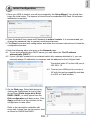
3-3. Select cameras by clicking their
checkboxes.
3-4.Click OK, return to the previous
window, and click the Insert button.
3-2. Click on the Search button.
4. It is important to ensure that the live vie
wing and recording configuration does not
exceed the system's limits:
In terms of local display, the default stream 1 for live view can be configured with a
resolution up to Full HD 30fps. Stream 1 is also a source for continuous recording.
Make sure your cameras' stream 1 resolution does not exceed 1080P at 30fps.
Compression
Resolution
Frame rate
Bit rate
No. of streams
MPEG4
CIF
30fps
512Kbps
12
VGA
30fps
1Mbps
5
H.264
1080P
30fps
6Mbps
2
CIF
30fps
512Kbps
7
VGA
30fps
1Mbps
3
1080P
30fps
6Mbps
1
The NVR supports Auto Stream Size, which automatically adjusts streaming display
for efficient leverage of system resources. If you disable the Auto Stream Size
function and manually configure your stream settings, you must comply with the
limitations listed above.
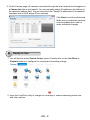
5. After inserting your cameras, you can start dragging cameras into view cells and
proceeding with the rest of the configuration. Refer to your User Manual for more
information.
EN - 9
English
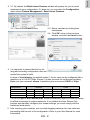
3. 3-1. By default, the Batch Insert Cameras window will prompt for you to recruit
cameras into your configuration. If it does not, you can enter the Configuration
menu, select Camera Management > Batch Insert Cameras.