1
Mini U581
CAN OBDII
Table of Contents
Safety Precautions and Warnings…….…………..………..2
General OBD-II Information………………………………..…2
Product Information……….………..….……………….……..5
1. Tool Description…………………..………….…………….…..5
2. Product Specifications………………….……….……………5
3. Product Features……………………………………..……….5
Operation Instructions……………….....……………………..5
1. How to reset the Contrast and Units:…………….…………..5
2. Read codes……………….…………………...……………….6
3. Erase codes……………………………………………………7
4. Live data ………………………………………….………..…..7
5. Freeze Frame…………………………………………….……8
6. IM Status…………..…………………………………….……..9
7. Vehicle info……………………………………………………..9
8. Oxygen Sensor…………………………………………...…10
9. Component Test……………………………………………...11
10. Rescan Data……………………………………………...…11
Warranty and Servicing………………………….…………..12
The use of upgrading software………………………..….…12
1. Set the hardware drive………………………….………….12
2. The use of upgrading software………………………...……13
1
Mini U581
CAN OBDII
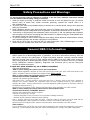
Safety Precautions and Warnings
To prevent personal injury or damage to vehicles or the Car Tool, read this instruction manual
first and observe the following safety precautions.
1. When an engine is running, it produces carbon monoxide, a toxic and poisonous gas. To prevent
serious injury or death from carbon monoxide poisoning ,operate the vehicle ONLY in a
well-ventilated area.
2. To protect your eyes from propelled objects as well as hot or caustic liquids, always wear approved
safety eye protection.
3. Keep cigarettes, sparks, open flame and other sources of ignition away from vehicle. Keep a dry
chemical (Class B) fire extinguisher rated for gasoline, chemical and electrical fires in work area.
4. .Connecting or disconnecting test equipment when the ignition is ON can damage test equipment
and the ignition OFF before connecting the Code Reader to or disconnecting the Code Reader from
the vehicle’s Data Link Connector(DLC).
5. To prevent damage to the on-board computer when taking vehicle electrical measurements. always
use a digital multi meter with at least 10megOhms of impedance.
6. Keep the car ToFol clean, dry and free from oil, water and grease. Use a mild detergent on a clean
cloth to clean the outside of the Scan Tool, when necessary.
General OBD-II Information
1. What is OBD-II?
OBD-II stands for On-Board Diagnostics, II generation. It is a set of documents issued by SAE and
ISO, which describe the interchange of digital information between on-board emission-related
Electronic Control Units (ECUs) of road vehicles and an OBD-II scan tool. OBD-II also commonly
refers to the physical on-board diagnostic system of a vehicle, which consists of an ECU (or multiple
ECUs), Malfunction Indicator Light(MIL), Diagnostic Link Connector (DLC), and the wiring that
connect the different elements.
2. How do I know whether my car is OBD-II compliant?
There are several ways.
1996 or newer model year vehicle sold in the United States
United States legislation requires all cars and light trucks model year (MY) 1996 and newer to be
OBD-II compliant. More information is available on the EPA's website.
2001 or newer model year gasoline vehicle sold in the European Union
Commission Directive 70/220/EEC, Annex I:
Vehicles with positive-ignition engines
With effect from 1 January 2000 for new types and from 1 January 2001 for all types, vehicles of
category M1, except vehicles the maximum mass of which exceeds 2500 kg, and vehicles of
category N1 class I, must be fitted with an on-board diagnostic (OBD) system for emission control in
accordance with Annex XI. [...]
Note that here "European Union" means countries which were members of the EU in 2000.
2004 or newer model year diesel vehicle sold in the European Union
Commission Directive 70/220/EEC, Annex I:
Vehicles with compression-ignition engines
Vehicles of category M1, except
- vehicles designed to carry more than six occupants including the driver,
- vehicles whose maximum mass exceeds 2500 kg,
from 1 January 2003 for new types and from 1 January 2004 for all types, must be fitted with an
on-board diagnostic (OBD) system for emission control in accordance with Annex XI.
Note that here "European Union" means countries which were members of the EU in 2003.
Other vehicles
If your vehicle does not fall into any of the above categories, look under the hood and try to locate a
label (Fig. 1) that explicitly states that the vehicle was designed to comply with OBD-II legislation.
2
Mini U581
CAN OBDII
Fig. 1 - Vehicle Emission Control Information Label
In this case, OBD-II is used as a general term and can mean any of the following:
OBD II (California ARB)
EOBD (European OBD)
JOBD (Japanese OBD)
You may also consult your vehicle's owner's manual and perhaps contact your local dealer. However,
be aware of the fact that many dealers do not know the difference between OBD and OBD-II.
If the vehicle is not OBD-II compliant, you cannot use a generic OBD-II scan tool such as U480 to
obtain diagnostic information from your vehicle.
But my car has the 16-pin OBD connector, shouldn't it be OBD-II compliant?
No, not necessarily. A lot of European and Asian manufacturers equipped their vehicles with
D-shaped 16-pin connectors long before they began installing OBD-II systems on those vehicles.
One curious thing to note here is the fact that most non-EOBD compliant vehicles had a DLC that
does not fully conform to SAE J1979. Compare figures 2 and 3, and notice the "ears" on the
non-EOBD compliant Ford Focus.
Fig. 2 - Ford Escort DLC
(courtesy of DigitalFriction, UK)
Fig. 3 - J1962 Vehicle Connector, Type A
(courtesy of SAE)
3. Which OBD-II protocol is supported by my vehicle?
All cars and light trucks built for sale in the United States after 1996 are required to be OBD-II
compliant. The European Union OBD legislation is somewhat more complicated.
An OBD-II compliant vehicle can use any of the five communication protocols: J1850 PWM, J1850
VPW, ISO9141-2, ISO14230-4 (also known as Keyword Protocol 2000), and more recently,
ISO15765-4/SAE J2480 (a "flavor" of CAN). US car manufacturers were not allowed to use CAN until
model year 2003.
There are two types of diagnostic link connectors (DLCs) defined by SAE J1962 - Type A and Type B,
shown in Figures 2 and 3, respectively. The main difference between the two connectors is in the
shape of the alignment tab.
Location - According to J1962,Type A DLC "shall be located in the passenger or driver's
compartment in the area bounded by the driver's end of the instrument panel to 300 mm (~1 ft)
beyond the vehicle centerline, attached to the instrument panel and easy to access from the driver's
seat. The preferred location is between the steering column and the vehicle centerline."
Fig. 1 - J1962 Vehicle Connector, Type A
(courtesy of SAE)
Type B DLC "shall be located in the passenger or driver's compartment in the area bounded by the
3
Mini U581
CAN OBDII
driver's end of the instrument panel, including the outer side, and an imagined line 750 mm (~2.5 ft)
beyond the vehicle centerline. It shall be attached to the instrument panel and easy to access from
the driver's seat or from the Co-drivers seat or from the outside. The vehicle connector shall be
mounted to facilitate mating and unmating."
Fig.2 - J1962 Vehicle Connector, Type B
(courtesy of SAE)
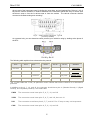
As a general rule, you can determine which protocol your vehicle is using by looking at the pinout of
the DLC:
Fig. 3
The following table explains how to determine the protocol:
Pin 2
Pin 6
Pin 7
must have
Pin 10
Pin 14
Pin 15
must have
Standard
J1850 PWM
must have
J1850 VPW
must have
may have*
must have
must have
ISO9141/14230
ISO15765 (CAN)
*Pin 15 (also called the "L-line") is optional in newer vehicles that use the ISO9141-2 or ISO14230-4
protocols.
In addition to pins 2, 7, 10, and 15, the connector should have pins 4 (Chassis Ground), 5 (Signal
Ground), and 16 (Battery Positive). This means that:
PWM
The connector must have pins 2, 4, 5, 10, and 16
VPW
The connector must have pins 2, 4, 5, and 16, but not 10.
ISO
The connector must have pins 4, 5, 7, and 16. Pin 15 may or may not be present.
CAN
The connector must have pins 4, 5, 6, 14, and 16.
4
Mini U581
CAN OBDII
Product Information
1. Tool Description
① OBDII Connector: connect car and the scan tool
② Screen: 128*164 pixel display, Backlit LCD
③ ENTER: OK
④ ESC: go back to the previous screens
⑤ UP/DOWN: up and down to choose different menu
⑥ USB interface: connect to USB cable
2. Product Specifications
●
Display-Backlit LCD, 128*64 pixel display.
●
Operating Temperature- 0 to 50OC(-32 to 122OF)
●
External Power: 10.0 to 15.5 volts provided via vehicle battery
●
Dimensions: 117mm Length(4.6"), 72mm Width(2.83"),
22mm Height (0.87"),
OBDII connector, 735mm (28.9")
3. Product Features
Works on all 1996 and newer cars & light trucks that are OBD II compliant (including the VPW, PWM,
ISO, KWP 2000 and CAN protocols)
Reads and clears generic and manufacturer specific Diagnostic Trouble Codes (DTCs)
Reading Freeze Frame Data
Testing I/M Reading Status
Reading vehicle info
Rescanning Data
EVAP System Test
Operating Instructions
1. How to reset the Contrast and Units:
1.
2.
3.
4.
Turn the ignition off
Locate the 16-pin Data Link Connector (DTC), and plug into the cable connector to the DLC.
Turn the ignition on
Wait for the LCD display
5
Mini U581
CAN OBDII
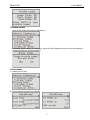
5. Press “UP” Button, Wait for the LCD display,
6. Select the “Contrast” and Press ENTER, adjust the Contrast
7. Select the “unit of measure” and Press Enter, select the Metric or English.
8. Press ”ENTER”, Turn the ignition on. Needn’t start the engine . and press any key
2. Read codes:
1. the trouble codes function read DTCs from the vehicle's computer modules there tow types of codes,
Malfunction Indicator Lamp(MIL) Codes and pending codes
MIL Codes: These codes cause the computer to illuminate the MIL when an emission related or
driveability fault occurs. The MIL is also known as the “service Engine Soon” or “Check Engine Lamp”.
MIL codes remain in the vehicle’s memory until the fault is repaired.
2. Pending Codes: These codes are also referred as “continuous monitor” and “maturing codes”. An
intermittent fault will cause the computer to store a code in memory. If the fault does not occur within
40 warm-up cycles, the code will be cleared from memory. If the fault occurs a specific number of
times, the code will mature into a DTC and the MIL will turn on.
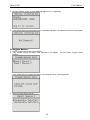
3. Select Trouble codes and press ENTER, The U581 retrives the DTCs stored in the vehicle's
computer modules.
▲
▲
if there are no trouble codes, it will display “NO CODES ARE FOUND”
If there are any trouble codes, all information will be reported on the display
6
Mini U581
CAN OBDII
3. Erase codes
Select Erase Codes and press the ENTER key.
a message appears asking if you are sure. Press the UP/DOWN arrow keys to move the brackets to
the desired response and press ENTER
4. Live data
1. Display the live data,
2. All live data are reported on the display
7
Mini U581
CAN OBDII
5. Freeze Frame
1. When an emission-related fault occurs, certain vehicle conditions are recorded by the on-board
computer. this information is referred to as a freeze.
Frame data. this data can be overwritten by faults with a higher priority.
2. if codes were erased, the freeze frame data may not be stored in vehicle memory.
Select Freeze Frame from the menu and press ENTER
3. All Freeze Frame data are reported on the display
8
Mini U581
CAN OBDII
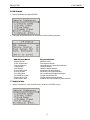
6. IM Status
1. Select I/M Status and press ENTER
2. Using the UP/DOWN arrows to view status of the following monitors.
Abbreviated Name
-Misfire Monitor
-FUEL System Mon
-Com Component
-Catalyst Mon
-Htd Catalyst
-Evap System Mon
-Sec Air System
-A/C Refrig Mon
-OXYGEN Sens Mon
Oxygen Sens HTR
-EGR System Mon
Expanded Name
Misfire monitor
Fuel System Monitor
Comprehensive Components Monitor
Catalyst Monitor
Heated Catalyst Monitor
Evaporative System Monitor
Secondary Air System Monitor
Air Conditioning Refrigerant Monitor
Oxygen Sensor Monitor
Oxygen Heater Sensor Monitor
Exhaust Gas Recirculation System Monitor
7. Vehicle info
1. Select “Vehicle info” from the main menu, press the “ENTER” button.
9
Mini U581
CAN OBDII
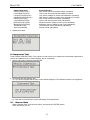
2. Use the SCROLL button to view additional digits of the 17-digit string.
3. If the vehicle does not support this mode, a message will show " the selected mode is not supported!"
8. Oxygen Sensor
1. Select Oxygen Sensor and press ENTER
2. If the vehicle support this mode, data reported on the display . You can select “Oxygen sensor
location”
If the vehicle does not support this mode, a message will show " Not supported!"
3. Select “Oxygen sensor test id”.
10
Mini U581
Abbreviated Name
RichToLeSeThV(Con)
LeanToRiSeThV(Con)
LowSeVFoSwTiCA(Con)
HighSeVoFoSwTiCa(Con)
RichToLeSwTi(Cal)
LeanToRiSeSwTi(Cal)
MinSeVoForTeCy(Cal)
MaxSeVoForTeCy(Cal)
TimeBeSeTr(Cal)
Sensor period(Cal)
CAN OBDII
Expanded Name
Rich to lean sensor threshold voltage (constant)
Lean to rich sensor threshold voltage (constant)
Low sensor voltage for switch time calculation (constant)
High sensor voltage for switch time calculation (constant)
Rich to lean sensor switch time (calculated)
Lean to rich sensor switch time (calculated)
Minimum sensor voltage for test cycle (calculated)
Maximum sensor voltage for test cycle (calculated)
Time between sensor transitions (calculated)
Sensor period (calculated)
4. Display test result.
9. Component Test
FUNCTIONAL DESCRIPTION—The purpose of this service is to enable the external test equipment to
control the operation of an on-board system, test or component.
1. Select Component Test and press ENTER
2. Test results are the following two:
a) If you do not support this function screen will be displayed “The selected mode is not supported!”
b) If the test is successful the screen will display "Command Sent”
10.
Rescan Data
Select "Rescan Data" from the main Menu, and press the "ENTER" button.
U581 will Retest you car
11
Mini U581
CAN OBDII
Warranty and Servicing
1. One Year Warranty
1. U581 warrants to its customers that this product will be free of all defects in materials and
workmanship under normal use and maintenance for a period of one (1) year from the date of the
original purchase.
2. This warranty does not apply to damages caused by improper use, accident, abuse, lightning, or if
the product was altered or repaired by anyone other than the Manufacturer’s Service Center.
2. Service Procedures
If you have any questions, please contact our local store, distributor or the Service Center
The use of upgrading software
1. Set the hardware drive
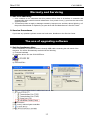
Correct installation of updated software is through USB cable connecting the usb mouth of the
computer. You will be automatically reminded as the following.
1) Find new hardware
2) Install the driver. Run the CH341SER.exe.
3) Press INSTALL
4) The driver has finished being installed and can run now.
12
Mini U581
CAN OBDII
2. The use of upgrading software
Correct installation of updated software, is through USB cable connecting the USB mouth of the
computer With to the memo scanner.
Move the cursor to "Upgrade", then do not press the ENTER Key.
1. visit website ww.memoscan.cn, download the software
2. Run UIF-ISP,. there will be the interface as follows
13
Mini U581
CAN OBDII
3. Select the com port.
4. Select produce.
5. Press “Open File” button, select the file for update(expand: .uif)
14
Mini U581
CAN OBDII
6. Pres “update”, there will be the interface as follows.
7. Then press the memo scanner’s ENTER key, The Memo scanner is trying to connect with PC.
8-1 The blow face will appear if the connection is success.
15
Mini U581
CAN OBDII
8-2 If the connection is fail, this time requests to close the power of memo scanner and check whether
the connection and the choice of COM mouth are right or not.
9. update successful
9-1. If the below interface appears, that’s to say the upgrading failure. This time requests to close the
power of memo scanner and back to step 1 to re-upgrading
16