1
Functions and Menu Tables
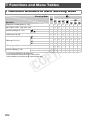
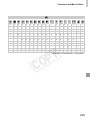
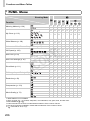
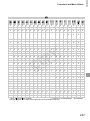
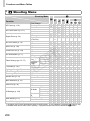
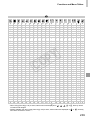
4 Shooting Menu
4
Shooting Mode
A
Function
AF Frame (p. 115)
AF Frame Size*3 (p. 117)
Digital Zoom (p. 53)
AF-Point Zoom (p. 75)
Servo AF (p. 118)
Continuous AF (p. 119)
AF-assist Beam (p. 77)
Flash Settings (pp. 70, 77)
i-Contrast (p. 107)
Hg Lamp Corr. (p. 71)
Wind Filter (p. 73)
Review (p. 78)
Review Info (p. 78)
Blink Detection (p. 76)
Grid Lines (p. 74)
IS Settings (p. 123)
Date Stamp (p. 57)
Face ID Settings (p. 59)
Face Detect*1
Tracking AF
Center
Normal
Small
Standard
Off
Digital Tele-converter
(1.4x/2.3x)
On
Off
On
Off*4
On
Off
On
Off
On
Red-Eye
Corr.
Off
On
Red-Eye
Lamp
Off
Auto
Off
On/Off
On/Off
Off/2 – 10 sec./Hold
Off
Detailed/Focus Check
On
Off
On
Off
Off
Continuous
IS Mode
Shoot Only
On
Powered
IS
Off
Off
Date / Date & Time
C
{
*2
–
–
–
{
{
G
I
{
{
{
{
{
{
{
{
–
{
{
{
–
{
{
{
{
{
{
{
{
{
–
–
–
–
–
{
–
{
{
{
–
{
{
–
{
{
{
{
{
{
{
–
{
{
{
{
{
{
{
{
{
{
{
–
{
{
{
{
{
{
{
{
{
{
{
{
{
{
{
{
{
{
{
–
{
{
{
{
{
{
{
{
{
{
{
{
{
{
{
{
–
–
–
–
–
–
–
{
–
{
{
–
{
{
{
{
{
{
{
{
–
{
{
{
{
{
{
{
{
{
{
–
{
{
{
{
{
{
{
{
{
{
{
{
{
{
{
{
{
–
{
–
{
{
{
{
{
{
{
{
{
{
{
{
{
{
{
{
–
{
–
{
{
{
{
{
–
{
{
{
–
{
–
{
{
{
{
{
{
{
{
{
{
{
{
{
{
–
{
{
{
–
{
{
–
{
–
{
{
{
{
–
{
–
{
{
{
{
{
{
{
{
{
{
{
{
{
{
{
{
{
{
–
{
{
–
{
{
{
{
{
{
–
{
–
{
{
{
{
{
{
{
{
{
{
{
{
{
{
{
{
{
{
–
{
{
–
{
{
{
{
{
{
–
{
–
{
{
{
{
{
{
{
{
{
{
{
{
{
{
{
{
Y
P
O
{
–
–
–
–
{
{
{
–
–
–
–
{
{
{
–
–
–
–
{
{
*1 Operation when no faces are detected varies by shooting mode. *2 Only available by pressing the o button (p. 58).
*3 Available when the AF frame is set to [Center]. *4 [On] when subject movement is detected in A mode.
208