Transcript
HARDWARE & INSTALLATION
INTEGRITY TESTS
If a problem is suspected with the T4 equipment,
the Integrity Tests provide a means for checking
whether or not the equipment is functioning
correctly.
3
NOTE: Always perform these tests
before calling the help line, to allow T4
to determine if there is an error with the
equipment.
The Integrity Tests can only be selected from the
Welcome screen. If there is a problem accessing
the Welcome Screen from the current display,
turn T4 OFF then back ON again.
DRG0012B
1
1.
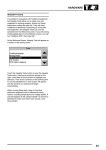
At the Welcome Screen, the Integrity Test
will appear as an option button on the
Control Panel.
2.
Select the Integrity Test button to view the
the following Integrity Test menu:
64
4
3.
Use the up and down scroll arrows at the
right hand side to highlight the required
Test selection.
4.
Select “Continue” from the Control Panel
to run the selected test. A new display will
be shown (dependent on specific
selection) and the selected test will begin
automatically.
NOTE: When performing Integrity
Tests, it is important to remember that
the results obtained can be affected by
adverse transient conditions such as
extremes of temperature or voltage spikes.
Always repeat the tests several times to
confirm any test failures.