1
Models NDIS and NDISC
WIRELESS DOORBELL AND INTERCOM
Overview
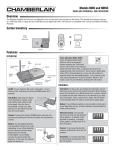
Carton Inventory
The Wireless Doorbell and Intercom can determine who is at the door
from anywhere in the house. The doorbell and intercom have up to a
1000 foot (300 m) range and use a 900 MHz secure digital radio link. The
intercom is compatible with various Chamberlain Wireless Products. The
doorbell and intercom can be programmed to create a new network or add
to an existing network.
Mounting Tape
THEORY OF OPERATION
Alcohol Wipe
To place a call to the intercom press the call button on the front of
the doorbell. To answer the call press and hold the talk button on the
intercom. Once the call is answered, a secure connection is made between
the two devices. The call button on the doorbell does not need to be
pressed to talk, however the talk button on the intercom must be held
to talk. Release the talk button to hear a response. After 30 seconds of
inactivity the doorbell and intercom will time out and the call is ended. If a
call is not answered within 30 seconds the intercom/doorbell will time out.
Refer to the Operation section for more information.
Doorbell
HOLD
OFF
VOLUME
MONITOR
ACTIVE
Rubber Pads
TALK
1
CHANNEL
3
2
4
Intercom
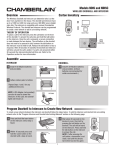
Assemble
INTERCOM
DOORBELL
1 Install 4 AA Alkaline batteries
1 Install 4 AA Alkaline batteries (not
(not provided). (Lithium batteries
recommended for colder
environments.)
provided).
2 Adhere rubber pads to bottom.
Repeat Steps 1 and 2 for any
additional intercoms.
NOTE: A DC Adapter (not provided) can
also be used to power the intercom. In
this case, the channel lights will remain
on.
OPTIONAL
TALK
ACTIV
E
HOLD
OFF
ME
VOLU
1
3
2
4
OR
MONIT
Program Doorbell to Intercom to Create New Network
To create a new network between the intercom and doorbell follow the steps below. To add the intercom and doorbell into an existing network refer to
the "Program Intercom and Doorbell into Existing Network" section on the following page.
1 Press and hold the learn button on
3 Wait about 30 seconds for the
devices to sync, then test by
pressing the call button on the
doorbell. The call will be heard
on the intercom. Press and hold
the talk button on the intercom to
answer the call.
NOTE: If after pressing the call
button a connection is not made,
wait until the devices have timed
out and try again.
E
ACTIV
D
HOL
OFF
TALK
ME
VOLU
1
3
2
4
the intercom until a beep is heard.
OR
MONIT
2 Within 10 seconds press and hold
the Learn button on the doorbell
until a beep is heard.
1
HOLD
OFF
ACTIVE
VOLUM
E
MONIT
OR
TALK
1
2
3
4
CHA
NNEL
Program Intercom and Doorbell into Existing Network
Do not program the new intercom and doorbell to each other before adding them to the existing network or they will form a separate network and
the memory will need to be cleared. First, program the intercom to the existing network, then program the doorbell. Before beginning, ensure that all
intercom are on the same channel (refer to Channel Button in the Operation section).
INTERCOM
DOORBELL
1 Press and hold the learn button on the
1 To add the doorbell to the network,
TALK
1
3
2
OR
MONIT
4
E
ACTIV
D
HOL
OFF
2 Within 10 seconds press and
TALK
ME
VOLU
1
3
2
OR
MONIT
4
intercom in the existing network until a beep is heard. Wait until
all the lights go out on the intercom (it may take up to 3-1/2
minutes for a secure network to be established).
hold the learn button on the new
doorbell until a beep is heard.
3 Wait about 30 seconds for the
3 Test by holding the talk button on the
new intercom until a beep is heard. This
will initiate a call to the other intercoms
in the network. Press and hold the talk
button on any network intercom to
answer the call.
ME
VOLU
2 Within 10 seconds press and hold the learn button on any
E
ACTIV
press and hold the learn button
on any intercom in the existing
network until a beep is heard.
D
HOL
OFF
new intercom until a beep is heard.
intercoms to sync, then test by
pressing the call button on the
doorbell. The call will be heard on
the intercoms in the network. Press
and hold the talk button on any
intercom to reply.
HOLD
OFF
ACTIVE
VOLUM
E
MONIT
OR
TALK
1
2
3
CHA
NNEL
4
HOLD
OFF
ACTIVE
VOLUM
E
MONIT
OR
TALK
1
2
3
CHA
NNEL
4
Repeat for any additional intercoms or doorbells.
Mount Doorbell
Choose a mounting location for the doorbell that is within range of the intercom(s) to ensure the doorbell will work properly. The doorbell can be
mounted using the provided screws or by using the double-sided mounting tape. It is recommended to use the mounting tape on surfaces such as
metal or glass.
MOUNTING WITH TAPE
MOUNTING WITH SCREWS
1 Mount doorbell with small silver
1 Clean back of doorbell and mounting
screws. Screw the top two screws
halfway into the mounting surface.
Place back of doorbell over screws.
Tighten screws.
surface using the alcohol wipe.
2 Peel off white paper from mounting
tape. Firmly press mounting tape on
back of doorbell.
2 Put the remaining silver screws
into the bottom holes of doorbell.
Tighten screws.
3 Peel paper from mounting tape.
Firmly press doorbell onto mounting
surface.
Secure Cover
1 Secure cover with the two large
black screws.
2
Operation
INTERCOM
Talk
Button
Speaker
VE
ACTI
TALK
ME
VOLU
1
3
2
OR
MONIT
4
Monitor
Button
Active Light
Channel
Lights
HOLDF
OF
Channel Select
Button
Monitor Mode*: Monitor mode is used to monitor noise in a specific
room. Place the intercom in the room that is to be monitored and press
and hold the monitor button until a beep is heard. Any other intercom
in the network can listen to that room. If a specific channel is selected
for monitor mode then only other intercoms on that channel or on the
paging channel can listen. Press the talk button to exit monitor mode. A
beep will be heard indicating monitor mode is no longer active. Monitor
mode functions only between intercoms, not with the doorbell. For
extended monitor usage, consider using a plug-in transformer.
Volume DOWN
Button
DC Adapter
Learn Button
Dipswitch #1
Dipswitch #2
Battery: The AA Alkaline batteries (not provided) will last up to a year
depending on use. When batteries are low intercom will emit three
beeps every ten minutes.
Volume UP
Button
On/Off: To turn intercom ON, press talk button. To turn intercom OFF,
hold down the Volume DOWN button for 3 seconds.
DOORBELL
Volume: Pressing the Volume DOWN button will lower the volume and
pressing the Volume UP button will increase the volume.
Learn Button
Call Button
Dipswitches
Talk Button
To answer a call: Press and hold the Talk button on the intercom to
talk (the Active Light will come on). Release the Talk button when done
talking to hear a response.
To initiate a call*: To initiate a call from one intercom to another, press
and hold the talk button until a beep is heard. All intercoms in the
network that are on the same channel or on the paging channel will
receive the call. Once a call is answered a secure connection is made
between the two intercoms and other intercoms in the network cannot
hear the conversation.
Speaker
Call Button: To make a call, press and release the call button and
all intercoms in the network will receive the signal. When the call is
answered by an intercom, a secure channel is created between the two
and the other intercoms in the network do not hear the conversation.
Once a secure connection is made, the call button on the doorbell does
not need to be pressed to speak.
Channel Button: The intercom can be set to one of four secure
channels or the paging channel (all channel lights are lit). The default
channel for the intercom is the paging channel. An intercom on a
channel can only hear an intercom on the same channel or on the
paging channel. To choose a channel press the channel button to set
intercom to one of four channels or the paging channel.
Battery: The AA Alkaline batteries (not provided) will last up to a
year depending on use. (Lithium batteries recommended for colder
environments.)
Voice Activation Mode (VOX): Voice Activation Mode (VOX) allows
a call to be answered without pressing the Talk button. Once a call is
heard on an intercom which has been set to VOX, a response can be
given by speaking loudly into the intercom. There will be a
slight delay when VOX is first activated by a voice, but the
intercom will continue to transmit audio until the speaking
stops. To put intercom into VOX, place Dipswitch #1 to the
1 2
UP position.
Alternate Chimes: The doorbell can be set to ring
with two different chime patterns, to identify which
doorbell is signaling. To change chime pattern, set
Dipswitch #2 to the OFF position.
Volume: To increase the doorbell volume, set
Dipswitch #4 to the OFF position.
Conference Mode*: Conference Mode allows multiple intercoms to
participate in a conversation compared to Normal Mode in which only
two intercoms can communicate. All intercoms must be
set to the same channel or the paging channel to be in
Conference Mode. To put intercom in Conference Mode set
Dipswitch #2 to UP position on all intercoms to be included
1 2
in the conference.
Sensitivity: To increase sensitivity on the doorbell
set Dipswitch #3 to the OFF position.
* This feature is used for networks with multiple intercoms ONLY
3
Troubleshooting
Intercom does not function.
Check batteries in intercom. If using a DC Adapter ensure that it is
plugged in. Ensure intercom is connected to a network. See Program.
Ensure that intercoms are on the same channel. See Operation.
Intercom is not getting expected transmission range.
Keep antenna vertical. Keep intercom away from metal objects and
electrical wiring. Cell phones, cordless phones, or other radio devices
may also limit range.
Intercom beeps every ten minutes.
The battery is low in the intercom. Replace with AA Alkaline batteries or
operate it with DC Adapter (not provided). A 12 volt, 300mA DC Adapter
may be used (center positive polarity on the round plug).
Need to clear intercom’s memory.
Press and hold Learn button, an initial beep will be heard. Continue
to hold until a second beep is heard (about 6 seconds). Ensure other
intercoms are not activated during this time. Once memory is clear the
intercom can be programmed to a new network.
Static and feedback is heard in intercom.
The intercoms are too close to each other. A cordless phone, cell phone,
or other radio devices can also cause static.
Intercom is sending audio while no buttons are pressed.
The sending intercom is set to Monitoring Mode or Voice Activation
Mode and will activate when sound is heard. It can be taken out of
Monitoring Mode by pressing the Talk button. It can be taken out of
Voice Activation Mode (VOX) by setting Dipswitch #1 to DOWN position.
See Operation.
Doorbell does not function.
Check batteries in doorbell. When you press the Call button you should
hear a tone. Ensure doorbell is connected to a network. See Program
Doorbell to Intercom.
The doorbell will not function when an intercom is in Monitor Mode.
Warranty
Doorbell is not getting expected transmission range.
Keep doorbell away from metal objects and electrical wiring. Do not
mount doorbell on a tree, masonry, or metal surface. When used in
buildings with stucco or cement walls, the range is greatly reduced.
Doorbell beeps every ten minutes.
The battery is low in the doorbell. Replace with AA Alkaline batteries.
Need to clear doorbell’s memory.
Press and hold Learn button, an initial beep will be heard. Continue to
hold until a second beep is heard (about 6 seconds). Once memory is
clear the doorbell can be programmed to a new network.
Intercom cannot be programmed to network.
A network may contain up to 12 intercoms. It may be necessary to
clear the network and reprogram all the intercoms to the network. See
Program Intercom and Doorbell into Existing Network.
The intercom does not connect to another intercom and a green light
is on longer than 3-1/2 minutes.
The intercom is out of range. Place the intercom closer to the other
intercoms in the network, with the antenna pointing up.
The other intercom in the network has no power. Replace the batteries.
The intercom has not completed programming. Clear the intercom's
memory and reprogram.
The intercom VOX mode is not working.
The intercom will take about 40 seconds to reactivate after responding to
a doorbell call.
NOTE: Manufacturer is not responsible for any radio or TV interference
caused by unauthorized modifications to this equipment. Changes or
modifications not expressly approved by the manufacturer could void the
authority to operate the equipment.
Accessories
ONE YEAR LIMITED WARRANTY
The Chamberlain Group, Inc. warrants to the first retail purchaser of this product that it is
free from defect in materials and/or workmanship for a period of 1 year from the date of
purchase.
This equipment has been tested and found to comply with the limits for a Class B digital
device, pursuant to Part 15 of the FCC Rules. These limits are designed to provide
reasonable protection against harmful interference in a residential installation. This
equipment generates, uses and can radiate radio frequency energy and, if not installed
and used in accordance with the instructions, may cause harmful interference to radio
communications. However, there is no guarantee that interference will not occur in a
particular installation. If this equipment does cause harmful interference to radio or
television reception, which can be determined by turning the equipment off and on, the user
is encouraged to try to correct the interference by one or more of the following measures:
• Reorient or relocate the receiving antenna.
• Increase the separation between the equipment and receiver.
• Connect the equipment into an outlet on a circuit different from that to which the receiver
is connected.
• Consult the dealer or an experienced radio/TV technician for help.
41B238 . . . . . . . . . . . . . . . . . . . . . . . . . . . . . . 12 Vdc 300mA Adapter
FOR TECHNICAL SUPPORT DIAL OUR TOLL
FREE NUMBER:
1-800-528-9131
www.chamberlain.com
NOTICE: To comply with FCC and or Industry Canada rules (IC), adjustment or modifications of this
receiver and/or transmitter are prohibited, except for changing the code setting or replacing the
battery. THERE ARE NO OTHER USER SERVICEABLE PARTS.
Tested to Comply with FCC Standards FOR HOME OR OFFICE USE. Operation is subject to the
following two conditions: (1) this device may not cause harmful interference, and (2) this device
must accept any interference received, including interference that may cause undesired operation.
Modèles NDIS et NDISC
SONNETTE DE PORTE ET INTERPHONE SANS FIL
Aperçu général
Inventaire de l’emballage
La sonnette et l'interphone sans fil permettent de déterminer qui est à la
porte, et ce, de tout emplacement de la maison. Ils ont une portée allant
jusqu'à 300 m (1 000 pieds) et utilisent une liaison radio numérique
sécurisée de 900 MHz. L'interphone est compatible avec différents
produits Chamberlain sans fil. On peut les configurer de façon à créer un
nouveau réseau ou les ajouter à un réseau existant.
Ruban de montage
MODE DE FONCTIONNEMENT
Pour faire un appel sur l'interphone, appuyez sur le bouton Call (parler)
situé à l'avant de la sonnette. Pour répondre à l'appel, appuyez sur le
bouton Talk (parler) de l'interphone et maintenez-le enfoncé. Dès que
vous répondez à l'appel, une connexion sécurisée s'établit entre les
deux appareils. Vous n'avez pas besoin d'appuyer sur le bouton Call
de la sonnette pour parler, mais vous devez garder le bouton Talk de
l'interphone enfoncé pour le faire. Relâchez le bouton Talk pour écouter
la réponse. Après 30 secondes d'inactivité, la sonnette et l'interphone
s'arrêtent automatiquement et l'appel est coupé. Si vous ne répondez pas
à un appel dans les 30 secondes, l'interphone et la sonnette s'arrêteront
automatiquement. Pour obtenir de plus amples renseignements, reportezvous à la section Fonctionnement.
Sonnette de
porte
Tampon imbibé
d'alcool
HOLD
OFF
VOLUME
MONITOR
ACTIVE
TALK
1
CHANNEL
3
2
Coussinets en
caoutchouc
4
Interphone
Assemblage
INTERPHONE
SONNETTE DE PORTE
1 Installez 4 piles AA alcalines
1 Installez 4 piles AA alcalines
(non fournies). (Les piles au
lithium sont recommandées pour
les environnements plus froids).
(non fournies).
2 Fixez les coussinets en caoutchouc
à la partie inférieure.
Répétez les étapes 1 et 2 pour tout
autre interphone.
REMARQUE : Un adaptateur c. c.
(non fourni) peut aussi être utilisé pour
alimenter l'interphone. Dans ce cas, les
témoins de l'alimentation et du canal
resteront allumés.
OPTION
TALK
ACTIV
E
HOLD
OFF
ME
VOLU
1
3
2
4
OR
MONIT
Configurer la sonnette et l'interphone pour créer un nouveau réseau
Pour créer un nouveau réseau entre l'interphone et la sonnette, suivez les étapes ci-dessous. Pour ajouter l'interphone et la sonnette à un réseau
existant, reportez-vous à la section « Configurer l'interphone et la sonnette sur un réseau existant » de la page suivante.
1 Appuyez sur le bouton Learn de
3 Attendez environ 30 secondes pour que les
appareils soient synchronisés, puis mettezles à l'essai en appuyant sur le bouton
Call de la sonnette. L'appel sera entendu
sur l'interphone. Appuyez sur le bouton
Talk (parler) de l'interphone et gardez-le
enfoncé pour répondre à l'appel.
REMARQUE : Si après avoir appuyé sur
le bouton Call, aucune liaison ne s'établit,
attendez jusqu'à ce que les appareils se
soient arrêtés automatiquement, puis
essayez à nouveau.
E
ACTIV
D
HOL
OFF
TALK
ME
VOLU
1
3
2
OR
MONIT
4
l’interphone et gardez-le enfoncé
jusqu'à ce que vous entendiez
un bip.
2 Appuyez sur le bouton Learn de la
sonnette dans les 10 secondes et
gardez-le enfoncé jusqu'à ce que
vous entendiez un bip.
5
HOLD
OFF
ACTIVE
VOLUM
E
MONIT
OR
TALK
1
2
3
4
CHA
NNEL
Configurer l'interphone et la sonnette sur un réseau existant
Ne configurez pas l'interphone et la sonnette neufs ensemble avant de les ajouter au réseau existant, sinon ils vont établir un réseau à part et la mémoire
devra être purgée. D'abord, configurez l'interphone sur le réseau existant, puis la sonnette. Avant de commencer, assurez-vous que tous les interphones
sont réglés au même canal (reportez-vous à la rubrique Bouton Channel de la section Fonctionnement).
INTERPHONE
SONNETTE DE PORTE
1 Appuyez sur le bouton Learn de
1 Pour ajouter la sonnette au réseau,
TALK
1
3
2
OR
MONIT
4
E
ACTIV
D
HOL
OFF
2 Appuyez sur le bouton Learn
TALK
ME
VOLU
1
3
2
OR
MONIT
4
dans les 10 secondes, et gardez-le enfoncé jusqu'à ce que vous
entendiez un bip. Attendez jusqu'à ce que tous les témoins de
l'interphone s'éteignent (cela peut prendre jusqu'à 3 1/2 minutes
pour qu'un réseau sécurisé s'établisse).
de la sonnette neuve dans les
10 secondes et gardez-le enfoncé
jusqu'à ce que vous entendiez
un bip.
3 Attendez environ 30 secondes
3 Procédez à un essai en gardant le
bouton Talk de l'interphone neuf
enfoncé jusqu'à ce que vous entendiez
un bip. Cela va lancer un appel aux
autres interphones du réseau. Appuyez
sur le bouton Talk de n'importe quel
interphone du réseau et gardez-le
enfoncé pour répondre à l'appel.
ME
VOLU
2 Appuyez sur le bouton Learn de n'importe quel interphone,
E
ACTIV
appuyez sur le bouton Learn de
n'importe quel interphone du réseau
existant et gardez-le enfoncé jusqu'à
ce que vous entendiez un bip.
D
HOL
OFF
l’interphone neuf et gardez-le enfoncé
jusqu'à ce que vous entendiez un bip.
pour que les interphones soient
synchronisés, puis mettez-les à
l'essai en appuyant sur le bouton
Call de la sonnette. L'appel sera
entendu sur les interphones du
réseau. Appuyez sur le bouton Talk
de n'importe quel interphone et
gardez-le enfoncé pour répondre.
HOLD
OFF
ACTIVE
VOLUM
E
MONIT
OR
TALK
1
2
3
CHA
NNEL
4
HOLD
OFF
ACTIVE
VOLUM
E
MONIT
OR
TALK
1
2
3
CHA
NNEL
4
Répétez cette étape pour tout autre interphone ou toute autre sonnette.
Monter la sonnette
Choisissez un emplacement de montage de la sonnette qui soit à la portée des interphones pour vous assurer que la sonnette fonctionnera bien. On peut
monter la sonnette en utilisant les vis incluses ou en employant un adhésif de montage à double face. Il est recommandé d'utiliser l'adhésif à double
face sur des surfaces métalliques ou en verre.
MONTAGE AVEC LE RUBAN
MONTAGE AVEC LES VIS
1 Nettoyez la partie arrière de la
1 Montez la sonnette avec les petites
sonnette et la surface de montage
en utilisant un tampon imbibé
d'alcool.
vis argentées. Visser les deux vis
du haut à moitié dans la surface
de montage. Mettez le dos de la
sonnette sur les vis. Serrez les vis.
2 Enlevez le papier blanc du ruban de
montage. Appuyez fermement sur
l'adhésif de montage à l'arrière de la
sonnette.
2 Mettez les autres vis argentées dans
les trous inférieurs de la sonnette.
Serrez les vis.
3 Enlevez le papier du ruban de
montage. Appuyez fermement
la sonnette contre la surface de
montage.
Fixez le couvercle
1 Fixez le couvercle avec les deux
grandes vis noires.
6
Fonctionnement
INTERPHONE
Bouton
Talk
Haut-parleur
VE
ACTI
TALK
ME
VOLU
1
3
2
OR
MONIT
4
Bouton
Monitor
Témoin d'activité
Témoins
de canaux
HOLDF
OF
Bouton Channel
Select
Mode de surveillance* : Le mode de surveillance sert à surveiller le
bruit dans une salle donnée. Placez l'interphone dans la salle qui doit
être surveillée, puis appuyez sur le bouton Monitor et gardez-le enfoncé
jusqu'à ce que vous entendiez un bip. Tout autre interphone du réseau
permet d'entendre les sons de cette salle. Si un canal particulier a été
sélectionné pour le mode de surveillance, on ne peut entendre les sons
que sur les autres interphones qui sont reliés à ce canal ou à la voie
d'appel unilatéral. Appuyez sur le bouton Talk pour quitter le mode
de surveillance. Un bip se fait entendre pour indiquer que le mode
de surveillance n'est plus actif. Le mode de surveillance fonctionne
seulement entre interphones, pas avec la sonnette. Pour une utilisation
prolongée du moniteur, pensez à utiliser un transformateur enfichable.
Bouton de
volume DOWN
Bouton de
volume UP
Adaptateur c. c.
Bouton Learn
Commutateur DIP 1
Commutateur DIP 2
Pile : Les piles alcalines AA (non fournies) dureront jusqu'à un an en
fonction de l'utilisation. Lorsque les piles sont faibles, l'interphone
émettra deux bips toutes les dix minutes.
Marche-arrêt : Pour allumer l'interphone, appuyez sur le bouton Talk.
Pour éteindre l'interphone, appuyez sur le bouton de volume DOWN et
gardez-le enfoncé pendant 3 secondes.
Volume : Le bouton de volume DOWN fait baisser le volume tandis que
le bouton de volume UP le fait augmenter.
SONNETTE DE PORTE
Commutateurs
DIP
Haut-parleur
Bouton Call : Pour lancer un appel, appuyez brièvement sur le bouton
Call et tous les interphones du réseau recevront le signal. Lorsque
vous répondez à un appel sur un interphone, un canal sécurisé est
créé entre les deux et les autres interphones du réseau ne permettent
pas d'entendre la conversation. Une fois que la liaison sécurisée est
réalisée, on n’a pas besoin d’appuyer sur le bouton Call de la sonnette
n'a plus besoin d'être appuyé pour parler.
Bouton de channel : On peut configurer l'interphone à l'un des quatre
canaux sécurisés ou à la voie d'appel unilatéral (tous les témoins des
canaux s'allument). La voie d'appel unilatéral est le canal par défaut
de l'interphone. Un interphone réglé sur un canal donné ne permet de
communiquer qu’avec un autre interphone sur le même canal ou la
même voie d’appel unilatérale. Pour choisir un canal, appuyez sur le
bouton channel pour configurer l'interphone à l'un des quatre canaux
ou à la voie d'appel unilatéral.
Pile : Les piles alcalines AA (non fournies) dureront jusqu'à un an en
fonction de l'utilisation. (Les piles au lithium sont recommandées pour
les environnements plus froids).
Mode d'activation vocale (VOX) : Le mode d'activation vocale (VOX)
permet de répondre à un appel sans appuyer sur le bouton Talk. Une
fois qu'on répond à un appel sur un interphone réglé au mode VOX, on
peut parler à vive voix sur cet interphone. Il y aura un léger
retard lorsque le mode VOX est d'abord activé par une voix,
mais l'interphone continuera à transmettre le signal audio
jusqu'à la fin de la conversation. Pour mettre l'interphone
1 2
en mode VOX, réglez le commutateur 1 à la position UP.
Mode conférence* : Le mode conférence permet à plusieurs
interphones de participer à un appel alors que le mode normal
ne permet de communiquer qu’entre deux interphones. Tous les
interphones doivent être réglés sur le même canal ou la
voie d'appel unilatéral pour entrer en mode conférence.
Pour mettre l'interphone en mode conférence, réglez le
commutateur 2 de tous les interphones à ajouter à la
1
conférence à la position UP.
Bouton Learn
Bouton Call
Bouton Talk
Pour répondre à un appel: Appuyez sur le bouton Talk de l'interphone
et gardez-le enfoncé pour parler (le témoin d'activité s'allumera).
Relâchez le bouton Talk lorsque vous avez fini de parler pour écouter la
réponse.
Pour lancer un appel*: Pour lancer un appel d'un interphone à l'autre,
appuyez sur le bouton Talk et gardez-le enfoncé jusqu'à ce que vous
entendiez un bip. Tous les interphones du réseau qui sont sur le même
canal ou sur la voie d'appel unilatéral recevront l'appel. Une fois que
vous répondez à un appel, une liaison sécurisée s'établit entre les
deux interphones et les autres interphones du réseau ne peuvent pas
entendre la conversation.
Autres carillons : La sonnette peut être réglée de
façon à faire résonner deux carillons différents afin
de déterminer la sonnette qui émet le signal. Pour
changer de carillon, mettez le commutateur DIP 2 à
la position OFF (arrêt).
Volume : Pour augmenter le volume de la sonnette,
mettez le commutateur DIP 4 à la position OFF.
Sensibilité : Pour augmenter la sensibilité de la
sonnette, mettez le commutateur DIP 3 à la position
OFF.
2
* Cette fonction n'est utilisée que pour les réseaux dotés de plusieurs interphones.
7
Dépannage
L'interphone ne fonctionne pas.
Vérifiez les piles de l'interphone. Si vous utilisez un adaptateur c. c.,
assurez-vous qu'il est branché. Assurez-vous que l'interphone est
connecté à un réseau. Voir Configuration. Assurez-vous que les
interphones sont connectés au même canal. Voir Fonctionnement.
L'interphone ne capte pas la portée de transmission attendue.
L'antenne doit rester verticale. Éloignez l'interphone des arbres des
objets métalliques et de tout câblage électrique. Les téléphones
cellulaires, les téléphones sans fil et d'autres dispositifs radio peuvent
aussi limiter la portée.
L'interphone émet un bip toutes les dix minutes.
La pile de l'interphone est faible. Remplacez-la par une pile alcaline
AA ou faites-le fonctionner avec un adaptateur c. c. (non fourni). Un
adaptateur c. c. de 12 volts, 300 mA peut être utilisé (polarité positive au
centre de la prise ronde).
Vous devez effacer la mémoire de l'interphone.
Appuyez sur le bouton Learn et gardez-le enfoncé, un bip initial
retentira. Continuez d'appuyer jusqu'à ce qu'un deuxième bip retentisse
(environ 6 secondes). Assurez-vous que les autres interphones ne sont
pas activés pendant ce temps. Une fois que la mémoire est effacée,
l'interphone peut de nouveau être configuré sur un nouveau réseau.
Des bruits statiques et de réinjection sont émis par l'interphone.
Les interphones sont trop près les uns des autres. Un téléphone sans fil,
un téléphone cellulaire ou tout autre dispositif radio peut aussi émettre
des bruits statiques.
L’interphone envoie des signaux audio sans qu’on appuie sur les
boutons.
L’interphone émetteur est défini en mode de surveillance ou en mode
d'activation par la voix et sera activé dès qu'un son sera entendu. On
peut quitter le mode de surveillance en appuyant sur le bouton Talk. On
peut quitter le mode d'activation par la voix en mettant le commutateur
DIP 1 à la position DOWN. Voir Fonctionnement.
La sonnette ne fonctionne pas.
Vérifiez les piles de la sonnette. Vous devriez entendre une tonalité
lorsque vous appuyez sur le bouton Call. Assurez-vous que la sonnette
est connectée à un réseau. Voir Configurer la sonnette et l'interphone.
La sonnette ne fonctionne pas lorsque l'interphone est en mode de
surveillance.
La sonnette ne capte pas la portée de transmission attendue.
Éloignez-la des objets métalliques et de tout câblage électrique. Ne
montez pas la sonnette sur un arbre, une surface de maçonnerie ou une
surface métallique. En cas d'utilisation dans des immeubles dotés de
murs en ciment ou en stucco, la portée est grandement réduite.
La sonnette émet un bip toutes les dix minutes.
Sa pile est faible. Remplacez-la par des piles alcalines AA.
Vous devez effacer la mémoire de l’interphone,
Appuyez sur le bouton Learn et gardez-le enfoncé, un bip initial retentira.
Continuez d'appuyer jusqu'à ce qu'un deuxième bip retentisse (environ
6 secondes). Une fois que la mémoire est effacée, on peut configurer la
sonnette sur un nouveau réseau.
L'interphone ne pourra pas être configuré sur le réseau.
Un réseau peut desservir jusqu'à 12 interphones. Il sera peutêtre nécessaire de supprimer le réseau et de reconfigurer tous les
interphones qui y sont reliés. Voir Configurer l'interphone et la sonnette
sur le réseau existant.
L'interphone ne se connecte pas à un autre interphone et un témoin
vert s'allume pendant plus de 3 1/2 minutes.
L'interphone se trouve hors de portée. Placez-le plus près des
interphones du réseau, en pointant l'antenne vers le haut.
L'autre interphone du réseau n'a aucune alimentation électrique.
Remplacez les piles.
L'interphone n'a pas terminé la configuration. Supprimez la mémoire de
l'interphone, puis refaites la configuration.
Le mode VOX de l'interphone ne fonctionne pas.
La réactivation de l'interphone prendra environ 40 secondes après qu'on
ait répondu à un appel de la sonnette.
REMARQUE : Le fabricant n'est pas responsable des interférences de
radiodiffusion sonore ou visuelle causées par des modifications non
autorisées de cet équipement. Toute modification non expressément
approuvée par le fabricant pourrait annuler l'autorisation d'exploiter
l'équipement.
Garantie
Accessoires
GARANTIE LIMITÉE D'UN AN
41B238. . . . . . . . . . . . . . . . . . . . . . . . Adaptateur de 12 V c. c., 300 mA
Le groupe Chamberlain, Inc. garantit à l’acheteur initial du produit que celui-ci est libre de
vice de main-d’œuvre et de fabrication, et ce, pendant une durée d’un an à compter de la
date d’achat.
SI VOUS AVEZ BESOIN DE SOUTIEN TECHNIQUE,
COMPOSEZ NOTRE NUMÉRO SANS FRAIS :
1-800-528-9131
Cet équipement a été testé et classé dans la catégorie d'un appareil numérique de classe B
en accord avec la partie 15 des directives FCC. Cette conformité a pour but de fournir une
protection raisonnable contre les interférences nuisibles dans une installation résidentielle.
Cet équipement génère, utilise et peut émettre des fréquences radio et, s'il n'est pas
installé et utilisé conformément aux instructions, peut causer des interférences nuisibles
aux communications radio. Cependant, il n'existe aucune garantie que des interférences
ne se produiront pas dans une installation particulière. Si cet équipement provoque des
interférences nuisibles à la réception d'une diffusion sonore ou visuelle, ce qu'on peut
déterminé en l'allumant et en l'éteignant, l'utilisateur est encouragé à essayer de résoudre ce
problème en prenant une ou plusieurs des mesures suivantes :
• Réorientez ou déplacez l'antenne de réception.
• Augmentez la distance entre l'équipement et le récepteur.
• Branchez l'appareil à une prise sur un circuit différent de celui du récepteur.
• Pour obtenir de l'aide, consultez le revendeur ou un radiotechnicien expérimenté.
114A4096F
www.chamberlain.com
AVIS : Les règles de la FCC ou d'Industrie Canada (IC), ou les deux, interdisent tout ajustement
ou toute modification de ce récepteur ou de cet émetteur, sauf pour modifier le code ou pour
remplacer la pile. IL N'EXISTE AUCUNE AUTRE PIÈCE SUSCEPTIBLE D'ÊTRE ENTRETENUE PAR
L'UTILISATEUR.
Vérifié pour conformité avec les normes FCC POUR UTILISATION À LA MAISON OU AU
BUREAU. L’utilisation est assujettie aux deux conditions ci-après : (1) ce dispositif ne doit pas
causer d'interférences nuisibles et (2) doit accepter toute autre interférence reçue, y compris les
interférences pouvant entraîner un fonctionnement indésirable.
© 2015, The Chamberlain Group Inc.
All Rights Reserved
Tous droits réservés
8