1
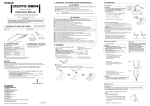
WARNING: Use 191,192 or other soldering testers to calibrate the Tip temperature. Apply solder or flux If there is insufficient solder on the PCB, or the soldered area is too small, apply solder or flax to the PCB. Solder may also be applied to the tip. Melt the solder Place the tip on the soldered part and melt the solder, confirm that the solder is fully melt. Remove the component After confirming that the solder is fully melted, lightly squeeze the TWEEZER to grasp the component and lift to remove the component. CAUTION: The high temperature of the tip may damage the PCB and put off the circuit diagram. Set the temperature at 300°C and the tip temperature can be improved slowly with the work condition. When operating use the temperature as low as possible to prevent the sensitive component from damage and stop the tip character from decreasing. SMD Hot TWEEZER Iron ASE-1209 User’s Manual PART 4: Replacing the tip CAUTION: Be sure to turn off the power switch before replacing the tip. Loose the nipple by turning it counterclockwise. It is not necessary to pull it out completely. 1. Insert the new tip as far as it will go, and adjust it so that it is parallel to the other tip. 2. Tighten nipple to fix the tip in place. 3. The tip temperature may vary according to the shape of the tip, you'd better calibrate it with soldering tester. Number Model Part name Dimension 26012 A1379 Tip / CHIP 1L 1mm 26013 A1378 Tip / CHIP 2L 2mm 26020 A1380 Tip / SOP 8L 8mm 26019 A1381 Tip / SOP 10L 10mm 26021 A1382 Tip / SOP 13L 13mm 26023 A1383 Tip / SOP 18L 18mm 26024 A1384 Tip / SOP 25L Heat Resistance Pad 20mm B2300 4 25mm Shape www.tmatlantic.com To use the Soldering Tweezers connect it to ASE-1107 soldering station PART1: Precaution In this instruction manual, “warning” and “caution” are defined as follows. WARNING WARNING: Misuse may potentially cause death of, or serious injury to, the user. CUATION: Misuse may potentially cause injury to the user or physical damage to the objects involved. For your own safety, be sure to comply with these precautions. CAUTION When the power is on, the tip is between 200°C/ 392°F and 400°C/752°F. Since mishandling may lead to bums or fire, be sure to comply with the following precautions. Do not touch the metallic parts near the tip. Do not use the product near flammable items. Advise other people in the work area that the unit can reach a very high temperature and should be considered potentially dangerous. Turn off the power while taking breaks and when finished using the unit. Before replacing parts or storing the unit, turn off the power and allow the unit to cool the room temperature. To prevent damage to the unit and ensure a safe working environment, be sure to comply with the following precautions. Do not use the unit for applications other than those specially described in the instruction manual. Before using the HOT TWEEZER IRON for the first time, calibrate the tip temperature. Do not rap the HOT TWEEZER IRON against the working bench to shake off residual soldering, or otherwise subject the iron to severe shocks. 2 Do not modify the unit. Use only genuine QUICK replacement parts. Do not wet the unit or use the unit when your hands are wet. The operating process will produce smoke. Make sure the area is well ventilated. Pull on the plug to disconnect the HOT TWEEZER IRON from the station outlet. Do not pull the cord. While using the unit, don’t do anything which may cause bodily or physical damage. PART 2: Summarization Specifications Power Power Consumption Heating Element Tip to grounded resistance Tip to grounded Potential Max temperature 24V AC (25W*2) Ceramic Heater under 2Ω under 2mV 400°C Applicable Models The unit is applied for those iron stations : 969, 967, 702, 937, 936, 926 etc. which are suitable for ceramic heating stations. NOTE: stations are not included. Connections Between pins 4 & 5 (Heating Between pins 1 & 2 (Sensor) Between pin 3 & Tip 1.5-3.5 Ω (Normal) 43-58 Ω (Normal) Under 2Ω PART3: Operating Instruction Set the temperature Never set the temperature to any value over 400°C (752°F). Doing so may damage the station. Set the temperature according to the type of the work to be done. 3