1
6.
7.
Select Back.
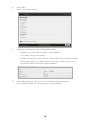
Select User Configuration.
8.
Configure the following User Configuration fields:
–– Enable User. Verify that this field is set to Enabled.
–– User Name. Enter a user name.
–– LAN and Serial Port User Privileges. Set privilege levels to Administrator.
–– Change Password. Set a password for user login. Make sure you set a
password different from the supplied default.
9.
Select Back and then select Finish. Confirm the changed settings.
The network settings are saved and the system reboots.
16