1
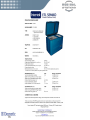
TCW 2000 Ice liner refrigerator and freezer
PIJ
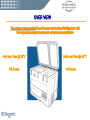
OVER VIEW
The unique rotomoulded Chest Freezer and inclined Refrigerator with
two separate compartments and compressors worldwide
Hold over time @ 32°C
60 hours
PIJ
Hold over time @ 43°C
44 hours
INSTALLATION
•The unit must be set up in a dry well-ventilated place. Avoid direct sunlight or
locating it close to a heat source.
•The place must be protected against bearing rain and dust.
•Ensure that the unit is steady and perfectly straight and does not touch any of
the units next to it.
•A good air circulation especially around the compressor is essential for
trouble-free operation. Keep the ventilation openings of the compressor cover
always free from any obstructions.
•Make sure that a minimum distance is provided
between the TCW2000 and any wall or other
device located next to it.
PIJ
INSTALLATION
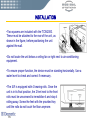
•Two spacers are included with the TCW2000.
These must be attached to the rear of the unit, as
shown in the figure, before positioning the unit
against the wall.
•Do not locate the unit below a ceiling fan or right next to air-conditioning
equipment.
•To ensure proper function, the device must be standing horizontally. Use a
water level to check and correct if necessary.
•The ILR is equipped with 4 bearing rolls. Once the
unit is in its final position, the 2 feet next to the front
rolls must be unscrewed to immobilise it and stop it
rolling away. Screw the feet with the provided key
until the rolls do not touch the floor anymore.
PIJ
INSTALLATION
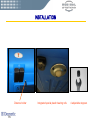
Distance holder
PIJ
Integrated special plastic bearing rolls
4 adjustable stoppers
POWER SUPPLY / ELECTRICAL CONNECTION
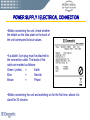
•Before connecting the unit, check whether
the details on the data plate on the back of
the unit correspond to local values.
•A suitable 3-pin plug must be attached to
the connection cable. The leads of the
cable are marked as follows:
Green / yellow
=
Earth
Blue
=
Neutral
Brown
=
Phase
•Before connecting the unit and switching on for the first time, allows it to
stand for 30 minutes.
PIJ
POWER SUPPLY / ELECTRICAL CONNECTION
•To prevent problems with other electrical equipment causing this unit to
malfunction, it should be connected to a separate circuit. Avoid multiple-socket.
•Make sure that the plug is easy accessible so that if needed, it can be easy
disconnected without having to move other equipment or furniture.
•The TCW2000 is equipped with a compressor which requires low starting
current and can also operate within a range of voltage variations. E.g. If the
normal operating voltage is 230 volts. 50 Hz. AC. It can start even when the
supply voltage occasionally go as low as 150 volts or as high as 280 volts.
•Though the ILR is capable of operating within a wide range of voltage
variations, for extra safety one separate Automatic Voltage Stabilizer should be
used with it.
PIJ
PREPARATION
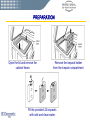
Open the lid and remove the
cabinet frame.
PIJ
Remove the icepack holder
from the icepack compartment.
Fill the provided 24 icepacks
with cold and clean water.
PREPARATION
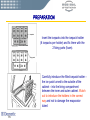
Insert the icepacks into the icepack holder
(6 icepacks per holder) and fix them with the
2 fixing parts (foam).
Carefully introduce the filled icepack holder –
the ice pack turned to the outside of the
cabinet – into the lining compartment
between the inner and outer cabinet. Watch
out to introduce the holders in the correct
way and not to damage the evaporator
tubes!
PIJ
PREPARATION
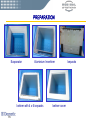
Evaporator
Aluminium Innerliner
Iceliner with 4 x 6 icepacks
PIJ
Iceliner cover
Icepacks
PREPARATION
To ensure the best transport of the cold
from the evaporator into the icepacks,
the icepacks holders must be pressed
firmly against the evaporator tubes and
fixed with the provided latches.
After all 6 icepack holders are inserted, replace the cabinet frame and put
the baskets in place.
PIJ
PREPARATION
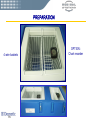
4 wire baskets
PIJ
OPTION:
Chart recorder
PREPARATION
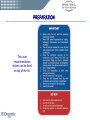
This user
recommendation
sticker can be fixed
on top of the lid.
PIJ
FREEZING OF ICEPACKS
• At 32°C ambient temperature, you can
freeze up to 36 icepacks, in the freezer
compartment. With 43°C ambient temperature
this quantity is reduced to 26 icepacks.
•The icepacks must be arranged according to
the picture beside
• It is recommended to precool the freezer for
24 hours before inserting the icepacks.
• Do not try to freeze icepacks during the
phase directly after starting the freezer.
PIJ
OPERATION
• The TCW2000 and its control panel is composed of 2 separate units:
The refrigerator part on the left side, and the freezer part on the right side of the
control panel. Both units are working completely independently which means
that one unit can function, while the other one is switched off.
• Switch on the unit by shifting the respective ON/OFF switch to position “I”. The
green light in the switch shows that the unit is functioning.
PIJ
CHANGING THE TEMPERATURE - SETPOINT
• The temperature set-points of the refrigerator and the freezer unit are preset
at the factory at following values: +4°C for refrigerator, -20°C for the freezer.
PIJ
CHANGING THE TEMPERATURE - SETPOINT
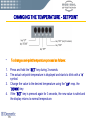
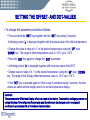
•
To change a set-point temperature proceed as follows:
1.
2.
Press and hold the “SET”-key during 3 seconds.
The actual set-point-temperature is displayed and starts to blink with a “c”
symbol.
Change the value to the desired temperature using the “UP” resp. the
“DOWN”-key.
If the “SET”-key is pressed again for 3 seconds, the new value is safed and
the display returns to normal temperature.
3.
4.
PIJ
OPERATION
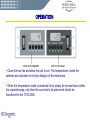
• Close the two lids and allow the unit to run. The temperatures inside the
cabinets are indicated on the two displays of the electronics.
• When the temperature inside is observed to be steady for several hours within
the required range, only than the vaccines to be preserved should be
transferred to the TCW 2000.
PIJ
POWER FAILURE
•
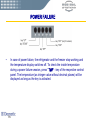
In case of power failure, the refrigerator and the freezer stop working and
the temperature display switches off. To check the inside temperature
during a power failure session, press “TMP” –key of the respective control
panel. The temperature (as integer value without decimal places) will be
displayed as long as the key is activated.
PIJ
STORAGE OF VACCINES IN THE ILR
CAUTION:
Special care should be taken to preserve the vaccines that get damaged
by freezing. Never store them in the freezer compartment of the TCW
2000. Watch out that the vaccines are not touching the side surfaces in
the cabinet of refrigerator. It is advisable to preserve such vaccines
(DTP, BCG, TT) in the baskets.
For storing vaccines:
• Keep the packets containing the vaccines in neat rows.
• Different vaccines should be kept separately to facilitate easy identification.
• Keep about 2 cm space between rows for circulation of air.
• Keep a separate thermometer among the vaccines to ascertain the actual
vaccine temperature.
PIJ
VACCINE STORAGE
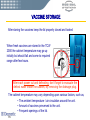
After storing the vaccines keep the lid properly closed and locked
When fresh vaccines are stored in the TCW
2000 the cabinet temperature may go up
initially but should fall and come to required
range after few hours.
After each power cut and defrosting, don‘t forget to evacuate the
defrost water inside the cabinet, by removing the drainage plug.
The cabinet temperature may vary depending upon various factors, such as,
• The ambient temperature / air circulation around the unit.
• Amount of vaccines preserved to the unit.
• Frequent openings of the lid.
PIJ
DEFROSTING and CLEANING
The moisture in the air, which enters the cabinet due to lid opening (and also
may be due to defectively-gasket or lid alignment) is attracted by the cold
surfaces inside. So, formation of frost and ice occurs on the walls around the
icepacks inside the icepack-compartment and the freezer compartment.
When the frost layer is 6mm thick, the unit, resp. the compartment has to be
defrosted.
IMPORTANT:
Before defrosting the unit, the vaccines preserved
in it will have to be removed and stored
temporarily in other working refrigerator or freezer.
If a second refrigerator or freezer is not available,
the vaccines will have to be preserved in Cold-Box
or Vaccine carrier, properly lining the same with
frozen ice packs, such that the vaccine
temperature remains within the recommended
storage temperature during the defrosting.
PIJ
DEFROSTING and CLEANING
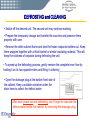
• Switch off the desired unit. The second unit may continue working.
• Prepare the temporary storage and transfer the vaccines and preserve them
properly with care.
• Remove the white cabinet frame and take the frozen icepacks holders out. Keep
them wrapped together with a thick blanket or similar insulating material. This will
keep the coldness of icepacks during defrosting the unit.
• To speed up the defrosting process, gently remove the complete inner liner by
holding it on its two opposite sides and lifting it uniformly.
• Open the drainage plug at the bottom front side of
the cabinet. Keep a suitable container under the
drain hose to collect the defrost water.
After each power cut and defrosting, don‘t forget to evacuate the
defrost water inside the cabinet, by removing the drainage plug.
PIJ
DEFROSTING and CLEANING
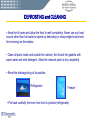
• Keep the lid open and allow the frost to melt completely. Never use any heat
source other than hot water to speed up defrosting or sharp-edged instrument
for removing ice formations.
• Clean all parts inside and outside the cabinet, the lid and the gaskets with
warm water and mild detergent. Allow the cleaned parts to dry completely.
• Reset the drainage plug at its position.
Refrigerator
Freezer
• Put back carefully the inner liner into its position (refrigerator).
PIJ
DEFROSTING and CLEANING
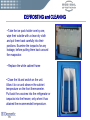
• Take the ice pack holder one by one,
wipe their outside with a clean dry cloth
and put them back carefully into their
positions. Examine the icepacks for any
leakage, before putting them back around
the evaporator.
• Replace the white cabinet frame
• Close the lid and switch on the unit.
Allow it to run and observe the cabinet
temperature on the front thermometer.
Put back the vaccines into the refrigerator or
icepacks into the freezer, only when it has
attained the recommended temperature.
PIJ
PERIODIQUE MAINTENANCE
Daily:
• Take temperature readings from the display and note down the temperature
and the time of reading.
• Keep the temperature records systematically. It is suggested that minimum 2
readings should be taken (in the morning and the afternoon) preferably at the
same hours of each day.
PIJ
PERIODIQUE MAINTENANCE
Weekly:
• Examine the icepack compartment and check frost formation. If necessary
defrost as explained earlier.
•If it is observed that defrosting is required to be done each week:
• Examine the gasket on the lid. Any gap between the cabinet and gasket
will allow outside air to enter and will start frost formation. In such cases
the hinges should be adjusted or the gaskets should be changed.
•Restrict and reduce frequency of opening the TCW2000. Open only
when absolutely necessary.
PIJ
PERIODIQUE MAINTENANCE
Monthly:
• Clean the compressor compartment and the condenser
at the back side.
• Switch off the unit and and unplug the wall socket.
• Unscrew the grid from the compressor
compartment. With a soft brush or vacuum cleaner
make the compartment and his components free
from dust.
•The condenser at the back side of the unit must
also be cleaned on the same manner.
IMPORTANT:
Dust and Ice are strong insulators, keep the unit always free from this
items to get a proper performance of your TCW 2000.
PIJ
TROUBLE SHOOTING
IMPORTANT NOTICE:
When a TCW2000 is found not working at all or not working properly,
assure that the vaccine temperature is within the recommended limits.
Do not open the lid unless it is very essential.
Observe the temperature from time to time and if you feel that the
temperature may exceed the higher limit before the unit is repaired –
transfer the vaccines to other working refrigerators, freezers or coldboxes.
For any abnormal sound, smoke, smell etc. In the TCW2000 disconnect
the plug from the wall socket and notify refrigerator technician.
PIJ
TROUBLE SHOOTING
Observe the green lights in the switches on the front panel. If both switches
remain dark in ON-position:
• Check if the wall socket switch is ON.
• Check if the voltage stabilizer (if any) is working or not.
• Check if power supply is available at the wall socket. This can be tested by
connecting an electric lamp or other appliances to the socket. The lamp
should light up or the appliances should work, if voltage is available at the
socket.
• If not available: There may be some defect in the power supply circuit
(blow-off fuse, loose connections, faulty switch or socket etc.) which should
be rectified through competent Electrical Maintenance Technicians.
• Check that the plug is inserted properly into the socket.
• Check the plug for loose connections.
• Even after all this actions, the green lamps are not lighting – Notify
Refrigerator Technician.
PIJ
TROUBLE SHOOTING
Both units (refrigerator and Freezer) are not working properly.
• Observe if the compressor cooling fan is working. If so, but the
compressor is not running - Notify Refrigerator Technician.
• Check if the recommended space is left, back and sides of the
TCW2000 for air circulation.
• Check if the compressor tries to start but trips-off early by the over-load
protector. This may be either due to too low supply voltage or defect in the
compressor or starting relay – put “off” the unit till return of normal voltage
and try to run once again. If defect prevails – Notify Refrigeration
Technician.
• Check if the condensers at the back of the unit are free from dust.
• Check if the unit is horizontally.
PIJ
TROUBLE SHOOTING
One unit (refrigerator or freezer) is not working properly
Check the temperature set point, the offset- and the DOT-values
Check that neither vaccines nor icepacks are in contact with the temperature probes
The cabinet temperature may go higher than normal, but should come down
after some time when:
• New vaccines are stored.
• The lid is opened frequently or kept open for longer duration.
• Unfrozen ice packs are put in for freezing.
• Check if there is to much ice formation on the evaporator tubes (more
than 5 mm) If so, defrost the unit.
• If the compressor is observed to be running continuously but no cooling is
attained – this may be due to leakage of refrigerant gas from the system or
defect in the unit – Notify Refrigerator Technician.
PIJ
TROUBLE SHOOTING
ABNORMAL NOISE
In case of any abnormal noise coming out from the TCW2000, try to locate the
source of the noise. Generally it may come from the compressor compartment.
In such cases:
• Unplug the unit from the wall socket and remove the protection grid from
the compressor compartment.
• Examine if the mounting brackets from the compressor are in place and
secure.
• Check if the fixing screws from the compressor fan are tight.
• Check if any pipe or component has changed there position or touching
others. If so, rectify carefully.
• Check if the TCW2000 is level and firm installed on its base. If not,
rectify.
• Even after all this actions, the noise is still present or it is coming from
inside the compressor - Notify Refrigerator Technician.
PIJ
SHUTTING DOWN
If the TCW2000 has to be shut-down for a long period or transportation:
• Unplug the unit from the wall socket.
• Allow to defrost and melt the ice from the icepacks. Remove the water
from the inner cabinet completely.
• Clean and dry-out the inner cabinet, leave the lid a little gap of 2cm
open to avoid unpleasant smell.
• For transportation; close the lid and roll the power supply cord into a
coil and place it carefully into the cable compartment to avoid damage.
PIJ
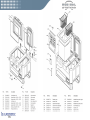
Spare part List
TCW 2000
PIJ
PIJ
PIJ
PIJ
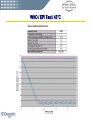
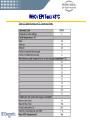
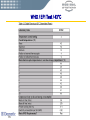
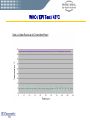
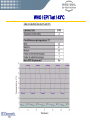
WHO / EPI Test at 43°C respectively 32°C
Testing was based on WHO/EPI
Equipment performance specifications and
test procedures E3: Icelined Refrigerators
and Freezers E3/PROC/4 dated 1 January
1998 for compliance with specification
reference E3/RF3 Icelined Refrigerator
and Freezer Compression, dated 1
January 1998.
PIJ
WHO / EPI Test / 43°C
PIJ
WHO / EPI Test / 43°C
PIJ
WHO / EPI Test / 43°C
PIJ
WHO / EPI Test / 43°C
PIJ
WHO / EPI Test / 43°C
PIJ
WHO / EPI Test / 43°C
PIJ
WHO / EPI Test / 43°C
PIJ
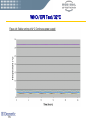
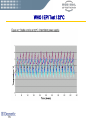
WHO / EPI Test / 32°C
PIJ
WHO / EPI Test / 32°C
PIJ
WHO / EPI Test / 32°C
PIJ
WHO / EPI Test / 32°C
PIJ
WHO / EPI Test / 32°C
PIJ
PIJ
User manual
PIJ
PIJ
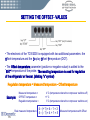
SETTING THE OFFSET- VALUES
• The electronic of the TCW2000 is equipped with two additional parameters: the
Offset-temperature and the Display-Offset-Temperature (DOT).
• The Offset-temperature parameter (positive or negative value) is added to the
“SET” temperature of the probe. The resulting temperature is used for regulation
of the refrigerator or freezer. (blinking “o” symbol)
Regulation temperature = Measured temperature - Offset-temperature
Example:
Measured temperature =
OFFSET temperature =
Regulation temperature =
Real measured temperature
PIJ
4°C (temperature where the compressor switches off)
+1°C
3°C (temperature where the compressor switches on)
4 – (+1) = 4 – 1 = 3
4 – (- 1) = 4 + 1 = 5
Measured temperature with Offset
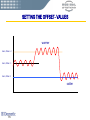
SETTING THE OFFSET- VALUES
warmer
Set 4, Offset =+1
Set 4, Offset = 0
Set 4, Offset =-1
colder
PIJ
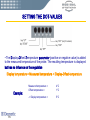
SETTING THE DOT-VALUES
• The Display-Offset-Temperature parameter (positive or negative value) is added
to the measured temperature of the probe. The resulting temperature is displayed
but has no influence on the regulation.
Display temperature = Measured temperature + Display-Offset-temperature
Example:
PIJ
Measured temperature =
Offset temperature =
4°C
1°C
-> Display temperature =
5°C
SETTING THE OFFSET- AND DOT-VALUES
• To change the parameter proceed as follows:
• Press and hold the “RST”-key together with the “SET”-key during 3 seconds.
•
A blinking symbol “o” is displayed together with the actual value of the offset-temperature.
• Change the value in steps of o.1° to the desired temperature using the “UP” resp.
“DOWN”-key. The range of offset-temperature value is -10°C up to +10°C.
• Press the “SET”-key again to change the “DOT”-parameter.
• A blinking symbol “A” is displayed together with the actual value of the DOT.
• Change value in steps of 0.1° to the desired temperature using the “UP” resp. “DOWN”key. The range of the Display-offset-temperature value is -10°C up to +10°C.
• If the “SET”-key is pressed again or if the no key is activated during 3 seconds, the new
values are safed and the display returns to normal temperature display.
Important:
The parameters for Offset and Display offset are preset at the factory. These default settings guarantee an
optimal function of the refrigerator/freezer and must therefore only be changed under very special
conditions in accordance with a Dometic service technician.
PIJ
IN COMPARISON WITH:
DOMETIC TCW 2000
VESTFROST MK 204
VESTFROST MF 114
PIJ