1
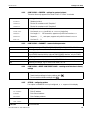
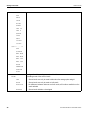
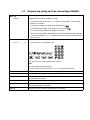
KERN & Sohn GmbH
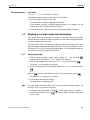
Ziegelei 1
D-72336 Balingen
E-Mail: [email protected]
Tel: +49-[0]7433- 9933-0
Fax: +49-[0]7433-9933-149
Internet: www.kern-sohn.com
Operating instruction
Platform scale
KERN ITT, KMT-TM
Version 2.1
11/2007
GB
ITT-BA-e-0721
ME-Nr.: 22017083
ITT-BA-e-0720
Table of contents
Table of contents
Page
1
1.1
1.2
1.3
Introduction .....................................................................................5
Safety instructions .............................................................................5
Description ......................................................................................6
Putting into operation ......................................................................10
2
2.1
2.2
2.3
2.4
2.5
2.6
2.7
2.8
2.9
2.10
2.11
2.12
2.13
Operation ......................................................................................12
Switching on and off .......................................................................12
Zeroing / Zero point correction ..........................................................12
Simple weighing .............................................................................12
Weighing with tare ..........................................................................13
Displaying the capacity available ......................................................15
Dynamic weighing ..........................................................................15
Weighing-in to a target weight and checkweighing .............................16
Working with identifications .............................................................18
Printing results ...............................................................................18
Displaying info ...............................................................................19
Switching scales .............................................................................19
Totalising .......................................................................................20
Cleaning ........................................................................................21
3
3.1
3.2
3.3
3.4
3.5
3.6
3.7
3.8
3.9
3.10
Counting .......................................................................................22
Counting parts into a container .........................................................22
Counting parts out of a container ......................................................23
Counting with variable reference quantity ...........................................23
Counting with minimum accuracy ....................................................23
Reference optimization ....................................................................24
Counting with automatic reference determination ................................24
Counting with a known average piece weight ....................................24
Counting by calling up a saved average piece weight .........................25
Counting by calling up a saved target quantity ...................................26
Counting with two scales .................................................................27
4
4.1
4.2
4.3
4.4
4.5
4.6
4.7
Settings in the menu ......................................................................29
Operating the menu ........................................................................29
Overview .......................................................................................31
Scale settings (SCALE) ....................................................................34
Application settings (APPLICATION) ..................................................38
Terminal settings (TERMINAL) ..........................................................42
Configuring interfaces (COMMUNICATION) .........................................43
Diagnosis and printing out of the menu settings (DIAGNOS) ................47
5
5.1
5.2
Interface description ......................................................................49
SICS interface commands ................................................................49
TOLEDO Continuous mode ..............................................................52
User manual ME-Nr.:22017083 01/07
3
ITT-BA-e-0720
Table of contents
4
6
Event and error messages ..............................................................54
7
7.1
Technical data and accessories ......................................................56
Technical data ...............................................................................56
8
8.1
8.2
Appendix ......................................................................................59
Table of Geo Values ........................................................................59
Sample protocols ...........................................................................62
User manual ME-Nr.:22017083 01/07
ITT-BA-e-0720
1
Introduction
Introduction
1.1
Safety instructions
CAUTION!
Do not use the scales in hazardous areas!
Our product range includes special devices for hazardous areas.
DANGER!
Electric shock hazard!
▲ Always pull out the mains plug before any work on the device.
DANGER!
Electric shock hazard if the mains cable is damaged!
▲ Check the mains cable for damage regularly and replace it immediately if it is damaged.
▲ On the rear side of the device, maintain a clearance of at least 3 cm in order to
prevent the mains cable bending too much.
CAUTION!
On no account open the device!
The warranty is void if this stipulation is ignored. The device may only be opened by
authorized persons.
Disposal
➜ Observe the valid environmental regulations when disposing of the scale.
If the device has a rechargeable battery:
The battery contains heavy metals and therefore must not be disposed of with normal
waste.
➜ Observe the local regulations for disposing of environmentally hazardous materials.
User manual ME-Nr.:22017083 01/07
5
ITT-BA-e-0720
Introduction
Note
Use with foodstuffs
Parts coming into contact with foodstuffs have smooth surfaces and are easy to clean.
The materials used do not splinter and are free of harmful substances.
With foodstuffs, it is recommended to use the supplied protective cover.
➜ Clean the protective cover regularly and carefully.
➜ Replace damaged or very dirty protective cover immediately.
6
User manual ME-Nr.:22017083 01/07
ITT-BA-e-0720
Introduction
1.2
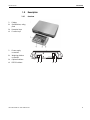
1.2.1
1
Display
2
Specifications, rating
plate
3
Numerical keys
4
Function keys
1
Power supply
connection
2
Weighing platform
connection
3
Optional interface
4
RS232 interface
Description
Overview
User manual ME-Nr.:22017083 01/07
1
2
3 4
7
ITT-BA-e-0720
Introduction
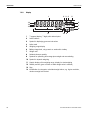
1.2.2
Display
1
2 3 4
Com
14
13
12
%
50
50
123
kg % Pcs
OK
0
123
5
Auto Opt
100100
11
6
7
8
10 9
1
7-segment display, 7 digits, with decimal point
2
Active interface
3
Symbol for displaying gross and net values
4
Active scale
5
Weighing range display
6
Battery charge level; only present on scales with a battery
7
Weight units
8
Selected reference quantity
9
Symbols for optimizing the average piece weight and accumulating
10 Symbol for dynamic weighing
11 Graphic display of the weighing range, display for checkweighing
12 Stability monitor (goes out when a stable weight value is reached)
13 Sign
14 Identification for changed or calculated weight values, e.g. higher resolution,
minimum weight not reached
8
User manual ME-Nr.:22017083 01/07
ITT-BA-e-0720
Introduction
1.2.3
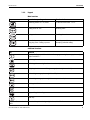
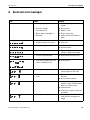
Keypad
Main functions
Key
Function in operating mode
Function in the menu
Switching device on / off, abort
To the last menu item –End-
Setting scale to zero
Scrolling back
Taring scale
Scrolling forward
Transfer key
Activating menu item
Long key press: Calling up menu
Accepting selected setting
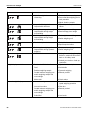
Additional functions
Key
Function
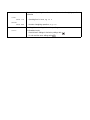
Info key: Calling up additional information, e.g. gross weight, average piece weight,
higher resolution ...
Switching the scale
Switching between weight value and number of pieces
Weighing in reference or defining average piece weight numerically
Determining average piece weight from 10 pieces
Determining average piece weight from any number of pieces
Entering identification
Memory
Sign; adding/subtracting
Clear key
Keys 0 ... 9 and decimal
point
Numerical keys for entering weight values, identifications ...
User manual ME-Nr.:22017083 01/07
9
ITT-BA-e-0720
Introduction
1.3
Putting into operation
1.3.1
Connecting the power supply
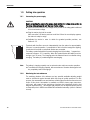
CAUTION!
Before connecting the scale to the mains, check whether the voltage value printed on
the rating plate corresponds with the local mains voltage.
▲ Never connect the device if the voltage value printed on the rating plate is different
to the local mains voltage.
➜ Plug the mains plug into the socket.
After connection, the device performs a self-test. When the zero display appears,
the device is ready to weigh.
➜ Calibrate the device in order to obtain the greatest possible precision, see
Section 4.3.2.
Terminals with AccuPac can work independently from the mains for approximately
30 hours in normal operation. A prerequisite for this is that the background lighting
is switched off and that no peripheral devices are connected.
The battery symbol indicates the present charging level of the battery. 1 segment corresponds to approx. 25 % capacity. When the symbol flashes the battery must be
charged (min. 4 hours). The charging period is extended if work is continued during
charging. The battery is protected against overcharging.
Note
The battery’s charging capacity can be reduced under continuous mains operation.
➜ To maintain the charging capacity, after a maximum of 4 weeks discharge the battery completely before recharging it.
1.3.2
Monitoring the test substances
The metrology features of the balance and any possible available adjusting weight
must be checked at regular intervals within the scope of quality assurance. For this
purpose, the answerable user must define a suitable interval as well as the nature and
scope of this check. Information is available on KERN’s home page (www.kernsohn.com) with regard to the monitoring of balance test substances and the test
weights required for this. Test weights and balances can be adjusted quickly and at
a reasonable price in KERN’s accredited DKD calibration laboratory (return to national
normal).
10
User manual ME-Nr.:22017083 01/07
1.3.3
Adjustment
General:
According to the EU guideline 90/384/EEC balances must be verified officially if they
are to be used as follows (legally regulated area):
• For commercial transactions if the price of goods is determined by weighing
• For the production of medines in pharmacies as well as for analyses in the medical
and pharmaceutical laboratory
• For official purposes
• For the production of finished packages
In case of doubt, please contact your local office of weights and measures.
Verification Information:
An EU qualification approval is available for those balances marked as appropriate for
verification in the technical data. In the event that the balance is applied in an area
subject to verification as described above, it must be officially verified and re-verified
at regular intervals.
Re-verification of a balance is carried out in compliance with the respective legal provisions of the states. The term of verification validity for balances in Germany, for
example, is normally 2 years.
The legal provisions of the country of use are to be observed.
ITT-BA-e-0720
2
Operation
Operation
2.1
Switching on
Switching on and off
➜ Press
.
The scale conducts a display test. When the weight display appears, the scale is
ready to weigh.
Switching off
➜ Press
.
Before the display goes out, -OFF- appears briefly.
2.2
Zeroing / Zero point correction
Zeroing corrects the influence of slight changes on the load plate.
Manual
1. Unload scale.
2. Press
.
The zero display appears.
Automatic
In the case of scales that cannot be certified, the automatic zero point correction can
be deactivated in the menu or the amount can be changed.
As standard, the zero point of the scale is automatically corrected when the scale is
unloaded.
2.3
Simple weighing
1. Place weighing sample on scale.
2. Wait until the stability monitor
goes out.
3. Read weighing result.
User manual ME-Nr.:22017083 01/07
12
ITT-BA-e-0720
Operation
2.4
2.4.1
Weighing with tare
Taring
➜ Place the empty container on the scale and press
.
The zero display and the symbol NET appear.
The tare weight remains saved until it is cleared.
2.4.2
Clearing the tare
➜ Unload scale and press
.
The symbol NET goes out, the zero display appears.
or
➜ Press
.
The symbol NET goes out, the gross weight appears in the display.
If A.CL-tr is activated in the menu, the tare weight is automatically cleared as soon
as the scale is unloaded.
2.4.3
Automatic taring
Prerequisite
A-tArE is activated in the menu, the symbol T flashes in the display.
➜ Place the container or packaging material on the scale.
The packaging weight is automatically saved as the tare weight, the zero display
and the symbol NET appear.
2.4.4
Numerical tare weight entry
1. Enter the known tare weight numerically and press
.
The entered weight is automatically saved as the tare weight, the symbol NET and
the tare weight with a minus sign appear.
2. Place the filled container on the scale.
The net weight appears in the display.
13
User manual ME-Nr.:22017083 01/07
ITT-BA-e-0720
Operation
2.4.5
Taring by calling up a saved tare value
ITT have a total of 100 memory locations for frequently used tare values, average
piece weights, target weights and target quantities. In the factory setting, the memory
locations 01 to 40 are reserved for tare values. The saved tare values are also preserved when the scale is switched off.
Saving tare weights
1. Determine the tare weight in one of the ways described earlier.
2. Enter the memory location number (factory setting: 1 ... 40) and keep
pressed until the confirmation appears in the display, e.g. tArE.12.
Note
If a tare weight had already been saved under the selected memory location, the message rEPLACE appears in the display.
• To save the new tare weight, press
• To abort the save process, press
. The old tare weight is overwritten.
. The previous memory location assignment
remains valid.
Calling up tare weights
➜ Enter the number of the memory location with the required tare weight (factory setting: 1 ... 40) and press
briefly.
The selected tare value is loaded from the memory and appears briefly in the display. The scale tares with the selected tare value and then displays the current net
weight.
Clearing saved tare weights
1. Enter the number of the memory location with the tare weight to be cleared (factory
setting: 1 ... 40) and press
briefly.
The saved tare value is displayed.
2. Press
within 2 seconds.
CLEArED briefly appears in the display. The saved tare value is cleared.
User manual ME-Nr.:22017083 01/07
14
ITT-BA-e-0720
Operation
2.4.6
Chain tare
Prerequisite
The tare function CHAIn.tr is activated in the menu.
With this function it is possible to tare several times if, for example, cardboard is
placed between individual layers in a container.
1. Place the first container or packaging material on the scale and press
.
The packaging weight is automatically saved as the tare weight, the zero display
and the symbol NET appear.
2. Weigh the weighing sample and read/print out the result.
3. Place the second container or packaging material on the scale and press
again.
The total weight on the scale is saved as the new tare weight. The zero display
appears.
4. Weigh the weighing sample in the second container and read/print the result.
5. Repeat the last two steps for other containers.
2.5
Displaying the capacity available
The scale has a graphic display of the scale capacity available. The bar indicates how
many per cent of the scale capacity is already occupied and what capacity is still
available. In the example, approx. 65 % of the scale capacity is occupied.
2.6
Dynamic weighing
With the dynamic weighing function, it is possible to weigh restless weighing samples
such as live animals. If this function is activated, the symbol
appears in the display.
With dynamic weighing, the scale calculates the mean value from 56 weighing operations within 4 seconds.
With manual start
Prerequisite
AVErAGE -> MAnuAL is selected in the menu.
The weighing sample must be heavier than 5 scale divisions.
1. Place the weighing sample on the scale and wait until it has stabilized.
2. Press
to start dynamic weighing.
During dynamic weighing, horizontal segments appear in the display, and the
dynamic result is then displayed with the symbol *.
3. Unload the scale to be able to start a new dynamic weighing operation.
15
User manual ME-Nr.:22017083 01/07
ITT-BA-e-0720
Operation
With automatic start
Prerequisite
AVErAGE -> AUtO is selected in the menu.
The weighing sample must be heavier than 5 scale divisions.
1. Place the weighing sample on the scale.
The scale starts the dynamic weighing automatically.
During dynamic weighing, horizontal segments appear in the display, and the
dynamic result is then displayed with the symbol *.
2. Unload the scale to be able to perform a new dynamic weighing operation.
2.7
Weighing-in to a target weight and checkweighing
The terminal allows the weighing-in of goods to a particular target weight within
defined tolerances. With this function it is possible to check whether weighed materials
are within a defined tolerance range.
The terminal has a total of 100 memory locations for frequently used tare values, average piece weights, target weights and target quantities. In the factory setting, the memory locations 81 to 90 are reserved for target weights. The saved target weights are
also preserved when the terminal is switched off.
2.7.1
Saving target weights
1. Enter the memory location number (factory setting: 81 ... 90) and keep
pressed until the confirmation tArGEt appears in the display.
2. Enter the target weight in the defined unit, e.g. 1.5 kg, and confirm with
.
The display tOLER appears and + flashes.
3. Enter the upper tolerance in the displayed weight unit, e.g. 0.1 kg, and confirm with
:
-or➜ Press
, enter the upper tolerance range in per cent and confirm with
.
The display tOLEr appears and – flashes.
4. Enter the lower tolerance accordingly.
The scale returns to weighing mode.
Note
If a target weight had already been saved under the selected memory location, the
message rEPLACE appears in the display.
• To save the new target weight, press
• To abort the save process, press
. The old target weight is overwritten.
. The previous memory location assignment
remains valid.
User manual ME-Nr.:22017083 01/07
16
ITT-BA-e-0720
Operation
2.7.2
Calling up target weights
➜ Enter the number of the memory location with the required target weight (factory
setting: 81 ... 90) and press
briefly.
The selected target weight and the tolerances are loaded from the memory and
appear briefly in the display. The scale is now ready for weighing-in or checkweighing.
2.7.3
Weighing-in
1. Place the empty container on the scale and tare.
2. Fill the container with the weighing sample.
The dispensing process can be followed in the graphic display. The 50 % marking
is on the far left here, so that more display segments are available for precise filling
between 50 % and 100 %.
As long as the lower tolerance is not reached, the minus tolerance mark is displayed.
If the weight of the weighing sample is within the defined tolerance, the mark OK
is visible and a short beep sounds if activated in the menu.
When the plus tolerance mark appears, the weight is above the permissible tolerance.
2.7.4
Checkweighing
1. Place the weighing sample on the scale.
2. Use the displayed mark to check whether the weighing sample is below, within or
above the defined tolerance.
2.7.5
Clearing the saved target weights
1. Enter the number of the memory location with the target weight to be cleared (factory setting: 81 ... 90) and press
briefly.
The saved target weight is displayed.
2. Press
within 2 seconds.
CLEArED briefly appears in the display. The saved target weight is cleared.
17
User manual ME-Nr.:22017083 01/07
ITT-BA-e-0720
Operation
2.8
Working with identifications
Weighing series can be assigned 2 identification numbers ID1 and ID2 with up to
40 characters that are also printed out on the protocols.
If for example a customer number and an article number are assigned, it can be
clearly seen on the protocol which article was weighed for which customer.
2.8.1
Entering identification
1. Enter identification and press
.
IdENt 1 appears in the display.
2. If the entered identification is to be saved as ID1, press
. If the entered identification is to be saved as ID2, first press
, and then press
.
The scale returns to weighing mode.
2.8.2
Displaying identification
➜ Displaying ID1: Briefly press
once.
The number currently assigned to the ID1 appears in the display. If no ID1 was
assigned, no Id appears.
➜ Displaying ID2: Briefly press
twice.
The number currently assigned to the ID2 appears in the display. If no ID2 was
assigned, no Id appears.
2.8.3
Clearing identifications
1. Briefly press
2. Press
once to display ID1 or briefly press
twice to display ID2.
for as long as the identification is displayed.
The clearing is briefly confirmed with the message CLEArEd.
2.9
Printing results
If a printer or computer is connected to the scale, the weighing results can be printed
out or sent to a computer.
➜ Press
.
The display contents are printed out and transferred to the computer. See
Section 8.2 for sample protocols.
User manual ME-Nr.:22017083 01/07
18
ITT-BA-e-0720
Operation
2.10
Displaying info
Up to 13 different values to be displayed can be configured in the menu for the key
.
Depending on the configuration in the menu, see Section 4.4.5, the following values
can be stored in any order (for example):
• Net quantity
• Gross weight
• Average piece weight
• Average piece weight, higher resolution
• Counting accuracy
1. Press
.
The first value is displayed.
2. Press
again.
The next value is displayed.
3. Repeat as often as necessary until the weight display appears again.
Note
2.11
If
is not pressed again within 5 seconds, the scale automatically changes to the
weight display, even if all information has not yet been queried.
Switching scales
If a second scale or a weighing platform is connected, e. g. via the optional analog
second scale interface, the currently active scale is shown in the display.
The second scale can be operated in exactly the same way as the first scale.
➜ Press
.
The display changes from one scale to the other.
19
User manual ME-Nr.:22017083 01/07
ITT-BA-e-0720
Operation
2.12
Totalising
The terminal ITT-BA-e-0720 can totalise weight values or pieces. Individual items can
also be subtracted.
A connected printer offers you the possibility of generating a printout for each individual item and/or a complete printout. For settings in the menu, see Section 4.4.2.
2.12.1
Totalising items
1. Place the first item on the scale and press
.
The weight value or the number of pieces are saved and, if necessary, printed out.
2. Unload scale.
3. Place the next item on the scale and press
again.
The weight value and the number of pieces of the next item are added to those of
the previous one.
4. Unload scale.
5. Repeat steps 3 and 4 for all other items.
2.12.2
Subtracting items
1. Place the item on the scale, press and hold down
.
The weight value or the number of pieces are subtracted and, if necessary, printed
out.
2. Unload scale.
2.12.3
Completing totalising
➜ When the last item has been totalised, press
.
The "Final Printout" is produced. The sum memory and the item counter are
cleared. The scale is ready for the next totalising process.
2.12.4
Calling up sum information
If the key
is assigned accordingly, the number of items, the net sum, the gross
sum and the number of pieces of the current item can be called up via this key, see
Section 4.4.5.
User manual ME-Nr.:22017083 01/07
20
ITT-BA-e-0720
Operation
2.13
Cleaning
CAUTION!
Electric shock hazard!
▲ Before cleaning with a damp cloth, pull out the mains plug to disconnect the unit
from the power supply.
Other cleaning information:
• Use damp cloths.
• Do not use any acids, alkalis or strong solvents.
• Do not clean using a high-pressure cleaning unit or under running water.
• Follow all the relevant instructions regarding cleaning intervals and permissible
cleaning agents.
21
User manual ME-Nr.:22017083 01/07
ITT-BA-e-0720
3
Counting
Counting
The terminal has additional functions for piece counting. The relevant settings in the
menu are described in Section 4.4.1.
3.1
Counting parts into a container
1. Place the empty container on the scale and press
.
The container is tared and the zero display appears.
2. Place 10 reference parts on the scale and press
.
-or➜ Place the number of pieces displayed above the key
.
on the scale and press
The scale determines the average piece weight and then shows the number of
pieces.
3. Add more parts to the container until the required number of pieces is reached.
4. When the piece counting is completed, press the key
to clear the result.
The scale is ready for the next weighing or counting.
Note
• The average piece weight remains saved in the factory setting until a new average
piece weight is determined.
• With
it is possible to switch between the number of pieces and the weighing
units preset.
• Depending on the assignment, it is possible to display the average piece weight,
i. e. the weight of an individual reference unit, with
.
• If A.CL-APW ON is set in the menu, the average piece weight is automatically
cleared after each counting operation. The average piece weight must be determined again for the next counting operation.
• If ACCurCY ON is set in the menu, the accuracy achieved is briefly shown after
the number of pieces is determined.
User manual ME-Nr.:22017083 01/07
22
ITT-BA-e-0720
Counting
3.2
Counting parts out of a container
1. Place the full container on the scale and press
.
The container is tared and the zero display appears.
2. Remove 10 reference parts and press
.
-or➜ Remove the number of pieces displayed above the key
and press
.
The scale determines the average piece weight and then shows the number of
pieces removed, together with a minus sign.
3. Remove more parts from the container until the required number of pieces is
reached.
3.3
Counting with variable reference quantity
Prerequisite
VAr-SPL ON must be set in the menu.
1. Place any number of reference parts on the scale.
2. Enter the number of reference parts with the numerical keypad and press
.
The scale determines the average piece weight and then shows the number of
pieces.
The rest of the counting process is as described earlier.
3.4
Counting with minimum accuracy
The item Min.rEFW in the menu allows to preset a minimum accuracy of 97.5 %,
99.0 % or 99.5 %. On the basis of this, the scale calculates the minimum reference
weight necessary to reach the defined accuracy.
1. Place the reference parts on the scale and press
or
.
2. If the average piece weight is not sufficient to ensure the desired accuracy,
Add x PCS appears.
3. Add the displayed number of pieces.
The scale then automatically determines the average piece weight with the larger
reference quantity.
The rest of the counting process is as described earlier.
23
User manual ME-Nr.:22017083 01/07
ITT-BA-e-0720
Counting
3.5
Reference optimization
The greater the reference quantity, the more accurately the scale determines the
number of pieces.
3.5.1
Automatic reference optimization
rEF.OPt -> AUtO must be set in the menu for this. The symbol Auto Opt appears
in the display.
1. Place the reference parts on the scale and press
or
.
2. Place additional reference parts, max. the same number as for the first reference
determination, on the scale.
The scale automatically optimises the average piece weight with the larger number
of reference parts.
The rest of the counting process is as described earlier.
Note
The reference optimization can be performed several times.
3.6
Counting with automatic reference determination
Prerequisite
A-SMPL ON is set in the menu.
➜ Place the number of pieces displayed above the key
into the container.
The scale automatically determines the average piece weight and then shows the
quantity.
The rest of the counting process is as described earlier.
3.7
Counting with a known average piece weight
➜ Enter the known average piece weight via the numerical keypad and press
.
The scale changes the unit to PCS.
The rest of the counting process is as described earlier.
User manual ME-Nr.:22017083 01/07
24
ITT-BA-e-0720
Counting
3.8
Counting by calling up a saved average piece weight
The terminal ITT-BA-e-0720 has a total of 100 memory locations for frequently used
tare values, average piece weights, target weights and target quantities. In the factory
setting, the memory locations 41 to 80 are reserved for average piece weights. The
saved average piece weights are also preserved when the terminal is switched off.
3.8.1
Saving average piece weights
1. Determine the average piece weight in one of the ways described earlier.
2. Enter the memory location number (factory setting: 41 ... 80) and keep
pressed until the confirmation appears in the display, e.g. APW.41.
Note
If an average piece weight had already been saved under the selected memory location, the message rEPLACE appears in the display.
• To save the new average piece weight, press
. The old average piece weight
is overwritten.
• To abort the save process, press
. The previous memory location assignment
remains valid.
3.8.2
Calling up average piece weights
➜ Enter the number of the memory location with the required average piece weight
(factory setting: 41 ... 80) and press
briefly.
The selected reference value is loaded from the memory and appears briefly in the
display. The scale determines the number of pieces with the selected reference
value.
3.8.3
Clearing saved average piece weights
1. Enter the number of the memory location with the average piece weight to be
cleared (factory setting: 41 ... 80) and press
briefly.
The saved average piece weight is displayed.
2. Press
within 2 seconds.
CLEArED briefly appears in the display. The saved average piece weight is
cleared.
25
User manual ME-Nr.:22017083 01/07
ITT-BA-e-0720
Counting
3.9
Counting by calling up a saved target quantity
The terminal ITT-BA-e-0720 has a total of 100 memory locations for frequently used
tare values, average piece weights, target weights and target quantities. In the factory
setting, the memory locations 91 to 100 are reserved for target quantities. The saved
target quantities are also preserved when the terminal is switched off.
3.9.1
Saving target quantities
1. Enter the memory location number (factory setting: 91 ... 100) and keep
pressed until the confirmation tARGEt appears in the display.
2. Enter the target quantity and confirm with
.
The display tOLEr appears and + flashes.
3. Enter the upper tolerance in pieces and confirm with
.
The display tOLEr appears and – flashes.
4. Enter the lower tolerance accordingly.
The scale returns to weighing mode.
Note
If a target quantity had already been saved under the selected memory location, the
message rEPLACE appears in the display.
• To save the new target quantity, press
• To abort the save process, press
. The old target quantity is overwritten.
. The previous memory location assignment
remains valid.
3.9.2
Calling up target quantities
➜ Enter the number of the memory location with the required target quantity (factory
setting: 91 ... 100) and press
briefly.
The selected target quantity and the associated tolerances are loaded from the
memory and appear briefly in the display.
3.9.3
Counting in to target quantities
1. Place the empty container on the scale and tare.
2. Specify a reference.
3. Fill the container with the material being counted.
The counting-in process can be followed in the graphic display. The 50 % marking
is on the far left here, so that more display segments are available for precise filling
between 50 % and 100 %.
As long as the lower tolerance is not reached, the minus tolerance mark is displayed.
If the counted-in number of pieces is within the defined tolerance, the mark OK is
visible and a short beep sounds if activated in the menu.
When the plus tolerance mark appears, the number of pieces is above the permissible tolerance.
User manual ME-Nr.:22017083 01/07
26
ITT-BA-e-0720
Counting
3.9.4
Clearing saved target quantities
1. Enter the number of the memory location with the target quantity to be cleared (factory setting: 91 ... 100) and press
briefly.
The saved target quantity with tolerances is displayed.
2. Press
within 2 seconds.
CLEArED briefly appears in the display. The saved target quantity is cleared.
3.10
Counting with two scales
For piece counting, it is possible to connect a second scale or weighing platform, e. g.
a floor scale for counting a large number of pieces via the optional analog second
scale interface.
The necessary settings for the application and interface parameters are described in
the Sections 4.4.1, 4.6.1 and 4.6.4.
3.10.1
Counting with a reference scale
Prerequisite
The connected second scale is configured as reference scale.
1. Place the reference parts on the reference scale and press
or
.
The scale determines the average piece weight and changes to the display in
pieces (PCS).
2. Place the parts to be counted on the first scale.
The total quantity is displayed.
Note
• If tOtAL-Ct -> bULK is set in the menu, only the number of pieces on the bulk
scale is displayed.
• If tOtAL-Ct -> bOtH is set in the menu, the reference quantity is added to the
bulk quantity.
27
User manual ME-Nr.:22017083 01/07
ITT-BA-e-0720
Counting
3.10.2
Counting with a bulk scale
Prerequisite
The connected second scale is configured as bulk scale.
1. Place the reference parts on the first scale and press
or
.
The scale determines the average piece weight and changes to the display in
pieces (PCS).
2. Place the parts to be counted on the bulk scale.
The total quantity is displayed.
Note
• If tOtAL-Ct -> bULK is set in the menu, only the number of pieces on the bulk
scale is displayed on the bulk scale.
• If tOtAL-Ct -> bOtH is set in the menu, the reference quantity is added to the
bulk quantity.
3.10.3
Note
Counting with an auxiliary scale
This configuration allows counting of diverse parts, for example very small parts on
one scale and large parts on the other scale.
Prerequisite
The connected second scale is configured as an auxiliary scale. The scale doesn’t
change automatically but only after pressing the
key.
1. Activate the appropriate scale.
2. Place the reference parts on this scale and press
or
.
The scale determines the average piece weight and changes to the display in
pieces (PCS).
3. Place the parts to be counted on the same scale.
The number of pieces is displayed.
User manual ME-Nr.:22017083 01/07
28
ITT-BA-e-0720
Settings in the menu
4
Settings in the menu
Settings can be changed and functions can be activated in the menu. This enables
adaptation to individual weighing requirements.
The menu consists of 6 main blocks containing various submenus on several levels.
4.1
4.1.1
Operating the menu
Calling up the menu and entering the password
The menu differentiates between 2 operating levels: Operator and Supervisor. The
Supervisor level can be protected by a password. When the device is delivered, both
levels are accessible without a password.
Operator menu
1. Press
and keep it pressed until COdE appears.
2. Press
again.
The menu item tErMINL appears. Only the submenu dEVICE is accessible.
Supervisor menu
1. Press
and keep it pressed until COdE appears.
2. Enter the password and confirm with
.
The first menu item SCALE appears.
Note
No supervisor password has been defined when the device is first delivered. Therefore
respond to the password inquiry with
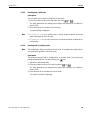
when you call up the menu for the first time.
If a password has still not been entered after a few seconds, the scale returns to weighing mode.
Emergency password for Supervisor access to the menu
If a password has been issued for Supervisor access to the menu and you have forgotten it, you can still enter the menu:
➜ Press
29
3 times and confirm with
.
User manual ME-Nr.:22017083 01/07
ITT-BA-e-0720
Settings in the menu
4.1.2
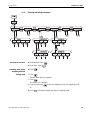
Selecting and setting parameters
COdE
CAL
dISPLAY
tErMINL
APPLIC
SCALE
tArE
...
dEVICE
SLEEP
Scrolling on one level
ACCESS
COMMUNI
PWr.OFF b.LIGHt
➜ Scroll forward: Press
➜ Scroll back: Press
Activating menu items/
accepting selection
➜ Press
.
Exiting menu
1. Press
.
COM 1
rESEt
MOdE
dIAGNOS
COM 2
End
...
PriNtEr PArAMEt rSt.COMX
.
.
The last menu item END appears.
2. Press
.
The inquiry SAVE appears.
3. Confirm inquiry with
to save the settings and return to weighing mode.
-or➜ Press
User manual ME-Nr.:22017083 01/07
to discard changes and return to weighing mode.
30
ITT-BA-e-0720
Settings in the menu
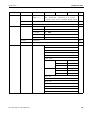
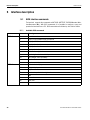
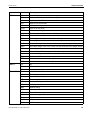
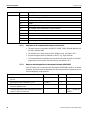
4.2
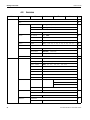
Overview
Level 1
Level 2
SCALE
SCALE1/SCALE2
34
CAL
34
dISPLAY
Level 3
Level 4
Level 5
UNIt1
g, kg, oz, lb, t
UNIt2
g, kg, oz, lb, t
Level 6
Page
36
rESOLU
UNt.rOLL
ON, OFF
A-tArE
ON, OFF
ChAIn.tr
ON, OFF
A.CL-tr
ON, OFF
ZErO
AZM
OFF; 0.5 d; 1 d; 2 d; 5 d; 10 d
rEStArt
ON/OFF
FILtEr
VibrAt
LOW, MEd, HIGH,
PrOCESS
UNIVEr, dOSING
StABILI
FASt, StAndrd, PrECISE
tArE
APPLIC
36
37
37
38
rESEt
SUrE?
COUNt
VAr-SPL
ON, OFF
SPL-qtY
Sq1 ... Sq5
Min.reFW
OFF, 97.5%, 99.0%, 99.5%
rEF OPt
OFF, AUtO
A-SMPL
ON, OFF
A.CL-APW
ON, OFF
ACCurCY
ON, OFF
tOtAL.Ct
bULK, bOth
Print
COM1, COM2 LOt.PrNt
ACCUMUL
36
38
39
FIN.PrNt
SUMMArY
CHECKW
rEACH Z
ON, OFF
bEEPEr
ON, OFF
40
SP.tOLSENd.MOd
MEMOrY
40
CONFIG
CLEAr.M
31
CONtINU, StAbLE
SUrE?
User manual ME-Nr.:22017083 01/07
ITT-BA-e-0720
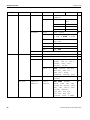
Level 1
tERMINL
COMMUNI
Settings in the menu
Level 2
Level 3
Level 4
Level 5
Level 6
Page
inFO.KEY
INFO 1 ...
INFO 13
Not.USEd, PCS NEt, GrOSS, tArE,
APW, HIGHrES, ACCurCY, n, G tOtAL,
N tOtAL, PCS.tOtL, tArGEt, dAtE, timE
AVErAGE
OFF, AUtO, MAnuAL
41
rESEt
SUrE?
41
dEVICE
SLEEP
OFF, 1 min, 3 min, 5 min
PWr OFF
YES, NO
b.LIGHt
ON, OFF
dAtE.tim
dAtE.FOr, dAtE, timE, AM.PM
bEEP
ON, OFF
41
42
ACCESS
SUPErVI
42
rESEt
SUrE?
43
COM 1/COM 2 MOdE
43
Print
A.Print
CONtINU
dIALOG
CONt.OLd
dIAL.OLd
dt-b
dt-G
GrOSS
ON, OFF
tArE
ON, OFF
nEt
ON, OFF
GrOSS
ON, OFF
tArE
ON, OFF
nEt
ON, OFF
COnt-Wt
COnt-Ct
bArc.rd
2nd.dISP
rEF
bULK
AuXILIA
User manual ME-Nr.:22017083 01/07
32
ITT-BA-e-0720
Settings in the menu
Level 1
Level 2
Level 3
Level 4
Level 5
PriNtEr
tEmPLat
StdArd, tEMPLt1,
tEMPLt2
ASCi.Fmt
LINE.FMt
MULtI
GLE
LENGtH
1 ... 100
SEPArAt
, ;...
Add LF
0 ... 9
PArAMEt
COMMUNI
OPtION
dEF.PrN
33
Level 6
Page
44
SIN-
bAUd
300 ... 38400
PAritY
7 nonE, 8 nonE, 7 odd,
8 odd, 7 EVEN, 8 EVEN
H.SHAKE
NO, XONXOFF, nEt 422,
nEt 485
NEt.Addr
0 ... 31
ChECSuM
ON, OFF
Vcc
ON, OFF
44
rSt.COMx
SUrE?
44
EtH.NEt
IP.AddrS, SUbNEt, GAtEWAY
44
USb
USb tESt
44
diGitAL
IN 1 ... 4
OFF, ZErO, tArE, Print, 44
CLEAr, rEF 10, rEF n,
SCALE, inFO, Unit,
tOtAL+, tOtAL–
OUT 1 ... 4
OFF, StAbLE, bEL.Min,
AbV.Min, bEL.tOL-,
AbV.tOL+, GOOd,
UndErLd, OVErLd, StAr
ANALOG
Mode
rEF, bULK, AuXILIA,
bYPASS
44
tEMPLt1/
tEMPLt2
LINE 1 ...
LINE 20
NOt.USEd, HEAdEr,
dAte, timE, Id1, Id2,
SCALE.NO, GrOSS, tArE,
nEt, APW, rEF Ct, PCS,
tArGEt, dEVIAt,
ACC NEt, ACC GrS,
ACC PCS, ACC LOt,
StArLN, CrLF, F FEEd
46
User manual ME-Nr.:22017083 01/07
ITT-BA-e-0720
Settings in the menu
Level 1
Level 2
Level 3
dIAGNOS
tESt SC
ExtErN
Level 4
Level 5
Level 6
Page
47
KboArd
dISPLAY
SNr
SNr2
LiSt
LiSt2
LiSt.M
WOrK.tim
rESEt.AL
4.3
4.3.1
timE
SHOW.tIM
WEIGH
SHOW.WGH
SUrE?
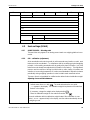
Scale settings (SCALE)
SCALE1/SCALE2 – Selecting scale
This menu item only appears if an analog second scale or a weighing platform is connected.
4.3.2
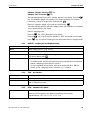
CAL – calibration (adjustment)
As the acceleration value due to gravity is not the same at every location on earth, each
balance must be coordinated – in compliance with the underlying physical weighing
principle - to the existing acceleration due to gravity at its place of location ( only if the
balance has not already been adjusted to the location in the factory). This adjustment
process must be carried out during the initial start-up, after change in location and
variation of surrounding temperature. It is also recommendable to adjust the balance
periodically during weighing operation in order to obtain exact measured values.
This menu item is not available for certified scales without internal calibration weight.
Adjusting of non verifiable balances
CAL
1. Unload scale.
2. Activate menu item CAL with
. The scale determines the zero point.
–0- appears in the display. The calibration weight to be placed on the scale then
flashes in the display.
3. If necessary, change the weight value displayed with
4. Place the calibration weight on the scale and confirm with
.
.
The scale calibrates with the calibration weight loaded. After calibration is completed, -donE- appears briefly in the display, and the scale automatically returns
to weighing mode.
User manual ME-Nr.:22017083 01/07
34
ITT-BA-e-0720
Settings in the menu
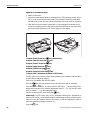
Adjusting of verifiable balances
• Switch off the scale.
• Remove the scale bottom plate by undoing the Torx TX20 retaining screws .Impor-
tant: In order to remove the bottom plate it is necessary to break the certification
seal affixed to it! Once this seal has been destroyed, the scale must be recertified
• Hold down the service switch (pushbutton) on the analogprint (indicated by an
arrow in the drawings below, while at the same time switching on the scale. Keep
the service switch pressed in until "Scale" appears in the display .
1.Display "Scale":Press the
2.Display "Metrolo":Press the
3.Display "Scale1":Press the
4.Display "ramp":Press the
5.Display "SNR":Press the
6.Display "SCAL.bld":Press the
-key (within 20sec)
-key
-key
-key
-key
-key
7.Display "GEO" (adjustment by means of GEO value):
The GEO value can be set in this block and the balance also adapted to the local gravity ratios without adjusting weights.
Case a)You are familiar with the GEO values.
Once the
-key has been pressed, the current GEO value will be displayed.
Press the
or
-key, in order to alter the GEO value. . The next value is displayed every time the key is pressed (adjustment range: 0 - 31). See the GEO value
chart in chapter 7.1.1 for the appropriate value.
Confirm the selected GEO value using the
-key.
Please note: The GEO value may not be readjusted following this "adjustment by
means of GEO value", as this would cause the set adjusting values to become invalid.
Case b)You are NOT familiar with the GEO values. In this case adjustment must be
made using adjusting weights (see item 9.).
Press the
35
-key.
User manual ME-Nr.:22017083 01/07
ITT-BA-e-0720
Settings in the menu
8.Display "LIN-CAL:" Press the
9.Display "CAL:" Press the
-key.
-key.
The scale determines the zero point. -preload- appears in the display. Press the
key. The calibration weight to be placed on the scale then flashes in the display.
-
If necessary, change the weight value displayed with
Place the calibration weight on the scale and confirm with
The scale calibrates with the calibration weight loaded. After calibration is completed,
-done- appeats briefly in the display.
Return to weighing mode:
Press the
-key, "END" will appear on the display
Press the
-key, order to save the alterations. "Save" will appear on the display.
Press
4.3.3
-key. to confirm. Following this the balance will return to weighing mode.
DISPLAY – weighing unit and display accuracy
UNIt1
Select weighing unit 1: g, kg, oz, lb, t
UNIt2
Select weighing unit 2: g, kg, oz, lb, t
rESOLU
Select readability (resolution), model-dependent
UNt.rOLL
When UNT.rOLL is switched on, the weight value can be displayed in all available
units and as pieces with
.
Notes
• On certified scales, the weighing units oz and lb are displayed with the symbol *.
• On certified scales, resolutions that deviate from the scale definition are displayed
without a weighing unit and with the symbol *.
• On dual-range/dual interval scales, resolutions marked with |<–> 1/2| are
divided up into 2 weighing ranges / intervals, e.g. 2 x 3000 d.
4.3.4
TARE – tare function
A-tArE
Switching on/off automatic taring
CHAIn.tr
Switching on/off chain tare
A.CL-tr
Switching on/off automatic taring with automatic clearing of the tare weight when the
load is removed from scale
4.3.5
AZM
ZERO – automatic zero update
On certified scales, this menu item does not appear.
Switching on/off automatic zero update and selecting zeroing range.
Possible settings: OFF; 0.5 d; 1 d; 2 d; 5 d; 10 d
User manual ME-Nr.:22017083 01/07
36
ITT-BA-e-0720
Settings in the menu
4.3.6
When the Restart function is activated, the last zero point and tare value are saved.
After switching off / on or after a power interruption, the device continues to work with
the saved zero point and tare value.
ON/OFF
4.3.7
VIbrAt
LOW
RESTART – automatic saving of zero point and tare value
FILTER – adaptation to the ambient conditions and the weighing type
Adaptation to the ambient conditions
• Very steady and stable environment. The scale works very quickly, but is very
sensitive to external influences.
MEd
• Normal environment. The scale operates at medium speed.
HIGH
• Restless environment. The scale works more slowly, but is insensitive to external
influences.
37
User manual ME-Nr.:22017083 01/07
ITT-BA-e-0720
Settings in the menu
Adaptation to the weighing process
PrOCESS
UNIVEr
• Universal setting for all weighing samples and normal weighing goods
dOSING
• Dispensing liquid or powdery weighing samples
Adjusting the weighing speed
StAbILI
FASt
• The scale operates very fast.
StAndrd
• The scale operates at medium speed.
PrECISE
• The scale operates with the greatest possible reproducibility.
The slower the scale works, the greater the reproducibility of the weighing results.
4.3.8
RESET – resetting scale settings to factory settings
Confirmation inquiry
SUrE?
• Reset the scale settings to factory settings with
• Do not reset scale settings with
4.4
4.4.1
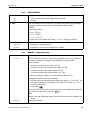
VAr-SPL
Application settings (APPLICATION)
COUNT – settings for counting
Adaptation of the reference quantity
ON
• The reference quantity can be changed in operating mode
OFF
• Counting only with defined reference quantities
Min.reFW
Monitoring the minimum reference weight
OFF
• No monitoring of the minimum reference weight
97.5, 99.0,
99.5
• Monitoring the minimum reference weight so that a counting accuracy of
rEF.OPt
97.5 %, 99.0 % or 99.5 % is achieved
Optimizing the average piece weight
OFF
• No reference optimization
AUtO
• Automatic reference optimization
User manual ME-Nr.:22017083 01/07
38
ITT-BA-e-0720
Settings in the menu
Automatic determination of the average piece weight
A-SMPL
• After taring, the average piece weight is determined with the next weight placed
ON
on the scale and the displayed reference quantity
• No automatic determination of the average piece weight
OFF
Automatic clearing of the average piece weight
A.CL-APW
• When the load is taken off the scale after a counting operation, the average piece
ON
weight is automatically cleared. The next counting operation begins with determining the average piece weight again.
• The average piece weight must be cleared manually by pressing
OFF
Displaying the counting accuracy
ACCurCY
• After the average piece weight is determined, the counting accuracy that can be
ON
achieved is shown briefly in the display.
• No counting accuracy display
OFF
Counting on two scales
tOtAl.Ct
bULK
• Display number of pieces for the parts on the bulk scale only
bOth
• Display number of pieces for all parts on the bulk and the reference scale
4.4.2
Configure printout for accumulation
PrINt
COM 1/COM 2
rEACH Z
ON
ACCUMULATION – totalising
Select interface for the connected printer / computer
LOt.PrINt
• Printout for each individual item
FIN.PrINt
• Printout only at the end of accumulation
SUMMArY
• Additional printout of the individual items after completion of accumulation
Reach a stable zero point between two items
• All load must first be removed from the scale before accumulation of the next item
is possible
OFF
39
• No load removal requested between two items
User manual ME-Nr.:22017083 01/07
ITT-BA-e-0720
Settings in the menu
4.4.3
CHECKWEIGHING
Setting the beep for checkweighing
bEEPEr
ON
• A short beep sounds when the target value is reached
OFF
• No beep
Limit for activation of the I/O relay box. The value to be entered is the percentage
proportion of the lower tolerance of the target weight / target quantity.
SP.tOL–
EXAMPLE
Target weight:2000 g
tOLER+:2010 g
tOLER-:1990 g
SP.tOL-:010 (%)
The relay box is not activated until 199 g (= 10 % of 1990 g) is reached.
Defines the form in which the scale sends information to the I/O relay box
SENd.MOd
CONtINU
• Information is permanently sent
StAbLE
• Information is only sent if the weight value is stable
4.4.4
CONFIG
40-40-10
MEMORY – configuring memory
Configuring the memory partitions.
ITT-BA-e-0720 have a total of 100 memory localizations that can be assigned to
tare values, average piece weights, target weights and target quantities.
Factory settings:
• 40 memory locations for tare values (01-40)
• 40 memory locations for average piece weights (41-80)
• 10 memory locations with target weights (81-90)
• 10 memory locations with target quantities (91-100)
The first target weight is called up e.g. with memory address No. 81.
Changing the range for the memory locations:
1. Enter the new range and separate each range with a point (e. g. 30.30.20). The
last range is automatically calculated. If an invalid entry is made, NOt.ALLO
is shown in the display.
2. Confirm with
.
Since only some of the entered values can be shown in the display, the display can
be moved to the right with the aid of the
key.
Note
➜ After every new partitioning, always check the memory values and adjust if necessary!
CLEAr.M
Clearing all memories.
User manual ME-Nr.:22017083 01/07
40
ITT-BA-e-0720
Settings in the menu
4.4.5
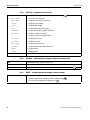
INFO-KEY – assignment of the Info key
Up to 13 additional values can be displayed via the key
INFO1
NOt.USEd
• Info space not occupied
PCS NEt
• Displays net weight in counting
GrOSS
• Displays gross weight
tArE
• Displays tare weight
APW
• Displays average piece weight
HIGHrES
• Shows display with a higher resolution
ACCUrCY
• Displays counting accuracy
n
• Displays number of totalised items
G tOtAL
• Displays gross sum
N tOtAL
• Displays net sum
PCS.tOtL
• Displays sum of pieces
tArGEt
• Displays target value and tolerances
dAtE
• Displays date
timE
• Displays time
INFO2 ... INFO13
4.4.6
.
As per INFO1
AVERAGE – determining the average weight for an unstable load
OFF
Calculating average weight switched off
AUtO
Calculating average weight with automatic start of the weighing cycle
MAnuAL
Calculating average weight with manual start of the weighing cycle via
4.4.7
SUrE?
RESET – resetting application settings to factory settings
Confirmation inquiry
• Reset the application settings to factory settings with
• Do not reset the application settings with
41
User manual ME-Nr.:22017083 01/07
ITT-BA-e-0720
Settings in the menu
4.5
4.5.1
Terminal settings (TERMINAL)
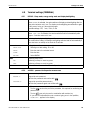
DEVICE – Sleep mode, energy-saving mode and display backlighting
This menu item only appears on devices in mains operation.
SLEEP
When SLEEP is activated, the scale switches off display and backlighting after the
time period set when not in use. The display and backlighting are switched on again
at the press of a key or if the weight changes.
Possible settings: OFF, 1 min, 3 min, 5 min
This menu item only appears on devices in battery operation.
PWr OFF
When PWr OFF is activated, the device switches itself off automatically after
approx. 3 minutes when not in use.
Switching the display backlighting on/off.
b.LIGHt
On scales with a battery, the background lighting switches itself off automatically if
there has been no activity on the scale for 5 seconds.
Setting date and time
DAtE.tim
DAtE.FOr
• Select type of date setting: EU or US
DAtE
• Enter the date in the selected format
tIME
• Enter the time
AM.PM
• Select AM/PM
Switching beep on/off
bEEP
ON
Switching on beep on each key press
OFF
Switching off beep on each key press
Note
This menu item is accessible without a Supervisor password.
4.5.2
SUPErVI
ENtER.C
ACCESS – password for Supervisor menu access
Password entry for Supervisor menu access
Request to enter password
➜ Enter the password and confirm with
rEtYPE.C
Request to repeat the password entry
➜ Enter the password again and confirm with
Notes
• The password can consist of up to 4 characters.
• The key
must not be part of the password. It is required for confirming the
password.
• The key
may only be used in combination with another key.
• If you enter an impermissible code or make a typing error in the repetition,
COdE.Err. appears in the display.
User manual ME-Nr.:22017083 01/07
42
ITT-BA-e-0720
Settings in the menu
4.5.3
RESET – resetting terminal settings to the factory settings
Confirmation inquiry
SUrE?
• Reset terminal settings to the factory settings with
• Do not reset the terminal settings with
4.6
4.6.1
Configuring interfaces (COMMUNICATION)
COM1/COM2 -> MODE – operating mode of the serial interface
Print
Manual data output to the printer with
A.Print
Automatic output of stable results to the printer (e. g. for series weighing operations)
CONtINU
Ongoing output of all weight values via the interface
dIALOG
Bi-directional communication via MT-SICS commands, control of the scale via PC
CONt.OLd
As per CONtINU, see above, but with 2 fixed blanks in front of the unit (compatible
with Spider 1/2/3)
dIAL.OLd
As per dIALOG, see above, but with 2 fixed blanks in front of the unit (compatible
with Spider 1/2/3)
dt-b
DigiTOL-compatible format.
GROSS
• Transfer of the gross weight, identified with "G"
tArE
• Transfer of the tare weight
nEt
• Transfer of the net weight
dt-G
As per dt-b, see above, gross weight identified with "G"
COnt-Wt
TOLEDO Continuous mode
COnt-Ct
TOLEDO Continuous mode, transfer of the number of pieces
bArc.rd
For connecting a serial bar code reader (automatically activates the 5-V voltage supply at Pin 9)
2nd.dISP
For connecting a second display (automatically activates the 5-V voltage supply at
Pin 9)
rEF
Data transfer from the reference scale (automatic switchover)
bULK
Data transfer from the quantity scale (automatic switchover)
AuXILIA
Data transfer from the reference or quantity scale (manual switchover)
43
User manual ME-Nr.:22017083 01/07
ITT-BA-e-0720
Settings in the menu
4.6.2
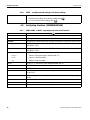
COM1/COM2 -> PRINTER – settings for protocol printout
This menu item only appears if the mode "Print" or "A.Print" is selected.
Selecting protocol printout
tEmPLat
StdArd
• Standard printout
tEmPLt1
• Printout in accordance with Template 1
tEmPLt2
• Printout in accordance with Template 2
Selecting formats for the protocol printout
ASCi.FmtT
LINE.Fmt
• Line format: MULtI (multi-line) or SINGLE (single-line)
LENGtH
• Line length: 0 ... 100 characters, appears only with line format MULtI
SEPArAt
• Separator: , ; . / \ _ and space; appears only with line format SINGLE
Add LF
• Line feed: 0 ... 9
4.6.3
COM1/COM2 -> PARAMET – communication parameter
bAUd
Selecting baud rate: 300, 600, 1200, 2400, 4800, 9600, 19200, 38400 baud
PAritY
Selecting parity: 7 none, 8 none, 7 odd, 8 odd, 7 even, 8 even
H.SHAKE
Selecting Handshake: NO, XONXOFF, nEt422, nEt485 (network operation
as per RS485 standard via the optional RS422/RS485 interface, only for COM1)
NET.Addr
Assigning network address: 0 ... 31, only for NET 485
ChECSuM
Activating checksum byte (appears only in TOLEDO Continuous mode)
Vcc
Switching 5V voltage, e.g. for a bar code reader, on / off
4.6.4
COM1/COM2 -> RESET COM1/RESET COM2 – resetting serial interface to factory
settings
Confirmation inquiry
SUrE?
• Reset interface settings to factory settings with
• Do not reset the interface settings with
4.6.5
OPTION – configuring options
If no option is installed or is not yet configured, N.A. appears in the display.
EtH.NEt
Configuration of the Ethernet interface
IP.AddrS
• Enter IP address
SUBNEt
• Enter Subnet address
GAtEWAY
• Enter Gateway address
not documented
USb
USb TEST
diGitAL
not documented
User manual ME-Nr.:22017083 01/07
44
ITT-BA-e-0720
Settings in the menu
IN 1 ... 4
OFF
ZErO
tArE
PriNt
CLEAr
rEF 10
rEF n
SCALE
inFO
UNIt
totAL+
totALOUT 1 ... 4
OFF
StAbLE
bEL.MIN
AbV.MIN
bEL.tOL
AbV.tOL
GOOd
UNdErLd
OVErLd
StAr
Configuration of the analog second scale interface
ANALOG
Operating mode of the second scale
Mode
rEF
• Second scale can only be used to determine the average piece weight
bULK
• Second scale can only be used as bulk scale
AuXILIA
• No difference between reference and bulk scale, all functions available on the
scale selected
BYPASS
45
• Second scale interface not assigned
User manual ME-Nr.:22017083 01/07
ITT-BA-e-0720
Settings in the menu
4.6.6
tEMPLt1/tEMPLt2
LINE 1 ... 20
DEF.PRN – configuring templates
Selecting Template 1 or Template 2
Select line
NOt.USEd
• Line not used
HEAdEr
• Line as header. The contents of the header must be defined via an interface com-
mand, see Section 5.1.
dAtE
• Date
timE
• Time
SCALE.NO
• Scale number
GROSS
• Gross weight
tArE
• Tare weight
nEt
• Net weight
APW
• Average piece weight
rEF Ct
• Reference quantity
PCS
• Pieces
tArGEt
• Target value
dEVIAt
• Deviation from the target value
ACC.NEt
• Totalised net weight
ACC.GrS
• Totalised gross weight
ACC.PCS
• Totalised number of pieces
ACC.LOt
• Totalised no. of items
StARLN
• Line with ***
CrLF
• Line feed (blank line)
F FEEd
• Page feed
User manual ME-Nr.:22017083 01/07
46
4.7
Diagnosis and printing out of the menu settings (DIAGNOS)
tESt SC
External
Testing scale with external calibration weight
1. The scale checks the zero point. -0- appears in the display. The test weight
flashes in the display.
2. If necessary, change the weight value displayed with
3. Put the calibration weight on the scale and confirm with
.
.
4. The scale checks the calibration weight put on them.
5. After the test is completed, the deviation from the last calibration briefly appears
in the display, ideally *d=0.0g, after which the scale changes to the next menu
item KboArd.
KboArd
PUSH 1 ... 25
Keyboard test
• Press the keys in the following order:
If the key works, the scale changes to the next key.
Note
You cannot abort the keyboard test!
If you have selected the menu item KboArd, you must press all keys.
dISPLAY
Display test: The scale displays all functioning segments
SNr
Display of the serial number
SNr2
Display of the serial number of scale 2. This menu item only appears if an analog
second scale is connected.
LiSt
Printout of a list of all menu settings
LiSt2
Printout of a list of all menu settings of scale 2. This menu item only appears if an
analog second scale is connected.
LiSt.M
Printout of a list of all values and settings in the memory
Display of the operating time of the scale and the number of weighing operations
performed
WOrK.tim
timE
SHOW.tim
• Operating time in hours, e.g. 56 h
WEIGH
SHOW.WGH
rESEt.AL
SUrE?
• Number of weighing operations, e. g. 135
Resetting all menu settings to the factory settings
Confirmation inquiry
• Reset all menu settings to the factory settings with
• Do not reset the menu settings with
ITT-BA-e-0720
Interface description
5
Interface description
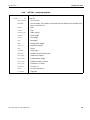
5.1
SICS interface commands
The terminal supports the command set MT-SICS (METTLER TOLEDO Standard Interface Command Set). With SICS commands, it is possible to configure, query and
operate the terminal from a PC. SICS commands are divided up into various levels.
5.1.1
LEVEL 0
LEVEL 1
49
Available SICS commands
Command
Meaning
@
Reset the scale
I0
Inquiry of all available SICS commands
I1
Inquiry of SICS level and SICS versions
I2
Inquiry of scale data
I3
Inquiry of scale software version
I4
Inquiry of serial number
S
Send stable weight value
SI
Send weight value immediately
SIR
Send weight value repeatedly
Z
Zero the scale
ZI
Zero immediately
D
Write text into display
DW
Weight display
K
Keyboard check
SR
Send and repeat stable weight value
T
Tare
TA
Tare value
TAC
Clear tare
TI
Tare immediately
User manual ME-Nr.:22017083 01/07
ITT-BA-e-0720
LEVEL 2
LEVEL 3
Interface description
Command
Meaning
C2
Calibrate with the external calibration weight
C3
Calibrate with the internal calibration weight
I10
Inquire or set scale ID
DAT
Inquire or set current date
I11
Inquiry of scale type
P100
Print out on the printer
P101
Print out stable weight value
P102
Print out current weight value immediately
PWR
Power On/Off
SIRU
Send weight value in the current unit immediately and repeat
SIU
Send weight value in the current unit immediately
SNR
Send stable weight value and repeat after every weight change
SNRU
Send stable weight value in the current unit and repeat after every weight change
SRU
Send weight value in the current unit and repeat
ST
After pressing the Transfer key, send the stable weight value
SU
Send stable weight value in the current unit
TIM
Inquire or set the time
TST2
Start test function with external weight
TST3
Start test function with internal weight
I12
ID1
I13
ID2
PW
Average piece weight
LEVEL SPECIAL CLR
Clear
DS
Short beep
I31
Header for the printout
ICP
Send configuration of the printout
LST
Send menu settings
M01
Weighing mode
M02
Stability setting
M03
Autozero function
M19
Send calibration weight
M21
Inquire/set weight unit
P
Print text
P130
Weight value, unit and price
PCS
Number of pieces
User manual ME-Nr.:22017083 01/07
50
ITT-BA-e-0720
Interface description
Command
Meaning
PM
Set values for checkweighing
PRN
Print out at every printer interface
REF
Average piece weight
RST
Restart
SFIR
Send weight value immediately and repeat quickly
SIH
Send weight value immediately in high resolution
SWU
Switch weight unit
SX
Send stable data record
SXI
Send data record immediately
SXIR
Send data record immediately and repeat
U
Switch weight unit
5.1.2
Requirements for communication between scale and PC
• The scale must be connected to the RS232, RS485, USB or Ethernet interface of a
PC with a suitable cable.
• The interface of the scale must be set to "Dialog" mode, see Section 4.6.1.
• A terminal progam must be available on the PC, e.g. HyperTerminal.
• The communication parameters baud rate and parity must be set in the terminal
program and on the scale to the same values, see Section 4.6.3.
5.1.3
Notes on network operation via the optional interface RS422/485
Up to 32 scales can be networked with the optional RS422/485 interface. In network
operation, the scales must be addressed from the computer before commands can be
sent and weighing results received.
Description of the steps
Host
Direction
1. Host addresses the scale, e.g. with the address
3A hex.
<ESC> 3A
–––>
2. Host sends a SICS command, e.g. SI
SI <CRLF>
–––>
Scale
3. The scale confirms receipt of the command and
sends the address back
<–––
<ESC> 3A
4. The scale responds to the command and returns
control of the bus to the host
<–––
S_S____45.02_kg
51
<CRLF>
User manual ME-Nr.:22017083 01/07
ITT-BA-e-0720
Interface description
5.2
5.2.1
TOLEDO Continuous mode
TOLEDO Continuous commands
The scale supports the following input commands in TOLEDO Continuous mode:
5.2.2
Command
Meaning
P <CR><LF>
Print out the current result
T <CR><LF>
Tare the scale
Z <CR><LF>
Zero the display
C <CR><LF>
Clear the current value
Tx.xxx <CR><LF>
Define tare
Output format in TOLEDO Continuous mode
Weight values are always sent in the following format in TOLEDO Continuous mode:
Status
Field 1
1
2
3
4
5
STX
SWA SWB SWC MSD
Field 2
6
7
8
9
10
11
–
–
–
–
LSD MSD
12
13
14
15
16
17
18
–
–
–
–
LSD
CR
CHK
Field 1
6 digits for the weight value that is sent without a decimal point and unit
Field 2
6 digits for the tare weight that is sent without a decimal point and unit
STX
ASCII characters 02 hex, characters for "start of text"
SWA, SWB, SWC
Status words A, B, C, see below
MSD
Most significant digit
LSD
Least significant digit
CR
Carriage Return, ASCII characters 0D hex
CHK
Checksum (2-part complement of the binary sum of the 7 lower bits of all previously sent
characters, incl. STX and CR)
User manual ME-Nr.:22017083 01/07
52
ITT-BA-e-0720
Interface description
Status word A
Status Bit
Function
Selection
6
5
Decimal
position
X00
0
1
4
3
2
1
0
0
0
0
X0
0
0
1
X
0
1
0
0.X
0
1
1
0.0X
1
0
0
0.00X
1
0
1
0.000X
1
1
0
0.0000X
1
1
1
Numerical X1
increment X2
0
1
1
0
X5
1
1
Status word B
Status word C
Function / value
Bit
Function / value
Bit
Gross / net: Net = 1
0
0
0
Sign: Negative = 1
1
0
1
Overload = 1
2
0
2
Movement = 1
3
Print request = 1
3
lb/kg: kg = 1
4
Extended = 1
4
1
5
1
5
Powerup = 1
6
Manual taring, only kg = 1
6
53
User manual ME-Nr.:22017083 01/07
ITT-BA-e-0720
6
Event and error messages
Event and error messages
Error
Cause
Remedy
Display Dark
• Back lighting set too dark
➜ Set back lighting (b.LIGHt)
brighter
• No mains voltage
➜ Check mains
• Unit switched off
➜ Switch on unit
• Mains cable not plugged in
➜ Plug in mains plug
• Brief fault
➜ Switch device off and back on
again
• Load plate not on the scale
➜ Place load plate on the scale
• Weighing range not reached
➜ Set to zero
• Weighing range exceeded
➜ Unload scale
Insufficient load
Overload
➜ Reduce preload
• Result not yet stable
➜ If necessary adjust vibration
adapter or weigh dynamically
• Function not permissible
➜ Unload scale and set to zero
• Zeroing not possible with over-
➜ Unload scale
load or insufficient load
• Average piece weight too low
➜ Select and place larger number of
reference parts on the scale
• No valid value from the reference
➜ Check cable connection between
the units
scale
➜ Check interface settings
• No calibration
➜ Unplug the mains plug then plug
it back in; switch unit off and then
back on in battery mode
➜ Calibrate scale
➜ Contact your dealer or local representative
• Average piece weight too low
User manual ME-Nr.:22017083 01/07
➜ Counting is not possible on this
scale with this average piece
weight
54
ITT-BA-e-0720
Event and error messages
Error
Cause
Remedy
• Unstable weight value when
➜ Ensure stable surroundings
referencing
➜ Ensure that the weighing pan is
freely movable
➜ Adjust vibration adapter
• Impermissible target value or
impermissible tolerance
• Setting the average piece weight
impermissible during weight
accumulating
• Switching the weighing unit
impermissible during weight
accumulating
• Printout not yet ended
➜ Repeat input with permissible
values
➜ End weight accumulating
➜ Reset average piece weight
➜ End weight accumulating
➜ Switch weighing unit
➜ End printout
➜ Repeat required action
• Switching the weighing unit
impermissible during dynamic
weighing
• EAROM checksum error
➜ End dynamic weighing
➜ Switch weighing unit
➜ Unplug the mains plug then plug
it back in; switch unit off and then
back on in battery mode
➜ Contact your dealer or local representative
Weight display unstable
• Restless installation location
➜ Adjust vibration adapter
• Draft
➜ Avoid drafts
• Restless weighing sample
➜ Dynamic weighing
• Contact between weighing pan
➜ Remedy contact
and/or weighing sample and
surroundings
Incorrect weight display
• Mains fault
➜ Check mains
• Incorrect zeroing
➜ Unload scale, set to zero and
repeat weighing operation
• Incorrect tare value
➜ Clear tare
• Contact between weighing pan
➜ Remedy contact
and/or weighing sample and
surroundings
• Scale tilted
55
➜ Level scale
User manual ME-Nr.:22017083 01/07
ITT-BA-e-0720
7
Technical data and accessories
Technical data and accessories
7.1
7.1.1
Technical data
General data
ITT
Applications
• Weighing
• Dynamic weighing
• Counting with fixed or variable reference quantity
• Counting with reference and bulk scale
• Accumulating
• Numerical definition of tare weights, average piece weights and reference quan-
tities
• 100 memory locations for tare weights, average piece weights, target weights
and target quantities
• Checkweighing and weighing-in to target weight/target quantity
Settings
• Resolution selectable
• Weighing unit selectable: g, kg, oz, lb, t
• Taring function: manual, automatic, chain tare
• Automatic zero point correction when the scale is switched on and during oper-
ation
• Filter for adapting to the ambient conditions (vibration adapter)
• Filter for adapting to the weighing type, e.g. dispensing (weighing process
adapter)
• Switch-off function, sleep mode for mains-operated devices, energy-saving
mode for battery operation
• Display lighting
• Add mode for determining the piece weight when counting
• Reference optimization
• Programmable memories and identifications
• Date and time
• Signal tone
• Graphic display of the weighing range
Display
• LCD (liquid crystal display), digits 16 mm high, with back lighting
User manual ME-Nr.:22017083 01/07
56
ITT-BA-e-0720
Technical data and accessories
ITT
• Pressure point membrane keypad
Keypad
• Scratch-proof labeling
• Diecast aluminum housing
Housing
• Dimensions, see Page 57
Protection Class (IEC 529,
DIN 40050, EN60529)
7.1.2
• IP65 (not with Ethernet interface)
Dimensions
71
36
49
200
4.5
277
Dimensions in mm
7.1.3
Net weights
ITT
7.1.4
without battery
with OptionPac
(incl. battery)
2.4 kg
4.4 kg
Interface connections
The compact scale can be fitted with a maximum of 2 interfaces. The following combinations are possible:
57
COM1
COM2
RS232
–
RS232
RS232
RS232
Ethernet
RS232
Digital I/O
RS232
Analog second scale
interface
User manual ME-Nr.:22017083 01/07
ITT-BA-e-0720
Technical data and accessories
7.1.5
Assignment of the interface connections
Pin
RS232
(COM1/
COM2)
Digital I/O Analog
Interface
(COM2)
1
–
GND
+ Excitation (+8.2 VDC)
2
TxD1/2
OUT0
+ Sense
3
RxD1/2
OUT1
Shield
4
–
OUT2
– Sense
5
GND
OUT3
– Excitation (GND)
6
–
IN0
–
7
–
IN1
+ Signal
8
–
IN2
– Signal
9
VCC
IN3
–
User manual ME-Nr.:22017083 01/07
58
ITT-BA-e-0720
8
Appendix
Appendix
8.1
Table of Geo Values
For weighing instruments verified at the manufacturer’s, the geo value indicates the
country or geographical zone for which the instrument is verified. The geo value set in
the instrument (e.g."Geo 18") appears briefly after switch-on or is specified on a label.
Table GEO VALUES 3000e shows the geo values for European countries.
Table GEO VALUES 6000e/7500e shows the geo values for different gravitation
zones.
8.1.1
GEO VALUES 3000e, OIML Class III (European Countries)
Geographical latitude
Geo value
Country
46°22' – 49°01'
18
Austria
49°30' – 51°30'
21
Belgium
41°41' – 44°13'
16
Bulgaria
42°24' – 46°32'
18
Croatia
48°34' – 51°03'
20
Czechia
54°34' – 57°45'
23
Denmark
57°30' – 59°40'
24
Estonia
59°48' – 64°00'
25*
Finland
64°00' – 70°05'
26
41°20' – 45°00'
17
45°00' – 51°00'
19*
47°00' – 55°00'
20
Germany
34°48' – 41°45'
15
Greece
45°45' – 48°35'
19
Hungary
63°17' – 67°09'
26
Iceland
51°05' – 55°05'
22
Ireland
35°47' – 47°05'
17
Italy
55°30' – 58°04'
23
Latvia
47°03' – 47°14'
18
Liechtenstein
53°54' – 56°24'
22
Lithuiania
49°27' – 50°11'
20
Luxemburg
50°46' – 53°32'
21
Netherlands
57°57' – 64°00'
24*
Norway
64°00' – 71°11'
26
User manual ME-Nr.:22017083 01/07
France
59
ITT-BA-e-0720
Appendix
Geographical latitude
Geo value
Country
49°00' – 54°30'
21
Poland
36°58' – 42°10'
15
Portugal
43°37' – 48°15'
18
Romania
47°44' – 49°46'
19
Slovakia
45°26' – 46°35'
18
Slovenia
36°00' – 43°47'
15
Spain
55°20' – 62°00'
24*
Sweden
62°00' – 69°04'
26
45°49' – 47°49'
18
Switzerland
35°51' – 42°06'
16
Turkey
49°00' – 55°00'
21*
United Kingdom
55°00' – 62°00'
23
* factory setting
60
User manual ME-Nr.:22017083 01/07
ITT-BA-e-0720
Appendix
8.1.2
GEO VALUES 6000e/7500e OIML Class III (Height £1000 m)
Geograhical latitude
Geo value
00°00' – 12°44'
5
05°46' – 17°10'
6
12°44' – 20°45'
7
17°10' – 23°54'
8
20°45' – 26°45'
9
23°54' – 29°25'
10
26°45' – 31°56'
11
29°25' – 34°21'
12
31°56' – 36°41'
13
34°21' – 38°58'
14
36°41' – 41°12'
15
38°58' – 43°26'
16
41°12' – 45°38'
17
43°26' – 47°51'
18
45°38' – 50°06'
19
47°51' – 52°22'
20
50°06' – 54°41'
21
52°22' – 57°04'
22
54°41' – 59°32'
23
57°04' – 62°09'
24
59°32' – 64°55'
25
62°09' – 67°57'
26
64°55' – 71°21'
27
67°57' – 75°24'
28
71°21' – 80°56'
29
75°24' – 90°00'
30
User manual ME-Nr.:22017083 01/07
61
ITT-BA-e-0720
Appendix
8.2
Sample protocols
Weighing with tare
G
T
N
0.1085 kg
0.0145 kg
0.0940 kg
Dynamic weighing
Dyn WT
T
Printout with header
43.52 kg
3.78 kg
KERN & Sohn GmbH
www.kern-sohn.com
G
T
N
G = Gross weight
N = Net weight
T = Tare
0.1085 kg
0.0145 kg
0.0940 kg
Dyn WT = dynamically determined weight
Protocol of the scale settings (menu point List, see page 47)
SOFTWARE VER 5-2-1.04
SCALE
------------METROLO
:NO APPr
SNR
:0000000
Scale Build
SCAL.TYP :2MULT.RN
BAS.UNIT :g
SCL.CAP1 :6000 g
RESOL.1
:2 g
SCL.CAP2 :15000 g
RESOL.2
:5 g
GEO
:19
DISPLAY
UNIt1
:g
UNIt2
:t
RESOLU
:2 g
UNt.rOLL :OFF
tArE
A-TArE
:OFF
CHAIn.tr :ON
A.CL-tr
:OFF
PB.TArE
:ON
ZERO
Z-CAPT
:-2 18
AZM
:0.5 d
RESTART
:OFF
FILTER
VIBRAT
:MED
PROCESS
:UNIVEr
StABILI
:StAnDrD
Min.WEiG
SEt.VAL
:150.000 g
ONOFF:OFF
62
APPLICATION
------------COUNT
VAr-SPL
:ON
Min.RefW
:99
REF OPT
:OFF
A-SMPL
:OFF
A.CL-APW
:OFF
ACCurCy
:ON
tOtAL.Ct
:BULK
ACCUMULATION
COM 1
LOT.PRNT :StdArd
FIN.PRNT :StdArd
SUMMARY
:OFF
COM 2
LOT.PRNT :StdArd
FIN.PRNT :StdArd
SUMMARY
:OFF
REACH Z
:ON
CHECKWEIGHING
BEEPER
:ON
SP.TOL :0 %
SEND.MOD
:CONTINU
MEMORY
:10-10-50
INFO.KEY
INFO.KEY1 :tArE
INFO.KEY2 :GROSS
INFO.KEY3 :APW
INFO.KEY4 :HIGHRES
INFO.KEY5 :ACCURCY
DYNAMIC
:OFF
TERMINAL
------------DEVICE
SLEEP
:OFF
B.LIGHt
:ON
DAtE.tim
DAtE.FOr
:EU
DAtE
:18.04.2004
timE
:21:10:52
BEEP
:OFF
COMMUNICATION
------------COM 1
MODE
1:Print
PriNtEr
tEmPLat
1:StdArd
ASCi.Fmt
LINE.FMT 1:MULTI
LENGtH
1:24
ADD LF
1:0
PARAMET
BAUD
1:2400
PAriTY
1:7 EVEn
H.SHAKE
1:XONXOFF
ChECSUM
1:OFF
Vcc
1:OFF
COM 2
MODE
2:DIALOG
PARAMET
BAUD
2:9600
PAriTY
2:8 nonE
H.SHAKE
2:XONXOFF
ChECSUM
2:OFF
Vcc
2:OFF
OPTION
EtH.Net
:N.A.
USB
:N.A.
ANALOG
:N.A.
DiGitAL
:N.A.
DEF.PrN
tEmPLt1
tEmPLt2
User manual ME-Nr.:22017083 01/07
KERN & Sohn GmbH
D-72322 Balingen-Frommern
Postfach 4052
E-Mail: [email protected]
Tel: 0049-[0]7433- 9933-0
Fax: 0049-[0]7433-9933-149
Internet: www.kern-sohn.de
Konformitätserklärung
EC-Konformitätserklärung
EC-Declaration of -Conformity
EC- Déclaration de conformité
EC-Declaración de Conformidad
EC-Dichiarazione di conformità
EC-Conformiteitverklaring
EC- Declaração de conformidade
EC- Prohlášení o shode
EC-Deklaracja zgodności
EC-Заявление о соответствии
D
Konformitätserklärung
Wir erklären hiermit, dass das Produkt, auf das sich diese Erklärung bezieht,
mit den nachstehenden Normen übereinstimmt.
GB
Declaration of
conformity
We hereby declare that the product to which this declaration refers conforms
with the following standards.
CZ
Prohlášení o
shode
Tímto prohlašujeme, že výrobek, kterého se toto prohlášení týká, je v souladu
s níže uvedenými normami.
E
Declaración de
conformidad
Manifestamos en la presente que el producto al que se refiere esta
declaración está de acuerdo con las normas siguientes.
F
Déclaration de
conformité
Nous déclarons avec cela responsabilité que le produit, auquel se rapporte la
présente déclaration, est conforme aux normes citées ci-après.
I
Dichiarazione di
conformitá
Dichiariamo con ciò che il prodotto al quale la presente dichiarazione si
riferisce è conforme alle norme di seguito citate.
NL
Conformiteitverklaring
Wij verklaren hiermede dat het product, waarop deze verklaring betrekking
heeft, met de hierna vermelde normen overeenstemt.
P
Declaração de
conformidade
Declaramos por meio da presente que o produto no qual se refere esta
declaração, corresponde às normas seguintes.
PL
Deklaracja
zgodności
Niniejszym oświadczamy, że produkt, którego niniejsze oświadczenie dotyczy,
jest zgodny z poniższymi normami.
RUS Заявление о
соответствии
Мы заявляем, что продукт, к которому относится данная декларация,
соответствует перечисленным ниже нормам.
Scale Series: BTBP/BTSP/BTTP/ITB/ITS/ITT
Plattform line: TP
Terminals:
KMB-TM, KMS-TM, KMT-TM
Mark applied
year
0103
Scale Series:
M
0103
1)
2)
3)
Standards
73/23/EEC
93/68/EEC
Low Voltage
EN61010-1
89/336/EEC
93/68/EEC
92/31/EEC
EMC
90/384/EEC
93/68/EEC
Non automatic weighing
Instruments 1), 2), 3)
Approval/
Test-certificate N°
EN61326-1
EN61000-3-2
EN61000-6-1 0,5µV/e ( 3V/m)
EN61000-6-2 1,3µV/e (10V/m)
EN45501
1), 2), 3)
T6189 1), 2)
TC7089 1), 2)
BTEP
Mark applied
year
EU Directive
M
EU Directive
Standards
73/23/EEC
93/68/EEC
Low Voltage
EN60950-1
89/336/EEC
93/68/EEC
92/31/EEC
EMC
EN61326-1 Kl.B
EN61000-3-2
EN61000-3-3
90/384/EEC
EN45501
93/68/EEC
Non automatic weighing
instruments 1)
gilt nur für geeichte Waagen
valable uniquement pour les balances vérifiées
la dichiarazione vale solo per le bilance omologate
vale só para balanças com aferição
dotyczy tylko wag legalizowanych
nur gültig für KMB-TM/KMS-TM/KMT-TM Terminals in
Verbindung mit zugelassenen Lastzellen
valable uniquement pour les terminaux KMB-TM/KMSTM/KMT-TM en liaison avec des cellules de charge
homologuées
valido solo per terminali KMB-TM/KMS-TM/KMT-TM in
collegamento con celle di carico approvate
só válido para os terminais KMB-TM/KMS-TM/KMT-TM
em união com as células de carga admissíveis
ważny tylko dla terminali KMB-TM/KMS-TM/KMT-TM w
połączeniu z dopuszczalnymi ogniwami obciążnikowymi
nur gültig für TP Wägebrücken in Verbindung mit einem
zugelassenen Waagenterminal
valable uniquement pour les plates-formes TP en
liaison avec un terminal de pesée homologué
valido solo per basamenti TP in collegamento con un
terminale di pesata approvato
Approval/ Testcertificate N°
1)
T7092 1)
TC7091 1)
applies only to certified balances
sólo aplicable a balanzas verficadas
Geldt uitsluitend voor geijkte weegschalen
platí jen pro cejchované váhy
действует только для поверенных весов
valid only for KMB-TM/KMS-TM/KMT-TM terminals
in connection with approved load cells
sólo válido para terminales KMB-TM/KMS-TM/KMTTM en combinación con células de carga aprobadas
uitsluitend geldig voor KMB-TM/KMS-TM/KMT-TM
terminals in verbinding met toegestane drukdozen
platí pouze pro terminály KMB-TM/KMS-TM/KMTTM ve spojitosti s přípustnými zátěžovými buňkami.
действительно только для терминалов KMBTM/KMS-TM/KMT-TM, связанных с допущенными
грузовыми ячейками
valid only for TP weighing platforms in connection
with an approved weighing indicator
sólo válido para plataformas de pesaje TP en
combinatión con un terminal de balanza aprobado
English
Important notice for verified weighing instruments
Weighing instruments verified at the place of manufacture bear the preceding mark on the packing
label and a green M-sticker on the descriptive plate. They may be set to work immediately.
Weighing instruments which are verified in two steps has no green "M" on the descriptive plate,
bear
the aforementioned identification on the packing label. The second step of the verification
M
must be carried out by the W&M authorities
The first step of the verification has been carried out in the manufacturing company. It comprises all tests according
EN45501-8.2.2. In regards to scales with analogue connection to the weighing-platform, a weighing test according to
EN45501-3.5.3.3 must be carried out additionally. This test is not necessary if the terminal bears the serial-number
of the weighing-platform.
M
Deutsch
Wichtiger Vermerk für geeichte Waagen in EU-Ländern
Werksgeeichte Waagen tragen vorstehendes Kennzeichen auf dem Packetikett und eine grünen MKleber. auf dem Eichschild. Sie dürfen sofort in Betrieb genommen werden.
Waagen die in zwei Schritten geeicht werden und kein grünes "M" auf dem Eichschild haben,
tragen vorstehendes Kennzeichen auf dem Packetikett.
M
Der zweite Schritt der Eichung ist durch den Eichbeamten durchzuführen.
Der erste Schritt der Eichung wurde im Herstellerwerk durchgeführt. Er umfaßt alle Prüfungen gemäß EN455018.2.2. Bei Waagen mit analogen Wägebrückenanschluss muß zusätzlich die Richtigkeit gemäß EN45501-3.5.3.3
geprüft werden.
Diese Prüfung ist nicht notwendig, wenn das Terminal die Serien-Nr. der Wägebrücke trägt.
M
Français
Remarque Importante pour les Instruments de pesage vérifiées dans les pays membre de
l’Union Européenne
Les instruments de pesage vérifiés en usine sont identifiés par un M sur leur emballage et par un
sticker M vert sur la plaque d'identification.
Ils peuvent être utilisés après leur installation.
Les instruments de pesage vérifiés en deux étapes portent l'identification M barré sur leur
emballage. La seconde étape de la vérification doit être effectuée par l’assistant technique de
M
l’administration des poids et mesures.
La première étape de la vérification a été effectuée en usine. Cela comprend tous les essais suivant la norme
EN45501-8.2.2. Pour les instruments de pesage avec une connexion analogique à la plate-forme de pesage, un
essai de pesage suivant la norme EN45501-3.5.3.3 droit être effectué en plus. Cela n'est pas nécessaire si le
terminal porte le numéro de la plate-forme de pesage.
M
Español
Nota importante para balanzas verificadas en paises de la UE
Las balanzas verificadas en origen llevan esta indicación en la etiqueta del embalaje y con la
M
etiqueta M sobre fondo verde en la placa de caracteristicas pueden ser utilizadas inmediatamente.
Balanzas cuya verificación se realiza en dos fases llevan esta indicación en la etiqueta del
embalaje. La segunda fase de la verificación debe ser realizada por el asistente técnico de la
oficina de contraste.
La primera fase de la verificatión ha sido realizada en origen. Incluye todos los ensayos según la norma EN455018.2.2. Para las básculas con plataforma de pesaje con salida analogica debe realizarse además el ensayo según
EN45501-3.5.3.3.
Este ensayo no es necesario si el terminal lleva el número de la plataforma de pesaje.
M
Italiano
Nota Importante per le bilance approvate nei paesi UE
Le bilance verificate in fabbrica portano questo contrassegno sull'etichetta dell'imballo e con il
sigillo M su sfondo verde sulla targhetta metrologica possono essere messe in uso
immediatamente.
Le bilance che vengono verificate in due fasi, portano questo contrassegno sull'etichetta
dell'imballo. La seconda fase della verifica deve essere eseguita dal servizio assistenza tecnica
M
dell'ufficio di pesi e misure.
La prima fase della verifica è stata eseguita dal produttore e comprende tutte le prove previste dalla norma di
riferimento EN45501-8.22. Riguardo le bilance con connessione analogica a piattaforma di pesata, una ulteriore
prova deve essere eseguita in accordo alla norma EN45501-3.5.3.3. Questa prova non è necessaria se il terminale
porta il numero di serie della piattaforma.
M
Netherlands
Belangrijke aanmerking voor geijkte weegschalen in EG-landen
In de fabriek geijkte weegschalen dragen dit kenteken op het emballage-etiket en een groene Msticker op het ijklabel. Deze kunnen meteen in gebruik genomen worden.
Bij weegschalen die in twee stappen geijkt moeten worden en geen groene “M” op het ijklabel
hebben, staat dit kenteken op het emballage-etiket.
M
De tweede stap van de ijking moet door het ijkwezen uitgevoerd worden.
De eerste stap van de ijking werd in de fabriek uitgevoerd. Deze stap omvat alle tests overeenkomstig EN45501-8.2.2.
Bij weegschalen met een analoge weegbruggenaansluiting moet aanvullend de nauwkeurigheid overeenkomstig
EN45501-3.5.3.3 getest worden.
Deze controle is niet nodig als de terminal het serienummer van de weegbrug heeft.
M
Português
Nota importante para as balanças aferidas em países EU
As balanças aferidas pela fábrica levam o cartaz identificador sobre a etiqueta de pacote e um
adhesivo
M verde sobre a placa de aferição.
M
Têm que colocar-se em funcionamento sem demora.
As balanças que foram aferidas em dois passos e que não tenham um "M" verde sobre a placa de
aferição,
têm o rótulo antecedente na etiqueta de pacote.
M
O segundo passo da aferição tem que ser feito por um empregado público de aferição.
A primeira fase da aferição foi feita na fábrica do produtor. Abarca todas as homologações segundo EN45501-8.2.2.
Nas balanças com uma conexão analógica da ponte de pesagem, há que controlar também a exactidão segundo
EN45501-3.5.3.3. Esta inspecção não é necessária se o terminal leva o número de série da ponte de pesagem.
Česky
Důležitý pokyn pro cejchované váhy v zemích EU
Váhy ocejchované ve výrobním závodě jsou opatřeny výše uvedenou značkou na etiketě balení a
zelenou nálepkou M na cejchovacím štítku. Takže se mohou okamžitě uvést do provozu.
Váhy se cejchují ve dvou etapách, a jestliže nemají zelené M na cejchovacím štítku, mají na etiketě
balení výše uvedenou značku.
M
Druhou etapu cejchování provádí cejchovní úřad.
První fáze cejchování byla provedena ve výrobním závodě. Zahrnuje všechny testy podle EN45501-8.2.2. V případě
vah s analogovým připojením vážního můstku se musí navíc zkontrolovat správnost podle EN45501-3.5.3.3. Tato
kontrola není potřebná, jestliže je na terminálu výrobní číslo vážního můstku.
M
Polski
Adnotacje dotyczące legalizowanych wag w państwach UE
Legalizowane u producenta wagi mają wystające oznaczenie na opakowaniu i zieloną nalepkę M na
M
znaku legalizacji. Takie wagi można natychmiast eksploatować.
Wagi, które są legalizowane w dwóch etapach i nie mają zielonego „M“ na znaku legalizacji, mają
wystające oznaczenie na etykiecie opakowania.
Drugi etap legalizowania musi przeprowadzić pracownik urzędu miar i wag.
Pierwszy etap legalizowania przeprowadzono w zakładzie producenta. Obejmuje wszystkie kontrole według
EN45501-8.2.2. W przypadku wag z analogowym złączem pomostu wagi należy dodatkowo skontrolować poprawność
zgodnie z EN45501-3.5.3.3. Taka kontrola nie jest konieczna, gdy terminal posiada numer seryjny pomostu wagi.
M
Pyccкu
Примечание для поверенных весов в странах ЕЭС
Поверенные на заводе весы помечаются вышеуказанным символом на упаковочной этикетке и
зеленой наклейкой "M" на табличке поверки.
Они могут немедленно приниматься в эксплуатацию.
Весы, которые поверяются в два этапа и не имеют зеленой наклейки "M" на табличке поверки,
помечаются вышеуказанным символом на упаковочной этикетке. Второй этап поверки должен
M
производиться поверочным ведомством.
Первый шаг поверки был выполнен на заводе-изготовителе. Он включает все проверки согласно EN455018.2.2. У весов с аналоговым подключением грузоприемного устройства необходимо дополнительно проверить
правильность согласно EN45501-3.5.3.3. Эта проверка не нужна, если терминал имеет серийный номер
грузоприемного устройства.
M
Date: 27.02.2007
Signature:
Gottl. KERN & Sohn GmbH
Management
Gottl. KERN & Sohn GmbH, Ziegelei 1, D-72336 Balingen, Tel. +49-[0]7433/9933-0,Fax +49-[0]7433/9933-149
Notice
Certified balances and balances used for legal applications have the EU type approval. The year of
the initial verification is shown next to the CE mark. Such balances are verified in the factory and carry
the „M“ mark on the actual balance and the packaging. The year of initial verification is shown next to
the CE mark. The GEO value of verified balances explains for which location of use the balance has
been verified. This GEO value is shown on the balance itself and on the packing. Further details see
GEO value table.
Hinweise
Für geeichte/eichpflichtige Waagen liegt eine EU Bauartzulassung vor. Das Jahr der ersten Eichung
ist neben dem CE Zeichen aufgeführt. Solche Waagen sind ab Werk geeicht und tragen die
Kennzeichnung „M“ auf dem Gerät selbst und auf der Verpackung. Der GEO-Wert gibt bei vom
Hersteller geeichten Waagen an, für welchen Aufstellungsort die Waage geeicht ist. Dieser GEO-Wert
befindet sich auf der Waage sowie der Verpackung. Genaueres ist der GEO-Wert-Tabelle zu
entnehmen.
Remarques
Les balances vérifiées/admissibles à la vérification font l’objet d’une approbation de modèle UE.
L’année de la vérification primitive est indiqués à côté de la marque CE. Ces balances sont vérifiées
d’origine et portent la marque „M“ sur l’appareil lui-même et sur l’emballage. Le valeur GEO indique le
lieu d’utilisation pour lequel la balance été vérifiée. Ce valeur GEO se trouve sur la balance ainsi que
sur l’emballage. Veuillez trouver plus de détails dans le tableau GEO.
Notas
Las balanzas verificadas/verificables cuentan con una aprobación de modelo UE. El año de la primera
verificación está indicado al lado del distintivo CE. Estas balanzas son verificadas en fábrica y llevan
la designación „M“ sobre el propio aparato y sobre el embalaje. El valor GEO indica el lugar de
ubicación por lo cual la balanza está verificado. El valor se encuentra sobre la balanza así como sobre
el embalaje. Por favor tomen demás detalles de la tabla GEO.
Avvertenza
Per le bilance approvate esiste un’approvazione CE del tipo. L´anno della prima verifica è indicato a
fianco della marcatura CE. I tipi marcati con un contrassegno „M“ su sfondo verde possono essere
impiegati da subito. Il coefficiente GEO di bilance omologate indica per quale luogo la bilancia è stata
omologata. Questo coefficiente GEO si trova sulla bilancia e sull’imballo. Ulteriori informazioni vedi
tabella coefficiente GEO
Opmerkingen
Voor geijkte weegschalen/weegschalen, die verplicht geijkt moeten worden, ligt er een EGmodelgoedkeuring ter inzage. Het jaar van de eerste ijking werd naast het EG-conformiteitsteken
vermeld. Dergelijke weegschalen werden in de fabriek geijkt en dragen het identificatielabel „M“ op het
apparaat zelf en op de verpakking. De GEO-waarde geeft bij door de fabrikant geijkte weegschalen
aan, voor welke plaats van opstelling de weegschaal geijkt is. Deze GEO-waarde bevindt zich op de
weegschaal en ook op de verpakking. Meer details kan er uit de tabel met de GEO-waarde afgeleid
worden.
Instruções
Para as balanças aferidas / obrigadas à aferição existe uma homologação de tipo construtivo da EU.
O ano da primeira aferição fica ao lado do simbolo CE. Tais balanças foram aferidas na fábrica e
levam o rótulo „M“ no mesmo aparelho e na embalagem. O valor GEO indica nas balanças aferidas
pelo produtor para qual lugar de colocação a balança foi aferida. Este valor GEO encontra-se na
balança assim como na embalagem. Mais pormenores podem ver-se na tablela dos valores GEO.
Poznámky
Pro ocejchované a cejchování podléhající váhy existuje povolení EU podle typu konstrukce. Rok
prvního cejchování se uvádí vedle značky CE. Takové váhy se cejchují ve výrobním závodě, a jsou
označeny znakem „M“ na vlastním přístroji, i na obalu. Hodnota GEO udává u výrobcem cejchovaných
vah, pro jaké místo instalace je váha ocejchována. Tato hodnota GEO se nachází na váze, jakož i na
obalu. Přesnější je odečíst hodnotu GEO z tabulky.
Wskazówki
Dla wag legalizowanych/podlegających obowiązkowi legalizowania istnieje dokument dopuszczenia
rodzaju konstrukcji UE. Rok pierwszej legalizacji jest podany obok znaku CE. Takie wagi są
legalizowane w zakładzie producenta i mają oznaczenie „M“ na sobie i na opakowaniu. W przypadku
wag legalizowanych u producenta wartość geograficzna podaje, dla jakich miejsc ustawienia waga
została legalizowana. Ta wartość geograficzna znajduje się zarówno na wadze jak i na opakowaniu.
Dokładne informacje znajdują się w tabeli wartości geograficznych.
Указания
Калиброванные/подлежащие поверке весы получают допуск на конструкцию ЕС. Год первой
поверки приведен рядом с символом CE. Такие весы поверены на заводе и имеют маркировку
„M“ на самом устройстве и на упаковке. Значение GEO на откалиброванных изготовителем
весах указывает, для какого места установки произведена калибровка весов. Это значение GEO
находится на весах и на упаковке. Более подробная информация содержится в таблице
значений GEO
GEO-WERT-Tabelle / GEO-value table
geographische
Höhe über Meer in Metern / altitude
Breite
/geo0-650
650-1300
1300-1950 1950-2600
graphical latitude
2600-3250
0°
9°
15°
19°
22°
25°
28°
30°
33°
35°
37°
40°
42°
44°
46°
48°
51°
53°
55°
58°
60°
63°
66°
69°
73°
77°
0/1
1/2
2/3
3/4
4/5
5/6
6/7
7/8
8/9
9 / 10
10 / 11
11 / 12
12 / 13
13 / 14
14 / 15
15 / 16
16 / 17
17 / 18
18 / 19
19 / 20
20 / 21
21 / 22
22 / 23
23 / 24
24 / 25
25 / 26
0‘
52‘
6‘
2‘
22‘
21‘
6‘
41‘
9‘
31‘
50‘
5‘
19‘
32‘
45‘
58‘
13‘
31‘
52‘
17‘
49‘
30‘
24‘
35‘
16‘
52‘
-
9°
15°
19°
22°
25°
28°
30°
33°
35°
37°
40°
42°
44°
46°
48°
51°
53°
55°
58°
60°
63°
66°
69°
73°
77°
85°
52‘
6‘
2‘
22‘
21‘
6‘
41‘
9‘
31‘
50‘
5‘
19‘
32‘
45‘
58‘
13‘
31‘
52‘
17‘
49‘
30‘
24‘
35‘
16‘
52‘
45‘
4/5
5/6
6/7
7/8
8/9
9 / 10
10 / 11
11 / 12
12 / 13
13 / 14
14 / 15
15 / 16
16 / 17
17 / 18
18 / 19
19 / 20
20 / 21
21 / 22
22 / 23
23 / 24
24 / 25
25 / 26
26 / 27
27 / 28
28 / 29
29 / 30
3/4
4/5
5/6
6/7
7/8
8/9
9 / 10
10 / 11
11 / 12
12 / 13
13 / 14
14 / 15
15 / 16
16 / 17
17 / 18
18 / 19
19 / 20
20 / 21
21 / 22
22 / 23
23 / 24
24 / 25
25 / 26
26 / 27
27 / 28
28 / 29
2/3
3/4
4/ 5
5/6
6/7
7/8
8/9
9 / 10
10 / 11
11 / 12
12 / 13
13 / 14
14 / 15
15 / 16
16 / 17
17 / 18
18 / 19
19 / 20
20 / 21
21 / 22
22 / 23
23 / 24
24 / 25
25 / 26
26 / 27
27 / 28
1/2
2/3
3/4
4/5
5/6
6/7
7/8
8/9
9 / 10
10 / 11
11 / 12
12 / 13
13 / 14
14 / 15
15 / 16
16 / 17
17 / 18
18 / 19
19 / 20
20 / 21
21 / 22
22 / 23
23 / 24
24 / 25
25 / 26
26 / 27