1
Introduction
The Acoustic Research AWSBTSK customizable portable wireless speaker makes it easy to
take your music wherever you go and share it whenever you want, with Bluetooth® wireless
connectivity and a built-in auxiliary input. It’s compact, easy-to-carry and simple to use, and
a free customizable speaker skin from SkinIt lets you make this speaker truly your own, with
thousands of designs to choose from, including professional and college sports teams, popular
entertainment and social icons, even your own photo or design.
This manual covers various connection options and detailed operating instructions for making
the Acoustic Research customizable portable wireless speaker a part of your lifestyle. If, after
having reviewed the instructions, you have any questions, please call toll-free 1-800-732-6866
or visit www.acoustic-research.com
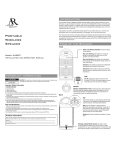
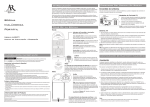
Front
Power and Pairing indicator shows the status
of the speaker.
Carrying
handle
Blue, slow blinking: The speaker is on but not
paired or connected (like when you turn the
speaker on for the first time).
Blue, fast blinking: The speaker is in Bluetooth
pairing mode. See the Bluetooth Setup section for
more information.
Solid blue: The speaker is paired with a Bluetoothenabled device and ready to play audio.
Solid green: The auxiliary audio input is selected.
See the Using the Auxiliary Input section for more
information.
Side
DC IN receives the small round end of the
included 9V 1100mA AC power adapter; remove
the protective cover to insert the adapter.
ric shock, do not remove cover (or back).
servicing to qualified service personnel.
lugs, convenience receptacles, and the point
eriods of time.
en the apparatus has been damaged in any
d or objects have fallen into the apparatus,
rmally, or has been dropped.
any product containing alcohol or other
void the risk of electric shock.
hem indoors in the event of a rainstorm to
ºF/0ºC and above 122ºF/50ºC).
Battery Compartment Cover
Speaker
(side panel)
AC Power
Adapter
120V A
wall ou
Back
AA Batteries
1. Twist the bolts on the bottom of
completely.
2. Remove the bottom of the spea
3. Insert six (6) AA batteries (not i
polarity diagrams (+ and –).
4. Line the bolts on the compartm
compartment and place the spe
5. Screw the bolts back in and tigh
Note: Place the rubber cap in the
DO NOT mix batteries with different
alkaline battery). DO NOT mix new a
the product when not in use for long
promptly and recycle or dispose of th
Setting Up
Pairing
Bottom
Battery Compartment cover is held in place by two metal bolts
To pair your Bluetooth-enabled de
that help keep the speaker sealed against the elements. See the
Powering the Speaker: AA Batteries section for instructions on
removing this cover and inserting batteries.
Top
turns the speaker on and off (press and hold for
3 seconds). It also toggles between Bluetooth and
auxiliary input for the audio signal (press).
Pair puts the speaker in pairing mode for
Bluetooth setup (press and hold for 3 seconds). It
also performs a fast reconnect with devices that
have lost connection (press). See the Bluetooth
setup section for more information.
Volume +/– buttons adjust the speaker’s volume
level
1. Make sure your device’s Bluetoo
settings menu on your device to
2. If the speaker isn’t already on, p
You will hear 4 beeps to indicate
front of the speaker starts flash
3. Press and hold for 3 seconds th
beeps to indicate pairing mode
starts blinking faster.
4. Open the Bluetooth settings me
of devices available (you might
password, enter “0000”.
5. A confirmation screen will appe
are successfully paired. The blu
connection. The speaker is now
6. Turn the volume on your device
the device. Control the speaker
the top of the speaker.
_____________________________________
_____________________________________
There are two options to power yo
adapter or using 6 AA batteries (n
Any Bluetooth-enabled device that
first be paired to the speaker. The
needs to be done only once.
oof of purchase. Attach it here and record
re located on the product.
_____________________________________
Powering the Speak
Tour of the Speaker
ion
ufacturer’s instructions.
ves, or other apparatus (including amplifiers)
Powering th
Storage compartment houses the built-in cable
for the speaker’s auxiliary input. It also offers a closed
compartment for your connected device or other items. See
the Using the Auxiliary Input section for more information.
Note:
• If you notice the sound from the
• You will hear a beep if you turn t