1
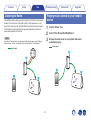
Contents
Setup
Use
Troubleshooting
.
Wireless Speaker
Owner’s Manual
.
HEOS 7
HEOS 5
HEOS 3
1
Status LED
Appendix
Contents
Setup
INTRODUCTION
BEFORE YOU BEGIN
System Requirements
Network Requirements
Controller Requirements
Getting To Know Your Speaker
Front panel
Controls
Back panel
Placing Your Speaker
Wall or Ceiling Mounting (HEOS 3 only)
Powering Your Speaker
Getting the HEOS App
SETTING UP YOUR FIRST HEOS SPEAKER
ADDING MORE HEOS SPEAKERS
Adding Wired Speakers
Adding Wireless Speakers
USING YOUR HEOS SPEAKER
Selecting a Room/Speaker
Listening to Radio
Playing music stored on your mobile device
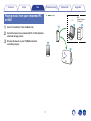
Playing music from your networked PC or NAS
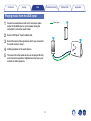
Playing music from the AUX input
Playing music from a USB device
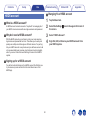
HEOS account
What is a HEOS account?
Why do I need a HEOS account?
Signing up for a HEOS account
Changing Your HEOS account
Use
Troubleshooting
4
5
5
5
6
7
8
9
10
11
11
12
12
13
14
14
14
15
15
16
16
17
18
19
20
20
20
20
20
Status LED
Playing from Streaming Music Services
Adding a Music Service
Changing Music Service Settings
Using Headphones (HEOS 7 only)
Listening To The Same Music In Multiple Rooms
Grouping Rooms
Ungrouping Rooms
Grouping All Rooms (Party Mode)
Ungrouping All Rooms
Using the Now Playing Queue
Play Now
Play Now & Replace Queue
Play Next
Add to End of Queue
Repeat and Shuffle Playback
Rearranging the Now Playing Queue
Deleting Songs from the Play Queue
Deleting All Songs from the Play Queue
Saving Playlists
2
Appendix
21
21
21
22
23
23
24
25
26
27
27
27
27
27
27
28
28
29
29
Contents
Setup
MAKING SPEAKER ADJUSTMENTS
Changing the Name of a Speaker
Changing the Wireless Network Connection
Changing the Speaker’s Equalizer
Changing the Speaker’s Orientation (HEOS 3 Only)
Adjusting the Audio Quality
Creating a Stereo Pair (HEOS 3 Only)
Removing a Stereo Pair (HEOS 3 Only)
Adjusting the Status Light Brightness
Advanced Speaker Settings
Network Settings
Firmware Upgrade
About
UPDATING YOUR SYSTEM
ADVANCED FEATURES
Submit Diagnostics
Sharing Music from your Mobile Device
Resetting Your Controller App
Power Modes
Network Standby
Deep Standby
Off
Use
Troubleshooting
30
30
30
31
31
31
32
32
32
33
33
33
34
35
36
36
37
37
37
37
37
37
Status LED
Appendix
BASIC TROUBLESHOOTING
My speaker won’t connect to my network using the audio cable
I get a message “Device was not found”
Music cuts out or delays sometimes
I hear a delay when using the AUX Input with my TV
Connecting to a WPS Network
Resetting Your Speaker
Restoring the Speaker to Factory Defaults
Contact Denon
Status LED Table
Supported File Types and Codecs
SPECIFICATIONS
Speaker Specifications
HEOS 7
HEOS 5
HEOS 3
INFORMATION
Trademarks
License
License Information for the Software Used in the Unit
3
38
38
38
39
39
39
40
40
41
42
48
49
49
49
50
51
52
52
53
53
Contents
Setup
Use
Troubleshooting
Status LED
Appendix
Thank you for purchasing this HEOS product. To ensure proper operation, please read this owner’s manual carefully before using the product.
NOTE
THIS DOCUMENT CONTAINS INFORMATION THAT IS SUBJECT TO CHANGE WITHOUT NOTICE.
For latest information, please visit HEOSbyDenon.com
INTRODUCTION
The HEOS speaker is part of the HEOS wireless multi-room sound system that enables you to enjoy your favorite music anywhere and everywhere
around your home. By utilizing your existing home network and the HEOS app on your iOS or Android™ device, you can explore, browse, and play music
from your own music library or from many online streaming music services.
0 True multi-room audio - play different songs in different rooms or the same song in every room
0 Utilizes your existing home wireless network for quick and easy setup
0 Industry leading microsecond audio synchronization between HEOS device
0 Legendary Denon audio quality
If you are in a hurry, you can be enjoying great sounding music in no time by following the steps outlined in the HEOS Quick Start Guide (packaged with
your HEOS device).
[Example] HEOS 5
.
HEOS 5 QUICK START GUIDE
Please continue reading this Owner’s Manual for more detailed information about the features and benefits of your HEOS Speaker.
4
Contents
Setup
Use
Troubleshooting
Status LED
Appendix
BEFORE YOU BEGIN
NOTE
If you have already installed at least one HEOS speaker, please skip to the section “ADDING MORE HEOS SPEAKERS” below (v p. 14).
System Requirements
Before you begin installing your first HEOS speaker, please make sure you understand and meet a few basic requirements.
o Network Requirements
Wireless Router - In order to use your HEOS music system, you should have a working wireless (Wi-Fi) network in your home. If you do not have a
wireless network, please contact your local Denon dealer or electronics retailer to assist you with purchasing and installing a wireless network in your
home.
.
The HEOS Extend Wireless Range Extender (sold separately) is available as an accessory, should
you need to setup a new wireless network or extend the range of your existing network. Please
contact Denon for more information about the Wireless Extender.
High Speed Internet Connection - HEOS accesses the Internet to stream music to your home from many popular online music services. HEOS is
also designed to provide you with software updates, which are delivered via your home Internet connection. DSL, Cable, and Fiber services will
provide the best experience and reliability. You may experience performance issues with slower Internet connections like satellite based services.
5
Contents
Setup
Use
Troubleshooting
Status LED
Appendix
o Controller Requirements
.
.
You can control your HEOS wireless multi-room sound system using the free HEOS app on any iOS or Android mobile device that meets these
minimum requirements:
Android Minimum Requirements
0 Android OS version 2.3 or later
0 All resolutions
iOS Minimum Requirements
0 iOS version 5.0 or later
0 iPhone® 3GS or newer
0 iPad®
0 iPod touch® (3rd generation) or newer
6
Contents
Setup
Use
Troubleshooting
Status LED
Appendix
Getting To Know Your Speaker
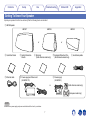
Unpack your speaker from the box and verify that the following items are included:
q HEOS Speaker
HEOS 7
HEOS 5
or
w Quick Start Guide
e Safety Information
u Ethernet cable
i Power supply and Power cord
Sheets
HEOS 3
or
r Warranty
(North America model only)
t Extended Protection Plan
(North America model only)
y Audio/Setup cable
o Power supply
(for HEOS 7/5)
(for HEOS 3)
or
(North America model only)
.
(European model only)
NOTE
Please use the power supply and power cord included in the box for your device.
7
Contents
Setup
Use
Troubleshooting
Status LED
Appendix
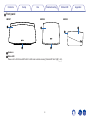
o Front panel
HEOS 7
HEOS 5
q
HEOS 3
q
q
.
w
w
w
A Speakers
B Status LED
Please refer to the “Status LED Table” for LED color and state meaning “Status LED Table” (v p. 42).
8
Contents
Setup
Use
Troubleshooting
Status LED
Appendix
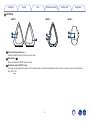
o Controls
HEOS 7
q
w
e
HEOS 3
w
q
.
q
w
HEOS 5
A Volume Up/Down buttons (+, –)
Adjusts the HEOS device’s volume level up or down.
B Mute button (:)
Mutes or unmutes the HEOS device’s volume.
C Headphone output (HEOS 7 only)
The music will stop playing through the built in speakers when you insert the headphones and turn back on when you remove the headphones.
See (v p. 22).
9
Contents
Setup
Use
Troubleshooting
Status LED
Appendix
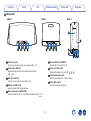
o Back panel
HEOS 7
HEOS 5
HEOS 3
i
o
w r y
q e t u
w r y
q e t u
w
DC18V
RESET 2.0A
.
q
AUX IN
USB
5V/1A
F Connect Button (CONNECT)
Used for Wi-Fi setup (v p. 39).
B Reset Button (RESET)
Various settings are reset to the factory default values
(v p. 40).
G Connect in Status LED
Indicates the status of this unit (v p. 39, 42).
H Threaded Mounting Hole
Used to mount this unit on a wall or ceiling.
I Safety Wiring Hole
Used to prevent from dropping.
D USB Input (USB 5V/1A)
Used to connect USB storage devices.
E Network Connector (NETWORK)
Used to connect this unit to a wired Ethernet network (v p. 14).
10
CONNECT
ry
etu
A Power Input (DC)
Used to connect the external power supply (v p. 12).
C AUX Input (AUX IN)
Used to connect audio devices (v p. 18).
NETWORK
Contents
Setup
Use
Troubleshooting
Status LED
Appendix
Placing Your Speaker
You can place your HEOS speaker anywhere you want to enjoy great sounding music. Please follow these simple guidelines when determining where to
place your speaker…
0 The speaker must be within range of your wireless network.
0 The HEOS speaker is designed to sound best when placed 3 to 12 inches (8 - 30 cm) from a wall.
0 Locate the speaker at least 12 inches (30 cm) from a television, computer, or other display device to avoid the possibility of interference.
0 Place the speaker across the room from where you will be listening, as close to ear level as possible.
0 The HEOS speaker is not waterproof. Do not place it near any water source and do not leave it outside in the rain or snow.
o Wall or Ceiling Mounting (HEOS 3 only)
The HEOS 3 speaker can optionally be mounted on a wall or ceiling using standard 1/4 inches (6.35 mm) threaded speaker or camera mounts which
support up to 10 lbs (4.5 kg). Please visit your local Denon dealer or electronics retailer for more information about possible wall and ceiling mounting
options.
Caution
Recommend installing a safety wire (not included) at the safety wiring hole on the back of the speaker in order to prevent injury to the user and others
or damage to property should the speaker fall for some reason.
11
Setup
Contents
Use
Troubleshooting
Status LED
Appendix
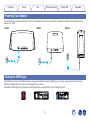
Powering Your Speaker
Connect the power cord included in the box to the back of the speaker and the plug to a wall outlet. The speaker is capable of automatically switching
between 100 - 240 V.
HEOS 7
HEOS 5
HEOS 3
AUX IN
USB
5V/1A
NETWORK
.
DC18V
RESET 2.0A
Getting the HEOS App
.
The HEOS app is the heart of the HEOS experience. Using your mobile device and the HEOS app, you can setup, browse, explore, and control your
HEOS system right in the palm of your hand, from anywhere in your home.
Download the HEOS app for iOS or Android by searching App StoreSM or Google Play™ store for “HEOS by Denon”.
12
CONNECT
Contents
Setup
Use
Troubleshooting
Status LED
Appendix
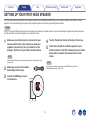
SETTING UP YOUR FIRST HEOS SPEAKER
Once you have placed your speaker in your listening room and have downloaded the HEOS app, you are ready to configure your speaker for music
playback. This involves following a few simple steps to get the speaker connected to your existing home network:
Caution
DO NOT connect the Ethernet cable if you are connecting your speaker to a wireless network. If you are connecting the speaker to a wired network, use
an Ethernet cable to connect the speaker to your network or router.
1
4
5
Make sure your mobile device is connected to your
wireless network (the same network you want your
speakers connected to). You can check this in the
Settings - Wi-Fi menu of your iOS or Android device.
NOTE
If your wireless network is secure, make sure you know the password to join
your network.
2
3
Tap the “Setup Now” button at the top of the screen.
Follow the instructions to add the speaker to your
wireless network. (The Wi-Fi settings from your mobile
device will be copied to the speaker via the audio
cable.)
NOTE
If you have any problems connecting your HEOS device, jump to the
Troubleshooting section (v p. 38).
Make sure you have the included
Audio/Setup cable handy.
Launch the HEOS app on your
mobile device.
13
Setup
Contents
Use
Troubleshooting
Status LED
Appendix
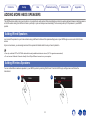
ADDING MORE HEOS SPEAKERS
The HEOS wireless multi-room sound system is a true multiroom audio system that automatically synchronizes audio playback between multiple speakers
so that the audio coming from different rooms is perfectly in sync and always sounds amazing! You can easily add up to 32 speakers to your HEOS
system.
Adding Wired Speakers
Just connect the speaker to your home network using an Ethernet cable and the speaker will appear on your HEOS app as a new room in the Rooms
screen.
At your convenience, you can assign a name to the speaker to indicate which room you have it placed in.
0 Use only a shielded STP or ScTP LAN cable which is easily available at electronics stores (CAT-5 or greater recommended).
0 Do not connect a Network Connector directly to the LAN port/Ethernet connector on your computer.
Adding Wireless Speakers
You can add additional wireless speakers to your HEOS system by selecting “Add Device” from the HEOS app’s settings menu and follow the
instructions:
1
2
Music
Music
Settings
.
Add Device
14
Contents
Setup
Use
Troubleshooting
Status LED
Appendix
USING YOUR HEOS SPEAKER
Once you have your speaker connected to your network and the HEOS app installed on your mobile device, it’s easy to start enjoying your favorite music.
You can listen to something different on every speaker or the same music perfectly synchronized on all speakers. It’s up to you!
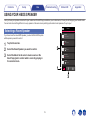
Selecting a Room/Speaker
Rooms
Drag one room into another to group them
If you have more than one HEOS speaker, you must tell the HEOS system
which speaker you want to control:
Song Name 1
Living
Tap the Rooms tab.
Song Name 2
2
Select the Room/Speaker you want to control.
Dining
Song Name 3
Select the Music tab to select a music source or the
Now Playing tab to control what is currently playing in
the selected room.
Bedroom
Song Name 4
Outside
Song Name 5
1
Rooms
Music
3
.
1
2
3
Kitchen
15
Now Playing
Contents
Setup
Use
Troubleshooting
Status LED
Appendix
Playing music stored on your mobile
device
Listening to Radio
The HEOS system includes access to more than 70,000 free internet radio
streams from all corners of the globe via the TuneIn radio service. Just
select the TuneIn logo from the main Music menu and browse among the
70,000 stations neatly organized into popular categories and select a
station that appeals to your mood.
1
2
3
NOTE
If you have a TuneIn account, you can sign into the TuneIn service under Settings Music Sources - TuneIn, and access all of your “My Favorite” TuneIn stations.
Tap the “Music” tab.
Select “This iPhone/iPod/iPad/Phone”.
Browse the local music on your phone and select
something to play.
Audio signal
.
.
Audio signal
16
Contents
Setup
Use
Troubleshooting
Playing music from your networked PC
or NAS
3
Appendix
Audio signal
PC
Select “Local Music” from the Music tab.
Select the name of your networked PC or NAS (network
attached storage) server.
Browse the music on your PC/NAS and select
something to play.
.
1
2
Status LED
17
NAS
(Network Attached
PC Storage)
Contents
Setup
Use
Troubleshooting
Playing music from the AUX input
2
3
4
5
Connect an audio device with a 3.5 mm stereo audio
output to the AUX input on your speaker using the
included 3.5 mm stereo audio cable.
Audio signal
Select “AUX Input” from the Music tab.
Select the name of the speaker to which you connected
the audio device in step 1.
Initiate playback on the audio device.
The sound from the audio device can be played directly
on the selected speaker or digitized and sent over your
network to other speakers.
.
1
18
Status LED
Appendix
Contents
Setup
Use
Troubleshooting
Playing music from a USB device
1
2
3
4
Audio signal
Insert a FAT32 formatted USB device into the USB port
on the back of the HEOS system.
Select “Local Music” from the Music tab.
Select the name of your HEOS system.
Browse the music on your USB device and select
something to play.
NOTE
.
0 It may take several minutes for the name of your HEOS system to appear in the
Local Music list if you have a large number of files on your USB device.
0 It is not possible to connect and use a computer via the USB port of this unit using
a USB cable.
19
Status LED
Appendix
Contents
Setup
Use
Troubleshooting
Status LED
Appendix
o Changing Your HEOS account
HEOS account
1
2
o What is a HEOS account?
A HEOS account is master account or “keychain” for managing all of
your HEOS music services with one single username and password.
3
4
o Why do I need a HEOS account?
With the HEOS account you just have to enter your music services
login names and passwords one time. This allows you to easily and
quickly use multiple controller apps on different devices. You just log
into your HEOS account on any device and you will have access to all
of your associated music services, play history and custom playlists,
even if you are at a friend’s house listening to music on their HEOS
system.
o Signing up for a HEOS account
You will be instructed to signup for a HEOS account the first time you
try to access any music service from the main Music menu of the
HEOS app.
20
Tap the Music tab.
Select the Settings a icon in the upper left corner of
the screen.
Select “HEOS Account”.
Sign Out, Edit, or Remove your HEOS account from
your HEOS system.
Contents
Setup
Use
Troubleshooting
Status LED
Appendix
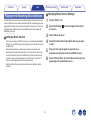
o Changing Music Service Settings
Playing from Streaming Music Services
1
2
A Music Service is an online music company that provides access to vast
music collections via free and/or paid subscriptions. Depending upon your
geographical location, there are several options to choose from. For more
information about which services are available in your area please visit
HEOSbyDenon.com
3
4
o Adding a Music Service
Once you’ve setup your HEOS account, you can add supported Music
Services to your HEOS system by tapping on the music service logo in
the Music tab.
Follow the instructions on the screen to add your username and
password for the selected music service. You only have to enter your
account information once as the HEOS account service will securely
remember your login information so you don’t have to enter it each
time you want to play music from the music service.
Additional Music Services may be available under Settings - Music
Services.
5
6
21
Tap the “Music” tab.
Select the Settings a icon in the upper left corner of
the screen.
Select “Music Sources”.
Select the name of the online Music Service you want
to edit.
Sign out, then sign in again to associate your
username and password with your HEOS account.
Select “Hide for Now” to prevent the service logo from
appearing on the main Music menu.
Contents
Setup
Use
Troubleshooting
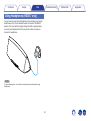
Using Headphones (HEOS 7 only)
.
You can listen to music through headphones by connecting your favorite
headphones to the 3.5 mm headphone jack on the side of the HEOS 7
speaker. The music will stop playing through the built in speakers when
you insert your headphones into the jack, and turn back on when you
remove the headphones.
NOTE
To prevent hearing loss, do not raise the volume level excessively when using
headphones.
22
Status LED
Appendix
Contents
Setup
Use
Troubleshooting
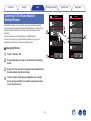
Listening To The Same Music In
Multiple Rooms
Status LED
Appendix
Rooms
Rooms
Drag one room into another to group them
Drag one room into another to group them
Dining
The HEOS system is a true multiroom audio system that automatically
synchronizes audio playback between multiple speakers so that the audio
coming from different rooms is perfectly in sync and always sounds
amazing!
You can easily add up to 32 speakers to your HEOS system.
You can join or group up to eight individual speakers into a group of
speakers that function as if they were a single speaker.
Dining
Song Name 1
Song Name 1
3
Living
2
Kitchen
Living+Kitchen
Song Name 2
Song Name 2
Kitchen
Bedroom
Drag a room out of this group to ungroup it
Song Name 3
o Grouping Rooms
3
4
Bedroom
Song Name 3
Tap the “Rooms” tab.
1
Press and hold your finger on room that is not playing
music.
.
1
2
4
Living
Drag it into the room that is playing music (indicated by
the red outline) and lift your finger.
The two rooms will be grouped together into a single
device group and both rooms will be playing the same
music in perfect sync.
23
Rooms
Music
Now Playing
Rooms
Music
Now Playing
Contents
Setup
Use
Troubleshooting
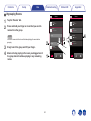
o Ungrouping Rooms
1
2
Tap the “Rooms” tab.
Appendix
Rooms
Rooms
Drag one room into another to group them
Drag one room into another to group them
Dining
Dining
Song Name 1
Press and hold your finger on room that you want to
remove from the group.
Song Name 1
Living
Living
Song Name 2
NOTE
Song Name 2
Living
You can not remove the first room that started playing the music before
grouping.
2
Drag it out of the group and lift your finger.
4
Kitchen
3
Kitchen
Song Name 4
Bedroom
Song Name 3
Bedroom
Song Name 3
Music will stop playing in the room you dragged out of
the group but will continue playing in any remaining
rooms.
1
.
3
4
Status LED
24
Rooms
Music
Now Playing
Rooms
Music
Now Playing
Contents
Setup
Use
Troubleshooting
o Grouping All Rooms (Party Mode)
Rooms
You can easily group the eight rooms together into Party Mode by
using a “pinch” gesture.
Drag one room into another to group them
Dining
2
Appendix
Rooms
Drag one room into another to group them
Song Name 1
Living
Place two fingers on the screen over the list of rooms.
Dining
Song Name 2
3
Quickly pinch your two fingers together and release.
4
Dining+Living+...
Song Name 1
Tap the “Rooms” tab.
Living
Kitchen
Song Name 3
Kitchen
Bedroom
All of your rooms will be joined together and begin
playing the same music in perfect sync.
Bedroom
Song Name 4
Drag a room out of this group to ungroup it
1
.
1
2
3
4
Status LED
25
Rooms
Music
Now Playing
Rooms
Music
Now Playing
Contents
Setup
Use
Troubleshooting
o Ungrouping All Rooms
You can easily ungroup all of your rooms and exit Party Mode by using
a “spread” gesture.
3
4
Appendix
Rooms
Rooms
Drag one room into another to group them
Drag one room into another to group them
Dining
Song Name 1
Tap the “Rooms” tab.
2
Dining
Song Name 1
Living
Dining
Place two fingers close together on the screen over list
of rooms.
3
Quickly spread your two fingers apart from each other
and release.
Song Name 2
Living
4
Kitchen
Song Name 3
Kitchen
Bedroom
Bedroom
Song Name 4
Drag a room out of this group to ungroup it
All of your rooms will be ungrouped and music will
stop playing in every room (except the original
“master” room that was playing before you grouped
the rooms together).
1
.
1
2
Status LED
26
Rooms
Music
Now Playing
Rooms
Music
Now Playing
Contents
Setup
Use
Troubleshooting
Status LED
Appendix
o Repeat and Shuffle Playback
Using the Now Playing Queue
You can control how the play queue plays the music that you have
added by using the Repeat and Shuffle controls. The playback
controls are visible on the Now Playing screen.
HEOS uses a Now Playing “Queue” to line up music that you want to listen
to. Music can be selected from any of your local or online music sources
(as long as they are not preprogrammed “radio” or “station” type streams).
This feature works similarly to how a jukebox works. You select something
to play (a song, album, playlist or even your entire music collection) and
add it to the “queue”. When you select something to play you will be asked
how you want to queue up your music.
1
2
o Play Now
Inserts the item into the queue after the currently playing track and
plays the selected item immediately.
o Play Now & Replace Queue
Clears the queue and plays the selected item immediately.
o Play Next
Inserts the item into the queue after the current song and plays it when
the current song ends.
o Add to End of Queue
Adds the item to the end of the queue.
27
Tap the “Now Playing” tab.
Tap the cover art to reveal the repeat b and shuffle c
controls.
Contents
Setup
Use
Troubleshooting
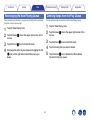
Rearranging the Now Playing Queue
3
4
Appendix
Deleting Songs from the Play Queue
Once you have songs lined up in your queue, you might want to rearrange
the order or remove some songs:
1
2
Status LED
You can remove songs one at a time from the Now Playing queue:
1
2
Tap the “Now Playing” tab.
Tap the Queue d icon in the upper right corner of the
screen.
3
4
5
Tap the Pencil e icon to enter Edit mode.
Rearrange the order of your queue by dragging the list
f icon (on the right side of each track row) up or
down.
28
Tap the “Now Playing” tab.
Tap the Queue d icon in the upper right corner of the
screen.
Tap the Pencil e icon to enter Edit mode.
Tap the track(s) that you want to delete.
Tap the Delete g icon to delete all of the selected
tracks from the play queue.
Contents
Setup
Use
Troubleshooting
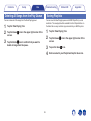
Deleting All Songs from the Play Queue
3
Appendix
Saving Playlists
You can remove all of the songs from the Now Playing queue:
1
2
Status LED
You can save the Now Playing queue as a HEOS Playlist that you can
recall later. The new playlist will be available from the Playlists button on
the Music tab on every controller app connected to your HEOS system.
Tap the “Now Playing” tab.
1
2
Tap the Queue d icon in the upper right corner of the
screen.
Tap the Delete g icon to confirm that you want to
delete all songs from the queue.
3
4
29
Tap the “Now Playing” tab.
Tap the Queue d icon in the upper right corner of the
screen.
Tap on the Save h icon.
Enter a name for your Playlist and tap the Save icon.
Contents
Setup
Use
Troubleshooting
Status LED
Appendix
MAKING SPEAKER ADJUSTMENTS
You can adjust specific settings for each of your HEOS Speakers in your
system:
1
2
3
Changing the Wireless Network
Connection
Select the Settings a icon located in the upper left
corner of the main Music menu to display the Settings
menu.
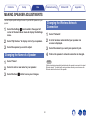
1
2
Select “My Devices” to display a list of your speakers.
3
4
Select the speaker you want to adjust.
Changing the Name of a Speaker
1
2
3
Select “Name”.
Select “Network”.
A list of wireless networks that your speaker can
access is displayed.
Select the network you want your speaker to join.
Wait as the speaker’s network connection is changed.
NOTE
Wired networking is automatically selected when the speaker is connected to a wired
Ethernet network. To switch back to using a wireless network you must remove the
Ethernet cable from the back of the speaker.
Select or enter a new name for your speaker.
Select the Save i button to save your changes.
30
Contents
Setup
Use
Troubleshooting
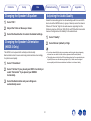
Selects the transcoding option for rebroadcasting audio from one HEOS
device to another HEOS device (or group of devices) across the network.
When set to “Normal”, high bit rate audio sources originating from the
firstdevice (such as AUX input, WAV, FLAC and PCM) will be transcoded
toensure the highest level of reliability for the audio stream.
Select “EQ”.
Adjust the Treble or Bass up or down.
Select the Reset button to restore the default settings.
1
2
Changing the Speaker’s Orientation
(HEOS 3 Only)
The HEOS 3 can be placed both vertically and horizontally.
Each orientation has it’s own sound tuning and should be set accordingly
for optimal sound quality.
1
2
3
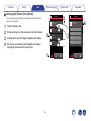
Appendix
Adjusting the Audio Quality
Changing the Speaker’s Equalizer
1
2
3
Status LED
Select “Quality”.
Select Normal (default) or High.
0 If you have selected High and you experience audio dropouts when streaming
sources from one device to other devices, please select Normal (default).
0 This setting does not affect the AUX input when played on the connected device
by itself (there are no other devices grouped to it), in which case the original
source quality and bit rate are maintained and there is no inherent delay.
Select “Orientation”.
Select “Vertical” if you placed your HEOS 3 vertically or
select “Horizontal” if you placed your HEOS 3
horizontally.
Select the Back button and your settings are
automatically saved.
31
Contents
Setup
Use
Troubleshooting
Creating a Stereo Pair (HEOS 3 Only)
Status LED
Appendix
Removing a Stereo Pair (HEOS 3 Only)
Two HEOS 3 speakers that have been grouped together in the Rooms tab
can be paired together to create a stereo speaker pair where one speaker
only outputs the left channel of audio and the other speaker outputs only
the right channel of audio.
If you have two HEOS 3 speakers that have been grouped and paired
together to output individual left and right channels of audio, you can
ungroup them in the Rooms tab then tell each speaker to output both left
and right channels of audio.
1
2
1
2
3
3
Select “Audio”.
Select “Left” if you want this speaker to play the left
channel of audio or select “Right” if you want this
speaker to play the right channel of audio.
Select the Back button and your settings are
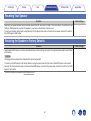
automatically saved.
Select “Audio”.
Select “Left+Right”.
Select the Back button and your settings are
automatically saved.
For information about ungrouping Rooms, please see “Ungrouping
Rooms” (v p. 24).
For information about grouping Rooms, please see “Grouping Rooms” (v p. 23).
Adjusting the Status Light Brightness
1
2
32
Select “Status Light”.
Adjust the brightness up or down or set the slider to
the OFF position to completely disable the status light.
Contents
Setup
Use
Troubleshooting
1
2
3
4
5
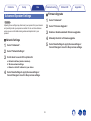
Caution
Adjusting these settings may disconnect your speaker from your network
and possibly render your speaker unusable. Do not use these features
unless you are comfortable making advanced adjustments to your
speaker.
o Network Settings
4
Appendix
o Firmware Upgrade
Advanced Speaker Settings
1
2
3
Status LED
Select “Advanced”.
Select “Network Settings”.
Scroll down to see all of the options for
a. Network Interface (wired or wireless)
b. Wireless network settings
c. Manual or static IP address for your device
Select Save Settings to apply the new settings or
Cancel Changes to revert to the previous settings.
33
Select “Advanced”.
Select “Firmware Upgrade”.
Enable or disable automatic firmware upgrades.
Manually check for a firmware upgrade.
Select Save Settings to apply the new settings or
Cancel Changes to revert to the previous settings.
Contents
Setup
Use
Troubleshooting
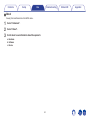
o About
Viewing Technical Details About the HEOS device.
1
2
3
Select “Advanced”.
Select “About”.
Scroll down to see information about the speaker’s
a. Hardware
b. Software
c. Device
34
Status LED
Appendix
Contents
Setup
Use
Troubleshooting
Status LED
Appendix
UPDATING YOUR SYSTEM
HEOS has the ability to add enhancements and updated functionality via your high speed Internet connection. When such updates become
available, you will be notified when you open the HEOS app. Follow the instructions on the screen to update the HEOS device and/or your
controller App.
In the event that you wish to manually initiate an update, please follow these steps:
1
2
3
Select the Settings a icon located in the upper left
corner of the main Music menu to display the Settings
menu.
Select “Check for Update”.
Follow the instructions on screen to install any
available updates to your HEOS system.
35
Contents
Setup
Use
Troubleshooting
Status LED
Appendix
ADVANCED FEATURES
There are a few advanced features of the HEOS system that you may want to explore once you become familiar with the basic operations. You can
access the advanced features of the HEOS system by following these steps:
1
2
Submit Diagnostics
Select the Settings a icon located in the upper left
corner of the main Music menu to display the Settings
menu.
If you are having trouble with your network or HEOS system, you may be
asked by Denon technical support personnel to select this option. This
feature will automatically send Denon technical support diagnostic
information about your HEOS system.
Select “Advanced Settings” to display a list the
available settings.
NOTE
No personal information is sent and your information will never be shared with
anyone.
36
Contents
Setup
Use
Troubleshooting
Sharing Music from your Mobile Device
Status LED
Appendix
Power Modes
The HEOS App has a feature called “Music Sharing” which can share the
local music stored on your mobile device to other HEOS app users on your
local network. To enable this feature, select Music Sharing, and set it on
“ON”.
The name of the device you are sharing from will appear as a new Local
Music source allowing other HEOS controller apps to browse and play
music from the your device.
o Network Standby
To save power, the device will automatically enter “Network Standby”
whenever there is no network access or playback for 20 minutes and
will automatically resume to full power whenever the device is selected
and playing music. There is no visible indicator or LED that will show
that the device is in Network Standby as it is a fully automatic function.
o Deep Standby
Resetting Your Controller App
The device also has the ability to automatically enter “Deep Standby”
whenever the wired or wireless network connection is removed for
more than 60 minutes in Network Standby. The front panel LED will
turn off during Deep Standby. To “wake” a HEOS device from Deep
Standby, you must press the volume or mute buttons which will
immediately turn on the front panel LED.
This feature will reset the control app to its original state when you first
installed it on your mobile device without requiring you to remove,
download, and reinstall it from the app store.
o Off
To completely turn off the power to the device you must remove the
mains plug from the power outlet.
37
Contents
Setup
Use
Troubleshooting
Status LED
Appendix
BASIC TROUBLESHOOTING
My speaker won’t connect to my network using the audio cable
Solution
Refer to Page
0 Make sure your mobile device is connected to your wireless network before setting up your speaker.
13
0 Alternatively, you can connect your speaker to your network router using the included Ethernet cable. Once connected via
14
Ethernet, the HEOS by Denon App should recognize the speaker and you can manually move it to your wireless network using
Settings/My Devices/Device_Name/Advanced/Network Settings.
I get a message “Device was not found”
Solution
Refer to Page
0 Move your speaker closer to your wireless router.
11
0 Your speakers and controller device may not be on the same network. Verify that the controller device is on the same network
13
0 Make sure you don’t have any other electronic devices interfering with your wireless network signals. Microwave ovens,
11
as your speakers. This is usually configured under the Settings feature on your device.
If you have more than one network, your device may hop to a different network as you move around your home.
cordless phones, and some televisions can cause wireless network interference.
0 If your speakers are located far away from your router, consider adding a Wireless Range Extender like the HEOS Extend.
5
0 In case your wireless router is incompatible with HEOS speaker, please use the optional HEOS Extend Wireless Range
5
Extender and hard-wire it to your router.
38
Contents
Setup
Use
Troubleshooting
Status LED
Appendix
Music cuts out or delays sometimes
Solution
Refer to Page
0 Make sure your Internet connection is operating correctly. If you are sharing your network with other users or devices, they may
5
0 Make sure your speakers are within range of your wireless network.
5
0 Make sure your speakers are not located near other electronic devices that could interfere with it’s wireless connectivity (like
5
be using most of your bandwidth (especially if they are streaming video).
microwave ovens, cordless phones, TVs, etc…).
I hear a delay when using the AUX Input with my TV
Solution
Refer to Page
0 If you are connecting the AUX input with your cable or satellite box for enjoying TV audio through multiple HEOS speakers, you
18
may hear a delay between when you see someone speak and when you hear the audio. This is because the HEOS system
must buffer the audio before it sends it out to the speakers so that it arrives at all speakers at the same time.
0 You can avoid this delay by listening only to the speaker which is directly connected to the set top box.
–
Connecting to a WPS Network
Solution
Refer to Page
If your wireless router support WPS (Wi-Fi Protected Setup™) your HEOS Wireless Speaker can optionally connect to your
network using the “Push Button” method by following these steps:
1.
2.
3.
4.
Press the WPS button on your router.
Within 2 minutes, Press and Hold the Connect button on the rear panel of the HEOS speaker for 5 seconds.
The LED on the front of the speaker will flash green for several seconds as it connects to your WPS router.
When the connection is complete, the LED on the front of the speaker will turn solid blue.
39
5
Contents
Setup
Use
Troubleshooting
Status LED
Appendix
Resetting Your Speaker
Solution
Refer to Page
Resetting your speaker will clear out the wireless network info, EQ, and name but retain it’s current software. You will have to use
Settings - Add Speaker to reconnect the speaker to your home network before it can be used.
To reset your speaker, gently insert a small paperclip into the Reset button hole on the back of the speaker and hold it in until the
front LED begins to flash amber.
–
Restoring the Speaker to Factory Defaults
Solution
Refer to Page
Restoring the HEOS device to its factory defaults will clear all of the settings and restore the original software which was installed
at the factory.
Caution
All settings will be erased and the software will likely be downgraded!
To restore your HEOS device to the factory defaults, unplug the power cable from the back of the HEOS device. Insert a small
paperclip into the Reset button hole on the back of the HEOS device, reconnect the power cable, and hold it in until the front LED
begins to flash amber.
* For further information, please visit HEOSbyDenon.com
40
–
Contents
Setup
Use
Troubleshooting
Status LED
Contact Denon
For U.S. & Canada only:
If you need further assistance with your HEOS product, please contact HEOS by Denon Customer Support Services below:
Website: www.HEOSbyDenon.com/Support
Email: [email protected]
Live Chat: www.HEOSbyDenon.com/LiveChat
Telephone: Toll Free (855) 499 2820
(M-F 10:00AM to 10:00PM EST / Sat 12:00PM to 8:00PM EST)
For the other region:
If you need additional help in solving problems, please contact Denon customer service in your area or visit HEOSbyDenon.com
41
Appendix
Contents
Setup
Use
Troubleshooting
Status LED
Appendix
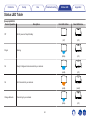
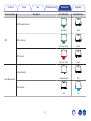
Status LED Table
[Example] HEOS 5
Device Operation
Front LED Action
Rear LED Action
.
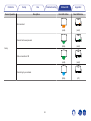
No AC power or Deep Standby
.
Off
Description
(off)
.
Booting
.
Plug in
(off)
(blink)
Ready-Configured and connected to your network
.
.
On
(off)
(off)
(solid)
.
Not Connected to your network
.
On
(solid)
.
Connecting to your network
.
Change Network
(solid)
(blink)
42
(off)
Contents
Setup
Device Operation
Use
Troubleshooting
Description
Status LED
Front LED Action
Appendix
Rear LED Action
.
.
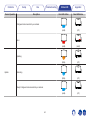
Not connected
(solid)
(solid)
.
.
Connect button was pressed
(blink)
Setup
(solid)
.
.
Cable connection is OK
(solid)
(solid)
.
.
Connecting to your network
(blink)
43
(off)
Contents
Setup
Device Operation
Use
Troubleshooting
Description
Status LED
Front LED Action
Appendix
Rear LED Action
.
.
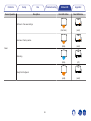
Configured and connected to your network
(off)
(solid)
.
.
Error
(solid)
(solid)
.
.
Updating
(blink)
.
.
Rebooting
(blink)
(off)
.
Ready-Configured and connected to your network
.
Update
(off)
(solid)
44
(off)
Contents
Setup
Device Operation
Use
Troubleshooting
Description
Status LED
Front LED Action
Appendix
Rear LED Action
.
.
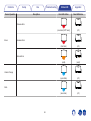
Soft reset - Clear user settings
(fast blink)
(solid)
.
.
Hard reset - Factory restore
(blink)
Reset
(solid)
.
.
Rebooting
(blink)
(off)
.
.
Ready-Not Configured
(solid)
45
(solid)
Contents
Setup
Device Operation
Use
Troubleshooting
Description
Status LED
Front LED Action
Appendix
Rear LED Action
.
.
Firmware Error
(slow blink (NOT fade))
.
Hardware Error
.
Errors
(off)
(fast blink)
(off)
.
.
Network Error
(solid)
(solid)
.
.
Volume Change
(quick blink)
(off)
(slow blink)
46
.
.
Mute
(off)
Contents
Setup
Device Operation
Use
Troubleshooting
Description
Status LED
Front LED Action
Appendix
Rear LED Action
.
.
a WPS session is active
(fast blink)
.
WPS connected
.
WPS
(solid)
(for 3 sec. solid)
(solid)
.
.
WPS time-out
(for 3 sec. solid)
(solid)
.
.
Network Standby
(dimmed solid)
Power Management
(off)
.
.
Deep Standby
(off)
47
(off)
Contents
Setup
Use
Troubleshooting
Status LED
Appendix
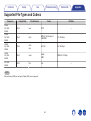
Supported File Types and Codecs
Frequency
Sample Rate
File Extension
Codec
Bit Rates
32 kHz
44.1 kHz
48 kHz
16 bit
wav
PCM
32 kHz
44.1 kHz
48 kHz
16 bit
mp3
MPEG-1 Audio Layer 3
CBR/VBR
32 - 320 kbps
32 kHz
44.1 kHz
48 kHz
16 bit
m4a
aac
AAC-LC
48 - 320 kbps
32 kHz
44.1 kHz
48 kHz
16 bit
wma
wma9
CBR
CBR:48 - 192 kbps
44.1 kHz
48 kHz
16 bit
flac
flac
---
---
NOTE
Files protected by DRM such as Apple’s Fairplay DRM, are not supported.
48
Contents
Setup
Use
Troubleshooting
Status LED
SPECIFICATIONS
Speaker Specifications
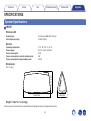
o HEOS 7
Wireless LAN
Network type:
Used frequency range:
Conforming to IEEE 802.11a/b/g/n
2.4 GHz, 5 GHz
General
Operating temperature:
Power supply:
Power consumption:
Power consumption in network standby mode:
Power consumption in deep standby mode:
41 °F - 95 °F (5 °C - 35 °C)
AC 100 – 240 V, 50/60 Hz
32 W
4W
0.45 W
Dimensions
7 63/64 (203)
Unit : in. (mm)
6 29/64 (164)
.
18 55/64 (479)
Weight : 9 lbs 14.7 oz (4.5 kg)
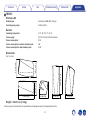
For the purpose of improvement, the specifications and design are subject to change without notice.
49
Appendix
Contents
Setup
Use
Troubleshooting
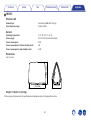
o HEOS 5
Wireless LAN
Network type:
Conforming to IEEE 802.11a/b/g/n
Used frequency range:
2.4 GHz, 5 GHz
General
Operating temperature:
41 °F - 95 °F (5 °C - 35 °C)
Power supply:
AC 120 V, 60 Hz (for North America)
Power consumption:
23 W
Power consumption in network standby mode:
4W
Power consumption in deep standby mode:
0.3 W
Dimensions
8 15/64 (209)
Unit : in. (mm)
6 17/32 (166)
.
11 37/64 (294)
Weight : 6 lbs 9.8 oz (3.0 kg)
For the purpose of improvement, the specifications and design are subject to change without notice.
50
Status LED
Appendix
Setup
Contents
Use
Troubleshooting
Status LED
o HEOS 3
Wireless LAN
Network type:
Conforming to IEEE 802.11a/b/g/n
Used frequency range:
2.4 GHz, 5 GHz
General
Operating temperature:
41 °F - 95 °F (5 °C - 35 °C)
Power supply:
AC 120 V, 60 Hz (for North America)
Power consumption:
22 W
Power consumption in network standby mode:
4W
Power consumption in deep standby mode:
0.3 W
Dimensions
5 3/64 (128)
10 23/32 (272)
5 5/8 (143)
6 9/64 (156)
Unit : in. (mm)
6 9/64 (156)
5 1/8 (130)
.
10 53/64 (275)
Weight : 4 lbs 3.0 oz (1.9 kg)
For the purpose of improvement, the specifications and design are subject to change without notice.
51
6 1/2 (165)
Appendix
Contents
Setup
Use
Troubleshooting
Status LED
Appendix
INFORMATION
Trademarks
.
.
Google Play is a trademark of Google Inc.
.
Wi-Fi Protected Setup™ logo is trademark of Wi-Fi Alliance.
.
Apple, the Apple logo, iPad, iPhone, and iPod touch are trademarks of
Apple Inc., registered in the U.S. and other countries. App Store is a
service mark of Apple Inc.
Adobe, the Adobe logo and Reader are either registered trademarks or
trademarks of Adobe Systems Incorporated in the United States and/or
other countries.
52
Contents
Setup
Use
Troubleshooting
Status LED
Appendix
License
n LGPL
o License Information for the Software Used in
the Unit
Open Source Used
ffmpeg
glibc
libmms
About GPL (GNU-General Public License), LGPL (GNU Lesser
General Public License) License
This product uses GPL/LGPL software and software made by other
companies.
After you purchase this product, you may procure, modify or distribute
the source code of the GPL/LGPL software that is used in the product.
Denon provides the source code based on the GPL and LPGL
licenses at the actual cost upon your request to our customer service
center. However, note that we make no guarantees concerning the
source code. Please also understand that we do not offer support for
the contents of the source code.
This section describes software license used for this unit. To
maintain the correct content, the original (English) is used.
n curl-7.24.0
COPYRIGHT AND PERMISSION NOTICE
Copyright (c) 1996 - 2014, Daniel Stenberg, <[email protected]>.
All rights reserved.
Permission to use, copy, modify, and distribute this software for any
purpose with or without fee is hereby granted, provided that the above
copyright notice and this permission notice appear in all copies.
THE SOFTWARE IS PROVIDED “AS IS”, WITHOUT WARRANTY OF
ANY KIND, EXPRESS OR IMPLIED, INCLUDING BUT NOT LIMITED
TO THE WARRANTIES OF MERCHANTABILITY, FITNESS FOR A
PARTICULAR PURPOSE AND NONINFRINGEMENT OF THIRD
PARTY RIGHTS. IN NO EVENT SHALL THE AUTHORS OR
COPYRIGHT HOLDERS BE LIABLE FOR ANY CLAIM, DAMAGES
OR OTHER LIABILITY, WHETHER IN AN ACTION OF CONTRACT,
TORT OR OTHERWISE, ARISING FROM, OUT OF OR IN
CONNECTION WITH THE SOFTWARE OR THE USE OR OTHER
DEALINGS IN THE SOFTWARE.
Except as contained in this notice, the name of a copyright holder shall
not be used in advertising or otherwise to promote the sale, use or
other dealings in this Software without prior written authorization of the
copyright holder.
n GPL
Open Source Used
bridge-utils
busybox
ebtables
Linux kernel
mtd-utils
ntfs-3g_ntfsprogs
ntpclient
u-boot
wireless-tools
Version
0.8.3
2.9
0.6.2
Version
2.8
1.21.1
2.0.10-4
2.6.30
1.4.3
2011.4.12
2007
2011.06
version 29
53
Contents
Setup
Use
Troubleshooting
n e2fsprogs-libs-1.40.8/lib/uuid
Status LED
Appendix
n expat-2.0.1
Redistribution and use in source and binary forms, with or without
modification, are permitted provided that the following conditions are
met:
Copyright (c) 1998, 1999, 2000 Thai Open Source Software Center Ltd
and Clark Cooper
Copyright (c) 2001, 2002, 2003, 2004, 2005, 2006 Expat maintainers.
1. Redistributions of source code must retain the above copyright
notice, and the entire permission notice in its entirety, including the
disclaimer of warranties.
2. Redistributions in binary form must reproduce the above copyright
notice, this list of conditions and the following disclaimer in the
documentation and/or other materials provided with the distribution.
3. The name of the author may not be used to endorse or promote
products derived from this software without specific prior written
permission.
Permission is hereby granted, free of charge, to any person obtaining a
copy of this software and associated documentation files (the
“Software”), to deal in the Software without restriction, including
without limitation the rights to use, copy, modify, merge, publish,
distribute, sublicense, and/or sell copies of the Software, and to permit
persons to whom the Software is furnished to do so, subject to the
following conditions:
The above copyright notice and this permission notice shall be
included in all copies or substantial portions of the Software.
THE SOFTWARE IS PROVIDED “AS IS”, WITHOUT WARRANTY OF
ANY KIND, EXPRESS OR IMPLIED, INCLUDING BUT NOT LIMITED
TO THE WARRANTIES OF MERCHANTABILITY, FITNESS FOR A
PARTICULAR PURPOSE AND NONINFRINGEMENT.
IN NO EVENT SHALL THE AUTHORS OR COPYRIGHT HOLDERS
BE LIABLE FOR ANY CLAIM, DAMAGES OR OTHER LIABILITY,
WHETHER IN AN ACTION OF CONTRACT, TORT OR OTHERWISE,
ARISING FROM, OUT OF OR IN CONNECTION WITH THE
SOFTWARE OR THE USE OR OTHER DEALINGS IN THE
SOFTWARE.
THIS SOFTWARE IS PROVIDED “AS IS” AND ANY EXPRESS OR
IMPLIED WARRANTIES, INCLUDING, BUT NOT LIMITED TO, THE
IMPLIED WARRANTIES OF MERCHANTABILITY AND FITNESS
FOR A PARTICULAR PURPOSE, ALL OF WHICH ARE HEREBY
DISCLAIMED. IN NO EVENT SHALL THE AUTHOR BE LIABLE FOR
ANY DIRECT, INDIRECT, INCIDENTAL, SPECIAL, EXEMPLARY, OR
CONSEQUENTIAL DAMAGES (INCLUDING, BUT NOT LIMITED TO,
PROCUREMENT OF SUBSTITUTE GOODS OR SERVICES; LOSS
OF USE, DATA, OR PROFITS; OR BUSINESS INTERRUPTION)
HOWEVER CAUSED AND ON ANY THEORY OF LIABILITY,
WHETHER IN CONTRACT, STRICT LIABILITY, OR TORT
(INCLUDING NEGLIGENCE OR OTHERWISE) ARISING IN ANY
WAY OUT OF THE USE OF THIS SOFTWARE, EVEN IF NOT
ADVISED OF THE POSSIBILITY OF SUCH DAMAGE.
54
Contents
Setup
Use
Troubleshooting
n getopt
Status LED
Appendix
n jQuery
http://cvsweb.netbsd.org/bsdweb.cgi/src/lib/libc/stdlib/
Copyright (c) 1987, 1993, 1994 The Regents of the University of
California. All rights reserved.
Copyright 2014 jQuery Foundation and other contributors
http://jquery.com/
Permission is hereby granted, free of charge, to any person obtaining a
copy of this software and associated documentation files (the
“Software”), to deal in the Software without restriction, including
without limitation the rights to use, copy, modify, merge, publish,
distribute, sublicense, and/or sell copies of the Software, and to permit
persons to whom the Software is furnished to do so, subject to the
following conditions:
The above copyright notice and this permission notice shall be
included in all copies or substantial portions of the Software.
THE SOFTWARE IS PROVIDED “AS IS”, WITHOUT WARRANTY OF
ANY KIND, EXPRESS OR IMPLIED, INCLUDING BUT NOT LIMITED
TO THE WARRANTIES OF MERCHANTABILITY, FITNESS FOR A
PARTICULAR PURPOSE AND NONINFRINGEMENT. IN NO EVENT
SHALL THE AUTHORS OR COPYRIGHT HOLDERS BE LIABLE FOR
ANY CLAIM, DAMAGES OR OTHER LIABILITY, WHETHER IN AN
ACTION OF CONTRACT, TORT OR OTHERWISE, ARISING FROM,
OUT OF OR IN CONNECTION WITH THE SOFTWARE OR THE USE
OR OTHER DEALINGS IN THE SOFTWARE.
Redistribution and use in source and binary forms, with or without
modification, are permitted provided that the following conditions are
met:
1. Redistributions of source code must retain the above copyright
notice, this list of conditions and the following disclaimer.
2. Redistributions in binary form must reproduce the above copyright
notice, this list of conditions and the following disclaimer in the
documentation and/or other materials provided with the distribution.
3. Neither the name of the University nor the names of its contributors
may be used to endorse or promote products derived from this
software without specific prior written permission.
THIS SOFTWARE IS PROVIDED BY THE REGENTS AND
CONTRIBUTORS “AS IS” AND ANY EXPRESS OR IMPLIED
WARRANTIES, INCLUDING, BUT NOT LIMITED TO, THE IMPLIED
WARRANTIES OF MERCHANTABILITY AND FITNESS FOR A
PARTICULAR PURPOSE ARE DISCLAIMED. IN NO EVENT SHALL
THE REGENTS OR CONTRIBUTORS BE LIABLE FOR ANY DIRECT,
INDIRECT, INCIDENTAL, SPECIAL, EXEMPLARY, OR
CONSEQUENTIAL DAMAGES (INCLUDING, BUT NOT LIMITED TO,
PROCUREMENT OF SUBSTITUTE GOODS OR SERVICES; LOSS
OF USE, DATA, OR PROFITS; OR BUSINESS INTERRUPTION)
HOWEVER CAUSED AND ON ANY THEORY OF LIABILITY,
WHETHER IN CONTRACT, STRICT LIABILITY, OR TORT
(INCLUDING NEGLIGENCE OR OTHERWISE) ARISING IN ANY
WAY OUT OF THE USE OF THIS SOFTWARE, EVEN IF ADVISED
OF THE POSSIBILITY OF SUCH DAMAGE.
55
Contents
Setup
Use
Troubleshooting
Status LED
Appendix
n libtar-1.2.11
n libpcap-1.4.0
Copyright (c) 1998-2003 University of Illinois Board of Trustees
Copyright (c) 1998-2003 Mark D. Roth
All rights reserved.
Developed by: Campus Information Technologies and Educational
Services, University of Illinois at Urbana-Champaign
Permission is hereby granted, free of charge, to any person obtaining a
copy of this software and associated documentation files (the “Software”),
to deal with the Software without restriction, including without limitation
the rights to use, copy, modify, merge, publish, distribute, sublicense,
and/or sell copies of the Software, and to permit persons to whom the
Software is furnished to do so, subject to the following conditions:
z Redistributions of source code must retain the above copyright
notice, this list of conditions and the following disclaimers.
z Redistributions in binary form must reproduce the above copyright
notice, this list of conditions and the following disclaimers in the
documentation and/or other materials provided with the distribution.
z Neither the names of Campus Information Technologies and
Educational Services, University of Illinois at Urbana-Champaign,
nor the names of its contributors may be used to endorse or promote
products derived from this Software without specific prior written
permission.
THE SOFTWARE IS PROVIDED “AS IS”, WITHOUT WARRANTY OF
ANY KIND, EXPRESS OR IMPLIED, INCLUDING BUT NOT LIMITED TO
THE WARRANTIES OF MERCHANTABILITY, FITNESS FOR A
PARTICULAR PURPOSE AND NONINFRINGEMENT.
IN NO EVENT SHALL THE CONTRIBUTORS OR COPYRIGHT
HOLDERS BE LIABLE FOR ANY CLAIM, DAMAGES OR OTHER
LIABILITY, WHETHER IN AN ACTION OF CONTRACT, TORT OR
OTHERWISE, ARISING FROM, OUT OF OR IN CONNECTION WITH
THE SOFTWARE OR THE USE OR OTHER DEALINGS WITH THE
SOFTWARE.
License: BSD
Redistribution and use in source and binary forms, with or without
modification, are permitted provided that the following conditions are
met:
1. Redistributions of source code must retain the above copyright
notice, this list of conditions and the following disclaimer.
2. Redistributions in binary form must reproduce the above copyright
notice, this list of conditions and the following disclaimer in the
documentation and/or other materials provided with the distribution.
3. The names of the authors may not be used to endorse or promote
products derived from this software without specific prior written
permission.
THIS SOFTWARE IS PROVIDED “AS IS” AND WITHOUT ANY
EXPRESS OR IMPLIED WARRANTIES, INCLUDING, WITHOUT
LIMITATION, THE IMPLIED WARRANTIES OF MERCHANTABILITY
AND FITNESS FOR A PARTICULAR PURPOSE.
56
Contents
Setup
Use
Troubleshooting
n mDNS 320.10.80
Status LED
Appendix
n mongoose
The majority of the source code in the mDNSResponder project is licensed
under the terms of the Apache License, Version 2.0, available from:
<http://www.apache.org/licenses/LICENSE-2.0>
To accommodate license compatibility with the widest possible range
of client code licenses, the shared library code, which is linked at
runtime into the same address space as the client using it, is licensed
under the terms of the “Three-Clause BSD License”.
The Linux Name Service Switch code, contributed by National ICT
Australia Ltd (NICTA) is licensed under the terms of the NICTA Public
Software Licence (which is substantially similar to the “Three-Clause BSD
License”, with some additional language pertaining to Australian law).
https://github.com/cesanta/mongoose/
Copyright (c) 2004-2013 Sergey Lyubka
Permission is hereby granted, free of charge, to any person obtaining a
copy of this software and associated documentation files (the
“Software”), to deal in the Software without restriction, including
without limitation the rights to use, copy, modify, merge, publish,
distribute, sublicense, and/or sell copies of the Software, and to permit
persons to whom the Software is furnished to do so, subject to the
following conditions:
The above copyright notice and this permission notice shall be
included in all copies or substantial portions of the Software.
THE SOFTWARE IS PROVIDED “AS IS”, WITHOUT WARRANTY OF
ANY KIND, EXPRESS OR IMPLIED, INCLUDING BUT NOT LIMITED
TO THE WARRANTIES OF MERCHANTABILITY, FITNESS FOR A
PARTICULAR PURPOSE AND NONINFRINGEMENT. IN NO EVENT
SHALL THE AUTHORS OR COPYRIGHT HOLDERS BE LIABLE FOR
ANY CLAIM, DAMAGES OR OTHER LIABILITY, WHETHER IN AN
ACTION OF CONTRACT, TORT OR OTHERWISE, ARISING FROM,
OUT OF OR IN CONNECTION WITH THE SOFTWARE OR THE USE
OR OTHER DEALINGS IN THE SOFTWARE.
57
Contents
Setup
Use
Troubleshooting
n openssl-1.0.0d
Status LED
Appendix
THIS SOFTWARE IS PROVIDED BY THE OpenSSL PROJECT “AS
IS” AND ANY EXPRESSED OR IMPLIED WARRANTIES,
INCLUDING, BUT NOT LIMITED TO, THE IMPLIED WARRANTIES
OF MERCHANTABILITY AND FITNESS FOR A PARTICULAR
PURPOSE ARE DISCLAIMED. IN NO EVENT SHALL THE OpenSSL
PROJECT OR ITS CONTRIBUTORS BE LIABLE FOR ANY DIRECT,
INDIRECT, INCIDENTAL, SPECIAL, EXEMPLARY, OR
CONSEQUENTIAL DAMAGES (INCLUDING, BUT NOT LIMITED TO,
PROCUREMENT OF SUBSTITUTE GOODS OR SERVICES; LOSS
OF USE, DATA, OR PROFITS; OR BUSINESS INTERRUPTION)
HOWEVER CAUSED AND ON ANY THEORY OF LIABILITY,
WHETHER IN CONTRACT, STRICT LIABILITY, OR TORT
(INCLUDING NEGLIGENCE OR OTHERWISE) ARISING IN ANY
WAY OUT OF THE USE OF THIS SOFTWARE, EVEN IF ADVISED
OF THE POSSIBILITY OF SUCH DAMAGE.
This product includes cryptographic software written by Eric Young
([email protected]). This product includes software written by Tim
Hudson ([email protected]).
Copyright (c) 1998-2011 The OpenSSL Project. All rights reserved.
Redistribution and use in source and binary forms, with or without
modification, are permitted provided that the following conditions are
met:
1. Redistributions of source code must retain the above copyright
notice, this list of conditions and the following disclaimer.
2. Redistributions in binary form must reproduce the above copyright
notice, this list of conditions and the following disclaimer in the
documentation and/or other materials provided with the distribution.
3. All advertising materials mentioning features or use of this software
must display the following acknowledgment:
“This product includes software developed by the OpenSSL Project
for use in the OpenSSL Toolkit. (http://www.openssl.org/)”
4. The names “OpenSSL Toolkit” and “OpenSSL Project” must not be
used to endorse or promote products derived from this software
without prior written permission. For written permission, please
contact [email protected].
5. Products derived from this software may not be called “OpenSSL”
nor may “OpenSSL” appear in their names without prior written
permission of the OpenSSL Project.
6. Redistributions of any form whatsoever must retain the following
acknowledgment:
“This product includes software developed by the OpenSSL Project
for use in the OpenSSL Toolkit (http://www.openssl.org/)”
58
Contents
Setup
Use
Troubleshooting
n portmap-6.0
Status LED
Appendix
n pstdint.h-0.1.12
Copyright (c) 1990 The Regents of the University of California.
z All rights reserved.
z Redistribution and use in source and binary forms, with or without
modification, are permitted provided that the following conditions are met:
z BSD License:
z Copyright (c) 2005-2011 Paul Hsieh
z All rights reserved.
z Redistribution and use in source and binary forms, with or without
modification, are permitted provided that the following conditions are
met:
1. Redistributions of source code must retain the above copyright
notice, this list of conditions and the following disclaimer.
2. Redistributions in binary form must reproduce the above copyright
notice, this list of conditions and the following disclaimer in the
documentation and/or other materials provided with the distribution.
3. A ll advertising materials mentioning features or use of this software
must display the following acknowledgement:
This product includes software developed by the University of
California, Berkeley and its contributors.
4. Neither the name of the University nor the names of its contributors
may be used to endorse or promote products derived from this
software without specific prior written permission.
1. Redistributions of source code must retain the above copyright
notice, this list of conditions and the following disclaimer.
2. Redistributions in binary form must reproduce the above copyright
notice, this list of conditions and the following disclaimer in the
documentation and/or other materials provided with the distribution.
3. The name of the author may not be used to endorse or promote
products derived from this software without specific prior written
permission.
z THIS SOFTWARE IS PROVIDED BY THE AUTHOR “AS IS” AND
ANY EXPRESS OR IMPLIED WARRANTIES, INCLUDING, BUT
NOT LIMITED TO, THE IMPLIED WARRANTIES OF
MERCHANTABILITY AND FITNESS FOR A PARTICULAR
PURPOSE ARE DISCLAIMED.
z IN NO EVENT SHALL THE AUTHOR BE LIABLE FOR ANY
DIRECT, INDIRECT, INCIDENTAL, SPECIAL, EXEMPLARY, OR
CONSEQUENTIAL DAMAGES (INCLUDING, BUT NOT LIMITED
TO, PROCUREMENT OF SUBSTITUTE GOODS OR SERVICES;
LOSS OF USE, DATA, OR PROFITS; OR BUSINESS
INTERRUPTION) HOWEVER CAUSED AND ON ANY THEORY OF
LIABILITY, WHETHER IN CONTRACT, STRICT LIABILITY, OR
TORT (INCLUDING NEGLIGENCE OR OTHERWISE) ARISING IN
ANY WAY OUT OF THE USE OF THIS SOFTWARE, EVEN IF
ADVISED OF THE POSSIBILITY OF SUCH DAMAGE.
z THIS SOFTWARE IS PROVIDED BY THE REGENTS AND
CONTRIBUTORS “AS IS” AND ANY EXPRESS OR IMPLIED
WARRANTIES, INCLUDING, BUT NOT LIMITED TO, THE IMPLIED
WARRANTIES OF MERCHANTABILITY AND FITNESS FOR A
PARTICULAR PURPOSE ARE DISCLAIMED. IN NO EVENT SHALL
THE REGENTS OR CONTRIBUTORS BE LIABLE FOR ANY DIRECT,
INDIRECT, INCIDENTAL, SPECIAL, EXEMPLARY, OR
CONSEQUENTIAL DAMAGES (INCLUDING, BUT NOT LIMITED TO,
PROCUREMENT OF SUBSTITUTE GOODS OR SERVICES; LOSS OF
USE, DATA, OR PROFITS; OR BUSINESS INTERRUPTION)
HOWEVER CAUSED AND ON ANY THEORY OF LIABILITY, WHETHER
IN CONTRACT, STRICT LIABILITY, OR TORT (INCLUDING
NEGLIGENCE OR OTHERWISE) ARISING IN ANY WAY OUT OF THE
USE OF THIS SOFTWARE, EVEN IF ADVISED OF THE POSSIBILITY
OF SUCH DAMAGE.
59
Contents
Setup
Use
Troubleshooting
n rl78flash 2000.3.1
Status LED
Appendix
n sqlite 2003.5.7
License
=======
The MIT License (MIT)
Copyright (c) 2012 Maxim Salov
SQLite Copyright
SQLite is in the
Public Domain
All of the code and documentation in SQLite has been dedicated to the
public domain by the authors. All code authors, and representatives of
the companies they work for, have signed affidavits dedicating their
contributions to the public domain and originals of those signed
affidavits are stored in a firesafe at the main offices of Hwaci. Anyone
is free to copy, modify, publish, use, compile, sell, or distribute the
original SQLite code, either in source code form or as a compiled
binary, for any purpose, commercial or non-commercial, and by any
means.
The previous paragraph applies to the deliverable code and
documentation in SQLite - those parts of the SQLite library that you
actually bundle and ship with a larger application. Some scripts used
as part of the build process (for example the “configure” scripts
generated by autoconf) might fall under other open-source licenses.
Nothing from these build scripts ever reaches the final deliverable
SQLite library, however, and so the licenses associated with those
scripts should not be a factor in assessing your rights to copy and use
the SQLite library.
All of the deliverable code in SQLite has been written from scratch. No
code has been taken from other projects or from the open internet.
Every line of code can be traced back to its original author, and all of
those authors have public domain dedications on file. So the SQLite
code base is clean and is uncontaminated with licensed code from
other projects.
Permission is hereby granted, free of charge, to any person obtaining a
copy of this software and associated documentation files (the
“Software”), to deal in the Software without restriction, including
without limitation the rights to use, copy, modify, merge, publish,
distribute, sublicense, and/or sell copies of the Software, and to permit
persons to whom the Software is furnished to do so, subject to the
following conditions:
The above copyright notice and this permission notice shall be
included in all copies or substantial portions of the Software.
THE SOFTWARE IS PROVIDED “AS IS”, WITHOUT WARRANTY OF
ANY KIND, EXPRESS OR IMPLIED, INCLUDING BUT NOT LIMITED
TO THE WARRANTIES OF MERCHANTABILITY, FITNESS FOR A
PARTICULAR PURPOSE AND NONINFRINGEMENT. IN NO EVENT
SHALL THE AUTHORS OR COPYRIGHT HOLDERS BE LIABLE FOR
ANY CLAIM, DAMAGES OR OTHER LIABILITY, WHETHER IN AN
ACTION OF CONTRACT, TORT OR OTHERWISE, ARISING FROM,
OUT OF OR IN CONNECTION WITH THE SOFTWARE OR THE USE
OR OTHER DEALINGS IN THE SOFTWARE.
60
Contents
Setup
Use
Troubleshooting
n strlcpy.c , v1.11
Status LED
Appendix
n tinyxml 2002.4.3
z Copyright (c) 1998 Todd C. Miller <[email protected]>
www.sourceforge.net/projects/tinyxml
Original file by Yves Berquin.
z Permission to use, copy, modify, and distribute this software for any
purpose with or without fee is hereby granted, provided that the
above copyright notice and this permission notice appear in all
copies.
z THE SOFTWARE IS PROVIDED “AS IS” AND THE AUTHOR
DISCLAIMS ALL WARRANTIES WITH REGARD TO THIS
SOFTWARE INCLUDING ALL IMPLIED WARRANTIES OF
MERCHANTABILITY AND FITNESS. IN NO EVENT SHALL THE
AUTHOR BE LIABLE FOR ANY SPECIAL, DIRECT, INDIRECT, OR
CONSEQUENTIAL DAMAGES OR ANY DAMAGES
WHATSOEVER RESULTING FROM LOSS OF USE, DATA OR
PROFITS, WHETHER IN AN ACTION OF CONTRACT,
NEGLIGENCE OR OTHER TORTIOUS ACTION, ARISING OUT OF
OR IN CONNECTION WITH THE USE OR PERFORMANCE OF
THIS SOFTWARE.
This software is provided 'as-is', without any express or implied
warranty. In no event will the authors be held liable for any damages
arising from the use of this software.
Permission is granted to anyone to use this software for any purpose,
including commercial applications, and to alter it and redistribute it
freely, subject to the following restrictions:
1. The origin of this software must not be misrepresented; you must
not claim that you wrote the original software. If you use this
software in a product, an acknowledgment in the product
documentation would be appreciated but is not required.
2. Altered source versions must be plainly marked as such, and must
not be misrepresented as being the original software.
3. This notice may not be removed or altered from any source
distribution.
n taglib-1.5
copyright : (C) 2002 - 2008 by Scott Wheeler
email : [email protected]
“The contents of this file are subject to the Mozilla Public License
Version 1.1 (the “License”); you may not use this file except in
compliance with the License. You may obtain a copy of the License at
http://www.mozilla.org/MPL/
Software distributed under the License is distributed on an “AS IS”
basis, WITHOUT WARRANTY OF ANY KIND, either express or
implied. See the License for the specific language governing rights and
limitations under the License.
61
Contents
Setup
Use
Troubleshooting
n Tremor
Status LED
Appendix
n zlib
http://wiki.xiph.org/index.php/Tremor
Copyright (c) 2002, Xiph.org Foundation
Redistribution and use in source and binary forms, with or without
modification, are permitted provided that the following conditions are
met:
http://www.zlib.net/
zlib.h -- interface of the ‘zlib’ general purpose compression library
version 1.2.3, July 18th, 2005
Copyright (C) 1995-2004 Jean-loup Gailly and Mark Adler
This software is provided ‘as-is’, without any express or implied
warranty. In no event will the authors be held liable for any damages
arising from the use of this software.
Permission is granted to anyone to use this software for any purpose,
including commercial applications, and to alter it and redistribute it
freely, subject to the following restrictions:
1. Redistributions of source code must retain the above copyright
notice, this list of conditions and the following disclaimer.
2. Redistributions in binary form must reproduce the above copyright
notice, this list of conditions and the following disclaimer in the
documentation and/or other materials provided with the distribution.
3. Neither the name of the Xiph.org Foundation nor the names of its
contributors may be used to endorse or promote products derived
from this software without specific prior written permission.
1. The origin of this software must not be misrepresented; you must
not claim that you wrote the original software. If you use this
software in a product, an acknowledgment in the product
documentation would be appreciated but is not required.
2. Altered source versions must be plainly marked as such, and must
not be misrepresented as being the original software.
3. This notice may not be removed or altered from any source
distribution.
THIS SOFTWARE IS PROVIDED BY THE COPYRIGHT HOLDERS
AND CONTRIBUTORS “AS IS” AND ANY EXPRESS OR IMPLIED
WARRANTIES, INCLUDING, BUT NOT LIMITED TO, THE IMPLIED
WARRANTIES OF MERCHANTABILITY AND FITNESS FOR A
PARTICULAR PURPOSE ARE DISCLAIMED. IN NO EVENT SHALL
THE FOUNDATION OR CONTRIBUTORS BE LIABLE FOR ANY
DIRECT, INDIRECT, INCIDENTAL, SPECIAL, EXEMPLARY, OR
CONSEQUENTIAL DAMAGES (INCLUDING, BUT NOT LIMITED TO,
PROCUREMENT OF SUBSTITUTE GOODS OR SERVICES; LOSS
OF USE, DATA, OR PROFITS; OR BUSINESS INTERRUPTION)
HOWEVER CAUSED AND ON ANY THEORY OF LIABILITY,
WHETHER IN CONTRACT, STRICT LIABILITY, OR TORT
(INCLUDING NEGLIGENCE OR OTHERWISE) ARISING IN ANY
WAY OUT OF THE USE OF THIS SOFTWARE, EVEN IF ADVISED
OF THE POSSIBILITY OF SUCH DAMAGE.
Jean-loup Gailly [email protected], Mark Adler
[email protected]
62
www.denon.com
63
D&M Holdings Inc.
3520 10321 20AD