1
ON-SCREEN MENU OPERATION
MENU NAVIGATION MAP
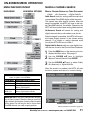
MANUAL CHANNEL SEARCH
MAIN MENU
MANUAL CHANNEL SEARCH HAS THREE CATEGORIES
SUB-MENU OPTIONS
• Cable
• Air (Antenna) • Digital Add-On
Cable Search looks for analog cable channels and
unscrambled (ClearQAM) digital cable channels.
This search may take several minutes. After the
search is complete, the HDTV will tune to the lowest ClearQAM channel, if available. Otherwise, the
HDTV will tune to the lowest analog cable channel.
Air(Antenna) Search will search for analog and
digital channels that are broadcast over-the-air.
After the search is complete, the HDTV will tune to
the lowest Digital channel or the lowest analog
channel. If no digital or analog channels were
found, the HDTV will tune to Video 1.
Digital Add-On Search adds any new digital channels that are found to the Channel Scan Database.
1
2
3
Press the MENU key on the remote control to
display the Main menu. (See page 7.)
Use the CURSOR keys to highlight
Manual Channel Search. Press ENTER.
Use the CURSOR keys to select Cable,
Air (Antenna), or Digital Add-On.
After the search is complete, the HDTV will exit
the menu system and return to normal viewing.
NOTE:“Not available” will appear on the screen
when an option is unavailable.
TUNING MODE
Analog RF
Digital RF
Video 1
Video 2/3 and
HDMI 1/2/3
UNAVAILABLE MENU OPTION(S)
Digital Caption
None (all Menu options available)
Manual Channel Search, Channel Scan
Memory, Digital Caption
Manual Channel Search, Channel Scan
Memory, Digital Caption, V-Guide
IMPORTANT FACT: This HDTV maintains only one database of digital channels. Therefore, when you search for
cable channels, the database of antenna digital channels
will be deleted. You will only be able to receive those
ClearQAM channels your cable company provides.
Manual Search Screen
(Menu operations continued on page 12.)
Need help? Visit our Web site at www.sanyoctv.com or Call 1-800-877-5032
11