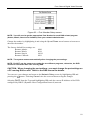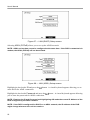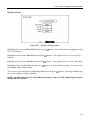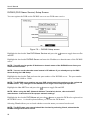
1
4-Channel Digital Video Recorder
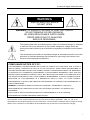
WARNING
RISK OF ELECTRIC SHOCK
DO NOT OPEN
WARNING: TO REDUCE THE RISK OF ELECTRIC SHOCK,
DO NOT REMOVE COVER (OR BACK).
NO USER-SERVICEABLE PARTS INSIDE.
REFER SERVICING TO QUALIFIED
SERVICE PERSONNEL.
The lightning flash with arrowhead symbol, within an equilateral triangle, is intended
to alert the user to the presence of uninsulated "dangerous voltage" within the
product's enclosure that may be of sufficient magnitude to constitute a risk of electric
shock.
The exclamation point within an equilateral triangle is intended to alert the user to the
presence of important operating and maintenance (servicing) instructions in the
literature accompanying the appliance.
COMPLIANCE NOTICE OF FCC:
THIS EQUIPMENT HAS BEEN TESTED AND FOUND TO COMPLY WITH THE LIMITS FOR A CLASS A
DIGITAL DEVICE, PURSUANT TO PART 15 OF THE FCC RULES. THESE LIMITS ARE DESIGNED TO
PROVIDE REASONABLE PROTECTION AGAINST HARMFUL INTERFERENCE WHEN THE EQUIPMENT
IS OPERATED IN A COMMERCIAL ENVIRONMENT. THIS EQUIPMENT GENERATES, USES, AND CAN
RADIATE RADIO FREQUENCY ENERGY AND IF NOT INSTALLED AND USED IN ACCORDANCE WITH
THE INSTRUCTION MANUAL, MAY CAUSE HARMFUL INTERFERENCE TO RADIO COMMUNICATIONS.
OPERATION OF THIS EQUIPMENT IN A RESIDENTIAL AREA IS LIKELY TO CAUSE HARMFUL
INTERFERENCE, IN WHICH CASE USERS WILL BE REQUIRED TO CORRECT THE INTERFERENCE AT
THEIR OWN EXPENSE.
WARNING: CHANGES OR MODIFICATIONS NOT EXPRESSLY APPROVED BY THE PARTY
RESPONSIBLE FOR COMPLIANCE COULD VOID THE USER’S AUTHORITY TO OPERATE THE
EQUIPMENT.
THIS CLASS OF DIGITAL APPARATUS MEETS ALL REQUIREMENTS OF THE CANADIAN
INTERFERENCE-CAUSING EQUIPMENT REGULATIONS.
The information in this manual is believed to be accurate as of the date of publication. IDIS, Co., Ltd. is not
responsible for any problems resulting from the use thereof. The information contained herein is subject to change
without notice. Revisions or new editions to this publication may be issued to incorporate such changes.
i
User’s Manual
Important Safeguards
1. Read Instructions
All the safety and operating instructions should be read before the
appliance is operated.
12. Servicing
Do not attempt to service this equipment yourself. Refer all servicing
to qualified service personnel.
2. Retain Instructions
The safety and operating instructions should be retained for future
reference.
13. Damage requiring Service
Unplug this equipment from the wall outlet and refer servicing to
qualified service personnel under the following conditions:
3. Cleaning
Unplug this equipment from the wall outlet before cleaning it. Do not
use liquid aerosol cleaners. Use a damp soft cloth for cleaning.
A.
B.
C.
D.
4. Attachments
Never add any attachments and/or equipment without the approval of
the manufacturer as such additions may result in the risk of fire,
electric shock or other personal injury.
5. Water and/or Moisture
Do not use this equipment near water or in contact with water.
6. Placing and Accessories
Do not misplace this equipment other than upright position. This
equipment has an open frame SMPS (Switching Mode Power Supply),
which may cause a fire or electric shock if anything is inserted into the
unit through the ventilation holes on the side of the equipment.
Do not place this equipment on an unstable cart, stand or table. The
equipment may fall, causing serious injury to a child or adult, and
serious damage to the equipment. Wall or shelf mounting should
follow the manufacturer's instructions, and should use a mounting kit
approved by the manufacturer.
When the power-supply cord or the plug has been damaged.
If liquid is spilled, or objects have fallen into the equipment.
If the equipment has been exposed to rain or water.
If the equipment does not operate normally by following the
operating instructions, adjust only those controls that are covered
by the operating instructions as an improper adjustment of other
controls may result in damage and will often require extensive
work by a qualified technician to restore the equipment to its
normal operation.
E. If the equipment has been dropped, or the cabinet damaged.
F. When the equipment exhibits a distinct change in performance —
this indicates a need for service.
14. Replacement Parts
When replacement parts are required, be sure the service technician
has used replacement parts specified by the manufacturer or that have
the same characteristics as the original part.
Unauthorized
substitutions may result in fire, electric shock or other hazards.
15. Safety Check
Upon completion of any service or repairs to this equipment, ask the
service technician to perform safety checks to determine that the
equipment is in proper operating condition.
16. Field Installation
This installation should be made by a qualified service person and
should conform to all local codes.
17. Correct Batteries
Warning: Risk of explosion if battery is replaced by an incorrect type.
Dispose of used batteries according to the instructions.
This equipment and cart combination should be moved with care.
Quick stops, excessive force, and uneven surfaces may cause the
equipment and cart combination to overturn.
7. Power Sources
This equipment should be operated only from the type of power source
indicated on the marking label. If you are not sure of the type of
power, please consult your equipment dealer or local power company.
8. Power Cords
Operator or installer must remove power and TNT connections before
handling the equipment.
9. Lightning
For added protection for this equipment during a lightning storm, or
when it is left unattended and unused for long periods of time, unplug
it from the wall outlet and disconnect the antenna or cable system.
This will prevent damage to the equipment due to lightning and
power-line surges.
10. Overloading
Do not overload wall outlets and extension cords as this can result in
the risk of fire or electric shock.
11. Objects and Liquids
Never push objects of any kind through openings of this equipment as
they may touch dangerous voltage points or short out parts that could
result in a fire or electric shock. Never spill liquid of any kind on the
equipment.
ii
18. Tmra
A manufacturer’s maximum recommended ambient temperature
(Tmra) for the equipment must be specified so that the customer and
installer may determine a suitable maximum operating environment
for the equipment.
19. Elevated Operating Ambient Temperature
If installed in a closed or multi-unit rack assembly, the operating
ambient temperature of the rack environment may be greater than
room ambient. Therefore, consideration should be given to installing
the equipment in an environment compatible with the manufacturer’s
maximum rated ambient temperature (Tmra).
20. Reduced Air Flow
Installation of the equipment in the rack should be such that the
amount of airflow required for safe operation of the equipment is not
compromised.
21. Mechanical Loading
Mounting of the equipment in the rack should be such that a hazardous
condition is not caused by uneven mechanical loading.
22. Circuit Overloading
Consideration should be given to connection of the equipment to
supply circuit and the effect that overloading of circuits might have on
over current protection and supply wiring. Appropriate consideration
of equipment nameplate ratings should be used when addressing this
concern.
23. Reliable Earthing (Grounding)
Reliable grounding of rack mounted equipment should be maintained.
Particular attention should be given to supply connections other than
direct conections to the branch circuit (e.g., use of power strips).
4-Channel Digital Video Recorder
Table of Contents
Chapter 1 — Introduction ..................................................................................1
Features ..........................................................................................................1
Technical Overview .......................................................................................2
Chapter 2 — Installation ....................................................................................3
Package Contents ..........................................................................................3
Required Installation Tools...........................................................................3
Connecting the Video Source.......................................................................3
Connecting the Loop Through Video...........................................................4
Connecting Audio ..........................................................................................4
Setting Unit for CVBS or VGA output ..........................................................4
Connecting the Monitor.................................................................................5
Connecting the Spot Monitor .......................................................................5
Connecting the RGB Monitor.......................................................................5
Connecting Alarms ........................................................................................5
AI 1 to 4 (Alarm In).......................................................................................6
GND (Ground) .............................................................................................6
ARI (Alarm Reset In)....................................................................................6
Alarm Out.....................................................................................................6
Connecting to the Network Port ...................................................................6
Connecting to the RS-232C Port ..................................................................7
Factory Reset .................................................................................................7
Connecting to the USB Port..........................................................................8
Connecting the Power Cord..........................................................................8
Chapter 3 — Configuration................................................................................9
Front Panel Controls .....................................................................................9
POWER LED ...............................................................................................9
REC LED .....................................................................................................9
ALARM LED ................................................................................................9
Camera Buttons (1 to 4) ............................................................................10
Quad/Sequence Button .............................................................................10
Menu Button ..............................................................................................10
PTZ Button.................................................................................................10
Panic Button ..............................................................................................10
Enter/Pause Button....................................................................................11
Arrow Buttons ............................................................................................11
Connecting the Infrared Remote Control ..................................................11
Turning on the Power ..................................................................................12
Initial Unit Setup...........................................................................................12
Quick Setup Screen .....................................................................................13
iii
User’s Manual
Normal Setup Screen...................................................................................14
System Information....................................................................................15
Date/Time Setup........................................................................................17
System Check Screen ...............................................................................20
Storage Screen..........................................................................................22
System Log Screen ...................................................................................24
System Shutdown......................................................................................24
Configuring Input Devices ..........................................................................25
Camera Setup Screen ...............................................................................25
Alarm In Setup Screen...............................................................................26
Motion Detector .........................................................................................27
Text-In Setup Screen.................................................................................28
Alarm Out Setup Screen............................................................................31
Audio Setup Screen...................................................................................32
RS232 Setup Screen .................................................................................33
Configuring Recording Settings.................................................................34
Record Mode Setup Screen ......................................................................34
Time-Lapse Record Mode Setup Screen ..................................................35
Time-Lapse Recording Schedule ..............................................................36
Pre-Event Recording Setup Screen ..........................................................37
Event Action Setup ......................................................................................38
Alarm In Event Action (Record) Setup Screen ..........................................38
Alarm In Event Action (Alarm Out) Setup Screen .....................................39
Alarm In Event Action (Notify) Setup Screen ............................................39
Motion Detector Event Action (Record) Setup Screen ..............................40
Motion Detector Event Action (Alarm Out) Setup Screen .........................41
Motion Detector Event Action (Notify) Setup Screen ................................41
Text-In Event Action (Record) Setup Screen ............................................42
Text-In Event Action (Alarm Out) Setup Screen........................................43
Text-In Event Action (Notify) Setup Screen...............................................43
Video Loss Event Action (Record) Setup Screen......................................44
Video Loss Event Action (Alarm Out) Setup Screen .................................45
Video Loss Event Action (Notify) Setup Screen ........................................45
Display Setup ...............................................................................................46
OSD (On-Screen Display) Setup...............................................................46
Main Monitoring Setup Screen ..................................................................48
Network Setup Screen.................................................................................49
LAN Setup Screen .....................................................................................50
Modem Setup ............................................................................................53
DVRNS (DVR Name Service) Setup Screen.............................................54
Callback Center Setup Screen ..................................................................55
Password Setup Screen ..............................................................................57
Config Screen...............................................................................................58
Clip Copy ...................................................................................................58
Load Default Setup ....................................................................................61
iv
4-Channel Digital Video Recorder
Load / Save Setup .....................................................................................61
Clear All Data.............................................................................................61
Chapter 4 — Operation ....................................................................................63
Turning on the Power ..................................................................................63
Live Monitoring ............................................................................................63
PTZ Mode ..................................................................................................64
Digital Zoom Mode.....................................................................................66
Recording Video...........................................................................................66
Recording Audio ..........................................................................................67
Playing Recorded Video..............................................................................67
Arrow Buttons ............................................................................................68
Enter/Pause Button....................................................................................68
Camera Buttons (1 to 4) ............................................................................68
Quad/Sequence Button .............................................................................68
Digital Zoom Playback Mode.....................................................................68
Searching Video ...........................................................................................69
Date/Time Search......................................................................................70
Calendar Search........................................................................................70
Event Search .............................................................................................71
Text-In Search ...........................................................................................73
Appendix A — USB Hard Disk Drive Preparation .........................................75
Preparing the USB-IDE hard disk drive in Windows 2000 .......................75
Preparing the USB-IDE hard disk drive in Windows 98 ...........................75
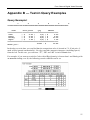
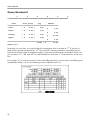
Appendix B — Text-In Query Examples.........................................................77
Query Example I ...........................................................................................77
Query Example II ..........................................................................................78
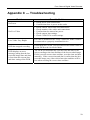
Appendix C — Troubleshooting .....................................................................79
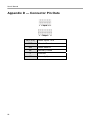
Appendix D — Connector Pin Outs ................................................................80
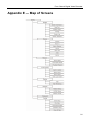
Appendix E — Map of Screens .......................................................................81
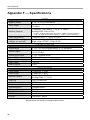
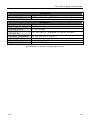
Appendix F — Specifications..........................................................................82
v
User’s Manual
List of Illustrations
Figure 1 — Typical DVR installation. ..........................................................................................1
Figure 2 — DVR rear panel. .......................................................................................................3
Figure 3 — Video input connectors. ...........................................................................................3
Figure 4 — Video Loop Through connectors..............................................................................4
Figure 5 — Audio In and Out connectors. ..................................................................................4
Figure 6 — CVBS / VGA switch..................................................................................................4
Figure 7 — Video Out connectors. .............................................................................................5
Figure 8 — VGA connector.........................................................................................................5
Figure 9 — Alarm Input connector strips. ...................................................................................5
Figure 10 — Alarm Output connector strips. ..............................................................................6
Figure 11 — Network connector. ................................................................................................6
Figure 12 — RS-232C connector. ..............................................................................................7
Figure 13 — Factory reset switch. ..............................................................................................7
Figure 14 — USB connector. ......................................................................................................8
Figure 15 — Power cord connector. ...........................................................................................8
Figure 16 — DVR front panel......................................................................................................9
Figure 17 — Infrared Remote Control. .....................................................................................11
Figure 18 — Admin Password screen. .....................................................................................12
Figure 19 — Quick Setup screen..............................................................................................13
Figure 20 — Normal Setup screen. ..........................................................................................14
Figure 21 — System Information screen. .................................................................................15
Figure 22 — System Information Change screen. ...................................................................15
Figure 23 — Virtual keyboard. ..................................................................................................16
Figure 24 — System Upgrade screen. .....................................................................................17
Figure 25 — Date/Time setup screen.......................................................................................17
Figure 26 — Holiday Setup screen...........................................................................................18
Figure 27 — Time Sync screen. ...............................................................................................19
Figure 28 — System Check (Config.) screen. ..........................................................................20
Figure 29 — System Check (Alarm Out / Notify) screen. .........................................................21
Figure 30 — Storage screen.....................................................................................................22
Figure 31 — S.M.A.R.T. Setup screen. ....................................................................................23
Figure 32 — System Log screen. .............................................................................................24
Figure 33 — Device menu screen. ...........................................................................................25
Figure 34 — Camera setup screen...........................................................................................25
Figure 35 — PTZ Device list. ....................................................................................................26
Figure 36 — Alarm In setup screen. .........................................................................................26
Figure 37 — Motion Detector setup screen. .............................................................................27
Figure 38 — Motion Detection Zone screen.............................................................................27
Figure 39 — Text-In Setup screen............................................................................................28
Figure 40 — Text-In (Generic Text) Setup screen. ..................................................................29
Figure 41 — Text-In (E-POS) Setup screen. ............................................................................30
Figure 42 — Alarm Out setup screen. ......................................................................................31
Figure 43 — Alarm Out Schedule screen. ................................................................................31
Figure 44 — Audio Setup screen..............................................................................................32
Figure 45 — RS232 setup screen. ...........................................................................................33
Figure 46 — Record Mode Setup screen. ................................................................................34
Figure 47 — Time-Lapse Record Setup screen. ......................................................................35
Figure 48 — Time-Lapse Recording Schedule screen.............................................................36
Figure 49 — Pre-Event Record Setup screen. .........................................................................37
vi
4-Channel Digital Video Recorder
Figure 50 — Alarm In Event Action (Record) setup screen......................................................38
Figure 51 — Alarm In Event Action (Alarm Out) setup screen.................................................39
Figure 52 — Alarm In Event Action (Notify) setup screen. .......................................................39
Figure 53 — Motion Detector Event Action (Record) setup screen. ........................................40
Figure 54 — Motion Detector Event Action (Alarm Out) setup screen.....................................41
Figure 55 — Motion Detector Event Action (Notify) setup screen............................................41
Figure 56 — Text-In Event Action (Record) setup screen........................................................42
Figure 57 — Text-In Event Action (Alarm Out) setup screen. ..................................................43
Figure 58 — Text-In Event Action (Notify) setup screen. .........................................................43
Figure 59 — Video Loss Event Action (Record) setup screen. ................................................44
Figure 60 — Video Loss Event Action (Alarm Out) setup screen. ...........................................45
Figure 61 — Video Loss Event Action (Notify) setup screen. ..................................................45
Figure 62 — OSD Setup screen. ..............................................................................................46
Figure 63 — Main Monitoring Setup screen. ............................................................................48
Figure 64 — Network Setup screen..........................................................................................49
Figure 65 — LAN (Manual) Setup screen.................................................................................50
Figure 66 — Port Number Setup screen. .................................................................................51
Figure 67 — LAN (DHCP) Setup screen. .................................................................................52
Figure 68 — LAN (ADSL) Setup screen. ..................................................................................52
Figure 69 — Modem Setup screen...........................................................................................53
Figure 70 — DVRNS Setup screen. .........................................................................................54
Figure 71 — Callback Center (LAN) Setup screen...................................................................55
Figure 72 — Callback Center (Modem) Setup screen..............................................................56
Figure 73 — Password setup screen........................................................................................57
Figure 74 — Config screen. ......................................................................................................58
Figure 75 — Clip Copy screen..................................................................................................59
Figure 76 — Disk Partition Selection screen. ...........................................................................60
Figure 77 — Load / Save Setup screen....................................................................................61
Figure 78 — Live Monitoring (Text-In) screen. .........................................................................64
Figure 79 — PTZ Menu. ...........................................................................................................65
Figure 80 — PTZ Preset screen. ..............................................................................................65
Figure 81 — Preset Apply screen.............................................................................................66
Figure 82 — Playback (Text-In) screen. ...................................................................................67
Figure 83 — Digital Zoom screen. ............................................................................................69
Figure 84 — Enlarged Digital Zoom screen..............................................................................69
Figure 85 — Search Menu........................................................................................................69
Figure 86 — Date/Time Search screen. ...................................................................................70
Figure 87 — Calendar Search screen. .....................................................................................70
Figure 88 — Event Log screen. ................................................................................................71
Figure 89 — Event Search (by Event) screen. .........................................................................72
Figure 90 — Event Search (by Camera) screen. .....................................................................72
Figure 91 — Text-In Log screen. ..............................................................................................73
Figure 92 — Text-In Search screen..........................................................................................73
vii
User’s Manual
viii
Four-Channel Digital Video Recorder
Chapter 1 — Introduction
Features
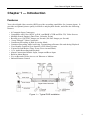
Your color digital video recorder (DVR) provides recording capabilities for 4 camera inputs. It
provides exceptional picture quality in both live and playback modes, and offers the following
features:
y
y
y
y
y
y
y
y
y
y
y
y
y
y
4 Composite Input Connectors
Compatible with Color (NTSC or PAL) and B&W (CCIR and EIA-170) Video Sources
Multiple Search Engines (Date/Time, Calendar, Event)
Records up to 120 NTSC Images per Second (100 PAL Images per Second)
“Loop-Through” Video Connectors
Continuous Recording in Disk Overwrite Mode
Continues Recording while Archiving, Transmitting to Remote Site and during Playback
User-friendly Graphical User Interface (GUI) Menu System
Various Record Modes (Time, Event, Pre-event and Panic)
1 Ch. Audio Recording and Playback
Alarm Connections Include: Input, Output and Reset Input
Built-in Alarm Buzzer
Live or Recorded Video Access via Ethernet or Modem
Infrared Remote Control
Figure 1 — Typical DVR installation.
1
User’s Manual
Technical Overview
Your DVR can replace both a time-lapse VCR and a multiplexer in a security installation. However,
it has many features that make it much more powerful and easier to use than even the most
advanced VCR.
The DVR converts analog NTSC or PAL video to digital images and records them on a hard disk
drive. Using a hard disk drive allows you to access recorded video almost instantaneously; there is
no need to rewind tape. The technology also allows you to view recorded video while the DVR
continues recording video.
Digitally recorded video has several advantages over analog video recorded on tape. There is no
need to adjust tracking. You can freeze frames, fast forward, fast reverse, slow forward and slow
reverse without image streaking or tearing. Digital video can be indexed by time or events, and you
can instantly view video after selecting the time or event.
Your DVR can be set up for event or time-lapse recording. You can define times to record, and the
schedule can change for different days of the week and user defined holidays.
The DVR can be set up to alert you when the hard disk drive is full, or it can be set up to record over
the oldest video once the disk is full.
Your DVR uses a proprietary encryption scheme making it nearly impossible to alter video.
You can view live video, search image, and control your DVR remotely by connecting via modem
or Ethernet. There is a USB port that can used to back up the clip file video to USB-IDE hard disk
drives, USB CD-RW drives or flash drives.
2
Four-Channel Digital Video Recorder
Chapter 2 — Installation
Package Contents
The package contains the following:
y
y
y
y
y
Digital Video Recorder
Power Cord
User’s Manual (This Document)
RAS Software CD and User’s Manual
Infrared Remote Control
Required Installation Tools
No special tools are required to install the DVR. Refer to the installation manuals for the other
items that make up part of your system.
Figure 2 — DVR rear panel.
Connecting the Video Source
Figure 3 — Video input connectors.
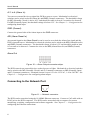
Connect the coaxial cables from the video sources to the BNC Video In connectors.
3
User’s Manual
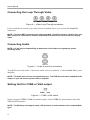
Connecting the Loop Through Video
Figure 4 — Video Loop Through connectors.
If you would like to connect your video source to another device, you can use the Loop BNC
connectors.
NOTE: The Loop BNC connectors are auto terminated. Do NOT connect a cable to the Loop
BNC unless it is connected to another terminated device because it will cause poor quality
video.
Connecting Audio
NOTE: It is the user’s responsibility to determine if local laws and regulations permit
recording audio.
Figure 5 — Audio In and Out connectors.
Your DVR can record audio. Connect the audio source to Audio In. Connect Audio Out to your
amplifier.
NOTE: The audio input is from an amplified source. The DVR does not have amplified audio
output, so you will need a speaker with an amplifier.
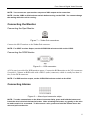
Setting Unit for CVBS or VGA output
Figure 6 — CVBS / VGA switch.
Set the switch to CVBS or VGA for monitor output. Select CVBS for spot monitor, and select
VGA for RGB monitor.
NOTE: The DVR may not support some LCD monitors or some monitors don’t support Multi
Sync.
4
Four-Channel Digital Video Recorder
NOTE: You cannot use spot monitor output and VGA output at the same time.
NOTE: Set the CVBS or VGA selector switch before turning on the DVR. You cannot change
the setting while the unit is running.
Connecting the Monitor
Connecting the Spot Monitor
Figure 7 — Video Out connectors.
Connect the SPOT monitor to the Video Out connector.
NOTE: For SPOT monitor Output, set the CVBS/VGA selector switch to the CVBS.
Connecting the RGB Monitor
Figure 8 — VGA connector.
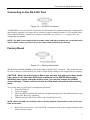
A VGA port is provided for RGB monitor output. Connect the RGB monitor to the VGA connector
if required. Connect an RGB cable with a DB-15 (male) connector, which is usually less than 10
feet, to the DVR connector.
NOTE: For RGB monitor output, set the CVBS/VGA selector switch to the VGA.
Connecting Alarms
Figure 9 — Alarm Input connector strips.
NOTE: To make connections on the Alarm Connector Strip, press and hold the button and
insert the wire in the hole below the button. After releasing the button, tug gently on the wire
to make certain it is connected. To disconnect a wire, press and hold the button above the
wire and pull out the wire.
5
User’s Manual
AI 1 to 4 (Alarm In)
You can use external devices to signal the DVR to react to events. Mechanical or electrical
switches can be wired to the AI (Alarm In) and GND (Ground) connectors. The threshold voltage
for NC (Normally Closed) is above 4.3V and should be stable at least 0.5 seconds to be detected.
For NO (Normally Open), the threshold voltage is below 0.3V. See Chapter 3 — Configuration for
configuring alarm input.
GND (Ground)
Connect the ground side of the Alarm input to the GND connector.
ARI (Alarm Reset In)
An external signal to the Alarm Reset In can be used to reset both the Alarm Out signal and the
DVR’s internal buzzer. Mechanical or electrical switches can be wired to the ARI (Alarm Reset In)
and GND (Ground) connectors. The threshold voltage is below 0.3V and should be stable at least
0.5 seconds to be detected. Connect the wires to the ARI (Alarm Reset In) and GND (Ground)
connectors.
Alarm Out
Figure 10 — Alarm Output connector strips.
The DVR can activate external devices such as buzzers or lights. Mechanical or electrical switches
can be wired to the NC (Normally Closed) and C (Common) connectors or NO (Normally Open)
and C (Common) connectors. Permitted current is up to 0.5 A for 125 VAC, 1 A for 30 VDC. See
Chapter 3 — Configuration for configuring alarm output.
Connecting to the Network Port
Figure 11 — Network connector.
The DVR can be networked using the 10/100Mb Ethernet connector. Connect a Cat5 cable with an
RJ-45 jack to the DVR connector. The DVR can be networked with a computer for remote
monitoring, searching, configuration and software upgrades. See Chapter 3 — Configuration for
configuring the Ethernet connections.
6
Four-Channel Digital Video Recorder
Connecting to the RS-232C Port
Figure 12 — RS-232C connector.
An RS-232C port is provided to connect an external modem for remote monitoring, configuration
and software upgrades, text input, and to connect a remote control keyboard. Use a modem cable
with a DB-9S (female) connector to connect to the DVR. See Chapter 3 — Configuration for
configuring the modem.
NOTE: The DVR is not supplied with a modem cable, and many modems are not supplied with
cables. Make certain you have the correct cable when purchasing the modem.
Factory Reset
Figure 13 — Factory reset switch.
The DVR has a Factory Reset switch to the right of the RS-232C connector. This switch will only
be used on the rare occasions that you want to return all the settings to the original factory settings.
CAUTION: When using the Factory Reset, you will lose any setting you have made.
If you want to use the same DVR name registered on the DVRNS server after
initializing the system using the factory reset, you need to contact the DVRNS
server manager. Please record and save the help desk information before factory
reset.
To reset the unit, you will need a straightened paperclip:
1. Turn the DVR off.
2. Turn it on again.
3. While the DVR is initializing, poke the straightened paperclip in the unlabeled hole to the
right of the RS-232C connector.
4. Hold the switch until all the LEDs on the Front Panel are lit.
NOTE: When the DVR successfully resets to factory defaults all the LEDs on the Front Panel
flash three times.
5.
Release the reset switch. All of the DVR’s settings are now at the original settings it had
when it left the factory.
7
User’s Manual
Connecting to the USB Port
Figure 14 — USB connector.
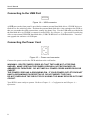
A USB port on the front panel is provided to connect external hard disk drives, CD-RW drives or
flash drives for archiving video. Position the external hard disk drive close enough to the DVR so
that you can make the cable connections, usually less than 6 feet. Use the USB cable provided with
the hard disk drive or CD-RW to connect it to the DVR. See Chapter 4 — Operation for archiving
video to an external USB-IDE hard disk drive, USB CD-RW drive or USB flash drive. You also
can upgrade the software via USB port.
Connecting the Power Cord
Figure 15 — Power cord connector.
Connect the power cord to the DVR and then to the wall outlet.
WARNING: ROUTE POWER CORDS SO THAT THEY ARE NOT A TRIPPING
HAZARD. MAKE CERTAIN THE POWER CORD WILL NOT BE PINCHED OR
ABRADED BY FURNITURE. DO NOT INSTALL POWER CORDS UNDER RUGS OR
CARPET.
THE POWER CORD HAS A GROUNDING PIN. IF YOUR POWER OUTLET DOES NOT
HAVE A GROUNDING PIN RECEPTACLE, DO NOT MODIFY THE PLUG.
DO NOT OVERLOAD THE CIRCUIT BY PLUGGING TOO MANY DEVICES IN TO ONE
CIRCUIT.
Your DVR is now ready to operate. Refer to Chapter 3 — Configuration and Chapter 4 —
Operation.
8
Four-Channel Digital Video Recorder
Chapter 3 — Configuration
NOTE: Your DVR should be completely installed before proceeding. Refer to Chapter 2 —
Installation.
Front Panel Controls
Figure 16 — DVR front panel.
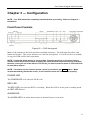
Many of the buttons on the front panel have multiple functions. The following describes each
button and control. Take a few minutes to review the descriptions. You will use these to initially
set up your DVR and for daily operations.
NOTE: A separate Alarm button is not provided. Pressing any keys on the front panel or
remote control resets alarm output including the internal buzzer when the alarm is activated.
However, when you are in the menu or PTZ mode, you have to exit the menu or PTZ mode first
to reset alarm output.
NOTE: The sensor for the infrared remote control is just above the PANIC button. Make
certain that nothing blocks the sensor, or the remote control will not function properly.
POWER LED
The POWER LED is lit when the DVR is On.
REC LED
The REC LED is lit when the DVR is recording. When the DVR is in the panic recording mode,
the REC LED flickers.
ALARM LED
The ALARM LED is lit when alarm output or internal buzzer is activated.
9
User’s Manual
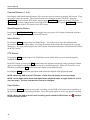
Camera Buttons (1 to 4)
Pressing the individual camera buttons will cause the selected camera to display full screen. They
are used to enter passwords. The camera buttons also function in the PTZ mode. Pressing
CAMERA 1 zooms in in the PTZ mode, and pressing CAMERA 2 zooms out in the PTZ mode.
CAMERA 3 is used to control near focus of the PTZ camera in the PTZ mode. CAMERA 4 is used to
control far focus of the PTZ camera in the PTZ mode.
Quad/Sequence Button
Pressing the QUAD/SEQUENCE button toggles between quad (2x2) display mode and sequence
mode. It also loads a Preset Apply in the PTZ mode.
Menu Button
Pressing the MENU button enters the Main Menu. You will need to enter the administrator
password to access the Main Menu. Pressing the button again closes the current menu or setup
dialog box. It is also used to display the search menu in the playback mode, and load the PTZ Menu
in the PTZ mode.
PTZ Button
Pressing the PTZ button opens a Pan/Tilt/Zoom screen which allows you to control properly
configured cameras.
In the PTZ mode, pressing the PTZ button enters the digital zoom mode, and pressing the button
again in the digital zoom mode returns to the live monitoring mode. When a PTZ device is not
installed, pressing the PTZ button enters the digital zoom mode directly.
Pressing the PTZ button in the playback mode enters the digital zoom playback mode.
NOTE: When the DVR is in the PTZ mode, a white line will display around the image.
NOTE: In the digital zoom mode and digital zoom playback mode, a bright small box is laid
over the image. The box indicates the area to be enlarged.
Panic Button
Pressing the PANIC button activates panic recording, so the DVR will record video regardless of
the time-lapse or event recording schedule. Press the button again to release the panic recording.
NOTE: When the DVR is in the Panic recording mode, the REC LED flickers and
on each camera screen.
10
displays
Four-Channel Digital Video Recorder
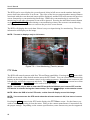
Enter/Pause Button
This button selects a highlighted item or completes an entry that you have made. Pressing the
ENTER/PAUSE button in the live monitoring mode freezes the current live screen, and the screen
displays
. Press the button again to return to the live monitoring mode.
Pressing the button in the playback mode will pause the video, and the screen displays . Pressing
ENTER/PAUSE button again in the pause mode goes to the live monitoring mode.
In the digital zoom mode, pressing the button enlarges a specific area of the screen. A
on the enlarged screen.
displays
Arrow Buttons
Arrow buttons are used to navigate through menus and GUI. They are also used to control Pan and
Tilt in the PTZ mode, and to move the specific area of screen that you want to enlarge in the digital
zoom mode.
In the playback mode, the Up-Arrow button selects the next image, and the Down-Arrow button
selects the previous image. Pressing the Left-Arrow button plays video backward at high speed.
Pressing the button again toggles the playback speed from ,
and
. The screen displays
,
and
respectively. Pressing the Right-Arrow button plays video forward at high
speed. Pressing the button again toggles the playback speed from ,
and
. The screen
and
respectively.
displays ,
Entering Playback mode from Live Monitoring mode can be user password protected.
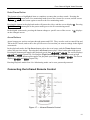
Connecting the Infrared Remote Control
Figure 17 — Infrared Remote Control.
11
User’s Manual
If a DVR unit ID is set to 0, the infrared remote control will control that DVR without any
additional operations. (Refer to the System Information setup screen in this chapter for further
information on setting the Unit ID.) If the Unit ID is 1 to 4, you must to press the ID button on the
remote control and number button (1 to 4) in order to control that DVR. The icon displays when
the DVR can be controlled by the infrared remote control. If the Unit ID of two or more DVRs is
set to 0, those DVRs will all react to the infrared remote control at the same time.
NOTE: The functions of the infrared remote control buttons are identical to the front panel
buttons.
Turning on the Power
Connecting the power cord to the DVR turns on the unit. The unit will take approximately 60
seconds to initialize.
Initial Unit Setup
Before using your DVR for the first time, you will want to establish the initial settings. This
includes items such as time and date, display language, camera, audio, remote control, record mode,
network and password. Your DVR can be set up using various screens and dialog boxes.
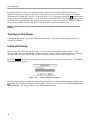
Press the MENU button on the front panel or remote control to enter the setup screens. The Admin
Password screen appears.
Figure 18 — Admin Password screen.
Enter the password by pressing the appropriate combination of camera number buttons and then the
button. The factory default password is 4321. There are two Setup screens: Quick Setup and
Normal Setup. The factory default is the Quick Setup screen.
12
Four-Channel Digital Video Recorder
Quick Setup Screen
Figure 19 — Quick Setup screen.
The Quick Setup screen allows you to set up the most commonly used features of your DVR. Use
button lets you make your
the arrow buttons to move through the options. Pressing the
selections.
Highlight the box beside Quick Setup and press the
button to toggle between On and Off. If
you select Off, you will use the Normal Setup screen to change the DVR’s settings.
Highlight the first box beside Recording Speed/Quality, and select recording speeds from as few
as 0.5 ips to as fast as 30 ips (25 ips for PAL).
NOTE: The DVR has a maximum recording speed of 30 ips per camera; however, the
recording speed may not be achieved when averaged over all cameras.
Highlight the second box beside Recording Speed/Quality, and select from Very High, High,
Standard and Low.
Highlight the box beside Audio Recording and select either On or Off. When it is set to On,
CAMERA 1 is automatically associated with the audio.
NOTE: It is the user’s responsibility to determine if local laws and regulations permit
recording audio.
Highlight the box beside Sequence Dwell Time and select from 3 to 60 seconds for the camera
sequence dwell time.
Selecting System Information enters a screen where you can set up system information.
Selecting Storage… enters a screen where you can check the storage status.
Selecting Camera… enters a screen where you can set up camera information.
13
User’s Manual
Selecting Network Setup… enters a screen where you can set up network information.
Selecting Password… enters a screen where you will be able to change passwords.
Selecting Date/Time… enters a screen where you will be able to set the DVR’s time and date.
Selecting System Shutdown shuts the DVR down. When shutting down the DVR, you need to
confirm that you want to shut down the unit, you will be asked for an administrator password.
NOTE: The Quick Setup mode will be released automatically when the user changes the DVR
settings remotely using the RAS (Remote Administration Software) program.
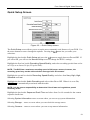
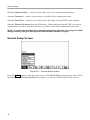
Normal Setup Screen
Figure 20 — Normal Setup screen.
Press the MENU button to enter the setup screen. If the Quick Setup screen appears, turn it off as
described above. The Normal Setup screen gives you access to all the DVR’s setup screens.
14
Four-Channel Digital Video Recorder
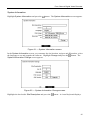
System Information
Highlight System Information and press the
button. The System Information screen appears.
Figure 21 — System Information screen.
In the System Information screen, you can name the site location, assign a unit ID number, select
button. The
the language to use and upgrade the software. Highlight Change and press the
System Information Change screen appears.
Figure 22 — System Information Change screen.
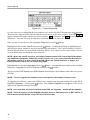
Highlight the box beside Site Description and press the
button. A virtual keyboard displays.
15
User’s Manual
Figure 23 — Virtual keyboard.
Use the arrow keys to highlight the first character you want in the Site Title and press the
button.
That character appears in the title bar and the cursor moves to the next position. Pressing
toggles between the upper and lower case keyboards,
backspaces, and
deletes entered
characters. You can use up to 20 characters including spaces in your title.
Once you have entered your title, highlight Close and press the
button.
Highlight the box beside Unit ID and press the
button. Change the number by highlighting it
and using the arrow buttons to increase and decrease the number. The Unit ID number is used to
identify the unit when it is networked with other DVRs. You cannot use the same number for two
or more DVRs that are within the same network.
NOTE: When the unit ID is set to 0, the infrared remote control will control that DVR without
any additional operations. When the unit ID is set to 1 to 4, you must press the ID button on
the remote control (1 to 4) to control that DVR. When the unit ID is set to 5 or higher, the
infrared remote control will not control any DVRs.
Highlight the box beside Language and press
button. A dropdown menu displays the available
button.
languages. Highlight the desired language and press the
The box beside H/W Version and S/W Version field displays the hardware and software version
of DVR.
NOTE: You can upgrade the software only in the System Information Change screen.
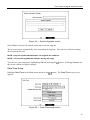
To upgrade the software, connect the USB device containing the upgrade package file to the DVR.
Highlight Upgrade… and press the
button. The System Upgrade screen appears. The screen
displays the upgrade package file name.
NOTE: If no hard disk drives are installed in the DVR, the Upgrade… button will be disabled.
NOTE: If the file system on the USB-IDE hard disk drive or USB flash drive is NOT FAT16 or
FAT32 format, format device using FAT16 or FAT32 format.
16
Four-Channel Digital Video Recorder
Figure 24 — System Upgrade screen.
Select Start, and enter the Admin password to start the upgrade.
The system restarts automatically after completing the upgrade. The software will start running
after restarting the unit.
NOTE: Only the system administrator can upgrade the software.
NOTE: You cannot upgrade the software during clip copy.
You can save your changes by highlighting OK and pressing the
the screen without saving the changes.
button. Selecting Cancel exits
Date/Time Setup
Highlight Date/Time in the Main menu and press the
appears.
button. The Date/Time setup screen
Figure 25 — Date/Time setup screen.
17
User’s Manual
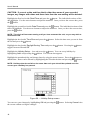
CAUTION: If you set a date and time that is older than some of your recorded
images, any images with dates and times later than the new setting will be deleted.
Highlight the first box beside Date/Time and press the
button. The individual sections of the
date highlight. Use the arrow buttons to adjust the numbers. Once you have the correct date, press
button.
the
button. The individual sections of the
Highlight the second box beside Date/Time and press the
time will highlight. Use the arrow buttons to adjust the numbers. Once you have the correct time,
button.
press the
NOTE: The clock will not start running until you have restarted the unit, so you may wish to
set the time last.
Highlight the box beside Time Zone and press the
button.
the list and press the
button. Select the time zone you are in from
Highlight the box beside Daylight Saving Time and press the
toggles between On and Off.
button. Pressing the
button
button. You can set up holidays by
Highlight the Holiday Setup… box and press the
highlighting Add: and pressing the
button. The current date appears.
button to
Highlight the month and day and change them by using the arrow buttons. Press the
button.
add the date. Dates can be deleted by highlighting the X beside the date and pressing the
NOTE: Holidays that do not fall on the same date each year should be updated once the
current year’s holiday has passed.
Figure 26 — Holiday Setup screen.
You can save your changes by highlighting OK and pressing the
the screen without saving the changes.
18
button. Selecting Cancel exits
Four-Channel Digital Video Recorder
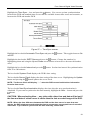
Highlight the Time Sync… box and press the
button. You can set up time synchronization
between the DVR and standard time servers that are available in most time zones and countries, or
between the DVR and another DVR.
Figure 27 — Time Sync screen.
Highlight the box beside Automatic Time Sync and press the
and Off.
button. This toggles between On
Highlight the box beside SNTP Server and press the
button. Change the numbers by
highlighting them and using the Up and Down arrow buttons to increase or decrease the number
value.
Highlight the box beside Interval and press the
from 30 to 300 minutes.
button. Set the time interval for synchronization
The box beside System Clock displays the DVR's time setting.
The box beside Server Clock displays the time setting of the time server. Highlighting the Update
button updates the server clock.
button and pressing the
NOTE: The Server Clock will display “ – ” when the DVR cannot load the time information
from the time server.
The box beside Next Synchronization displays the time when the next synchronization is
scheduled. If you want to synchronize the time instantly, highlight the Now… button and press the
button.
CAUTION: When selecting Now…, any video with a later time and date will be lost if
the time and date of a time server is earlier than the last recorded image of the DVR.
NOTE: When the time difference between the DVR and the time server is more than one
minute, the DVR might not synchronize the time to prevent any unexpected loss of recorded
video data. If you want to synchronize the time manually, select Now….
19
User’s Manual
Highlight the Run as Server box and press the
button. Pressing the
button toggles between
On and Off. When it is On, the DVR you are setting up will run as a time server.
You can save your changes by highlighting OK and pressing the
the screen without saving the changes.
button. Selecting Cancel exits
button. A list of date formats appears.
Highlight the box beside Date Format and press the
button. The choices are:
Highlight the format you wish to use and press the
MM-DD-YYYY
DD-MM-YYYY
YYYY-MM-DD
MM/DD/YYYY
DD/MM/YYYY
YYYY/MM/DD
To change the time format, highlight the box beside Time Format and press the
DVR toggles between 12 Hours (AM/PM) and 24 Hours (military time).
You can save your changes by highlighting OK and pressing the
the screen without saving the changes.
button. The
button. Selecting Cancel exits
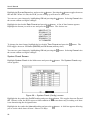
System Check Screen
Highlight System Check in the Main menu and press the
screen appears.
button. The System Check setup
Figure 28 — System Check (Config.) screen.
Highlight the box under the On/Off heading and press the
button. This toggles between On and
Off. When it is On, the DVR reports a fault condition if it does not detect any recording or if there
is no alarm during the designated time.
Highlight the box under the Interval heading and press the
you to set the check interval from 1 Hour to 30 Days.
20
button. A slide bar appears allowing
Four-Channel Digital Video Recorder
The Status field displays Good when the DVR continues operating according to the user’s settings
without any problems, there was recording, or any alarm occurred during the designated time. The
Status field displays Bad when there was no recording, or no alarm occurred during the designated
time.
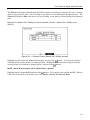
Highlight the Alarm Out / Notify tab and the System Check – Alarm Out / Notify screen
displays.
Figure 29 — System Check (Alarm Out / Notify) screen.
Highlight the box under the Alarm Out heading and press the
button. A drop menu displays
available alarm outputs for the recording problem. Highlight the desired alarm output from the
external alarm out terminal or internal buzzer, and press the
button.
NOTE: Alarm Out cannot be set to Check Point – System.
Highlight the box under Notify and press the
button. This toggles between On and Off. When it
is On, the DVR notifies the remote site of its System (Good) and Record (Bad).
21
User’s Manual
Storage Screen
Highlight Storage in the Main menu and press the
button. The Storage setup screen appears.
Figure 30 — Storage screen.
The Type field displays the type and capacity of storage device.
The Status field displays the device status or fault conditions. (Good, Disk Bad, S.M.A.R.T.
Alert, High Temperature, or Not installed)
NOTE: If the DVR senses S.M.A.R.T. Alert or High Temperature, the S.M.A.R.T. Monitoring
Information screen will appear. Once the S.M.A.R.T. Monitoring Information screen displays,
replacing the hard disk drive is recommended, usually within 24 hours.
NOTE: The S.M.A.R.T. Monitoring Information screen appears only in the monitoring mode.
The °C field displays the temperature of the storage device.
The Usage field displays the device usage.
The DVR can be set to react to storage problems by activating an internal buzzer or external alarms,
display a warning message and/or notifying a PC running RAS (Remote Administration System).
Highlight the box beside Storage Problem Action: Alarm Out / Notify and press the
button to
select from Beep, the alarm output terminal that you want to associate with the storage problem
event, and/or Notify.
Highlight the S.M.A.R.T. Setup… and press the
appears.
button. The S.M.A.R.T. Setup screen
NOTE: If no hard disk drives are installed in the DVR, the S.M.A.R.T. Setup… button will be
disabled.
22
Four-Channel Digital Video Recorder
Figure 31 — S.M.A.R.T. Setup screen.
Your DVR shows the conditions of Hard Disk Drives when the installed IDE hard disk drives
support S.M.A.R.T. (Self-Monitoring, Analysis and Reporting Technology) Monitoring program.
button to toggle between On and Off.
Highlight the box beside Use. Press the
The Last-check field shows the date and time information of the last storage check.
Highlight the box beside Period, and select from Daily, Weekly or Monthly for the checking
period.
NOTE: When selecting Weekly and Monthly, the Day of Week and Day of Month field will be
activated under the Period field. Select the check day or check date.
Highlight the box beside Check Time, and adjust the numbers using arrow buttons.
Highlight the box beside Temperature Threshold and adjust the numbers using arrow buttons.
Highlight the box beside Sensor Unit and select from Celsius or Fahrenheit.
If you want to check the storage status instantly, highlight Check Now and press the
You can save your changes by highlighting OK and pressing the
the screen without saving the changes.
button.
button. Selecting Cancel exits
23
User’s Manual
System Log Screen
Highlight System Log in the Main menu and press the
appears.
button. The System Log screen
Figure 32 — System Log screen.
The System Log screen displays a record of various events logged by the DVR. The list shows the
dates and times the system was turned ON and OFF, system was restarted, recording was started or
stopped, playback was started or stopped, setup changes were made, and data banks were cleared.
The events are listed from the most recent to the oldest. You can scroll through the list a page at a
time by selecting the Up and Down arrow buttons and pressing the
button. You can go directly
to an event number by highlighting the event number box (left of the UP arrow), pressing the
button.
button, using the arrow buttons to change the number, and pressing the
System Shutdown
Highlight System Shutdown in the Main menu and press the
button. This shuts the DVR
down. When shutting down the DVR, you need to confirm that you want to shut down the unit, and
you will be asked for an administrator password.
24
Four-Channel Digital Video Recorder
Configuring Input Devices
You can configure the video, audio and remote control devices connected to the DVR.
Figure 33 — Device menu screen.
Camera Setup Screen
Highlight Camera in the Main menu and press the
button. The Camera setup screen appears.
Figure 34 — Camera setup screen.
You can turn on or off each camera, and also hide the video of the camera number by highlighting
the camera Setup heading and pressing the
button. Select the On, Off, Covert 1 or Covert 2
from a drop down list.
NOTE: When selecting Covert 1, the DVR displays the camera title and status icons on the
covert video. When selecting Covert 2, the DVR displays only camera title in gray on the
covert video.
25
User’s Manual
You can assign titles to each camera by highlighting the Title heading and pressing the
A virtual keyboard allows you to enter camera names.
button.
Selecting the PTZ Device box causes a list of controllable cameras to display. Select your camera
from the list and press the
button. You will need to connect the camera to the RS-232C terminal
on the back of the DVR following the camera manufacturer’s instructions.
Figure 35 — PTZ Device list.
NOTE: When selecting the PTZ device you wish to control by selecting it from the menu, the
displays on the PTZ camera screen.
button.
You can assign IDs to each camera by highlighting the ID heading and pressing the
Change the number by highlighting it and using the arrow buttons to increase and decrease the
number. The PTZ ID number can be set from 0 to 256.
Alarm In Setup Screen
Highlight Alarm In in the Main menu and press the
button. The Alarm In setup screen appears.
Figure 36 — Alarm In setup screen.
26
Four-Channel Digital Video Recorder
The alarm terminal strip on the back of the DVR has inputs associated with each alarm. You can set
up each input on the Alarm In Setup screen. You can turn each input On (via Alarm I/O or
Camera Alarm) or Off. Each input can be given a title, and the inputs can be set as NO (normally
open) or NC (normally closed) independently.
Motion Detector
Figure 37 — Motion Detector setup screen.
Your DVR has built-in video motion detector. Video motion detector can be turned On or Off for
each camera.
Highlighting the box under the Sensitivity heading allows you to adjust the DVR’s sensitivity to
motion. There are five settings with 1 being the least sensitive and 5 being the most sensitive.
You can define the area of the image where you want to detect motion; e.g., a doorway. Highlight
button. The Motion Detection Zone screen
the icon under the Zone heading, and press the
will display.
Figure 38 — Motion Detection Zone screen.
27
User’s Manual
The Motion Detection Zone screen is laid over the video for the selected camera. You can set up
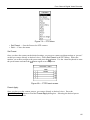
motion detection zones by selecting or clearing blocks. The menu on the setup screen has the
following functions:
NOTE: You can activate or deactivate 4 cells at a time using the
button. Once 4 cells are
highlight, you can select individual cells by using the camera buttons.
Exit with save — Closes the menu after saving the changes.
Exit without save — Closes the menu without saving the changes.
Select All blocks — Activates all blocks to detect motion.
Clear All blocks — Deactivates all blocks so that they will not detect motion.
Text-In Setup Screen
Highlight Text-In in the Main menu and press the
button. The Text-In setup screen appears.
Figure 39 — Text-In Setup screen.
NOTE: If networking is configured by the external modem, the text-in cannot be set up. Set
the DVR for LAN connections and set up text-in for RS-232C port.
NOTE: Text-in data will not be recorded during clip copy.
You can set the DVR to display the text-in information. Highlight the box beside Use Text-In and
press the
button to toggle between On and Off.
Highlight the box beside Product Type, and press the
button. Select your device from the list.
NOTE: Generic Text and E-POS devices are currently supported.
Highlight the Multi-devices on 1 channel box and press the button to toggle between On and Off.
When it is On, the DVR supports up to 4 text inputs.
28
Four-Channel Digital Video Recorder
NOTE: The following description is for a Generic Text device. The screen changes for
different types of text input devices, and there will be different parameter boxes for you to
enter information.
Figure 40 — Text-In (Generic Text) Setup screen.
button. Use the virtual keyboard to
Highlight the box beside Transaction Start, and press the
enter the Transaction Start string. Refer to the device manufacturer’s documentation for the text
string that the device first sends when a transaction starts.
If you want the DVR to react to any character sent from the text-in device, you will want to turn On
button to toggle between On and Off.
Any Character. Highlight Any Character, and press the
NOTE: If Any Character is turned On, you will not be able to enter any text in the Start String
box.
Highlight the box beside Transaction End, and press the
button. Use the virtual keyboard to
enter the Transaction End string. Refer to the device manufacturer’s documentation for the text
string that the device sends when a transaction ends.
button. Select the number of additional lines of
Highlight the more line(s) box and press the
text that you want the DVR to record. You can choose from 0 to 10.
button. Use the virtual keyboard to enter
Highlight the box beside Line Delimiter, and press the
the character(s) that the device uses to indicate the end of a line. Control characters can be created
using ^ and a capital letter; e.g., ^J for NL (New Line), ^M for CR (Carriage Return). Refer to the
device manufacturer’s documentation for Line Delimiter character(s).
button. Use the virtual keyboard to enter
Highlight the box beside Ignore String, and press the
the strings of text that you want the DVR to ignore. Refer to the device manufacturer’s
documentation for text strings that the device sends during transactions, so you will know which
ones you do not want recorded.
29
User’s Manual
Highlight the box beside Transaction Timeout, and set the length of time to wait for the new text
string. The DVR will consider a transaction ended if there is no text sting during timeout dwell time
after the last text input string. You can adjust the timeout dwell from 0 to 300 seconds.
Highlight the box beside Display Dwell, and set the length of time you would like to display text-in
data. You can adjust the display dwell time from 1 to 300 seconds.
Highlight the Case Sensitive box and press the
button to toggle between On and Off. Refer to
the device manufacturer’s documentation to determine if the text strings are Case Sensitive. If the
device distinguishes between upper and lower case letters, make certain the Case Sensitive box is
turned On.
NOTE: The following description is for an E-POS device.
Figure 41 — Text-In (E-POS) Setup screen.
button. Change the number by
Highlight the box beside Register Number and press the
highlighting it and using the Up and Down arrow buttons to increase or decrease the number. The
Register Number is used to identify any specific text input when the E-POS device has multi text
inputs.
Highlight the box beside C/J Prefix and press the
and J (Journal data).
button to toggle between C (Customer data)
NOTE: The settings from Transaction Start to Case Sensitive are identical to Generic Text
settings.
30
Four-Channel Digital Video Recorder
Alarm Out Setup Screen
The Alarm Out setup screen allows you to establish a schedule for each alarm output from the
DVR.
Figure 42 — Alarm Out setup screen.
Each alarm output can be given its own title by highlighting the box under the Title heading and
pressing the
button. A virtual keyboard appears allowing you to enter the title.
Highlighting the Sched field and pressing the
button opens a schedule screen. You can
schedule alarm output in 30-minute increments from 0:00 to 24:00.
Figure 43 — Alarm Out Schedule screen.
You can select individual blocks of time, entire days of the week, entire blocks of time or the entire
schedule. Select a specific block of time by highlighting it. Select an entire day by highlighting the
day of the week or Holiday on the left of the screen. Select an entire block of time by highlighting
the time at the top of the screen. Select the entire screen by highlighting the empty box in the upper
left corner of the screen. Press the
button from No Arming (no block) to On (blue block) to
Event (yellow block).
31
User’s Manual
When set to On, the Alarm Out is active during the scheduled time. When set to Event, the Alarm
Out is only active when there is an Event during the scheduled time.
Audio Setup Screen
Highlight Audio in the Main menu and press the
button. The Audio Setup screen appears.
Figure 44 — Audio Setup screen.
button. This toggles between On and
Highlight the box beside Audio Recording and press the
Off. When it is On, the DVR also records audio when it is recording video.
Highlight the box beside Mute and press the
button. This toggles between On and Off. When it
is On, the DVR will NOT play live or recorded audio.
Highlight the box beside Audio In and press the
button. A list of cameras appears, and you can
select the camera number you would like to associate with audio input. When Audio Recording is
set to On, the displays on the associated camera screen.
NOTE: Audio will play through the attached speaker while the DVR is recording audio and the
associated camera displays full screen.
You can save your changes by highlighting OK and pressing the
the screen without saving the changes.
button. Selecting Cancel exits
NOTE: The DVR will NOT record audio when the recording speed is set to less 15 ips (12.5 ips
for PAL). The DVR may not record audio depending on the Transfer Speed when the RAS
(Remote Administration System) Watch application program is connected.
32
Four-Channel Digital Video Recorder
RS232 Setup Screen
The RS232 setup screen allows you to set up the RS-232C port to communicate with external
devices such as remote controls and dome cameras.
Figure 45 — RS232 setup screen.
Highlight the field for the settings you wish to make. Select the correct Baud Rate, Parity, Data
Bit and Stop Bit for the device you are connecting to the DVR.
Select a device connected with the DVR among Remote Control, External Modem, Text-In or
PTZ in the Usage field.
NOTE: Selecting the External Modem in the RS232 field only defines the RS-232C port as
being used for the external modem connections. Refer to Modem Setup screen for details of
setting up an external modem.
NOTE: Selecting the PTZ in the RS232 field only defines the RS-232C port as being used for
the PTZ camera connections. Select the PTZ device in the Camera Setup screen.
33
User’s Manual
Configuring Recording Settings
NOTE: When the DVR is recording video, the REC LED on the front panel is lit and the
displays on each camera screen.
Your DVR offers a variety of flexible recording modes. You can set it up to record all the time or to
only record events. It can be set up to continue recording once the hard disk drive is full by
recording over the oldest video, or you can set it up to alert you when the hard disk is full and stop
recording.
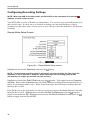
Record Mode Setup Screen
Figure 46 — Record Mode Setup screen.
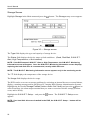
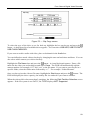
Highlight the box beside Resolution and press the
button.
NOTE: The maximum recording speed is 30 images per second (25 ips for PAL) when the
resolution is set to Standard. However, when set to High, the recording speed will be
decreased to 15 images per second (12.5 ips for PAL).
Highlight the box beside End Of Disk and press the
button. This toggles between Overwrite
and Stop. When in the Overwrite mode, the DVR continues recording when the hard disk drive is
full by overwriting the oldest video. When in the Stop mode, the DVR stops recording when the
hard disk drive is full.
If the DVR is set to the Stop mode, you can set it to beep or activate the Alarm Out port when the
hard disk drive is full. Highlight the box beside On Disk Full Beep and press the
button to
toggle between On and Off. Highlight the box beside On Disk Full Alarm Out and press the
button to toggle between On and Off.
34
Four-Channel Digital Video Recorder
Pressing the PANIC button on the front panel enters the Panic Recording mode. You can program
the recording speed, quality and duration when the DVR is in the Panic Recording mode. On
Panic Recording Speed can be set from 0.5 to 30 ips (25 ips PAL), and On Panic Recording
Quality can be selectable from Very High, High, Standard and Low. On Panic Recording
Duration can be set from 5 to 60 minutes. The panic recording will be stopped automatically
according to the preset duration as long as the PANIC button is not pressed to stop the panic
recording. Select No Limit if you want to stop panic recording manually.
NOTE: When the DVR is in the Panic Recording mode, it ignores the time-lapse or event
recording settings and follows the panic recording settings.
NOTE: The maximum panic recording speed is 30 images per second (25 ips for PAL) when
the resolution is set to Standard. However, when set to High, the recording speed will be
decreased to 15 images per second (12.5 ips for PAL).
NOTE: When the DVR is in the Panic Recording mode, the REC LED on the front panel flickers
and the displays on each camera screen.
Highlight the first box beside Auto Deletion. Pressing the
button toggles between On and Off.
When set to On, the DVR will delete video recorded earlier than user-defined period. Highlight the
second box beside Auto Deletion, and press the
button to select the length of time recorded data
will be kept from 1 to 99 Days.
NOTE: When the End Of Disk is set to Stop, DVR will NOT restart recording even when the
video recorded earlier than user-defined period is deleted.
You can save your changes by highlighting OK and pressing the
the screen without saving the changes.
button. Selecting Cancel exits
Time-Lapse Record Mode Setup Screen
Figure 47 — Time-Lapse Record Setup screen.
Highlight the box under the Speed heading and press the
button. A drop-down list of recording
speeds appears. You can select from 0.5 ips to 30 ips (25 ips for PAL).
35
User’s Manual
NOTE: You cannot select 30 ips (25 ips for PAL) for High Resolution.
Highlight the box under the Quality heading and press the
button. A drop-down list appears.
You can select from Very High, High, Standard and Low image quality. All other variables being
equal; Very High will require 300% more hard disk space than Standard, High will require 200%
more, and Low 50% less.
NOTE: Higher quality images require more storage space and will reduce the recording
capacity of the hard disk drive.
You can set the DVR to record video based on the Time-lapse Recording Schedule defined during
Time-Lapse Record Setup. Highlighting the box beside Time Lapse Recording and pressing the
button toggles between On and Off.
You can set the maximum amount of time-lapse video to be stored. Once the DVR reaches this
amount, it will start recording over the oldest time-lapse video. The time-lapse video is stored
separate from Event video. When Keep the continuous pictures is set to On, you can set the time
from 1 Hour to the maximum allowed by the storage capacity of your hard disk drive.
NOTE: The maximum storage time is only an estimate because the amount of space required
to store video varies depending on many factors such as motion and image complexity.
Time-Lapse Recording Schedule
Figure 48 — Time-Lapse Recording Schedule screen.
You can program the DVR to record only during certain times based on time, day of the week, and
holidays. The smallest time segment you can use is 30 minutes. A blue rectangle indicates the
DVR is set to record during those 30 minutes. When there is no rectangle, the DVR will not record
during those 30 minutes.
There are several ways to set recording times:
y You can highlight an individual block and toggle it On or Off by pressing the
button.
y You can change a 30-minute segment for all days by placing the cursor on the time line and
pressing the
36
button to toggle the segment On or Off.
Four-Channel Digital Video Recorder
y You can change an entire day by placing the cursor on the day of the week and pressing the
button to toggle the day On or Off.
y You can change the entire calendar by placing the cursor in the upper left-hand box (above “S”
and to the left of the time line) and pressing the
Off.
button to toggle the entire calendar On and
NOTE: The Holiday (H) schedule applies to the dates you established as holidays when
setting Date/Time.
You can save your changes by highlighting OK and pressing the
the screen without saving the changes.
button. Selecting Cancel exits
Pre-Event Recording Setup Screen
Figure 49 — Pre-Event Record Setup screen.
When the DVR is in the Event Record mode, it is possible to have it record images before the event
occurs. The Pre-Event Record screen allows you to define how to handle pre-event recording.
You can turn individual cameras On or Off for pre-event recording. The image speed can be set
from 0.5 to 30 ips (25 ips PAL), and image quality can be selectable from High, Standard and
Low.
NOTE: When a camera is set to On, the
displays on each camera screen. However, the
DVR will record the video only when events are detected.
NOTE: The pre-event recording speed is 30 images per second (25 ips for PAL) when the
resolution is set to Standard. However, when set to High, the recording speed will be
decreased to 15 images per second (12.5 ips for PAL).
You can set the amount of time to record prior to the event by adjusting the Dwell Time. You can
set the Dwell Time from 1 to 300 seconds.
NOTE: When the DVR is in the Time-Lapse mode, it ignores the pre-event settings and follows
the time-lapse settings.
37
User’s Manual
Event Action Setup
You can program the DVR to record, activate the alarm output and/or notify the remote site
whenever sensor, motion, text-in or video loss events are detected. Highlight the Alarm-In Action,
Motion Action, Text-In Action or Video Loss Action in the Event Action menu and press the
button. The Event Action setup screens will appear.
Alarm In Event Action (Record) Setup Screen
The DVR can be set to react to events differently. Each sensor can be assigned a schedule, camera,
recording speed, video quality and dwell time.
Figure 50 — Alarm In Event Action (Record) setup screen.
Highlight the Sched box and press the
described earlier.
button. A schedule screen appears. Set the schedule as
Highlight the Camera box and press the
button. A camera selection screen appears. Select the
camera number you would like to associate with the sensor.
NOTE: You can associate multiple cameras with a sensor.
Highlight the Speed box and select number of images per second you would like to record from the
drop-down menu.
Highlight the Quality box and select the image quality you want to record from the drop-down
menu.
Highlight the Dwell Time box and set the length of time you would like to record for the associated
event.
38
Four-Channel Digital Video Recorder
Alarm In Event Action (Alarm Out) Setup Screen
The DVR can be set to react to events differently by activating an internal buzzer or external alarms.
Figure 51 — Alarm In Event Action (Alarm Out) setup screen.
Highlight the Sched box and press the
described earlier.
button. A schedule screen appears. Set the schedule as
Highlight the Alarm Out box and either Beep or the alarm output terminal that you want to
associate with the sensor.
Highlight the Dwell Time box and set the length of time you want the output activated.
Alarm In Event Action (Notify) Setup Screen
The DVR can be set to notify the remote site when certain events are activated.
Figure 52 — Alarm In Event Action (Notify) setup screen.
39
User’s Manual
Highlight the Sched box and press the
described earlier.
button. A schedule screen appears. Set the schedule as
Highlight the Notify box and press the
button. This toggles between On and Off. When it is On,
the DVR notifies the remote site when certain events occur based on a defined schedule.
NOTE: For the Notify action to work, the DVR should be registered in the RAS (Remote
Administration System).
When the DVR detects alarm input, the
displays on each associated camera.
Motion Detector Event Action (Record) Setup Screen
The DVR can be set to react to motion detector differently. Each camera can be assigned a schedule,
associated camera, recording speed, video quality and dwell time.
Figure 53 — Motion Detector Event Action (Record) setup screen.
Highlight the Sched box and press the
described earlier.
button. A schedule screen appears. Set the schedule as
Highlight the Camera box and press the
button. A camera selection screen appears. Select the
camera number you would like to associate with the camera.
NOTE: You can associate multiple cameras with a camera that detects motion.
Highlight the Speed box and select number of images per second you would like to record from the
drop-down menu.
Highlight the Quality box and select the image quality you want to record from the drop-down
menu.
Highlight the Dwell Time box and set the length of time you would like to record for the associated
motion event.
40
Four-Channel Digital Video Recorder
Motion Detector Event Action (Alarm Out) Setup Screen
The DVR can be set to react to motion events differently by activating an internal buzzer or external
alarms.
Figure 54 — Motion Detector Event Action (Alarm Out) setup screen.
Highlight the Sched box and press the
described earlier.
button. A schedule screen appears. Set the schedule as
Highlight the Alarm Out box and either Beep or the alarm output terminal that you want to
associate with the motion event.
Highlight the Dwell Time box and set the length of time you want the output activated.
Motion Detector Event Action (Notify) Setup Screen
The DVR can be set to notify the remote site when certain motion events are activated.
Figure 55 — Motion Detector Event Action (Notify) setup screen.
41
User’s Manual
Highlight the Sched box and press the
described earlier.
button. A schedule screen appears. Set the schedule as
Highlight the Notify box and press the
button. This toggles between On and Off. When it is On,
the DVR notifies the remote site when certain events occur based on a defined schedule.
NOTE: For the Notify action to work, the DVR should be registered in the RAS (Remote
Administration System).
When the DVR detects motion, the
displays on each associated camera.
Text-In Event Action (Record) Setup Screen
The DVR can be set to react to text input from the text-in device. The text-in can be assigned a
schedule, associated camera, recording speed, video quality and dwell time.
Figure 56 — Text-In Event Action (Record) setup screen.
Highlight the Sched box and press the
described earlier.
button. A schedule screen appears. Set the schedule as
button. A camera selection screen appears. Select the
Highlight the Camera box and press the
camera number you would like to associate with the text-in device.
NOTE: You cannot associate multiple cameras with a text-in device.
Highlight the Speed box and select number of images per second you would like to record from the
drop-down menu.
Highlight the Quality box and select the image quality you want to record from the drop-down
menu.
Highlight the Dwell Time box and set the length of time you would like to record for the text input.
42
Four-Channel Digital Video Recorder
Text-In Event Action (Alarm Out) Setup Screen
The DVR can be set to react to text-in by activating an internal buzzer or external alarms.
Figure 57 — Text-In Event Action (Alarm Out) setup screen.
Highlight the Sched box and press the
described earlier.
button. A schedule screen appears. Set the schedule as
Highlight the Alarm Out box and either Beep or the alarm output terminal that you want to
associate with the text-in device.
Highlight the Dwell Time box and set the length of time you want the output activated.
Text-In Event Action (Notify) Setup Screen
The DVR can be set to notify the remote site in the case of text-in.
Figure 58 — Text-In Event Action (Notify) setup screen.
43
User’s Manual
Highlight the Sched box and press the
described earlier.
button. A schedule screen appears. Set the schedule as
Highlight the Notify box and press the
button. This toggles between On and Off. When it is On,
the DVR notifies the remote site when it has text input from a text-in device based on a defined
schedule.
NOTE: For the Notify action to work, the DVR should be registered in the RAS (Remote
Administration System).
When the DVR detects text input, the
displays on the associated camera.
Video Loss Event Action (Record) Setup Screen
The DVR can be set to react to video loss from a camera differently. Each camera can be assigned
a schedule, associated camera, recording speed, video quality and dwell time.
Figure 59 — Video Loss Event Action (Record) setup screen.
Highlight the Sched box and press the
described earlier.
button. A schedule screen appears. Set the schedule as
button. A camera selection screen appears. Select the
Highlight the Camera box and press the
camera number you would like to associate with the camera that has lost video.
NOTE: You can associate multiple cameras with a camera.
Highlight the Speed box and select number of images per second you would like to record from the
drop-down menu.
Highlight the Quality box and select the image quality you want to record from the drop-down
menu.
Highlight the Dwell Time box and set the length of time you would like to record for the associated
video loss.
44
Four-Channel Digital Video Recorder
Video Loss Event Action (Alarm Out) Setup Screen
The DVR can be set to react to video loss differently by activating an internal buzzer or external
alarms.
Figure 60 — Video Loss Event Action (Alarm Out) setup screen.
Highlight the Sched box and press the
described earlier.
button. A schedule screen appears. Set the schedule as
Highlight the Alarm Out box and either Beep or the alarm output terminal that you want to
associate with the camera that has lost video.
Video Loss Event Action (Notify) Setup Screen
The DVR can be set to notify the remote site in the case of video loss.
Figure 61 — Video Loss Event Action (Notify) setup screen.
45
User’s Manual
Highlight the Sched box and press the
described earlier.
button. A schedule screen appears. Set the schedule as
Highlight the Notify box and press the
button. This toggles between On and Off. When it is On,
the DVR notifies the remote site when it loses video input from a camera based on a defined
schedule.
NOTE: For the Notify action to work, the DVR should be registered in the RAS (Remote
Administration System).
When the DVR detects video loss, the
displays on each associated camera.
Display Setup
Highlight the OSD, Main Monitoring in the Main menu, and press the
on-screen display or camera display on the main monitor.
button to set up the
OSD (On-Screen Display) Setup
The DVR can be set up to display Date, Time, Title and Status on screen. Each feature can be
turned on or off, and you can adjust the margins.
Figure 62 — OSD Setup screen.
Highlight the box beside Date and press the
button to toggle the date display On and Off.
Highlight the box beside Time and press the
button to toggle the time display On and Off.
Highlight the box beside Title and press the
Highlight the box beside Status and press the
46
button to toggle the camera title display On and Off.
button to toggle status display On and Off.
Four-Channel Digital Video Recorder
NOTE: Each icon displayed on the screen describes the system status as follows:
y Freeze
— Displays while in Freeze mode.
— Displays while in Sequence mode.
y Sequence
y Zoom
— Displays on the enlarged video.
y Remote Control
y Record
— Displays when the DVR can be controlled by the infrared remote control.
— Displays on each camera screen while the DVR is recording video.
y Panic
— Displays while in Panic recording mode.
y Audio
— Displays while the DVR is recording audio.
y Event Detection
loss event.
y Video Loss
y PTZ
— Displays when the DVR detects alarm input, motion, text input, or video
— Displays when the camera loses video signal.
— Displays on each PTZ camera.
NOTE: When the camera is set to Covert 1, status icons are not displayed on the screen.
Highlight the box beside Left/Right Margin and press the
margins. The margins can be set from 1 to 24.
Highlight the box beside Top/Bottom Margin and press the
margins. The margins can be set from 1 to 24.
Highlight the box beside Text-In and press the
Off.
button to adjust the left and right
button to adjust the top and bottom
button to toggle the text-in data display On and
If you want to read text input strings displayed on the screen easily and clearly, turn On Text-In
Background color. Highlight the box beside Text-In Background color and press the
button
to toggle between On and Off.
47
User’s Manual
Main Monitoring Setup Screen
You can adjust the display dwell time for each camera displayed on the main monitor. You also can
set the video from the event-detected camera to be displayed on the main monitor during the preset
dwell time.
Figure 63 — Main Monitoring Setup screen.
Highlight the box beside Sequence Dwell Time and press the
sequence dwell time from 3 to 60 seconds.
button. You can adjust the
NOTE: The DVR does not sequence the camera having video loss.
Highlight the box beside Event Monitoring and press the
button to toggle between On and Off.
When it is On, video from the lowest camera number among those connected with the
event-detected sensor will be displayed full-screen on the main monitor for the preset dwell time.
Highlight the box beside Event Monitoring Dwell Time and press the
the event monitoring dwell time from 3 to 60 seconds.
48
button. You can adjust
Four-Channel Digital Video Recorder
Network Setup Screen
In the Network Setup screen you can set up the DVR for LAN and modem connections.
Figure 64 — Network Setup screen.
Highlight the box beside Connection. Press the
button to toggle between LAN and Modem.
Highlight the box beside Admin Password and press the
button. A virtual keyboard appears.
You will first be asked to enter the current password. Then you can enter a new password; you will
be asked to confirm the new password before it is accepted.
button. A virtual keyboard appears.
Highlight the box beside User Password and press the
You will first be asked to enter the current password. Then you can enter a new password; you will
be asked to confirm the new password before it is accepted.
NOTE: These passwords are for network use. They are different from the Admin and User
passwords for the DVR itself.
NOTE: The passwords are case sensitive. The factory default password for both
Administrator and User is 12345678.
CAUTION: Write the password down and keep it in a safe place. Once the
password has been reset, the default will no longer work. If the password is
forgotten, the unit must be reset using the Factory Reset Button and all data
settings will be lost.
The transfer speed is the number of images that can be transferred per second for each camera.
Highlight the box beside Transfer Speed, press the
button, and adjust the number.
NOTE: The maximum transfer speed over a LAN is 30 images per second (25 ips for PAL)
when the resolution is set to Standard. However, when set to High, the transfer speed will be
decreased to 15 images per second (12.5 ips for PAL).
You can program the image quality for transferring to the RAS (Remote Administration System).
Highlight the box beside Remote Quality and press the
button. The image quality can be
selectable from Very High, High, Standard and Low.
49
User’s Manual
LAN Setup Screen
Figure 65 — LAN (Manual) Setup screen.
Highlight the box beside Type and press the
(PPPoE).
button to select from Manual, DHCP and ADSL
Selecting Manual from the Type allows you to set up LAN parameters manually.
NOTE: You will need to get the appropriate IP Address, Gateway and Subnet Mask from your
network administrator.
Change the numbers by highlighting them and using the Up and Down arrow buttons to increase or
decrease the number.
The factory default LAN settings are:
IP Address:
192.168.1.129
Gateway:
192.168.1.254
Subnet Mask:
255.255.255.0
button to enter the IP address of the DNS
Highlight the box beside DNS Server and press the
server. If you set up the DNS Server, the domain name of the DVRNS server instead of the IP
address can be used during the DVRNS Server setup. Refer to the DVRNS Setup section for details.
Highlight Port Number Setup… and press the
appears.
50
button. The Port Number Setup screen
Four-Channel Digital Video Recorder
Figure 66 — Port Number Setup screen.
NOTE: You will need to get the appropriate Port Number for each RAS related program
(Admin, Watch, Search and Callback) from your network administrator.
Change the number by highlighting it and using the Up and Down arrow buttons to increase or
decrease the number.
The factory default Port settings are:
Remote Admin:
Remote Watch:
Remote Search:
Remote Callback:
8200
8016
10019
8201
NOTE: The system restarts automatically after changing the port settings.
NOTE: Do NOT use the same port number for two different programs, otherwise, the DVR
cannot be connected with a PC running RAS.
CAUTION: When changing the port settings, you must change the port settings on
a PC running RAS as well. Refer to the RAS manual for details.
You can save your changes and return to the Network Setup screen by highlighting OK and
pressing the
button. Selecting Cancel exits the screen without saving the changes.
Selecting DHCP from the Type and highlighting OK reads the current IP Address of the DVR
configured by DHCP (Dynamic Host Configuration Protocol) network.
51
User’s Manual
Figure 67 — LAN (DHCP) Setup screen.
Selecting ADSL (PPPoE) allows you to set up the ADSL network.
NOTE: ADSL and modem cannot be configured at the same time. If the DVR is networked via
modem, the ADSL (PPPoE) will not be selected.
Figure 68 — LAN (ADSL) Setup screen.
Highlight the box beside ID and press the
enter the ID for ADSL connection.
button. A virtual keyboard appears allowing you to
Highlight the box beside Password and press the
you to enter the password for ADSL connection.
button. A virtual keyboard appears allowing
NOTE: Entering the ID and Password and highlighting OK reads the current IP Address of the
DVR configured by the ADSL network.
NOTE: If the DVR is configured for DHCP or an ADSL network, the IP address of the DVR
might change whenever the unit is turned on.
52
Four-Channel Digital Video Recorder
Modem Setup
Figure 69 — Modem Setup screen.
Highlight the box beside Baud Rate and press the
to 115,200 appears.
Highlight the box beside Data Bit and press the
formats.
Highlight the box beside Stop Bit and press the
Highlight the box beside Parity and press the
from None, Odd or Even parity.
button. A list of baud rates ranging from 300
button. This toggles between 7 bit and 8 bit
button. This toggles between 1 and 2 Stop Bits.
button. A drop-down list appears. You can select
You can save your changes by highlighting OK and pressing the
the screen without saving the changes.
button. Selecting Cancel exits
NOTE: If the RS-232C port is in use for Remote Control, Text-In or PTZ, networking cannot be
configured for a modem.
53
User’s Manual
DVRNS (DVR Name Service) Setup Screen
You can register the DVR on the DVRNS server to use DVR name service.
Figure 70 — DVRNS Setup screen.
Highlight the box beside Use DVR Name Service and press the
and Off.
button to toggle between On
Highlight the box beside DVRNS Server and enter the IP address or domain name of the DVRNS
server.
NOTE: You will need to get the IP Address or domain name of the DVRNS Server from your
network administrator.
NOTE: You can use the domain name instead of IP address if you already set up the DNS
Server during the LAN Setup.
Highlight the box beside Port and enter the port number of the DVRNS server. The port number
can be set from 10000 to 12000.
NOTE: The DVRNS server settings on your DVR should match the settings on the registered
DVRNS server. Any changes on the DVRNS server might cause improper operation.
Highlight the Use NAT box and press the
button to toggle On and Off.
NOTE: When using the NAT (Network Address Translation) device, refer to the NAT
manufacturer’ instructions for the proper network settings.
Highlight the box beside DVR Name and press the
button to name the DVR to be registered on
the DVRNS server. A virtual keyboard allows you to enter the DVR name.
Selecting Check allows you to check whether or not the name you entered can be used.
NOTE: The DVR name you entered should be checked by selecting Check, otherwise the
DVRNS changes will not be saved.
54
Four-Channel Digital Video Recorder
NOTE: When entering no name or a name already registered on the DVRNS server, an error
message displays.
Highlighting OK and pressing the
button registers the DVR on the DVRNS server. Proper
DVRNS settings will display the help desk information of the DVRNS server in the box beside
Help Desk.
CAUTION: If you want to use the same DVR name registered on the DVRNS server
after initializing the system using the factory reset, you need to contact the DVRNS
server manager. Please record and keep the help desk information before factory
reset.
CAUTION: The DVRNS registration will be limited to one DVRNS server. The DVR
cannot be registered to multiple DVRNS servers. Please contact your network
administrator when you want to register the DVR to another DVRNS server.
Callback Center Setup Screen
The DVR can be set up to contact a computer running RAS (Remote Administration System) on a
LAN when an event occurs. Also it can be set up to dial a pager with a numeric message when an
event occurs if you have a modem connected to the DVR.
Callback Center Setup by LAN connections
Figure 71 — Callback Center (LAN) Setup screen.
Highlight the box beside IP Address and enter the IP address of the computer you want contacted
during an event.
Highlight the box beside Retry and enter the number of times you would like the DVR to try
contacting the computer. You can select from 1 to 10 retries.
Highlight the box beside E-mail notification and press the
button to toggle between On and Off.
55
User’s Manual
Highlight the box beside SMTP Server IP and enter the SMTP server IP address, obtained from
your system administrator.
Highlight the box beside E-mail recipient and enter the recipient’s e-mail address. Use the virtual
keyboard to enter the e-mail address.
Highlight the box beside E-mail sender and enter the sender’s e-mail address.
NOTE: The e-mail address must include the character “@” to be a valid address.
Highlight the box beside Authentication and press the
button to toggle between On and Off.
Highlight the box beside ID and enter the SMTP ID. A virtual keyboard appears allowing you to
enter the ID.
Highlight the box beside Password and enter the SMTP password. A virtual keyboard appears
allowing you to enter the password.
NOTE: Authentication should be turned On and ID and Password should be entered when
using the SMTP server requiring user authentication.
Callback Center Setup by Modem connections
Figure 72 — Callback Center (Modem) Setup screen.
Highlight the box beside Pager Number and enter the telephone number of the pager. Enter the
number as it must be dialed from your telephone system; e.g., if you must dial “9” for an outside
line, enter “9” before the pager number.
Highlight the box beside Mailbox and enter the voice mailbox number if your pager uses a voice
mailbox.
Highlight the box beside Site ID and enter a three-digit site ID number.
56
Four-Channel Digital Video Recorder
When an event occurs, the DVR will dial the pager and leave a four- or five-digit number. The first
three digits are the site ID number and the last digits are the type of event (1: Alarm In, 2: Text-In,
3: Motion Detection, 4: Video Loss, 10: Check Recording, 11: Storage, 13: S.M.A.R.T., and 18:
System). For example, “0754” means that Site 75 has lost video.
NOTE: The DVR will wait for at least four minutes between pages. If another event occurs
less than four minute after the DVR has notified a pager, it will not dial the pager. It does this
so that the telephone line will not be tied up.
You can save your changes by highlighting OK and pressing the
the screen without saving the changes.
button. Selecting Cancel exits
Password Setup Screen
An Administrator password is required to turn the system off, enter the setup screen, load default
setups, clear all data, change system date and time and change the Administrator password. A User
password is required to enter playback, fast forward playback and fast backward playback modes
from live monitoring mode, and enter the search menu screen in live monitoring mode. Highlight
Password in the Main menu and press to enter the Password screen.
Figure 73 — Password setup screen.
button to toggle between On and Off. If the
Highlight the box beside User and press the
password is set to On, you will be asked to enter the current password so that you can turn it Off. If
the password is set to Off, you will be asked to enter the new password and to confirm it before it
will be turned on.
The Administrator password cannot be turned On and Off. You can change the Administrator
password by first entering the current password, entering a new password and finally confirming
the new password.
To change the password, highlight the Password box and press the
button. A window appears
asking you to enter the current password. If you enter the correct password, another window
appears asking you to enter a new password using the camera buttons. After you press the
button, another screen appears asking you to confirm the new password.
57
User’s Manual
NOTE: The Admin and User passwords are composed of up to eight digits using the camera
buttons. The default Admin password is 4321.
CAUTION: Write down the new password and save it in a secure place. If the
password is forgotten, the unit must be reset using the Factory Reset Button and
all data settings will be lost.
To lock the buttons on the front panel or remote control, highlight Key Lock On and press the
button. Once the buttons are locked, pressing any button on the front panel or remote control will
cause a password screen to display. You will need to enter the correct password to unlock the keys.
The Key Lock password is 4321. The Administrator password also can be used to unlock the keys.
You can save your changes by highlighting OK and pressing
screen without saving the changes.
button. Selecting Cancel exits the
Config Screen
The Config menu is used to perform functions such as switching between Quick Setup and Normal
Setup, backing up video, loading default setup and clearing all data.
Figure 74 — Config screen.
Clip Copy
The Clip Copy screen can be used to back up video to an external USB hard disk drive, USB
CD-RW drive or USB flash drive. The backup clip images can be viewed on computers running
Microsoft Windows 98, ME, 2000 or XP. Refer to the Appendix A — USB Hard Disk Drive
Preparation for information on preparing the external drive for back up.
58
Four-Channel Digital Video Recorder
Figure 75 — Clip Copy screen.
To select the type of the drive to use for back up, highlight the box on the top and press the
button. A drop-down list of available drives appears. You can select USB HDD, USB CD-RW or
USB FLASH MEMORY.
If you want to archive audio with video, place a checkmark in the Audio box.
You can define how much video to back up by changing the start and end times and dates. You can
also select which camera you wish to back up.
Highlight the File Name box and press the
button. A virtual keyboard appears. Enter a file
name for the video you are backing up and select Close. The DVR will automatically add the
camera number (for example “01”) and “.exe” to the file name. If you want to save the file in a
specific folder, enter the folder name followed by a “/”. For example: “folder/filename”
button. The
Once you have given the video a file name, highlight the Start button and press the
DVR will display the drive capacity, the backup file size and ask if you want to continue.
When the selected drive has more than 2 partitions, the following Disk Partition Selection screen
appears. If the file system is not FAT32, the TYPE displays NOT Supported.
59
User’s Manual
Figure 76 — Disk Partition Selection screen.
Once you select the drive and partition to use for clip copy, the DVR will display the drive capacity
and the clip size, and ask if you want to continue.
NOTE: Do not back up files larger than 2GB.
You can use other functions on the DVR while video is being backed up. To do this, highlight the
button. You can return to the Clip Copy screen at any time to check
Close button and press the
the progress.
NOTE: You cannot end the archiving process during CD burning.
Refer to the RAS User’s Manual for instructions on how to review the images you have backed up.
NOTE: During clip copy, you cannot change the system date and time, shut the system down,
switch to the Quick Setup mode, clear all data, and change the system setup from a remote
site.
NOTE: The recording speed will be decreased to 1 ips per camera during CD burning, or while
the DVR is preparing clip copy data on hard disk drive.
CAUTION: Do NOT use poor quality CD-R or CD-RW discs or ones that have been
scratched or damaged in any way.
CAUTION: Do NOT disconnect the USB cable or the power from the external drive
while backing up video. If the external drive is shut down or the USB cable is
disconnected while backing up, THE DVR SYSTEM MAY NOT WORK NORMALLY
OR THE EXTERNAL DRIVE COULD BE DAMAGED, and you will get an error
message the next time you try to back up. You will need to power down the DVR
and restart it to get rid of the error message. Once the file system of the USB-IDE
hard disk drive has been corrupted, this error message cannot be dismissed. Even
after restarting the DVR it may automatically restart while preparing a backup. You
must recover the file system using the recovery program, or you must reformat the
hard disk drive.
60
Four-Channel Digital Video Recorder
Load Default Setup
Highlighting and selecting Load Default Setup will bring up screen asking you if you really want
to load default settings and confirm it with a password.
NOTE: Loading the Default Setup will not change the current time, time zone, daylight saving
time and network settings.
Load / Save Setup
You can load saved DVR settings or save the current DVR settings.
To load saved DVR settings, connect the USB device containing the setup file (.cfg) to the DVR.
Highlight Load – File Name and press the
button. The Load Setup screen appears. The
screen displays setup file names that are available. Select the desired setup file and press the OK
button. The selected file name is displayed on the File Name field. Selecting Load will load the
selected save settings and change the DVR settings accordingly.
NOTE: Even after changing the DVR settings by loading saved settings, the time-related
settings (Date/Time, Time Zone and Daylight Saving Time) will NOT be changed.
NOTE: If you want to change the network settings, check Include network setup. Otherwise,
the network settings will NOT be changed.
To save the current settings, connect the USB device to the DVR. Highlight Save – File Name
and press the
button. A virtual keyboard allows you to enter the file name. Selecting Save will
save the current DVR settings in .cfg file format on the USB device.
Figure 77 — Load / Save Setup screen.
Clear All Data
Highlighting and selecting Clear All Data will bring up screen asking you if you really want to
clear all data and confirm it with a password.
CAUTION: Selecting Clear All Data will erase all recorded video.
61
User’s Manual
62
Four-Channel Digital Video Recorder
Chapter 4 — Operation
NOTE: This chapter assumes your DVR has been installed and configured. If it has not,
please refer to Chapter 2 and 3.
The DVR’s controls are similar to a VCR. As with a VCR, the main functions are recording and
playing back video. However, you have much greater control over recording and playing back
video. You can establish recording schedules based on time of day and day of the week. The DVR
allows you to search through the recorded video using much more sophisticated tools than those
available with VCRs. Additional DVR features that are not available with VCRs are remote control
and viewing and recording video at the same time you are watching previously recorded video. The
DVR operates even when no hard disk drives are installed. In this case, recording, playback and
any processes that access hard disk drives are not supported. You can only view live video,
establish system settings that are not related to hard disk drive operation. Also the unit can be
connected with RAS Watch either via Ethernet or modem.
The Front Panel controls are described in Chapter 3 — Configuration.
Turning on the Power
Once you have installed the DVR following the instructions in Chapter 2 — Installation, it is ready
to record.
The unit will take approximately 60 seconds to initialize.
The DVR will recover automatically once the unit is initialized if recorded data on the storage
device has been damaged.
Live Monitoring
As soon as the DVR completes its initialization process, it will begin showing live video on the
attached monitor and playing live audio through the attached speaker. The default mode is to
display 4 cameras at once. Pressing any camera button will cause that camera to display full screen.
It displays live video and plays live audio until the user enters another mode.
Pressing the QUAD/SEQUENCE button toggles between quad (2x2) display mode and sequence
mode.
Pressing the
button in the Live Monitoring mode will freeze the current image on the screen
until you press the button again. The screen displays
.
63
User’s Manual
The DVR can be set to display the event-detected video in full-screen on the monitor during the
preset dwell time when there is an Event. The video of the lowest camera number among cameras
associated with the event-detected sensor will be displayed, and the DVR will return to the previous
screen format after event monitoring dwell time. While the event monitoring is activated, the
monitoring for all other subsequent events will be ignored. Pressing the individual camera button
or the QUAD/SEQUENCE button during event monitoring releases the current event monitoring
and displays the selected camera or return to the previous screen format.
The DVR will display the text-in data if there is any text input during live monitoring. The text-in
information will display on the image.
NOTE: The text-in displays only in full screen.
Figure 78 — Live Monitoring (Text-In) screen.
PTZ Mode
The DVR will control cameras with Pan, Tilt and Zoom capabilities. Pressing the PTZ button while
in full-screen mode of the desired camera enters the PTZ mode. You can control the camera using
buttons on the front panel or remote control, or by setting up presets. Press the arrow buttons to pan
left and right, and tilt the camera up and down. Use CAMERA 1 and CAMERA 2 to zoom in or zoom
out. CAMERA 3 and CAMERA 4 can be used to focus the image.
NOTE: You will only be able to enter the PTZ mode if the RS232C port is set to PTZ, and the
displays on the camera screen.
PTZ device is selected during the Camera setup. The icon
NOTE: When the DVR is in the PTZ mode, a white line will display around the image.
NOTE: You cannot enter the PTZ mode when the selected camera is Off, has lost or is set to
Covert.
Pressing the MENU button in the PTZ mode displays the PTZ Menu screen. Set the feature you
wish to control by selecting it from the menu. Refer to the camera manufacturer’s instructions for
the proper settings. Depending on the camera specifications, some features may not be supported.
64
Four-Channel Digital Video Recorder
Figure 79 — PTZ Menu.
y Set Preset — Sets the Presets for PTZ camera.
y Quit — Closes the menu
Set Preset
Once you have the camera at the desired settings, you can save camera position settings as “presets”
so that you can go directly to desired views. Select Set Preset in the PTZ Menu. Select the
button. Use the virtual keyboard to enter
number you want to assign to the preset and press the
button again to save as preset.
the preset name and enter the
Figure 80 — PTZ Preset screen.
Preset Apply
Once you have set the camera presets, you can go directly to desired views. Press the
QUAD/SEQUENCE button to load the Preset Apply dialog box. Selecting the desired preset
number loads the preset.
65
User’s Manual
Figure 81 — Preset Apply screen.
Digital Zoom Mode
You can enter the Digital Zoom Mode by pressing the PTZ button in the PTZ mode. When a PTZ
device is not installed, pressing the PTZ button in the live monitoring mode enters the Digital Zoom
Mode directly.
NOTE: You cannot enter the Digital Zoom mode when the selected camera is Off, has lost or
is set to Covert.
Once you are in the Digital Zoom mode, a bright small box is laid over the image. The box
indicates the area to be enlarged. Move the position of that box using the arrow buttons, and press
the
button to enlarge that area. A displays on the enlarged screen. Pressing the PTZ button
again returns the DVR to the Live Monitoring mode.
Recording Video
Once you have installed the DVR following the instructions in Chapter 2 — Installation, it is ready
to record. Unless you change the setup, the DVR is recording video and will continue recording
until the hard disk drive is full. The factory default is Stop when the hard disk drive is full. The
DVR can be set to continue recording (Overwrite) once the hard disk drive is full. It does this by
recording over the oldest video.
Although you will be able to record without changing the unit from its original factory settings, you
will want to take advantages of the DVR’s many tools. See Chapter 3 — Configuration for detailed
descriptions of the recording mode options.
NOTE: When the DVR is recording video, the REC LED on the front panel is lit and the
displays on each camera screen.
Although you have set time-lapse or event recording, pressing the PANIC button activates panic
recording, so the DVR will record video regardless of the time-lapse or event recording schedule.
Press the button again to release the panic recording.
NOTE: When the DVR is in the panic recording mode, a REC LED flickers and the
on each camera screen.
66
displays
Four-Channel Digital Video Recorder
Recording Audio
If the DVR was set up to record audio, it will record audio when video is recording.
NOTE: The DVR will NOT record audio when the recording speed is set to less than 15 ips.
Also audio recording might be affected by network bandwidth conditions while monitoring
the DVR remotely using the RAS (Remote Administration System) program.
NOTE: Make certain you comply with all local and federal laws and regulations when
recording audio.
Playing Recorded Video
Once video has been recorded, you can view it using the arrow buttons. When playing video for the
first time, the DVR will display the most recent image. When playing video subsequent times, the
DVR will start playing video from the last recalled image.
When playing video, the DVR will display the text-in data if there is any text input. The text-in
information will display on the image.
NOTE: The text-in displays only in the full screen.
NOTE: Make sure that Text-In is turned On during OSD setup if you want to display the text-in
information on the playback image.
Figure 82 — Playback (Text-In) screen.
67
User’s Manual
Arrow Buttons
: Pressing the left-arrow button plays video backward at high speed. Pressing the button again
and
. The screen displays ,
and
toggles the playback speed from ,
respectively.
: Pressing the right-arrow button plays video forward at high speed. Pressing the button again
and
. The screen displays ,
and
toggles the playback speed from ,
respectively.
: After selecting
, press the up-arrow button to advance to the next image.
: After selecting
, press the down-arrow button to review to the previous image.
NOTE: Entering Fast/Backward Playback mode from Live Monitoring mode can be password
protected.
Enter/Pause Button
Pressing the
button will pause the video on the screen. The screen displays .
Camera Buttons (1 to 4)
Pressing a camera button will display that camera full screen.
Quad/Sequence Button
When playing back video, you can change the display format from full screen to quad (2x2) mode
by pressing the QUAD/SEQUENCE button. Pressing a camera button during quad (2x2) mode
returns the display to full screen.
NOTE: When playing recorded video at maximum speed with very high image quality,
playback of recorded audio may be interrupted occasionally.
NOTE: The user cannot change the system setup from a remote site during Playback mode.
Digital Zoom Playback Mode
You can enter the Digital Zoom Playback mode by pressing the PTZ button in the Playback mode.
Once you press the PTZ button in the playback mode, the image pauses and a bright small box is
laid over the image. This box indicates the area to be enlarged. Move the position of the box using
the arrow buttons, and press the
button to enlarge that area. A displays on the enlarged
screen. Pressing the PTZ button again releases the Digital Zoom Playback mode and returns to the
playback mode.
NOTE: You cannot enter the Digital Zoom Playback mode when the selected camera is set to
Covert and not played back.
68
Four-Channel Digital Video Recorder
Figure 83 — Digital Zoom screen.
Figure 84 — Enlarged Digital Zoom screen.
Searching Video
Pressing the MENU button in the playback mode displays the Search Menu.
Figure 85 — Search Menu.
69
User’s Manual
y Go to the First — Displays the first recorded image
y Go to the Last — Displays the last recorded image
y Date/Time Search… — Searches by date and time (see below for more details)
y Calendar Search… — Searches using a calendar (see below for more details)
y Event Search… — Selects video from the event log (see below for more details)
y Text-In Search… — Searches text input strings (see below for more details)
y Clip Copy… — Clips a video segment and saves it.
Date/Time Search
Figure 86 — Date/Time Search screen.
button. Adjust the numbers using arrow buttons.
Move the cursor over the date and press the
Once you have set the date you want to search for video, press the
button.
Move the cursor over the time and press the
button. Adjust the numbers using arrow buttons.
Once you have entered the time you want to search for video, press the
button.
Once you have set the date and time you want to search, highlight the OK button and press the
button. The selected date and time will display. (If no video was recorded at the selected time, a
blank screen will display.) The arrow buttons can now be used to review the surrounding video.
Calendar Search
Figure 87 — Calendar Search screen.
70
Four-Channel Digital Video Recorder
Days with recorded video display on the calendar with white numbers. Highlight a day using arrow
buttons and press the
button to select it.
A time bar will display at the bottom of the calendar. Hours in which video was recorded will be
highlighted with blue. Highlight the time bar and select the time using the arrow buttons.
NOTE: The time bar is in one-hour segments. If a segment is highlighted, it means that some
video was recorded during that hour. However, it does NOT mean video was recorded for the
entire hour.
Once you have set the date and time you want to search, highlight the GO button and press the
button. The selected date and time will display. The arrow buttons can now be used to review the
surrounding video.
Event Search
Figure 88 — Event Log screen.
The DVR maintains a log of each time the Alarm Input port is activated. The Event Log screen
displays this list. Highlight the event for which you would like to see video.
button will extract the event video and display the first image of the event. Pressing
Pressing the
button again pauses
the arrow button will start playing the “event” video segment. Pressing the
the video, and pressing the button again returns to live monitoring.
You can also narrow your event search by selecting the Query… button and setting up the new
search condition.
71
User’s Manual
Figure 89 — Event Search (by Event) screen.
Figure 90 — Event Search (by Camera) screen.
Highlight the box beside Search by and press the
Camera.
button to toggle between Event and
You can search video from the first to last recorded images, or you can set the start and stop times
and dates.
When you select the Search by Camera, select the target cameras and event options. When you
select the Search by Event, select event options for each device.
Once you set your desired search conditions, highlight Find and press the
button to display the
search results in the Event Log screen. Selecting Cancel exits the screen without saving the
changes.
72
Four-Channel Digital Video Recorder
Text-In Search
Figure 91 — Text-In Log screen.
The DVR maintains a log of each time there is Text Input. The Text-In Log screen displays this list.
Highlight the event for which you would like to see video.
button will extract the event video and display the first image of the event. Pressing
Pressing the
the arrow button will start playing the “text-in” video segment with the text-in data on the image.
button again pauses the video, and pressing the button again returns to live
Pressing the
monitoring.
You can also narrow your event search by selecting the Query… button and setting up the new
search condition.
Figure 92 — Text-In Search screen.
You can search video from the first to last recorded images, or you can set the start and stop times
and dates.
Select the target cameras to search text-in data.
73
User’s Manual
Highlight the Case Sensitive box and press the
button to toggle between On and Off. If the
Case Sensitive box is turned On, the DVR distinguishes between upper and lower case letters.
Highlight the Load Query box and press the
button to load the saved Query settings.
Highlight the Save Query box and press the
button to save the current Query settings. Enter
the title for the current Query option using the virtual keyboard.
Highlight the Clear Query box and press the
button to delete the current Query settings.
Highlight the Name box and enter the text to search using the virtual keyboard.
Highlight the Comp. box and enter the comparison operator using the virtual keyboard.
Highlight the Value box and enter the comparison value using the virtual keyboard.
NOTE: The Column and Line can be used for more specific search of the text-in data. Column
indicates the location of each individual category, and Line indicates the line where the
category is located. Change the number of Column and Line by highlighting it and using the
Up and Down arrow buttons to increase and decrease the number.
NOTE: Enter AND or OR in the box under – heading for more specific text-in data search.
Once you set your desired search conditions, highlight Start and press the
button to display the
search results in the Text-In Log screen. Selecting Close exits the screen and returns to the
previous screen.
74
Four-Channel Digital Video Recorder
Appendix A — USB Hard Disk Drive Preparation
Preparing the USB-IDE hard disk drive in Windows 2000
NOTE: Preparing a USB-IDE hard disk drive under Windows XP is almost identical to
Windows 2000.
1.
2.
3.
4.
Connect the USB-IDE hard disk drive to your computer using the USB Cable.
Turn on your computer.
The USB device icon should display on the Taskbar.
If the USB-IDE hard disk drive is partitioned or has data, it will show up in My
Computer as a hard disk drive icon. Check the file system by right clicking on the icon
and checking under Properties > General > File System. If the file system is NOT
FAT32 format, format the USB-IDE hard disk drive using the FAT32 format.
5. If the USB-IDE hard disk drive is not partitioned, go to Administrative Tools in
Control Panel and launch Computer Management. Open Disk Management in Storage
and right click an unallocated region of the USB-IDE hard disk drive. Then, click
Create Partition.
6. In the Create Partition wizard, click Next then Primary Partition, and follow the
instructions on the screen. Make sure that the FAT32 is selected for the file system.
NOTE: The partition size should be less than 32GB because of Windows OS limitations.
After formatting is complete, the USB-IDE hard disk drive will be added to My Computer.
7. Connect the USB-IDE hard disk drive to the DVR.
Preparing the USB-IDE hard disk drive in Windows 98
NOTE: Preparing a USB-IDE hard disk drive under Windows ME is almost identical to
Windows 98.
1. Connect the USB-IDE hard disk drive to your computer using the USB Cable.
2. Turn on your computer. The Add New Hardware wizard window will appear.
3. Install the device driver for the USB backup device following the instructions provided
with your USB hard disk drive.
4. If the USB-IDE hard disk drive is partitioned or contains data, it will show up in My
Computer as a hard disk drive icon. Check the file system in Properties > General >
File System. If the file system is NOT FAT32 format, format the USB-IDE hard disk
drive with FAT32 format.
5. Run the FDISK utility by clicking Start then RUN. Type “fdisk” and click OK.
6. When the MS-DOS command prompt appears, type “Y” and hit the enter key.
7. In the FDISK Option menu, choose “5. Change current fixed disk drive.”
8. Choose the appropriate letter corresponding to the USB-IDE hard disk drive.
9. In the FDISK Option menu, choose “1. Create DOS partition or Logical DOS Drive.”
75
User’s Manual
10. In the Create DOS Partition or Logical DOS Drive menu, choose “1. Create Primary
DOS Partition.” And Type “Y” to use all available space and hit the enter key. Hit
ESC to exit the screen after the USB-IDE hard disk drive partition is created.
11. Restart your computer and verify the newly created drive is in My Computer.
12. Right click the newly created hard disk drive icon and select “Format”.
13. In the Format Screen, select “Full” as the “Format type” and click “Start”.
14. After formatting is complete, connect the USB-IDE hard disk drive to the DVR.
76
Four-Channel Digital Video Recorder
Appendix B — Text-In Query Examples
Query Example I
1
2
3
4
5
6
123456789012345678901234567890123456789012345678901234567890
Item
Unit price
Qty
amount
==================================================
Coke
| $
2.20 |
1(s) | $
2.20
Fanta
| $
2.20 |
1(s) | $
2.20
Hotdog
| $
3.50 |
3(s) | $
10.50
Pepsi
| $
1.95 |
1(s) | $
1.95
==================================================
total : $
16.85
Thank you~~
In the above text-in data, you can find that the comparison value is located at 17th (Unit price, $
mark will be ignored automatically), 28th (Qty) and 40th (amount) characters (including spaces)
from the left. In this case, you can enter “17”, “28” and “40” in each Column box.
For example, if you want to search for Coke with a Qty (Quantity) of more than 1 and Hotdog with
an amount totaling over $8, the following search condition can be set.
77
User’s Manual
Query Example II
1
2
3
4
5
6
123456789012345678901234567890123456789012345678901234567890
Item
Unit price
Qty
amount
==================================================
Coke
| $
2.20 |
1(s)
$
2.20
Fanta
| $
2.20 |
1(s)
$
2.20
Hotdog
| $
3.50 |
3(s)
$
10.50
Pepsi
| $
1.95 |
1(s)
$
1.95
==================================================
total : $
16.85
Thank you~~
In the above text-in data, you can find that the comparison value is located at 17th (Unit price, $
mark will be ignored automatically), 28th (Qty) and 40th (amount) characters (including spaces)
from the left, but the value of amount category is located on a different line from Item. In this case,
you can enter “17”, “28” and “40” in each Column box and enter “1” in the Line box for the next
line.
For example, if you want to search for Coke with a Qty (Quantity) of more than 1 and Hotdog with
an amount totaling over $8, the following search condition can be set.
78
Four-Channel Digital Video Recorder
Appendix C — Troubleshooting
Problem
Possible Solution
No Power
y Check power cord connections.
y Confirm that there is power at the outlet.
No Live Video
y
y
y
y
y
Live Video Very Bright
If a cable is attached to the “Loop” connector, make certain it
is connected to a properly terminated device.
DVR has stopped recording
If hard disk drive is full, you will either need to delete video or
set the DVR to the Overwrite Mode.
DVR displays an error
message stating that the last
recorded image date and time
is later than the current date
and time setting of the DVR.
The DVR will automatically reset the time and date of the
unit, according to the time and date of the last recorded image.
If this is not the correct time and date, reset the time and date
manually. If the correct time and date is earlier than the last
recorded image, any video with a later time and date will be
lost when resetting the correct time and date.
Check camera video cable and connections.
Check monitor video cable and connections.
Confirm that the camera has power.
Check camera lens settings.
Check CVBS/VGA switch settings.
79
User’s Manual
Appendix D — Connector Pin Outs
Input
Output
AI (1 to 4)
GND
Chassis Ground
ARI
Alarm Reset In
NC
Normally Closed
C
NO
80
Alarm Inputs 1 to 4
Common
Normally Open
Four-Channel Digital Video Recorder
Appendix E — Map of Screens
81
User’s Manual
Appendix F — Specifications
Monitor Outputs
VIDEO
NTSC or PAL (auto detect)
Composite: 4 looping inputs, 1 Vp-p, auto-terminating,
75 Ohms
Composite: One (BNC), 1 Vp-p, 75 Ohms
Analog RGB: One (VGA)
Video Resolution
Playback/Record Speed
(images per second)
720x480 (NTSC), 720x576 (PAL)
Standard: 120ips (NTSC), 100ips (PAL)
High: 60ips (NTSC), 50ips (PAL)
Signal Format
Video Input
− NTSC: 30.8kHz (horizontal frequency) / 60Hz (vertical frequency)
− PAL: 30.8kHz (horizontal frequency) / 50Hz (vertical frequency)
Alarm Input
Alarm Output
Alarm Reset Input
Internal Buzzer
Network Connectivity
Audio Input
Audio Output
Video Input
Video Loop
Monitor Output
Audio In
Audio Out
Alarms
Alarm Reset In
Ethernet Port
RS-232C Serial Port
USB Port
IR Port
INPUTS/OUTPUTS
4 TTL, NC/NO programmable, 4.3V threshold
2 relay out, terminal block, NC & NO, 0.5A @ 125VAC,
1A @ 30VDC
1 TTL, terminal block
80dB at 10cm
10/100 Base Ethernet, RS-232C for external modem
1 line in
1 line
CONNECTORS
Composite: 4 BNC
Composite: 4 BNC
Composite: 1 BNC
Analog RGB: 1 (VGA)
1 RCA connector
1 RCA connector
Terminal block
Terminal block
RJ-45
DB9 (P)
1 on front panel (1.1)
1 Remote Control
Specifications are subject to change without notice.
82
Four-Channel Digital Video Recorder
STORAGE
EIDE hard disk drive (1)
USB hard disk drive, CD-RW drive or Flash Memory
Primary Storage
Backup Storage
Dimensions (W x H x D)
Unit Weight
Shipping Weight
Shipping Dimensions
(W x H x D)
Operating Temperature
Operating Humidity
Power
Approval
GENERAL
13.4 x 1.8 x 12.2 (340mm x 46.5mm x 310mm)
7.05 lbs. (3.2kg)
9.7 lbs. (4.4kg)
18.1 x 6.2 x 16.1 (460mm x 158mm x 410mm)
41°F to 104°F (5°C to 40°C)
0% to 90%
100–240V~, 50/60Hz, 0.6A
FCC, CE, CB, UL
Specifications are subject to change without notice.
V1.0
83
WEEE (Waste Electrical & Electronic Equipment)
Correct Disposal of This Product
(Applicable in the European Union and other European countries with separate collection systems)
This marking shown on the product or its literature, indicates that it should not
be disposed with other household wastes at the end of its working life. To
prevent possible harm to the environment or human health from uncontrolled
waste disposal, please separate this from other types of wastes and recycle it
responsibly to promote the sustainable reuse of material resources.
Household users should contact either the retailer where they purchased this
product, or their local government office, for details of where and how they
can take this item for environmentally safe recycling.
Business users should contact their supplier and check the terms and
conditions of the purchase contract. This product should not be mixed with
other commercial wastes for disposal.