1
Phantom 3 Professional User Manual
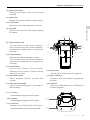
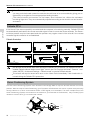
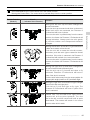
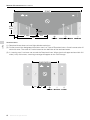
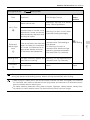
Flight Mode Switch
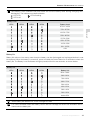
Toggle the switch to select the desired flight mode.
You may choose between; P-mode, F-mode and Amode.
Position
Figure
Position 1
Flight Mode
Position 1
F-mode
Position 2
A-mode
Position 3
P-mode
Position 2
Position 3
Remote Controller
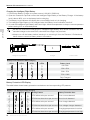
P-mode (Positioning): P-mode works best when the GPS signal is strong. There are three different
versions of P-mode, which will be automatically selected by the Phantom 3 Professional depending on
GPS signal strength and the Vision Positioning sensors:
P-GPS: GPS and Vision Positioning both are available; the aircraft is using GPS for positioning.
P-OPTI: Vision Positioning is available but a sufficient GPS signal is not available. Aircraft is using
only Vision Positioning for position holding.
P-ATTI: Neither GPS nor Vision Positioning is available, the aircraft is using only its barometer for
positioning, so only altitude is maintained.
A-mode (Attitude): GPS and Vision Positioning System are not used for stabilization. The aircraft uses
only its barometer to stabilize. The aircraft can automatically return to the Home Point if remote controller
signal is lost and the Home Point was recorded successfully.
F-mode (Function): Intelligent Orientation Control (IOC) is activated in this mode. For more information
about IOC, refer to the IOC section in the Appendix.
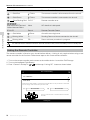
By default, the Flight Mode Switch is locked to P-mode. To unlock other flight modes, launch the DJI Pilot
app, enter the “Camera” page, and tap “Mode”, then activate “Multiple Flight Mode”.
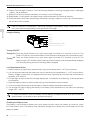
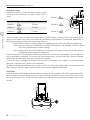
RTH Button
Press and hold the RTH button to start the Return-to-Home (RTH) procedure. The LED ring around the RTH
Button will blink white to indicate that the aircraft is entering RTH mode. The aircraft will then return to the
last recorded Home Point. Press this button again to cancel the RTH procedure and regain control of the
aircraft.
26 © 2015 DJI. All Rights Reserved.