1
708 User Guide
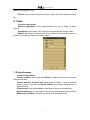
key—choose browse mode—fast press Up or Down direction key
to choose Manual mode or Automatic mode
Manual mode:Press direction key to do page turning
Automatic mode:The e-book shall turn the pages automatically as per
the interval time of page turning being set.
Automatic page turning
Operating steps : during e-book reading—fast press M
key—choose Automatic page turning— fast press Up or Down
direction key to choose interval time of automatic page turning
5. Playing music
Function description
Volume adjustment: Fast press direction key up or down to adjust
volume
Playback or pause: Fast press ‘M’ to playback or pause current music
under this interface.
Previous or next track: Fast press direction key left or right to choose
last or next song
Fast forward or rewind: long press key left or right to activate
fast-forward or Rewind operation
Music list setting: Fast press key ‘M’ to recall online menu, it consists of
repeat mode, play setting, Microsoft music effect and music effects
choice.
Repeat setting: play single once, play back single, play whole once,
repeat all.
Play setting: sequential play, random play
Music effect: 3D, strong bass, Volume balancing
Music effect choice: normal, Microsoft music effect, rock, pops hit,
5