1
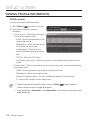
appendix Troubleshooting PROBLEM I can’t access the camera from a web browser. SOLUTION yy Check to make sure that the camera’s Network settings are appropriate. yy Check to make sure that all network cables have been connected properly. yy If connected using DHCP, verify that the camera is able to acquire dynamic IP addresses without any problem. yy If the camera is connected to a Broadband Router, verify that port forwarding is properly configured. Viewer got disconnected during monitoring. I cannot connect to the system using a tab browser of Internet Explorer 7.0. yy Connected Viewers become disconnected upon any change to camera or network configurations. yy Check all network connections. yy If the camera is connected over an PPPoE network, it’ s possible for Viewer to disconnect under poor network conditions. yy An error may be generated when connecting with a new window or tab since the cookie data are shared. Do not use a new window or tab, select “File New session”. The camera connected to the network is not detected in the IP installer program. yy Turn off the firewall settings on your PC and then search the camera again. Images overlap. yy Check whether two or more cameras are set to a single multicast address instead of different addresses. If a single address is used for multiple cameras, the images may overlap. No image appears. yy If the transmission method is set to multicast, check whether there is a router that supports multicast in the LAN the camera is connected to. 122_ appendix