1
Breeze User Manual Ver1.2
5.4
Measuring
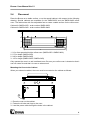
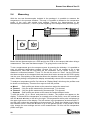
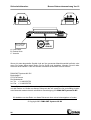
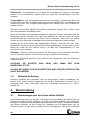
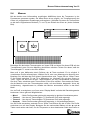
With the two test thermocouples included in the package it is possible to measure the
temperature in the process chamber. This way it is possible to determine the temperature
profile of the oven with certain oven settings. Connect the thermocouples to the
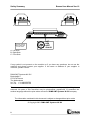
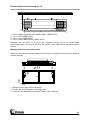
thermocouple connectors (T1 and T2) at the beginning of the transport belt (see next figure).
l
O
T1
T2
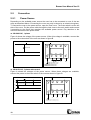
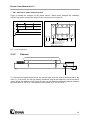
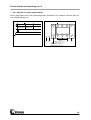
Mount the two thermocouples on a PCB and lay the PCB on the transport belt when doing a
measurement. Take care that thermocouple T1 is going into the oven as first.
To do a measurement go to the measure screen by pressing the M button. It is possible to
save six different temperature profiles. Choose one out of six profiles to do a new
measurement. Note that the old profile will be overwritten. Set at “Offset Therm 2” the
distance in millimetres between T1 and T2. Go with the cursor to “Start”. Lay the PCB with
the thermocouples on the transport belt and press the S button as soon as the PCB is going
into the oven. Now plotting of the data that enters the machine through the 2 thermocouples
starts. When plotting is completed the display automatically returns to the measure screen.
To analyse a temperature profile, first choose at “Display Mode” which way the profiles must
be shown on the display. There are four ways to show the profiles:
•
•
•
•
Mixed
Thermo 1
Thermo 2
Separate
: Both profiles are shown at the same time and at the same level.
: Only the profile measured by thermocouple T1 is showed.
: Only the profile measured by thermocouple T2 is showed.
: Both profiles are shown at the same time and at different levels.
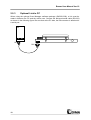
To see the profile, go to “Show” and press the S button. The profiles now appear on the
display. To determine the temperature at a certain point of the profile, move the vertical bar
with the ← and → button to the left or the right. The temperature at this point is displayed in
the upper right corner of the display. The left number is the temperature at thermocouple T1
and the right number the temperature at thermocouple T2. Press the S button to go back to
the measure screen. Press the M button to go to the general screen. If the profile is not all
right, change the oven settings and do a new measurement. Do this until the temperature
profile is all right.
20