1
Networked
Robotics
Page 1 of 90
Tempurity System User’s Guide
Tempurity-04-0006.5
™
Tempurity System
User’s Guide
Tempurity Version 2.0
Copyright ©2010 Networked Robotics Corporation. All rights reserved.
1.12.2010
Networked
Robotics
Page 2 of 90
Tempurity System User’s Guide
Tempurity-04-0006.5
Table of Contents
Table of Contents............................................................................................................ 2
Introduction ..................................................................................................................... 6
About Tempurity .......................................................................................................................... 6
The Networked Robotics Mission................................................................................................ 6
Tempurity Components ............................................................................................................... 6
Tempurity Architecture ................................................................................................................ 6
About this Document ................................................................................................................... 7
Tempurity™ System Requirements .............................................................................. 8
Tempurity Server™ Computers .................................................................................................. 8
Tempurity Monitor™ Computers ................................................................................................. 8
NTMS Network Hardware ........................................................................................................... 8
Direct Data Collection from Scientific Instruments (Direct Connections).................................... 8
Data Collection from Networked Robotics Probes (Sensors) ..................................................... 8
An Overview of the Tempurity System ......................................................................... 9
Connecting to Tempurity: An Overview....................................................................................... 9
Tempurity System Software ...................................................................................................... 11
How it Works - The Tempurity System Architecture ................................................................. 12
Networked Robotics’ NTMS Network Hardware ....................................................................... 13
Configuring Networked Robotics’ Hardware for Data Collection............................. 15
Power the NTMS ....................................................................................................................... 15
Connect to the Network............................................................................................................. 15
Wireless Networking.................................................................................................................. 17
Extending Connections ............................................................................................................. 17
The NTMS Configuration Wizard .............................................................................................. 19
Downloading the NTMS Configuration Wizard .....................................................................................19
Run the NTMS Configuration Wizard ...................................................................................................19
Viewing and Setting the NTMS’s IP Address........................................................................................21
Viewing and Setting the Interface, Instrument or Sensor Type.............................................................21
Physically Connect the NTMS to your Instrument – An Example Direct Connection and an
Example Sensor ........................................................................................................................ 21
Example Direct Data Connection Type: Ultracold (-80°C) Freezers .....................................................22
Example Sensor Type: Networked Robotics TPL3 Temperature Probe in Refrigerators/ Freezers/
Incubators/ Ovens/ Rooms ...................................................................................................................22
Placing Digital Temperature Probes in Glycerin Solutions ...................................................................24
Extensions............................................................................................................................................24
Monitoring a Freezer through Standard Network Wall Plates................................................... 24
Testing Data Collection through the Network Manually ............................................................ 25
The Ping Command..............................................................................................................................26
The Telnet Command...........................................................................................................................26
The Tempurity Server ................................................................................................... 29
Dedicated vs Shared Use Computers as Tempurity Servers ................................................... 29
Downloading the Tempurity Server Software ........................................................................... 29
The Tempurity Server Status Icon on the Windows Taskbar.................................................... 31
Server Running ....................................................................................................................................31
Copyright ©2010 Networked Robotics Corporation. All rights reserved.
1.12.2010
Networked
Robotics
Page 3 of 90
Tempurity System User’s Guide
Tempurity-04-0006.5
Server Stopped ....................................................................................................................................32
Starting and Stopping the Tempurity Server using the Taskbar ...........................................................32
Starting and Stopping the Tempurity Server using Windows................................................................33
The Tempurity Server Configuration Utility ............................................................................... 34
Configuring Monitored Devices ............................................................................................................35
Custom Monitored Device Types .........................................................................................................38
Configuring the Server Identity .............................................................................................................40
Enabling E-mail and Text Message Alarm Notifications .......................................................................40
Testing the Ability to Send Mail ............................................................................................................41
Microsoft Exchange Servers and Testing the Ability to Send Mail........................................................42
Using Gmail as your Alarm Notification Mail Server .............................................................................42
Enabling Voice Alarm Notifications.......................................................................................................43
Editing Tempurity Server Configuration Files Manually ........................................................................44
Configuration Histories and Restoring Previous Configurations ...........................................................44
Setting the Windows Options on your Tempurity Server Computer ......................................... 45
Tempurity System Data............................................................................................................. 45
Measurement Interval...........................................................................................................................45
Time of Data Collection ........................................................................................................................45
Units .....................................................................................................................................................46
Location................................................................................................................................................46
Data Retention .....................................................................................................................................46
Data Backup.........................................................................................................................................46
Accuracy...............................................................................................................................................46
Value Alarms ........................................................................................................................................47
Communication Alarms ........................................................................................................................47
The Tempurity Monitor Client ...................................................................................... 49
Distributed Alarm Notification.................................................................................................... 49
Dedicated vs Shared Use Computers as Tempurity Monitors .................................................. 49
Running the Server and the Monitor on the Same Computer................................................... 49
Downloading and Installing ....................................................................................................... 49
Starting the Tempurity Monitor.................................................................................................. 53
Stopping the Tempurity Monitor ................................................................................................ 53
Connection Status to the Tempurity Server .............................................................................. 54
Main Monitor Screen ................................................................................................................. 54
Alarm Status Icons ...............................................................................................................................56
Alarm Window ........................................................................................................................... 57
Monitored Device Information Window ..................................................................................... 57
Graphs....................................................................................................................................... 58
Exporting Data to Other Applications ........................................................................................ 61
Statistics .................................................................................................................................... 62
Alarm Notifications .................................................................................................................... 63
Defining an Alarm Notification Group ...................................................................................................64
Choosing Alarm Notification Types and Entering Alarm Notification Addresses ..................................65
Test Alarm Notifications........................................................................................................................66
Alarm Notification Groups are Mapped to the Tempurity Server for which they were Created.............66
Alarm Notification History .....................................................................................................................66
Storage and Transfer of Alarm Notification Groups ..............................................................................66
Monitor Restart.....................................................................................................................................67
E-mail to Text Gateways ......................................................................................................................67
Time Delay in Receiving Alarm Notifications ........................................................................................68
Monitoring Multiple Tempurity Servers from a Single Computer .............................................. 69
Regional Versions of the Tempurity Monitor............................................................................. 70
Copyright ©2010 Networked Robotics Corporation. All rights reserved.
1.12.2010
Networked
Robotics
Page 4 of 90
Tempurity System User’s Guide
Tempurity-04-0006.5
Hardware Upgrades – Changing the Function of your NTMS Hardware ................. 71
When to Upgrade your Firmware .............................................................................................. 71
Downloading the Hardware Upgrade Wizard............................................................................ 71
Running the Hardware Upgrade Wizard ................................................................................... 71
Time Zones and Time Accuracy .................................................................................. 73
System Operations ....................................................................................................... 75
Redundancy .............................................................................................................................. 75
Large Scale Power Outages ..................................................................................................... 75
Safety ........................................................................................................................................ 76
Periodic Testing......................................................................................................................... 76
Regulatory Use.......................................................................................................................... 77
Suggestions for Operation ........................................................................................................ 77
Index............................................................................................................................... 78
Appendix A: Glossary of Key Tempurity System Terms........................................... 80
Appendix B: USP Temperature Storage Definitions.................................................. 81
Appendix C: File Locations.......................................................................................... 82
Appendix D: Networked Robotics’ NTMS Hardware FCC Certification ................... 83
Appendix E: The NTMS Configuration Utility ............................................................. 84
Appendix F: Configuring your PC for Use as a Tempurity Server or Monitor ........ 87
Appendix G: Tempurity System Specifications ......................................................... 89
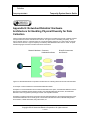
Appendix H: Networked Robotics’ Hardware Architecture for Handling Physical
Diversity for Data Collection ........................................................................................ 90
Copyright ©2010 Networked Robotics Corporation. All rights reserved.
1.12.2010
Networked
Robotics
Page 5 of 90
Tempurity System User’s Guide
Tempurity-04-0006.5
Customer Support Information
Networked Robotics Corporation
1-877 FRZ TEMP
www.NetworkedRobotics.com
Copyright
Trademarks
Information in this document is subject to change without
notice. The temperatures used in the examples are
fictitious and are not actual temperatures recorded from
any organization. No part of this document may be
reproduced or transmitted in any form or by any means
without the express written consent of Networked Robotics
Corporation.
The Networked Robotics NR logo is a trademark of
Networked Robotics Corporation.
@2009 Networked Robotics Corporation All Rights
Reserved. Printed in the USA
Tempurity System User Manual Tempurity Version 2.0
This document and the associated online and printed
documentation are the property of Networked Robotics
Corporation and are loaned to the user under the terms of
the license agreement. Unauthorized copying or use of the
software or any associated materials is contrary to the
proprietary rights of Networked Robotics Corporation and
is a violation of state and federal law. This material must
be returned to Networked Robotics Corporation upon
demand.
LinkSys is a registered trademark of Cisco-LinkSys
Corporation California. Microsoft, Windows, Windows XP,
Exchange, and the Windows logo are registered
trademarks of Microsoft Corporation in the United States
and/or other countries. Gmail is a registered trademark of
Google Inc. Corporation. Sprint PCS is a registered
trademark of Sprint Communications Company L.P. US
Telecom Inc. T-Mobile is a registered trademark of
Deutsche Telekom Ag. Corporation. Cingular is a
registered trademark of Cingular Wireless LLC. Verizon is a
registered trademark of Verizon Trademark Services LLC.
Nextel is a registered trademark of Nextel Communications,
Inc. Forma is a registered trademark of Thermo Fisher Inc.
Corporation. Revco is a registered trademark of Thermo
Fisher Inc., Kelvinator is a registered trademark of
Electrolux Home Products, Inc.
Other product names mentioned may be service marks,
trademarks, or registered trademarks of their respective
companies and are hereby acknowledged.
Networked Robotics Corporation
825 Chicago Avenue
Suite F
Evanston, IL 60202
Copyright ©2010 Networked Robotics Corporation. All rights reserved.
1.12.2010
Networked
Robotics
Page 6 of 90
Tempurity System User’s Guide
Tempurity-04-0006.5
Introduction
About Tempurity
The Tempurity System is the most powerful system on the market for achieving compliance with United
States Food and Drug Administration and other quality regulations. Environmental conditions are critical
to the quality of biologics, food, and compounds. By enabling centralized data collection from
environmentally-sensitive scientific equipment and sensors that are anywhere on your network, the
Tempurity System enables you to confirm the integrity of your organization’s key assets.
The Networked Robotics Mission
Networked Robotics’ mission is to enable real-time data collection from diverse sources with regulatorycompliant hardware and software. Our systems are designed and documented for use in United States
Food and Drug Administration (FDA) Good Laboratory Practices (GLP) and Good Manufacturing
Practices (GMP) Environments.
Tempurity Components
The system is comprised of both advanced software and unique new network hardware. All Tempurity
Software can be easily downloaded and used on computers running the Windows operating system.
Unique Networked Robotics hardware collects data from diverse data sources.
Tempurity Architecture
The peer-to-peer architecture of Tempurity means that the system is flexible to a degree that has not
been achieved by monitoring systems to-date. Tempurity components can be rapidly installed
anywhere, and can be quickly configured to communicate with other Tempurity components. The
Tempurity architecture is “distributed” because pieces of the system run on multiple, networked
computing devices that communicate with each other.
The Tempurity architecture improves monitoring capability by increasing access to mission-critical
information. It enables a high degree of redundancy, and decreases the barriers of connection-time.
Key benefits of the Tempurity System distributed architecture are:
Copyright ©2010 Networked Robotics Corporation. All rights reserved.
1.12.2010
Networked
Robotics
Page 7 of 90
Tempurity System User’s Guide
Tempurity-04-0006.5
1) Data can be collected from instruments and sensors that are anywhere on the network. Networked
Robotics hardware “learns” to talk to new sensor and instrument types through downloadable firmware.
2) Any Windows computer can collect data.
3) Using an instantly downloadable tool, running permanently in the background of your computer, any
computer on the network can watch data and when needed, implement alarm notifications to anyone,
anywhere.
About this Document
For the most up-to-date information on the Tempurity System hardware and software you may wish to
consult the Networked Robotics web site at www.NetworkedRobotics.com. The web site can be
considered to be the main source of information for the Tempurity System and is expected to be
updated more frequently than this manual.
This manual can be downloaded from the “Documentation” subsection of the “Download” section of the
web site. See also the Tempurity Quickstart guide and documentation for individual interface and
sensor hardware products.
Directions for invoking Windows functions are given using the Windows Classic View of the Control
Panel.
Copyright ©2010 Networked Robotics Corporation. All rights reserved.
1.12.2010
Networked
Robotics
Page 8 of 90
Tempurity System User’s Guide
Tempurity-04-0006.5
Tempurity™ System Requirements
The following describes the minimum hardware requirements that are necessary to run the Tempurity
System.
Tempurity Server™ Computers
o Pentium III or better PC
o 128 Megabytes of RAM
o At least 2 gigabytes of free disk space for data storage
o PC must be connected to a network that has access to Networked Robotics‘ NTMS hardware
o This computer must be connected to a network that has access to an SMTP mail server
o BIOS options that support automatic recovery after power failure
Tempurity Monitor™ Computers
o Pentium III or better PC
o 128 Megabytes of Ram
o At least 100 megabytes of free disk space
o 1024 x 768 screen resolution or greater
o This computer must be connected to a network that can access the Tempurity Server Computer
o For many Monitors, BIOS options that support automatic recovery after power failure are recommended
NTMS Network Hardware
o An Ethernet TCP/IP network (10 Megabit or autosensing connection)
o Standard 115-Volt, 60 Hertz AC power outlet for each NTMS hardware device
Direct Data Collection from Scientific Instruments (Direct Connections)
o The list of equipment that to which Tempurity can communicate directly continues to grow monthly.
Ultracold freezers from Thermo Revco®, Thermo Forma®, Harris®, Baxter®, VWR®, Kelvinator®,
Thermo Cryoplus® liquid nitrogen freezers, and Thermo Forma® incubators are supported. Your
NTMS network hardware “learns” to talk directly to new instrument types and sensors via
downloadable firmware. See the Networked Robotics web page for more current information.
Data Collection from Networked Robotics Probes (Sensors)
o The list of Networked Robotics probe types that are supported by the Tempurity System continues to
expand. Networked Robotics TPL3 probes for temperature, RTD for liquid nitrogen or highertemperature ovens, HPL1 for humidity, DCP for alarm and other switch contacts, and AC power
probe are current options. Your NTMS network hardware “learns” to talk to new sensor types and
scientific instruments via downloadable firmware. See the Networked Robotics web page for more
current information.
Copyright ©2010 Networked Robotics Corporation. All rights reserved.
1.12.2010
Networked
Robotics
Page 9 of 90
Tempurity System User’s Guide
Tempurity-04-0006.5
internet
An Overview of the Tempurity System
Connecting to Tempurity: An Overview
The major steps to follow for a new Tempurity System installation are as follows: Use the
downloaded programs shown by the black-and-white tool icons, which can be obtained from the
“Download” section of the Networked Robotics web site:
1)
Set up the Networked Robotics NTMS4 Network Device(s)
Download the NTMS Configuration Wizard
to any PC
A.
B.
Configure the network addresses in each NTMS4 for use on your network
C.
Configure the 4 physical data acquisition ports on each NTMS4 for the type of instrument or
sensor interface(s) from which data will be collected
D.
Physically connect the scientific instrument or sensor(s) to the NTMS4’s data port(s)
E.
Test network data collection
2)
Set up the Tempurity Server
A.
Download and install the Tempurity Server software
to specify data collection from the
B
Run the Tempurity Server Configuration Utility
network addresses in (1) above and set alarm threshold criteria
C
Start the Tempurity Server to initiate data collection
3)
Set up the Tempurity Monitor Client(s)
Copyright ©2010 Networked Robotics Corporation. All rights reserved.
1.12.2010
Networked
Robotics
Page 10 of 90
Tempurity System User’s Guide
Tempurity-04-0006.5
A.
Download and install the Tempurity Monitor(s)
on the appropriate computer(s) (can be
the same as the Tempurity Server) and enter the network address of the Tempurity Server(s) to watch
B.
Create alarm notification groups and enter alarm notification addresses
C.
Review data and alarm history as needed
4)
Set BIOS and Windows parameters on both Server and Monitor Computers
to ensure that the Tempurity System is accessible and always running
5)
Periodically Review and Test System Configuration and Functionality
All software and configuration utilities can be downloaded from the Networked Robotics web
site.
Copyright ©2010 Networked Robotics Corporation. All rights reserved.
1.12.2010
Networked
Robotics
Page 11 of 90
Tempurity System User’s Guide
Tempurity-04-0006.5
Tempurity System Software
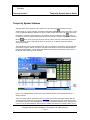
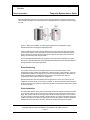
The figure below shows the three main components of the Tempurity System software running
simultaneously on a single computer. The NTMS Configuration Wizard
, shown in the center is used
to set up Networked Robotics hardware and thus to enable network-based data collection from freezers,
refrigerators, incubators, and cryofreezers. The Tempurity Server Configuration Utility
, shown on
the lower left, is used to initiate network data collection and storage to a single computer. The Tempurity
Monitor
, shown on the upper right, is used to view any data in real-time and to initiate the sends of
alarm notifications. Each component can be run on the same, or on different computers. Network
security factors apply.
Tempurity-Monitor-running and Tempurity-Server-running computers must be able to communicate with
each other through the network, and Server computers must be able to communicate with Networked
Robotics’ NTMS hardware. For fully distributed operation network ports 3010 and 80 must be open on
the firewall of the Tempurity Server computer.
Figure 1: The 3 Main Software Components of the Tempurity System Running Simultaneously on a
Single Computer
The three components are obtained from the “Download” section of the Networked Robotics web site
via three separate downloads. Download by clicking on the relevant tool and then install each program
as needed by clicking on the downloaded file. The NTMS Configuration Wizard is run by clicking directly
on the icon for the downloaded file. After it has been installed, the Monitor is invoked by clicking on the
Copyright ©2010 Networked Robotics Corporation. All rights reserved.
1.12.2010
Networked
Robotics
Page 12 of 90
Tempurity System User’s Guide
Tempurity-04-0006.5
icon in the Windows taskbar, usually at the bottom right of your screen. After installation, the Server
Configuration Utility, which is used to initiate automatic data collection and logging, is invoked in the
programs list under “Start->All Programs>TempurityConfig”.
indicates that this is a computer on which
The NR icon in the Windows Taskbar at the lower right
the Tempurity Server software is enabled for data collection.
How it Works - The Tempurity System Architecture
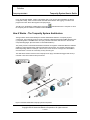
The figure below shows schematically the network-distributed architecture of Tempurity System
components. The Tempurity Server (2) sends commands to Networked Robotics NTMS hardware units
(1) requesting data. The NTMS units in turn query scientific instruments and sensors in each of their
unique data languages. (See the section on the NTMS hardware.)
The primary function of the Networked Robotics hardware is integration. Networked Robotics hardware
speaks the unique data language of diverse instruments and sensors. The network messages to the
NTMS requesting data are in a simple, common form, but the format of messages from the NTMS to
each instrument or sensor are necessarily of many diverse types.
The data values that are returned to the Tempurity Server (2) by the NTMS are tagged with a time (a
universal or time-zone irrelevant time) and stored.
1
3
2
Figure 2: Network-Distributed Tempurity System Components
Copyright ©2010 Networked Robotics Corporation. All rights reserved.
1.12.2010
Networked
Robotics
Page 13 of 90
Tempurity System User’s Guide
Tempurity-04-0006.5
The Tempurity Server (2) watches the data streams from the monitored devices to see if the data
values that are collected meet the conditions that would initiate an alarm condition. Tempurity Monitors
(3) are constantly in contact with the server, watching remotely for the development of alarm conditions.
If such an event occurs they determine who should be notified and how. The process is initiated by the
Monitor Client (3) however it is the Server (2) that implements the sending of these messages through
an e-mail server or other means to the outside world.
Networked Robotics’ NTMS Network Hardware
The Networked Robotics NTMS4 (Network Telemetry Monitoring System) is a network device that is
designed to collect data from diverse data sources. Most commonly these are environmental data
sources such as the temperatures from ultracold (-80°C) freezers, liquid nitrogen freezers, standard
freezers, refrigerators, cold boxes, incubators, or rooms via either direct data connections to those
types of instruments (In effect data is collected indirectly from the instruments own sensors) or via
Networked Robotics’ proprietary sensors.
Networked Robotics hardware must be configured in a process similar to that of configuring other types
of network devices; the units must be set to run in your company’s network environment, and each of
the connected data ports on the NTMS must be configured for data collection from the type of scientific
instrument or sensor from which values will be collected.
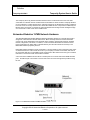
A front view of the NTMS4i is shown below. The data ports are on the left side of the NTMS with data
port 1 the leftmost jack. The network connector has a silver rim and is the rightmost jack when facing
the unit.
Figure 3: The Networked Robotics NTMS Hardware
Copyright ©2010 Networked Robotics Corporation. All rights reserved.
1.12.2010
Networked
Robotics
Page 14 of 90
Tempurity System User’s Guide
Tempurity-04-0006.5
Each of the NTMS4’s four data ports can be used to communicate with any supported monitored device.
Any combination of these instrument and sensor connections may be implemented on any of the four
data ports. For example all four could be configured to collect temperature from standard refrigerators
via Networked Robotics’ TPL3 temperature probes (Networked Robotics Product #30002), or, in an
alternate case, two data ports could collect temperatures from probes in standard refrigerators, the third
could collect temperature via a direct connection to the serial port of a Forma-compatible ultracold
freezer (Networked Robotics Product #30003), and the fourth could collect temperature via a direct
connection to the serial port of a Harris®-(Revco®-compatible) (Networked Robotics Product #30004)
freezer. Some monitored device types such as incubator direct connections) report several parameters
(e.g. temperature, humidity, Co2, O2) all through a single NTMS data port.
Each Networked Robotics NTMS is labeled with a unique ID. The Unique ID is important for tracing
connectivity to instruments or sensors.
The reset switch on the unit sets the unit to factory defaults. To reset, unplug the unit and then depress
the switch with a pen or paperclip while plugging in the unit.
For a list of Networked Robotics interface and sensor products, see the Networked Robotics web site at
www.NetworkedRobotics.com.
Copyright ©2010 Networked Robotics Corporation. All rights reserved.
1.12.2010
Networked
Robotics
Page 15 of 90
Tempurity System User’s Guide
Tempurity-04-0006.5
Configuring Networked Robotics’ Hardware
for Data Collection
In order to enable network data collection, you will configure the Networked Robotics NTMS hardware
software, connect the instrument or sensor
through your network using the NTMS Configuration Wizard
to the NTMS, and test network data collection through the operating system independent of the Tempurity
System software.
In most cases it is best to immediately connect the NTMS to the network where it will be used, near the
monitored scientific instrument or sensor and configure it there, however in some cases, such as when the
NTMS needs to be put in a difficult-to-get-to or unsafe location, when it will be used in another building not
on your local network, or on a wireless connection, you may want to briefly plug it into a nearby network port
in your office, configure and test it, and then move it to the network at the monitored location.
Power the NTMS
When you plug the power into the NTMS you will see that the three LEDs on the left side of the unit are
active. The yellow LED is the “link” light. It indicates that the NTMS is connected properly to the
network. After powering up, the yellow light will blink once to indicate that the firmware is operating
properly. The green light will flicker when connected to an active network. The red and green lights
indicate data communication with scientific instruments and sensors.
Connect to the Network
The figure below, reproduced from the first panel displayed in the NTMS Configuration Wizard
,
shows how the NTMS is connected to your network. In this figure the network switch is shown in the
same room as the NTMS. In many cases the network switch, shown below in blue, will be mounted in a
network closet in your facility, and you will be connected to it via the same standard wall plates and
jacks used to connect personal computers to your network.
Copyright ©2010 Networked Robotics Corporation. All rights reserved.
1.12.2010
Networked
Robotics
Page 16 of 90
Tempurity System User’s Guide
Tempurity-04-0006.5
Figure 4: How to Connect the NTMS4 to your Network
In some cases it may be appropriate to first connect the NTMS unit directly to a Windows computer.
(You are creating a two-node network), configure the NTMS IP address using the NTMS Configuration
Wizard software, and then move the unit to your organization’s network at the monitored site.
This temporary connection to the PC can be implemented with either: 1) a CAT5 crossover cable or 2) a
switch/hub and two standard CAT5 Ethernet cables. Make sure that the NTMS Configuration Wizard
has been downloaded to your PC before you disconnect it from the internet.
Option 1: Crossover Cable
A crossover network cable can be purchased at any electronics store such as Best Buy or
Radio Shack. Crossover cables use the same RJ-45 plugs as regular Cat-5 Ethernet cables,
although they have different internal wiring.
Connect the crossover network cable directly from your computer’s network port to the
NTMS4’s network socket (the silver connector). Ensure that the NTMS is on.
Option 2: Switch or Hub
If you don’t have a crossover cable you can connect your computer to a switch or hub with a
standard network cable, and then connect the NTMS to the same switch or hub with another
standard network cable, the NTMS4 is a 10 Mb/s device. It should be used on 10/100
switches on 10 Mb-or-less hubs.
Figure 5: Methods of Setting up a Two-Node Network for Configuration
Copyright ©2010 Networked Robotics Corporation. All rights reserved.
1.12.2010
Networked
Robotics
Page 17 of 90
Tempurity System User’s Guide
Tempurity-04-0006.5
Wireless Networking
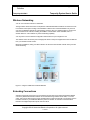
You can use a wireless network to collect data.
The figure below shows how this is accomplished. A Networked Robotics NTMS is connected via CAT5
to a wireless access point or bridge. The installation is different from a wired installation only in that in
one case, the NTMS is attached to a wired switch, and in the other to a wireless bridge or access point.
Some institutions mix methods, installing the NTMS in a wired fashion where available, and in a
wireless fashion in rooms without any extant networking capability.
You may wish to use the alternate configuration method above to pre-configure the unit.
The wireless router and access point or bridge (both shown in blue) are equipment that can be obtained
from your wireless network vendor.
Methods of installation, testing, and data collection are the same with wireless network as they are with
wired networking.
Figure 6: Using the NTMS with a Wireless Network
Extending Connections
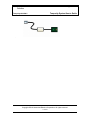
Scientific instruments and sensors can be installed more than 300 ft from Networked Robotics NTMS
units. Every Networked Robotics interface can be extended using standard CAT5 cable, or in some
cases, 6-pin phone cable using the simple, standard RJ45 coupler included with your interface. See the
hardware manual for your Networked Robotics product for details. An extension to the Networked
Robotics TPL3 digital temperature probe is shown below.
Copyright ©2010 Networked Robotics Corporation. All rights reserved.
1.12.2010
Networked
Robotics
Page 18 of 90
Tempurity System User’s Guide
Tempurity-04-0006.5
.
Copyright ©2010 Networked Robotics Corporation. All rights reserved.
1.12.2010
Networked
Robotics
Page 19 of 90
Tempurity System User’s Guide
Tempurity-04-0006.5
The NTMS Configuration Wizard
Once you have established network connectivity to your NTMS, you will run the NTMS Configuration
Wizard software. The Configuration Wizard scans your network for any Networked Robotics NTMS
devices, and lists them according to their Networked Robotics Unique ID and their current IP address.
You will select the appropriate unit to configure by double-clicking on one of the units that were returned
by the Wizard’s search. Then enter the appropriate network and interface settings.
The NTMS Configuration Wizard is an important tool for managing the Tempurity System. It allows you
to map a logical address, the IP address (the address used in the Tempurity System software for data
collection) to the specific NTMS unit, the physical address, as shown by its Unique ID that is used to
collect data from a specific instrument or sensor.
Downloading the NTMS Configuration Wizard
You can download the NTMS Configuration Wizard at www.networkedrobotics.com/download. The
Wizard software can be downloaded directly to your computer and executed by clicking on the
black and white tape measure icon of the downloaded file
.
Run the NTMS Configuration Wizard
A series of screens will be displayed to help you ensure that the NTMS is connected to the network
properly. Then the program will scan your local network for any Networked Robotics hardware. The
discover function of the Wizard finds any NTMS units on the current subnet. A subnet commonly
includes the collection of all network devices on a floor or within a single building, but the definition
of a subnet in your facility is determined by your network administrator.
The below shows an example of a single unit returned by the discovery function of the Wizard.
Double click on the spreadsheet-style line showing the NTMS to be configured.
Copyright ©2010 Networked Robotics Corporation. All rights reserved.
1.12.2010
Networked
Robotics
Page 20 of 90
Tempurity System User’s Guide
Tempurity-04-0006.5
Figure 7: NTMS Unit Returned by the Wizard’s Discovery Function
The NTMS MAC Address shown in the table is the same as the Networked Robotics Unique ID as
labeled on the side of your hardware. The numbers are always unique. No two network devices will
have the same Networked Robotics Unique ID/ MAC address.
The default IP address of a new NTMS is 192.168.1.44. Be aware that there is a potential for IP
address conflict when several new units are connected to the network at once. Each must be
distinguished with a unique IP address before data collection or standard network connectivity
testing tools like “Telnet” or “Ping” (see below) can be used. Duplicate IP addresses will create
unpredictable results.
The visibility of the device in the Wizard can create a misleading impression; just because a unit
shows up in a NTMS Configuration Wizard discovery scan does not mean that Tempurity System
data collection can occur. Both the ability to successfully test network data collection manually
using “Telnet” and “Ping” and data collection through the Tempurity System are only enabled after
you have provided an IP address and subnet mask that is appropriate for your company’s network.
Copyright ©2010 Networked Robotics Corporation. All rights reserved.
1.12.2010
Networked
Robotics
Page 21 of 90
Tempurity System User’s Guide
Tempurity-04-0006.5
Figure 5: Configuring the Interface Type of the Connected Instrument or Sensor for each Physical
Data Port of the NTMS
Viewing and Setting the NTMS’s IP Address
Enter the static IP address that is appropriate for your company’s network at the monitored site.
Enter the appropriate Subnet Mask (Netmask) for that location as well. The Tempurity System can
collect data from any local or remote network source. If you are unsure what values to use, check
with your network administrator.
Viewing and Setting the Interface, Instrument or Sensor Type
Each connected NTMS data port must be configured for the type of instrument or sensor from
which data collection will occur. The figure above shows the simple pull-down list used to set the
instrument or sensor type. Check the hardware manual for each Networked Robotics interface or
probe product to determine the appropriate item to select.
The list of supported interfaces changes as new instruments and sensors are supported by
Networked Robotics hardware. You require access to both the most recent NTMS Configuration
Utility and the most recent NTMS firmware to support the latest instrument and sensor interfaces.
Both can be obtained from the “download” section of the Networked Robotics web site.
Physically Connect the NTMS to your Instrument – An Example
Direct Connection and an Example Sensor
Each scientific instrument or sensor is connected differently. The details of how to connect each
interface are described in the individual Networked Robotics hardware manuals included with each
Copyright ©2010 Networked Robotics Corporation. All rights reserved.
1.12.2010
Networked
Robotics
Page 22 of 90
Tempurity System User’s Guide
Tempurity-04-0006.5
interface or sensor product. Examples of the two broad classes of connections are given here: direct
data connections using an Ultracold Freezer Interface (Networked Robotics Product Numbers #30003,
and #30004) as an example and sensors/probes using The Networked Robotics TPL3 digital
temperature probe (Networked Robotics Product Numbers #30002, #30012) as an example.
Example Direct Data Connection Type: Ultracold (-80°C) Freezers
The following diagram shows how many types of ultracold freezers can be connected to the
Tempurity System. The system connects to the freezer’s data port in order to collect the
temperatures as they are reported by the ultracold’s own internal temperature sensor. When using
a direct connection, the value collected and stored by the Tempurity System is the same as the
value shown on the instrument’s front panel.
The figure below shows the connection from NTMS to the ultracold freezer. Cat5 patch cable is
used to connect the NTMS hardware to an interface adapter (DB-9 to RJ-45) that connects to the
serial port of the ultracold.
Figure 6: Method of Direct Connection to an Ultracold (-80°C) Freezer
There are several interface adapters for almost all brands of ultracold freezer models including
Thermo Revco®, Thermo Forma®, Harris®, VWR®, Baxter®, Kelvinator® and others. You must
use the appropriate interface adapter for your make and model.
Direct connections require that the instrument be powered on and working properly in order to
acquire data. If the instrument is unplugged from wall power, the Tempurity System will issue a
communication alarm for the monitored device. See Networked Robotics interface hardware
manuals for specific connection instructions.
Example Sensor Type: Networked Robotics TPL3 Temperature Probe in
Refrigerators/ Freezers/ Incubators/ Ovens/ Rooms
Networked Robotics’ proprietary TPL3 digital temperature probes are used to record the interior
temperatures of refrigerators, freezers, some ultracold freezers, and other instruments. In these
kinds of scientific instruments the probes are usually installed through the seal of the refrigerator or
freezer door on the hinge side. The door must be open to install the probe.
Copyright ©2010 Networked Robotics Corporation. All rights reserved.
1.12.2010
Networked
Robotics
Page 23 of 90
Tempurity System User’s Guide
Tempurity-04-0006.5
Networked Robotics probes are constructed of ultra-thin wires that will ensure the integrity of the
door’s rubber seal. Make sure that the probe wire is installed flat and not twisted as it runs through
the seal.
Figure 7: Method of Installation for collecting temperature from a Refrigerator using a
Networked Robotics TPL3 Digital Temperature Probe
Some incubators have smaller openings between the instrument and the door. This makes
probe insertion difficult. It may be helpful to remove the probe’s dual-lock adhesive backing
before inserting the probe through the hinge space. Add new dual-lock to the probe before
affixing it to the interior wall of the incubator.
Do not install Networked Robotics TPL3 probes in ovens that reach temperatures of higher
than 100°C. Networked Robotics RTD probes (Networked Robotics Product Number #30014)
are appropriate for such high temperatures.
Probe Positioning
The location of the TPL3 or TPL3U probe within the device will have an effect on the
temperature reading. Usually lower placement of probes results in colder readings. There can
be temperature gradients of 5 degrees C or more in a full-sized refrigerator. In the devices of
some manufacturers the temperatures near the cooling coils may be lower than the
temperature at other locations within the refrigerator.
Networked Robotics recommends that probes be positioned ¼ of the way from the top of a
refrigerator or freezer about one foot deep, if possible, on the door-hinge side wall. Placing the
probe on the hinge side reduces the degree of fluctuation in temperature measurement caused
by opening the door.
Probe Installation
The Networked Robotics TPL3 probe head includes a dual-lock strip that is designed to attach
to an opposite dual-lock strip on the wall of the freezer. The wall of the freezer must be dry to
apply. Use a paper towel to dry the region where the probe will be mounted. In some cases it
may be necessary to warm the wall with a gloved hand for 15 or 20 seconds before the probe
is affixed. The warmer and dryer the interior wall, the more likely that the dual-lock will adhere
permanently. If the probe does not attach, remove the old dual-lock strip and try again.
Copyright ©2010 Networked Robotics Corporation. All rights reserved.
1.12.2010
Networked
Robotics
Page 24 of 90
Tempurity System User’s Guide
Tempurity-04-0006.5
The probe is not designed to be installed in environments where frost covers the interior wall of
the device.
To remove the Networked Robotics TPL3 probe from the freezer wall, use a slight twisting
motion while pulling the probe away from the wall of the freezer. Unplug the probe from the
NTMS’ RJ-45 temperature jack.
The Networked Robotics TPL3U probe is frozen directly to the wall of an ultracold freezer
using a glycerin/water solution. See the TPL3 digital temperature probe hardware manual for
details.
Placing Digital Temperature Probes in Glycerin Solutions
Many regulated customers will have a history of using temperature probes in glycerin for standard
refrigerators and freezers. Use of glycerin solutions dampens the response time to temperature
fluctuations. Some regulatory standards require the use of temperature probes in glycerin, citing
that appropriate volumes be used that reflect the mass of any at-risk material. Networked Robotics
TPL3 digital probes are fully waterproof and can be used in these solutions indefinitely.
Extensions
You can extend a connection from your scientific instrument or sensor to your NTMS with standard
CAT5 or 6-pin phone cable using the standard RJ-45 coupler provided with most interfaces. The
instrument or sensor can be placed 300ft or more away from the NTMS. See your specific
hardware manual for details.
Monitoring a Freezer through Standard Network Wall Plates
The sensors or direct connections responsible for the monitoring of refrigerators, freezers, and other
instruments can be plugged directly into the same wall plates that are commonly used to provide
network to your personal computers.
Normally personal computers are connected to the network though the CAT5 wiring in your building that
all meet in a network closet located somewhere on your floor or building. In the network closet there’s a
panel (shown below right) called a patch panel that allows connections to the wall plate in your office.
Common connections are network or phone.
You can use this infrastructure to collect data for Tempurity.
In this case the NTMS units to which these sensors are connected are mounted in racks or shelves in a
network closet. Each data port of the NTMS as shown below right is connected or “patched” to an RJ45
jack on one of your standard network wall plates.
The figure below shows an example of a room temperature monitoring application. The Networked
Robotics TPL3 probe is plugged in directly to a wall plate which in turn is connected through the
buildings CAT5 infrastructure to an NTMS (the link between the wall plate and the patch panel is not
shown). Temperature is being measured from 3 other rooms or labs, which are not shown in the figure
Copyright ©2010 Networked Robotics Corporation. All rights reserved.
1.12.2010
Networked
Robotics
Page 25 of 90
Tempurity System User’s Guide
Tempurity-04-0006.5
below. In this case the NTMS unit is installed in a network closet, and connected to the probe via the
building’s CAT5 infrastructure.
For facilities that have advanced network infrastructure this method makes it very easy to connect a
large number of monitored devices in just a few hours.
Lab or Room
Network Closet
Figure 8: A Networked Robotics TPL3 digital temperature probe used for Measuring Room
Temperature as Installed in a Standard Network Wall Plate.
Testing Data Collection through the Network Manually
Once the instrument or sensor is physically connected to an NTMS we recommend that you test the
ability to acquire remote data manually. We recommend that you do this before configuring this
monitored device for automatic data collection through the Tempurity System software. By assuring that
basic network connectivity and network data collection are possible BEFORE Tempurity System
configuration, you help to identify the source of connection problems early in the connection process.
To test manually you will use some common operating-system-resident network testing commands.
“Ping” and “Telnet” commands are available on Windows XP computers by default, but must be
manually enabled in Windows Vista and Windows 7. On these operating systems use “Control PanelÆ
Programs and Features Æ Turn Windows Features on or off” and check “Telnet” to enable this feature.
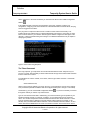
The Ping Command
Ping is used in order to confirm basic, network-device-to-network-device connectivity. Make sure
that your NTMS is connected to your network. From any computer go to the Windows command
prompt via “Windows StartÆRun Æ Enter Cmd” and then at the black screen type
“Ping ”IPaddress”
Copyright ©2010 Networked Robotics Corporation. All rights reserved.
1.12.2010
Networked
Robotics
Page 26 of 90
Tempurity System User’s Guide
Tempurity-04-0006.5
where “IPaddress” is the same IP address you entered for the device in the NTMS Configuration
Wizard.
.
If the NTMS responds to the ping) proceed with the connection, otherwise, examine your
configuration. A high ping-time is not indicative of a Networked Robotics hardware failure, but ping
errors do suggest such a failure.
If the ping does not respond at all then there is a failure in basic network connectivity. This
indicates the kind of problem that your network administrator would have in connecting any other
kind of network device to your network. Was the right IP address configured for this region of the
network? Is there a firewall blocking the message? Your Network administrator may be helpful in
analyzing the problem.
Figure 9: A Successful Ping Response
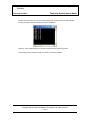
The Telnet Command
If the Ping responds, go a step further and use the Windows-based “Telnet” utility from any PC.
The use of “Telnet” tests the ability to obtain measurements through remote network data collection
from the instrument or sensor.
From Windows XP choose “START”, then “RUN”, and then type “CMD” and return. At the black
screen type
“Telnet” IPaddress Port,
where IP is the same IP address you used in the “Ping” command above, and Port is the network
TCP port address (defaults are 8088 to 8091 for the physical data ports 1 through 4 of an NTMS)
as selected by your use of the NTMS Configuration Wizard
through the network you will see only a blank screen.
. If you are successfully connected
Type the command character that is indicated by your monitored device type as specified in your
interface hardware manual. For example, a capital “T” for any temperature type of monitored
device. The resultant temperature and the associated checksum value will be returned. For other
types of monitored device a different command character will be entered, for example “H” for
humidity. See your Networked Robotics interface or sensor hardware manual for details. An error
will be returned if the NTMS does not sense a successful connection to the instrument or sensor.
Copyright ©2010 Networked Robotics Corporation. All rights reserved.
1.12.2010
Networked
Robotics
Page 27 of 90
Tempurity System User’s Guide
Tempurity-04-0006.5
If a data value is returned, you can now safely configure the Tempurity Server for data collection
knowing that proper physical connectivity has been established.
Figure 10: A Successful Response to Several Temperature Requests through Telnet
The flowchart below is designed to help you identify connectivity problems:
Copyright ©2010 Networked Robotics Corporation. All rights reserved.
1.12.2010
Networked
Robotics
Page 28 of 90
Tempurity System User’s Guide
Tempurity-04-0006.5
Telnet
command
responds with
an error
Network connectivity problem:
•
firewall blocking connection
•
wrong destination IP or port address
•
NTMS unit unplugged from network or
power
Connection to NTMS but NTMS does not return a
temperature or other data:
Telnet
connects but
“T” or other
command
character
yields an
error
Responds to
“T” or other
command
character with a
temperature or
other data value
Networked Robotics Sensors
•
bad probe
Direct Connections to Instruments
•
bad cable to instrument
•
instrument is not communicating properly
•
bad Networked Robotics interface
•
some setup required of instrument – see
interface manual
Both Sensors and Direct Connections
•
cable too long (300 ft or more)
•
wrong NTMS interface type set in NTMS
Configuration Wizard
•
wrong command character for instrument
or sensor connected
Connection OK. If still not collecting
in Tempurity System software, run the
telnet test again from the Tempurity
Server computer or check and correct
the Tempurity Server configuration and
restart the server.
Figure 10: Flow Chart for Testing Network Data Collection
Once measurements can be collected manually through the network, you can be sure that the
instrument is connected properly and that this monitored device can be configured for automatic
data collection through Tempurity.
Copyright ©2010 Networked Robotics Corporation. All rights reserved.
1.12.2010
Networked
Robotics
Page 29 of 90
Tempurity System User’s Guide
Tempurity-04-0006.5
The Tempurity Server
The Tempurity Server’s function is to collect temperatures and other kinds of data from each monitored
device at the scheduled time interval and to store that data on the Tempurity Server computer. The server
program responds to requests from all Tempurity Monitor clients and sends alarm notifications to the outside
world. The software runs in the background on your computer and has no direct user interface, however the
Tempurity Server Configuration Utility, indicated by the black-and-white wrench icon, writes information to
files that specify the operation of the Server. The information in these files is loaded into the server program
every time it is restarted.
Dedicated vs Shared Use Computers as Tempurity Servers
In general, Tempurity Server computers need not be dedicated to the Tempurity System. As long as
CPU load is less than maximum most of the time, you can use the Tempurity Server computer for any
other normal functions, such as word processing, browsing the web etc. Temperatures and other kinds
of measurements will continue to be collected as scheduled.
Tempurity Servers are sensitive to downtime. Scheduled maintenance that is required for other
applications will temporarily suspend data collection and alarm notification. In general a Tempurity
Server should not share a computer with an application that requires down-time, generates very high
network traffic, could generate an excessive CPU load, or automatically updates. The Tempurity Server
software will conflict with any web server software such as Internet Information Services and Apache.
Downloading the Tempurity Server Software
The Tempurity Server can be downloaded and installed from the Networked Robotics web site
from
at http://www.networkedrobotics.com/serverdownload
You may also want to download the Tempurity Monitor from
at http://www.networkedrobotics.com/download/
See the section of this manual on the Tempurity Monitor
You must have an account with “Administrator” access in order to install the Tempurity Server. Major
versions of Tempurity components can not be mixed; Version 1 Servers must be used with Version 1
Monitors and Version 2 Tempurity Servers must be used with Version 2 Tempurity Monitors.
Copyright ©2010 Networked Robotics Corporation. All rights reserved.
1.12.2010
Networked
Robotics
Page 30 of 90
Tempurity System User’s Guide
Tempurity-04-0006.5
Figure 11: Tempurity Server Software Installation
If a previous version of the Tempurity Server is installed you may need to uninstall the previous version
using the Windows “add/remove programs” option of the control panel as shown in the figure below.
Figure 12: Uninstalling the Previous Version of the Tempurity Server Software
When the Tempurity Server software is installed, an icon will appear in the Windows taskbar.
Although the icon is displayed as green after installation, “monitored devices” must be configured
manually in the Tempurity Server Configuration Utility
before data can be acquired.
The Tempurity Server Status Icon on the Windows Taskbar
The Tempurity Server status icon in the Windows Taskbar is automatically displayed whenever a user is
logged into Windows. The taskbar shows at-a-glance whether the Tempurity Server is running and thus
that data collection is possible. It also allows an easy way to start, or stop data collection.
Copyright ©2010 Networked Robotics Corporation. All rights reserved.
1.12.2010
Networked
Robotics
Page 31 of 90
Tempurity System User’s Guide
Tempurity-04-0006.5
If you are connecting to a Tempurity Server computer through remote desktop, the taskbar is usually
not visible. You will need to use “Control Panel-> Administrative Tools->Services” to see the status of
the Tempurity Server as described below.
Server Running
When the Tempurity Server is running you will see the following icon in the taskbar:
The server may or may not be collecting temperatures and other data if the taskbar icon is green.
To see whether data collection is occurring, you will need to view the Tempurity Monitor where
green icons indicate that data is being collected as expected. The taskbar icon indicates only
whether the server software is operating and has no relevance to the collection status of any of the
monitored devices.
Under conditions of normal network connectivity Tempurity Monitors that are connected to this
Server show the Server’s name in white characters as in the “localhost” that is displayed in the
screenshot below. “Localhost” is the network name for “this computer that we are on”.
Figure 13: Tempurity Monitor Connected to Tempurity Server
Server Stopped
When the Tempurity Server is stopped, the Tempurity Taskbar icon shows:
Copyright ©2010 Networked Robotics Corporation. All rights reserved.
1.12.2010
Networked
Robotics
Page 32 of 90
Tempurity System User’s Guide
Tempurity-04-0006.5
All of the Tempurity Monitors that are connected to this Server will always show the Server name in
red as indicated in the screenshot below. When the Tempurity Server is stopped, no data collection
can occur. Tempurity Monitors are not able to initiate Alarm Notifications. No Alarm Notifications
can be sent when the Tempurity Server is stopped.
When a Tempurity Server is stopped, all of the Tempurity Monitor displays, status icons and
graphs, for this server are essentially “frozen”, showing the last-known alarm statuses. When the
Server is restarted, the Monitor is able to automatically reconnect and obtain real-time data once
again.
Figure 14: Tempurity Monitor Connection to the Tempurity Server is Lost
Starting and Stopping the Tempurity Server using the Taskbar
You can initiate or halt data collection by starting or stopping the Tempurity Server program by
clicking on the Tempurity Server icon in the Tempurity Taskbar. The server must be restarted
every time that there is a configuration change. While usually the restart is handled in the
Tempurity Server Configuration Utility, there are times where it is convenient to use the Taskbar for
this purpose.
Copyright ©2010 Networked Robotics Corporation. All rights reserved.
1.12.2010
Networked
Robotics
Page 33 of 90
Tempurity System User’s Guide
Tempurity-04-0006.5
Figure 15: Starting and Stopping the Server through the Taskbar Icon
Starting and Stopping the Tempurity Server using Windows
You can start and stop the Tempurity Server through Windows as well as by using the Tempurity
Taskbar Icon. Choose “StartÆ Control Panel Æ Administrative Tools Æ Services” then scroll to the
line for “Tempurity Server”. Right-click on this line. You will be able to start, stop, and restart as
needed. The same method can be used on the Tempurity Monitor service, however multiple
instances of the Tempurity Monitor (Monitor0, Monitor1, Monitor2 etc.) can run on a single
computer whereas only one Tempurity Server usually runs on a single computer (The Tempurity
Server can run under Windows Virtual Machine, in which case more than one Tempurity Server
can run on a single physical computer).
Figure 16: Starting and Stopping the Tempurity Server through Windows
The Tempurity Server Configuration Utility
The Tempurity Server must be instructed on the network source from which to collect data and must be
given the alarm definition criteria that will indicate under what combination of circumstances an alarm
condition will be issued. These parameters are entered through the Tempurity Server Configuration
Utility.
Copyright ©2010 Networked Robotics Corporation. All rights reserved.
1.12.2010
Networked
Robotics
Page 34 of 90
Tempurity System User’s Guide
Tempurity-04-0006.5
Open the Tempurity Server Configuration Utility. The program’s icon is a wrench as shown below. You
can invoke the program by “StartÆProgramsÆ Tempurity ServerÆTempurity Configure”.
The first time you run the program no monitored devices will be defined. You will need to manually add
each monitored device, making sure to enter the appropriate network, Id, and alarm criteria.
The main display of the Tempurity Server Configuration Utility is shown below. In the example below 11
monitored devices are identified and are thus are enabled for network data collection.
Figure 17: The Main Tempurity Server Configuration Utility screen.
Configuring Monitored Devices
The following buttons are used to manage the list of monitored devices:
Insert:
Duplicate:
Edit:
Remove:
Adds a new monitored device to the end of the table
Adds a new monitored device to the end of the table, but fills
as defaults in each field the current settings for the device
highlighted
This is used to change the settings for the selected monitored
device
Removes the selected monitored device
Copyright ©2010 Networked Robotics Corporation. All rights reserved.
1.12.2010
Networked
Robotics
Page 35 of 90
Tempurity System User’s Guide
Tempurity-04-0006.5
On the Menu Bar under the “File” option are:
Save:
Revert:
Clear All Entries:
Saves the settings to the configuration files
Loads the currently saved settings from the configuration files,
thus overwriting all recent but unsaved changes. Note that
once you save a new configuration you can no longer revert to
the old settings unless you manually reload the history files.
Clears all monitored devices. Does not take effect until “Save”
is selected.
When you double-click on a single line showing a monitored device the following data-entry screen
is shown.
This screen requires you to provide ID, network source, and alarm criteria for a single monitored
device.
In Tempurity terminology a monitored device is really a data stream and not a physical entity. For
example a Networked Robotics Forma® incubator interface can collect temperature, humidity,
carbon dioxide, and oxygen concentration from a single interface and thus from a single network
address. For this kind of connection four Tempurity System monitored devices are created, one for
each parameter.
Copyright ©2010 Networked Robotics Corporation. All rights reserved.
1.12.2010
Networked
Robotics
Page 36 of 90
Tempurity System User’s Guide
Tempurity-04-0006.5
Figure 18: Configuring a Tempurity System Monitored Device
The following table provides an explanation of each field:
2
Variable Name1
Explanation
Legal Values
Monitored Device Name
Unique name for the monitored device.
This is your organization’s name for the
freezer. Usually this name will be labeled
on the front of each refrigerator or freezer.
String (1-9 characters long)
Monitored Device ID
Unique number for the monitored device.
Data will be stored by filename under this
number.
Number between 1 and 999
IP or Hostname
IP address or hostname of the Networked
Robotics’ NTMS to which the monitored
device is connected.
Legal IPV4 address or
hostname as defined in DNS
Server A - record
Port
The network TCP port address to which
the monitored device is connected. These
port addresses are selected when you use
the NTMS Configuration Wizard to set the
network parameters of the NTMS
hardware, but by default physical port 1 is
8088, port 2 is 8089, port 3 is 8090, and
port 4 is 8091
This entry field is free-form but is meant to
hold the Unique ID of the particular NTMS
from which data is collected. See the
yellow and black side label on the NTMS.
Time out-of-range in hours, minutes and
seconds required to trigger a stage 1
alarm. Seconds are allowed in this field
but alarm resolution is about 10 minutes.
It is not recommended to choose a value
less than 10 minutes.
Time out-of-range in hours, minutes and
seconds to trigger a stage 2 alarm.
Seconds are allowed in this field but alarm
resolution is about 10 minutes. It is not
recommended to choose a value less than
20 minutes.
Number between 0 and
65535
Networked Robotics Hardware
ID
Stage 1 Value Interval
Stage 2 Value Interval
Positive Integer
Positive Integer
Copyright ©2010 Networked Robotics Corporation. All rights reserved.
1.12.2010
Networked
Robotics
Page 37 of 90
Tempurity System User’s Guide
Tempurity-04-0006.5
Stage 1Comm Alarm Interval
Stage 2 Comm Alarm Interval
Minimum Value
Maximum Value
Time out-of-data-communication in hours,
minutes and seconds that is required to
trigger a first stage communication alarm.
Communication alarms usually occur 10
minutes after this specified interval. It is
not recommended to choose a value less
than 10 minutes.
Time out-of-data-communication required
in hours, minutes and seconds in order to
trigger a second stage communication
alarm. Communication alarms usually
occur 10 minutes after this specified
interval. It is not recommended to choose
a value less than 20 minutes.
Data Value in default units. If the data
value drops below this value for the alarm
interval time, it will trigger an alarm. This
minimum value should be less than the
maximum value.
Data Value in default units If the
temperature goes above this value for the
alarm interval time, it will trigger an alarm.
The high temperature should be higher
than the Low Temp parameter.
Positive integer
Positive integer
Integer
Integer
Monitored Device Type
Examples are “Temperature”, “Humidity”,
“Volts”, and “Custom”. These are
predefined in the Tempurity Configuration
Utility Software. To choose a unique type
such as “Flood” or “Door” choose
“Custom”.
Value Type
If this is a custom type, you can enter
whatever you want here, otherwise it is
filled in for you automatically based on the
Monitored Device Type.
Value Units
If this is a custom type you can enter
whatever you want here, otherwise the
units are filled in for you based on the
Monitored Device Type that you selected.
Practically speaking, keep
this to 9 characters or less,
longer are OK, but will
sometimes be displayed
incompletely.
Value Precision
The number of decimal places stored in
the data file.
Should be no more than 3.
Copyright ©2010 Networked Robotics Corporation. All rights reserved.
1.12.2010
Networked
Robotics
Page 38 of 90
Tempurity System User’s Guide
Tempurity-04-0006.5
Command Character:
The Command Character is sent to the
NTMS to request data. Command
characters are consistent among
monitored device types. Every temperature
source is “T”. Every humidity source is “H”.
See the individual hardware manual for
your interface, which lists the available
types and thus command characters for a
particular physical interface.
A single character supported
by the instrument and sensor
to which you are connected.
Figure 19: Tempurity Server Configurable Variables
Custom Monitored Device Types
The ability to define Custom Monitored Device Types is a powerful feature of the Tempurity System
designed to enable the monitoring of any parameter.
As an example, take a custom monitored device of type “Flood” that detects the presence or
absence of water. In this case the Networked Robotics DCP Probe (Networked Robotics Product
#30008) is connected to a Waterbug® Flood sensor. Since the Networked Robotics DCP
probe/Waterbug can only detect a flood or noflood condition, and not for example water level, the
detection of a flood condition is unitless.
The following shows how a custom monitored device of type “Flood” is created. Command
character is “T” in this case, because the default Networked Robotics Dry Contact Probe command
character is “T”, as indicated in the hardware manual for the DCP.
Copyright ©2010 Networked Robotics Corporation. All rights reserved.
1.12.2010
Networked
Robotics
Page 39 of 90
Tempurity System User’s Guide
Tempurity-04-0006.5
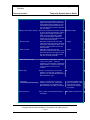
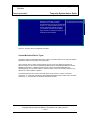
Figure 20: Defining a Custom Monitored Device of Type “Flood”
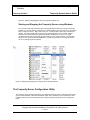
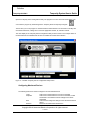
The following shows how the “Flood” monitored device type looks in the Tempurity Monitor:
Copyright ©2010 Networked Robotics Corporation. All rights reserved.
1.12.2010
Networked
Robotics
Page 40 of 90
Tempurity System User’s Guide
Tempurity-04-0006.5
Figure 21: Tempurity Monitor Screens for a Custom Monitored Device with the Type of “Flood” and
units “Nounits”
Configuring the Server Identity
The data-entry field shown below the monitored device table is designed to be an indicator or
reminder of the Tempurity Server’s function. It is the most useful in organizations that are running
multiple Tempurity Servers simultaneously because it makes it easier for an operator configuring a
list of monitored devices to distinguish one Tempurity Server from another. The field has no
function other than to display a saved message to users of the Server Configuration Utility.
Figure 22: Free-form Entry Field to Describe this Tempurity Server
Enabling E-mail and Text Message Alarm Notifications
In version 2 of the Tempurity System alarm notifications are initiated by Tempurity Server
computers. The Monitor client sends a message to the server computer which in turn
communicates with the SMTP mail servers that are responsible for sending the message. In
version 2 of the Tempurity System all non-voice alarm notifications are sent to a mail server by the
Tempurity Server. The process of configuring Tempurity’s mail parameters is similar to that of
configuring the mail parameters in a mail client like Microsoft Outlook. An SMTP mail server must
be entered and tested in the Tempurity Server Configuration Utility in order for e-mail and text
alarm notifications to be sent.
Usually, authentication information, a username and password, will be sent to the mail server
through an authenticated SMTP protocol. This authentication allows the mail server to trust the
request to send mail. Some mail servers allow Usernames and passwords to be encrypted using
the SSL protocol.
The screen below must be completed and tested fully (except when using Exchange mail servers)
in order for alarm notifications to be sent by Tempurity. The figure below shows example settings
that could be used to send Tempurity alarm notifications through a Networked Robotics
Corporation mail server and account.
Copyright ©2010 Networked Robotics Corporation. All rights reserved.
1.12.2010
Networked
Robotics
Page 41 of 90
Tempurity System User’s Guide
Tempurity-04-0006.5
Figure 23: Configuring E-mail Alarm Notifications
Smtp Server:
SSL:
Login:
From E-mail:
Username:
Password:
The network address (IP or domain name) of the mail server
that you are logging into
Encrypts the username and password. Must be supported by
the mail server you have selected
Uses authenticated SMTP to initiate the sending of a mail
message. You must provide a username and password to use
this feature
The mail account from which Tempurity alarm notifications will
be sent
Usually the part of the mail address before the “@” sign. Your
mail account name.
The password to that mail account
Testing the Ability to Send Mail
Once mail server parameters have been entered you must test them from the Tempurity Server
before defining any alarm notification groups in any Tempurity Monitors. To do this click on the
“Test” button in the E-mail Configuration dialog. Then enter the “To” address of the test e-mail and
a short descriptive message. Click the “Send” button. An hourglass may appear as the e-mail test
can take a minute or more. If the test returns an error, check your entries and try again. If the test is
successful, any Tempurity Monitors with network access to this server will be able to send mail and
text alarm notifications.
Microsoft Exchange Servers and Testing the Ability to Send Mail
There are some limitations in the ability of the Tempurity System to test connections to Microsoft
Exchange mail servers. The server-side Test function will always fail when the mail server you are
connecting to is a Microsoft Exchange® mail server. Despite the failure of the server-side test
system Tempurity is capable of sending alarm notifications if the address and login parameters
have been entered appropriately. To test a connection to Exchange, you will have to test your
Copyright ©2010 Networked Robotics Corporation. All rights reserved.
1.12.2010
Networked
Robotics
Page 42 of 90
Tempurity System User’s Guide
Tempurity-04-0006.5
settings using the Tempurity Monitor. Make sure that the Monitor Name setting in the Tempurity
Monitor is exactly 10 characters. Then define an alarm notification group and ensure that the
message is received. If the alarm notification is not received, check the entry of the “Configure
Email’ parameters in the Tempurity Server Configuration Utility.
Figure 24: Testing the Ability of the Tempurity Server to Send Alarm Notifications
If the test is not successful, and you are sure that you have entered the SMTP information
correctly, try using a Gmail or other mail server and account. Networked Robotics can provide a
mail account if needed for temporary testing.
Using Gmail as your Alarm Notification Mail Server
Networked Robotics recommends the use of Gmail for sending Tempurity System alarm
notifications. Gmail is a reliable, standard interface that is easily used as a Tempurity System alarm
notification engine. From your Gmail account you will be able to track all sends of alarm
notifications by logging in and viewing the “Sent” folder.
Company mail systems, while under company control, are subject to security policy changes by
company mail administrators that may affect the performance of Tempurity.
An example configuration is given below for the use of a Gmail account called “toxcotempurity”.
You must register for a Google account in order to use Gmail.
Copyright ©2010 Networked Robotics Corporation. All rights reserved.
1.12.2010
Networked
Robotics
Page 43 of 90
Tempurity System User’s Guide
Tempurity-04-0006.5
Figure 25: Example Configuration for Sending Alarm Notifications through a Gmail Account
You can also use SSL to connect to a Gmail mail server if desired.
Yahoo® Mail can not be used as a Tempurity System mail server as Yahoo blocks mail requests
not coming through their web pages.
Enabling Voice Alarm Notifications
Networked Robotics must specifically authorize voice alarm notifications from Tempurity Servers.
In order to enable voice alarm notifications at your site two things are required: 1) a voice password
obtained from Networked Robotics, which must be entered into the Tempurity Server Configuration
Utility and 2) Networked Robotics must authorize your Tempurity Server(s) externally-known IP
address or addresses. Voice passwords are obtained from Networked Robotics Corporation. The
external address of your Tempurity Server(s) must be provided to Networked Robotics and enabled
by Networked Robotics for voice sends. To find the relevant external address, from your Tempurity
Server computer go to a website such as:
http://whatismyipaddress.com/
Send the request to enable voice alarm notifications to [email protected].
Networked Robotics does not recommend the use of voice alarm notification types as the primary
means of recognizing problem conditions. In the current implementation of voice alarm
notifications, your phone is called up to three times, after which the system stops making attempts.
Networked Robotics recommends using e-mail or text alarm notification types in conjunction with
voice alarm notifications. In this way a persistent record is made of the alarm condition that could
be missed with just a voice call. Voice alarms can not be used with phones that are on extensions
or require other than a 10-digit phone number.
Copyright ©2010 Networked Robotics Corporation. All rights reserved.
1.12.2010
Networked
Robotics
Page 44 of 90
Tempurity System User’s Guide
Tempurity-04-0006.5
Once your voice password is entered, and your external address is registered with Networked
Robotics. Test voice alarm notifications by defining an Alarm Group in the Tempurity Monitor with
at least one alarm notification address with type “Voice”.
Editing Tempurity Server Configuration Files Manually
The set of text files that define Tempurity Server operation are called configuration files. These are
created by the Tempurity Server Configuration utility and can be found in the Tempurity\configs
directory. The absolute location of the directory is the Windows directory:
C:\Windows\System32\Tempurity\Config
Editing configuration files manually is not recommended, but some advanced users may consider
this option with caution.
One possible option is to change the data collection period which is set by default to 1 minute. To
do this, use an editor like notepad to change the “logInterval=60” to the appropriate data collection
period in seconds. Data collection periods other than the default were not tested as part of the
Tempurity System validation and should be used at your own risk. The low limit of reliable data
collection period depends heavily on the characteristics of your server computer, including
processor and disk speed, and the load caused by other applications. A higher-than-the-default
data collection period could cause an unanticipated delay in alarm notifications.
Configuration Histories and Restoring Previous Configurations
Tempurity Server configuration files are stored in a history directory whenever changes are made.
The history directory is created for any single date on which changes are made and can hold one
configuration. This means that only the last changes on any given day are stored. Earlier
configurations made on that day are not stored.
To retrieve a configuration we recommend manually making a backup of the configuration directory
(see Appendix C for location of files). Then copy the files in the history directory to the “Config”
directory (the active configuration files). Confirm the proper configuration using the Tempurity
Server Configuration Utility and then restart the Tempurity Server to restart data collection.
Copyright ©2010 Networked Robotics Corporation. All rights reserved.
1.12.2010
Networked
Robotics
Page 45 of 90
Tempurity System User’s Guide
Tempurity-04-0006.5
Setting the Windows Options on your Tempurity Server
Computer
In order to assure that data collection occurs constantly, it is important that you change the Windows
settings on the Tempurity Server computer.
The most important settings are those having to do with power loss recovery. You should set your
Windows power scheme to “Power Always On”, and set your PC’s BIOS to “Restore on AC Power
Loss” or equivalent. These setting assure that when power is interrupted, and then restored,
processing, and thus data collection resumes automatically. Appendix F describes these changes in
more detail, including a full list of recommendations for setting your PC for use as a Tempurity Server or
Monitor.
Tempurity System Data
The following describes the data that is collected and stored by the Tempurity Server.
Measurement Interval
The system collects temperatures and other data at approximately 1-minute intervals by default.
The collection period may vary by a few seconds. If a communication failure occurs, the program
will try again at one-minute intervals until another several minutes have passed. If no measurement
is successfully made at this time, a communication error has occurred and the icon for this
monitored device on the main monitor screen will turn blue.
Measurement target times are independent, each device is on a different time schedule. The target
measurement times can shift relative to other monitored devices, and to the initial measurement
schedule over time as communications interruptions and the latency mentioned above shifts target
data collection times.
Although the data measurement period can be changed from the default of one minute, (see
above) this capability is not recommended.
Systems that are CPU-overloaded may have higher-than-normal measurement latencies. The
discrepancy between target and actual measurement times can be 10 seconds or more on such
systems.
Time of Data Collection
Tempurity stores each collected value with a Universal Time. The Universal Time on February 13,
2009 at 23:31:30 was 1234567890. Universal Time is time-zone independent. See Wikipedia on
Unix Time for more information. Times displayed in the Tempurity Monitor are all displayed in local
time.
Units
Copyright ©2010 Networked Robotics Corporation. All rights reserved.
1.12.2010
Networked
Robotics
Page 46 of 90
Tempurity System User’s Guide
Tempurity-04-0006.5
Data is always saved in default units. For Temperature this is Celsius, for humidity it is percent
relative humidity. Temperature can be viewed in the Tempurity Monitor in either Celsius or
Fahrenheit, and all messages are sent in the selected scale.
Location
Temperature and other data are stored in Windows text files on the Tempurity Server. Data files
are stored in subdirectories based on the monitored device’s numeric ID and the date. There will be
a time-value data file for each monitored device for each day that on which any data is collected. A
data file might not be created for a given day if a persistent communication error exists for the
monitored device on that day or days.
Each time-value data file has an associated Cyclic Redundancy Check (CRC) file which is used to
verify the validity of the data collected on that day.
Appendix C lists the location of the Windows text files that store Tempurity System data.
Data Retention
There are no mechanisms for deleting data through the Tempurity System. If you wish to delete
information, you must delete the data files through the operating system.
Networked Robotics does not recommend deleting any data files at any time, especially in
regulated environments.
Data Backup
Tempurity Data should be backed up using your normal Windows file backup procedures, ensuring
that the backup procedure covers the files specified in the “Location” heading listed above.
Regulated customers will want to include backup procedures as part of a comprehensive written
monitoring procedure. Consider using built-in disk redundancy, redundant Tempurity Servers, or
automatic network-based backup procedures.
Accuracy
The accuracy of any data acquired by the Tempurity System is based on the accuracy of the
specific sensors or instrumentation connected to the Networked Robotics NTMS network hardware.
You must reference the manufacturer’s product documentation for accuracy information.
Because it is a common method of acquiring temperature data through Tempurity, brief accuracy
information about the Networked Robotics TPL3 digital temperature probe is given here. The
Networked Robotics TPL3 digital temperature probe is based on the Dallas/Maxim DS18b20Z
integrated circuit. The Dallas chips show the highest accuracy at physiological temperatures and
the lowest near the low range of -80C. See the Networked Robotics TPL3 manual for a detailed
Copyright ©2010 Networked Robotics Corporation. All rights reserved.
1.12.2010
Networked
Robotics
Page 47 of 90
Tempurity System User’s Guide
Tempurity-04-0006.5
accuracy chart. Temperatures from DS18B20Z integrated circuits report to a precision of .1
degrees Centigrade. See the Networked Robotics TPL3 manual for more details.
Value Alarms
Tempurity System value alarms are defined by the parameters of value, and time. Out-of-range
conditions are not considered to have generated alarm conditions until the measured value has
been continuously out-of-range for the time indicated by the Stage One time threshold parameter
(for a yellow alarm) or for the Stage Two time threshold parameter (for a red alarm). These alarm
threshold parameters can be defined for each individual monitored device. For example, if desired,
an incubator temperature could be set to a 1-hour yellow Stage One alarm time, and a refrigerator
to a 2-hour yellow Stage One alarm time threshold. These alarm time thresholds are defined via the
Tempurity Server Configuration Utility.
Even a single in-range measurement will reset the alarm time-out-of-range counters in the
software. When this occurs, the device must once again be continuously out-of-range for the Stage
One time threshold period before an alarm will be generated. Note that a device that is cycling in
and out of range may never trip a Tempurity temperature alarm despite being out-of-range for a
considerable percentage of the day. This can occur when the monitored device is cycling such that
the tip of the temperature cycle is just within normal range.
Alarm conditions are recognized based on their alarm time thresholds at the time that the data was
acquired. It should not be assumed that at the time of a historic alarm that the current alarm time
thresholds were in force. The applicable alarm criteria in force on the indicated date can be
recovered from configuration history files if needed.
Communication Alarms
Monitored devices that don’t respond to server requests for temperature or other kinds of data will
eventually elicit a communications alarm. A communication alarm, sometimes referred to in this
manual as a communication error, may have several causes. The alarm may be due to a planned
interruption of network service by the network administrators or an unexpected failure of your
organization’s network components such as routers or switches.
Because the Tempurity Server must get a response from a monitored device within a defined time
period, an intermittently-functioning network may sometimes cause an increased frequency in this
type of error. A router that is intermittently functioning may also be the cause of frequent
communication alarms.
Other causes of communication errors:
•
•
•
•
Temperature or other probe failure or disconnection
NTMS hardware failure or disconnection
Freezer or other Instrument failure (direct connections only) or disconnection
A loss of power or an unplugged power cable to a direct-connected
instrument or NTMS
If a monitored device is in a Stage One alarm, and then moves to a communication error state, the
Stage One alarm will wait to clear and will wait to move to a Stage Two alarm until at least one
more temperature measurement is acquired for that monitored device. When the temperature value
is received, if it is out-of-range, the “missing” data is assumed to have been continuously out-of-
Copyright ©2010 Networked Robotics Corporation. All rights reserved.
1.12.2010
Networked
Robotics
Page 48 of 90
Tempurity System User’s Guide
Tempurity-04-0006.5
range. Communication errors resolve automatically when the conditions causing them, such as an
unplugged temperature probe, are reversed.
The two types of alarms, communication and value, are linked. You cannot selectively enable alarm
notifications for value alarms without also enabling them to the same alarm notification addresses
for communication alarms. However communications alarms and temperature alarms can be
configured to have different time thresholds. There are four time thresholds defined for Tempurity
alarms, stage one and two communication alarm thresholds, and stage one and two temperature
time thresholds. These are entered separately into fields of the Tempurity Server Configuration
Utility for each monitored device.
Copyright ©2010 Networked Robotics Corporation. All rights reserved.
1.12.2010
Networked
Robotics
Page 49 of 90
Tempurity System User’s Guide
Tempurity-04-0006.5
The Tempurity Monitor Client
`
The Tempurity Monitor application is used to view temperatures and other data and to initiate the sends of
alarm notification messages such as e-mail or text messages.The Monitor may run independently on any
computer on the network, however it must have network access to at least one Tempurity Server. Tempurity
Monitors are Read-only in the sense that they do not modify network-collected data. Essentially a Tempurity
Monitor’s job is to enhance the distribution of the server-collected data.
Distributed Alarm Notification
The Tempurity System is fundamentally different from other monitoring systems in that alarm
notifications are configured and executed in the client software. Many customers will prefer to run only
one Monitor – on the same computer as the Server, but the Monitor can run on many different
computers simultaneously. An unlimited number of “watching” computers, Tempurity Monitors, can be
constantly running in the background and monitoring a Tempurity Server for alarms in its population of
monitored devices. Each monitor is under the control of its user who can define destination e-mail and
text messages independently. There are only two requirements to this highly distributed architecture 1)
the Monitor must have network access to the Server and 2) the Monitor must be on all the time.
Dedicated vs Shared Use Computers as Tempurity Monitors
The Tempurity Monitor software runs in the background of your computer at all times. It does not use a
significant amount of either CPU or network resources, and is not affected by most other software.
Running the Server and the Monitor on the Same Computer
The most common computer for a Tempurity Monitor will often be the Tempurity Server. This is the
more traditional approach to temperature monitoring. Placing both Tempurity Monitor and Tempurity
Server on the same machine allows centralized management of the monitoring process. Enter a server
address of ‘localhost’ when the Tempurity Monitor prompts for a server address.
Downloading and Installing
The Tempurity Monitor client software can be downloaded from the Networked Robotics web site at
http://www.networkedrobotics.com/download.
Installation requires administrative access to the computer on which you are installing the software.
Copyright ©2010 Networked Robotics Corporation. All rights reserved.
1.12.2010
Networked
Robotics
Page 50 of 90
Tempurity System User’s Guide
Tempurity-04-0006.5
Figure 26: Installation of the Tempurity Monitor
During the download process you may either open directly (start the download) or save the download
file to your disk. Click on the downloaded file and respond to the prompts. If you have previously
installed the program you may need to uninstall it using “WindowsÆStartÆControl PanelÆ Add/remove
Programs” before installing the new version.
Figure 27: Uninstalling the Last Version of the Tempurity Monitor
The Monitor installer will ask a few questions including confirmation of legal agreement and other
common installation options. The screen below appears with the following options:
Copyright ©2010 Networked Robotics Corporation. All rights reserved.
1.12.2010
Networked
Robotics
Page 51 of 90
Tempurity System User’s Guide
Tempurity-04-0006.5
Figure 28: Service Options when Installing the Tempurity Monitor
Launch Monitor service immediately after install
The default is to start the Tempurity Monitor immediately. If you uncheck this option, you will need
to start the Tempurity Monitor manually using the “Administrative Tools->Services” option of the
Control Panel. Leave this setting checked unless you are an advanced user.
Disable closing the Monitor
This option, if checked, prevents manually closing the Tempurity Monitor. The Tempurity Monitor,
by default, allows users to close it with the standard “X” in the red box at the top right of a Windows
screen. But if you do this, it stops the ability for this computer to send alarm notifications
permanently. This is often an unintended action. To prevent this, check the box next to “Disable
closing the Monitor” so that the program will always be running. Be aware that if the box is
checked, the only way to stop the Monitor is through the “Administrative Tools->Services” option of
the Control Panel as shown in Figure 16.
The Main Tempurity Monitor Installation Options are presented in a subsequent installation screen:
Copyright ©2010 Networked Robotics Corporation. All rights reserved.
1.12.2010
Networked
Robotics
Page 52 of 90
Tempurity System User’s Guide
Tempurity-04-0006.5
Figure 29: The Main Configuration Options when Installing the Tempurity Monitor
Tempurity Server Name
The Tempurity Server name is the network address, either an IP address or host name of the
computer running the Tempurity Server software. Examples of possible Tempurity Server names
are given below.
Examples of Tempurity Server names:
demo.networkedrobotics.com
The Networked Robotics computer at the
network address indicated by this domain
name must be defined in a DNS server Arecord)
tempurity.mycompany.com
This same as above, but a computer in
Mycompany.
10.45.67.21
The computer at this IP address. Should be a
static IP address
“Localhost”
This computer that we are on now, same as
below but textual rather than numeric
127.0.0.1
This computer that we are on now. This is called
the loopback address
Tempurity Monitor Name
There can be many Tempurity Monitors in an organization. When an alarm notification is sent, it is
tagged with the name of the specific Tempurity Monitor that initiated it. The default is the Windows
name for this computer.
Copyright ©2010 Networked Robotics Corporation. All rights reserved.
1.12.2010
Networked
Robotics
Page 53 of 90
Tempurity System User’s Guide
Tempurity-04-0006.5
If the Tempurity Server has been configured to use a Microsoft Exchange® mail server, you must
use any 10-character Tempurity Monitor Name. This only applies to Tempurity Servers that are
configured to send alarm notifications via Exchange mail servers.
Number of Tempurity Monitors
Consider setting this option to more than one monitor only in the case where you want this
computer to watch several Tempurity Servers simultaneously. These servers can be at any
organization, anywhere on the internet as long as you have network access. The Tempurity Server
name needs to be entered manually within the Tempurity Monitor software’s “Configuration
Options” for additional Monitors.
Starting the Tempurity Monitor
The monitor automatically starts after the installation procedure is run. If you have entered a valid
Tempurity Server name in the installation process you will see red or green icons for the monitored
devices as defined in the server you selected and as shown in Figure 32 below. If the connection
indicator status is red as in Figure 31 you may have entered an incorrect Tempurity Server name. To
enter a valid name, choose “Configuration Options from the menu bar. Enter the appropriate name and
click OK. If you still are not able to connect there may be a firewall or other network connectivity issue
preventing network access to that Tempurity Server. Check that the server software is running on the
indicated computer.
Figure 30: Monitor Configuration Screen
Stopping the Tempurity Monitor
Do not close or stop the Tempurity Monitor if you have activated any alarm notification groups. The
monitor must be running in order to initiate alarm notifications. If you have accidentally closed the
monitor you must restart it with the procedures shown in Figure 16, or by reinstalling the Tempurity
Monitor software. Consider reinstalling using the “Disable Closing the Monitor” installation option. If this
option is selected the program can not be manually closed and thus can not be manually stopped.
Copyright ©2010 Networked Robotics Corporation. All rights reserved.
1.12.2010
Networked
Robotics
Page 54 of 90
Tempurity System User’s Guide
Tempurity-04-0006.5
Connection Status to the Tempurity Server
If the Tempurity Server name or IP address, shown next to the Monitor’s local time, is shown in white
characters, the Monitor has made a proper connection to a Tempurity Server. If the name is shown in
red characters, a connection has not been established. It sometimes takes as long as a minute for a
Tempurity Monitor to connect to a Tempurity Server.
If this is the first time that you are connecting this Monitor to a Tempurity Server, and the server name is
shown in red, it is likely that no monitored device icons will be displayed. The screen will be blank
except for the heading. Check that you have entered an appropriate server name and that the
Tempurity Server is running at the network address indicated. Make sure that the firewall on the server
is open on port 3010.
Figure 31: Connection Status to Tempurity Server
If you see a Tempurity Monitor with an unexpectedly red server name, the Tempurity Monitor is unable
to connect to the Tempurity Server. No alarm notifications are possible from this Monitor and steps must
be taken to identify and correct the problem. Check your network status and the status of the Tempurity
Server. When the adverse conditions are reversed, no manual intervention is needed, the Monitor will
regain its ability to communicate with the server, and the server indicator will once again be displayed in
white characters
Main Monitor Screen
The main monitor screen shows an at-a-glance view of the status of each of the monitored devices
connected to the Tempurity Server. The status is indicated by a) color and b) text descriptions.
Copyright ©2010 Networked Robotics Corporation. All rights reserved.
1.12.2010
Networked
Robotics
Page 55 of 90
Tempurity System User’s Guide
Tempurity-04-0006.5
Figure 32: The Tempurity Monitor Main Screen
The table below shows the progression of the visual display of the icon over time as monitored devices
report out-of-range values (Value Alarms), or do not report values as expected (Communication
Alarms). The lower the entry in the table, the longer the monitored device has been out-of-expected
performance.
Copyright ©2010 Networked Robotics Corporation. All rights reserved.
1.12.2010
Networked
Robotics
Page 56 of 90
Tempurity System User’s Guide
Tempurity-04-0006.5
Value Alarms
Communication Alarms
Value
Condition
•
•
•
•
Icon
Alarm
Alarm
Condition
Displayed? Notifications
Normal
No
No
Out-of Range
Yes
No
Out-of-Range Stage 1
Yes
Yes
Out-of-Range Stage 2
Yes Yes
•
•
•
•
Icon
Notifications
Normal
No
Not Collecting
No
Stage 1 Comm
Yes
Stage 2 Comm
Yes
Figure 33: Alarm Visualization in the Tempurity Monitor
.
Alarm Status Icons
The alarm status on the main Monitor screen is represented by the following colored icons:
Green – The monitored device is operating within temperature range. A temperature on
this icon indicates an out-of-range condition, but it has not persisted for long enough to
generate an alarm condition of yellow or red.
Blue – Data cannot be obtained. The device may or may not be within the allowable data
range. Anytime data has ceased to be collected as expected, the icon will be blue.
Gray – No device is present. This occurs when the monitored device ID was configured
for data collection but has not collected at least one value since the Tempurity Server was
last started. If even a single data value was collected, and then no further data came in,
the icon would be blue, not gray.
Yellow – A Stage One alarm exists for this monitored device. The value of the last
measurement will be shown.
Copyright ©2010 Networked Robotics Corporation. All rights reserved.
1.12.2010
Networked
Robotics
Page 57 of 90
Tempurity System User’s Guide
Tempurity-04-0006.5
Red – A Stage Two alarm exists for this device. The value of the last measurement is
shown.
“Comm” indicates that a communication error exists for a monitored device. The Tempurity Server
has collected at least one measurement, but can no longer collect. Note that devices indicated as
gray on the monitor may also be suffering from an inability to collect temperatures or other kinds of
data. When the Tempurity Server starts, it must be able to make a network connection to the
indicated network address. If it cannot collect values, the monitor icon for that device remains gray.
When the connectivity problem is corrected, the device will change from gray to green status. If a
subsequent communication error occurs the monitor icon will show as a blue communication error
rather than a gray inactive indication.
Alarm Window
The alarm window of the main monitor screen shows a list of the Communication, Stage One, and
Stage Two alarms that have occurred within the last year starting January 1 of the current year. It also
shows the time, if any, that these alarms cleared. Usually there will be a clear event for every alarming
monitored device however there are some possible exceptions such as when a reconfiguring of high
and low value thresholds occurs.
The alarm window display can be toggled on or off using the option on the ‘View’ menu as shown
below.
The data in this file is held in an alarm file. See Appendix C for details.
The alarm window can be cleared using the “View->Display Alarms” option from the Monitor menu bar.
Monitored Device Information Window
Detailed information about the current status of the monitored device may be obtained by clicking on the
representative icon for any monitored device. The screen shows the time of the next reading, a realtime graph of the temperatures in the previous two hours, the time of the last reading, the last
temperature recorded and the alarm status. The IP address and the port address of the monitored
device are also displayed.
If this window is left open, this graph will be updated in real-time every minute.
Copyright ©2010 Networked Robotics Corporation. All rights reserved.
1.12.2010
Networked
Robotics
Page 58 of 90
Tempurity System User’s Guide
Tempurity-04-0006.5
Figure 34: Monitored Device Information
The window shows the parameters that were set for this monitored device in the Tempurity Server
Configuration Utility. It also shows the last-collected measurement and the data acquisition schedule.
Graphs
Graphs of this monitored device’s data can be generated by clicking on the “Open Graph” button. As
Figure 35 shows, graphs can also be obtained from the menu bar of the main monitor screen.
Copyright ©2010 Networked Robotics Corporation. All rights reserved.
1.12.2010
Networked
Robotics
Page 59 of 90
Tempurity System User’s Guide
Tempurity-04-0006.5
Figure 35: Method of Graphing from the Monitor
Figure 36 below shows a graph of a temperature kind of monitored device type.
The graph will autoscale by default. The autoscale may be overridden by entering maximum and
minimum Y axis values. Any time interval can be selected by entering a time period manually or by
scrolling with the arrow buttons. Zoom in or out to see data at the desired granularity.
Figure 35: An Example Graph from a Monitored Device of Type Temperature
Setting
Definition
Device
Device 2
The graph of the selected monitored device
Plots a second monitored device
Copyright ©2010 Networked Robotics Corporation. All rights reserved.
1.12.2010
Networked
Robotics
Page 60 of 90
Tempurity System User’s Guide
Tempurity-04-0006.5
Top Value
The temperature or other data high value limit
Bottom Value
The temperature or other data low value limit
Auto Scale
The Top Value and Bottom Value will be
automatically set based on the measurements in the
selected time range
Zooms into a shorter time range
Zooms out to a greater time range
Moves forward the current time interval
Moves backwards the current time interval
Zooms to the last out-of-range value recorded
Graph
Draws a graph with the given settings
Copyright ©2010 Networked Robotics Corporation. All rights reserved.
1.12.2010
Networked
Robotics
Page 61 of 90
Tempurity System User’s Guide
Tempurity-04-0006.5
Figure 36: An Example Graph showing a Simultaneous Plot of Relative Humidity and Temperature from
Two Monitored Devices
The ‘File->View Data’ menu option allows you to view the numeric values in the selected date and time
range of the graph. This numeric data can be copied and pasted into other applications e.g. Microsoft
Excel.
.
Figure 37: Tempurity System Numeric Data
Exporting Data to Other Applications
One way to export data is to click on the “Copy” button as shown in Figure 37, which moves all the
measurements in the date range that you selected for the graph to the copy buffer.
Then Paste the data into the other application. When pasting into Microsoft Excel® you may need
to use the “Text to Columns” feature to split the time and the measured value into separate
columns.
Another way to export data is to create a comma-separated value (.CSV) file. Choose the “File>Export Data” option from the graph. The .CSV file holds 3 values for each measurement: universal
time, local time, and the measurement and its units. Some users will want to delete the universal
time column, because its unique format is hard to read without special converting software.
Copyright ©2010 Networked Robotics Corporation. All rights reserved.
1.12.2010
Networked
Robotics
Page 62 of 90
Tempurity System User’s Guide
Tempurity-04-0006.5
Large time ranges will be difficult to export because of the large number of data points. At the
default measurement interval, Tempurity stores a little more than 10,000 data points per week for
each monitored device. You may want to consider exporting small data ranges and reducing the
quantity of data via another application.
Statistics
Simple statistics are available using the “File->Statistics” option from the graph to describe the data in
the time range specified by the current graph. The below shows the statistics window operating on a
range of data that includes one out-of-range event as seen in the data graph below left.
Figure 38: Statistics Windows and Statistics for an Example Data Range
Each statistical calculation is indicated by an icon as described below:
Allowed Data Value Range
Current High Value Limit
Current Low Value Limit
Max, Min, and Mean
The maximum recorded data value in this time range
Copyright ©2010 Networked Robotics Corporation. All rights reserved.
1.12.2010
Networked
Robotics
Page 63 of 90
Tempurity System User’s Guide
Tempurity-04-0006.5
The minimum recorded data value in this time range
The mean recorded data value in this time range. The number
of data points in this time range is also shown.
Number of Events High or Low
The number of events where data was higher than allowed
The number of events where data was lower than allowed
Percentage of Points In or Out-of-Range
The percentage of recorded data points that were in-range
The percentage of recorded data points that were higher than
the high value limit
The percentage of recorded data points that were lower than
allowed
An “event” is defined as an instance where the data was out-of-range to any level and
then returned to normal. The difference between an alarm and an “event” is that alarms
are bound by alarm time critera. Events are not bound by these criteria. Any out-of-range
case will be an event no matter how long it lasts. Like the other statistics, events are only
counted for the time period selected by the graph’s time range.
Alarm Notifications
The Tempurity System is capable of sending messages through the internet when alarm conditions are
found to have arisen in any of the monitored devices. In Tempurity System terminology, these
messages are called “alarm notifications’. There are different kinds of alarm notifications such as Email, Text message, Robotic Voice, Pager, etc.
An Alarm Notification Group is a list of people and their contact information (phone numbers, e-mail, etc)
that will be contacted when there’s a problem with any of a specified list of monitored devices.
Copyright ©2010 Networked Robotics Corporation. All rights reserved.
1.12.2010
Networked
Robotics
Page 64 of 90
Tempurity System User’s Guide
Tempurity-04-0006.5
The Tempurity Monitor continuously talks to the Tempurity Server to see whether any alarms have been
found. If so, and if an Alarm Notification Group has been defined that references the errant monitored
device, alarm notifications are sent. The Tempurity Server sends these alarm notifications but the send
is triggered by the Tempurity Monitor.
Defining an Alarm Notification Group
To define an alarm notification group, choose “E-mail and Text Messaging from the menu bar.
Create an alarm notification group name. You may want to define groups by area of responsibility,
“Tox”, “QA”, or “Gene Tox” for example. Individual freezers can be assigned to each alarm group
Figure 39: Creating an Alarm Notification Group
Choosing Alarm Notification Types and Entering Alarm Notification
Addresses
The above shows the process of defining alarm notifications. First an alarm group is defined. Then
added to it are alarm notification addresses, a list of people and their e-mail addresses or phone
Copyright ©2010 Networked Robotics Corporation. All rights reserved.
1.12.2010
Networked
Robotics
Page 65 of 90
Tempurity System User’s Guide
Tempurity-04-0006.5
numbers. Then the user selects the monitored devices, the freezers, refrigerators, etc. that this
group of people cares about and at what stage (Stage 1 or Stage2 or both) they want to be notified.
Figure 40: Selecting the Monitored Devices of Interest for this Group
The options are to select or clear all Stage One or Stage Two alarms, select or clear all alarms, or
select individual monitored devices with individual alarm stages.
Note that communication alarms cannot be selected independently of temperature and other value
alarms. If a notification is selected when a monitored device is in temperature alarm state,
notification will also be sent when a communication alarm exists for that same device.
The time thresholds for these two events are different however, as specified in the Tempurity
Server Configuration utility. For example, if the Stage One value threshold is 1 hour, and the stage
1 communication threshold is 4 hours, and if that device stops responding to the Tempurity Server
at 45 minutes after out-of-range values began, a notification will be sent 4 hours and 10 minutes
after temperatures stopped being received. The communication alarm supersedes the temperature
alarm in this case and an alarm notification was not sent at the 1 hour mark as would be the case if
out-of-range values had continued to arrive.
Figure 41: Test Messages are Sent to the Addresses in your Alarm Notification Group
Test Alarm Notifications
Test alarm notification messages are always sent after you have configured the alarm notification
group. The program will not be able to recognize whether the entered e-mail or other notification
address that you entered is valid. Therefore always check that the alarm notification test e-mail or
text message was received as expected.
Copyright ©2010 Networked Robotics Corporation. All rights reserved.
1.12.2010
Networked
Robotics
Page 66 of 90
Tempurity System User’s Guide
Tempurity-04-0006.5
You can test existing alarm notification groups by simply highlighting a group in the first panel of the
alarm notification wizard and clicking on the “Test” button.
E-mail addresses and phone numbers change. Networked Robotics recommends that you test your
alarm notification groups on a monthly basis.
Alarm Notification Groups are Mapped to the Tempurity Server for which
they were Created
If you change the network name or address of the Tempurity Server that is being watched by this
Tempurity Monitor (see options in Figure 30) then your alarm notification groups will seem to
disappear. That’s because alarm notification groups “belong” to the Tempurity Servers under which
they were created. If you change the watched Tempurity Server back to the original, you will once
again see the alarm notification groups that you created for that server.
The current version of Tempurity does not recognize equivalence in network names. So “localhost”
and “127.0.0.1” will appear to be two different servers with two different sets of alarm notification
groups even though they are equivalent network names. The same would apply to a domain name
like “tempurity1.mycompany.com” and “10.34.56.29”. You should use a consistent name for your
Tempurity Server.
Networked Robotics recommends the use of domain names rather than IP addresses to reference
the network address of Tempurity Servers. One reason for this is that if the IP address of the
Tempurity Server changes – alarm notification groups will need to be reentered or reloaded as
below if you use and IP address, but this would not be required if you were using a domain name.
Alarm Notification History
You can use the “Sent” folder of the e-mail account you configured as the sending account in your
Tempurity Server (see Figure 23) in order to view a record of the e-mail and text message alarm
notification types. No such record is available for voice alarm notifications.
Storage and Transfer of Alarm Notification Groups
The Tempurity Monitor acts as an extension to your Windows operating system. It stores all the
information for alarm notification groups in the Windows Registry by the watched Tempurity Server
name, as entered in the Monitor configuration (See Figure 30).
If you have a detailed list of alarm notification groups, you can transfer them from one Tempurity
Monitor to another by exporting and importing registry keys. Use “Start->Run->Regedit” then
navigate to Hkey_Users-> Tempurity Monitor->Monitor. If you do a registry Export of this branch of
a tree, and a subsequent import of the registry file into another computer on which the Monitor is
running, the Monitor will inherit the alarm notification groups specified. The figure below shows the
registry organization. Since the Monitor was installed many Tempurity Server names were defined,
each with their own alarm notification groups. Server names shown in the figure range from “1”
through “192.168.1.106” to “D”.
Copyright ©2010 Networked Robotics Corporation. All rights reserved.
1.12.2010
Networked
Robotics
Page 67 of 90
Tempurity System User’s Guide
Tempurity-04-0006.5
Figure 42: Storage of Tempurity Monitor Alarm Notification Groups in the Registry
Monitor Restart
When the Tempurity Monitor is restarted, for example if the PC reboots or if the Monitor is manually
restarted using “Control Panel->Administrative Tools->Services’ alarm notifications will be sent for
any monitored devices currently in an alarm state.
This means that there are cases where you may receive more than one alarm notification for any
alarm stage.
E-mail to Text Gateways
The Tempurity System uses E-mail as the means of sending a text message to a cell phone.
The software does this by sending an e-mail to the E-mail-to-Text gateway provided by the cell
phone provider. When you choose a particular cell phone service provider or pager, the Tempurity
System formats the e-mail into the form required by the selected provider’s text message gateway.
Because implementation of e-mail to text gateways is controlled by the major cell phone service
providers, the format of e-mail message for a particular gateway changes from time-to-time.
If the format of a gateway no longer works for a particular service provider, it could be that the
format has changed. Use the internet or call the cell phone company to find the e-mail format for
provider’s e-mail-to-text gateway. You can send text alarm notifications to those recipients using an
Alarm Notification Type of “E-mail” by providing an E-mail address that complies with the e-mail
address for the gateway.
Several companies have more than one gateway format, often as the result of mergers or
acquisitions in their industry. Some of the most common gateways are listed below. We
recommend that you try the lowest number first for any particular vendor. For example T-Mobile 2
is the lowest of the possible T-Mobiles.
Copyright ©2010 Networked Robotics Corporation. All rights reserved.
1.12.2010
Networked
Robotics
Page 68 of 90
Tempurity System User’s Guide
Tempurity-04-0006.5
At the time of this writing here are some of the gateways for cell phone providers:
If the user has a text-message or SMS-enabled phone, you can send them a
message via Internet e-mail. Here is a list of known e-mail addresses: (replace
number with the recipient’s 10 digit wireless phone number. Some of these may
differ from the format of alarm notification types in Tempurity.
ATT Wireless
[email protected]
Cingular
[email protected]
(must be logged in)
Nextel
[email protected]
Sprint (PCS) [email protected]
T-Mobile
[email protected]
US Cellular
[email protected]
Many providers now allow users to set up their own e-mail alias for text messaging.
Please check with your provider for details.
Check with your cell phone provider for any updates to these addresses.
These e-mail addresses must be accessible from the SMTP Mail server that you selected
for use with Tempurity in the Tempurity Server Configuration Utility. Some corporate mail
servers are set to block some kinds of mail. Check with your mail administrator if test email or text messages are not received.
Time Delay in Receiving Alarm Notifications
The time that it takes for an alarm notification to reach its destination is variable. It depends on the
characteristics of corporate e-mail systems and other mail servers, on the speed of the e-mail to
text gateways of cell phone providers, on whether a cell phone is out-of-tower-range and other
factors that are sometimes beyond the control of either customer organizations or Networked
Robotics. Individual cell phone providers may have response times that are highly variable
especially during periods of internal maintenance. If you suspect that an alarm notification is
reaching you late, contact the e-mail or text messaging provider that you use. Alarm notifications
are usually tagged with the time that the provider sent the message, not the time that it was sent to
the provider by Tempurity.
Monitoring Multiple Tempurity Servers from a Single Computer
A single computer running several instances of the Tempurity Monitor can watch the status of as many
as 30 different Tempurity Servers, each with their own alarm notification groups, in parallel. These
servers can be in different companies, states, or countries.
Copyright ©2010 Networked Robotics Corporation. All rights reserved.
1.12.2010
Networked
Robotics
Page 69 of 90
Tempurity System User’s Guide
Tempurity-04-0006.5
To monitor multiple Tempurity Servers from a single computer, at install time just set the number of
Tempurity Monitors to the number of Servers you wish to watch. Enter the unique Tempurity Server
address into each instance of the Tempurity Monitor. Alarm groups and their corresponding alarm
notification addresses are independent in each instance of the Monitor.
Figure 43: Running Multiple Instances of the Tempurity Monitor
When you want to restart instances of the Monitor through Windows, you can do it through Control
Panel->Administrative Tools -> Services”. Each Monitor is labeled with a unique number for example
Monitor0, Monitor1, Monitor2, etc.
Regional Versions of the Tempurity Monitor
This feature is currently in Beta release.
The Tempurity Monitor is designed to run in the same written language that your Windows computer
uses. In Windows this setting is found in the “Regional and Language-> Regional Options->Standards
and Formats” option of the Windows XP Control Panel.
Currently supported languages include French, German, Italian, Portuguese, Dutch, Chinese, and
Japanese. Other languages will run in English.
Although the Tempurity Monitor program automatically runs in the language of your computer, the
installation procedure always runs in the specific language version that you select from the Networked
Robotics download page. If you download the French version of the Tempurity Monitor, but your
Windows options have set your PC as Spanish, the installation of the Monitor will proceed in French but
the Tempurity Monitor will run in Spanish.
Copyright ©2010 Networked Robotics Corporation. All rights reserved.
1.12.2010
Networked
Robotics
Page 70 of 90
Tempurity System User’s Guide
Tempurity-04-0006.5
Certain features may not be available in foreign language versions, for example the synthesized speech
in voice alarm notifications is optimized for English and may be difficult to understand in regional
versions. Certain items are not translated, for example Tempurity Server network names and IP
addresses are constant in all languages at present.
Figure 44: French Language Version of the Tempurity Monitor
Copyright ©2010 Networked Robotics Corporation. All rights reserved.
1.12.2010
Networked
Robotics
Page 71 of 90
Tempurity System User’s Guide
Tempurity-04-0006.5
Hardware Upgrades – Changing the Function
of your NTMS Hardware
You can change the functionality of your Networked Robotics hardware by changing the firmware resident in
the unit. The upgrade is easily made from any networked PC.
When to Upgrade your Firmware
NTMS Firmware should be changed when it is necessary to connect to new kinds of instruments and
sensors that are not supported by the version of the hardware you purchased. Some firmware
enhancements are quality-related; they provide fixes for known problems.
Scans returned by the NTMS Configuration Wizard show the firmware version resident in each NTMS.
You can use this utility as the basis for determining whether any units require firmware upgrades. As a
general rule, Networked Robotics does not recommend updating units with no specific need for
enhanced functionality.
Older (2006 and older) Networked Robotics NTMS units do not support firmware upgrades.
Any changes to NTMS firmware that support new instrument interfaces or sensor types that you plan to
connect to usually also require the downloading of a new version of the NTMS Configuration Wizard
software as described in detail above. The new NTMS Configuration Wizard will support the ability
to configure your NTMS for data collection from the new device type.
Downloading the Hardware Upgrade Wizard
Download the Hardware Upgrade Wizard from the “Hardware Upgrades” subsection of the download
section of the Networked Robotics web site. The downloaded file comes as a zipped package of several
files including the Upgrade Wizard, the Networked Robotics firmware file with a .NRF extension, and
release notes. You’ll need to use a tool like WinZIp® to unzip and use the files. Once unzipped, click on
the NTMS Upgrade Wizard program
as indicated by the pliers icon.
Running the Hardware Upgrade Wizard
The upgrade can be done from any PC on the same local area network as the NTMS that you wish to
change. The Firmware Upgrade Wizard runs in a similar manner to the NTMS Configuration Wizard. It
Copyright ©2010 Networked Robotics Corporation. All rights reserved.
1.12.2010
Networked
Robotics
Page 72 of 90
Tempurity System User’s Guide
Tempurity-04-0006.5
scans your network for any Networked Robotics hardware. From the returned list you will double-click
on the unit you wish to upgrade, choose a .NRF (Networked Robotics Firmware) file to load, and then
wait for the process to finish. It should take about 3 minutes depending on the speed of your network.
Figure 46: The Introductory Panel of the NTMS Upgrade Wizard
If a network failure or power failure occurs during the firmware upgrade process you need to power cycle the
NTMS and start over.
If the NTMS does not perform as expected with the new version, you can run the NTMS.
Copyright ©2010 Networked Robotics Corporation. All rights reserved.
1.12.2010
Networked
Robotics
Page 73 of 90
Tempurity System User’s Guide
Tempurity-04-0006.5
Time Zones and Time Accuracy
The Tempurity System is designed to operate in an environment in which temperatures and other kinds of
data can originate in many world time zones. Any computer, anywhere, can view the data collected by
Tempurity Servers. The system has features that facilitate the data interpretation from data sources
(Tempurity Servers) in multiple geographical regions.
The Tempurity Server stores each data collection time in universal time format. When a Tempurity Monitor
Client displays alarm times, graphed data or numeric data, these measurements are shown in the
appropriate local time based on the Windows Operating System setting of the Tempurity Monitor computer’s
time zone.
An example of the global time-related features of Tempurity follows:
A temperature measurement was collected from a Tempurity Server based in New York at 3:00 pm US EST. The
temperature showed a spike of 0°C over a baseline of -20°C. A stage 1 alarm was issued at that time recognizing the
out-of-range condition. Assume that each Windows Monitor client has their correct time zone specified in the
Windows Date and Time option of the Windows control panel, if a Tempurity Monitor client reviews that temperature
spike from Denver at Mountain Standard Time, it will appear on graphs and in the data view option as having
occurred at 1:00 pm. If a Monitor client in London connects to that same Tempurity Server in New York and views
the data, that same 0°C temperature spike will be plotted as having occurred at 8:00 PM.
The Windows time zone defined on the server computer does not affect the time displayed by any client. If
the Tempurity Server computer time zone is changed there will be no consequences to the data collection
times viewed by any Monitor Client in any time zone. However, if you change the Windows time of day
setting on that same server, this will be reflected in the observed record for all connected Monitors in all time
zones. For example if you change the server’s time of day from 10:12 to 10:14, this two-minute change will
be reflected in the subsequent data observed by all Monitors.
The Main Monitor Screen’s time display , shown in white numbers, is not related or dependent on time zone.
A visual tool only, it shows the local time of the client computer in white numbers. This is the Tempurity
Monitor computer’s Windows system time and is unrelated to the Tempurity Server’s time or time zone. It is
not attached to any collected data or any alarm notifications issued by Tempurity.
For all Tempurity Server computers we recommend that you connect to a time synchronization server, a
computer on the network who’s job is to issue the correct time to other computers. You can automatically
synchronize your Tempurity Server by clicking on the Windows time, usually at the bottom right of the Start
bar. Choose “internet time” and the “automatically synchronize” option (See figures below). This will set
your Tempurity Server computer’s time with the network time server and thus will always be accurate.
Copyright ©2010 Networked Robotics Corporation. All rights reserved.
1.12.2010
Networked
Robotics
Page 74 of 90
Tempurity System User’s Guide
Tempurity-04-0006.5
Figure 47: Setting a Network Time Server
Copyright ©2010 Networked Robotics Corporation. All rights reserved.
1.12.2010
Networked
Robotics
Page 75 of 90
Tempurity System User’s Guide
Tempurity-04-0006.5
System Operations
Redundancy
The Tempurity System allows greater reliability through the use of redundant processes. You can
download and configure multiple Tempurity Servers that collect temperatures from exactly the same
population of monitored devices simultaneously.
The figure below shows one strategy for redundancy called “near-far”. Two Tempurity Servers and two
Tempurity Monitors have been implemented. The Tempurity Monitor at site A, shown in blue, watches
its local Tempurity Server also shown in blue. The site B Tempurity Server, shown in green, collects
temperatures from the monitored devices at site A; the site B Tempurity Monitor also watches its local
Tempurity Server. At least one location will survive any negative event that causes large-scale power or
network failure. In this way communication alarm notifications are guaranteed to be sent.
Figure 48: A Strategy for Utilizing Redundant Tempurity Components
Large Scale Power Outages
You need to avoid a bit of a Catch22 in Tempurity System operations. On the one hand if there’s a
power failure then the outside world needs to know about it because freezers will be affected, on the
other hand the system that tells the outside world that there’s a problem,Tempurity, needs power. So
how do we resolve this discrepancy?
The situation in the case of a large-scale power outage can be complicated. In general several
monitored devices will not be able to transmit temperature and other data and thus will enter a
Copyright ©2010 Networked Robotics Corporation. All rights reserved.
1.12.2010
Networked
Robotics
Page 76 of 90
Tempurity System User’s Guide
Tempurity-04-0006.5
communication alarm state. In this case alarm notifications will still be sent to the outside world as long
as a minimum infrastructure is still powered up.
To make sure that this infrastructure is available you will either need to use redundant servers from
another , unaffected, site as described above, or use uninterruptible power supplies (UPS) to backup
your Tempurity Server computer and the path to the outside world. By “path” we mean any routers or
switches or other network equipment that the Tempurity Server needs in order to get to the outside
world. If you are using a mail server the “path” means the network routers and switches to your internal
mail server, the mail server itself, and the routers and switches needed to get from the mail server to the
outside world. Note that if you use an external mail server like Gmail for alarm notifications then it
eliminates the need to power-protect a company-internal mail server.
Figure 49: Tempurity Monitor Display under Conditions of Large-Scale Communication Failure
Safety
The contents of scientific refrigerators and freezers are often hazardous. Recognize safety concerns.
Use appropriate protective equipment before opening any scientific device containing scientific
samples. Be aware of any procedures that need to be followed in the event of a hazardous material
spill. The contents of the refrigerator or freezer should always be labeled and sealed to prevent
accidents. Protective gloves should be worn when working inside scientific refrigerators and freezers.
Periodic Testing
Test alarm notification groups periodically. Tempurity System alarm notifications are based on the
operating capability of large telecommunications companies. These companies are often merging and
sometimes change their capabilities and requirements.
Some regulated customers require a calibration or recalibration procedure for the scientific instruments
and sensors that provide data to Tempurity.
Copyright ©2010 Networked Robotics Corporation. All rights reserved.
1.12.2010
Networked
Robotics
Page 77 of 90
Tempurity System User’s Guide
Tempurity-04-0006.5
Regulatory Use
The Tempurity System was designed for use in FDA regulated environments, specifically for use under
the United States Food and Drug Administration’s Good Laboratory Practices and Good Manufacturing
Practices standards.
Compliance with these standards often requires the use of corporate operating procedures for reacting
to potential sample quality issues caused by the failure of refrigerators, freezers, or other equipment.
Procedures for reacting to Tempurity events will be uniquely defined by your company scientists,
management, and quality assurance specialists. Some clients might define the Stage One alarm as an
event designed to enable an event to be addressed by lab or facilities personnel and reserve the Stage
Two alarm as an event that needs to be communicated to quality personnel. Some organizations might
consider communication alarms to be equally important as temperature and other value alarms from a
regulatory and quality point of view while others may wish to disregard communications alarms
completely.
Suggestions for Operation
Based on our experience, the most reliable freezer monitoring depends on several overlapping methods
– each with assigned human responsibility. The first line of defense is often the freezer’s internal
audible alarm, where nearby lab personnel can respond to the alarm and correct the problem. The
second line of defense, with the advent of Tempurity’s advanced distributed data, is centralized
monitoring of an entire organization’s samples, which might be accomplished by a facilities or security
group. Hallway displays, implemented via a dedicated computer running the Tempurity Monitor, and
showing the entire population of freezers for a group or department can be a third line of defense.
Monitoring freezers is sometimes assumed to be a “reactive” process. Many of our clients find that the
value of Tempurity is less in the generation of alarm notifications for out-of-range conditions than in the
ability to easily examine the daily cycling of the temperatures and other environmental conditions of
their samples under “normal” conditions. Some customers will be able to recognize trends in
temperature history that signal the need for replacement or maintenance of their freezer or incubator.
A person is still the best judge of a temperature quality problem and how to fix it. For these reasons we
feel that the most powerful feature of Tempurity is the ubiquitous, fingertip-access to the temperatures
and other data types from critical scientific instruments and sensors. People and processes must be
appropriately employed in order to assure sample quality and these people are best served by the use
of advanced tools like the Tempurity System by Networked Robotics.
Copyright ©2010 Networked Robotics Corporation. All rights reserved.
1.12.2010
Networked
Robotics
Page 78 of 90
Tempurity System User’s Guide
Tempurity-04-0006.5
Index
Activate settings, 86
Alarm, 64, 80
stage one, 47
stage one interval, 36
stage one time threshold,
47
stage two interval, 36
Alarm criteria, 35
Alarm file, 82
Alarm notification
definition, 63
time delay, 68
Alarm Notification, 80
Alarm notification group
monitored devices, 65
name, 64
storage, 66
Alarm Notification Group,
80
Alarm notification groups
disappearing, 66
testing, 65
Alarm Notification Type, 80
Alarm notifications
periodic testing, 76
text gateways, 67
Alarm Window, 57
Authenticated SMTP, 40
Baxter®, 86
Calibration, 76
Calibration Factor, 36
Cat5, 86
Client software installation,
8
Command Character, 36
Communication alarm
comm one interval, 36
comm two interval, 36
description, 47
intermittent, 47
Configuration files
definition, 44
editing, 44
histories, 82
location, 82
restoring, 44
Connectivity problems, 27
flowchart, 28
Crossover cable, 16
Custom monitored device
types, 38
Data file, 82
Data retention, 89
Digital temperature probe, 22
DLL, 82
Dry Contact Probe, 38
DS18b20Z, 46
Extending connections, 17
FDA, 6
Firewall, 26
Firewall exceptions, 88
Flood sensor, 38
Flow Chart for Testing
Network Data Collection,
28
Forma®, 86
Forma®-compatible, 84
Freezer, 22
Freezer failure, 47
Glycerin, 24
Gmail, 42
Google account, 42
Graph
autoscale, 60
Guaranteed alarm
notification, 75
Hallway displays, 77
Harris, 86
Inactive, 57
Interface type, 21
Networked Robotics RTD
probe, 23
supported interfaces, 21
ultracold freezer interface,
22
Kelvinator®, 86
localhost, 31
Mail account name, 41
Main monitor screen
blue, 56
gray, 56
green, 56
red, 57
yellow, 56
Maximum Value, 36
Microsoft Exchange®, 41
monitor name limitation,
53
Minimum Value, 36
Monitor Name, 80
Monitored device
maximum number, 88
Monitored Device, 80
Monitored Device Name, 36
Monitored Device Type, 36,
80
Monitoring multiple Tempurity
Servers, 68
Network
hub, 16
switch, 16
Network time server, 73
Networked Robotics
Unique ID, 80
NTMS, 13
10 Mb/s, 16
data port 1, 13
data ports, 13
default IP, 20
distance from sensor, 17
FCC certification, 83
green led, 15
hardware architecture, 90
initial connection, 84
IP address, 85
MAC Address, 20
NTMS Configuration
Wizard, 15
Part 15 compliance, 83
port 3000, 84
red led, 15
requirements, 8
reset switch, 14
static IP, 21
unique ID, 14
yellow led, 15
NTMS Configuration utility, 84
downloading, 84
screwdriver icon, 84
NTMS Configuration Wizard
downloading, 19
Ovens, 23
Peer-to-peer, 6
Ping, 25
Power options, 87
Power outages, 75
Precision, 36
Probe
dual-lock, 23
Copyright ©2010 Networked Robotics Corporation. All rights reserved.
1.12.2010
Networked
Robotics
Page 79 of 90
Tempurity System User’s Guide
Tempurity-04-0006.5
installation, 23
positioning, 23
removal, 24
Redundancy
data collection, 75
near-far, 75
Refrigerator, 23
Requirements, 8
Revco®, 86
Revco®-compatible, 84
RJ-45, 86
Safety, 76
Screen resolution, 88
SMTP mail server
Exchange, 41
SMTP mail servers, 40
Specifications, 88
SSL protocol, 40
Standard network wall plates,
24
Standard operating
procedures, 77
Subnet, 19
TCP port, 36
TCP/IP, 85
Telnet, 25
successful response, 27
Temperature data
backup, 46
cyclic redundancy check,
46
data files, 82
deletion, 46
events, 63
location, 46
measurement interval, 45
measurement period, 45
statistics, 62
time of measurement, 45
Temperature units, 45
Tempurity Monitor, 68, 80
alarm notifications, 64
alarm window display, 57
disable close, 51
downloading, 49
installation options, 51
main monitor screen, 54
number of monitors, 53
read-only, 49
starting, 53
supported languages, 69
time display, 73
watching multiple servers,
68
Tempurity Server, 33, 40, 80
automatic restart, 87
computer time, 73
configuration files, 44
Configuring Monitored
Devices, 34
conflict with any web
server software, 29
conflicts with web server
software, 88
connecting through remote
desktop, 31
dedicated, 29
downloading, 29
external IP address, 43
identity, 40
monitoring multiple
servers, 69
name, 52
operating system, 89
recommended name, 66
starting and stopping
through Windows, 33
stopped, 32
Tempurity Server
Configuration Utility, 32
testing automatic restart,
87
testing mail server
connection, 42
time synchronization, 73
uninstalling, 30
Tempurity Server
Configuration Utility, 32,
33
wrench icon, 34
Tempurity System
installation, 9
PC settings, 87
Tempurity System software,
11
Tempurity Taskbar, 30
Text message
alias, 68
Thermo Revco®, 22
Time zone, 88
Time zones, 73
TPL3 digital temperature
probe, 46
TPL3U digital temperature
probe
installation, 24
Ultracold
adapter, 22
connection, 22
Uninterruptible power
supplies, 76
Units, 36
Universal time, 88
USP definition
cold, 81
cool, 81
excessive heat, 81
freezer, 81
room temperature, 81
warm, 81
Value alarms, 47
Voice alarms
enabling, 43
phone number, 43
VWR®, 86
Windows
automatic updates, 88
Windows XP Professional, 7
Wireless network, 17
Copyright ©2010 Networked Robotics Corporation. All rights reserved.
1.12.2010
Networked
Robotics
Page 80 of 90
Tempurity System User’s Guide
Tempurity-04-0006.5
Appendix A: Glossary of Key Tempurity System Terms
Monitored Device – The data stream that you are watching. It is obtained from a network
address that is an IP address/network port combination. Sometimes the instrument or sensor
interface supports data collection of several monitored device types from a single IP address/port
combination. For example both humidity and temperature are obtained from the Networked
Robotics HPL1 relative humidity probe. In this case the humidity stream is a monitored device and
the temperature stream is a second monitored device even though both parameters come from the
same sensor.
Monitored Device Type– E.G. Relative Humidity, Co2 concentration, Temperature (not
incubator, freezer, room which are considered to be instruments or sensors)
Monitor Name – Since any computer can initiate alarm notifications, alarm notification
messages need to be labeled with a name that distinguishes it from other senders of alarm
notifications – The Monitor Name
Alarm – A state attached to each monitored device. There are multiple stages of alarm state. In
Tempurity the word “alarm” is a noun and not a verb
Alarm Notification – A message telling you that a monitored device is in alarm state.
Alarm Notifications will be sent when a monitored device enters an alarm state
Alarm Notification Group – When a monitored device that is specified in the alarm
notification group alarms, alarm notification messages are sent to the list of the intended recipients
in the alarm notification group
Alarm Notification Type – e.g. E-mail, cell phone text message, automated voice to a
phone
Tempurity Server – Collects data from monitored devices through the network and stores
it. Defines when an alarm is occurring. Services the data feeds to any connected Tempurity
Monitors and the Monitor’s requests to send alarm notifications
Tempurity Monitor – Continuously watches a Tempurity Server to see if alarm conditions
have been met for any Monitored Devices. The Monitor can not write regulated data. It reads data
however and can distribute data visually or in the form of alarm notifications. The Tempurity Monitor
is the main user interface for the Tempurity System
Networked Robotics Unique ID – The unique numeric combination labeled on the
side of each NTMS unit. This is the same number as the MAC address of the NTMS hardware.
Copyright ©2010 Networked Robotics Corporation. All rights reserved.
1.12.2010
Networked
Robotics
Page 81 of 90
Tempurity System User’s Guide
Tempurity-04-0006.5
Appendix B: USP Temperature Storage Definitions
From US Pharmacopeia Quality Review No. 40, Revised 6/94
“In some USP monographs, there are specific directions for stating the temperature at which
Pharmacopeial articles shall be stored….. The following are storage definitions, as defined in the
General Notices section of the USP XXII-NF XVII, for recommended conditions commonly specified
on product labels.”
Freezer
A place in which the temperature is maintained thermostatically between -20°C and -10°C (-4°F and 14°F).
Cold
Any temperature not exceeding 8°C (46 F). A refrigerator is a cold place in which the temperature is
maintained thermostatically between 2°C and 8°C (36°F- 46 F).
Cool
Any temperature between 8°C and 15°C (46°F-59 F). An article that requires cool storage, alternatively
may be stored in a refrigerator, unless otherwise specified by the individual USP monograph.
Room Temperature
The temperature prevailing in a working area.
Controlled Room Temperature
A temperature maintained thermostatically that encompasses the usual and customary working
environment of 20°C to 25°C (68°F-77°F) that allows for brief deviations between 15°C and 30°C (59°F86 F) that are experienced in pharmacies, hospitals, and warehouses. Articles may be labeled for storage
at "controlled room temperature" or at "up to 25", or other wording. An article for which storage at
Controlled room temperature is directed may, alternatively, be stored in a cool place, unless otherwise
specified in the individual monograph or on the label. (See the entire revised definition of Controlled Room
Temperature in the Ninth Supplement to USP XXII-NF XVII.)
Warm
Any temperature between 30°C and 40°C (86°F-104 F).
Excessive Heat
Any temperature above 40°C (104°F).
Copyright ©2010 Networked Robotics Corporation. All rights reserved.
1.12.2010
Networked
Robotics
Page 82 of 90
Tempurity System User’s Guide
Tempurity-04-0006.5
Appendix C: File Locations
Files:
C:\Windows\System32\Tempurity
BinConfigData -
executable files
configuration files
Data and verification files
Configuration histories are stored in the “History” subdirectory of the Configuration folder by year and
date
Alarm data is stored in the files “alarm_YYYY” where YYYY is the year that the alarms were observed
C:\Program Files\Networked Robotics
stores client executables and needed DLLs and DLL registration utility
Some needed DLL files are also stored in the Windows\System32 directory.
An Example Alarm File Record:
1225221944,1225221944,011, HPL1Probe, Comm,01
Times are the same and shown in Universal Time
Monitored Device ID
Monitored Device Name
Type of Alarm
Stage 1=Stage1, 2=Stage2, 3=Clear
An Example Data File Record
1258437680 +22.50 Celsius +0.00
Time of acquisition is shown in Universal Time
Data Value
Units
Correction Factor
Copyright ©2010 Networked Robotics Corporation. All rights reserved.
1.12.2010
Networked
Robotics
Page 83 of 90
Tempurity System User’s Guide
Tempurity-04-0006.5
Appendix D: Networked Robotics’ NTMS Hardware FCC
Certification
The NTMS4 version I network hardware complies with FCC Part 15 Subpart A requirements.
NOTE: This equipment has been tested and found to comply with the limits for a Class A digital
device, pursuant to Part 15 of the FCC Rules. These limits are designed to provide reasonable
protection against harmful interference when the equipment is operated in a commercial
environment. This equipment generates, uses, and can radiate radio frequency energy and, if not
installed and used in accordance with the instruction manual, may cause harmful interference to
radio communications. Operation of this equipment in a residential area is likely to cause harmful
interference in which case the user will be required to correct the interference at his own expense.
The NTMS4 version R network hardware complies with FCC Part 15 Subpart B requirements.
Note: This equipment has been tested and found to comply with the limits for a Class B digital
device, pursuant to Part 15 of the FCC Rules. These limits are designed to provide reasonable
protection against harmful interference in a residential installation. This equipment generates, uses
and can radiate radio frequency energy and, if not installed and used in accordance with the
instructions, may cause harmful interference to radio communications. However, there is no
guarantee that interference will not occur in a particular installation. If this equipment does cause
harmful interference to radio or television reception, which can be determined by turning the
equipment off and on, the user is encouraged to try to correct the interference by one or more of the
following measures:
- Reorient or relocate the receiving antenna.
- Increase the separation between the equipment and receiver.
- Connect the equipment into an output on a circuit different from that to which the
receiver is connected.
- Consult the dealer or an experienced radio/TV technician for help.
Copyright ©2010 Networked Robotics Corporation. All rights reserved.
1.12.2010
Networked
Robotics
Page 84 of 90
Tempurity System User’s Guide
Tempurity-04-0006.5
Appendix E: The NTMS Configuration Utility
Introduction
The NTMS Configuration utility is an older, alternate form of configuring NTMS hardware. This
utility is considered deprecated for most uses. For most installations you should use the NTMS
Configuration Wizard
to configure your Networked Robotics NTMS units as described in the
main body of the text. The main remaining function of this utility is for configuring NTMS units over
a wide area network. The NTMS Configuration Wizard works only over a local area network.
The Configuration Utility is capable of configuring only a subset of Networked Robotics
interfaces. For some products you may need to configure the unit locally before installing
it at the remote site.
Downloading the NTMS Configuration Utility
You can download this utility from www.networkedrobotics.com/download. If the utility has been
previously installed you may need to specifically uninstall it first using the “WindowsÆControl
PanelÆAdd or Remove Programs” function.
Starting the NTMS Configuration Utility
Open the NTMS Configuration utility from WindowsÆStartÆAll Programs Æ and start the program
as identified by the screwdriver icon shown
.
The Initial Connection
Set the host address in the NTMS configuration screen to match the IP address of the NTMS that
you are configuring. For a new unit this will be the default address of 192.168.1.44. The control
network port address is always port 3000. Note that the NTMS can always be reset to default
parameters by holding in the restart button while powering up the unit. You can use a paper clip or
pen to access the button. The first time you configure the NTMS you should power the NTMS with
the restart button depressed. This sets the unit to a state that is appropriate for configuration. Do
not use the restart button again unless you wish to set the unit to its manufacturers default
parameters.
Click the ‘Connect’ button. The color indicator light on the right side should turn from red to green. If
it remains red, check the physical cable connections and make sure that you have set the computer
and the NTMS network parameters correctly. Then click ‘Disconnect’ and attempt to connect again.
The figure below shows the NTMS Configuration utility screen as it is set to a new IP address and
configured for use with a temperature probe, two Revco®-compatible devices, and a Forma®compatible monitored device.
Copyright ©2010 Networked Robotics Corporation. All rights reserved.
1.12.2010
Networked
Robotics
Page 85 of 90
Tempurity System User’s Guide
Tempurity-04-0006.5
FigureE1: Tempurity Configuration Utility Screen
Network Configuration
You will need to obtain a static (non-changing) IP address from your network administrator.
IP address
In the box labeled ‘IP’, enter the IP address that has been assigned to you by your
network administrator for use with the NTMS. The format is XXX.XXX.XXX.XXX as shown
in the figure above.
In the box labeled ‘Mask’, enter the subnet mask identified by your network administrator
for the building or location in which the NTMS is to be employed.
Network Port Address
All network messages on a TCP/IP network are sent to an IP address/network port
address combination. Your company may be implementing a firewall that is blocking some
network port numbers. You may wish to check with your network administrator to ensure
that the network ports you select are valid especially if communicating over a wide-area
network. Allowable network port numbers are between 0001 and 9999. Each of the four
temperature ports (on an NMTS4) must have a unique address.
Temperature Port Configuration
The NTMS4 requires that the type of monitored device be identified for each temperature port.
The three options are as follows:
1)
Probe – The Networked Robotics proprietary probe based on the
Dallas/Maxim temperature sensing integrated circuit. The RJ-11 end of the
Copyright ©2010 Networked Robotics Corporation. All rights reserved.
1.12.2010
Networked
Robotics
Page 86 of 90
Tempurity System User’s Guide
Tempurity-04-0006.5
2)
3)
temperature probe will be plugged in to the RJ-45 jack temperature port of
the NTMS. The probe end will be affixed inside the monitored device.
Revco® – A serial connection to a Revco brand or compatible ultracold
freezer – compatible brands include Kelvinator®, Harris, Baxter, and others.
A Cat5 patch cable will be plugged into the temperature port. The other end
is plugged into the ultracold’s serial adapter.
Forma® – A serial connection to a Forma brand or compatible ultracold
freezer – compatible brands include VWR® and others. A Cat5 patch cable
will be plugged into the temperature port. The other end is plugged into the
ultracold’s serial adapter.
Almost every ultracold brand utilizes one of the two freezer data communications
protocols. Networked Robotics’ NTMS hardware is designed to collect from all of
these ultracold brands, but must be configured to do so as above. The system
connects directly to the serial connector of the ultracold. Most new -80°C freezers
have this capability.
Reading and Saving Settings
Read Settings
This button reads the current configuration parameters from the NTMS. This function allows you to
view any previous configuration, and to confirm a proposed configuration before activating it on the
NTMS4.
Set Settings
This button stores the current configuration parameters into the NTMS memory. Once set, power
cycling the unit will activate the new settings. Usually these are implemented by selecting the
‘Activate Settings’ button.
Activate Settings
After you have clicked the ‘Set Settings’ button and/or the ‘Read Settings’ button, verify that all
network and temperature port parameters are correct and then click the ‘Activate Config’ button.
You must click this button for your entered values to be used by the NTMS4. Once selected, the
configuration is permanently stored in non-volatile memory. Your NTMS is now ready for the field.
Note that the 'Activate Config' function performs the same functions as power cycling the NTMS.
Note: Once you have changed the IP address of the NTMS, your computer may no longer be able
to communicate with your network. Change the IP address of your computer to reflect the new
settings or change the settings to the original values for your organization.
Copyright ©2010 Networked Robotics Corporation. All rights reserved.
1.12.2010
Networked
Robotics
Page 87 of 90
Tempurity System User’s Guide
Tempurity-04-0006.5
Appendix F: Configuring your PC for Use as a Tempurity
Server or Monitor
Your computer system administrator is best able to tell if these changes are required. For some types of
computing environments these changes would not be needed, for example Tempurity Server computers
running from machine rooms with highly backed up power supplies might not need the power-related
BIOS setting changes recommended below.
1) Control Panel -> Power Options
->Power Schemes Set to “Power Always On”
->Settings for “Power Always On” Power Scheme
“Turn off Hard Disks” should be set to “Never”
“System Hibernates” should be set to “Never”
“System Standby” should be set to “Never”
“Turn off Monitor” It’s fine to allow the computer’s monitor to turn off automatically after a
given time unless this is a Tempurity Monitor computer used as a wall-mounted (eg.
hallway or lab) display, meant to be always on in which case it should be set to “Never”
2) BIOS - Power Test and BIOS Setting
A Tempurity Server computer should be set to run automatically after a power fails and is
then restored. When the power is restored processing should start automatically without
the need for any manual intervention.
You will need to set the BIOS options of your computer. The commands to access BIOS
are different on each computer model. Usually a function key is pressed during the boot
sequence. You’ll need to check your manual to find the proper keystrokes to enter. Once
in the BIOS you’ll want to look at the category:
“Power Management Setup” or equivalent
There should be a setting called AC Power Loss Restart" or "Restore on AC Power
Loss". This should be set to Yes.
Although it’s not good for your computer (it is good for your compliance or quality
program) You should test that the setting is right by yanking the power cord out of the PC
or unplugging it from the wall, then plug it back in. If Windows restarts, the system is
appropriate for the Tempurity System to automatically recover from a power failure.
Copyright ©2010 Networked Robotics Corporation. All rights reserved.
1.12.2010
Networked
Robotics
Page 88 of 90
Tempurity System User’s Guide
Tempurity-04-0006.5
3) Control Panel -> Windows Firewall -> Exceptions
If you want other PCs to access the Tempurity data then right click on Properties and then
Advanced for Firewall click Exceptions and Add port 3010 TCP. If you want other PCs to
be able to run the Tempurity Monitor and thus to initiate alarm notifications also ensure
that port 80 is open on the Tempurity Server computer.
4) Control Panel->Automatic Updates
Set to “Notify me but don’t download or install them”
Automatic Updates can interrupt normal PC operation at unexpected times. Install updates
manually.
5) Control Panel -> Display -> Settings -> Screen Resolution
Should be set to 1024 x 768 resolution or better
6) Control Panel -> Date and Time
Enter the correct, date, time zone, and time
Networked Robotics recommends connection to a time server, which is the default and
already set on most new PCs. The Time Zone setting does NOT matter since Tempurity
data is tagged with Universal Time. However the time of day should be correct.
7) Control Panel -> User Accounts
Make sure that passwords are entered on all Windows accounts. This is required for
regulatory compliance.
8) The Tempurity Server should not run web server software such as IIS or Apache. These will
conflict with the Tempurity Server software and cause unpredictable results in both Tempurity and
your web service.
Appendix G: Tempurity System Specifications
Maximum Number of Monitored Devices on Each Tempurity Server
56
Copyright ©2010 Networked Robotics Corporation. All rights reserved.
1.12.2010
Networked
Robotics
Page 89 of 90
Tempurity System User’s Guide
Tempurity-04-0006.5
Server Operating System
Windows XP Professional, Windows 2003
Temperature Scale
Celsius and Fahrenheit in the Monitor Client
Celsius only in the Tempurity Server Configuration
Alarm Levels
2
Data Retention
There is no capability for data deletion or modification through the Tempurity System.
Data Format
Temperatures and other data are stored in a series of Windows text files.
Network Access
Access to a properly functioning TCP/IP network connection is required. The Networked
Robotics NTMS4 hardware is designed to work in a switched network environment of 10
Mb/sec or less
Power Backup
Tempurity relies on the availability of power and network to collect temperatures and other
data types. UPS power should be used on Tempurity Server, Tempurity Monitor computers,
internal mail servers, and the network equipment that supports outbound connections to the
internet.
Copyright ©2010 Networked Robotics Corporation. All rights reserved.
1.12.2010
Networked
Robotics
Page 90 of 90
Tempurity System User’s Guide
Tempurity-04-0006.5
Appendix H: Networked Robotics’ Hardware
Architecture for Handling Physical Diversity for Data
Collection
Figure H1 below describes the Networked Robotics architecture for handling the physical complexity needed
to acquire data from diverse instruments and sensors. The figure shows a cascading complexity, from a
uniform network device, to a limited number of connector/hardware interfaces, to a wide variety of scientific
instruments and sensors. Logical complexity is handled by labile NTMS firmware that can “learn” to speak
the data languages of diverse scientific instruments and sensors.
Network Hardware Connector
Hardware/Interfaces
Scientific Instruments
and Sensors
Figure H1: Networked Robotics Corporation’s Architecture for Collecting Data form Diverse Instrumentation
An example of network hardware is the Networked Robotics NTMS.
Examples of connector/interfaces are the Networked Robotics DCP probe, the Networked Robotics ThermoRevco® and compatible ultracold freezer interface, the Networked Robotics RTD Probe, the Networked
Robotics Thermo-Cryoplus® liquid nitrogen freezer and compatible interface.
Examples of scientific instruments and sensors are the Networked Robotics TPL3 digital temperature probe,
the Networked Robotics HPl1 humidity probe, Thermo-Revco® Ultracold freezers, Marvel® Refrigerators
and Freezers, Lauda® water baths, Sanyo® freezers, etc.
Copyright ©2010 Networked Robotics Corporation. All rights reserved.
1.12.2010