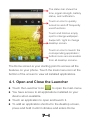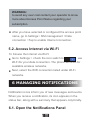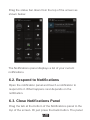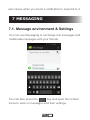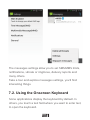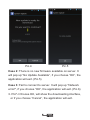
1
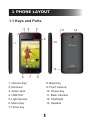
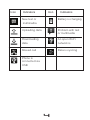
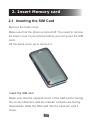
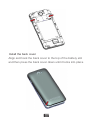
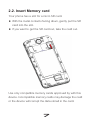
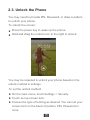
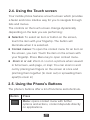
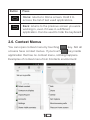
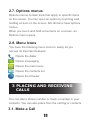
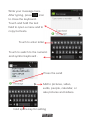
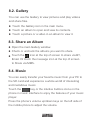
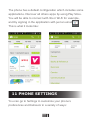
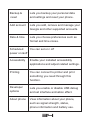
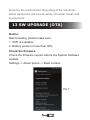
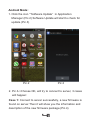
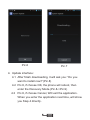
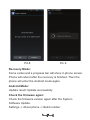
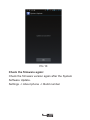
USER MANUAL Welcome Thank you for purchasing this product. For your cellular phone works properly, please follow the instructions in this manual. To prevent any possible incidents or malfunctions, please follow all safety warnings. Screen displays and illustrations in this user’s manual are designed to help you operate this phone to its optimum performance Contents 1 PHONE LAYOUT 1.1 Keys and Parts 3 4 5 11 2 9 1 10 13 6 7 8 1. Volume Key 8. Back key 2. Receiver 9. Front camera 3. Audio Jack 10. Power key 4. USB Port 11. Back Camera 5. Light Sensor 12. Flashlight 6. Menu Key 13. Speaker 7. Home key 1 12 Key tips Power/Lock key When powering off status, press and hold to turn on the phone; When powering on status, press and hold to enter phone options (Power off, Reboot, profile mode and Airplane mode); Prevent accidental touches or when you want to wipe smudges you’re your touch screen, put the touch screen to sleep by pressing Power/Lock key; To wake up the touch screen, just press Power/Lock key again, and then drag the lock icon to the right on the screen to unlock according to the clue on the screen. Menu key Press to open a list of actions available in the current screen. Home key Press to return to the Home screen from anywhere on your phone Press and hold to bring up the recent applications window. Back key 2 With in a menu, press to return to the previous screen, or to dismiss a dialog box or menu. When the onscreen keyboard is open, press to close the on screen key board Volume keys Press to adjust the volume. 1.2 Icons and Indicators Icon Indicators Icon Indicators No signal Vibrate mode Airplane mode Ringer is silenced Problem with sign-in or sync Phone microphone is mute Connected to a Wi-Fi network Battery is very low Alarm is set Battery is charged 3 Icon Indicators Icon Indicators New text or multimedia Battery is charging Uploading data Problem with text or multimedia Downloading data An open Wi-Fi network is Missed call Data is syncing Phone is connected via USB 4 2. Insert Memory card 2.1. Inserting the SIM Card Remove the back cover Make sure that the phone is turned off. You need to remove the back cover of your phone before you can insert the SIM card. Lift the back cover up to remove it. Insert the SIM card Make sure that the clipped corner of the SIM card is facing the correct direction and the metallic contacts are facing downwards. Slide the SIM card into the card slot until it stops. 5 Install the back cover Align and hook the back cover to the top of the battery slot and then press the back cover down until it locks into place 6 2.2. Insert Memory card Your phone has a slot for a micro SD card. With the metal contacts facing down, gently put the SD card into the slot. If you want to get the SD card out, take the card out. Use only compatible memory cards approved by with this device. Incompatible memory cards may damage the card or the device will corrupt the data stored in the card. 7 2.3. Unlock the Phone You may need to provide PIN, Password, or draw a pattern to unlock your phone. To unlock the screen: Press the power key to wake up the phone. Hold and drag the unlock icon to the right to unlock. You may be required to unlock your phone based on the unlock method in settings. To set the unlock method: On the main menu, touch Settings > Security. Touch set up screen lock. Choose the type of locking as desired. You can set your screen lock on the basis of pattern, PIN, Password or none. 8 2.4. Using the Touch screen Your mobile phone features a touch screen which provides a faster and more intuitive way for you to navigate through lists and menus. The controls on the touch screen change dynamically depending on the task you are performing: Selection: To select an item or button on the screen, touch the item with your fingertip. The button will illuminate when it is selected. Context menus: To open the context menu for an item on the screen, you can: Touch the item on the screen with your fingertip. Press Menu key to open context menu. Zoom in or out: Zoom in / out on a picture when viewed in full screen, web page, or map: You can zoom in and out by placing two fingers on the screen at once and pinching them together (to room out) or spreading them apart(to zoom in) 2.5. Using the Phone’s Buttons The phone’s buttons offer a lot of functions and shortcuts. Button Press Menu: opens context menu with further options and actions, content depends directly on applications. 9 Button Press Home: returns to Home screen. Hold it to access the list of last used applications. Back: returns to the previous screen you were working in, even if it was in a different application. Can be used to hide the keyboard. 2.6. Context Menus You can open context menu by touching key. Not all screens have context menus. If you touch key inside application that has no context menu, nothing happens. Examples of context menu from Contacts environment: 10 2.7. Options menus Options menus contain tools that apply to specific items on the screen. You can open an option by touching and holding an item on the screen. Not all items have options menus. When you touch and hold some items on a screen, an Options menu opens. 2.8. Menu Icons You have the following menu icons to easily let you access its important features: Opens the dialer Opens messaging Opens the main menu Opens the contacts list Opens the browser 3 PLACING AND RECEIVING CALLS You can dial a phone number or touch a number in your contacts. You can also place from the call log or contacts. 3.1. Make a Call 11 Tap the icon on main menu or the home screen to dial the desired number. Touch the icon on main menu or the home screen to make a call from call log, contact, groups or favorites. To dial an international number, touch and hold the 0 key to enter the Plus (+) symbol, and then enter the international country prefix, followed by the phone number Press the Volume Up/ Down keys to adjust the call volume. You can access Call Logs, Contacts from the dialer screen. While during a call, touch the icon to end a call. 3.2. Disable Phone Calls (Airplane mode) Some locations like airplanes may require you to turn off your mobile, Wi-Fi, and BT wireless connections. Press and hold the Power button. Touch the Airplane mode. 3.3. Disable SIM card You may have only one SIM card and you want to close the SIM card. To do it go to: 12 Settings >SIM management > turn off SIM 1/SIM 2 Then you can choose which SIM card enable or disable: SIM 1 is for 3G and 2G (SIM1 slot) SIM 2 is for 2G (SIM2 slot) 4 THE HOME SCREEN When you sign in, the home screen opens. 13 The status bar shows the time, signal strength, battery status, and notification. Touch an icon to quickly turned on and off frequently used functions Touch and hold an empty spot to change wallpaper. Swipe left / right to change desktop screen. Touch an icon to launch the corresponding application; bottom icons are accessible from all desktop screens. The Home screen is your starting point to access all the features on your phone. Touch the main menu icon at the bottom of the screen to view all installed applications. 4.1. Open and Close the Launcher Touch the Launcher Icon to open the main menu. You have access to all applications installed on your device when available. Touch an application to open and launch it. To add an application shortcut to the desktop screen, press and hold it until it vibrates and enters Home 14 screen. Place it and release your finger. Slide the Launcher left or right to bring more icons into view. As soon as you install a new application, it comes in this list. 4.2. Switch to Recently Used Application Press and hold the icon for a few seconds. Touch an icon to open its application. Or press to return to the current application. 4.3. Customize Home Screen You can add applications, shortcuts, widgets, or change the wallpaper Applications: 15 Press to open the Home screen. Touch the Launcher Icon to open the main menu. To add an application shortcut to the desktop screen, press and hold it until it vibrates and enters Home screen. Place it and release your finger. Widgets: Press to open the Home screen. Touch the Icon to open the widgets. To add a widget shortcut to the desktop screen, press and hold it until it vibrates and enters Home screen. Place it and release your finger. Wallpapers: Start from the Home screen; press MENU to access the context menus. You can also touch & hold an empty area of the home screen and in the menu, touch Wallpapers Tap Desktop Wallpapers item. Select one of the pictures. It can be from the Gallery, Live wallpapers, Video Wallpaper or Wallpapers. Gallery contains the pictures you have stored on your phone storage. Wallpaper is pre installed on your phone. When you’ve decided on a picture, make sure it is highlighted, and then select Set wallpaper If you select Gallery, the picture album opens. Slide your fingers to find the picture you want to use, and then touch 16 it. If this picture is too large, you must crop it first Folders: You can very easily regroup desktop icons in a folder on screen to save space and access more applications. Touch and hold any icon on desktop screen to move it. Go on another icon and release to create a folder containing both icons. Then add as many icons as folder can hold, give it a name, move it where you want. 5 CONNECT TO THE INTERNET 5.1. To configure your Internet: Go to Settings> More > Mobile Networks > Data connection. By default, your network provider sends the Access Point Name settings via SMS, or it comes automatically with your SIM card. You may need to install these settings. After this, you can choose from the listed access point names. If the access point names are not listed by default, please contact your network provider for the same. To add any operator Access point Name, go to settings > More > Mobile networks > Access Point Name. 17 WARNING: to avoid any over cost contact your operator to know more about Access Point Name regarding your subscription. After you have selected or configured the access point name, go to Settings> SIM management >Data connection >Tap to enable Internet connection. 5.2. Access Internet via Wi-Fi To browse the Internet via Wi-Fi: Go to Settings > check the icon switch to use Wi-Fi for your data connection. The phone will scan for available wireless networks. Next, select the WIFI connection listed under Wi-Fi networks. 6 MANAGING NOTIFICATIONS Notification icons inform you of new messages and events. When you receive a notification, its icon appears in the status bar, along with a summary that appears only briefly. 6.1. Open the Notifications Panel 18 Drag the status bar down from the top of the screen as shown below: The Notifications panel displays a list of your current notifications. 6.2. Respond to Notifications Open the notification panel and touch a notification to respond to it. What happens next depends on the notification. 6.3. Close Notifications Panel Drag the tab at the bottom of the Notifications panel to the top of the screen. Or just press the back button. The panel 19 also closes when you touch a notification to respond to it. 7 MESSAGING 7.1. Message environment & Settings You can use Messaging to exchange text messages and multimedia messages with your friends. You can also press the key and open the context menu to work on messages and their settings. 20 The messages settings allow you to set SMS/MMS limits, notifications, vibrate or ringtones, delivery reports and many others. Take a tour and explore messages settings, you’ll find interesting things. 7.2. Using the Onscreen Keyboard Some applications display the keyboard by default. In others, you touch a text field where you want to enter text, to open the keyboard. 21 Write your message here. After typing, press icon to close the keyboard. Touch and hold the text field to open a menu and to copy/cut texts. Touch to enter letter Touch to switch to the numeric and symbol keyboard . Press the send Add to pictures, video, audio, people, calendar, or take pictures and videos. hold space key for setting 22 7.3. Create and Send Multimedia Message A Message becomes an MMS if you send it to an email address, or add multimedia media file(s). Touch compose new message. Enter or select a mobile phone number. Touch the composition text box and write your message. key to open the context menu. Touch the Touch Attach to attach various types of files. Send the MMS. 7.4. Operation on a message: Open the message thread containing the message your want to operate. key until a context menu opens. Touch the Make your choice. You can also Insert quick test, Insert Contact, add subject, add to Contacts, and Chat settings. 7.5. Lock a Message You can lock a message so it won’t be deleted if you reach your storage limits. Touch and hold message in a message window. 23 Touch Lock message in the menu that opens. Unlock a message by touching and holding it and then touch Unlock message. 8 MULTIMEDIA 8.1. Camera Your camera’s pictures and videos are stored in both the SD card and device. You can copy pictures and videos from both the SD card and device to a PC and vice versa. Touch to change panoramic Touch settings to change them Change between front and back camera Touch to toggle camera mode Change flash Change between front and back camera Touch to Touch to take video take Picture 24 8.2. Gallery You can use the Gallery to view pictures and play videos and share files. Touch the Gallery icon in the main menu. Touch an album to open and view its contents. Touch a picture or a video in an album to view it. 8.3. Share an Album Open the main Gallery window. Check or uncheck the albums you want to share. icon at the top of screen to share via BT, Touch the Email. Or touch the message icon at the top of screen to Share via MMS. 8.4. Music You can easily transfer your favorite music from your PC to the SD card and experience a whole world of interesting and melodious music. Touch the key or the intuitive buttons icons on the phone in music interface to enjoy the features of your music player. Press the phone’s volume up/down keys on the left side of the mobile phone to adjust the volume. 25 8.5. FM Radio You can listen to your favorite FM channels using the inbuilt FM receiver of your phone and a corded earphone Touch icons on the phone in Radio interface to explore and enjoy the features of your inbuilt FM radio: Record sound Save your favorites FM stations Enable speaker Press the phone’s volume up/down keys on the left side of the mobile phone to adjust the volume. Troubleshooting: it happens sometimes that applications crash and stop working. When FM radio crash you keep hearing the current FM station but you are not able to change it, in this case the phone must be reboot. 8.6. Record Sounds Touch the Sound Recorder in the main menu. Tap to start recording a voice clip. “Recording” appears when it is recording a voice clip. to stop or save the recording. Tap 8.7. Make Screenshot 26 Press and hold for 1 second both Volume Down and Power buttons together. 9 CONNECT TO NETWORKS AND DEVICES Your phone can connect to a variety of networks and devices, including Wi-Fi, GPRS, BT, devices, such as headsets. You can also transfer files to/from your PC through the data cable. 9.1. Connect to PC Plug the phone to a computer with the supplied cable. Go to Notifications bar Touch "USB connected" Then touch “Turn on USB storage” (see below). This mounts the external SD card and internal memory as USB keys. Then you can manage your files directly from your computer. Once finished, click again (“Turn off USB storage”) to unmount SD card from computer and use it with phone again. 27 WARNING: during USB connection, SD card is no longer available to the phone, all apps using SD card cannot work. Don't erase/move applications data also. 9.2. Connect to Internet Refer to section 5 for details. 9.3. Connect to Wi-Fi Networks Refer to Section 5 for details. 28 9.4. Pair With BT Devices Go to Settings > check the icon switch to If BT is off, check BT to turn it on. Your phone scans and displays the BT devices in range. If the device you want to pair with is not in the list, make it discoverable. If your phone stops scanning before you make the other device discoverable, touch Scan for devices. Touch the ID of the other device in the list Settings to pair them. If you are prompted to for a password, enter any password on one device and enter the same password you entered in the other device to be paired.), If the pairing is successful, your phone connects to the device. 9.5. Connect to Internet via your Phone You can browse the Internet on your PC using your mobile phone. To do this: Connect your mobile phone to your PC via the USB cable. Go to Settings>More >Tethering & portable hotspot and then touch USB Tethering. A prompt for installation will appear on your PC. Proceed 29 as suggested. In case of Linux, Windows 7 and Vista OS, the drivers get automatically installed. However, in case of Windows XP, , maybe you need to manually install the drivers. 9.6. Install Secure Certificate from SD Card If your VPN or Wi-Fi Network relies on secure certificates, you must obtain the certificates and store them in your phone’s storage, before you can configure access to those VPN or Wi-Fi networks on your phone. You may need to download the certificates from a website. Copy the certificate from your computer to the root of the SD card. Touch Settings> Security. Touch Install from SD card under Credential Storage. Touch the file name of the certificate to install. Only the names of certificates that you have not already installed on your phone are displayed. If prompted, enter the certificate’s password and touch OK. Enter a name for the certificate and touch OK. 10 DOWNLOAD APPLICATIONS 30 The phone has a default configuration which includes some applications. Discover all others apps by using Play Store. You will be able to connect with 3G or Wi-Fi for example, and by signing in the application with just an email This is what it looks like: 11 PHONE SETTINGS You can go to Settings to customize your phone’s preferences and behavior in a variety of ways: 31 SIM card Lets you turn on or turn off your SIM management card and configure your SIM card to be used to voice call, video call, SMS send and data connection. Wi-Fi Lets you configure and manage connections to networks and devices by Using Wi-Fi. BT Lets you manage BT to communicate with other BT devices, such as headsets and other portable devices. Data usage Data usage refers to the amount of data uploaded or downloaded by your device during a given period. More… Lets you configure and manage connections to networks and devices. Home You can set launcher. Audio profiles You can switch profiles. At what volume the phone rings, vibrates etc. 32 Display Lets you configure brightness and other screen settings. Storage Lets you see and manage available space on your phone and on your SD card. Battery Lets you check the battery level and status. Apps Lets you view all applications downloaded or on SD card and mange all running applications in devices. Location Lets you set the location related settings like Wi-Fi and mobile network, GPS settings for your phone and check to take account of your location in search results and other services. Security Lets you protect personal information, like adjust your phone's lock, set SIM card lock etc. Language & Lets you select the language for the input text on your phone and for configuring the onscreen keyboard. 33 Backup & Lets you backup your personal data reset and settings and reset your phone. Add account Lets you add, remove and manage your Google and other supported accounts. Date & time Lets you choose preferences such as format and time zones. Scheduled You can set on / off power on &off Accessibility Enable your installed accessibility applications and adjust related settings. Printing You can connect to printer and print something you need through this function. Developer Lets you enable or disable USB debug options and set interface animation effect. About phone View information about your phone, such as signal strength, status, phone information and battery use. 34 12 HEALTH AND SAFETY INFORMATION Please read the following guidelines regarding the use of your phone. Not following them may be dangerous or illegal. Certification Information (SAR) Your phone is designed not to exceed the limits of emission of radio waves recommended by international guidelines. These guidelines include safety margins designed to assure the protection of all persons, regardless of age and health. SAR (specific absorption rate) is the unit of body-absorbed RF quantity when the phone is in use. SAR value is ascertained according to the highest RF level generated during laboratory tests. The true SAR level during phone usage will be far lower than this level. The SAR value of the phone may change depending on factors such as how close you are to a network tower, use of accessories and other enhancements. The highest SAR value of the device is 0.164 W/kg (head) and 0.415 W/kg (body) for 2G, 0.199 W/kg (head) and 0.427 W/kg (body) for 3G, averaged over 10 gm of human 35 tissue. The SAR value may differ depending on national reporting, testing requirements and the network band. SAR Recommendations Use a wireless hands-free system (headphone, headset) with a low power BT emitter. Please keep your calls short and use SMS whenever more convenient. This advice applies especially to children, adolescents and pregnant women. Prefer to use your cell phone when the signal quality is good. People having active medical implants should preferably keep the cell phone at least 15 cm away from the implant. Maintain a preferable distance of 15 mm from the device. Safe Driving Do not use the phone while driving. When you have to use the phone, please use the personal hands-free kit. Please do not put the phone onto any passenger seat or any place from which it may fall down in case of vehicular collision or emergency braking. During Flight Flight is influenced by interference caused by the phone. It 36 is illegal to use a phone on the airplane. Please turn off your phone or switch to flight mode during a flight. In Hospitals Your Phone’s radio waves may interfere with the functioning medical devices. Consult a physician or the manufacturer of the medical device to determine whether they are adequately shielded from external Radio Frequency. Switch off your device when regulations instruct you to do so. Do not carry the wireless device in the Chest pocket. Turn off the phone if there is any reason to suspect that interference is taking place. Unsafe Areas Please turn off your phone when you are close to a gas station or in the vicinity of any place where fuel and chemical preparations, or any other dangerous goods are stored. Taking Care of Your Device Your device is a product of superior design and craftsmanship and should be handled with care: The following suggestions will help you protect your phone: Keep the device dry. If your device gets wet, remove the 37 battery without turning on the device, wipe it with a dry cloth and take it the service center. Do not store the device in high or cold temperature. High temperatures can shorten the life of electronic devices and damage batteries. Do not use or store the device in dusty, dirty areas. Its moving parts and electronic components can be damaged. Do not attempt to open the device other than as instructed in this guide. Repairing the phone by yourself other than our authorized service agents/centers goes against the warranty rules. Do not drop, knock, or shake the device. Rough handling can break internal circuit boards and fine mechanics. Do not use harsh chemicals, cleaning solvents, or strong detergents to clean the device. Only use a soft, clean, dry cloth to clean the surface of the device. Do not store your device near magnetic fields or allow your device to come in contact with magnetic fields for extended period of time. Battery Recommendations Please put the battery in a well-ventilated place out of direct sunlight. Charge the battery at room temperature range. If the time span of the battery after charging becomes 38 much shorter than usual, the battery life is at an end. Replace the battery with a new battery of the same make and specification. Do not discard the battery with household trash. Please dispose of used battery according to your local environmental laws and guidelines. Use manufacturer approved batteries, chargers, accessories and supplies. I-mobile will not be responsible for user’s safety when using unapproved batteries or accessories. Recycle Your Phone The WEEE logo (shown at the left) appears on the product (battery, handset, and charger) to indicate that this product must not be disposed off or dumped with your other household wastes. You are liable to dispose of all your electronic or electrical waste equipment by relocating over to the specified collection point for recycling. of such hazardous waste. Collection and proper recovery of your electronic waste equipments at the time of disposal will allow us to help 39 preserve the environment. Recycling of the electronic waste equipment will ensure safety of human health and environment. 13 SW UPGRADE (OTA) Notice: Before testing, please make sure: 1. WIFI is available. 2. Battery power is more than 40%. Check the firmware: Check the firmware version before the System Software Update. Settings -> About phone -> Build number Pic.1 40 Android Mode: 1. Click the icon ““Software Update” in Application Manager (Pic.2) Software Update will start to check for update (Pic.3) Pic.2 Pic.3 2. Pic.3->Choose OK, will try to connect to server, 3 cases will happen: Case 1: Connect to server successfully, a new firmware is found on server.Then it will show you the information and description of the new firmware package.(Pic.4) 41 Pic.4 Pic.5 Case 2: There is no new firmware available on server. It will pop up” No Update Available”, if you choose ”OK”, the application will exit. (Pic.5) Case 3: Fail to connect to server. It will pop up "Network error!", if you choose ”OK”, the application will exit. (Pic.6) 3. Pic7->Choose OK, will show the downloading interface, or if you choose ”Cancel”, the application will exit. 42 Pic.6 Pic.7 4. Update interface: 4.1 After finish downloading, it will ask you: “Do you want to install now?”(Pic.8) 4.2 Pic.8, if choose OK, the phone will reboot, then enter the Recovery Mode.(Pic.8->Pic.9) 4.3 Pic.8, if choose Cancel, Will exit the application. When you enter the application next time, will show you Step 4 directly. 43 Pic.8 Pic.9 Recovery Mode: Some codes and a progress bar will show in phone screen. Phone will reboot after the recovery is finished. Then the phone will enter the Android mode again. Android Mode: Update result: Update successfully Check the firmware again: Check the firmware version again after the System Software Update. Settings -> About phone -> Build number 44 Pic.10 Check the firmware again: Check the firmware version again after the System Software Update. Settings -> About phone -> Build number 45 14 Battery Informations Type Li-ion Capacity 1500 mAh • The battery life depends on many factors, including • • • • the SIM card, network conditions, settings, usage and enviorenment. Making calls, turning on the backlight and music player will consume more battery power. The standby time is shorter when the network is not available than in the standard status. For power saving, the backlight turns off automatically if your phone stands idle for an assigned time. The performance of battery varies with the charging status, temperature, local radio wave and backlight status. 46 15 Condition Of Waranty 1. Mobile phone device, portable charger, charger, wireless headset are in-warranty of 12 months after the date of purchase. 2. Battery, headset, USB data connector, memory card, are in-warranty of 6 months after the date of purchase. 3. This warranty shall apply to mobile phone and accessory under “i-mobile” brands that are purchased from Shop namely, I-mobile by Samart and Authorized Distributor or Authorized Service Center as appointed in Thailand only. 4. The condition of the warranty for mobile phone and accessory that are purchased in other countries, except Thailand. It shall be applied in accordance with the applicable law. For Thailand, the purchaser acknowledges the end of warranty period as stated in the warranty sticker or purchase's record of i-mobile system. 5. Within the warranty period, maintenance or parts replacement is free of charge. Should be noted that i-mobile reserves the rights no return the damaged part. 6. i-mobile provides warranty for mobile phone and accessory with the terms and conditions that are stated 47 in the law excluding the commerce, product satisfaction, lost of benefit or expected profit, loss or damages from the violation of personal rights in conversation, and working discontinuance or loss of information arising of the use or inability to use. 7. In cellular network / signal and sounds that are used with mobile phone and accessory is the service of independent operators, not i-mobile. Therefore, 8. i-mobile will not be responsible for the working process, the readiness of the service, and the area covered. Any mobile phone and accessories that are already repaired or had parts replacement, the warranty period will continue from the remaining warranty onward or 60 days from the repaired date whichever is longer. 9. Customer has to pay for the repair cost and cost of replacement parts provided that the said repair are not in the warranty conditions. 10. The warranty sticker on the mobile phone must not be torn, tattered, scraped or crossed out. 48 THIS WARRANTY IS VOID UNDER THE FOLLOWING CONDITIONS 1. Mobile phone and accessory are damaged due to the abnormal use, improper use, being stored in the damped or overheated area, or other inappropriate environment, the interference that can cause damage, including unforeseeable accident, spill with liquid or food, or any actions that cause damages to mobile phone and accessories. 2. Mobile phone and accessory are damaged due to the natural disaster. 3. Mobile phone and accessory are repaired, changed parts, adjusted, modified, connected, customized without any authorization by i-mobile. 4. Using of mobile phone and accessory together with, or connect with the mobile phone or accessory that are neither provided nor certified by i-mobile including any accessory are inappropriate to use together with mobile phone and accessory. 5. Small alteration in the brightness and color on the screen might occur in each mobile phone and accessory, might results in bright or dark dots on the screen. This is called as pixel defect. It can occur when these pixels are malfunction and cannot be modified. 49 The Pixel defect of 2 pixels is considered acceptable. Small alteration in a picture taken by a camera might occur in each mobile phone and accessory is considered normal and it is not the camera module to be deemed as malfunction. 6. Editing, scarping, crossing over the IMEI number of the mobile phone or accessory, including the warranty number will be deemed as the termination of the warranty. 7. Damaging of the label, warranty sticker on the mobile will be deemed as termination of the warranty. 8. i-Mobile will not assure provided that the software from i-mobile will be up to your wishes or the working process of the software will not be discontinued or flawless. i-mobile will not assured provided that the additional software to download or install by you for the purpose of work or entertainment will be up to your wishes without mistakes and flaw that is out of control of i-mobile. 9. The warranty and responsibilities of i-mobile are not covered the malfunction of any software or access of information from virus, or unauthorized access, which cause the damage in the banking transaction, E-banking, or any important information, or using the mobile phone illegally. 50 10. The warranty and responsibilities of i-mobile are not covered the malfunction of any software or access of information from virus, or unauthorized access, which cause the damage in the banking transaction, E-banking, or any important information, or using the mobile phone illegally. 11. The warranty will not cover the loss of personal information during the use or during the installation, software remove, including applications, songs, videos, and any memberships that Customer has already purchased. 12. The warranty will not cover the responsibility of the loss of any personal information during the repair at Authorized Service center of i-mobile, including the applications, songs, videos, and any memberships that Customer has already purchased. 13. The warranty will not cover the damage that occurs from the use of any device under “i-mobile brand” with other products which are not the product of i-mobile. 14. The warranty will not cover any expenses in the co-ordination with i-mobile for solving the problem and the process of delivering for examination and repair service. 51