1
Formulas and Equations
20
When you want to use a complicated equation in LabVIEW, you do not
have to wire together various arithmetic functions on the block diagram.
You can develop equations in a familiar, mathematical environment and
then integrate the equations into an application.
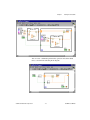
Use the Formula Node and Expression Node to perform mathematical
operations in the LabVIEW environment. For more advanced functionality,
you can link to the mathematics applications HiQ and MATLAB to develop
equations. HiQ and MATLAB are software packages that help you
organize and visualize real-world math, science, and engineering problems.
For more information…
Refer to the LabVIEW Help for more information about using equations and the
syntax to use, available functions and operators, and descriptions of possible
errors.
Methods for Using Equations in LabVIEW
You can use the Formula Node, Expression Node, HiQ-Script node, and
MATLAB script node to perform mathematical operations on the block
diagram.
You must have HiQ or MATLAB installed on your computer to use the script nodes
because LabVIEW uses ActiveX technology to pass the script to HiQ or MATLAB for
execution. LabVIEW uses ActiveX technology, which is available only on Windows, to
implement the script nodes. Therefore, script nodes are available only on Windows.
Note
Because National Instruments ships HiQ with LabVIEW, you can install
the software at no extra cost to gain more functionality in handling
equations.
© National Instruments Corporation
20-1
LabVIEW User Manual