1
D-Light Sync Pak
Set-Up
DMX-512: DMX is short for Digital Multiplex. This is a universal protocol used as a form of communication between intelligent fixtures
and controllers. A DMX controller sends DMX data instructions from
the controller to the fixture. DMX data is sent as serial data that travels from fixture to fixture via the DATA “IN” and DATA “OUT” XLR terminals located on all DMX fixtures (most controllers only have a DATA
“OUT” terminal).
DMX Linking: DMX is a language allowing all makes and models
of different manufactures to be linked together and operate from a
single controller, as long as all fixtures and the controller are DMX
compliant.
Data Cable (DMX Cable) Requirements (For DMX and Master/Slave
Operation): The D-Light can be controlled via DMX-512 protocol. The
D-Light is a two channel DMX unit. The DMX address is set on the
rear panel of the D-Light. Your unit and your DMX controller require a
standard 3-pin XLR connector for data input and data output. If you
are making your own cables, be sure to use standard two conductor shielded cable (This cable
may be purchased at almost all pro sound and
lighting stores). Your cables should be made with
a male and female XLR connector on either end of
the cable. Also remember that DMX cable must be
daisy chained and can not be split.
©American
DJ Supply® - www.americandj.com - D-Light Sync Pak User Manual Page 5
D-Light Sync Pak
Operating Instructions
Power Supply: Before plugging your unit in, be sure the source
voltage in your area matches the required voltage for your American
DJ® D-Light before attempting operation. Note: The D-Light must
first be connected to a DLS-1 controller or DMX controller in
order to work.
General Operation:
This fixture is designed to operate only when connected to the compatiable Sony® Audio system along with the Sony® DLS-1 controller
or a DMX controller. The D-Light use two lamps to create multiple
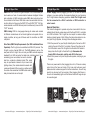
strobing colored beams of light. Follow the instructions below to connect your D-Light System, or simply follow the diagram below.
1. With the power off on your Sony® Audio System. Connect an XLR
cable to the end of the DLS-1 controller. Connect the other end of
the XLR cable to one of the D-Lights. Use the other XLR cable to
daisy chain the D-Light to the other D-Light. Remember the
female XLR is the output, and the male XLR is the input.
2. Switch the power on to your Sony® audio system, and plug in your
D-Lights.
There is no power switch, after plugging the unit in, if there is no lamp
output check the fuse and bulbs. If the fuse and bulbs are good,
please contact customer support for further instructions, the unit may
need to be returned unit for servicing. After plugging this fixture in,
the unit will immediately light and the internal motor will begin to spin
to an audio signal.
©American
DJ Supply® - www.americandj.com - D-Light Sync Pak User Manual Page 6