1
5. Using On-Screen Menu
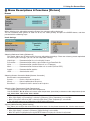
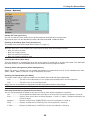
[Setup - Installation]
Selecting Projector Orientation [Orientation]
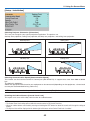
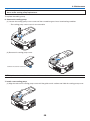
This sets your image for your type of projection application. The options are:
desktop front projection, ceiling rear projection, desktop rear projection, and ceiling front projection.
Desktop front
Ceiling rear
Desktop rear
Ceiling front
Selecting Communication Speed [Communication Speed]
This feature sets the baud rate of the PC Control port (Mini DIN 8 Pin). It supports data rates from 4800 to 38400
bps.
The default is 38400 bps.
Select the appropriate baud rate for your equipment to be connected (depending on the equipment, a lower baud
rate may be recommended for long cable runs).
NOTE: Your selected communication speed will not be affected even when [Reset] is done from the menu.
Disabling the Cabinet Buttons [Control Panel Lock]
This option turns on or off the Key Lock function for cabinet buttons.
NOTE:
• The Control Panel Lock setting will not affect the remote control or PC Control Functions.
• When the cabinet buttons are disabled, pressing and holding the EXIT button for about 10 seconds will change the setting to
enable.
• The Key Lock icon will be displayed at the bottom right of the menu when Control Panel Lock is enabled.
42