1
CoaguChek XS Plus
System
t
Getting Started
®
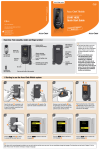
Follow these steps to get started using the meter:
1. Watch the CoaguChek XS Plus System DVD. It will help you get comfortable with the
CoaguChek XS Plus Meter and the testing procedures.
2. Read this Getting Started guide. You will learn how to set up and perform your first
blood and optional liquid quality control tests on the CoaguChek XS Plus Meter.
3. With this Getting Started guide by the meter, follow the steps to perform your first test.
Getting Started
Installing Batteries
t
Then, as necessary, refer to the user manual:
The CoaguChek XS Plus System User Manual is a comprehensive guide to the meter
and test strips. It is designed to provide answers to your questions about the meter’s
operation and use.
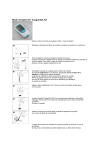
1. Open Compartment
2. Insert Batteries
Press the release tab on the battery
cover on the back of the meter.
Slide the battery cover off.
Insert 4 AA batteries according to
the diagram inside the battery cover.
Replace the cover.
After you insert the batteries, the meter powers on and the screen changes to the
language menu.
You’ll need to set several parameters before using the meter for the first time.
Main Menu
09:15 am
Setup
t
Patient Test
Control Test
3. Set the Language
Language
4. Set the Date and Time Format
Format
09:15 am
Dansk
Deutsch
Date
09:15 am
DD.MM.YYYY
Date:
5. Set the Date
Year:
09:15 am
MainReview
Menu Results
09:15 am
Screen
6. Set the Time
Time
09:15 am
2009
09:15 am
9
Hour:
09:15 am
am
Setup Menu
Menu
09:15
Setup
Result Units
09/16/2009Control Test
Screen
Screen
MM/DD/YYYY
English
YYYY-MM-DD
Month:
1
Day:
1
59
Minute:
Español
Time:
Français
24H 12H
09/16/2009
09/16/2009
English is the default selection. It is
highlighted in black.
Press
to save your language setting.
The display changes to the Date and
Time Format screen.
MM.DD.YYYY is the default date
selection.
12H is the default time selection
Press
to save your date and time
format settings.
The display changes to the Date screen.
Preparing for a Test
Language
ReviewSelection
Results
Screen
Options 09:15 am
Options
PM
Setup
Contrast
Date
/ Time
ID
Setup
ID Setup
09/16/2009
Result Units
Press or
to select the year, then
or
to select the month, then
or
to select the day.
Press or
to select the hour, then
or
to select the minutes
then AM or PM.
Press
to save the current date.
to save the current time.
Press
The display changes to the time screen.
The display returns to the Main Menu.
The date settings are important. Each time
you run a test, the meter compares its date
with the test strip’s expiration date. An
incorrect date may cause an expired strip
error on in-date strips preventing you from
running a test.
If the test strips are expired, the meter
displays an error message and prevents you
from running a test.
09/16/2009
You
may Lockouts
change or re-enter the date,
09/16/2009
Lockouts
timeLanguage
or formatSelection
at any time. Always access
these options by:
09/16/2009
09/16/2009
Date
/ Time
Pressing
Setup
on the main menu, then
Screen on the setup menu, then
09/16/2009Date/Time
on the screen menu
…which brings you to the Set Date,
Set Time, and Format options.
t
09/16/2009
AM
Setup
Contrast
Patient Test
2. Match Code
3. Insert Test Strip Code Chip
4. Wash Hands
• CoaguChek XS Plus Meter • Container of test strips
• Test Strip Code Chip
• CoaguChek Lancet
• Alcohol wipe
• Cotton ball
The code number on the test strip
container and the test strip code chip
must match.
Each box of test strips comes with a
matching code chip. Test strip code
chips are identified with an “S.”
Every time you open a new box of test
strips, you will replace the test strip
code chip.
With the code number facing up,
insert the code chip into the code chip
slot until it snaps into place.
Have the patient wash his or her
hands in warm, soapy water. Or, clean
the fingertip with an alcohol wipe.
Make sure the fingertip and your
gloved hands are thoroughly dry.
Before continuing, review these
tips for getting a good blood drop.
Increasing the blood flow in the finger
will help you get a good drop of blood,
so keep in mind these tips:
• Warm the hand. Have the patient
hold it under his or her arm, use
a hand warmer, and/or wash with
warm water.
• Have the patient let that arm hang
by his or her side.
• Massage the finger from its base.
Use these techniques until the fingertip
has increased color.
2. Insert Test Strip
3. Select Patient Test
4. Collect the Sample
5. Apply the Sample
Twist the protective cap off the lancet.
Massage the finger until you see
increased color in the fingertip.
Keeping the hand down, press the
tip of the lancet firmly against the
side of the fingertip. Press the blue
trigger button.
Gently squeeze from the base of the
finger to develop a drop of blood.
Within 15 seconds of sticking the
fingertip, apply the blood to the target
area on the test strip.
Find the clear target area on the
test strip. You can dose from the
side or top.
Hold the blood drop to the test strip
until you hear a beep. The flashing
blood drop symbol will disappear and an
hourglass symbol symbol appears and
the test begins.
Do not add more blood to the test
strip. Do not touch the test strip
while the test is in progress.
The meter performs an automatic quality
control check on the strip before it
displays the test result.
appears in the display briefly
QC
following a successful QC check.
The result appears in less than a minute.
Testing
t
1. Gather the Following Items
1. Remove a Test Strip
Main Menu
09:15 am
Patient Test
Control Test
Review Results
Setup
Logout
09/16/2009
Take a test strip out of the container.
Close the container tightly.
You have 10 minutes to use a test strip
once you remove it from the container.
Slide the test strip into the test strip
guide in the direction of the arrows
until it stops.
The meter powers on, and the main
menu appears.
If you insert a strip from a new lot
number for the first time, the meter
will display the number of the test strip
code chip required. Remove the old
code chip and insert the new one.
6. Record Result
7. Clean Up
Record your result as instructed by
your facility.
Note: If during testing the meter
displays an error message, refer to the
Error Messages section of the user
manual for an explanation and steps on
how to proceed.
Place the used strip and lancet in an
approved biohazard container.
Power the meter off.
Press Patient Test on the main
menu screen.
Enter the Patient ID.
An hourglass symbol appears.
A test strip symbol appears with a
flashing blood drop. You have 180
seconds to apply the sample.
2. Match Code
3. Reconstitute Control Solution
• CoaguChek XS Plus Meter • Container of test strips
• Test Strip Code Chip
• CoaguChek XS Plus PT Control
Solutions
• Diluent Dropper (2)
• Quality Control Code Chip
The code number on the control
solution and the Quality Control Code
Chip must match.
Each box of controls comes with a
matching code chip. Control code chips
are identified with a “C” in
the number.
Open a bottle of lyophilized control.
Cut off the flared tip of the dropper at
the end of the stem.
Hold the diluent dropper vertically by
the stem, not the bulb, to avoid loss
of diluent.
Do not hold the pipette close to
your face.
Transfer the entire contents of the
dropper to the bottle. Do not touch
the dropper to the dried material or to
the sides of the bottle.
Do not discard the dropper. You will
need it to apply a drop of control to
the test strip later in the test.
Running an optional liquid quality control test
1. Remove a Test Strip
2. Insert Test Strip
3. Select Control Test
Main Menu
4. Insert QC Code Chip
QC Test
09:15 am
*
Patient Test
Close the bottle.
Gently swirl the bottle using a circular
motion to dissolve the dried material.
Do not shake or turn the bottle on its
side or upside down. Avoid creating
bubbles.
Let the bottle sit undisturbed for at
least a minute to ensure that the dry
material dissolves completely.
t
1. Gather the Following Items
t
PREPARING TO RUN An optional liquid QUALITY CONTROL test
09:15 am
New
5. Select the Level
QC Test
QC:
999
Code: 184
Par:
Op:
Operator 1
09:15 am
PT
QC 248
Control Test
QC 379
Level 1
Review Results
QC 462
Level 2
Setup
QC 332
09/16/2009
09/16/2009
09/16/2009
Take a test strip out of the container.
Close the container tightly.
You have 10 minutes to use a test strip
once you remove it from the container.
Slide the test strip into the test strip
guide in the direction of the arrows
until it stops.
The meter powers on, and the main
menu appears.
Press Control Test on the main menu
screen.
An hourglass symbol appears.
The QC Test menu appears.
Press New on the QC Test menu.
A code chip symbol with a flashing
arrow appears on the screen.
Remove the Test Strip Code Chip and
insert the Quality Control Code Chip
with the number facing up until it
snaps into place.
The meter stores the code chip
information in memory for future use.
Select Level 1 for running a level one
control.
An hourglass symbol appears.
A test strip symbol appears with a
flashing dropper symbol. You have
180 seconds to apply the quality control
solution.
6. Collect Control
7. Apply the Control
8. Record Result
9. Remove Control Code Chip
10. Clean Up
Using the dropper, gently squeeze
and hold the bulb. Insert the tip of
the dropper into the control solution.
Slowly release the bulb to draw the
control up to the bulb. Avoid creating
bubbles in the control.
Apply a drop of control to the target
area.
Hold the control drop to the test strip until
you hear a beep. The flashing dropper
symbol will disappear. An hourglass will
appear, indicating the test is in progress.
Return any unused control to the bottle
for additional tests. Reconstituted
controls are good for 30 minutes.
The result appears in less than one
minute.
Record your result as instructed by
your facility.
Note: If during testing the meter displays
an error message, refer to the Error
Messages section of the user manual
for an explanation and steps on how to
proceed.
Run a level 2 control test with a new test
strip following the same steps.
Remove the Quality Control Code Chip
and store it with the remaining controls.
Replace the Test Strip Code Chip.
Roche Diagnostics recommends that you
keep a code chip in the slot to keep the
electrical contacts free of dirt.
Place the used strip and control bottles
in an approved biohazard container.
Power the meter off.
0123
COAGUCHEK is a trademark of Roche.
© 2007–2009 Roche Diagnostics. All rights reserved.
Manufactured for and distributed in the U.S.A. by:
Roche Diagnostics
9115 Hague Road
Indianapolis, IN 46256
Roche Diagnostics GmbH
Sandhofer Strasse 116
68305 Mannheim
Germany
www.coaguchek.com
0 5021456001 (02) 2009-09 USA