1
27
II.3.1 Operation Menu
If at the top level you decide to look at operations, the following menu will appear:
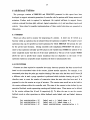
I-INSERT new operation
D-DELETE an operation
F-FIND an operation or some i n f o about an operation
A-INSERT a6soc. actuator for t h i s operation
P-INSERT an o u t op cond OR header for t h i s operation
C-INSERT an o u t op cond AND header for t h i s operation
0-INSERT an i n op cond OR header for t h i s operation
H-INSERT an i n op cond AND header for t h i s operation
L-LIST a l l of t h e names present
Q-Quit, and look a t another data base
? - L i s t a l l of the commands a v a i l a b e l
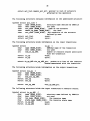
"P" will generate the structure for an output transition and name that transition
TRANS-(n);
where n is a number DBBUILD maintains. Once the transition has been named;
DBBUILD will ask if there are any resource states that you want to attach to this transition.
Upon entering a state DBBUILD will generate a structure to hold the state name. DBBUILD
will name this structure STATE-(n)
much in the same way it names the transitions.
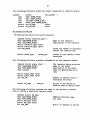
"C" can be used to add additional resource states to a n existing output transition. DBBUILD
will first ask for t h output transition name (TRANS-1,
TRANS-2,
etc.) and then allow you
to enter a resource state.
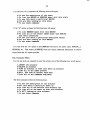
"0"and "H" perform the same as "P" and "C" respectively, but are used for input
transitions rather than output transitions.
NOTE 1:
T h e words "OR" and "AND" used in the menus refer to transitions and resource states
associated with that operation respectively.
OR is used for transitions because they represent
the different enabling or resulting sets of resource states. AND is used for resource states within
a transition because all of the resource states must be satisfied for that transition to be enabled.
NOTE 2:
T h e labels TRANS-(n)
and STATE-(n)
are used by DBBUILD to search through the record.