1
VMS-333 & VMS-Mobile User Guide
Version 1.19
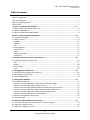
6.4 Use the feature trigger to mark features of interest........................................................................ 35
6.5 Make an audio note.......................................................................................................................... 35
6.6 Upload recorded data to the computer. .......................................................................................... 36
6.7 View your recorded data .................................................................................................................. 36
6.8 Pay attention to indicators ............................................................................................................... 36
Light indicators (LEDs) ......................................................................................................................... 36
Audio indicators .................................................................................................................................. 37
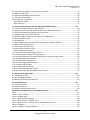
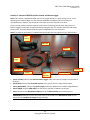
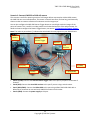
7.0 Using an Android Device with the VMS-333 and DSLR Cameras ........................................... 38
7.1 Connect the Android device to the VMS-333 ................................................................................... 38
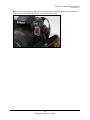
7.2 Optional: Connect the Android device directly to a Nikon DSLR camera......................................... 38
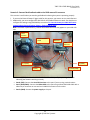
7.3 Start up VMS-Mobile and examine the home screen ...................................................................... 39
7.4 Upload new firmware to the VMS-333 ............................................................................................ 41
7.4 Load the offline map you want to access from VMS-Mobile ........................................................... 42
7.5 Work with offline maps .................................................................................................................... 46
7.6 Load KML files ................................................................................................................................... 47
7.7 Mark individual features of interest and continuous conditions/features ...................................... 52
7.8 Load a feature definition file ............................................................................................................ 55
7.9 Edit a feature definition file .............................................................................................................. 57
7.10 About feature definition files ......................................................................................................... 60
Feature Definition File Details............................................................................................................. 61
7.11 Control the way feature triggers behave ....................................................................................... 65
7.12 Determine if the camera is running properly ................................................................................. 68
7.13 Control the behavior of an external DSLR camera and Laser Range Finder................................... 68
7.14 Configure VMS-333 parameters ..................................................................................................... 70
7.15 Set intervalometry parameters ...................................................................................................... 71
7.16 Set Laser Range Finder parameters ................................................................................................ 75
7.17 Configure VMS-333 data ................................................................................................................ 76
7.18 Configure VMS-333 buttons ........................................................................................................... 79
7.19 Exit and stop background services ................................................................................................. 79
7.20 Get familiar with the VMS-Mobile folder structure ....................................................................... 79
8. Using the Laser Range Finder ................................................................................................ 80
8.1 Introducing the LRF .......................................................................................................................... 80
8.2 LRF Operating Procedure.................................................................................................................. 81
8.3 Making Sure Everything is Working .................................................................................................. 83
9.0 Troubleshooting ................................................................................................................. 85
9.1 Prevent Problems ............................................................................................................................. 85
9.2 Resolve Problems ............................................................................................................................. 85
9.3 Red Hen Systems Support Team ...................................................................................................... 86
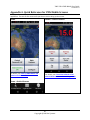
Appendix A. Quick Reference for VMS-Mobile Screens ............................................................. 87
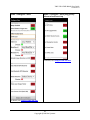
Home ...................................................................................................................................................... 87
Home > Control Camera ......................................................................................................................... 87
Home > Android menu ........................................................................................................................... 87
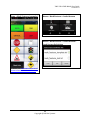
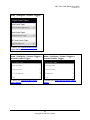
Home > Mark Features (example) .......................................................................................................... 88
Home > Mark Features > Android menu ................................................................................................ 88
Home > Mark Features > Android menu > Load Feature Definitions .................................................... 88
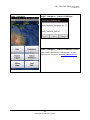
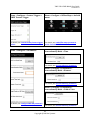
Home > Configure................................................................................................................................... 89
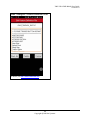
Home > Configure > Feature Definitions ................................................................................................ 89
5
Copyright © Red Hen Systems