1
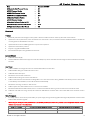
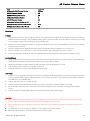
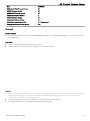
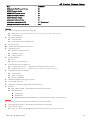
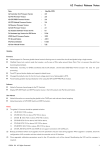
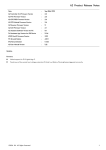
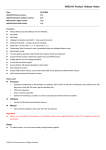
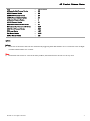
A2 Product Release Notes Date : May 8th, 2015 A2 Controller Unit Firmware Version : 2.5 A2 IMU Firmware Version : 2.5 A2 GPS PRO Firmware Version : 2.6 A2 GPS Module Firmware Version : 2.6 A2 Receiver Firmware Version : 1.1 A2 LED Firmware Version : 2.1 A2 Assistant Software Version for PC : 1.6 DJI Assistant App Version for iOS Device : 1.1.24 iOSD Mark II Firmware Version : 3.02 PC Ground Station : 4.0.11 iPad Ground Station : 1.4.62 A2 User Manual Version : 1.22 Updates: Firmware Added support for Zenmuse gimbal channel control, allowing users to control the aircraft and gimbal using a single remote. Modified Home Lock control mode that creates a no-fly zone of 10m radius around Home Point. This is to prevent the pilot from becoming disorientated. Added data recording for GNSS coordinates and aircraft attitude. Use the latest iOSD Data Viewer to export this data for postprocessing. Fixed PC ground station display and waypoint related issues. Changed the default action for the first level voltage alarm from a flashing light to RTH. Fixed heading problem during initialization when using the GPS-COMP-PRO-PLUS module. Software Added a Zenmuse channel page to the PC Assistant. Display GPS SNR Health and SNR Fluctuation status in the DJI Assistant and iPad Ground Station. User Manual Added information on connecting the gimbal to the CAN2 port and relevant channel mapping. Added description of GPS SNR Health and SNR Fluctuation. Notes: (2) (3) The gimbal’s firmware should be updated as below: a) H3-3D GCU V1.12 or above, b) Z15-5D GCU V2.4 or above, IMU V1.8 or above, c) Z15-5D Ⅱ GCU V2.4 or above, IMU V1.8 or above, d) Z15-GH3 GCU V2.4 or above, IMU V1.8 or above, e) Z15-GH4 GCU V2.4 or above, IMU V1.8 or above, f) Z15-BMPCC GCU V2.4 or above, IMU V1.12 or above, g) Z15-5N, Z15-GH2, Z15-7N and Z15-5R do not support connection with CAN2 port. Backup parameters before each upgrade since the parameters may be reset during upgrade. When upgrade is complete, check the configuration of A2 controller unit then unlock the controller unit in A2 Assistant. (4) Once upgraded, calibration parameters saved in the A2 controller unit will be cleared. Recalibrating the IMU and the compass is required. © 2014 DJI. All Rights Reserved. 2