1
Panel Descriptions
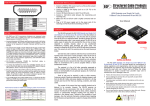
AT-HD50RSL HDMI Receiver over Single CAT5 with Local HDMI and CAT5 Outputs
1. Power indicator
2. 16-level rotary control: Adjust the 16-level equalization control corresponding to the transmission distance of receiving HDMI signals. For surround sound audio output, please adjust from 0-to-7 (longest-to-shortest
transmission length). For stereo audio output, please adjust from 8-to-F
(longest-to-shortest transmission length). It is recommended to adjust
from 7-to-0 or from F-to-8 to find the optimal visual experience.
3. RJ-45 In: Link to AT-HD50RSL, or AT-HD50SS with a CAT-5e/6 cable
1 2 3
4
5
6
7
4. Audio out: Plug in a local speaker here
5. HDMI Out: Connect to a HDMI display with a HDMI M-M cable here
6. RJ-45 Out: Link to another AT-HD50RSL for cascading; or link to ATHDRS or AT-HD15SRS to another HDMI display with a CAT5e/6 cable
7. +5V DC: Connect to 5V 4A DC power supply
AT-HDRS HDMI over Single CAT5 Receiver
HDMI-OUT: Connect to a HDMI display with a HDMI M-M cable here.
EQ: Adjust the 8-level equalization control knob to the received HDMI
signals. 0 – 7 = strongest – weakest. It is recommended to switch
from 7 to 0 to find the optimal visual experience.
6