1
Remote Regeneration
Flow Rate Display
A set of input terminals with a programmable delay are
provided as a standard feature of the 962 Stager that
allows regeneration to be initiated from a remote
location. This feature can be used to facilitate remote
manual regeneration requirements or assist in further
automating the control system such as the use of a
differential pressure switch.
In the normal operating mode the series 962 Stager
control will alternate between Capacity Remaining
(gallons or m3) and Flow Rate (gallons per minute or
m3/hr). In the event of power loss, (including battery
power) the display will alternate between Time of Day
and Capacity Remaining once power has been
restored. The control will remain in this display mode
until the Time of Day is reset or until any button is
pressed. The flow rate display is indicated by a small
L.E.D. in the top left corner of the display. When P19 is
set to “4” (user defined pulse equivalent) flow rate will
not be displayed.
Selectable Automatic Regenerations
There are four automatic regeneration methods;
“delayed with immediate override”, “delayed only”,
“day of week”, and “calendar override”. Immediate
regeneration is used to start an automatic regeneration
immediately when the capacity remaining in a tank is
reduced to zero. Delayed regeneration is used to start
an automatic regeneration at a predetermined time of
day when the capacity remaining is below a defined
reserve. The reserve capacity may be fixed or variable.
The variable reserve is determined by past usage
history. Regeneration can be accomplished based on
the day of the week at a specific time of day or after
programmable number of days since the last
regeneration.
Programming the Series 962 Stager
Control
This section contains common aspects of
programming the 962 control and retrieving historical
operating data. A label provided with the control should
be filled out with programming parameters on system
start-up.
Factory Default Values
The control is shipped from the factory
pre-programmed with the correct operation type.
Capacity and Hardness values are set to 0 and must
be changed to appropriate values before the control
will operate. “Err 4” will be displayed until a valid
number is entered for each of these items. Program
variable P12 is preset to U.S. units of measure or metric
units to match geographical shipping locations.
Optional Battery Backup
An optional backup battery can be provided so that the
Time of Day and water usage will be maintained for up
to 8 hours during a power outage. All 962 Stager
controls are provided as “Battery Backup Capable”.
Batteries can be purchased separately. The control has
a trickle charge circuit that will recharge the battery in
the event it is depleted by a power outage. If the
optional battery backup is provided with the Series
962, make sure that it is properly connected.
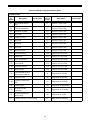
Program Levels
The Series 962 Stager controls have been designed to
facilitate different levels of programming requirements.
Level I includes program variables that are frequently
referenced by users, operators, installers and service
personnel. They are accessible without the requirement
of codes. Level II includes variables that are most
typically used at the time of installation and initial setup.
They are accessible only with access codes. Level III
locations are used primarily for accessing operation
history information. Level IV locations are used to set
the regeneration days of the week. Level III and IV
parameters also require access codes. Programming
levels are further defined in Tables I, II, and III.
Caution: A standard 9V alkaline battery
may be used as a substitute, but will not
be rechargeable.
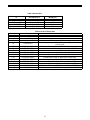
Levels
I
II
III
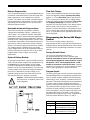
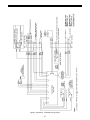
Figure 1
7
Access Code
None Required
Press and hold the (↑ ) and (↓)
arrow buttons for 3 seconds
Press and hold the (←) and (↑ )
arrow buttons for 3 seconds