1
User Manual for the Bioenno Power Solar Controller
for 48V LiFePO4 Batteries (30A Max)
Model SC4830SYD
User Manual
For Use with LiFePo4 (Lithium Iron Phosphate) Batteries Only
Thank you for purchasing the Bioenno Power Solar Controller, Model SC-4830SYD.
Product Introduction
The Bioenno Power Solar Controller, Model SC-4830SYD, is intended for use with 48V LiFePO4 (lithium iron
phosphate) batteries. Your LiFePO4 battery must have a built-in Protection Circuit Module (PCM) that provides
balancing of the internal cells, protection against overcurrent, undervoltage (overdischarge), and overcharging. It
is not advised that you connect this controller directly to LiFePO4 cells, by themselves. You will need to know the
parameters of the LiFePO4 batteries you intend to use with the unit. The unit includes an LCD display with simple
button operation, with various status displays. It is important to note that this unit must have 3 parameters
programmed prior to use including: (1) Value for the “Low Voltage Disconnection” voltage [the voltage of the
battery at which the controller will disconnect power to the load, to avoid over-discharging the battery, otherwise
known as the “cut-off” voltage], (2) Value for the “Low Voltage Reconnection” voltage [the voltage of the battery at
which the controller should re-activate the electrical load] , and (3) Value for the “High Voltage Disconnection”
voltage [the voltage of the battery at which the controller should cutoff the charging circuit, to avoid overcharging
the battery]. Please follow the instructions below.
Installation
1)
2)
3)
Make sure to use the proper gauge of cable to allow for up to
30 Amps through the controller. Please avoid placing the
controller in a damp/dusty area or near any flammable or
corrosive materials.
Install the controller into a fixed vertical plane.
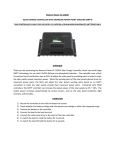
As shown on the right, connect the (1) Load, (2) LiFePo4
battery and (3) Solar Panel to the controller in exactly this
order (1) Load first, (2) LiFePo4 battery second, and (3) Solar
Panel third.
Operation
Description of LCD graphic symbols
Controller has stopped providing power to the load (not filled up-arrow)
Controller has stopped providing power to the battery (not filled down-arrow)
:Po /
Controller is delivering power to the load (filled up-arrow)
Controller is charging the battery (filled down-arrow)
Load
The system is working correctly (smiley face)
The system is not working correctly (frown face)
Solar Panel
Load sensor control
Battery charge capacity display
Load timer display
Battery
Description of Button Functions
Set Button
The Set Button allows you to cycle through all the display screens on the LCD controller. This includes the battery
voltage, battery temperature (if applicable and using a temperature sensor), the solar panel charge current, the
load discharge current, the accumulated charge capacity (Ah), the accumulated discharging capacity (Ah), set
point for the low voltage disconnection (LVD), set point for the low voltage reconnection (LVR), set point for the
high voltage disconnection (HVD), and the load working mode.
Display Screens That Can be Obtained by Pushing the Set Button
Plus (+) Button
The plus button is used to increase the value for each parameter. Also, to restore factory defaults, hold down the
plus button for 5 seconds.
Minus (-) Button
The minus button is used to decrease the value for each parameter. Also, in the main interface setting (also
known as the Battery Voltage) setting, push this button to turn on the load.
Viewing and Setting the Parameters
When the controller is powered on, the default screen will be the “battery voltage” screen. This is also known as
the “main interface screen”. By pushing the Set button, it is possible to cycle through all the screens. By holding
down the Set button for more than 5 seconds, the parameters values start flashing. Set the values and then push
Set again to store the values.
Battery Voltage (Main Interface) Screen
In this screen, the charge status, discharge status, approximate battery capacity, and battery
voltage is displayed. In this screen, push the minus (-) button to turn on and off the load.
Note, that turning the load on and off is only possible in the battery voltage (main interface)
screen.
Temperature Screen
The ambient temperature of the controller is shown. The value can be used for temperature
compensation for the low voltage disconnect function. The temperature sensor must be
attached.
Solar Panel Charging Screen
The charge current from the solar panel is shown in this screen.
Load Discharge Current Screen
The load current from the battery to the load is shown in this screen
Accumulated Charging Capacity by Solar Panel to the Battery Screen
This screen shows the estimated capacity delivered by the solar panel to the battery.
To reset, hold the Set button for 5 seconds. This is an estimate only.
Capacity that was Delivered by the Battery to the Load
This screen shows the estimated capacity delivered by the battery to the load.
To reset, hold the Set button for 5 seconds. This is an estimate only.
Setting/Storing the Low Voltage Disconnection (LVD) voltage value
This screen is very important to setting the low voltage disconnection (LVD) voltage value.
When the battery voltage is lower than this low voltage disconnection voltage, the
controller will cut the load circuit to prevent the battery from over-discharge.
Set this value to match your LiFePO4 battery’s “cut-off” voltage value.
To set this value, hold the Set button for 5 seconds and the parameter value
Will start flashing. Use the + and – buttons to set the value. Then hold the Set
Button for 5 seconds to store the value.
Setting/Storing the Low Voltage Reconnection (LVR) voltage value
This screen is very important to setting the low voltage reconnection (LVR) voltage value.
When the battery voltage is restored to a value that is
higher than the LVR voltage, the controller will re-activate/re-connect
the load circuit.To set this value, hold the Set button for 5 seconds and the parameter value
Will start flashing. Use the + and – buttons to set the value. Then hold the Set
Button for 5 seconds to store the value.
Setting/Storing the High Voltage Disconnection (HVD) voltage value
This screen is very important to setting the high voltage reconnection (HVD) voltage value.
When the battery voltage reaches the HVD voltage, the controller will cut off
the charging circuit to prevent over-charging the battery. When the
the load circuit.To set this value, hold the Set button for 5 seconds and the parameter value
Will start flashing. Use the + and – buttons to set the value. Then hold the Set
Button for 5 seconds to store the value.
“Load Working Mode” Screen
This screen allows the user to set a timer for turning the load on after dark
(for a solar street light application) and then turning off the load at dawn.
Set the value to “24h” to have the load always on. Set the value to “0h” to turn
the load power after dark, and turn off the load after dawn. Set the value
from “1h” to “23h” to turn the load on after dark, and shut off the load after 1h, 2h, 3h, etc.
Use the + and – buttons to set the value. Then hold the Set
Button for 5 seconds to store the value.
Faults/Errors
LVD Protection Screen
This screen shows that the battery is below the LVD protection voltage. Charge
the battery until the battery reaches the LVR voltage. The controller
will then resume to provide power to the load.
Overload Protection
This screen shows that the load is consuming too much power.
Reduce the power of the load and press the minus (-) button to resume power to the load
Short Circuit Protection
This screen shows that there is a short circuit at the load. Check the load.
Resolve the problem with the load and press the minus (-) button resume power to the load.
Solar Panel Fault
If the solar panel icon is flashing, check for an open circuit between the solar panel and the controller. Resolve.
Technical Data
Voltage
48VDC
Rated Current
30A
Maximum Open Circuit Solar Panel Voltage
<100 VDC
Low Voltage Disconnect (LVD Voltage
42.8VDC (programmable)
Low Voltage Reconnection (LVR) Voltage
50.0VDC (programmable)
Operating Temperature
-10 deg C to 60 deg C
Dimensions
188 mm x 90 mm x 48 mm