1
PC INTERFACE
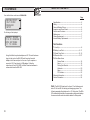
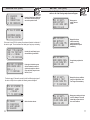
From the Main Menu scroll down to DOWNLOAD
REVIEW/PRINT
VOLT METER
>DOWNLOAD
SETUP
The following will be displayed
CONNECT TESTER
TO A PC RUNNING
DATA SOFTWARE
'N' TO CANCEL
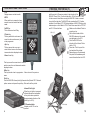
Using Auto Meter's optional adapter cord AC-12 insert the stereo
plug into the jack on the BVA-300 and then plug the serial
adapter into a free serial port on the rear of your computer or
connect to AC-32 serial port to USB adapter. Follow the
instructions of the AC-62 AMP Link Data Download software to
retrieve data from the BVA-300.
TABLE OF CONTENTS
Page
Specifications--------------------------------------------------------2
Safety------------------------------------------------------------------4
Cause of Battery Failure------------------------------------------4
Inspection and Visual Check-------------------------------------5
Controls and Functions--------------------------------------------6
Maintenance---------------------------------------------------------7
Clamp Replacement-----------------------------------------------7
Internal Battery Replacement------------------------------------7
Test Sections
1. Hook Up-----------------------------------------------------------8
2. Battery Load Test------------------------------------------9 -11
3. Starter Draw Test-----------------------------------------12 -15
4. Alternator Test----------------------------------------------16-17
5. Other Menu Items
Review Tests-------------------------------------------- 18
About------------------------------------------------------ 18
Printing Test Results---------------------------------- 19
Voltmeter------------------------------------------------- 20
Setup------------------------------------------------------ 20
PC Interface--------------------------------------------- 22
Warranty Information--------------------------------------------- 23
Contact Information---------------------------------------------- 24
Note: The BVA-300 load tests 6 volt and 12 volt batteries and
tests 12 Volt and 24 Volt starting and charging systems. The
following examples illustrated are for a 12 Volt system. The BVA300 automatically identifies the appropriate voltage and displays
the menu selection and instructions needed for that system.
22
3