1
User’s Manual
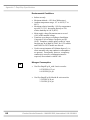
RapidVap® Vacuum, N2 & N2/48
Evaporation Systems
Models
7900000
7900002
7900010
7900012
7910000
7910010
7910012
7910014
7900001
7900003
7900011
7900013
7910001
7910011
7910013
7910015
To receive important product updates,
complete your product registration card
online at register.labconco.com
Labconco Corporation
8811 Prospect Avenue
Kansas City, MO 64132-2696
800-821-5525, 816-333-8811
FAX 816-363-0130
E-MAIL [email protected]
HOME PAGE www.labconco.com
Please read the User’s Manual before operating the equipment.
Copyright © 1999, 2007 Labconco Corporation. All rights reserved.
The information contained in this manual and the accompanying products are copyrighted and all rights
reserved by Labconco Corporation. Labconco Corporation reserves the right to make periodic design
changes without obligation to notify any person or entity of such change.
Warranty
Labconco provides a warranty on all parts and factory workmanship. The warranty includes areas of
defective material and workmanship, provided such defect results from normal and proper use of the
equipment.
The warranty for all Labconco products will expire one year from date of installation or two years
from date of shipment from Labconco, whichever is sooner, except the following;
•
•
•
•
•
Purifier® Delta® Series Biological Safety Cabinets and PuriCare® Lab Animal Research
Stations carry a three-year warranty from date of installation or four years from date of
shipment from Labconco, whichever is sooner.
SteamScrubber® & FlaskScrubber® Glassware Washers carry a two-year warranty from
date of installation or three years from date of shipment from Labconco, whichever is sooner.
Blood Drawing Chairs carry a ten year warranty.
Carts carry a lifetime warranty.
Glassware is not warranted from breakage when dropped or mishandled.
This limited warranty covers parts and labor, but not transportation and insurance charges. In the
event of a warranty claim, contact Labconco Corporation or the dealer who sold you the product. If
the cause is determined to be a manufacturing fault, the dealer or Labconco Corporation will repair or
replace all defective parts to restore the unit to operation. Under no circumstances shall Labconco
Corporation be liable for indirect, consequential, or special damages of any kind. This statement may
be altered by a specific published amendment. No individual has authorization to alter the provisions
of this warranty policy or its amendments. Lamps and filters are not covered by this warranty.
Damage due to corrosion or accidental breakage is not covered.
Returned or Damaged Goods
Do not return goods without the prior authorization from Labconco. Unauthorized returns will not be
accepted. If your shipment was damaged in transit, you must file a claim directly with the freight carrier.
Labconco Corporation and its dealers are not responsible for shipping damages.
The United States Interstate Commerce Commission rules require that claims be filed with the delivery
carrier within fifteen (15) days of delivery.
Limitation of Liability
The disposal and/or emission of substances used in connection with this equipment may be governed by
various federal, state, or local regulations. All users of this equipment are required to become familiar with
any regulations that apply in the user’s area concerning the dumping of waste materials in or upon water,
land, or air and to comply with such regulations. Labconco Corporation is held harmless with respect to
user’s compliance with such regulations.
Contacting Labconco Corporation
If you have questions that are not addressed in this manual, or if you need technical assistance, contact
Labconco’s Customer Service Department or Labconco’s Product Service Department at 1-800-821-5525
or 1-816-333-8811, between the hours of 7:00 a.m. and 6:00 p.m., Central Standard Time.
Part #7490100, Rev. G
ECO E465
TABLE OF CONTENTS
CHAPTER 1: INTRODUCTION
About This Manual
Typographical Conventions
Your Next Step
1
2
3
4
CHAPTER 2: PREREQUISITES
Electrical Requirements
Location and Exhaust Requirements
Vacuum Pump Requirements
Vacuum Line Traps
Nitrogen Supply Requirements
Space Requirements
Tools Required
Your Next Step
5
6
6
7
8
8
9
9
9
CHAPTER 3: GETTING STARTED
Unpacking Your RapidVap
RapidVap Components
Setting Up Your RapidVap
Vacuum Pump Connection
Sample Block
Nitrogen Gas Connection
Exhaust Port
Electrical Connection
Calibrate the Vacuum Sensor
Chemical Attack on RapidVap Components
Solvent Safety Precautions
Your Next Step
11
12
12
14
14
15
16
17
17
17
17
19
21
CHAPTER 4: USING YOUR RAPIDVAP
Planning
Glassware Selection and Speed Setting Guidelines
Loading Glassware Into the RapidVap
23
24
25
26
Heat Setting Guidelines
Time Setting Guidelines
RapidVap Controls
Operating the RapidVap Controls
Operating The RapidVap
Operational Notes
Interrupting a Cycle After it Has Begun
End Alarms
RS-232 Communications
RS-232 Programming Syntax
RS-232 Hardware Required
28
33
35
37
39
40
40
41
41
42
44
CHAPTER 5: MAINTAINING YOUR RAPIDVAP
45
CHAPTER 6: MODIFYING YOUR RAPIDVAP
Changing the Sample Blocks
Installing the Optional Lid Heater
47
47
48
CHAPTER 7: TROUBLESHOOTING
49
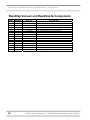
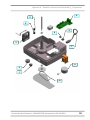
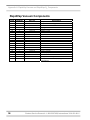
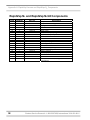
APPENDIX A: RAPIDVAP AND
RAPIDVAP N2 COMPONENTS
53
APPENDIX B: RAPIDVAP DIMENSIONS
61
APPENDIX C: RAPIDVAP SPECIFICATIONS
Wiring Diagram (115V)
Wiring Diagram (230V)
Evaporation Rates
RapidVap Vacuum Models
RapidVap N2 Models
RapidVap N2/48 Models
63
65
66
67
67
68
72
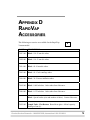
APPENDIX D: RAPIDVAP ACCESSORIES
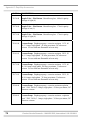
RapidVap Vacuum Model Accessories
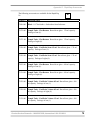
RapidVap N2 Model Accessories
RapidVap N2/48 Model Accessories
75
75
79
81
DECLARATION OF CONFORMITY
83
CHAPTER 1
INTRODUCTION
Congratulations on your purchase of a Labconco
RapidVap. Labconco manufactures two types of
RapidVaps - one utilizes vacuum and the other utilizes
nitrogen as an aid to evaporation. Each model is
available for operation on 115V or 230V.
Superior evaporation rates are achieved by the unique
blending of several gentle forces on the sample.
Samples are subjected to a gyrating motion causing the
liquid to form a vortex configuration which greatly
increases the surface area and hence the ability to
evaporate. A precisely controlled amount of thermal
energy can be supplied to the sample to heat it. In the
vacuum model, the sample can be subjected to a
decreased pressure by the application of a regulated
vacuum. In summary, the vacuum model RapidVap
performance is maximized by increasing the sample’s
surface area, increasing temperature and decreasing
pressure.
In the RapidVap N2, a stream of nitrogen or dry gas is
directed downward onto the surface of the sample. This
reduces the partial pressure directly over the liquid to
speed evaporation and helps remove the solvent as it
evaporates. In summary, the RapidVap N2 performance
is maximized by increasing the sample’s surface area,
increasing temperature and directing gas over the
sample.
Product Service Domestic 1-800-522-7658, International 816-333-8811
1
Chapter 1: Introduction
The gyrating motion imparted to the sample causes
other, more subtle effects to occur. Excellent mixing of
the components in the liquid sample is obtained. Also,
as the liquid forms the vortex shape, a centrifugal force
is established which forces the liquid outward against
the tube walls. This helps prevent bumping and in turn
allows the evaporation rate to be optimized.
The microprocessor which controls the operation of the
heater and the motor provides excellent regulation and
reproducibility of protocols. The end of the run can be
signaled by the automatic end point system or by a
manually preset timer. Nine different protocols can be
stored in memory so exact test parameters can be easily
repeated.
About This Manual
This manual is designed to help you learn how to
install, use, and maintain your RapidVap. Instructions
for performing routine maintenance and making minor
modifications to your RapidVap are also included.
Chapter 1: Introduction provides a brief overview of
the RapidVap, explains the organization of the manual,
and defines the typographical conventions used in the
manual.
Chapter 2: Prerequisites explains what you need to do
to prepare your site before you install your RapidVap.
Electrical and exhaust requirements are discussed as
well as vacuum pump or nitrogen requirements.
Chapter 3: Getting Started contains the information
you need to properly unpack, inspect, install, and test
your RapidVap.
Chapter 4: Using Your RapidVap discusses the basic
operation of your RapidVap. Information on how to
arrange the samples inside your RapidVap and select an
operating cycle is included.
Chapter 5: Maintaining Your RapidVap explains how
to perform routine maintenance on your RapidVap.
2
Product Service Domestic 1-800-522-7658, International 816-333-8811
Chapter 1: Introduction
Chapter 6: Modifying Your RapidVap describes how to
install other blocks and the optional lid heater.
Chapter 7: Troubleshooting contains a table of
problems you may encounter while using your
RapidVap, including the probable causes of the
problems, and suggested corrective actions.
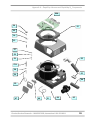
Appendix A: RapidVap and RapidVap N2 Components
contains labeled diagrams of the components of the
RapidVaps.
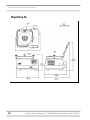
Appendix B: RapidVap Dimensions contains
comprehensive diagrams showing the dimensions for
the RapidVap and RapidVap N2.
Appendix C: RapidVap Specifications contains product
specifications. Wiring diagrams for both the 115V and
230V RapidVaps are also included.
Appendix D: RapidVap Accessories lists the part
numbers and descriptions of all of the accessories
available for your RapidVap.
Typographical Conventions
Recognizing the following typographical conventions
will help you understand and use this manual:
•
•
•
•
Book, chapter, and section titles are shown in italic
type (e.g., Chapter 3: Getting Started).
Steps required to perform a task are presented in a
numbered format.
Comments located in the margins provide
suggestions, reminders, and references.
Critical information is presented in boldface type in
paragraphs that are preceded by the exclamation
icon. Failure to comply with the information
following an exclamation icon may result in injury
to the user or permanent damage to your RapidVap.
Product Service Domestic 1-800-522-7658, International 816-333-8811
!
3
Chapter 1: Introduction
)
V
N
•
•
Important information is presented in capitalized
type in paragraphs that are preceded by the pointer
icon. It is imperative that the information contained
in these paragraphs be thoroughly read and
understood by the user.
Information that is specific to a particular model of
RapidVap is preceded by a letter icon. The V icon
indicates the text is specific to the Vacuum model.
The N icon indicates the text is specific to the
RapidVap N2 model.
Your Next Step
If your RapidVap needs to be installed, proceed to
Chapter 2: Prerequisites to ensure your installation site
meets all of the requirements. Then, go to Chapter 3:
Getting Started for instructions on how to install your
RapidVap and make all of the necessary connections.
For information on the operational characteristics of
your RapidVap, go to Chapter 4: Using Your
RapidVap.
If your RapidVap is installed and you need to perform
routine maintenance on the RapidVap, proceed to
Chapter 5: Maintaining Your RapidVap.
For information on making modifications to the
configuration of your RapidVap go to Chapter 6:
Modifying Your RapidVap.
Refer to Chapter 7: Troubleshooting if you are
experiencing problems with your RapidVap.
4
Product Service Domestic 1-800-522-7658, International 816-333-8811
CHAPTER 2
PREREQUISITES
Before you install your RapidVap, you need to prepare
your site for installation. Carefully examine the
location where you intend to install your RapidVap.
You must be certain that the area is level and of solid
construction. In addition, an exhaust means must be
provided and a source of nitrogen must be available for
the RapidVap N2. An electrical source must be located
near the installation site.
Carefully read this chapter to learn:
•
•
•
•
the electrical supply requirements.
the exhaust requirements.
the nitrogen supply requirements for the
RapidVap N2.
the vacuum pump requirements for the
RapidVap Vacuum.
Refer to Appendix C: RapidVap Specifications for
complete RapidVap electrical and environmental
conditions, specifications and requirements.
Product Service Domestic 1-800-522-7658, International 816-333-8811
5
Chapter 2: Prerequisites
Electrical Requirements
V
N
If your RapidVap is a Vacuum model, a dedicated
electrical outlet is required. This outlet requires a 20
Amp circuit breaker or fuse for models rated at 115V
(60 Hz). A 10 Amp circuit breaker or fuse is required
for models rated at 230V (50/60 Hz). 115V models are
equipped with a 20 Amp NEMA 5-20P plug. 230V
models are equipped with a 16 Amp CEE 7/7 plug. It
may be necessary to remove the plug and install a
different plug to match the available receptacle.
If your RapidVap is a Nitrogen model, a dedicated
electrical outlet is required. This outlet requires a 15
Amp circuit breaker or fuse for models rated at 115V
(60 Hz) or an 8 Amp circuit breaker or fuse is required
for 230V (50/60 Hz) models. 115V models are
equipped with a 20 Amp NEMA 5-20P plug. 230V
models are equipped with a 16 Amp CEE 7/7 plug. It
may be necessary to remove the plug and install a
different plug to match the available receptacle.
Location and Exhaust
Requirements
V
N
6
The RapidVap Vacuum Evaporation System should be
located within a fume hood if hazardous or flammable
solvents are used. In all cases, regardless of the solvent
used, it is strongly recommended that the vacuum pump
is located and vented in a fume hood.
The RapidVap N2 Evaporation System should be
located within a fume hood if hazardous or flammable
solvents are used. In all cases, regardless of the solvent
used, it is recommended that the exhaust hose is vented
into a fume hood or other laboratory ventilation device.
Product Service Domestic 1-800-522-7658, International 816-333-8811
Chapter 2: Prerequisites
Vacuum Pump
Requirements
A vacuum pump must be provided by the user. For
most applications, it is recommended that the vacuum
pump is capable of a free air flow of 88 L/min and 29.0
inch Hg (31 mbar) vacuum although, in some
applications other pumps may be satisfactory or be
required. The inlet fitting on the vacuum pump must be
suitable for 0.50 I.D. hose.
V
Biological samples, for example, are often dissolved in
water, a high boiling point solvent, and are often heat
liable. Such samples require the high vacuum
achievable with a mechanical vacuum pump, usually
with an ultimate vacuum of 1.3 x 10⁻⁴ mBar to achieve
a good evaporation rate.
On the other hand, samples dissolved in methylene
chloride, a low boiling point solvent, can be efficiently
concentrated using a water aspirator.
The nomograms in Chapter 4: Using Your RapidVap
will help determine the boiling point of a solvent at
pressures below atmospheric. This can serve as a guide
to the appropriate vacuum source.
)
TO INSURE THAT AGGRESSIVE
SAMPLES USED IN THE RAPIDVAP
DO NOT DAMAGE THE VACUUM
PUMP, IT IS RECOMMENDED THAT
ALL INTERNAL WETTED PARTS
ARE TEFLON OR TEFLON COATED.
TO PREVENT A HAZARDOUS
CONDITION, THE PUMP MUST BE
SUITABLE FOR HANDLING THE
VAPORS FROM THE SOLVENTS
THAT WILL BE EVAPORATED IN
THE RAPIDVAP.
Product Service Domestic 1-800-522-7658, International 816-333-8811
7
Chapter 2: Prerequisites
!
CAUTION: When selecting the
vacuum pump it is very important to
consider the flammability of the
solvents that will be used. If the
solvents are flammable, an explosion
proof vacuum pump is recommended.
Vacuum Line Traps
When using a mechanical pump which is not corrosion
resistant, a trap must be used in the vacuum line to
prevent damage from solvent vapors. This is most
often a condenser-type trap chilled with dry ice/acetone.
When evaporating acids, it is advisable to include a
soda lime acid trap in the vacuum line. This adds
additional protection for the pump.
!
Several components within the
RapidVap are made from stainless
steel and can be degraded if exposed
to acids. Before evaporating acids, be
sure to contact Labconco.
A moisture trap and radioisotope trap are also available.
When evaporating high boiling point solvents, a liquid
trap should be positioned between the RapidVap and
the vacuum pump to prevent liquid from entering the
pump. Refer to Appendix D: RapidVap Accessories for
ordering information.
Nitrogen Supply
Requirements
N
8
The 1/4" I.D. hose on the rear of the RapidVap N2 must
be attached to a source of nitrogen or other suitable gas.
Pressure must NOT exceed 20 psi. A regulator must be
supplied by the user. The nitrogen supply must be
capable of 0.6 CFM flow rate for the 8 place RapidVap
N2. The RapidVap N2/48 requires a flow rate of 3.5
CFM. A suitable barb or compression fitting must be
supplied by the user.
Product Service Domestic 1-800-522-7658, International 816-333-8811
Chapter 2: Prerequisites
Space Requirements
Refer to Appendix C: RapidVap Specifications for
dimensional drawings of the RapidVap.
Tools Required
Common hand tools are required to set up the
RapidVap. A screwdriver or 5/16" socket is needed to
attach hose clamps. A tubing cutter or knife is needed
to shorten exhaust hoses. If the sample block must be
installed or exchanged, attaching nuts on the RapidVap
Vacuum and RapidVap N2 require a 7/16" socket. The
manifold guides, which secure the block on the
RapidVap N2/48, require a 9/16" socket.
Your Next Step
After you have determined that the location for your
RapidVap accommodates the installation and
operational requirements, you are ready to unpack and
install your RapidVap. Proceed to Chapter 3: Getting
Started.
Product Service Domestic 1-800-522-7658, International 816-333-8811
9
Chapter 2: Prerequisites
10
Product Service Domestic 1-800-522-7658, International 816-333-8811
CHAPTER 3
GETTING STARTED
Now that the site for your RapidVap is properly
prepared, you are ready to unpack, inspect, install, and
test your RapidVap. Read this chapter to learn how to:
•
•
•
•
•
•
•
unpack and move your RapidVap.
set up your RapidVap.
connect the vacuum pump or nitrogen source to
your RapidVap.
connect the electrical supply source to your
RapidVap.
properly exhaust your RapidVap.
calibrate the vacuum sensor.
solvent safety precautions.
Depending upon which model of RapidVap you are
installing, you will need common hand tools including
a flat blade screw driver, a 7/16" socket and an
adjustable wrench to complete the instructions in this
chapter.
!
The RapidVap weighs over 70 lbs.
(33 Kg). The carton allows for lifting
with a mechanical lift truck or hand
truck. If you must lift the RapidVap
manually, use at least two (2) persons
and follow safe-lifting guidelines.
Product Service Domestic 1-800-522-7658, International 816-333-8811
11
Chapter 3: Getting Started
Unpacking Your RapidVap
The United States
Interstate Commerce
Commission rules
require that claims be
filed with the delivery
carrier within fifteen (15)
days of delivery.
Carefully unpack your RapidVap and inspect it for
damage that may have occurred in transit. If your
RapidVap is damaged, notify the delivery carrier
immediately and retain the entire shipment intact for
inspection by the carrier.
)
DO NOT RETURN GOODS
WITHOUT THE PRIOR
AUTHORIZATION OF LABCONCO.
UNAUTHORIZED RETURNS WILL
NOT BE ACCEPTED.
)
IF YOUR RAPIDVAP WAS
DAMAGED IN TRANSIT, YOU
MUST FILE A CLAIM DIRECTLY
WITH THE FREIGHT CARRIER.
LABCONCO CORPORATION AND
ITS DEALERS ARE NOT
RESPONSIBLE FOR SHIPPING
DAMAGES.
Do not discard the carton or packing material for your
RapidVap until you have checked all of the components
and installed and tested the RapidVap.
RapidVap Components
As previously mentioned, Labconco manufactures two
types of RapidVap, the Vacuum and the Nitrogen
models. Each model is available in 115V or 230V.
The different RapidVap models require different
assembly components. Locate the model of RapidVap
you received in the following tables. Verify that the
components listed are present and undamaged.
12
Product Service Domestic 1-800-522-7658, International 816-333-8811
Chapter 3: Getting Started
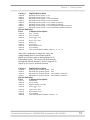
Catalog #
RapidVap Description
79000-00
79000-01
79000-02
79000-03
79000-10
79000-11
79000-12
79000-13
RapidVap Vacuum System – 115V
RapidVap Vacuum System – 230V
RapidVap Vacuum System – 115V with lid heater
RapidVap Vacuum System – 230V with lid heater
RapidVap Vacuum System – 115V with RS 232 Interface
RapidVap Vacuum System – 230V with RS 232 Interface
RapidVap Vacuum System – 115V with lid heater with RS 232 Interface
RapidVap Vacuum System – 230V with lid heater with RS 232 Interface
Plus the Following:
Part #
Component Description
78286-04
14888-00
13364-00
13365-00
19116-00
19092-21
12556-00
74901-00
74848-00
Hose - Vacuum
Two (2) Clamps
Power Cord – 115V
or
Power Cord – 230V
Washer (3)
Acorn Nut (3)
Heat Transfer Grease
User’s Manual
Cable Assembly RS232 (Models 79000-10, -11, -12, -13)
Since users’ preference of sample size varies, the
sample holding block is not included with the
RapidVap Vacuum System or the RapidVap N2/48
Evaporation System. The correct size block must be
selected and ordered separately. Refer to Appendix D:
RapidVap Accessories for block selection.
Catalog #
RapidVap Description
79100-00
79100-01
79100-10
79100-11
RapidVap N2 Evaporation System – 115V
RapidVap N2 Evaporation System – 230V
RapidVap N2 Evaporation System – 115V with RS 232 Interface
RapidVap N2 Evaporation System – 230V with RS 232 Interface
Plus the Following:
Part #
Component Description
79131-01
19660-00
79255-00
13364-00
13365-00
12556-00
74901-00
74848-00
Exhaust Hose
One (1) Clamp
Eight (8) Sample Tube Caps
Power Cord – 115V
or
Power Cord – 230V
Heat Transfer Grease
User’s Manual
Cable Assembly RS232 (Models 79100-10, -11)
Product Service Domestic 1-800-522-7658, International 816-333-8811
13
Chapter 3: Getting Started
Catalog #
RapidVap Description
79100-12
79100-13
79100-14
79100-15
RapidVap N2/48 Evaporation System – 115V
RapidVap N2/48 Evaporation System – 230V
RapidVap N2/48 Evaporation System – 115V with RS 232 Interface
RapidVap N2/48 Evaporation System – 230V with RS 232 Interface
Plus the Following:
Part #
Component Description
79131-01
19660-00
13364-00
13365-00
12556-00
74901-00
74488-00
19116-00
74848-00
Exhaust Hose
One (1) Clamp
Power Cord – 115V
or
Power Cord – 230V
Heat Transfer Grease
User’s Manual
Manifold Guide (3)
Washer (3)
Cable Assembly RS232 (Models 74100-14, -15)
If you do not receive one or more of the components
listed for your RapidVap, or if any of the components
are damaged, contact Labconco Corporation
immediately for further instructions.
Setting Up Your RapidVap
After you verify the RapidVap components, move your
RapidVap to the location where you want to install it.
Then, follow the steps listed below.
Vacuum Pump Connection
V
14
Connect the pump inlet to the fitting at the right hand
rear corner of the RapidVap using the hose and clamps
provided. Route the hose to prevent kinks. Clamp all
connections securely. Plug the pump into the pump
receptacle on the back of the unit and turn the pump
switch on if it is so equipped. When evaporating high
boiling point solvents, a liquid trap should be
positioned between the RapidVap and the vacuum
pump to prevent liquid from entering the pump. It is
recommended that the vacuum pump is located inside a
fume hood. If that is not possible, the exhaust of the
Product Service Domestic 1-800-522-7658, International 816-333-8811
Chapter 3: Getting Started
pump should be directed to a laboratory fume hood or
other laboratory ventilation device.
Vacuum pump
power connection
Optional vacuum
pump exhaust hose
to ventilation device
Vacuum pump
inlet fitting
Vacuum hose
Clamp all connections
Hose
Optional liquid trap or
chilled trap or
secondary trap
Sample Block
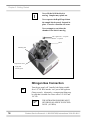
If the RapidVap was not shipped with the sample block
installed then it must be installed by the user. The
sample block must be securely attached to its mounting
plate. Note the asymmetric hole pattern of the three
thru mounting holes. Locate the three flat washers
either nuts or manifold guides that were shipped with
the RapidVap. The RapidVap Vacuum uses nuts while
the RapidVap N2/48 uses guide rods.
Apply a small amount of heat transfer grease that was
shipped with the RapidVap to the end of the
temperature sensor probe that extends up from the
bottom of the chamber. Position the block over the
three studs in the chamber. Install the flat washers and
either nuts or guide rods. Tighten securely.
Product Service Domestic 1-800-522-7658, International 816-333-8811
15
Chapter 3: Getting Started
!
Never lift the lid if the block is
moving. Samples may splash out.
Never operate the RapidVap without
the sample block securely fastened in
place. Excessive vibration will occur.
Never attempt to reach into the
chamber if the block is moving.
Nut or guide rods – 3 required
Washer – 3 required
Block
Mounting stud
Temperature sensor
Apply heat
transfer grease
Nitrogen Gas Connection
N
Turn the gas supply off. Install a barb fitting suitable
for a 1/4" I.D. hose into the “out” port of the regulator.
Clamp securely. Alternately, a compression fitting may
be used that is suitable for a hose with a 3/8" O.D. and
1/4" I.D.
)
16
THE NITROGEN PRESSURE MUST
NEVER BE ALLOWED TO EXCEED
20 PSI. (103 KPA)
Product Service Domestic 1-800-522-7658, International 816-333-8811
Chapter 3: Getting Started
Exhaust Port
If the RapidVap N2 is not located in a fume hood, attach
one end of the two inch diameter venting hose that is
supplied with the RapidVap to the exhaust port on the
right side of the unit. Clamp securely. Route the other
end to a fume hood or other laboratory ventilation
device.
N
Electrical Connection
Plug the power cord into the receptacle on the back of
the RapidVap and plug the other end into a suitable
wall power receptacle.
Calibrate the Vacuum Sensor
The vacuum sensor can be calibrated to room ambient
atmospheric pressure. To do this, determine the
atmospheric pressure using a known reference device
such as a mercury barometer. Press and hold the
vacuum release button on the RapidVap while turning
on the RapidVap power switch. Use the increase or
decrease buttons to make the vacuum display agree
with the reference pressure. Press run to store the
calibration in memory.
V
Chemical Attack on
RapidVap Components
Your RapidVap Evaporation System is designed to be
chemical resistant to most compounds that are
commonly used in the concentration processes that are
performed in it. However, by necessity, the RapidVap
is comprised of a number of different materials, some
of which may be attacked and degraded by certain
chemicals. The degree of degradation is obviously
dependent on the concentration and duration of
exposure. Some of the major components of the
RapidVap that are susceptible to degradation are as
follows:
Product Service Domestic 1-800-522-7658, International 816-333-8811
17
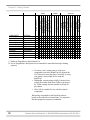
C
D
D
C C D D D
D D D D D D
D D D D D D
C
D
C
D
D
D
C D
D C D
D
D D
D D
Bases
Solvents
Acetone
Acetonitrile
Chloroform
Dimethyl Formamide
Dimethyl Sulfoxide (DMSO)
Ethanol
Ethyl Acetate
Hexanes
Isoproponal
Methylene Chloride
Toluene
COMPONENT
MATERIAL
Manifold N2/48
Acetal (Delrin)
Exhaust Elbow N2 Polyamid (Nylon)
Blower Fan N2
Polyamid (Nylon)
Exhaust Hose N2
Polyethylene
Vacuum Fittings
Polypropylene
Blower Housing N2 Polypropylene
Vacuum Hose
PVC
Trim Ring
Bromyl Butyl
O- Rings
Neoprene
Block Hardware
Stainless Steel
Nozzle N2
Stainless Steel
Vacuum Sensor
Stainless Steel
Boric Acid
Formic Acid
Hydrobromic Acid 20%
Hydrochloric Acid 20%
Nitric Acid 20%
Sulfuric Acid 10%
Trifluoroacetic Acid (TFA)
Acetic Acid 20%
Acids
Ammonium Hydroxide
Potassium Hydroxide
Chapter 3: Getting Started
C
D
C
C
C
D C
D C
C
C
C C
C C
C
C
C
C
D D
D D C D D
D D
D D D
D
D D
C D D D
D
D D
D
D
C- Moderate Degradation- Questionable Use
D- Severe Degradation- Infrequent use recommended- immediate thorough cleaning
required
•
•
•
If a rotary vane vacuum pump is used, most
compounds used in the RapidVap will degrade the
oil if allowed to enter the pump. Generally, a rotary
vane pump is not suitable for use with the
RapidVap.
Diaphragm vacuum pumps sold by Labconco have
wetted parts either made from Teflon or protected
by Teflon coatings and are suitable for nearly all
procedures.
Glass lids are suitable for use with all common
compounds.
When using compounds in the RapidVap that are
hostile to the materials of construction, it is imperative
that the equipment is properly maintained.
18
Product Service Domestic 1-800-522-7658, International 816-333-8811
Chapter 3: Getting Started
•
•
After each run, clean up all residues, spills, and
materials that might have splashed in the chamber
using agents suitable for the substance involved.
When using a rotary vane pump the oil in the pump
should be checked often. It must be changed if it is
cloudy, shows particles or is discolored. The useful
life of vacuum pump oil can be extended if the
vacuum pump is operated for an extended period of
time after the RapidVap run is over. This allows
contaminants to be purged from the hot oil. This
must be done with the inlet to the pump blocked off
to prevent air from free flowing through the pump.
If the pump is operated at an elevated vacuum level,
oil will be expelled from the pump and damage will
occur.
With prudent maintenance your RapidVap will provide
years of service. Warranty on the effected parts will be
void if maintenance has obviously been neglected. If
you have questions about using specific compounds in
your RapidVap, contact Labconco Technical Service at
1-800-821-5525 or 816-333-8811 or e-mail
[email protected].
)
Solvent Safety Precautions
The RapidVap is not classified as “explosion proof.” It
has been designed with safety as a primary consideration
and should be used in a prudent manner using “good
laboratory practices.” It has been designed for use with
compounds as described in the United States National
Electrical Code Class I, Group D. The block that holds
the sample tubes may be programmed to run as hot as
100°C, however, the heater element may normally run
at 110°C. A thermal fuse limits the heater to a
maximum temperature of 130°C. It is important that
the solvents used are compatible with these
temperatures. Do not evaporate solvents that have an
autoignition temperature below 180°C. Do not
evaporate solvents that are classified as Group A, B, or
C by the National Electrical Code. Evaporate only nonflammable or Group D solvents with autoignition
temperatures 180°C or above. Use of other compounds
could cause an explosion.
Product Service Domestic 1-800-522-7658, International 816-333-8811
19
Chapter 3: Getting Started
!
Solvents used in the RapidVap may be
flammable or hazardous. Use extreme
caution and keep sources of ignition
away from the solvents. When using
flammable or hazardous solvents,
both the RapidVap and the vacuum
pump should be operated inside a
fume hood.
If a sample is spilled in the chamber it
must immediately be cleaned up.
Hazardous materials such as strong
acids or bases, radioactive substances
and volatile organics, must be handled
carefully and promptly cleaned up if
spilled.
Several components of the RapidVap
which are located inside the chamber
are made of stainless steel which can
be attacked by acids. Use of acids
such as trifluoroacetic acid can result
in degradation of the product and the
vacuum pump if the vacuum system is
being used. Use care when using
aggressive liquids which can damage
the RapidVap and thoroughly clean
the RapidVap after each use. Contact
Labconco before evaporating acids.
WARNING: The disposal of
substances used in connection with
this equipment may be governed by
various Federal, State or local
regulations. All users of this
equipment are urged to become
familiar with any regulations that
apply in the user’s area concerning
the dumping of waste materials in or
upon water, land or air and to comply
with such regulations.
20
Product Service Domestic 1-800-522-7658, International 816-333-8811
Chapter 3: Getting Started
Your Next Step
The installation and setup of your RapidVap is now
complete. To learn how to load and operate your
RapidVap, proceed to Chapter 4: Using Your
RapidVap. To make a modification to the configuration
of your RapidVap, proceed to Chapter 6: Modifying
your RapidVap. To perform additional diagnostics on
your RapidVap, proceed to Chapter 7:Troubleshooting.
To learn about the maintenance requirements for your
RapidVap, proceed to Chapter 5: Maintaining Your
RapidVap.
Product Service Domestic 1-800-522-7658, International 816-333-8811
21
Chapter 3: Getting Started
22
Product Service Domestic 1-800-522-7658, International 816-333-8811
CHAPTER 4
USING YOUR
RAPIDVAP
After your RapidVap has been installed as detailed in
Chapter 3: Getting Started, you are ready to begin
using your RapidVap. Read this chapter to learn how
to:
•
•
•
•
•
set operating parameters.
operate the controls.
properly select and position glassware inside
your RapidVap.
understand the display.
interrupt a cycle after it has begun.
!
Do not use the RapidVap in a manner
not specified by the manufacturer
(refer to Appendix C: RapidVap
Specifications). The electrical
protection properties of the RapidVap
may be impaired if the RapidVap is
used inappropriately.
Product Service Domestic 1-800-522-7658, International 816-333-8811
23
Chapter 4: Using Your RapidVap
Planning
V
Thoroughly understand procedures and the equipment
operation prior to beginning work. The unique
performance of the RapidVap Vacuum is dependent
upon the proper balance of heat, vacuum and vortexing
action. If the proper balance is not established, it is
possible to damage or lose a portion of the sample.
Therefore, if you are unfamiliar with the RapidVap or
are attempting a new protocol, it may be helpful to
make a trial run that is void of the sample you are
attempting to concentrate.
Select the size of the sample tube so it is compatible
with the block. Tubes should not be loose in the block.
Blocks are available with holes for various size tubes.
Refer to Appendix D: RapidVap Accessories for
available block sizes and pages 19 and 20 for
recommended usable tube volumes and vortex speeds.
N
The unique performance of the RapidVap N2 is
dependent upon the proper balance of heat, gas flow
and vortexing action. If the proper balance is not
established, it is possible to damage or lose a portion of
the sample. Therefore, if you are unfamiliar with the
RapidVap N2 or are attempting a new protocol, it may
me helpful to make a trial run that is void of the sample
you are attempting to concentrate.
Determine if the sample which is to be processed will
be allowed to go to dryness or whether the evaporation
is to cease prior to dryness. If the process should not go
to dryness, the proper sample tubes must be selected to
allow the desired amount of solvent to remain in the
tubes. Sample tubes are available for various end point
volumes. Refer to Appendix D: Accessories for
available sample tubes. Any style ground glass tube
may be used if the sample is to go to dryness, however,
flat bottom tubes evaporate the quickest.
24
Product Service Domestic 1-800-522-7658, International 816-333-8811
Chapter 4: Using Your RapidVap
Glassware Selection and
Speed Setting Guidelines
The speed at which the sample block should oscillate is
dependent on the sample tube size and the sample
volume. Generally, the tube should be no more than
half full. The faster the speed, the higher the sample
will vortex giving a maximum surface area and
therefore a maximum evaporation rate. However, if the
speed is too fast, samples will raise above the top of the
tube and be lost. Smaller tubes can be run faster than
larger tubes. The following table gives recommended
safe speeds for tubes loaded with water. Experimentation
with the specific sample may determine faster speeds.
When setting the speed, keep in mind that the sample
will raise up slightly in the tube when vacuum is
applied to the chamber of the vacuum model.
GLASS VIALS USED IN THE RAPIDVAP
SHOULD BE OF THE STYLE THAT DO NOT
HAVE THE BEAD OR LIP ON THE TOP
EDGE. IF VIALS WITH BEADS ARE USED,
THE BEADS COULD HIT EACH OTHER
AND BREAK THE GLASS.
)
V
Several different size sample blocks are available for
the RapidVap Vacuum model. The maximum
recommended sample volumes and vortex speeds are as
follows:
TUBE
SIZE
SAMPLE
VOLUME
VORTEX
SPEED
12 x 75 mm (6 ml)
13 x 100 mm (10 ml)
16 x 150 mm (23 ml)
15 ml centrifuge
28 mm (46 ml)
600 ml
3 ml
5 ml
12 ml
7.5 ml
23 ml
50 ml
100 ml
200 ml
300 ml
400 ml
450 ml
95%
95%
95%
66%
48%
45%
45%
38%
29%
20%
18%
Product Service Domestic 1-800-522-7658, International 816-333-8811
25
Chapter 4: Using Your RapidVap
TUBE
SIZE
V
N
170 ml
SAMPLE
VOLUME
VORTEX
SPEED
50 ml
75 ml
100 ml
125 ml
50%
47%
42%
35%
Two sample blocks are available for the RapidVap N2.
Recommended speeds are as follows:
TUBE
SIZE
600 ml
170 ml
SAMPLE
VOLUME
50 ml
100 ml
200 ml
300 ml
400 ml
450 ml
50 ml
75 ml
100 ml
125 ml
VORTEX
SPEED
90%
90%
76%
58%
40%
36%
100%
95%
85%
70%
Four sample blocks are available for the RapidVap
N2/48. Recommended speeds are as follows:
TUBE
SIZE
12 mm (6 ml)
13 mm (10 ml)
16 mm (23 ml)
20 mm (35 ml)
SAMPLE
VOLUME
3 ml
5 ml
12 ml
18 ml
VORTEX
SPEED
100%
100%
100%
100%
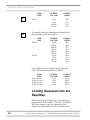
Loading Glassware Into the
RapidVap
Smooth operation of the RapidVap is dependent upon
proper balance of the machine. Therefore, if less than a
full load of samples is run, it is important to load
samples into the RapidVap in a fairly uniform manner
26
Product Service Domestic 1-800-522-7658, International 816-333-8811
Chapter 4: Using Your RapidVap
distributing the weight of the samples and glassware
evenly in the sample block.
)
IN ORDER TO MAXIMIZE THE
PERFORMANCE OF THE RAPIDVAP
IT IS IMPORTANT THAT SOME OF
THE SAMPLES ARE CLUSTERED
AROUND THE FRONT LEFT HAND
BLOCK MOUNTING STUD. THE
BLOCK TEMPERATURE SENSOR IS
LOCATED ADJACENT TO THIS
BLOCK MOUNTING STUD. BY
POSITIONING THE SAMPLE NEAR
THE SENSOR, THE SENSOR WILL
DETECT THE COOLING EFFECT OF
THE EVAPORATING SAMPLES AND
SIGNAL THE CONTROLS TO
SUPPLY MORE HEAT TO THE
SAMPLE BLOCK.
The best evaporation rate is achieved under conditions
that maximize sample surface area. These include
using the largest tube possible, and using the highest
vortex speed possible.
When less than 8 samples are run in the RapidVap N2
or less than 48 samples are run in the RapidVap N2/48,
nitrogen flow can be directed to 2, 4, or 6 positions. It
is important to position glassware properly in the
RapidVap N2 when less than a full block is run to
ensure that nitrogen gas is directed downward where
the sample is located. Note the label on the hub in the
center of the chamber. This indicates which nozzles on
a RapidVap N2 or nozzle clusters on a RapidVap N2/48
will be activated. If one or two positions are to be run,
samples must be positioned at locations identified (2).
If three or four positions are to be run, samples must be
positioned at locations identified (4). If five or six
positions are to be run, samples must be positioned at
locations identified (6). If seven or eight positions are
to be run, samples may be positioned at any of the
locations. When using the RapidVap N2/48, glassware
may be placed anywhere within the activated cluster of
nozzles.
Product Service Domestic 1-800-522-7658, International 816-333-8811
N
27
Chapter 4: Using Your RapidVap
Heat Setting Guidelines
The evaporation rate achieved by the RapidVap is
dependent upon a variety of factors. These include the
nature of the solvent, the temperature, the pressure in
the vacuum system or the flow of the nitrogen gas in
the RapidVap N2, the volume of sample, shape of tubes
and vortex speed. Because of the multiplicity of factors
it is impossible to give “typical” performance data.
By design, the RapidVap Vacuum model can be run at
lower temperature settings than the RapidVap N2
model. This is because the decrease in pressure will
cause the sample to evaporate at a lower temperature.
As a general guideline, to speed the evaporation
process, the RapidVap temperature should be set as
high as possible as long as the temperature will not
damage the sample or cause the sample to bump.
V
28
In the RapidVap Vacuum models, generally the
evaporation rate will be optimized with the block
temperature set and preheated 20 to 40°C above the
boiling point of the solvent at the operating pressure.
Product Service Domestic 1-800-522-7658, International 816-333-8811
Chapter 4: Using Your RapidVap
For example, methanol (which boils at 65°C at
atmospheric pressure) boils at 5°C at pressure of 53
mBar. Under these vacuum conditions, the block
temperature should be set between 25 to 45°C. The
nomogram and equation to follow will help in this
determination.
Calculating the boiling point:
The operating pressure corresponding to the desired
boiling point temperature may be calculated for any
solvent using the following formula:
log P = 2.8811 – Ta – T
(b)(T)
Where P = Vacuum (mm Hg)
Ta = Boiling Point Temperature at Atmospheric
Pressure (°K)
T = Desired Boiling Point Temperature (°K)
b = Constant from Table
Useful conversion factors:
1 mBar = .75 mm Hg
°K = °C + 273
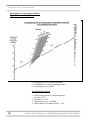
Using the nomogram:
To use this graph, three facts must be known about a
given solvent:
1. Boiling point at normal atmospheric pressure
(1 Bar).
2. Constant b.
3. Either operating temperature or operating pressure.
To determine the desired boiling point at a given
pressure:
1. Find the boiling point at normal atmospheric
pressure (1 Bar) on the left side of the graph (page
32).
2. Find the operating pressure on the right side of the
graph.
3. Draw a straight line linking these two points.
Product Service Domestic 1-800-522-7658, International 816-333-8811
29
Chapter 4: Using Your RapidVap
4. Find “Constant b” for the solvent on the top of the
grid. Follow that line until it intersects with the line
as drawn between the two points. This point
represents the boiling point at the given pressure
and the temperature is read off the left or right side
of the grid (0-250°C).
To determine the operating pressure necessary to
achieve a given boiling point:
1. Find the boiling point at normal atmospheric
pressure (1 Bar) on the left side of the graph.
2. Find the “Constant b” and follow this line to the
desired boiling point on the grid (0-250°C).
3. Draw a straight line linking these two points and
extrapolate on the right hand scale to find the
operating pressure.
30
Product Service Domestic 1-800-522-7658, International 816-333-8811
Chapter 4: Using Your RapidVap
Physical constants:
SOLVENT
Acetone
Acetonitrile
Acetylene tetrachloride
Benzene
Butyl alcohol
Carbon tetrachloride
Chlorobenzene
Chloroform
1.2 Dichloroethane
Dichloroethylene
Diproplyether
Dioxide
Ethyl acetate
Ethyl alcohol
Ethylene dichloride
Heptane
Hexane
Iso-amyl alcohol
Iso-butyl alcohol
Isopropyl alcohol
Methyl alcohol
Methylene chloride
Methyl ethyl ketone
N-Amyl alcohol
Pentachloroethane
Pentane
Propyl alcohol
Tert, Butanol
1, 1, 2, 2,
Tetrachloroethane
Tetrachloroethylene
Toluene
1, 1, 1, Trichloroethane
Trichloroethylene
Water
Xylene
BOILING
PT (°C)
DENSITY
(g/cm³)
HEAT OF
VAPORIZATION
(Kcal/Kg)
CONSTANT b
VACUUM FOR
BOILING POINT
AT 40°C (MBAR)
56
82
147
80
118
77
132
60
83
55
68
111
77
78
85
98
69
132
108
82
65
40
80
137
159
36
97
83
146
.790
.786
1.602
0.879
0.810
1.594
1.110
1.480
1.235
1.250
0.726
1.034
0.900
0.791
1.256
0.680
0.659
0.800
0.803
0.785
0.792
1.325
0.810
0.814
1.700
0.626
0.804
0.787
1.603
125
178
53
93
120
45
90
59
126
41
76
98
102
205
78
74
85
120
120
160
267
41
113
142
45
85
165
141
60
0.196
0.195
0.200
0.202
0.156
0.206
0.202
0.203
0.201
0.200
0.207
0.195
0.189
0.159
0.200
0.200
0.206
0.160
0.160
0.158
0.167
0.194
0.206
0.158
0.207
0.214
0.154
0.154
0.198
556
208
20
236
26
271
36
474
210
584
375
70
240
175
194
120
360
15
44
136
337
1013
243
11
15
1013
67
130
20
121
111
74
87
100
140
1.624
0.867
1.346
1.462
1.000
0.870
50
86
76
57
540
82
0.202
0.202
0.206
0.202
0.167
0.199
53
76
301
183
72
25
Product Service Domestic 1-800-522-7658, International 816-333-8811
31
Chapter 4: Using Your RapidVap
Determination of Operating Conditions
Applied Vacuum/Boiling Point:
ts = Boiling point at 1 bar (normal pressure)
tp = Boiling point at P mbar (operating pressure)
p = Operating pressure in mbar
Example methyl alcohol:
1. Boiling point at normal (1 bar) atmospheric
pressure = 65°C.
2. Constant b = 0.160
3. Operating pressure = 130 mBar
4. Boiling point at 130 mBar pressure = 24°C
32
Product Service Domestic 1-800-522-7658, International 816-333-8811
Chapter 4: Using Your RapidVap
Constant b
0.200
0.195
0.190
0.185
0.180
0.165
0.160
Groups
Aliphatic hydrocarbons
Aliphatic halogenated hydrocarbons
Aromatic hydrocarbons
Aromatic halogenated hydrocarbons
Ketones
Ethers
Nitriles
Heterocyclic compounds
Aldehydes
Esters
Amines
Phenols
Acids
Alcohols
Time Setting Guidelines
It is often desirable to stop the concentration process
before the solvent is entirely evaporated. This is
accomplished by using glassware that has a small
diameter stem on the bottom and using the “Time”
function to shut off the process after a predetermined
interval of time.
N
The “Cool Zone” feature is available on the RapidVap
N2 with 8 places and is not available on the RapidVap
N2 with 48 places.
The design of the RapidVap N2 causes the evaporation
to proceed quickly when the sample is in the larger
upper chamber of the sample tubes. When the solvent
evaporates sufficiently to drop the level into the smaller
stem, the evaporation rate decreases significantly. This
phenomenon allows the solvent in all sample tubes to
evaporate out of the large upper chamber before any of
the small chambers are completely evaporated dry
providing that all sample tubes are filled with nearly the
same starting volumes.
Product Service Domestic 1-800-522-7658, International 816-333-8811
33
Chapter 4: Using Your RapidVap
Cool-Zone
When it is necessary to end the concentration process
with the sample still dissolved in a small amount of
solvent, the time function should be activated and the
process time set to allow the solvent sufficient time to
evaporate completely out of the large upper portion of
the sample tube and into the small lower portion “Cool
Zone.” This time can be approximated by knowing the
starting sample size, the desired end point volume, the
stem size of the sample tube used and the solvent. The
tables in Appendix C: RapidVap Specifications indicate
the approximate time required to evaporate various
common solvents. Actual times must be determined by
the user. When the set time has expired, the RapidVap
N2 will give an audible alarm and turn off all RapidVap
functions.
34
Product Service Domestic 1-800-522-7658, International 816-333-8811
Chapter 4: Using Your RapidVap
The tables in Appendix C: RapidVap Specifications
indicate approximate times required to evaporate
various common solvents. Actual times must be
determined by the user. The RapidVap can be set to
alarm after a preset period of operation. When the time
expires, the RapidVap will give an audible alarm and
turn off all functions.
V
RapidVap Controls
The control panel for the RapidVap vacuum model and
the RapidVap N2 are shown below with a description
about their function.
RapidVap Vacuum Model
1
2
6
3
7
5
4
Product Service Domestic 1-800-522-7658, International 816-333-8811
35
Chapter 4: Using Your RapidVap
RapidVap N2 Model
1
2
3
6
5
4
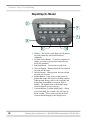
1. Display – The liquid crystal display (LCD) shows
set point parameters and actual measured
conditions.
2. Set Point Select Button – To select a parameter to
change, press the set point select button directly
below the parameter.
3. Run/Stop Button – Used to start or stop a run.
4. Decrease Button – When pressed, the last selected
set point will decrease.
5. Increase Button – When pressed, the last selected
set point will increase.
6. Preheat Button – Used to turn on the heaters to
preheat the sample block prior to loading samples.
When pressed during a run, it will switch the end
point alarm from audible to muted or back to
audible. The audible alarm is the default mode
when the RapidVap is powered up.
7. Vacuum Release (Vacuum Model Only) – When
pressed and held, the vacuum valve will open to
break vacuum. This is used to quickly decrease
vacuum should bumping of the sample occur.
36
Product Service Domestic 1-800-522-7658, International 816-333-8811
Chapter 4: Using Your RapidVap
Operating The RapidVap
Controls
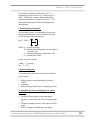
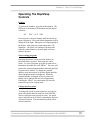
Preheat:
To preheat the chamber, press the preheat button. The
LED next to the button will illuminate and the display
will show:
SP:
XXC ACT: XXC
Press increase or decrease buttons until the desired set
point is displayed. The actual block temperature will be
displayed to the right. When power is being supplied to
the heaters, a bar under the actual temperature will
illuminate. The block will continue to preheat until
either the preheat button is pressed again or the run
button is pressed.
Select existing program:
Operating parameters can be stored in memory so
protocols can be repeated. Nine programs can be
stored. To select a program, press the set point select
button directly under the word “PROG.” An arrow will
point to the current program number indicating that this
set point can be altered. To change the program
number, press the increase or decrease button until the
desired program number is displayed. When the
program number is changed, all its set points will
change also to indicate the last entered parameters.
Pressing the “PROG” set point button will reset the
timer to the previous set point time.
Change speed set point:
To change the speed set point parameter, press the set
point select button directly under the word “SPEED.”
Arrows will point to the present set point. The speed
may be altered from 0 to 100% by pressing the increase
or decrease buttons. The last entered set point will be
stored in memory.
Product Service Domestic 1-800-522-7658, International 816-333-8811
37
Chapter 4: Using Your RapidVap
It is suggested that the user set the vortex speed at a low
percentage and gradually increase it after the run is
started. This will minimize the possibility of samples
sloshing out of the tubes. Reruns of the same protocol
may start at the speed determined by previous runs.
Change heat set point:
To change the heat set point, press the set point select
button under the word “HEAT.” Arrows will point to
the present set point which can be changed from
-- (OFF) up to 99° by pressing the increase or decrease
buttons. The set point is 100°C if the display shows
“HI.” The last entered set point will be stored in
memory.
Change time set point:
To change the time set point, press the set point select
button under the word “TIME.” Arrows will point to
the present set point which can be changed from 1 to
999 minutes by pressing the increase or decrease
buttons. If it is desired to have the RapidVap run
continuously without alarming at the end of a time
period, press the increase button until the display says
“RUN.” The last entered set point will be stored in
memory.
To reset the timer to the previous set point time, the
“PROG” set point button must be pressed.
Change the Vacuum set point (Vacuum model only):
V
38
To change the vacuum set point, press the set point
select button directly under the word “VACUUM.” An
arrow will point to the last entered vacuum set point.
The vacuum level may be set between 0 to 999 mBar
by pressing the increase or decrease buttons. Above
999 mBar, the display will show “HI.” With a “HI”
setting, the vacuum pump will not operate. The last
entered set point will be stored in memory. Keep in
mind that even though a deep vacuum set point may be
entered, the actual vacuum level that the RapidVap will
Product Service Domestic 1-800-522-7658, International 816-333-8811
Chapter 4: Using Your RapidVap
try to maintain can be no deeper than the vacuum level
that the vacuum pump can maintain.
Select the number of samples that will be run
(RapidVap N2 only):
Press the set point select button under the word
“SAMPLE.” An arrow will point to the last entered set
point. By pressing the increase or decrease button, the
number of samples or clusters may be changed from 2
to 4 to 6 to 8. When running less than eight samples in
the RapidVap N2 or 48 samples in the RapidVap N2/48,
be sure to position them as described in the previous
paragraph “Loading Glassware Into the RapidVap.”
N
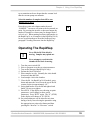
Operating The RapidVap
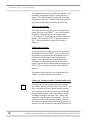
!
Never lift the lid if the block is
moving. Samples may splash out.
Never attempt to reach into the
chamber if the block is moving.
1.
2.
3.
4.
5.
Turn the power switch ON.
Select a program or set the set point parameters.
Turn on the nitrogen (RapidVap N2 only).
Preheat the block if desired.
Place samples in vials. Normally the vials should
be no more than half full.
6. Load sample vials in the chamber.
7. Close the lid. On RapidVap N2/48 models, press
down and rotate the cross bar on the top of the lid
counter clockwise approximately 1/8".
8. Swing both latches over the lid and tighten both
knobs. Do not over tighten.
9. Press RUN. If the display was showing set point
parameters, it will change to show actual
parameters. Press “RUN” again. The “S” (STOP)
in the display will change to “R” (RUN).
10. Set point parameters can be altered at any time
during a run by first selecting the parameter using
the appropriate set point select button and then
pressing the “Increase” or “Decrease” switch.
Product Service Domestic 1-800-522-7658, International 816-333-8811
39
Chapter 4: Using Your RapidVap
11. If the time set point is used, at the end of the set
time an alarm will sound. All operating functions
will cease.
12. Press STOP to terminate operation if the RapidVap
has not already stopped itself.
13. When the evaporation is complete, allow the
chamber to stop moving, unlatch the latches, on the
RapidVap N2/48 models rotate the cross bar
clockwise approximately 1/8", lift the lid and
remove the samples.
14. Any time the RapidVap is not in operation, the
power switch should be turned OFF. This will
prolong the life of the cooling fan and the blower in
the RapidVap N2.
Operational Notes
The LCD display conveys various pieces of
information. When the RapidVap is turned on , the
RapidVap will return to the same mode (RUN or
STOP) that it was in when the power was turned off. If
the RapidVap was in the RUN mode when the power
was turned off, when the power is turned on, the
RapidVap will attempt to return to the programmed set
points.
If the previous run is to be duplicated, it is important to
press the program set point button prior to pressing run.
This will show all the set points for that program and
will reset the timer back to the programmed set point.
Without pressing the program set point button, the time
will not be reset and will continue to count down from
the time at which it was stopped.
Interrupting a Cycle After it
Has Begun
At any time during a run, the cycle may be stopped by
pressing the STOP button. This shuts off all operating
functions. After the chamber stops oscillating, the
latches may be unlatched and the lid opened. If it is
necessary to re-start the RapidVap, close the lid and
40
Product Service Domestic 1-800-522-7658, International 816-333-8811
Chapter 4: Using Your RapidVap
secure the latches and press RUN. The RapidVap will
resume operation at the same set point parameters and
the timer will continue to count down from the time at
which the RapidVap was stopped.
End Alarms
The RapidVap has two means to signal the completion
of a run. The first method is determined by the operator
when the run time is set as described in the previous
paragraph, Time Setting Guidelines. In the second
method the RapidVap will automatically sense when an
evaporation process is nearly complete by comparing
temperatures in the unit. When the RapidVap detects
end point, it will sound an alarm and the LED next to
the “PREHEAT/ END ALARM” button will flash.
This alerts the operator to closely monitor the run’s
completion. This method performs best when large
samples are processed at high temperatures. When
small samples or low temperatures are used, the alarm
may signal prior to the end of evaporation. The audible
alarm may be canceled by pressing the “PREHEAT/
END ALARM” button. The LED will continue to flash
until the “STOP” button is pressed. If the button is
pressed again, the audible alarm will become active
again.
RS-232 Communications
Some RapidVaps are equipped with RS-232
communications capabilities. This hardware and
software allows a user to perform all the front panel
functions from a standard RS-232 link.
Communications will be at 4800 baud, no parity, 8 bit
word, 1 stop bit, and a 3-wire interface (TXD, RXD and
circuit common). The RS-232 link will be duplex or
two-way, that is, it will allow the RapidVap Basic and
N2 models to be controlled externally (incoming
commands) as well as provide status information
coming out of the RapidVap (outgoing status). All
communications will be done in standard ASCII format
using the programming syntax below.
Product Service Domestic 1-800-522-7658, International 816-333-8811
41
Chapter 4: Using Your RapidVap
RS-232 Programming Syntax
The RapidVap only responds to commands sent by the
connected computer or terminal – it does not send out
commands on its own. The programming syntax has
two forms:
1. # [command abbreviation letter] [value]; when
the command requires a numeric value.
2. # [command abbreviation letter ]; when the
command does not require a numeric value.
When the programming syntax contains a numeric
value, it will change the operation of the RapidVap.
When the programming syntax does not contain a
numeric value, the RapidVap will respond with its
current status for that command value.
Note that the lead-in character is “#” while the “[ ]”
(brackets) are shown only to separate parameters for
ease of understanding. These brackets will not be used
in the actual ASCII command string. Finally, the “;” is
used to indicate the end of a command. Also note that
‘\n’ indicates a newline character.
#R[x];
#S[xxx];
#T[xxx];
#t[xxxx]
#V[xxxx];
42
x=0 for stop, x=1 for run and x=2 for pre-heat, will get a
x’\n’ response for confirmation; when a “#R;” with no “[x]”
is sent, the RapidVap will respond 0, 1 or 2
Selects the vortex speed of program 9 from 0% or 12% to
100%, will get a xxx;yyy’\n’ response for confirmation.
(xxx:speed setpoint, yyy:actual speed)
Selects the HEAT TEMPERATURE SET POINT of
program 9 from 30 to 100 (C), will get a xxx;yyy’\n’
response for confirmation. (xxx:temperature setpoint,
yyy:actual temperature); by entering “#T0;”, the heat will
be set to OFF
Selects the TIME SET POINT of program 9 from 1 to 999
minutes, and 1000 for no stopping (will run continuously),
will get a xxxx;yyyy’\n’ response for confirmation.
(xxxx:time setpoint, yyyy:time left)
Selects the VACUUM SET POINT (if the RapidVap is a
Vacuum model) of program 9 from 1 to 1000 mBar, will get
a xxxx;yyyy’\n’ response for confirmation. (xxxx:vacuum
setpoint, yyyy:actual vacuum)
Product Service Domestic 1-800-522-7658, International 816-333-8811
Chapter 4: Using Your RapidVap
#H[xxx];
#L[x];
#N[x]
#M[x];
#E;
#e;
Selects the PRE-HEAT SET POINT of program 9 from 30
to 100 C, will get a xxx;yyy’\n’ response for
confirmation.(xxx:pre-heat setpoint, yyy:actual
temperature)
KEY LOCKED when x=1 and UNLOCKED when x=0,
will get a x’\n’ response for confirmation
elects the N2 VALVES (if the RapidVap is an N2 model) of
program 9 from 0,2,4,6,8, will get a x’\n’ response for
confirmation
x=1 will mute the audio alarm; x=0 will allow the audio
alarm to work normally
The RapidVap will respond to this command with a
numeric value as follows :’”1"’=indicates an endpoint has
been reached; “0”=endpoint has not been reached
The RapidVap will respond to this command with a
numeric value as follows: 0=all functions are normal;
“1”=lid is open; “2”=communication problem; “3” and later
numbers will be established later as specific error messages
Note: When controlling the RapidVap using the
RS-232 link, all control parameters will be entered into
program 9.
Note: All of the above commands can be sent with no
numeric value, that is ‘#[command];’ (without value) to
read out the setpoint and actual value without changing
the setpoint.
Note: There is no command for the vacuum release
button on the front panel since this button is momentary
in nature – the “#V0000;” command will bleed the
vacuum chamber to atmospheric pressure.
Note: The above commands can be sent at a maximum
rate of one command per second.
Product Service Domestic 1-800-522-7658, International 816-333-8811
43
Chapter 4: Using Your RapidVap
RS-232 Hardware Required
The connecting cable, Labconco #7484800 is supplied
with the unit and is wired as shown below.
44
Product Service Domestic 1-800-522-7658, International 816-333-8811
CHAPTER 5
MAINTAINING YOUR
RAPIDVAP
Under normal operation, the RapidVap requires little
maintenance. The following maintenance schedule is
recommended:
As needed:
1. Clean up all spills; remove liquids from chamber.
2. Clean lid and gasket using soft cloth, sponge or
chamois and a mild, non-abrasive soap or detergent.
Weekly:
1. If the vacuum pump contains oil, check the
condition and level. If the oil level is low, add oil.
If the oil contains excessive amounts of moisture,
detected by a cloudiness in the oil, it will be
necessary to change the oil. For further information
regarding procedures for changing the vacuum
pump oil, refer to the vacuum pump manufacturer’s
instructions. To expel small amounts of water that
may have accumulated in the pump oil, periodically
operate the vacuum pump against a dry, leak-tight
system. The gas ballast must be open.
Product Service Domestic 1-800-522-7658, International 816-333-8811
V
45
Chapter 5: Maintaining Your RapidVap
Monthly:
1. The rubber components on the RapidVap may
eventually deteriorate and require replacement. The
effective life of rubber parts depends upon both
their usage and the surrounding environment.
Check all rubber hoses and gaskets and replace any
that show signs of hardening, permanent set or
deterioration.
2. Using a soft cloth, sponge or chamois and a mild,
non-abrasive soap or detergent, clean the glass lid.
3. Using a soft cloth, sponge, or chamois and a mild,
non-abrasive soap or detergent, clean the exterior
surfaces of the unit. Liquid spray cleaners and
polishes may be used on the exterior surfaces. Do
not use solvents to remove stains from the exterior
surfaces as they may damage the finish.
4. All weekly activities.
46
Product Service Domestic 1-800-522-7658, International 816-333-8811
CHAPTER 6
MODIFYING YOUR
RAPIDVAP
The configuration of your RapidVap may need to be
changed to accommodate your needs. For example,
you may want to change the sample size you are
running so you will need to change the block or you
may want to add a lid heater to eliminate condensation
inside the lid. Read this chapter to learn how to:
•
•
change blocks.
install a lid with heater.
Changing the Sample
Blocks
If it is necessary to change from one sample size to
another, it may be necessary to change the block. Refer
to Appendix D: RapidVap Accessories for available
sample blocks.
First, using a 7/16" socket (RapidVap Vacuum and
RapidVap N2), remove the three nuts and washers on
the top of the existing block. The RapidVap N2/48
requires a 9/16" socket to remove the three manifold
guides that secure the block. Lift the block out of the
chamber. Note the asymmetric hole pattern of the three
Product Service Domestic 1-800-522-7658, International 816-333-8811
47
Chapter 6: Modifying Your RapidVap
mounting holes. Apply a small amount of heat transfer
grease supplied with the RapidVap to the end of the
temperature sensor probe that extends up from the
bottom of the chamber.
Position the block over the three studs in the chamber.
Install the flat washers and nuts or manifold guide rods.
Tighten securely.
Installing the Optional Lid
Heater
V
48
If a Lid Heater is to be added by the user, first
disconnect the main power cord to the RapidVap. Then
remove the existing lid by removing the two screws that
hold either the RH or LH hinge pivot support bracket.
Remove the bracket and then slide the lid assembly off
of the other bracket. Install the new lid with the heater
attached by reversing the process. Plug the jack
attached to the lid heater into the receptacle on the back
of the RapidVap. The lid heater will operate any time
the main power switch is on.
Product Service Domestic 1-800-522-7658, International 816-333-8811
CHAPTER 7
TROUBLESHOOTING
Refer to the following if your RapidVap fails to operate
properly. If the suggested corrective actions do not
solve your problem, contact Labconco for additional
assistance. The following failure codes may appear on
the display when problems are sensed by the internal
self check routine.
DISPLAY
ERROR CODE
CAUSE
CORRECTIVE ACTION
Top Temp Sensor
Top sensor failure
Replace top sensor assembly.
Connection failure
Repair connection.
Bottom sensor
failure
Replace bottom sensor assembly.
Connection failure
Repair connection.
Sensor failure
Replace sensor assembly.
Connection failure
Repair connection.
Lid open
Close lid.
Switch failure
Replace switch.
Connection failure
Repair connection.
Bottom Temp
Sensor
Vacuum Sensor
Lid Opened
Product Service Domestic 1-800-522-7658, International 816-333-8811
49
Chapter 7: Troubleshooting
DISPLAY
ERROR CODE
CAUSE
CORRECTIVE ACTION
Mem Fail – Push
Prog
Memory failure
Push program button.
New memory IC
chip
Push program button.
Bad memory IC
chip
Call Labconco – Replace IC chip or control
PCB.
Stalled condition
Turn power off. Try to restart after one
minute. Call Labconco if error message
remains.
Excessive speed
detected, i.e. >120%
Turn power off. Try to restart after one
minute. Call Labconco if error message
remains.
Defective motor
Turn power off. Try to restart after one
minute. Call Labconco if error message
remains.
Motor Error
Other corrective actions for potential problems are as
follows:
PROBLEM
CAUSE
CORRECTIVE ACTION
Unit will not
operate
Unit not connected to
electrical power
Connect unit to proper electrical
receptacle.
Circuit breaker blown
Correct electrical problem and reset
circuit breaker by pressing button.
Lid open
Close lid.
Sample tubes not
located symmetrically
in block
Reposition sample tubes.
Sample block loose
Tighten all three mounting screws.
Sample block not
installed
Install sample block.
Vent hose exhausting
into lab area
Redirect hose to fume hood.
Inoperable blower
(RapidVap N2)
Replace blower.
Excessive
vibration
Sample odor in
lab
50
Product Service Domestic 1-800-522-7658, International 816-333-8811
Chapter 7: Troubleshooting
PROBLEM
CAUSE
CORRECTIVE ACTION
Sample in
bottom of
chamber
Gas pressure too high
(RapidVap N2)
Reduce pressure.
Vortex speed too high
Reduce speed.
Condensation forming
inside lid (RapidVap
Vacuum)
Install lid heater. See page 36.
Sample going to
dryness (RapidVap N2)
Program RapidVap N2 to prevent dryness.
Sample sloshing out of
tube
Decrease vortex speed.
Heat setting is too high
Decrease heat.
Gas supply depleted
(RapidVap N2)
Replenish gas.
Heater inoperable
Contact Labconco.
Vacuum pump failure
(RapidVap Vacuum)
Check pump.
Pump not on
Turn on pump.
Control valve open
Check control valve.
Leaks in lines or
connectors
Locate and repair.
Foreign material on lid
gasket
Clean gasket and lid.
Vacuum pump oil low
Add oil.
Excessive
contamination in
vacuum pump oil
Replace oil.
Pump not connected to
RapidVap
Connect hose and power cord.
Poor recovery
rates
Evaporation
rate is reduced
No vacuum
poor vacuum
(RapidVap
Vacuum)
Product Service Domestic 1-800-522-7658, International 816-333-8811
51
Chapter 7: Troubleshooting
PROBLEM
CAUSE
CORRECTIVE ACTION
No gas flow
(RapidVap N2)
Gas depleted
Install new supply of gas.
Sample position not
activated
Activate position per page 30.
Nozzle clogged
Unplug nozzle with fine wire.
Valve inoperable
Contact Labconco
Valve inoperable
Contact Labconco
Control inoperable
Contact Labconco
Gas flows
continuously
52
Product Service Domestic 1-800-522-7658, International 816-333-8811
APPENDIX A
RAPIDVAP VACUUM
AND RAPIDVAP N2
COMPONENTS
The following pages list components that are available
for your RapidVap. The parts shown are the most
common replacement parts. If other parts are required,
contact Product Service.
Product Service Domestic 1-800-522-7658, International 816-333-8811
53
Appendix A: RapidVap Vacuum and RapidVap N2 Components
RapidVap Vacuum and RapidVap N2 Components
Item
Quantity
Part No.
1
2
3
4
4A
4B
4C
5
6
7
7A
8
9
10
11
--
1
4
1
1
1
1
1
8
8
1
1
1
1
1
1
1
13023-00
74953-00
79167-00
74838-00
74838-03
74838-04
74838-05
74887-00
74915-00
13364-00
13365-00
12926-00
79176-00
78252-00
12111-00
13444-06
54
Description
Switch, Power
Foot
Fan Cooling
PCB, Main (RapidVap Vacuum)
PCB, Main (RapidVap N2 & RapidVap N2/48)
PCB, Main (RapidVap Vacuum w/RS232)
PCB, Main (RapidVap N2 & RapidVap N2/48 w/ RS232)
Isolator, Upper
Isolator, Lower
Cord, Power (115V)
Cord, Power (230V)
Triac
Diode Bridge
Belt
Motor
Fuse, 12A, Type T, Slow Blow (Not Shown)
Product Service Domestic 1-800-522-7658, International 816-333-8811
Appendix A: RapidVap Vacuum and RapidVap N2 Components
4
5
6
9
8
3
7
11
2
1
10
Product Service Domestic 1-800-522-7658, International 816-333-8811
55
Appendix A: RapidVap Vacuum and RapidVap N2 Components
RapidVap Vacuum Components
Item
Quantity
Part No.
Description
21
22
23
24
25
26
27
28
29
30
31
32
33
34
34A
35
36
37
38
39
--
1
1
1
2
2
6
2
3
3
3
1
1
1
1
1
1
1
1
1
1
1
74917-00
74870-00
74916-00
74882-00
74880-00
19271-05
74883-00
19092-21
19116-00
79046-01
74979-00
15532-00
74847-00
74846-00
74844-00
79759-01
13056-00
74920-02
74926-00
13061-00
Temperature Sensor, Lower
Temperature Sensor, Upper
Vacuum Sensor
Spring, Latch
Latch
Washer, Latch
Knob, Latch
Nut, Block
Washer, Block
Stud, Block
Trim Ring
Hose, Exhaust
Shield, Lid
Lid
Lid With Heater
Thermal Fuse
Valve, Vacuum
PCB, Display/Control
Label, Control Panel
Relay, Vacuum Pump
Fuse, Main Vacuum PCB, 2A, Type T, Slow Blow
(Not Shown)
56
Product Service Domestic 1-800-522-7658, International 816-333-8811
Appendix A: RapidVap Vacuum and RapidVap N2 Components
33
27
26
25
34
24
31
28
29
30
23
21
35
32
22
39
36
38
37
Product Service Domestic 1-800-522-7658, International 816-333-8811
57
Appendix A: RapidVap Vacuum and RapidVap N2 Components
RapidVap N2 and RapidVap N2/48 Components
Item
Quantity
Part No.
51
52
53
54
55
56
57
57A
58
59
60
60A
61
62
63
64
65
66
67
68
--
1
1
2
2
6
2
3
3
3
3
1
1
1
1
1
1
1
1
1
1
1
74917-00
74870-00
74882-00
74880-00
19271-05
74883-00
19092-21
74488-00
19116-00
79046-01
74845-00
74497-00
74979-00
79131-01
74889-01
79131-02
79096-00
74920-02
74922-00
79759-01
13444-03
58
Description
Temperature Sensor, Lower
Temperature Sensor, Upper
Spring, Latch
Latch
Washer, Latch
Knob, Latch
Nut, Block (RapidVap N2)
Guide Stud (RapidVap N2/48)
Washer, Block
Stud, Block
Lid (RapidVap N2)
Lid (RapidVap N2/48)
Trim Ring
Hose, Exhaust Short
Valve Assembly, Nitrogen
Hose Exhaust Long
Blower, Exhaust
PCB, Display/Control
Label, Control Panel
Thermal Fuse
Fuse, Exhaust Blower, 4A, Type T, Slow Blow
(Not Shown)
Product Service Domestic 1-800-522-7658, International 816-333-8811
Appendix A: RapidVap Vacuum and RapidVap N2 Components
60A
56
61
55
54
53
57
58
62
59
57A
58
63
59
64
52
67
66
51
68
Product Service Domestic 1-800-522-7658, International 816-333-8811
65
59
Appendix A: RapidVap Vacuum and RapidVap N2 Components
60
Product Service Domestic 1-800-522-7658, International 816-333-8811
APPENDIX B
RAPIDVAP
DIMENSIONS
RapidVap Vacuum
Product Service Domestic 1-800-522-7658, International 816-333-8811
61
Appendix B: RapidVap Dimensions
RapidVap N2
62
Product Service Domestic 1-800-522-7658, International 816-333-8811
APPENDIX C
RAPIDVAP
SPECIFICATIONS
This Appendix contains technical information about the
RapidVap including specifications, environmental
operations conditions, wiring diagrams and evaporation
rates.
Electrical Specifications
•
•
•
•
•
•
•
•
•
•
Nominal amperage for 115V RapidVap Vacuum
(model 79000-00 & 79000-10) excluding vacuum
pumps: 8A
Maximum amperage with vacuum pump: 16A
Nominal amperage for 230V RapidVap Vacuum
(model 79000-01 & 79000-11) excluding vacuum
pumps: 4A
Maximum amperage with vacuum pump: 8A
Nominal amperage for 115V RapidVap Vacuum
(model 79000-02 & 79000-12) with Lid Heater
excluding vacuum pump: 8.6A
Maximum amperage with vacuum pump: 16A
Nominal amperage for 230V RapidVap Vacuum
(model 79000-03 & 79000-13) with Lid Heater
excluding vacuum pump: 4.3A
Maximum amperage with vacuum pump: 8A
Nominal amperage for 115V RapidVap N2 (model
79100-00, 79100-10, 79100-12 & 79100-14): 8A
Nominal amperage for 230V RapidVap N2 (model
79100-01, 79100-11, 79100-13 & 79100-15): 4A
Frequency (all models): 50/60 Hz
Phase: Single
Heater power: 1000 watts
Lid heater power: 40 watts
Product Service Domestic 1-800-522-7658, International 816-333-8811
63
Appendix C: RapidVap Specifications
Environmental Conditions
•
•
•
•
•
•
•
N
64
Indoor use only.
Maximum altitude: 6562 feet (2000 meters).
Ambient temperature range: 41° to 104°F (5° to
40°C).
Maximum relative humidity: 80% for temperatures
up to 88°F (31°C), decreasing linearly to 50%
relative humidity at 104°F (40°C).
Main supply voltage fluctuations not to exceed
±10% of the nominal voltage.
Transient overvoltages according to Installation
Categories II (Overvoltage Categories per IEC
1010). Temporary voltage spikes on the AC input
line that may be as high as 1500V for 115V models
and 2500V for 230V models are allowed.
Used in an environment of Pollution degrees 2 (i.e.,
where normally only non-conductive atmospheres
are present). Occasionally, however, a temporary
conductivity caused by condensation must be
expected, in accordance with IEC 664.
Nitrogen Consumption
•
Gas flow RapidVap N2 with 8 active nozzles:
0.55 SCFM @ 12 psi
0.41 SCFM @ 6 psi
•
Gas flow RapidVap N2/48with 48 active nozzles:
3.5 SCFM @ 20 psi
2.5 SCFM @ 10 psi
Product Service Domestic 1-800-522-7658, International 816-333-8811
Appendix C: RapidVap Specifications
Wiring Diagram (115V Models)
Product Service Domestic 1-800-522-7658, International 816-333-8811
65
Appendix C: RapidVap Specifications
Wiring Diagram (230V Models)
66
Product Service Domestic 1-800-522-7658, International 816-333-8811
Appendix C: RapidVap Specifications
Evaporation Rates
RapidVap Vacuum Models
V
The following tables show the approximate time to
evaporate various solvents in 75mm and 16mm sample
tubes when the sample block is fully loaded. Other sample
blocks are available for different size tubes. If they are
used or if a different number of samples is run at one time,
the evaporation times can be estimated from these charts or
determined experimentally.
Evaporation Time – 75 mm dia. Sample Tube
(Time in Minutes)
Solvent:
Block Preheat &
Block Set Point
Temperature:
Vacuum:
Starting Volume
300ml
250
200
150
100
50
Methylene
Chloride
Toluene
Acetonitrile
Water
50°C
80°C
75°C
80°C
250 mbar
133 mbar
167 mbar
133 mbar
62
56
49
42
36
22
90
72
66
57
33
40
102
84
71
60
49
37
402
345
289
239
189
95
Number of samples: 8
Vortex speed: 28%
Vacuum pump: Labconco model – 79249-00
Rated free air flow – 88 L/min
Max. attainable vacuum – 31 mbar
Product Service Domestic 1-800-522-7658, International 816-333-8811
67
Appendix C: RapidVap Specifications
V
Evaporation Time – 16 mm dia. Sample Tube
(Time in Minutes)
Solvent:
Block Preheat &
Block Set Point
Temperature:
Vacuum:
Starting Volume
10 ml
8
6
4
2
Methylene
Chloride
Toluene
Acetonitrile
Water
50°C
80°C
75°C
80°C
200 mbar
200 mbar
330 mbar
133 mbar
18
14
10
8
4
25
20
14
12
6
25
22
17
13
7
119
101
72
50
26
Number of samples: 69
Vortex speed: 95%
Vacuum pump: Labconco model – 79249-00
Rated free air flow – 88 L/min
Max. attainable vacuum – 31 mbar
RapidVap N2 Models
N
The following tables indicate the approximate time
required to evaporate various common solvents. Tables A
and B show the average time required to evaporate 8
samples from the selected beginning volume to a level
where the solvent is at the top of the Cool-Zone stem.
Tables C shows the average time to evaporate various
solvents in different length Cool-Zone stems. It shows the
average time for solvents to evaporate from the top of the
stem to the indicated remaining volume when 8 vials are
run simultaneously. The following example illustrates the
use of the charts:
Assume that a starting volume of 300 ml
methylene chloride is placed in a 600 ml
sample vial with a 1.5 ml stem. The vial is
covered with a cap. The desired endpoint
volume is 0.5 ml. From Table A, the time to
evaporate to the top of the stem is 59
minutes. From Table C, the time to
68
Product Service Domestic 1-800-522-7658, International 816-333-8811
Appendix C: RapidVap Specifications
evaporate from the top of the stem to 0.5 ml
is 17 minutes. Adding the two times
together, the total time to evaporate 300 ml
of methylene chloride to 0.5 ml in a sample
tube with a 1.5 ml stem is approximately 76
minutes.
If fewer than eight samples are run at a time,
the time to evaporate will become shorter.
N
Table A
Evaporation Time in Upper Portion of Sample Vial
(600 ml Sample Tubes) (Time in Minutes)
Solvent:
Block Preheat &
Block Set Point
Temperature:
Starting Volume
450 ml
400
350
300
250
200
150
100
50
Methylene
Chloride
Ethyl
Acetate
Hexanes
Acetone
Toluene
Water
40°C
75°C
70°C
55°C
100°C
95°C
91
80
69
59
51
43
36
28
18
82
65
56
48
40
33
26
19
12
54
52
35
29
22
19
16
11
7
90
75
64
54
45
38
31
23
14
109
80
69
60
50
41
32
23
13
623
531
437
379
323
270
221
173
106
Number of samples: 8
Nitrogen pressure: 10 psi at volumes 0 thru 300 ml
(see Note 1)
5 psi at volumes above 300 thru 350 ml
4 psi at volumes above 350 thru 400 ml
2 psi at volumes above 400 thru 450 ml
Vortex speed: 70% at volumes 0 thru 300 ml
(see Note 1) 36% at volumes above 300 thru 450 ml
Sample tubes covered with caps
Note 1: Even though the RapidVap N2 is capable of
processing starting volumes as high as 450 ml using the
600 ml sample vial, its optimum volume is 300 ml. Above
Product Service Domestic 1-800-522-7658, International 816-333-8811
69
Appendix C: RapidVap Specifications
300 ml, the vortex speed must be reduced and the nitrogen
pressure must be decreased to prevent the sample from
splashing out. This data for starting volumes over 300 ml
was generated by starting the evaporation at reduced levels
of nitrogen pressure and vortex speed. As the solvent
evaporated, the nitrogen pressure and vortex speed were
increased.
Table B
N
Evaporation Time in Upper Portion of Sample Vial
(600 ml Sample Tubes) (Time in Minutes)
Solvent:
Block Preheat &
Block Set Point
Temperature:
Starting Volume
450 ml
400
350
300
250
200
150
100
50
Methylene
Chloride
Ethyl
Acetate
40°C
75°C
70°C
58
53
48
41
35
30
25
19
10
56
48
40
35
31
26
22
17
9
33
29
24
21
19
16
14
11
7
Hexanes Acetone
Toluene
Water
55°C
100°C
95°C
68
61
54
47
43
38
34
29
16
75
63
52
45
40
35
28
22
15
420
352
321
266
230
193
153
120
68
Number of samples: 8
Nitrogen pressure: 10 psi at volumes 0 thru 300 ml
(see Note 1)
5 psi at volumes above 300 thru 350 ml
4 psi at volumes above 350 thru 400 ml
2 psi at volumes above 400 thru 450 ml
Vortex speed: 70% at volumes 0 thru 300 ml
(see Note 1) 36% at volumes above 300 thru 450 ml
Sample tubes: Not covered with caps
70
Product Service Domestic 1-800-522-7658, International 816-333-8811
Appendix C: RapidVap Specifications
Table C
N
Evaporation Rate in Cool-Zone Stem
(600 ml Sample Tubes) (Time in Minutes)
Methylene
Chloride
Ethyl
Acetate
Hexanes
Acetone
Toluene
Water
40°C
75°C
70°C
55°C
100°C
95°C
Ending
Volume
0.5
Dry
4
10
4
9
3
7
4
9
5
10
42
78
1.5 ml Stem
1.5
1.0
0.5
Dry
4
9
17
31
4
7
13
24
2
5
8
16
3
7
12
22
5
9
15
26
23
43
75
120
2.0 ml Stem
2.0
1.0
Dry
3
17
64
3
11
34
2
8
26
3
15
47
4
14
50
28
80
201
3.0 ml Stem
3.0
2.0
1.0
Dry
4
20
57
128
4
12
34
81
3
10
25
52
3
16
50
108
5
17
40
89
34
76
170
339
Solvent:
Block
Preheat &
Block Set
Point Temp:
Glassware
0.5 ml Stem
Number of samples: 8
Vortex speed: 70%
Nitrogen pressure: 10 psi
Sample tubes: Covered or not covered with caps
Glassware Used:
0.5 ml (PN 79259-00) .77 in (1.9 cm) Long Stem
1.5 ml (PN 79139-00) 1.37 in (3.5 cm) Long Stem
2.0 ml (PN 79137-00) 1.62 in (4.1 cm) Long Stem
3.0 ml (PN 79135-00) 2.25 in (5.7 cm) Long Stem
Product Service Domestic 1-800-522-7658, International 816-333-8811
71
Appendix C: RapidVap Specifications
RapidVap N2/48 Models
The following tables show the approximate time to
evaporate various solvents in 12mm and 20mm sample
tubes when the sample block is fully loaded. Other sample
blocks are available for different size tubes. If they are
used or if a different number of samples is run at one time,
the evaporation times can be estimated from these charts or
determined experimentally. Evaporation rates may vary
from tube to tube.
N
Evaporation Time RapidVap N2/48 Models
(12 mm Sample Tubes) (Time in Minutes)
Solvent:
Block Preheat
& Block Set
Point Temp:
Starting Volume
2 ml
Methylene
Chloride
Toluene
Acetonitrile
Methanol
Hexane/
Ethyl Acetate
75:25
Hexane/
Ethyl Acetate
50:50
40°C
80°C
75°C
40°C
40°C
40°C
6
8
8
18
5
5
Number of samples: 48
Vortex speed: 100%
Nitrogen pressure: 8 psi
72
Product Service Domestic 1-800-522-7658, International 816-333-8811
Appendix C: RapidVap Specifications
Evaporation Time RapidVap N2/48 Models
(20 ml Sample Tubes) (Time in Minutes)
Methylene
Chloride
Toluene
Acetonitrile
Methanol
Hexane/
Ethyl Acetate
75:25
Hexane/
Ethyl Acetate
50:50
Block Preheat &
Block Set Point
Temp:
50°C
80°C
75°C
40°C
40°C
40°C
Starting Volume
10 ml
8
6
4
2
17
14
11
9
5
23
21
18
15
9
24
21
18
14
8
49
18
20
Solvent:
Number of samples: 48
Vortex speed: 100%
Nitrogen pressure: 20 psi
Product Service Domestic 1-800-522-7658, International 816-333-8811
73
Appendix C: RapidVap Specifications
74
Product Service Domestic 1-800-522-7658, International 816-333-8811
APPENDIX D
RAPIDVAP
ACCESSORIES
This following accessories are available for the RapidVap
Vacuum model.
PART #
DESCRIPTION
74913-00
Block. 110-12 mm dia. tubes.
74858-00
Block. 110-13 mm dia. tubes.
74914-00
Block. 69-16 mm dia. tubes.
74963-00
Block. 69-15 ml centrifuge tubes.
74964-00
Block. 26-28 mm scintillation tubes.
74945-00
Block. 8-600 ml tubes. Order tubes from Labconco.
74864-00
Block. 8-170 ml tubes. Order tubes from Labconco.
V
Block. Special orders (size and number of tubes). Contact Labconco.
79092-00
Sample Tube – Flat Bottom. Borosilicate glass. 600 ml capacity.
Package of one (1).
Product Service Domestic 1-800-522-7658, International 816-333-8811
75
Appendix D: RapidVap Accessories
76
PART #
DESCRIPTION
79134-08
Sample Tube – Flat Bottom. Borosilicate glass. 600 ml capacity.
Package of eight (8).
79270-00
Sample Tube – Flat Bottom. Borosilicate glass. 170 ml capacity.
Package of one (1).
79271-08
Sample Tube – Flat Bottom. Borosilicate glass. 170 ml capacity.
Package of eight (8).
79141-00
Vacuum Pump. Diaphragm pump - corrosion resistant. 115V, 60
Hz, 3.3 amps, single phase. 42 liters per minute, 207 mbar max
vacuum. For use with non-flammable solvents only.
79141-01
Vacuum Pump. Diaphragm pump - corrosion resistant. 220V, 50
Hz, 1.5 amps, single phase. 36 liters per minute, 207 mbar max
vacuum. For use with non-flammable solvents only.
79171-00
Vacuum Pump. Diaphragm pump - corrosion resistant. 115V, 60
Hz, 10.8 amps, single phase. 88 liters per minute, 31 mbar max
vacuum. For use with non-flammable solvents only.
79171-01
Vacuum Pump. Diaphragm pump - corrosion resistant. 230V, 50
Hz, 4.0 amps, single phase. 74 liters per minute, 31 mbar max
vacuum. For use with non-flammable solvents only.
79248-00
Vacuum Pump. Diaphragm pump - corrosion resistant-explosion
proof. 120V, 60 Hz, 5.8 amps, single phase. 42 liters per minute, 207
mbar max vacuum.
79248-01
Vacuum Pump. Diaphragm pump - corrosion resistant - explosion
proof. 220V, 50 Hz, 3.1 amps, single phase. 36 liters per minute, 207
mbar max vacuum.
Product Service Domestic 1-800-522-7658, International 816-333-8811
Appendix D: RapidVap Accessories
PART #
DESCRIPTION
79249-00
Vacuum Pump. Diaphragm pump - corrosion resistant - explosion
proof. 115V, 60 Hz, 5.8 amps, single phase. 88 liters per minute, 31
mbar max vacuum.
79249-01
Vacuum Pump. Diaphragm pump-corrosion resistant - explosion
proof. 220V, 50 Hz, 3.1 amps, single phase. 74 liters per minute, 31
mbar max vacuum.
14677-01
Vacuum Pump. Two stage direct drive pump. 115 VAC, 60 Hz, 6.8
amps, single phase. 195 liters per minute, 2 x 10⁻³ mbar max vacuum.
For use with non-flammable solvents only.
77394-03
Vacuum Pump. Two stage direct drive pump. 220/208-230 VAC, 50/60
Hz, 3.4 amps, single phase. 195 liters per minute, 2 x 10⁻³ mbar max
vacuum. For use with non-flammable solvents only.
77394-02
Vacuum Pump. Two stage direct drive pump. 220/208-230 VAC,
50/60 Hz, 3.4 amps, single phase. 117 liters per minute, 2 x 10⁻³ mbar
max vacuum. For use with non-flammable solvents only.
14721-00
Vacuum Pump. Two stage direct pump. 115 VAC,
60 Hz, 6.8 amps, single phase. 117 liters per minute, 2 x 10⁻³ mbar
max vacuum. For use with non-flammable solvents only.
78153-00
Secondary Trap Canister. Includes stand and fittings. Requires an
insert suitable for the application.
78148-00
Acid Trap Insert. Installs inside secondary trap canister. Contains
acid neutralizing desiccant.
78149-00
Moisture Trap Insert. Installs inside secondary trap canister.
Contains desiccant.
Product Service Domestic 1-800-522-7658, International 816-333-8811
77
Appendix D: RapidVap Accessories
78
PART #
DESCRIPTION
78150-00
Radioisotope Trap Insert. Installs inside secondary trap canister.
Contains activated charcoal.
78152-00
Solvent Trap Insert. Installs inside secondary trap canister. Contains
molecular sieve.
75380-00
Secondary Vacuum Trap. 9 ¾" h x 7 7/8" diameter with ¾" vacuum
connections. Volume of inner pot holds 2.85 liters of dry ice and
alcohol. Ice trapping capacity is over 900 ml. Shipping weight 9 lbs.
75382-00
Secondary Vacuum Trap. 9 ¾" h x 7 7/8" diameter with 1/2"
vacuum connections. Volume of inner pot holds 2.85 liters of dry ice
and alcohol. Ice trapping capacity is over 900 ml. Shipping weight 9
lbs.
75384-00
Secondary Vacuum Trap. 7 7/8" h x 6 5/8" diameter with 1/2"
vacuum connections. Volume of inner pot holds 1.8 liters of dry ice
and alcohol. Ice trapping capacity is 200 ml. Shipping weight 5 lbs.
74865-00
Lid Heater. Includes glass lid with heater attached.
78734-00
Liquid Trap. Capable of trapping 2,550 ml.
79705-00
Liquid Trap. Capable of trapping 240 ml.
Product Service Domestic 1-800-522-7658, International 816-333-8811
Appendix D: RapidVap Accessories
The following accessories are available for the RapidVap
N2.
N
PART #
DESCRIPTION
74864-00
Block. 8–170 ml tubes. Order tubes from Labconco.
79270-00
Sample Tube – Flat Bottom. Borosilicate glass. 170 ml capacity.
Package of one (1).
79271-08
Sample Tube – Flat Bottom. Borosilicate glass. 170 ml capacity.
Package of eight (8).
79266-00
Sample Tube – End Point Stem 1.5 ml. Borosilicate glass. 170 ml
capacity. Package of one (1).
79269-08
Sample Tube – End Point Stem 1.5 ml. Borosilicate glass. 170 ml
capacity. Package of eight (8).
79092-00
Sample Tube – Flat Bottom. Borosilicate glass. 600 ml capacity.
Package of one (1).
79134-08
Sample Tube – Flat Bottom. Borosilicate glass. 600 ml capacity.
Package of eight (8).
79259-00
Sample Tube – End Point Volume 0.5 ml. Borosilicate glass. 600
ml capacity. Package of one (1).
79260-08
Sample Tube – End Point Volume 0.5 ml. Borosilicate glass. 600
ml capacity. Package of eight (8).
79139-00
Sample Tube – End Point Volume 1.5 ml. Borosilicate glass. 600
ml capacity. Package of one (1).
Product Service Domestic 1-800-522-7658, International 816-333-8811
79
Appendix D: RapidVap Accessories
80
PART #
DESCRIPTION
79140-08
Sample Tube – End Point Volume 1.5 ml. Borosilicate glass. 600
ml capacity. Package of eight (8).
79137-00
Sample Tube – End Point Volume 2 ml. Borosilicate glass. 600 ml
capacity. Package of one (1).
79138-08
Sample Tube – End Point Volume 2 ml. Borosilicate glass. 600 ml
capacity. Package of eight (8).
79135-00
Sample Tube – End Point Volume 3 ml. Borosilicate glass. 600 ml
capacity. Package of one (1).
79136-08
Sample Tube – End Point Volume 3 ml. Borosilicate glass. 600 ml
capacity. Package of eight (8).
74876-00
Rack – For 600 ml Sample Tubes. Holds eight (8) tubes.
74863-00
Rack – For 170 ml Sample Tubes. Holds eight (8) tubes.
79254-08
Sample Tube Cap–Teflon – For 600 ml Sample Tubes. Package of
eight (8).
79268-08
Sample Tube Cap–Teflon – For 170 ml Sample Tubes. Package of
eight (8).
79265-08
Sample Tube Cap–Polyethylene – For 170 ml Sample Tubes.
Package of eight (8).
79255-00
Sample Tube Cap–Polyethylene – For 600 ml Sample Tubes.
Package of one (1).
Product Service Domestic 1-800-522-7658, International 816-333-8811
Appendix D: RapidVap Accessories
The following accessories are available for the RapidVap
N2/48.
N
PART #
DESCRIPTION
74821-00
Block. 48 – 12 x 75 mm tubes.
74822-00
Block. 48 – 13 x 100 mm tubes.
74823-00
Block. 48 – 16 x 150 mm tubes.
74824-00
Block. 48 – 20 x 150 mm tubes.
74945-00
Block. 8 – 600 ml glass tubes.
79092-00
Glass Tubes for Block 74945-00. 600 ml flat bottom. Pkg. of 1.
79134-08
Glass Tubes for Block 74945-00. 600 ml flat bottom. Pkg. of 8.
Product Service Domestic 1-800-522-7658, International 816-333-8811
81
Appendix D: RapidVap Accessories
82
Product Service Domestic 1-800-522-7658, International 816-333-8811
DECLARATION OF CONFORMITY
Application Council Directive(s):
73/23/EEC, 89/336/EEC, 2002/95/EC (ROHS),
2002/96/EC (WEEE), 2004/108/EC
Standard(s) to which conformity is declared: EN61010-1, EN61326-1, EN55022,
EN61000-3-2/3
Manufacturer’s Name:
Labconco Corporation
Manufacturer’s Address:
8811 Prospect Avenue
Kansas City, MO 64132 USA
Importer’s Name:
See Shipping/Customs Documents
Importer’s Address:
See Shipping/Customs Documents for your equipment
Type of Equipment:
Laboratory Equipment – Sample Preparation
Model No.:
Serial No.:
RapidVap N2 79100-01
79100-11
79100-13
79100-15
RapidVap
79000-11
79000-13
79000-01
79000-03
Various – See Individual Declaration
Year of Manufacture: 1996 and Subsequent
I, the undersigned, hereby declare that the equipment specified above conforms to the
above Directive(s) and Standard(s).
See individual Declaration of Conformity which
will be signed by the importer for your country.
Place:
_______________________________________
(Signature)
Date:
_______________________________________
(Full Name)
_______________________________________
(Position)
Labconco P/N 36960-08, Rev. C, ECO E465
Product Service Domestic 1-800-522-7658, International 816-333-8811
83