1
2
Installation and Operation Manual
Industry Canada
Operation is subject to the following two conditions: (1) this device may not cause interference,
and (2) this device must accept any interference, including interference that may cause undesired
operation of the device.
FCC Statement
Note: This equipment has been tested and found to comply with the limits for a Class B digital
device, pursuant to Part 15 of the FCC Rules. These limits are designed to provide reasonable
protection against harmful interference in a normal installation. This equipment generates uses
and can radiate radio frequency energy and, if not installed and used in accordance with the
instructions, may cause harmful interference to radio communications. However, there is no
guarantee that interference will not occur in a particular installation. If this equipment does cause
harmful interference to radio or television reception, which can be determined by turning the
equipment off and on, the user is encouraged to try to correct the interference by one or more of
the following measures:
1- Reorient or relocate the receiving antenna
2- Increase the separation between the equipment and receiver
3- Connect the equipment into an output on a circuit different from that to which the
receiver is connected
4- Consult the dealer or an experienced technician for help
5- A shielded cable must be used when connecting a peripheral to the serial ports
Important
It is the owner’s sole responsibility to install and use the unit in a manner that will not cause
accidents, personal injury or property damage. The user of this product is solely responsible for
observing safe boating practices.
Global Positioning System: The Global Positioning System (GPS) is operated by the US
government which is solely responsible for its operation, accuracy and maintenance. The GPS
system is subject to changes which could affect the accuracy and performance of all GPS
equipment anywhere in the world.
Installation: If installation is not correct, the unit can not perform at its designed potential. If in
doubt, consult your Samyung ENC dealer. Ensure that any holes made are in a safe position and
will not weaken the boat’s structure. If in doubt, consult a qualified boat builder.
SAMYUNG ENC DISCLAIMS ALL LIABILITY FOR ANY USE OF THIS PRODUCT IN A WAY THAT MAY
CAUSE ACCIDENTS, DAMAGE OR THAT MAY VIOLATE THE LAW.
Governing language: This statement, any instruction manuals, user guides and other
information relating to the product (documentation) may be translated to, or has been translated
from, another language (translation). In the event of any conflict between any translations of the
documentation, the English language version of the documentation will be the official version of
the documentation. This manual represents the installation procedures as at the time of printing.
Samyung ENC reserves the right to make changes to specifications without notice.
Copyright © 2009 Samyung ENC, Republic of Korea, all rights reserved.
Presentation
Thank you for having purchased a Samyung ENC product. This handbook contains an explanation
of how to install, operate and maintain your unit.
Installation and Operation Manual
3
SAFETY INSTRUCTIONS
Electronic charts displayed by the chart plotter are believed to be
accurate and reliable, but they are not intended to replace official
charts which should remain your main reference for all the matters
related to the execution of a safe navigation. For this reason we would like to
remind you that you are required to carry on board and use the officially published
and approved nautical chart.
Please read through this manual before the first operation. If you have any
questions, please contact the customer service or your local dealer or distributor
Extensive exposure to heat may result in damage to the chart plotter.
Connection to the power source with reversed polarity will damage the chart
plotter severely. This damage is not covered by the warranty.
Do not disassemble. The chart plotter contains dangerous transmission, receiving
circuits which only experienced technicians must handle Exposure of the display to
UV rays may shorten the life of the liquid crystals used in you plotter. This
limitation is due to the current technology of the LCD display.
Avoid overheating which may cause loss of contrast and, in extreme case, a
darkening of the screen. Problems which occur from over heating are reversible
when temperature decreases.
Screen Cleaning Precautions
Cleaning your chart plotter screen is a very important operation and must be done
carefully. The following is the cleaning procedure.
You use a tissue or lens tissue and a cleaning spray containing Isopropanol (a
normal spray cleaner sold for PC screens. Fold the tissue or lens tissue into a
triangular shape, moisten the tip and use the index finger behind a corner to
move the tissue across the surface, in overlapping side to side strokes. If the
tissue is too wet, a noticeable wet film will be left in its path and you will need to
repeat the process. If too dry, the tissue won’t glide easily, and may damage the
surface.
If you require technical advice or assistance, contact your nearest Samyung ENC
office or visit our website, www.samyungenc.com.
4
Installation and Operation Manual
1 Introduction
1-1
1-2
1-3
1-4
1-5
Summary ...............................................................................9
AIS Technology Summary ........................................................9
Specification......................................................................... 11
Packing List .......................................................................... 12
Optional Accessories ............................................................. 12
2 Getting Started
2-1 Mounting the Unit ................................................................. 13
2-1-1 Bracket Mounting................................................................................... 13
2-1-2 Flush Mounting ...................................................................................... 13
2-2
2-3
2-4
2-5
2-6
Keys .................................................................................... 14
C-MAP MAX Secure Digital (SD) Card ...................................... 15
Manual / Auto Power on and off............................................. 15
SRM(Safety Related Message)................................................ 16
Brightness, night mode and Background ................................. 16
3 AIS Function Explanation
3-1
3-2
3-3
3-4
3-5
Screen configuration ............................................................. 17
Screen change...................................................................... 18
Vessel list............................................................................. 18
Own vessel / other vessel information .................................... 19
AIS...................................................................................... 19
3-5-1 Message ................................................................................................ 20
3-5-2 Initial setup ........................................................................................... 21
4 General Operation
4-1
4-2
4-3
4-4
4-5
4-6
Chart Selection ..................................................................... 22
Simulate Mode...................................................................... 22
Data Bar .............................................................................. 22
Compass .............................................................................. 23
Multi window displays ........................................................... 24
The page window ................................................................. 26
4-7 Chart ............................................................................ 28
4-7-1
4-7-2
4-7-3
4-7-4
Chart window ........................................................................................ 28
Perspective view .................................................................................... 28
Latitude and longitude ........................................................................... 29
Chart scale ............................................................................................ 29
Installation and Operation Manual
5
4-7-5 Finding a chart symbol........................................................................... 29
4-7-6 S-Map search......................................................................................... 30
4-7-7 Chart symbols and information............................................................... 30
4-7-8 Introduction to navigating...................................................................... 30
4-7-9 Going to a waypoint or to a point on the chart ....................................... 31
4-7-10 Following a route ................................................................................. 31
4-7-11 Goto Key ............................................................................................. 31
4-7-12 Distance and bearing calculator............................................................ 32
4-7-13 Projected course .................................................................................. 32
4-8 Highway ....................................................................... 33
4-9 Gauges ........................................................................ 33
4-10 Waypoints ................................................................... 34
4-10-1
4-10-2
4-10-3
4-10-4
4-10-5
4-10-6
4-10-7
Creating a new waypoint...................................................................... 34
Moving a waypoint............................................................................... 34
Editing an existing waypoint................................................................. 34
Deleting a waypoint ............................................................................. 35
Find a waypoint ................................................................................... 35
Sort Waypoints .................................................................................... 35
Deleting all waypoints .......................................................................... 35
4-11 Routes........................................................................ 36
4-11-1 Managing a route from the chart window ............................................. 36
4-11-2 Managing a route from the route window ............................................. 37
4-12 Satellites ..................................................................... 38
4-12-1 Satellite information............................................................................. 38
4-13 Tides........................................................................... 39
4-14 AIS ............................................................................. 40
4-14-1 Viewing AIS Vessels ............................................................................. 40
4-14-2 AIS Windows ....................................................................................... 40
4-15 DSC .......................................................................... 42
4-15-1 distress................................................................................................ 42
4-15-2 Poll ...................................................................................................... 43
4-16 NAVTEX..................................................................... 44
4-17 Engine Faults.............................................................. 44
5 Advance Settings
5-1 System Configuration Settings ........................................ 45
5-1-1
5-1-2
5-1-3
5-1-4
5-1-5
5-1-6
5-1-7
Language .............................................................................................. 45
Chart Selection ...................................................................................... 45
Beep volume ......................................................................................... 45
Auto power............................................................................................ 45
Features ................................................................................................ 45
Factory reset ......................................................................................... 45
About .................................................................................................... 45
5-2 Chart Settings................................................................ 46
5-2-1 Rotation ................................................................................................ 46
6
Installation and Operation Manual
5-2-2 Palette................................................................................................... 46
5-2-3-1 General(C-MAP) .................................................................................. 46
5-2-3-2 General(S-MAP) .................................................................................. 47
5-2-4-1 Land & Sea (C-MAP) ........................................................................... 47
5-2-4-2 Land & Sea (S-MAP) ........................................................................... 47
5-2-5 Map datum ............................................................................................ 47
5-2-6 NMEA datum offset................................................................................ 48
5-2-7 Map shift ............................................................................................... 48
5-2-8 Restore default ...................................................................................... 48
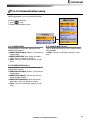
5-3 Communication setup.................................................... 49
5-3-1 NMEA 2000............................................................................................ 49
5-3-2 NMEA 0183-Port 1 ................................................................................. 49
5-3-3 NMEA 0183-Port 2 ................................................................................. 49
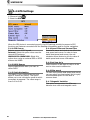
5-4 GPS Settings ................................................................. 50
5-4-1
5-4-2
5-4-3
5-4-4
5-4-5
5-4-6
5-4-7
GPS Source............................................................................................ 50
DGPS Source ......................................................................................... 50
Static Navigation.................................................................................... 50
Speed Filter and Course Filter ................................................................ 50
Lat/Lon d.p’s ......................................................................................... 50
Ship speed ............................................................................................ 50
Magnetic Variation ................................................................................. 50
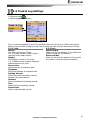
5-5 Track & Log Settings...................................................... 51
5-5-1 Track ..................................................................................................... 51
5-5-2 Logs ...................................................................................................... 51
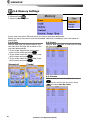
5-6 Memory Settings ........................................................... 52
5-6-1
5-6-2
5-6-3
5-6-4
5-6-5
Save ...................................................................................................... 52
Load...................................................................................................... 52
Delete ................................................................................................... 52
Format .................................................................................................. 53
Screen snap shot ................................................................................... 53
5-7 AIS Settings .................................................................. 53
5-7-1
5-7-2
5-7-3
5-7-4
Display filter .......................................................................................... 53
Alarm option.......................................................................................... 54
Display options ...................................................................................... 54
Restore default ...................................................................................... 54
5-8 Alarms......................................................................... 55
5-8-1 Fish ....................................................................................................... 55
5-8-2 Deep ..................................................................................................... 55
5-8-3 Shallow ................................................................................................. 55
5-8-4 Temperature .......................................................................................... 55
5-8-5 Temperature rate ................................................................................... 55
5-8-6 Low battery ........................................................................................... 55
5-8-7 Navigation alarms .................................................................................. 55
5-8-8 AIS........................................................................................................ 55
5-8-9 DGPS..................................................................................................... 55
5-8-10 Restore default .................................................................................... 55
5-9 Others.......................................................................... 56
5-9-1 Simulate ................................................................................................ 56
5-9-2 Waypoint ............................................................................................... 56
5-9-3 GPS ....................................................................................................... 56
Installation and Operation Manual
7
5-9-4
5-9-5
5-9-6
5-9-7
5-9-8
Units ..................................................................................................... 56
Comms.................................................................................................. 56
Time...................................................................................................... 56
Restore default ...................................................................................... 56
Calendar................................................................................................ 56
6 INSTALLATION
6-1
6-2
6-3
6-4
6-5
6-6
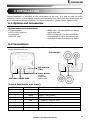
Options and Accessories ........................................................ 57
Connections ......................................................................... 57
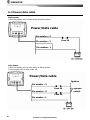
Power/data cable.................................................................. 58
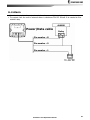
Alarm .................................................................................. 59
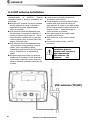
VHF antenna installation........................................................ 60
GPS antenna ........................................................................ 61
6-6-1 GPS antenna of BNC type ...................................................................... 61
6-6-2 The antenna using NMEA....................................................................... 61
6-7 NMEA 0183 .......................................................................... 62
6-8 NMEA 2000 .......................................................................... 63
6-9 Setup and test...................................................................... 63
8
Installation and Operation Manual
1 Introduction
1-1 Summary
AIS is a spearhead equipment to provide
voyage information such as ship’s position,
course, speed, etc. real time. This is to
protect the marine collision of ships,
obligations, IMO promotes. AIS induction
makes it possible to recognize the existence
of other ships & progress status, even if
radar cannot recognize ships around. Under
the poor field of visions, this can discern ship
name, course, speed, which can make safety
managements such as ship collision
protection, broad area control, search &
rescue, etc, more efficiently. AIS is using VHF
frequency.
In
1997,
International
Telecommunication Union World Radio
communication Conference specified two
VHF frequencies (161.975 MHz - 87B channel
& 162.025 MHz - 88B channel) for AIS.
AIS-50N has high efficiency AIS Class B. It
provides plotter functions, needed in voyage.
Some functions can be used with
establishment of option devices and sensors
only.
AIS-50N can be connected to outer devices,
which have NMEA0183 or NMEA 2000. It can
display relevant information.
ex.)
• Navtex
• DSC VHF radiotelegraph
• Auto Navigation equipment
1-2 AIS Technology Summary
Communication methods of AIS are simplex,
semi-duplex, or duplex operation of TDMA
(Time Division Multiple Access). Allowance of
occupied bandwidth is within 25㎑. These are
classified into A Class & B Class transceivers,
equipped on vessels, according to uses.
► A Class transceiver : Mandatory installed
in international passenger ships & oceangoing ships over 300ton. Ship positions
should be reported on voyage.
► B Class transceiver : Mainly installed in
small ships of length under 65 feet.
4 data information, used in AIS are as
followings.
► Safety Related Message : This is
according to requirement of message,
includes voyage information or weather
warning.
► Static Information : IMO number, call
sign & vessel name, length & width of
vessel, vessel type. Renewal of antenna
positions (division of vessel prow, stern &
left light sides) of GPS is done every
6 minutes or when data are revised, or
there is a demand.
► Dynamic Information : Accurate mark of
ship position, overall status, Coordinated
Universal Time (UTC), course, speed,
heading, voyage status, yaw angle &
sensor information. These are renewed by
interval of following table, according to
change of speed & direction.
► Voyage Related Information : Draft,
risk cargo, destination & ETA, route plan &
boarding persons. Renewal is done every 6
minutes or when data are revised, or there
is a demand.
Installation and Operation Manual
9
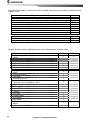
Intervals of Information renewal are shown by table, according to ship status, classified by two
Classes of AIS.
Ship status (A Class)
Under speed 3 knots, in anchorage or moorage
Over speed 3 knots, in anchorage or moorage
Under 14 knots in voyage
Under 14 knots in changing courses in voyage
Over 14 knots under 23 knots in voyage
Over 14 knots under 23 knots in changing courses in voyage
Over 23 knots in voyage
Over 23 knots in changing courses in voyage
Interval
3min.
10sec.
10sec.
3⅓sec.
6sec.
2sec.
2sec.
2sec.
Ship status (B Class)
Interval
3min.
30sec.
Under 2 knots in voyage
Over 2 knots in voyage
General Overall contents, explained above, can be summarized as below table.
Data
Static Information of radio station
- MMSI
- vessel name
- vessel type
- call sign
- IMO number
- antenna position
Voyage Related Information
- draft
- boarding persons
- risk cargo
- destination & ETA
Dynamic Information of radio station
- Universal Time Coordinated. (UTC)
- ship position
- course(COG)
- speed(SOG)
- heading
- turn rate
- voyage status
- ship speed
- ship status
Safety Related Message
- alarm
- safety
10
Installation and Operation Manual
A Class
B Class
1-3 Specification
[AIS-50N]
GENERAL
Category
Size
Display
Supply voltage
Supply current
External beeper or light
output
Operating temperature
Detail
164 mm(H) x 183 mm(W) x 92.5 mm(D)
5.6” diagonal, TFT color, 480 x 640 pixels.
10 to 34 V DC
13.8 V
24 V
1A - AIS receiving by mode
0.5A - AIS receiving by mode
2A - AIS transmitting mode
0.9A - AIS transmitting mode
Switched to ground to sound alarm, 30V DC, 200 mA maxmum
-10° to 50°C
ALARMS
User set up: Arrival, Anchor, deviation, risk, low voltage, AIS risk vessel, AIS approaching
GPS NAVIGATION
Chart card
User card
Waypoints
Routes
Tracks
Chart datums
Chart scale
C-MAP™ SD Card (NT-MAX, NT+ or NT)
SD Card
Up to 10,000, with default or user defined alphanumeric names up to
eight characters.
100 Routes, with up to 100 points each
By time or distance, 10 track of 15,000 points
216 Chart datums, One user-defined map shift.
0.2 to 500 nm for chart (chart dependent) down to 0.005 nm in plotter
mode.
COMMUNICATIONS
NMEA
NMEA 0183(1) Inputs from
compatible instruments
NMEA 0183(1) Outputs, for
compatible instruments
NMEA 0183(2) Inputs from
compatible instruments
NMEA 0183(2) Outputs, for
compatible instruments
NMEA 2000 Inputs from
compatible instruments
NMEA 2000 Outputs, for
compatible instruments
NMEA 0183 4800, 9600, 38400 baud, NMEA 2000
DBK, DBS, DBT, DPT, GGA, GLL, GNS, GGA, GSV, HDG, HDT, MDA,
MTA, MTW, MWD, MWV, RMC, RPM, VHW, VTG, VWT, ZDA
APA, APB, BWR, GGA, GLL, GSA, GSV, RMB, RMC, VTG, XTE, DBT,
DPT, MTW, VHW, XDR
GGA, GLL, HDT, RMC, GSV, SSD, VSD
GGA, GLL, HDT, RMC, GSV, VDM, VDO, ALR, TXT, ACS, ACA, ACK, GSB
System date and time(PGN126992),Vessel
Heading(PGN127250),Engine parameters/Rapid Update(PGN127488),
Engine parameters/Dynamic(PGN127489),Trip
parameters/Engine(PGN127497),Engine
parameters/Static(PGN127498),Fluid level(PGN127505),Water
Speed(PGN128259),Water depth(PGN128267),Position/Rapid
Update(PGN129025),COG & SOG/Rapid Update(PGN129026),GNSS
Position Data(PGN129029),GNSS DOPs(PGN129539),GNSS Sats in
View(PGN129540),Wind Data(PGN130306),Environmental ParameterWater temp(PGN130310),Environmental Parameter(PGN130311)
Water Speed(128259), Water depth(128267), XTE(129283), NAV.
data(129284), NAV. data(129285), COG & SOG(129026), GNSS
position(129029), Water temp.(130310)
AIS
VHF Transceiver
Transmitter x 1
Receiver x 2
Channel Bandwidth
Communication
Antenna Impedance
Frequency stability
Frequency: 156.025 to 162.025 MHz in 25 kHz steps
Receiver 1. default CH is 87A, AIS (161.975 MHz)
Receiver 2. default CH is 88B, AIS (162.025 MHz)
25 kHz
Simplex & semi-duplex operation
50Ω(TNC)
±10 PPM(-20℃ to +60℃)
Installation and Operation Manual
11
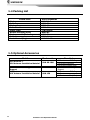
1-4 Packing List
Item List
Part number
Display
Bracket
Display Cover
Protection Cover
Power Cable
Bracket mounting screw
Flush mount Kit (Including screw)
Cable tie
User’s Manual(Eng)
AIS-50N-E
N560-DB
N560-CB
N560-CC
LTW-2000-8
N560-BP
N560-TK
N560-CK
AIS-50N-ME
1-5 Optional Accessories
Model
Part number
GPS Antenna +
GPS Antenna Installation Material
GPS Antenna Stand type
Support
VHF Antenna +
VHF Antenna Installation Material
12
SAN-60-10M
57745
SAN-150
Installation and Operation Manual
Item List
GPS antenna + BNC Plug
GPS antenna support
GPS antenna cable(10m)
GPS Antenna Stand type
Support
VHF antenna + TNC Plug
VHF antenna support
VHF antenna cable(15m)
2 Getting Started
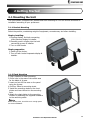
2-1 Mounting the Unit
The chart plotter is supplied with bracket and flush mounting kit. You can choose a method of
installation according to your preference.
2-1-1 Bracket Mounting
Select the position, considering weight of equipment, conveniences, etc before installing.
Display installing:
1 Gripping display, find both connecting
joints between display & installer.
2 Smoothly push in display into the both
connecting groove of installer.
3 Turn on both knobs.
Display separation
1 Switch off the device.
2 Turn off both knobs & separate display &
installer.
2-1-2 Flush Mounting
1 Find a location for flush mounting.
2 Drill a hole in the area of the cutout area
for the blade of jig saw.
3 insert and cut out the area on the panel
using the jig saw
4 Drill four holes for mounting studs.
5 Install the mounting studs on the chart
plotter and insert them into the mounting
hole.
6 Attach the chart plotter to the mounting
location by attaching the supplied hardware
to the mounting studs.
Note
Before drilling work, check if there is enough space
for device installation.
Installation and Operation Manual
13
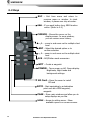
2-2 Keys
ESC – Exit from menu and return to
previous menu or window. In chart
window, it places own ship at center.
SRM – If you push button long, SRM function
works. (Refer to 2-5)
CURSOR – Moves the cursor on the
display screen. In sonar window,
you can review sonar history.
-,+ – zoom in and zoom out to multiple chart
level
ENT – Select the desired option or to
confirm selection
-,+ – zoom in and zoom out to multiple chart
level
AIS – AIS/Plotter mode conversion
WPT – Create a waypoint.
POWER – Turns power on/off. Opens display
Brightness, Night mode and
background settings.
SD Card – Open the cover to install
SD card
GOTO - Start navigating to a destination
point such as a MOB waypoint,
waypoint.
PAGE – Show main windows and allow you to
setup displays as you like.
MENU – Access to setting menu - Show
available options of current window.
14
Installation and Operation Manual
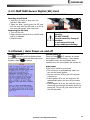
2-3 C-MAP MAX Secure Digital (SD) Card
This section provides instructions for inserting and removing C-MAP MAX SD card procedure.
Inserting the SD Card
1 Hold the SD card so that you can
see the C-Map label.
2 Open the door, gently push the SD card
into the slot; push the SD card in as far as
you hear click sound, then close door.
Removing the SD Card
1 Turn off the unit.
2 Open the door and push in on the SD card
until it is released.
3 Close the door.
Insert C-MAP SD card
correctly.
(DO NOT FORCE)
Close SD card door firmly all
the times.
Do not remove SD card
during reading and writing.
2-4 Manual / Auto Power on and off
Manual power on
Press
and hold until the display shows
the start up page. When the Warning screen
to accept.
appears, press
Manual power off
Press and hold
for 5 seconds. A counter
timer appears on the screen, if you release
the button before the countdown timer
reaches zero, the chart plotter will remain On.
Auto power
If the unit is wired for auto then:
• The unit turns on automatically when you
turn on the boat’s ignition.
• You can not turn off the unit if the ignition
is turned on.
• If Auto power off is set, the unit turns off
automatically when you turn off the boat’s
ignition.
• If Auto power off is set, the unit will not be
turned off even though the boat’s ignition is
turned off. To turn off, you need to turn off
the unit manually.
Installation and Operation Manual
15
2-5 SRM(Safety Related Message)
Users can set up 15 letters. If you push SRM
button, set up message is transmitted.
If you push SRM button long, counter is
displayed. In 3 seconds (3->2->1), setup
message is transmitted.
SRM function of AIS-50N is made to meet
62287-1 Message 14 standard of
IEC(International. Electrotechnical
Commission) Users can set up SRM, which
they want, referring to 3-5-1.
SRM does not work, when
equipment does not receive
GPS signals.
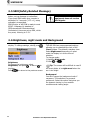
2-6 Brightness, night mode and Background
You can change the screen setting for the
display. To change settings, shortly press
.
Brightness
To change the brightness, select
Brightness, and press
to dim or
to
brighten.
Press
to return to the previous screen.
Night mode
The AIS-50N has preprogrammed settings
allowing you to customize the look of the
Chart window. The default is daytime view.
Select Night mood depending on what
mode the display is in at the time of
selection.
To change mode:
1 Highlight Night mode.
2 Press
or
.
Tip: The screen will be difficult to read if
the chart plotter is in night mood when the
sun is too bright
Background
You can Changes the background color if
necessary. This selection is a personal
preference. Select the option that gives you
the clearest viewing in your weather
conditions and viewing angle.
16
Installation and Operation Manual
3 AIS Function Explanation
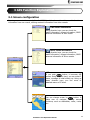
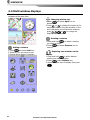
3-1 Screen configuration
Opening screen is the vessel list of AIS-50N, which shows the distances & directions
information from own vessel, utilizing received information from other vessels.
Own vessel information
Using direction keys, you can check the
static Information, voyage information, GNSS
antenna information of own vessel.
Other vessel information
Using direction keys, you can check the
static Information, voyage information, GNSS
antenna information of other vessels.
AIS
If you push
button, it becomes AIS
screen. Using direction keys, you can select 2
items, message & initial setting up. Using up
down direction keys, you can move to
detailed menus of 2 items.
Plotter
You can change screen by
button. It
helps user to navigate, utilizing several
functions, such as destination, wake, route,
etc.
Installation and Operation Manual
17
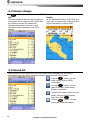
3-2 Screen change
By
button you can change screen(AIS/Plotter).
AIS
AIS is the system to discern vessel position &
information. As the main function of AIS-50N,
this shows on screen the distances &
directions information from own vessel,
utilizing received information from other
vessels.
Plotter
As the additional function of AIS-50N, this
helps user to check easily, displaying other
ship’s movements on marine chart.
3-3 Vessel list
Opening screen is the vessel list of AIS-50N, which shows the distances & directions
information from own vessel, utilizing received information from other vessels.
: Pushing
button, you can
check vessel name or MMSI
information.
: Pushing
button, you can
select the lineup.(vessel name /
distance / direction)
: Selecting the vessel, which user will
check, using up down direction
keys, then push
.
: Pushing
button, you can
check own vessel information.
18
Installation and Operation Manual
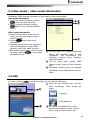
3-4 Own vessel / other vessel information
Using own vessel / other vessel information, user can check the static Information, voyage
information, GNSS antenna information of own vessel or other vessels easily.
Own vessel information
1 Check own vessel information, pushing
①
button in vessel list screen
②
2 Return to vessel list screen, pushing
button in own vessel information
screen.
Other vessel information
1 Select the other vessel, which user will
check, using up down direction keys in
vessel list screen.
2 Pushing
, check other vessel
information.
3 Using left right direction keys, select one
among 3 items(static, voyage, GNSS
antenna), which user wants to check.
4 After checking information, return to vessel
list screen, pushing
in other vessel
information screen
③
① You can check GPS (DGPS) connecting
status, VHF reception, date & time
information,
AIS
transmitting
(red
flickering), receiving (green flickering)
status information.
② You can select static, voyage, GNSS
antenna items, using left right direction
keys.
③ Information window shows the detailed
information of the selected item among 3
items.
3-5 AIS
This shows 2 items, voyage related message(necessary in AIS) & initial information setting up
on screen. Pushing
in vessel list screen, you can move to AIS screen.
① Using left right direction keys, you can
select 2(message, initial setting up)
items.
①
②
:
message
:
initial setting up
② This shows the detailed items of the
selected item between 2 items. You can
move, using up down direction keys.
Installation and Operation Manual
19
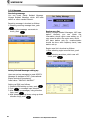
3-5-1 Message
Receiving message
You can check Safety Related Message,
Voyage Related Message, which AIS base
station or other vessels transmit.
Receiving message is checked as follows.
1 Selecting receiving message item, push
.
2 Selecting the message, use wants to
check, push
.
Region area list
Among Voyage Related Messages, AIS base
station transmit, you can check the
information about region area setting up. If
own vessel is within the region area, which
AIS base station sets up, communication
should be done with frequency band, base
station set up.
Region area list is checked as follows.
1 After selecting region area list item, push
.
2 After selecting area item, which user will
check, push
.
Safety Related Message setting up
Users can set up messages to meet 62287-1
Message 14 standard of IEC. (International.
Electro technical Commission)
Initial value: “MAYDAY! MAYDAY!”
Setting up SRM is as follows.
.
1 Selecting SRM setting up item, push
2 Push
in message input window.
3 After setting up messages, using direction
keys, push
.
4 After selecting saving items, using up down
direction keys, push
.
20
Installation and Operation Manual
Sensor information
You can check the status of sensor,
Input to AIS in voyage.
► GNSS : Check GPS receiving status
► speed : Check if vessel moving speed data
are input
► course : Check if vessel moving course
data are input
► head direction : Check if vessel head
direction data are input
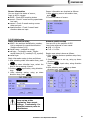
3-5-2 Initial setup
Static information setup
► MMSI : As maritime identification number,
this is assigned for vessel identification.
(9digits-number(0~9))
► vessel name : marked on vessel
► call sign : To identify vessel.( 7digitscapital letter(A~Z), number(0~9), symbol)
► vessel type
Static information setup is done as follows.
1 After selecting static information item, push
.
2 Using up down direction keys, select the
item to set up among 4 items.
3 Pushing
, input value, using direction
keys.
4 After selecting saving, using up down
direction keys, push
.
Sensor information are checked as follows.
1 After selecting sensor information item,
push
.
2 Check the status of sensor.
Antenna position setup
You can set up the position of GPS
inner/outer antenna of own vessel.
► A+B = 0~511m
► C+D = 0~63m
Region area setup is done as follows.
1 After selecting antenna position setup item,
.
push
2 Select the item to set up, using up down
direction keys.
, input value, using direction
3 Pushing
keys.
4 After selecting saving, using up down
direction keys, push
.
Static information can be
once set up at the
beginning. User cannot
change it voluntarily. For
detailed contents, refer to
distributors.
Installation and Operation Manual
21
4 General Operation
4-1 Chart Selection
A user can select a map between C-MAP and
S-MAP.
Chart Selection
.
1 Press and hold
2 Select the system setting icon.
3 Select Chart then a chart you prefer.
S-MAP is a preinstalled chart but
optional C-Map Max
can be used. Please
contact your nearest
Samyung ENC office
for purchasing the CMap
4-2 Simulate Mode
Simulate Mode is great for practicing the actual use of a product when the satellites signals
and internal alarms are not available. In the simulate mode, the unit turns the GPS receiver off
and ignores data from all optional devices.
Two simulate modes are available as below.
• Normal: Allows a user to practicing the
actual use of a product without satellites
connection.
• Demo: boat travel alone given route at
given speed and show different function of
the unit.
Do not try to navigate in a
simulate mode. While the
simulate mode is turned on,
the GPS receiver is not
active.
4-3 Data Bar
Data bar displays useful navigation
information at the top of the display.
Displaying Data bar
1 Press
and select Data bar.
2 Select Data bar.
22
Installation and Operation Manual
Setting the data displayed in data bar
and select Data bar.
1 Press
2 Select Data bar then Data bar setup.
3 Move the cursor key to highlight the data
field you want to change then press
.
4 Select Data type.
5 Select a desired data you want to display in
the field then press
.
6 Repeat above steps if necessary.
Selecting the Data bar size
1 Press
and select Data bar.
2 Select Data bar then Data bar size.
3 Select the desired size of data bar.
[Large]
[Small]
Tip: If you select None for all data fields,
the data bar will disappear to save space for
the chart.
Tip: Even though you setup a data bar
for specific window, the data bar is not apply
to all other window.
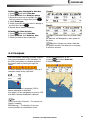
4-4 Compass
The chart plotter computes compass direction
from the constellation of GPS satellites. For
the GPS chart plotter to compute direction
the vessel must be moving through the
water.
To turn the compass off or on:
and select Data bar.
1 Press
2 Select Compass.
For easy reading and recognition, there is a
compass needle at top right side.
When the compass is displayed, COG is
always displayed in data field.
Also when you are navigating to a point, COG
and BRG is always displayed in data bar.
Tip
COG(Course Over Ground) – The course you
vessel is heading.
BRG(Bearing) – The direction from your
current position to a destination point.
Installation and Operation Manual
23
4-5 Multi window displays
The Chart plotter can display up to four
windows at the same time.
Changing window size
1 Press
and select Split icon on
bottom.
or
to change the height of the
2 Press
windows if there is only two windows. If the
unit is displaying more that three windows,
press
,
,
or
to change the
height of the windows.
Deleting a window
1 Press and hold
to select a window
you want to delete.
and select Remove icon to
2 Press
remove.
Adding a window
1 Press
and select Add icon.
2 Select an icon you want to add.
3 Repeat above steps if necessary.
24
Replacing two windows on the
display
1 Press and hold
to active desired
window you want to replace.
2 Press
, select Replace icon.
3 Select icon you want to display then press
.
Installation and Operation Manual
The active window
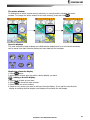
To distinguish an active window among windows, an orange border indicates the active
window. To change the active window to the next window, press and hold
.
Favorite displays
The most commonly used windows are called favorite displays and up to six favorite windows
can be saved. Also each favorite display can have data bar and compass.
Displaying a favorite display
1 Press
twice.
2 when above window pops up select a desire display you want.
Adding a favorite display
1 Organize a window as you want.
2 Press
to show the main window.
3 Select Save icon at the bottom
4 Select an icon where you want to add your favorite display. If you add the new favorite
display on existing favorite display new display will overwrite the old display.
Installation and Operation Manual
25
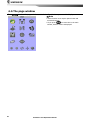
4-6 The page window
Press
to show the page window and select a function icon you want to display.
Note
1 Some function icons require optional units and
connected sensors.
2 If you press
one more time in the main
window, favorite window is displayed.
26
Installation and Operation Manual
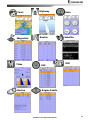
Chart
Waypoints
Tides
Navtex
Highway
Data
Routes
Satellite
AIS
DSC
Engine Faults
Installation and Operation Manual
27
4-7 Chart
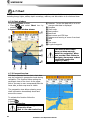
The Chart window mainly shows all relevant navigation data available on your preloaded maps,
including buoys, lights, cables, depth soundings, marinas, and tide station in an overhead view.
4-7-1 Chart window
To go to the Chart window:
• Press
and select Chart icon by
pressing
.
A typical Chart window shows:
②
①
③
⑧
⑤
⑪
④
⑨
⑦
⑥
① Data bar. To turn the data off or on or to
change what data is displayed
② Compass
③ Chart scale
④ Boat position
⑤ Boat track
⑥ Boat course and CDI lines
⑦ Distance and bearing of cursor from boat
⑧ Land
⑨ Sea
⑩ The cursor
⑪ A typical waypoint
The built-in world chart
does not show enough
detail for navigation. When
you use the Chart Plotter to
navigate, always use a chart
card which covers the
region.(C-MAP)
⑩
4-7-2 Perspective view
If C-Map is selected for the chart, chart data
may be projected in perspective mode during
navigation. This function allows setting the
panoramic view of the chart. As the upper
side of the map is more compressed than the
lower side, a wider map area is visible.
The perspective view allows showing more
chart information immediately ahead and
around the cursor.
To activate this function follow the
procedure:
1 Press
.
2 Select Perspective.
S-MAP does not support the
Pespective View.
(See 4-1 for chart selection)
28
Installation and Operation Manual
4-7-3 Latitude and longitude
Latitude and longitude coordinates define a
position on earth and can be displayed in
data bar.
In the data bar, own ship position is shown
as below:
47° 43.000’ N or S Latitude
003° 21.656’ E or W Longitude
However, if you move the cursor, then the
latitude and longitude in the data bar is the
cursor’s position as below.
47° 43.325 N or S Latitude
003° 29.607 E or W Longitude
Info
Latitude: Angular distance North or South of
the equator measured by lines encircling the
earth parallel to the equator in degrees from
0° to 90°.
Longitude: angular distance North or South of
the equator measured by lines encircling the
earth parallel to the equator in degrees from
0° to 90°.
When reading the boat
position, make sure the
position is not the cursor
position.
4-7-4 Chart scale
The chart scale change by pressing
to
show more detail information of chart and by
to show wider view of the chart.
When you press
or
, the scale of
chart is display in the chart on top left corner.
4-7-5 Finding a chart symbol
This function is only available when C-MAP
SD card is inserted and C-map is selected.
To find a port by name
.
1 Press
2 Select Find then Port by name.
3 Press
or
to select a letter then press
for next letter.
4 Once you enter the name of port, press
.
5 After searching process, select a nearest
port in the list then the cursor will place on
the port you selected on the chart window.
6 Repeat 2-3 steps of D section to display the
information.
S-MAP does not support this
function.
(See 4-1 for chart selection)
To find port & service
1 Press
.
2 Select Find then Port & service.
3 Select a service you want to find.
4 After searching process, select a nearest
service area in the list then the cursor will
place on the service area you selected on
the chart window.
Installation and Operation Manual
29
4-7-6 S-Map search
This function is available when C-MAP SD
card is inserted and C-map is selected.
To find port & service
1 Press
.
2 Select Find then Port.
3 Press
or
to select a port then
.
4 After searching process, select a nearest
port in the list then the cursor will place on
the portyou selected on the chart window.
C-Map Chart does not
support this function.
(See 4-1 for chart selection)
4-7-7 Chart symbols and information
This function is only available when C-MAP
SD card is inserted and C-map is selected.
Using C-Map Max card allows you to show
different kind of symbols and their
information on chart plotter display. On some
objects such as a port, you can see a picture
of landscape layout.
S-MAP does not support this
function.
(See 4-1 for chart selection)
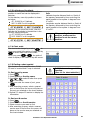
[Chart symbol Data Box]
To display information
1 Move cursor on an icon to display its name.
2 Press
and select Chart info.
3 Move cursor key to highlight an item and
.
press
4 Information related to the item appears at
the bottom window.
[Chart info]
4-7-8 Introduction to navigating
Use the navigation chart to plan your course, view map information, and as a navigational aid.
This unit has two ways of navigating, going straight to a waypoint or following a route (a
group of waypoints).
30
Installation and Operation Manual
4-7-9 Going to a waypoint or to a point on the chart
A waypoint is a particular location on a voyage whether it is a starting, intermediate or
destination point. A waypoint is the simplest piece of information your equipment requires to
get you to a destination. In the shortest distance possible. This unit can save up to 10,000
waypoints.
Goto Cursor Option
Find Option
1 Press
1 Press
and select the Chart window.
and select the Chart icon.
2 Move the cursor to the destination point.
2 In the Chart window, press
and
3 Press
and select Goto cursor to
select Find then Waypoints.
start navigating.
3 select a waypoint to start navigation.
Goto WPT Option
1 Press
and select the Chart window
Make sure the course does
2 Move the cursor to place cursor on a
not pass over land or
waypoint.
dangerous waters.
3 Press
and select Goto WPT to start
navigating.
Cancelling navigating
1 Press
2 Press
and select the Chart icon.
and select Cancel Goto.
4-7-10 Following a route
Often a trip from one place to another involves several course changes, requiring a series of
route points (waypoints) which you navigate to, one after another. The sequence of waypoints
leading to the ultimate destination is called a route. You can save up to 100 routes and a route
may consist of 100 waypoints.
Create Route Option
Start Route Option
1 Press
1 Press
and select the chart window.
and select the chart window.
2 Press
and select Start Route.
2 Select New route.
3 Name a route name.
3 Move cursor keys to select a route to start
4 Move cursor keys to select a waypoint.
navigating.
(Repeat this step as much as you need)
4 Select Forward or Reverse to decide
and select Add.
5 Press
which direction you want to navigate.
6 Press
.
Route Window Option
7 Repeat 2-4 steps of Route window option.
and select the routes window
1 Press
2 In the route window, mover the cursor to
Skipping a waypoint
highlight a route you want to start
1 Press
and select the chart window.
navigating to.
2 Press
and select Skip.
3 Press
and select start
3 Repeat above step if necessary.
4 Select Forward or Reverse to decide
which direction you want to navigate.
Cancelling a route
1 Press
and select the chart window.
2 Press
and select Cancel route.
4-7-11 Goto Key
This key is very useful when you desire to
start navigating to a destination point. When
the key is pressed, it starts navigating to the
point of the cursor or Route.
Going to a point
1 Move the cursor to an open position.
2 Press
.
Installation and Operation Manual
31
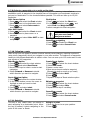
4-7-12 Distance and bearing calculator
The unit can show the bearing and the length
of leg and the total distance of legs.
Setting Legs
1 In the chart window, press
and
select Distance. Information is displayed
on window showing bearing/leg
distance/total distance at bottom pop up at
the bottom left side
2 Move the cursor to the start point which is
start point of first leg and press
.
3 Move the cursor to a point which is the end
of first leg.
4 Repeat 2-3 steps for more legs.
5 Press
to exit.
Saving as a route
1 Once you set all the legs, press
and
select Save.
or
2 Enter a route name by pressing
to select a letter then press
for next
letter.
3 Press
to save the new route.
Tip: Bearing and distance
Deleting the last leg
and select Remove.
1 Press
2 Repeat above step if you want to remove
more legs.
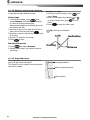
4-7-13 Projected course
The projected course shows you how far it
can go at give time and speed.
This function is very useful to avoid collusion
with other vessels.
Projected position
Boat’s projected course
Boat position
32
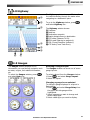
Installation and Operation Manual
4-8 Highway
①
②
③
④
The Highway window shows a 3D view of
the vessel traveling through the water when
navigating to a destination point.
To go to the Highway window, press
and select Highway icon.
The Highway window shows:
① Compass.
② Data bar.
③ Destination waypoint.
④ Boat’s plotted course to destination.
⑤ DTG scale (Distance To Go).
⑥ BTW scale (Bearing to waypoint).
⑦ CDI (Course Deviation Indicator).
⑧ XTE scale (Cross Track Error).
⑤
⑥
⑧
⑦
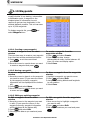
4-9 Gauges
The Gauges window displays all the
information you need during navigation such
as water, engine, fuel related information,
etc.
To select the Gauges window, press
and select Data icon.
Selecting a Gauges layout
The Gauges window can show one of seven
gauge layouts.
To select a layout from the Gauges window:
1 Press
and select Gauge Layout.
2 Select one layout.
Changing a gauge in one selected
To change a gauge displayed in a layout in
Data display.
1 Press
and select Gauge Setup then
the upper left side gauge will be
highlighted.
2 Select a gauge you want to change and
select Gauge type.
3 Select a data type you want to display.
Installation and Operation Manual
33
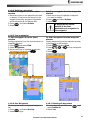
4-10 Waypoints
A waypoint is a particular location on a
voyage whether it is a starting, intermediate
or destination point. A waypoint is the
simplest piece of information the unit
requires to get you to a destination in the
shortest distance possible. This unit can save
up to 10,000 waypoints.
To display waypoint list, press
select Waypoint icon.
and
4-10-1 Creating a new waypoint
To create a waypoint from the chart
window
There are two ways to create a new waypoint
from the chart window as described below:
1 Press
on at the current boat
position.
2 Move the cursor to a point where you want
to create a waypoint and press
.
4-10-2 Moving a waypoint
To move a waypoint from the chart
window
1 Move the cursor to place it on the waypoint
you want to move. (If you move the cursor
on the waypoint correctly, waypoint
information will be displayed at the bottom
left).
2 Press
and select Move.
3 Move the cursor to a point where you want
to move and press
.
4-10-3 Editing an existing waypoint
To Edit a waypoint from the chart
window
1 Move the cursor to the waypoint you want
to edit. (If you move the cursor on the
waypoint correctly, waypoint information
will be displayed at the bottom left)
2 Press
and select Edit.
3 Edit waypoint data as you need and press
.
34
To create a waypoint from the
waypoints window
1 Press
and select Create.
2 Enter waypoint data, change
alphanumerical name, choose between 48
icons, 16 colors and display option.
3 Select Save.
To Move a waypoint from the waypoints
window
1 Highlight a waypoint you want to move.
2 Press
and select Edit.
3 change the existing latitude and longitude
to new position.
4 Select Save.
To Edit a waypoint from the waypoints
window
1 Move cursor key to highlight a waypoint
you want to edit.
2 Press
and select Edit.
3 Edit waypoint data as you need and press
.
Installation and Operation Manual
4-10-4 Deleting a waypoint
To delete a waypoint from the chart
window
1 Move the cursor to the waypoint you want
to delete. (If you move the cursor on the
waypoint correctly, waypoint information
will be displayed at the bottom left)
2 Press
and select Delete.
3 Select Yes.
4-10-5 Find a waypoint
To find a waypoint from the chart
window
Finding waypoints from the chart window is a
simplified function.
1 Press
and select Find.
2 Select Waypoints.
3 Move cursor key to highlight a waypoint
you want to find and press
.
4-10-6 Sort Waypoints
To change the order of displayed waypoint
list:
1 Press
and select Sort by.
2 Select a sort type.
Deleting a waypoint from the waypoints
window
1 Move cursor key to highlight a waypoint
you want to delete.
and select Delete.
2 Press
3 Select Yes.
A waypoint can not be
deleted if the final
destination of navigation is
the waypoint.
To find a waypoint from the waypoint
window
Finding waypoints from the waypoint window
is provided by a full function.
1 Press
and select Find.
2 Press
,
,
or
to find a waypoint
name.
3 Select
.
4-10-7 Deleting all waypoints
1 In the waypoints window, press
select Delete all.
2 Select Yes.
Installation and Operation Manual
and
35
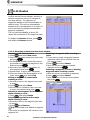
4-11 Routes
A trip from one place to another often
involves several course changes, requiring a
series of waypoints which you navigate to,
one after another. The sequence of
waypoints leading to the final destination is
called a route. The unit can automatically
advance to the next waypoint on a route. So
you do not have to change the destination
waypoint repeatedly.
The unit has the capability to store 100
routes with maximum of 100 waypoints each.
To display the Routes window, press
and select the Routes window.
4-11-1 Managing a route from the chart window
Creating a new route window
Inserting a waypoint while creating a
1 Press
and select New route.
route
1 If you want to insert a waypoint between
2 Enter the new route name using cursor key
waypoints which will be just after the one
.
and press
you want to insert.
3 On the Chart window, move the cursor to
and select Insert.
2 Press
the position of the starting waypoint in the
3 Move the cursor to the new inserted
Route and press
.
waypoint and press
4 Move the cursor keys to the position of
.
next waypoint and press
.
Inserting a waypoint in front of starting
5 Repeat step 4 to enter more waypoints.
waypoint while creating a route
6 Once you entered the last waypoint in the
1 Move the cursor to the starting waypoint
route, press
and select End.
2 Press
and select Insert.
Editing a waypoint in route while
3 Move the cursor to the new start location
creating a route
and press
.
1 Move the cursor to the waypoint you want
to move.
2 Press
and select Move.
3 Move cursor to a position where you wan
to move the waypoint and press
.
Deleting a last waypoint from the route
while creating a route
1 Press
and select Delete.
Deleting a waypoint from the route
while creating a route
1 Move the cursor to the waypoint you want
to remove.
2 Press
and Remove.
Tip: Even though you deleted a waypoint
in the route, the waypoint still remains in the
waypoint list.
36
Installation and Operation Manual
4-11-2 Managing a route from the route window
Creating a rout from the route window
Deleting a waypoint in the waypoint list
1 To go to the Route window, press
1 Highlight a waypoint you want to delete in
the waypoint list.
and select the Route icon
and select Remove.
2 Press
select Create
2 Press
3 If you want to enter a route name,
Deleting a route in the route window
highlight name and press
.
1 Highlight a route you want to delete.
4 Press
and press
.
and select Delete.
2 Press
5 Press
or
to highlight a waypoint
6 Press
to insert a waypoint
Deleting all route in the route window
7 Repeat step 5 and 6 until you create a
1 Press
and select Delete All.
route
8 Press
to exit
Displaying a route in the Chart window from
the route list:
Inserting a waypoint between two
1 Highlight a route you want to display in the
waypoints
Chart window.
1 In the Route window, select a route you
2 Press
and select Display.
want to insert in the route list and press
or press
and select Edit.
2 Highlight a leg where you want to insert a
waypoint
and select insert
3 Press
4 Highlight a waypoint and press
.
5 Press
to exit
Editing a route in the chart window
1 In the route list, press
and select
Edit on chart.
2 Follow the procedure of “Editing a waypoint
in route while creating a route “
Installation and Operation Manual
37
4-12 Satellites
4-12-1 Satellite information
Acquiring GPS signals
When the unit is first turned on it will take
some time for the GPS signal acquiring. After
signals are received, the unit will
automatically find a position of boat in the
chart window.
Satellite information window
The satellite window displays different
information about the GPS satellites and GPS
position as below.
To go to the satellite window, press
and select Satellite icon.
① Ship’s Coordinates.
② Time received GPS satellites.
③ Date received GPS satellites.
④ HDOP: Horizontal Dilution of Precision. It
is a parameter indicating the accuracy of
the GPS.
⑤ Location of GPS Satellites.
⑥ GPS signal strengths status in graph.
Press
to display GPS signal information
from GPS satellite in NMEA0183 data format
at the GPS signal strengths status display.
To return to GPS signal strengths status
display, press
again.
The satellite window shows:
①
⑥
②
③
④
⑤
38
Installation and Operation Manual
4-13 Tides
The Tides window is useful for boaters that
are concerned about the height of the water
or by fisherman that wish to know the tide
and moon phase of a specific date.
Displaying a tide information from the
chart window
1 In the Chart window, press
.
2 Select Find and Tide station.
3 Press
or
to move cursor and select a
tide station
4 Press
,
,
or
to the position of
selected tide station and press
.
5 Select Tide height station to display the
information
6 Press
to exit.
Displaying tide station information in
the tides window
1 Press
and select Tides window.
2 Select Tide height station to display the
information.
3 Press
to exit.
Tip: The unit only displays the tide
information nearest your boat in the tides
windows.
Choosing the date of the tide
information.
1 In the Tides window, Press
and
select one of the following options.
- Set date: manually set a date.
- Today: automatically set the date of
today.
- Next day: automatically set the date of
today.
- Prev day: automatically set the date of
yesterday
2 Press
to return to the window.
The tides window shows data for the
chosen date
⑥
①
⑦
②
⑧
③
⑨
④
⑤
① Current time and chosen date for display.
② Data for the chosen date.
③ Tide height cursor, a horizontal dotted
line. Press
or
to move cursor up
and down.
④ Time cursor, a vertical dotted line. Press
or
to move cursor sideways.
⑤ Time of cursor and tide height at that
time.
⑥ Tide station name and distance from boat.
⑦ Moon phase for moon at the current time
on the chosen date.
⑧ Tide chart.
⑨ Tide height.
Installation and Operation Manual
39
4-14 AIS
AIS is an Automatic Identification System for identification and localization of boat. AIS provide
a means for boats to exchange and share boat data including identification, position, course,
etc. This information can be displayed on the screen of you unit. AIS is intended to assist you
to monitor other boats movements to improve safety and prevent collision.
AIS functions require an optional AIS unit to be installed. Contact your nearest Samyung ENC
dealer for more details or visit at www.samyungenc.com.
To activate AIS function:
1 Press and hold
and select System Configuration icon.
2 Select Features then AIS.
4-14-1 Viewing AIS Vessels
When the unit is connected to AIS unit which
support NMEA0183 or NMEA2000, you can
check other vessel that are equipped with
AIS unit on the screen. To check AIS
information place the cursor on the AIS
object then AIS information displays at the
bottom of window.
① AIS equipped vessel
② Dangerous Vessel
③ Projected Course
④ AIS equipped vessel Data Box
⑤ Range Rings
②
③
①
⑤
④
4-14-2 AIS Windows
To display the AIS windows:
1 Press
, and select AIS icon.
2 Press and hold
to select one of the
two tabs: Vessels or Messages tab.
- Vessel: show you all the AIS equipped
vessel around you. (up to 200 vessels)
- Message: show you all the messages
related to safety from other AIS equipped
vessels.
Sorting Vessels
1 Press
, select Sort by.
2 Select one of the options.
40
Displaying an AIS vessel on the chart
To overlay AIS equipped vessel on the chart
window:
1 Press
or
to select a vessel you want
to display in AIS window.
2 Press
and select Display.
Displaying AIS equipped vessel Details
1 Press
or
to select a vessel you wan
to display full AIS detail in the AIS window.
2 Press
or press
and select
More Info.
3 Press
or
to see more detail.
Installation and Operation Manual
[AIS Vessel Information -1]
[AIS Vessel List]
[AIS Vessel Information -2]
[AIS Vessel Safety message]
Installation and Operation Manual
41
4-15 DSC
This feature requires connection to optional DSC VHF radio.
DSC window shows the distress and poll information received from other vessel through DSC
VHF radio.
To go to the DSC windows:
1 Press
, select DSC icon.
2 Select one of two tabs: Distress or Poll.
4-15-1 distress
During a distress situation, a vessel that is
equipped with a DSC VHF radio and
connected to GPS has the capability to
transmit a DSC distress call with GPS
position. When a compatible VHF radio
receives a distress call, the distress call
location is displayed on the screen and it is
logged into DSC Distress window.
Tip : When receiving a Distress call from
other vessel, it creates a distress waypoint
automatically. However, the waypoint you
edit in option menu is a different waypoint
from the distress waypoint.
Deleting a Distress Call
1 Highlight a received distress call you want
to delete.
2 Press
and select Delete.
Deleting all Distress Call
1 Press
and select Delete all.
Tip: Even though you delete a DSC call,
the DSC waypoints still exist.
Distress Message
When the distress message is received, the
distress message will be popped up as below.
Displaying a distressed vessel in the
chart window
1 Highlight a received distress call you want
to display.
2 Press
and select Display.
Going to the distress position
1 Highlight a received distress call you want
to navigate to.
2 Press
and select Goto.
Editing a distress waypoint
1 Highlight a received distress call you want
to edit.
2 Press
and select Edit Waypoint.
3 Change data field and select Save.
42
Installation and Operation Manual
4-15-2 Poll
Poll
A compatible radio with the unit can request
the position of other DSC VHF radio equipped
vessels around its position. When the position
of a vessel is received, the location is
displayed on the screen and it is logged into
Poll window
To display the Poll tab, press and hold
Deleting all poll
1 Press
and select Delete all.
Tip: Even though you delete a DSC call,
the DSC waypoints still exist.
.
Displaying an poll vessel in the chart
window
1 Highlight a poll you want to display.
2 Press
and select Display.
Going to the poll vessel position
1 Highlight a poll you want to go.
2 Press
and select Goto.
Edit a distress waypoint
1 Highlight a poll you want to edit.
2 Press
and select Edit Waypoint.
3 Change data field and select Save.
Tip : When receiving a poll from other
vessel, it does not create a waypoint as a
distress call
Deleting a poll
1 Highlight a received distress call you want
to delete.
and select Delete.
2 Press
Installation and Operation Manual
43
4-16 NAVTEX
NAVTEX is an international automated direct
printing service for delivery of navigational
and meteorological warnings and forecast, as
well as urgent marine safety information.
Deleting a message
1 Move the cursor to a message you want to
delete.
2 Press
and select Delete.
NAVTEX functions require an optional
NAVTEX receiver with NMEA0183 output to
be installed and connected to the chart
plotter.
To go to the NAVTEX window, press
and select the NAVTEX icon.
Reloading NAVTEX messages
NAVTEX messages need to be loaded from
NAVTEX receiver manually. (Up to 50
messages)
1 Press
and select Reload all.
4-17 Engine Faults
Engine faults window show you all the errors or malfunctions of relating to the engine in real
time. If any reason causing a problem is solved then corresponding error or malfunction
indication will disappear.
44
Installation and Operation Manual
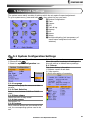
5 Advanced Settings
The system menu mainly consists of settings which do not require frequent adjustment.
then select the icon you want.
To go to system menu, press and hold
① System Configuration.
②
③
①
② Chart.
③ Comms.
④ GPS.
⑤ Track & log.
④
⑥
⑤
⑥ Memory.
⑦ AIS.
⑧ Alarms.
⑨ Others.
⑦
⑧
⑨
⑩ Set Alpha blending (set transparency of
menu boxes’ background over main
windows)
⑩
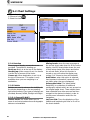
5-1 System Configuration Settings
To go to System configuration:
1 Press and hold
.
2 Select the system configuration icon.
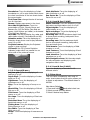
5-1-6 Factory reset
When this option is selected. All settings of
this unit returns to default factory settings.
5-1-7 About
This shows factory information:
1 Software version & sale date
2 C-Map version.
3 Wiring information of connector
5-1-1 Language
Change the language for menus and data
screens.
5-1-2 Chart Selection
Select a chart between S-MAP or C-MAP
chart.
5-1-3 Beep volume
Select the level of beep sound.
5-1-4 Auto power
See section 2-4.
5-1-5 Features
When external devices are connected to the
unit, the corresponding options need to be
set.
Installation and Operation Manual
45
5-2 Chart Settings
To go to the chart settings:
1 Press and hold
.
2 Select the chart icon.
C-MAP
S-MAP
5-2-1 Rotation
Three types of display presentations are
provided. The default is heading up.
North up: North is at the top of the display.
Heading up: When course is set, the course
is at the top of screen all the times.
Course up: When destination is set it is at
the top of the screen. This option is only
available when you are navigating to a
destination.
5-2-2 Palette
Palettes are used to enhance the visibility of
the display depending on the surrounding
light environments. Four types of displays are
provided; Normal, NOAA, Sunlight and Night.
5-2-3-1 General(C-MAP)
Plotter mode: this mode allows you to
zoom in and out at scales where cartographic
data are not available.
46
Mixing levels: when the map coverage at
the current chart scale does not fill the entire
display, the GPS chart plotter draws the rest
of map using charts from above and below
the current scale. When this function is
turned on you will notice the display may
redraw 2 to 3 times to show all the detail.
AntiClutter: when this option is selected,
less important information (names & icons)
are hiden when they are overlapped.
Value added data: The Value Added
Data(VAD) is a collection of additional
cartographic objects which are not present on
the original paper chart. These objects have
been obtained from other sources and then
merged to the electronic charts in order to
provide more information useful for the
navigation.
Lat/Lon Grid: Turns the displaying of the
latitude and longitude grid lines on or off on
the chart window.
Installation and Operation Manual
Boundaries: Turns the displaying of chart
boundaries on, off or auto mode which shows
the chart boundaries of the two charts below
the current scale.
Text/Icon Size: change the size of text and
icon on the chart.
Names: Display area names in the chart.
Nav-aids & Light Sector: Turns the
presentation of Light, Signals, Buoys and
Beacons On, Off, No Sector (Nav-Aids are
shown, Light Sectors are hidden) or Animated
(The lights are flashed).
Nav-aids: The way to display fog, radar and
radio station signals. (International and US)
Attention areas: Turns the displaying of
Attention Areas where need to pay attention
more) On or Off.
Projected course: Display the Projected
course in given set time.
CDI scale: Set CDI (Course Deviation
Indicator) scale which is a parallel line on
either side of the pottered course.
5-2-3-2 General(S-MAP)
Lat/Lon grid: Turns the displaying of
Lat/Lon on or off
Depth Digit: Turns the displaying of water
depth on or off
Lighthouse: Turns the displaying of
Lighthouse on or off
Buoy: Turns the displaying of buoys on or
off
Wreck Ship: Turns the displaying of Wreck
Ship on or off
Fish Haven: Turns the displaying of Fish
Haven on or off
Sea Lane: Turns the displaying of Sea Lane
on or off
Restricted Area: Turns the displaying of
Restricted area on or off
Fishing Area: Turns the displaying of
Fishing Area on or off
Sea Cable: Turns the displaying of Sea
Cable on or off
Name: Turns the displaying of area name on
or off
Mark Attribute: Turns the displaying of
Mark Attribute on or off
Sea Sector No: Turns the displaying of Sea
Sector No on or off
5-2-4-1 Land & Sea (C-MAP)
Water features: Turns the displaying of sea
bed nature and tide stations icon on or off.
Object depths: Turns the displaying of
object depths on or off.
Spot soundings: Turns the displaying of
spot sounding on or off.
Sounding min: Set the minimum depth limit
to show depth sounding, bathymetric lines
and depth area.
Sounding max: Set the maximum depth
limit to show depth sounding, bathymetric
lines and depth area.
Tidal stream: Turns the displaying of tidal
streams on or off.
Land Features: Turns the displaying of land
features on or off.
Land elevation: Turns the displaying of land
elevations on or off.
Safe Navigation Area: Set the water depth
for safe navigation and displaying safe
navigation area in color.
5-2-4-2 Land & Sea (S-MAP)
Turns the displaying of sea color in 16
different colors.
5-2-5 Map datum
This unit has a compatibility with most of
major chart system and this option allows you
to select a map datum. The default datum is
WGS84.
Map datum Selection
1 Press and hold
and select chart icon
2 Select general and Map datum
3 Select a desired map datum
Installation and Operation Manual
47
5-2-6 NMEA datum offset
When you select other Map datum different
from WGS84, latitude and longitude will be
different from WGS84’S coordinates and this
might confuse other device such as VHF radio
if connected to the unit. If this option is
applied, latitude and longitude send on the
unit NMEA output will be the same as
coordinates in WGS84.
5-2-7 Map shift
Sometimes current position of own ship does
not match with the current location on the
chart. To correct this position error, you can
apply a map shift.
Applying a map shift
1 In the Chart setup menu, press and hold
and select Chart icon.
2 Select Map shift to ON.
3 Move cursor to the actual position on the
chart.
4 Press
and select Set.
Canceling a map shift
If you want to clear the map shift:
1 In the Chart setup menu, select Map shift.
2 Press
and select Clear.
5-2-8 Restore default
Returns every chat settings to default.
48
Installation and Operation Manual
5-3 Communication setup
When this equipment is connected to marine communication equipments through compatible
NMEA equipment, you can use this function.
You can use as follows.
long.
1 Push
2 Select communication icon.
5-3-1 NMEA 2000
Communication with other equipments by
NMEA 2000 method.
• NMEA 2000 output: Select, if you want to
output data.
• NMEA 2000 PGN: User select the data
item, which he wants to output
• View: You can check data, output in realtime.
5-3-3 NMEA 0183-Port 2
This is used exclusively for AIS, always output
AIS message.
• View: You can check data, output in realtime.
5-3-2 NMEA 0183-Port 1
Communication with other equipments by
NMEA 0183 method.
• NMEA 0183 output: Select, if you want to
output data.
• NMEA 0183 speed: You can set up the
speed of data output.
• NMEA 0183 selection: User select the
data item, which he wants to output
• View: You can check data, output in realtime.
Installation and Operation Manual
49
5-4 GPS Settings
To go to the GPS settings:
1 Press and hold
.
2 Select the GPS icon.
When the GPS device is connected properly, the GPS settings provide the access to GPS
functions and features connected with the satellites information used for further navigation.
5-4-4 Speed Filter and Course Filter
5-4-1 GPS Source
Select a source of GPS signals
Occasional waves and wind at sea affect the
Internal: Select this option when uses the
boat speed and course. In order to have
internal GPS antenna.
stable boat speed and course, the unit
NMEA0183 & NMEA2000: Select this
calculates these factors to give the value of
option when using an external GPS or DGPS
stable speed and course information.
antenna via NMEA.
5-4-5 Lat/Lon d.p’s
5-4-2 DGPS Source
Select number of last digit of Lat/Lon to be
Select WAAS/EGNOS when you want to
sent to other marine electronics.
utilize DGPS.
5-4-6 Ship speed
To have more precise boat speed and course,
5-4-3 Static Navigation
This option is very useful when the boat
you can select your boat speed. Mid is highly
stops or moves very slowly. This option
recommended option for the most of
allows you to set a minimum speed at which
common boat.
movement is assumed. The value range is
from 0.00 to 9.99.
5-4-7 Magnetic Variation
This option compensates the difference
between true north and magnetic north.
50
Installation and Operation Manual
5-5 Track & Log Settings
To go to the tracking and long settings:
1 Press and hold
.
2 Select the track & log icon.
The unit has the capability to store 10 individual tracks and record up to 15,000 track points.
Before using the track function you will need to setup the track function that suits your boat.
5-5-1 Track
5-5-2 Logs
Record
Reset trip dist
Off: Stop a recording of Track
Shows you the trip distance. If you select this
1 to 10 (select a track number): Start a
option it resets the trip distance.
recording of the boat’s course.
Reset total dist
Display
Show you the total trip distance. If you select
this option it resets the total trip distance.
Off: Display no track on the chart.
1 to 5 (select a track number): Display a
selected track on the chart.
Record color
Select the color of recording track.
Thickness
Select the thickness of recorded track.
Plotting Interval
Select the method of plotting interval
between time and distance.
Distance
Select the distance of plotting interval.
Time
Select the time of plotting interval.
Delete track
Delete a selected track record.
Installation and Operation Manual
51
5-6 Memory Settings
To go to the memory settings:
1 Press and hold
.
2 Select the Memory icon.
A user card is an option SD card which you need to purchase additionally.
Before you use a user card it must be formatted. Note that formatting a user card erases all
saved data.
5-6-1 Save
5-6-2 Load
Select a data type you want to save in the
Select a data you want to road into the load
user card then the data will be saved in the
list then press
.
user card automatically.
1 If you select waypoint for saving data,
enter the file name and press
.
2 If you select routes for saving data, enter
the file name and press
.
3 If you select tracks for saving data, enter
the file name and press
.
[Waypoints]
[Tracks]
5-6-3 Delete
Select a data you want to delete then press
.
Also, you can sort the file by name. Press
and select sort by name.
52
Installation and Operation Manual
5-6-4 Format
Erase all data in the user card. Format the
user card before using it.
5-6-5 Screen snap shot
To take the snap shot of current screen, press
twice. To save the captured image, press
and select Save or Save all to save
the captured images on the user card.
5-7 AIS Settings
Note
AIS feature require an optional AIS receiver.
To go to the AIS settings:
.
1 Press and hold
2 Select the AIS icon.
5-7-1 Display filter
There are a couple of methods to filter AIS vessel in this unit as below.
Filter by Type : The type of vessel which is
Filter by speed : Vessels with speed below
selected will not be displayed on the chart.
the set value are filtered.
Filter by distance : Vessels outside the
Show Dangerous Only : When this option
radius of selected distance from own ship is
is selected, it shows dangerous vessel only.
filtered.
Installation and Operation Manual
53
5-7-2 Alarm option
Dangerous Vessel Alarm : When this
option is selected an alarm will activate. Even
this option is not selected; dangerous vessels
will still be on the chart.
TCPA Limit : Set the Time of Closet Point of
Approach limit.
CPA Limit : Set the Closet Point of Approach
limit.
Proximity alarm : Trigger an alarm when
any AIS equipped vessel is within a set
proximity radius.
Proximity radius : Set a radius for
proximity alarm.
5-7-3 Display options
Projected course : Set a time for projected
course. The project course show the estimate
course of vessel base on the given time.
Range rings : Select a number of Range
rings.
5-7-4 Restore default
Returns every AIS setting to default.
54
Installation and Operation Manual
5-8 Alarms
Press and
then Alarms:
A warning message with beep sound is displayed when an alarm condition is met by user
to clear the alarm. However, the alarm will be displayed again when the
setting. Press
alarm condition occurs again. The unit provides alarms for various functions.
5-8-1 Fish
5-8-6 Low battery
Trigger an alarm when echo from the sensor
Trigger an alarm when battery voltage is
is matched to preprogrammed fish profile.
lower than a set value.
5-8-2 Deep
Trigger an alarm when the depth value
received from the sensor is deeper than a set
value.
5-8-3 Shallow
Trigger an alarm when the depth value
received from the sensor is shallower than a
set value.
5-8-4 Temperature
Trigger an alarm when the reported
temperature from the sensor is same as a set
value.
5-8-5 Temperature rate
Trigger an alarm when the rate of
temperature change from the sensor is same
as a set value.
5-8-7 Navigation alarms
Arrival radius : Trigger an alarm when your
boat is approaching the destination to set
value
Anchor alarm : Trigger an alarm when your
boat moves more than set valve
XTE : Trigger an alarm when your boat
moves off the current CDI scale.
Danger : Trigger an alarm when your boat is
getting closed to dangerous point.
5-8-8 AIS
See the Alarm option of 4-7 (AIS Settings).
5-8-9 DGPS
Trigger an alarm when DGPS signal is not
received.
5-8-10 Restore default
Returns every alarm settings to default.
Installation and Operation Manual
55
5-9 Others
Press and
then Others:
5-9-1 Simulate
simulation: Start/end exercise mode.
mode: Refer to exercise mode of 4-2.
speed: Simulated boat speed
direction: Simulated course
route: route to follow
5-9-2 Waypoint
Select a way to display waypoints.
5-9-3 GPS
5-4 Refer to GPS setup.
5-9-6 Time
local time
Change the sunrise & sunset time of chart in
order to read correct time, provided from GPS
satellite.
time indication: Select time indicating form.
date indication: Select date indicating form.
5-9-7 Restore default
It initializes all the set up information.
5-9-8 Calendar
It provides calendar function.
5-9-4 Units
Select units of each number.
Tip: air pressure
VHF receiver of the option, connected to
barometer, is required: InHg or mB
5-9-5 Comms
5-3 Refer to communication setup.
.
56
Installation and Operation Manual
6 INSTALLATION
Correct installation is important to the performance of the unit. It is vital to read the entire
installation section of this manual and the documentation that comes with the antenna and any
other units before starting installation. For further information, please contact Samyung ENC.
6-1 Options and Accessories
Optional sensors and instruments
• External alarms
• GPS or DGPS antenna
• Fuel sensors
• DSC VHF radio
• NMEA 2000: The chart plotter can display
engine data and.
• Other instruments: The chart plotter can
receive data from other instruments and
send data to other instruments by NMEA.
6-2 Connections
You can connect AIS-50N to power supply, GPS antenna, VHF antenna, automatic navigation
device, digital device, etc.
[Pin number]
VHF antenna
(TNC)
Power & Data
-ALARM
-Autopower
-NMEA 0183
GPS (BNC) NMEA 2000
[Power & Data(ALARM, Auto power)]
Number
1
Color
Black
Function
Ground: - power in, NMEA ground.
2
Brown
Ignition_On
3
White
4
Blue
NMEA 1 In (Plotter)
5
Red
+ power in, 12 to 34 V DC
6
Orange
NMEA 2 Out (AIS)
7
Yellow
NMEA 2 In (AIS)
8
Green
External alarm
NMEA 1 Out (Plotter)
Installation and Operation Manual
57
6-3 Power/data cable
Basic power
• Wire the display unit for basic power as below picture.
Power/Data cable
Pin number : 5
Fuse 2A
Pin number : 2
Pin number : 1
Auto power
• Wire the display unit for auto power as below picture.
• During setup, set up Auto power off.
Power/Data cable
Ignition
Pin number : 2
Fuse 2A
Pin number : 5
Fuse 2A
Pin number : 1
58
Installation and Operation Manual
Ignition
switch
6-4 Alarm
• Wire the chart plotter for any external alarm beepers or lights as below picture.
• The output from the unit to external alarm is maximum 30V DC 200mA. It is needed to fit a
suitable relay.
ALARM
Power/Data cable
Relay
Pin number : 8
Pin number : 5
Pin number : 1
Installation and Operation Manual
59
6-5 VHF antenna installation
VHF antenna play roles in stable
communication
of
AIS-50N.
Several
important points in antenna installation are
as follows.
► Normally VHF antenna should be installed
at high position of vessel. It should be
separated from other equipments as
much as possible.
► VHF antenna should be separated from
the structure of conductive materials. It
should be laid at higher place by 2M at
least. Besides, it should not be near big
vertical objects. Also, it should have 360degree horizontal view.
► VHF antenna should be separated from
high pressure energy sources, such as
radars, other transmitting radars,
transmitting radio antenna by 2M at least.
Also, it should be out of transmitting
beam.
► At same height more than one antenna
should not be installed. If VHF antenna is
at the same height with other antennas,
distance between antennas should be 2M
at least.
VHF antenna installation is done as follows.
► Locate antenna installing bracket at
structurally solid position.
► Install antenna on antenna mount-make
coaxial cable from antenna reach the
body position. In order to use high quality
RG-8U coaxial cable & reduce the drop of
electric current, keep the length of
cables as short as possible.
► Give some space to the cable length
toward body direction.
► Stick connector to the end of coaxial
cable.
► Connecting cable to body, use TNC
connector.
Please check the
installation distance
between VHF antenna &
other equipments.
GPS antenna : 5M
Compass
: 1M
VHF antenna (TX/RX)
60
Installation and Operation Manual
6-6 GPS antenna
Selecting an antenna
Fit one of these GPS antennas:
6-6-1 GPS antenna of BNC type
Position, where GPS antenna is installed,
affects GPS receiving rate. Connector of
connecting device is BNC type.
Antenna installation
Installation should be done where sky is open
360-degree. Proper distance should be kept
between VHF antenna & compass.
For detailed installation method, please refer
to SAMYUNG ENC or agencies.
Please check the
installation distance
between GPS antenna &
other equipments.
VHF antenna : 3M
Compass
: 1M
6-6-2 The antenna using NMEA
The chart plotter can receive the GPS data
from the compatible device (NMEA). The
chart plotter can connect several devices to
an external GPS.
• An optional differential beacon DGPS
antenna to give enhanced accuracy within
range of land based differential beacons in
areas where WAAS or EGNOS are not
available. Such a DGPS antenna has both a
GPS receiver and a beacon receiver, and it
automatically applies the beacon correction
to the GPS position.
To set the DGPS options(None or
WAAS/EGNOS):
Connect the GPS directly to the input. Set the
option. The new setting will be displayed if it
was successfully applied.
Note:
The chart plotter can apply the WAAS and
EGNOS DGPS corrections to any GPS
antenna.
For more information, contact Samyung ENC.
Installation and Operation Manual
61
6-7 NMEA 0183
The GPS chart plotter can be connected to
external devices with NMEA0183 and display
information such as followings.
• DSC VHF Radio
• GPS antenna(NMEA 0183)
• Navtex
Main functions of NMEA 0183 port in AIS-50N
are as follows.
► NMEA 0183(1): Used as exclusive plotter
port. Option device should be connected to
(1), in order to use additional functions,
provided from plotter, Navtex,
DSC,
etc.
Input (1) NMEA 0183
NMEA 0183(1,2) ports work
individually. Please ask
SAMYUNGENC for detailed
information.
Output (1) NMEA 0183
Pin number : 1
Pin number : 1
Pin number : 4
Pin number : 3
Power/Data cable
Power/Data cable
Input (2) NMEA 0183
Output (2) NMEA 0183
Pin number : 1
Pin number : 1
Pin number : 7
Pin number : 6
Power/Data cable
Power/Data cable
DSC VHF radio
Install DSC VHF wireless devices of option,
referring to above NMEA 0183(1) input
pictures.
Other NMEA instruments
NMEA is an industry standard for
interconnecting instruments. The chart plotter
can be connected to other NMEA instruments.
Set up the optional NMEA instruments as
above pictures.
62
► NMEA 0183(2): Used as exclusive AIS
port. This outputs AIVDM, AIVDO
messages of AIS.
• The chart plotter can receive and display
depth, paddlewheel boat speed and water
temperature from an optional compatible
instrument.
• The chart plotter can receive data from an
optional compatible GPS or GPS/DGPS
source.
Installation and Operation Manual
• The chart plotter can send GPS position and
other navigation data to an autopilot or
other instrument. An autopilot requires
APB, APA and VTG sentences
For information on sending NMEA data to the
instrument, contact Samyung ENC.
During setup to send NMEA data to other
instruments, set NMEA out and specify the
NMEA data to send.
6-8 NMEA 2000
NMEA 2000 interface standard was
introduced for communications network to
interconnect marine electronic equipments
such as navigation chart plotter, engine, tank
level sensor and others on vessels. The
standard is regulated by The National Marine
Electronics Association in USA.
The chart plotter can be connected to
external devices with NMEA2000 and display
information such as followings.
• Engines have fuel flow sensors, therefore
fuel sensors are not required.
• The chart plotter can receive and display
wind speed and direction from an optional
compatible wind instrument.
• The chart plotter can receive and display
depth from an optional depth instruments.
• The chart plotter can receive and display
boat speed and water temperature from a
paddlewheel sensor on a optional speed
instrument.
If connected display unit, use the cable
compatible with NMEA 2000 standard.
6-9 Setup and test
1 Put a blanking cap on any unused connector on the back of the display unit. Ensure all
connectors are plugged in and the display unit is in place.
2 If the display unit is bracket mounted, adjust tilt and rotation for best viewing and hand
tighten the knob.
3 Insert any required C-MAP chart card.
4 Enter setup data to set up the chart plotter to your requirements and to set up any optional
sensors or instruments.
5 At the satellite display, check that it picks up GPS satellites. Wait for the GPS receiver to start
up and the GPS satellite to change to ‘Used in fix’.
Installation and Operation Manual
63
64
Installation and Operation Manual
Thank you for purchasing an SAMYUNG ENC product. This product has been
thoroughly checked and is covered by the Samyung ENC’s warranty for defects in
materials and workmanship under normal use from the date of purchase.
This warranty provides for the free repair or replacement of defective parts from our
Samyung ENC authorized dealer.
In the event that your SAMYUNG ENC product needs service, please return your
SAMYUNG ENC product at your expense (shipping and insurance) to your Samyung
ENC distributor or SAMYUNG ENC authorized Service Centers. SAMYUNG ENC will, at
its discretion, repair or replace any defective products or its components at no cost to
you. This is your exclusive remedy for defective products
Exclusions: are specifically excluded from warranty;
1. Consumable items, including, but not limited to: fuses, impellers, impeller
bearings, impeller shafts are specifically excluded from this warranty. . .
2. All costs associated with transducer replacement, other than the cost of the
transducer itself.
3. Routine system checkouts, alignment and calibration, seatrials, unless
required by replacement of defective parts.
Limited warranty: SAMYUNG ENC will not be responsible for equipment that has
been damaged or rendered defective:
1. as a result of incorrect installation, misuse, accident, water damage, abuse
or other external causes
2. by modification or service other than by SAMYUNG ENC or authorized
distributors, authorized Service Centers. SAMYUNG ENC will not be liable in
any event for any consequential or indirect loss or damage. Exceptions are
expressly set out in this warranty, SAMYUNG ENC makes no other
warranties, express or implied, including any implied warranties of
merchantability and fitness for a particular purpose. If any limitation or
exclusion of liability in this warranty is invalid and SAMYUNG ENC becomes
liable for loss or damage that would otherwise have been excluded, such
liability will be limited to the total amount actually paid by you for the
product.
3. if the serial number label on the unit has been removed, altered or
mutilated
Installation and Operation Manual
65
66
Installation and Operation Manual
Installation and Operation Manual
67
68
Installation and Operation Manual