1
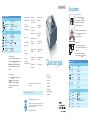
BiPAP AVAPS
Provider setup menu (cont.)
Alarm settings
Apnea
Patient disconnect
MinVent
Low min vent
Low Vte
V
System settings
Backlight
Language
hPa/cmH2O
Setup parameter display1
Humidifier
//
Reset blower hours
Provider mode2
TE
(Off), 10, 20, 30 sec
(Off), 15, 60 sec
(Off) to 99 lpm in 1.0 increments
(On), (Off)
(On), (Off)
EN, IT, ES, DE, FR, Icon
hPa, cmH2O
(Leak), RR, MinVent, V
0 to 5
(No), (Yes)
(On), (Off)
TE
Philips Healthcare is part of
Philips Respironics
Philips Respironics Deutschland
Royal Philips Electronics
1010 Murry Ridge Lane
+49 8152 93 06 0
Murrysville, PA 15668
How to reach us
www.philips.com/healthcare
[email protected]
i
Philips Respironics France
Customer Service
+33 2 51 89 36 00
800 345 6443 (toll free, US only)
You will remain in provider mode until you exit the Setup
screen using the
(Back) selection, or until a screen
time-out occurs after one minute.
Asia
Philips Respironics Italy
+39 039 203 1
+49 7031 463 2254
Philips Respironics International
Europe, Middle East, Africa
+49 7031 463 2254
Latin America
North America
+1 425 487 7000
800 285 5585 (toll free, US only)
Headquarters
Philips Respironics Sweden
+33 1 47 28 30 82
+46 8 120 45 900
Philips Respironics Asia Pacific
Philips Respironics Switzerland
+65 6882 5282
+41 6 27 45 17 50
Philips Respironics Australia
Philips Respironics United Kingdom
+61 (2) 9666 4444
+44 800 1300 845
Philips Respironics China
www.philips.com/respironics
+86 021 24127311
2. Provider mode ( )
You can choose or to enable or disable provider mode.
Selecting will unlock the device and give access to all
ventilation settings in Setup menu. Selecting will lock
the device so the patient does not have access to his
ventilation settings.
To access provider mode:
1. From the main menu, highlight
(Setup).
2. Press and hold ramp button and control wheel
simultaneously for 4-5 seconds until beep.
3. Provider Setup screen then appears.
+1 724 387 4000
+55 11 2125 0744
1. Setup parameter display
You can select which measured parameters will display on the
monitor screen. Choose from (Leak), RR (Respiratory Rate),
MinVent (Minute Ventilation), or VTE (Tidal Volume). See the
Measured Parameter section of the User Manual for more
information.
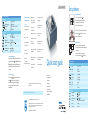
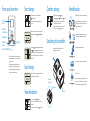
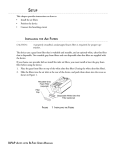
Set up device
To program device:
PAP
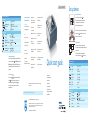
Quick start guide
• Set up device
• Front panel overview
• Start therapy
Respironics, BiPAP and AVAPS are trademarks of Respironics, Inc. and its affiliates.
All rights reserved.
• Stop therapy
• View information
• Comfort settings
Please visit www.philips.com/respironics
• Undocking the humidifier
• Humidification
© 2010 Koninklijke Philips Electronics N.V. All rights are reserved.
Philips Healthcare reserves the right to make changes in specifications and/or to discontinue any
product at any time without notice or obligation and will not be liable for any consequences
resulting from the use of this publication.
Broudy AE 10/15/10 MCI 4103088 PN 1070333
S/T
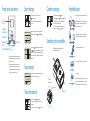
Provider setup menu
Therapy settings
Mode
AVAPS
AVAPS
VT
Vte
IPAP max
IPAP min
IPAP
IPAP
EPAP
EPAP
BPM
BPM
Ti
Ti
Comfort settings
Flex control
Flex setting
Rise time control
Rise time
Ramp
Ramp start
1. Turn control wheel to specific setting and press.
2. Turn control wheel to desired option and press control
wheel to select.
3. Turn control wheel to next setting and repeat.
4. To exit, turn control wheel to
(Back) and press.
CPAP, S, S/T, T, PC
On, Off
200-1500 ml
4-25 cmH2O
4-25 cmH2O
4-25 cmH2O
4 to IPAP
0-30
0.5-3.0 sec
(On), (Off)
(Off), 1, 2, 3
(On), (Off)
1-3 (1=200 ms; 2=300 ms; 3=400 ms)
0-45 min
4 to EPAP