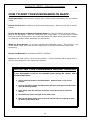
1
BAUMATIC BDW16 dishwasher user manual
19
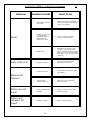
BEFORE YOU CALL FOR SERVICE …
CHECKING AGAINST THE CHARTS BELOW MAY FIX YOUR PROBLEM.
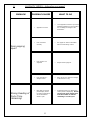
PROBLEM
Dishwasher
doesn’t run!
POSSIBLE CAUSES
•
Fuse blown, or the
circuit breaker acted
•
Power supply is not
turned on
•
Water pressure is low
•
… And (situation A)
the number 28-20 is
showing on the
display. This means
that your dishwasher
has entered Test
Mode – a factory
sequence which you
need not concern
yourself with. This
happens because the
Delay Timer key was
pressed before the
‘ON/OFF’ key was
pressed.
•
Drain Pump
doesn’t stop!
•
WHAT TO DO
•
Replace fuse or reset circuit
breaker.
•
Remove any other appliances
feeding from the same socket as
the dishwasher.
•
Make sure the dishwasher is turned
on and the door is closed securely.
•
Check that the water supply is
connected properly and the water is
turned on.
•
For situation A, Press and hold
down the Delay Timer key at the
same time as you’re pressing the
‘ON/OFF’ button to switch the
dishwasher off. Wait a few
seconds then press only the
‘ON/OFF’ button again. You are
now ready to program your
dishwasher for a washing cycle as
per usual.
•
For situation B, Press ‘ON / OFF’
button to turn the dishwasher off.
Then, press and hold down the
Program Key (‘P’) at the same
time as you’re pressing the ‘ON /
OFF’ button to switch the
dishwasher on again. You are now
ready to program a cycle as per
usual.
•
The system is designed to detect an
overflow. When it does, it shuts off
the circulation pump and turns on
the drain pump. Call a Baumatic
Ltd approved technician.
… Or (situation B)
the display shows one
of the following:
12,11,10, 09, 08,
07, 06, 05, 04, 03,
02, 01, 00.
Overflow
19