1
GENERAL SAFETY INFORMATION
WARNING! Read and understand all instructions. Failure to follow all instructions listed
below may result in electric shock, fire and/or serious personal injury.
SAVE THESE INSTRUCTIONS!
•
Prevent object and liquid entry. Never spill liquid of any kind on the video display
unit. Liquid increases the risk of electrical shock and damage to the product.
•
The unit is not shock-resistant. Do not use Explorer Compact as a hammer and
avoid high impact resultant from things such as dropping the unit from height.
•
Do not immerse camera handle or LCD screen in water. Avoid moisture, and store
product in a dry place. Such measures reduce the risk of electric shock and damage. The lens and the tube are water resistant when the unit is fully assembled,
but the LCD screen and handle are not.
•
Do not use the camera if condensation forms inside the lens. Let the water evaporate before using again.
•
Turn off the system if it is not in use.
•
Attention should be given to the environmental aspects of battery disposal.
•
Remove the batteries when cleaning the unit.
•
Remove the batteries before storing the unit for a long time.
•
When necessary, REPLACE ALL FOUR (4) BATTERIES in this unit with new ones,
not one (1) or two (2) batteries at a time.
•
Use only the size and type of battery specified.
•
Be sure to install the battery with the correct polarity as indicated in the battery
compartment.
•
Properly dispose of batteries. Exposure to high temperatures can cause batteries
to explode, so do not dispose of in a fire. Place tape over the terminals to prevent
direct contact with other objects.
•
Some countries have regulations concerning battery disposal. Please follow all
applicable regulations.
WELCOME
Accessories
Congratulations on your purchase of our inspection video camera with recordable color
LCD screen, the EXPLORER COMPACT. Please read the user manual carefully before
using this product. This product is designed as a remote inspection device, live time
video streaming. Appropriate for use in surveying pipes or other hard-to-reach places,
equipment or furnishing installation, car repair, etc. Features include waterproof LED
lens, real-time viewing.
Double Hook x 1
Single Hook x 1
Magnet x 1
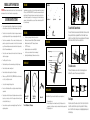
To Attach Flexible Tube with Handle
To connect the flexible tube camera with control handle, first make sure that
the keyed end of the tube is aligned with the slot in the handle, then use
slight force to push them together. Once properly aligned, twist the treaded
knob clockwise until the connection is securely in place.
FEATURES
•
•
•
•
•
•
•
Allows for easy surveying of small, hard-to-reach places
Mini water-proof camera with 980mm(3ft) flexible extended tube
Manufactured and tested to IP67 waterproof standard
2.31"TFT-LCD monitor
Adjustable brightness on lens-mounted LED light
4 useful accessories included: hook, mirror and magnet
Lightweight, handheld design, flexible and convenient to use
Mirror x 1
Rubber ring x 1
STRUCTURE
Keyed end plugs into socket
Fasten the treaded knob
Mini Waterproof LED Lens
Flexible Tube
Flexible Tube Interface
PACKING LIST
Color TFT-LCD Monitor
Video Output
Power Indicator
Contrast
Brightness
Handle
Power Switch
Rotate/Mirror Image
To Install Accessories
The three (3) included accessories (mirror, hook and magnet) are all
attached to the camera in the same way as illustrated below:
Hook the hole
Wear the rubber ring
INSTALLATION
Handle with LCD
screen x1
Flexible Tube
with Lens x1
*GL8898 = GT8898(handle) + GT4818(camera)
Video cable x 1
To Install Batteries (Dry your hands before installation or replacing batteries.)
1.
2.
3.
Remove battery cover;
Extract the battery box from the handle, Insert four (4) AA batteries into their
appropriate slots, with proper orientation, as indicated on the battery compartment;
Replace battery cover.
Video Output
Insert video cable into the video out socket of the monitor, insert the other
end of the cable into the video in jack of any compatible TV or display
device. The LCD monitor is now capable of outputting high quality video to
another display.