1
eBMU
PMB 8753/2
Infineon SPP-AT Command and Response
4.6
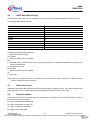
UART Baud Rate Change
The baud rate of the UART can be changed by writing into the UART_Baudrate parameter of the BD_DATA.
The available UART Baud rates are:
UART Baud Rate (bauds/s)
9600
19200
38400
57600
115200
230400
460800
921600
1843200
3250000
Configuration value for BD_DATA
0
1
2
3
4
5
6
7
8
9
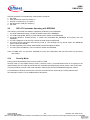
Procedure to change UART Baud Rate
1. Enter into production mode:
AT+JPRO=1
2. Received confirmation from eBMU:
OK
3. Write BD_Data command and specify the UART Baud Rate in the designated parameter according to the
values provided above.
4. Exit production mode:
AT+JPRO=0
5. Received confirmation from eBMU:
OK
6. SW Reset
Note: Original BD_Address and Osc_trim values need to be preserved. Read both with AT+JRBD command
before changing the UART baud rate.
4.7
Data Flow Control
eBMU acknowledges a data packet sent by send data command (AT+JSDA) with an “OK” response when it has
been transmitted. The host shall wait for the acknowledgement before sending a new packet.
4.8
Production Mode
Production mode is used for configuration and test purposes, the production mode shall be entered in order to
execute the following commands:
AT+JDOI: DOwnload EEPROM Image
AT+JEDT: Enable Device under Test
AT+JCAC: Crystal Auto Calibration
AT+JCBD: Change BD_Data
User's Manual
Software Description
21
Revision 2.0, 2008-10-21
SPP-AT User's Manual Software Description downloaded by Annakarin Ericson (Infineon Technologies Sweden) at 22 Jan 2009 11:07