1
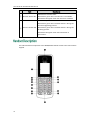
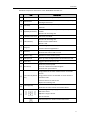
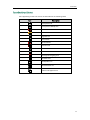
Overview This chapter provides the overview of the W52P IP DECT phone. Topics include: Base Station Description Handset Description Displaying Information on LCD Screen Icon Instructions If you require additional information or assistance with your new phone, contact your system administrator. After the base station starts up successfully and the handset is registered to the base station, all LEDs on the base station illuminate solid green. Hardware component instructions of the W52P base station are: Item Description Locates a misplaced handset. ① Paging Key Toggles the registration mode. Resets the base station to factory settings. Indicates the mode of the base station: Fast flashes green when the base station is in the paging mode. ② Registration LED Slow flashes green when the base station is in the registration mode. Illuminates solid green when there is at least one handset registered to the base station. 9