1
MINI KEYPAD
RFiD/Z-WAVE
QUICK INSTALLATION GUIDE
v1.2
CLASS: 0X80 COMMAND_CLASS_BATTERY
This class is used to request and report battery levels for a given device.
When battery level is lower then 20% the Mini Keypad RFiD/Z-Wave will
send a battery warning (value 255) after every wake up notification. A
battery get will report the actual value even if below 20 %
CLASS: 0X85 COMMAND_CLASS_ASSOCIATION
The Association Command Class is used to associate the Mini
Keypad RFiD/Z-Wave to other devices. When a tag or code is read,
the Mini Keypad RFiD/Z-Wave will send a notification to the Z-Wave
devices in its association group. It will also report the state of the
tamper alarm to the devices in this association group.
Number of groupings: 1
Maximum supported nodes per group: 5
CLASS: 0X84 COMMAND_CLASS_WAKE_UP
The Wake Up Command Class is used at battery-operated devices.
This class allows the Mini Keypad RFiD/Z-Wave to wake up
occasionally to notify others devices, that the Mini Keypad RFiD/ZWave is ready to receive commands. After receiving the commands
the Mini Keypad RFiD/Z-Wave will go into sleep mode again. The wake
up interval can be set using the WAKE_UP_INTERVAL_SET command.
The default value is 0x1C20 = 7200 sec = 2 hour
The default node is 0xFF = 255 (broadcast)
It is possible to send a wake up notification on user interaction.
Besides sending a Wake Up Notification automatically every 2 hours
(or any other time that is configured using the Wake Up Interval Set
command), the Mini Keypad RFiD/Z-Wave also sends a Wake Up
Notification when:
The tamper alarm state changes (Mini Keypad RFiD/Z-Wave is
mounted or removed from the wall)
A tag read
A code is entered using the keypad
SIZE: 1 byte*
3 | Feedback timeout
DESCRIPTION:
To configure the timeout to wait for a
WAKEUP_NO_MORE_INFORMATION before the error beep is
automatically sound.
The error beeps are fixed 8 beeps shortly after each other.
DEFAULT: 0x00
PARAM1: 0x00 means disabled
PARAM2,3,4: not used
SIZE: 1 byte*
4 | Feedback beeps per second
DESCRIPTION:
To configure the number of beeps per second.
Every beep is fixed about 10ms.
DEFAULT: 0x02
PARAM1: nr of beeps per second
PARAM2,3,4: not used
SIZE: 1 byte*
5 | The mode
DESCRIPTION:
To configure the operating mode.
DEFAULT: 0x01
SIZE: 1 byte*
PARAM1:
MODE 1: Normal operating mode.
MODE 3: Z-Wave chip is always on to request e.g. version or
manufacturer id. If any mode other then 3, that value will be reported
after a get but will be handled in SW as mode 1.
PARAM2,3: not used.
* if a size is other then given size the frame is ignored totally so
configuration values are not changed
CLASS: 0X71 COMMAND_CLASS_ALARM_V2
In the Mini Keypad RFiD/Z-Wave, this Command Class has two
purposes:
1 | Identify the state of the tamper alarm. The device will send an
unsolicited report to the devices in its association group if tempering
is detected. The state of the tamper alarm can also be requested
by any other device.
2 | Report tags or codes that are entered. The Mini Keypad RFiD/ZWave will send an unsolicited report to the devices in its association
group with the UID that belongs to the code or tag and whether the
alarm system should be armed (Away) or disarmed (Home).
Every other alarm type that is requested will be ignored by
application.
ALWAYS AWAKE MODE
The always awake mode is used to request different values from the
device e.g. version and manufacturer specific.
NOTE: in always awake mode the batteries will be drain very fast,
we do not recommend to use this mode for a longer period. Always
awake mode should only be used in order to configure the device.
NOTE: it is not possible to use the buttons of the Mini Keypad RFiD/ZWave while it is operating in always awake mode.
The always awake mode can be activated by:
CONFIGURATION_SET
PARAMETER: 0x05
SIZE: 0x01 (can’t be different from 1)
VALUE: 0x03 (mode 3)
The LED of the device will toggle on and off every second to notify you
that it is functioning in always awake mode.
The always awake mode can be deactivated by:
CONFIGURATION_SET
PARAMETER: 0x05
SIZE: 0x01 (can’t be different from 1)
VALUE: Any value except 3
A second option to deactivate mode 3 is:
1 | Remove batteries.
2 | Wait ca 10 seconds
3 | Replace batteries
NOTIFICATION SOUND AND ACKNOWLEDGEMENT
2 | Feedback time
DESCRIPTION:
To configure the time the beep is automatically turned off in seconds.
DEFAULT: 0x0F
PARAM1: 0x00 means disabled, 0xFF is endless.
PARAM2,3,4: not used
When the value of configuration value is requested 2 possible values
can be returned CONFIGURATION_REPORT
PARAMETER: 0x01
VALUE 0X55: Configuration settings of the device are altered.
The device will report this even if the configuration parameters are
changed back to the default value.
VALUE 0XAA: Configuration of the device is untouched.
Note that this value will not change to 0x55 upon modifying the wake
up interval and that re-setting the value to 0xAA will always reset the
wake up interval.
AFTER THIS THERE ARE TWO POSSIBILITIES:
1 | The Mini Keypad RFiD/Z-Wave does not receive anything (or receives
a Wake Up No More Information upon its Wake Up Notification). It
starts the error sound to notify the user of the unaccepted code.
2 | The Mini Keypad RFiD/Z-Wave receives either a Basic (or Switch
Binary) on (to start the normal notification sound) or off (to silently
acknowledge the code). The acknowledgement timer is stopped.
Note that it is actually possible to disable notification sound, but
enable acknowledgement. In this case a silent acknowledgement can
be both a Basic/Switch Binary on (0xFF) or off (0x00).
we make every home smart
www.zipato.com
we make every home smart
CLASS: 0X70 COMMAND_CLASS_
CONFIGURATION_V1
CONFIGURE PARAMETERS:
1 | Set to default
DESCRIPTION:
Set all configuration values to default values (factory settings).
Read more in chapter Configuration Reset.
SIZE: 1 byte*
PARAM1: if 0xFF then set to default
PARAM2,3,4: not used
The Mini Keypad RFiD/Z-Wave supports a configuration reset function.
CONFIGURATION RESET MEANS
All configuration values are defaulted.
Wake up interval is defaulted.
RFID
Controller
Press HOME or
AWAY button
Hold tag in front of
the RFID
RFID does not
recognize tag
USER_CODE_
REPORT
(User ID 0, UID
Status 0, tag code
Controller searches
for empty UID
WAKE_UP_
NOTIFICATION
The Mini Keypad RFiD/Z-Wave is capable of playing a notification
sound. This feature is typically used to notify a user that an alarm
system is being activated. Since the Mini Keypad RFiD/Z-Wave is a
non-listening device, the feature can not be controlled at all times. It
requires the Mini Keypad RFiD/Z-Wave to wake up and send a Wake
Up Notification. After sending a notification that a tag/code is read
(either an unknown or already configured code), the Mini Keypad
RFiD/Z-Wave will send a Wake Up Notification. The notification sound
can be turned on/off upon receiving any Wake Up Notification. See the
section about the Wake Up Command Class for information on when
a Wake Up Notification is send.
This function can be activated by sending a configuration set frame:
CONFIGURATION_SET
PARAMETER: 0x01
SIZE: 0x01 (can’t be different from 1)
VALUE: 0xFF (can be any value except for 0x55)
When the wake up time is set to 0 a wake up notification is never send
periodically, only on user interaction.
CONFIGURE A NEW TAG
(for configuring new codes, you can skip directly to the WAKE_UP_
NOTIFICATION).
SOUND NOTIFICATION
The Mini Keypad RFiD/Z-Wave supports 3 types of notification sound
configurations:
1 | Notification sound disabled (configuration parameter 2 set to zero)
2 | Notification sound enabled (default, configuration parameter 2 set
to auto-stop time).
3 | Notification sound and acknowledgement enabled (configuration
parameter 3 set to acknowledgement timeout). In the first mode, any
Basic or Switch Binary commands that are received are ignored.
The second mode, the default, can be used to inform a user that the
alarm system is armed or disarmed. To use this, you can send a Basic
or Switch Binary set on (0xFF) after receiving an Alarm Report and
the Wake Up Notification following it.
The last mode can be used in situations where, for example, users
can only disarm the alarm system at certain times. In this case, the
user can be notified whether or not its code or tag is accepted. By
configuring configuration parameter 3, you can set an acknowledge
timeout. Whenever a Lock/Unlock Alarm Report containing an UID
is send by the Mini Keypad RFiD/Z-Wave, the acknowledgement
timeout timer is started.
CONFIGURATION RESET
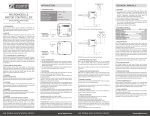
TYPICAL OPERATION DIAGRAMS
The following diagrams show the user action that is required and
the messages which are being sent from/to the Mini Keypad RFiD/ZWave for several basic operations, including optional functionality as
the sound notification and UID acknowledgement.
USER_CODE_SET
(new User ID, UID
Status 1, tag code
(possibly
interviewing RFID
for unused UID)
WAKE_UP_
NO_MORE_
NOTIFICATION
RFID
Controller
Press AWAY button
Hold tag in front of
the RFID or enter
user code and
press ENTER
RFID recognizes
tag/code
ALARM_
REPORT_v2
(ZW Alarm Event
0x05, User ID)
Controller enables
the alarm system
WAKE_UP_
NOTIFICATION
OPTIONAL: START NOTIFICATION
RFID
starts notification
sound
SWITCH_
BINARY_SET
(value 0xFF)
WAKE_UP_
NO_MORE_
NOTIFICATION
www.zipato.com