1
AZ1856_Eng_93_CCR
2008.3.12
13:26
Page 9
Cassette Recorder
–
–
Note:
No recording will take place during the 7 seconds in the beginning of the tape.
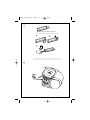
To prevent the accidental erasure of a recording, keep the cassette side to be safeguarded
in front of you and break out the left tab.
Recording on this side is no longer possible.
MP3-CD/ CD Player
About MP3
The music compression technology MP3
(MPEG1 Audio Layer 3) significantly reduce
the digital data of an audio CD while
maintaining CD quality sound.
•
legal music files from the internet to your
computer hard disc, or create such files by
converting audio CD files in your computer
through appropriate encoder software.
(128kbps bit rate or higher is recommended
for MP3 files.)
Recording from radio
1
2
3
4
5
6
7
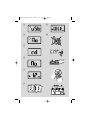
Set the source selector to FM.
For radio, tune to the desired radio station
using the TUNING knob.
Press 9 / to open the cassette holder.
Insert a blank tape.
Press 0 to start recording.
For brief interruptions, press ;.To resume
recording, press ; again.
To stop recording, press 9 /.
•
3
4
5
6
7
1
2
3
Set the source selector to DISC/USB.
Insert a CD/USB device and if desired, programme disc track numbers.
➜Press USB/CD to select CD/USB mode
Press 9 / to open the cassette holder.
Insert a blank cassette.
Press 0 to start recording.
➜Playing of the CD programme starts automatically from the beginning of the programme.
For brief interruptions, press ;..To resume
recording, press ; again.
To stop recording press 9 /
To select and record a particular passage within a track
Press and hold ∞ or § on the set to select
a passage.
Put the CD player in ; position at the
selected passage.
➜Recording will start from this exact point
when you press 0.
Press 2; to start recording.
Creating a MP3 CD: burn the music files
from your computer hard disc on a CDR or
CDRW using your CD burner.
Helpful hints:
Synchro start CD/USB
recording
1
2
Getting MP3 files: you can either download
– Make sure that the file names of the MP3 files
end with .mp3 or .wma.
– Number of albums: maximum 500
– Number of tracks: maximum 1000
– The length of file names affects the number of
tracks for playback. With shorter file names,
more files can be burned on a disc.
Playing a disc
This player plays Audio Discs including CD-R/
CD-RW, MP3 CD and WMA. Do not try to
play a CD-ROM, CD-I, CDV,VCD, DVD or
computer CD.
•
•
1
IMPORTANT!
CDs encoded with copyright protection
technologies by some record companies may
be unplayable by this product.
DRM-protected WMA disc is not supported.
Adjust the source selector to
DISC/USB.
➜ Display shows uSb (see 3), or No if no
USB device available (see 4)