1
L O E G R I A
U S E R
M A N U A L
by
S P I T F I R E
Welcome.
Thanks for purchasing Albion II - Loegria, an exciting new array of orchestral and cinematic tools made “the Spitfire
way”.
We have introduced a raft of revolutionary features so even if you’re an ace Albion I user, this document may have
some useful ideas on how to get the best out of your new purchase. Reading manuals is a bore, so stick this next to
your loo and give it a read whenever you can.
About Spitfire:
Spitfire was formed in 2008 by a group of successful British composers as a means of producing the tools they
needed for their busy work schedules. Sick of dry, humourless, ugly, unrealistic enormously untamable sounding
libraries, Spitfire set about redefining the way samples were created.
Our aim is to reproduce the conditions of top movie recording sessions and approach sampling as if we were recording a film score one note at a time. To record performances, and parts thereof, not scientifically created samples. To
capture the timbre of a world-class set of players but also to record the room they were playing in.
If you are wanting perfectly tuned, normalised or “dry” samples you have probably come to the wrong place. For
here you may find the odd string squeak, a “fruity” note, and lots and lots of “room” but put the whole package together, write some beautiful music and suddenly this library and our approach will make perfect sense.
About Albion:
Albion I was the first comprehensive set of Orchestral tools produced by Spitfire for the world at large. Having spent
4 years sweating blood and tears over what is arguably one of the world’s best set of bespoke and exclusive orchestral
libraries. Spitfire rolled it’s sleeves up to “have some fun”.
Albion was designed as a work-horse cinematic orchestral palette designed to be used as the “daddy” of your main
rig, or simply a sketch pad on your laptop. And so it proved, many thousands of you adopted and approved of our
approach. So much so we were glad to introduce a whole raft of new features and content into our latest free update.
Some thing we always plan to do with all our libraries.
About “Loegria”
Like volume 1, Albion II is a totally stand alone “everything you would need out of the box” set of compositional
tools. Recorded performances of the best musicians in film music, to tape via the finest signal path available in one
of the greatest recording studios in the world. But there the comparison ends. And in so saying this makes Loegria
the perfect bed fellow for owners of Albion I.
Where Albion I is designed to provide that enormous, epic cinematic sound. Albion II is designed to fill your 5.1
space with beautiful cinematic detail and beauty, esoteric instruments and approaches and eccentric ideas. All with
an essential selection of additional orchestral voices not found in Albion I.
Alongside a more comprehensive intricate and detailed string section (including some very useful half section articulations), we have a beautiful and very British Euphonium and Horn choir, and some lovely recorder sections.
We have updated and created a totally new bank of the very cinematic and thunderous Darwin percussion. A totally new set of Stephenson’s pads derived from all this new material including some truly amazing sequenced FX
designed by Stanley Gabriel. A new tool called reversals, and our most eccentric outing yet.... The Byron Tapes.....
More of them later.
We have also bundled this into what can only be described the most genius and complex “simple-to-use” UI out
there. As a group of composers ourselves, we know what will make our lives more interesting and inspired and hope
some of you feel “why hasn’t anyone else thought of that?!” when you encounter the content and technology we have
spent the last year developing.
2.
System Requirements
KONTAKT - Albion is bundled with a Kontakt Player, so if you do not use or own a full version of Kontakt not
to worry. However if you ever want to do some deep editing other than the extensive set of customisable tools
provided on our unique front panel. Making the leap to Kontakt is something we’d wholeheartedly support. If
you are an existing user of Kontakt, please make sure you have the absolute latest version. 98% of all enquiries to our support dept’ are cured by the upgrade. This is a cutting edge library and it simply won’t work on
anything but the latest version.
RECOMMENDED SPEC:
The better your computer, the better the performance of Albion. But not to worry if you’re not spec’d up to the
hilt. All programs are provided with a set of parameters that enable you to tone back the CPU demands of any
given patch. But moving forward, we’re confident this module will keep your computer busy for many years
to come! We recommend a combination of high processor speeds, a good chunk of memory and a devoted
7200rpm eSata, USBII, Thunderbolt, or Firewire audio drive. The more memory you have, the less demand
placed on your drive, and having a totally devoted drive gives you the chance to load less into memory and reduce load times. The higher the speed of your CPU, the more capable your computer will be to deal with some
of the amazing, but complicated scripts we’ve written.
PCs:
We recommend an i5, or i7 Quad or 8 Core machine with 8 Gig or above memory. Vista 64 or Windows 7.
However, it will work with SP2, Pentium or Athlon XP 1.4GHz 1Gig RAM.
MACs:
We recommend a Mac-Pro Intel Based Dual, Quad or 8 Core machine with 8 Gig or above memory. Mac OS
10.6.1 (Snow Leopard). However, we have made the module work satisfactorily on a Mac Mini 2.4 GHz and a
MacBook Pro 2.4GHz Intel Core 2 Duo.
DRIVES:
Firewire, USBII, or eSata, 7200rpm. Ask your dealer for drives that are suitable for “AV use”. We always recommend as small a drive as possible, as the platter will be smaller and the seek time less. The library will eventually
take up 25 Gig on your hard drive. If using several large libraries, or a number of Spitfire modules from the
same machine, we really recommend having your samples distributed over a number of drives. Lacie eSata or
Quadras 7200rpm we highly recommend. Moreover, an exciting development lies in the recent arrival of some
amazing solid state (SSD) drives. With seek times reduced to a fraction (0.1ms vs 6-9ms) of what standard
drives can offer, we are certain you will be able to reduce your sampler’s “pre-load” (page 24.) buffer tenfold
meaning you’ll be able to load enormous orchestral palettes into a single machine.
HOST:
The Kontakt 4 platform should work comfortably on most commonly found platforms and DAWs. As always
make sure you’re as up-to-date as you can afford! If you’re planning on building or adding Spitfire to an already
large orchestral palette, we recommend running your library independently of your DAW, either on your host
computer (e.g. via Re-Wire) or on a slave device (e.g.. via Midi or MOL). This will assist your load in times,
and will allow your DAW to do what it does best, sort out all your note ons and note offs! We heartily endorse
Plogue Bidule (www.plogue.com) as a virtual rack/ routing system. For more advice and information about
setting up please check our website.
3.
CONTENTS:
INSTALLATION05
GETTING STARTED06
THE SOUNDS:
“ALBION” ORCHESTRA07
DARWIN PERCUSSION ENSEMBLE12
STEPHENSON’S STEAM BAND14
THE BYRON TAPES16
FENTON REVERSALS18
THE FRONT PANEL20
OSTINATUM23
THE ALBION FX SEQUENCER25
SURROUND USE27
AFAQs28
INSTALLATION
1. Download the free Kontakt Player application from here and install it.
http://www.native-instruments.com/#/en/products/producer/kontakt-player/
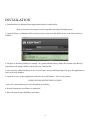
2. Open the Player (or Kontakt 4 full version if you have that) and click ‘Add Library’ in the library browser
window:
3. Navigate to the library folder, for example: the ‘Spitfire Albion Library’ folder that contains your library’s
Instruments and Samples folders, and also has the ‘info.nkx’ file.
4. Now, you have added the library to the Service Centre, and you will be prompted to open the application to
enter your Serial Number.
5. Open the Service Centre application, and enter the Serial Number - this is in the format:
XXXXX-XXXXX-XXXXX-XXXXX-XXXXX
...and is the same number you used to download your library.
6. Restart Kontakt and your library is authorised.
7. Blow the dust off your ModWheel and enjoy!
5.
GETTING STARTED
If you have never used Kontakt before we wholeheartedly recommend your familiarise yourself with the basics
of patch (or instrument) loading, multi management, outputting and MIDI routing detailed in the Kontakt
user-manual and Native Instruments website:
http://www.native-instruments.com/#/en/products/producer/kontakt-4/?page=975
If you are an established Kontakt user please make sure you have ABSOLUTELY the latest version of it downloaded via the NI service centre. Albion simply wont work on any previous versions. We cannot describe the
multitude of painful symptoms you will experience if you don’t do this, needless to say, one thing is certain;
KONTAKT WILL NOT LET YOU KNOW YOU CANT PLAY ALBION ON YOUR OLDER ITERATION.
You’ll just think we’re a bunch of jerks and have sold you a DOA VI...... So, please click on the service centre
and wait for that progress bar to finish, to save brain curdle.
6.
THE ALBION ORCHESTRA
“Loegria” Sessions:
40
L o ndo n pla y e r s , r e c o r de d t o t a pe .
7.
WELCOME TO THE SPITFIRE ORCHESTRAL EXPERIENCE!
When you start playing these patches you will be triggering some of the greatest players, playing the greatest some priceless - instruments, in one of the greatest recording studios in the world. Produced by successful film
composers and orchestrators, through a selection of unique vintage mics, onto a meticulously serviced Studer
2” tape machine via world class Neve mic pre’s and analogue Neve desk and finally via head-of-the-class prism
AD converters into the 96k 24bit digital format from which these 48k samples are derived.
London is a very special place, a unique melting pot of not only cultures but of artistic industries. In one town
we have 120 theatres with 80 orchestra pits. 5 world-class symphony orchestras, an embarrassment of chamber
groups, dozens of concert halls from the Royal Albert right down to the newly opened Kings Place, two major
opera houses, a beleaguered but buzzing pop industry, a vibrant jazz circuit, a TV output that has global reach,
some of the finest film technicians and facilities houses in the world. Ringed by a number of world-class film
studio facilities London has the highest concentration of orchestral recording facility’s outside Los Angeles. All
this filters into the panoply of experience and demand placed on our musicians. What’s more we have 4 of the
greatest music academy’s in the world with some of the finest collections of rarefied and priceless antique instruments. Quite frankly we have captured the greatest, most colourfully experienced musicians on the planet
today, playing some of the most valuable and beautiful sounding instruments. It is this spirit and soul that we
hope comes bursting out of the box the minute you start playing our wares.
We believe that sample libraries promote orchestral music in TV and Film soundtracks and on pop records
by making the opportunity of writing it accessible for all. It is our aim at Spitfire to promote British musicians
and studios the world over. By encouraging people to wherever possible, to use UK talent, by encouraging and
inspiring composers to write better orchestral music! Whilst we know most, if not all composers would use any
money they were given to book real players, we understand that this is not always possible. We feel even with
a single player though the production value of your recordings and realisations will always increase ten-fold.
So please, wherever you can, try and keep music live. We’re proud to say that all of our musicians are paid the
highest possible union scale and are paid a twice-yearly voluntary royalty based on sales. There are details of
how to book these guys online, with many of the soloists offering remote possibilities for those unable to make
it to our shores.
Unlike Albion 1 the orchestral content is organised in a very different manner. Instead of loading individual
articulations, you instead load the entire ensemble or “band” and select articulations from within that patch.
Either via the front panel or by keyswitching. If you wish to work in the “traditional” way of having one track,
channel or lane per articulation, simply load up the desired “Template Shell” click on the articulation you want,
and microphone position and move on to the next track.
In order to maintain Albion’s claim to work on “any” system especially on your laptop late on the red-eye from
NY to LA. We have selected useful default articulations and mic positions so your system doesn’t crap out every
time you load something.
THE MOD WHEEL..... Go on, give it a wiggle.
All longs patches use the mod wheel to dial in different dynamic layers. Used in conjunction with a volume
fader you will get an extraordinary sense of dynamic headroom and timbral control. Look out for “MW” in the
title of the patch or instrument.
SAMPLE STARTS
To maintain reality we cut our samples earlier than others. The start of a note often gives a sample it’s character.
By cutting it’s front off too much we feel you take away it’s personality. If things are playing back a bit behind
the beat, even after quantizing don’t be afraid of pulling that pre-delay down a few dozen ms on your DAW.
8.
STRINGS:
There are many popular enormous sounding strings libraries out there (Albion 1 included!). The reason for this
is because they’re fun to use, impressively easy to impress with, they have been very fashionable and they enable composers to “move” the listener, to stir their audience with scale. But most of all, they’re relatively easy to
make. A wealth of players give the perfect smudge needed when looping or cross fading content. The accuracy
of individual tuning becomes inversely proportional based on number of players.
However when you start simplifying your waveforms, lessening the number of players everything needs to be
approached at a more intricate level, from performing, to recording, and to how respectfully this material is
treated within digital post production.
We’re very proud of Albion I, it was a toughy to follow. But we have really created something extraordinary
here, and we all hope you agree the result is a wonder of delicate beauty, thoughtful consideration and technical expertise. We hope it inspires you to write music that doesn’t move with scale, but with searing melody,
transparent intelligent harmony and subtle textural variety.
Here’s a brief guide to what we have made for you.
We recorded 8 1st Vns, 6 2nd Violins, 4 Violas, 4 Cellos and 3 Basses all in situ, left to right in the centre of
Lyndhurst hall - Air Studios. For mic positions see later in this manuals more “technical” detailing of the front
panel. As working composers we debated long and hard the most useful articulations. Aiming for a transparent, delicate and very modern sound. We decided to concentrate on making the most useful library as opposed
to comprehensive. So you wont find any bass trills, and the legato range is limited to the instrument group’s
“sweet spots”. This is so we could strike a balance between breadth of the range of articulations, the degree of
attention to detail, system usage on a variety of rigs and of course cost.
THE ARTICULATIONS:
STACCATO - Marked “light” unlike other libraries we wanted the staccato to be pretty to the ear, not just a
thunderous assault. These are short and bright notes.
C SORD SHORTS - Marked “brushed”, C Sord stands for “Con Sordino” which is with the practise mutes engaged to give a brighter softer and quieter sound. These are super softly played short articulations with a very
gentle attack that have an almost Baroque like quality. Excellent for shimmering ostinatos.
PIZZ - Plucked (Pizzicato) strings, unlike other libraries, reproduced here as played. Loose. We have not artificially snipped these performances. These are as varied as world-class players play these fiddly articulations.
We feel the less players you have playing this the better the sound, so this patch is an excellent divisi (when you
divide one section, ie the 2nds, into playing two parts) sounding pizzicato that will brighten and sparkle within
thick arrangements of larger sounding libraries.
COL LEGNO - When orchestrating this always warn your players in advance so they can bring a practise bow
or even a pencil. Short articulations played with the back of the bow to give a very unique wooden clicking
noise. If you’re doing repetitive or single note patterns like say in the opening of Holst’s “Mars” you may want
to engage “use neighbouring zones” (See page 22)
LONGS - Marked “Dolce”, which is a warm soft tone without excessive amounts of vibrato these articulations
xfade through dynamic layers and an instruction of “poco espressivo”. The result is a very transparent modern
tone, and is a great alternative to reaching for the Sordinos as so many people do when needing a mellow tone.
9.
LONGS 1/2 SECTION - As above but with one player per desk tacit. This will enable you to create true divisi
sections and yet again provide a cleaner, purer and more defined tone. As these are completely separate recordings to the full longs, you will be able to increase the perceived size of the band by doubling parts with both
versions.
CON SORD LONGS - We concentrated hard to make these soft, but still warm. When using mutes with smaller sections it is so easy for the sound to become thin, sterile and lifeless. We think these still have a warmth and
welcome silken brightness to them.
LEGATO - These are true legato patches where every possible interval within the range we have selected has
been recorded. Kontakt analyses what you are playing and inserts these intervals between the notes to give a
smooth, expressive sound suitable to melodies or internal counterpoint. They are monophonic and rely on you
overlapping the notes otherwise the start of the sample will be re-triggered. When using quantise make sure the
overlaps still exist. A good way of doing this is to open your piano roll or matrix editor, select or lasso all and
increase the lengths of every note by enough milliseconds to ensure every note overlaps. These articulations
could prove to be invaluable to eking out melodies when using larger sounding libraries.
A really cool new feature of our legatos is that the attack differs depending on how hard you play. So play softly
and samples are addressed that have a beautiful slow bloom, play a bit harder for faster melodic, Loure (accented legato) phrases and Loegria will address samples with a faster attack.
LEGATO 1/2 SECTION - As above but with half of the players tacit. Again great for more detailed contrapuntal
sections.
TREMOLANDO - A fast short bowed tremolando (lots of short and frequent bowing back and forth out of
time with each other) that produces a beautiful shimmer on top of (or an octave above) normal longs, or in
isolation provide tense anticipatory tones.
ARTIFICIAL HARMONICS - By resting a finger lightly on a string a fourth above the pitch it is being played at,
a harmonic tone is formed. The resulting sound is 2 octaves above the pitch being played. It is an unusual technique and requires a huge amount of skill, we have decided to keep the samples with all the unusual artefacts
and tuning imperfections you would get intact. We believe this is what gives these techniques their character.
TRILL MINOR (HALF TONE) - These long articulations are made by rapidly alternating fingers between the
tonic and a semitone (half tone) above. Nice to use as long phrases but also just little frills or ornaments within
legato phrases.
TRILL MAJOR (WHOLE TONE) - As above but with the fingers alternating between the tonic and a whole
tone above.
FLAUTANDO - These are difficult to get right with an orchestra. Especially of this size. In the wrong hands
they can sound thin, cold, and ugly. In the right hands they can be the most inspiring tool for tender soft and
understated but deeply moving compositions. We achieved these long articulations by offering up the quite
complicated instruction on the scores: “Flautando, poco sul tasto, warm and harmonic like, poco vibrato”. The
players, we believe, then played with little weight but a fast stroke, slightly near or on the finger board with
a measured amount of vibrato”. But by giving such a panoply of instructions each player interprets it slightly
differently. And by hearing a number of players playing all slightly differently, the warmth and sense of scale is
increased so you don’t get the “thinness” often associated with this technique.
10.
BRASS & WIND
Albion I covered so many of what brass and woodwind sections are asked to do for films that we decided to
produce a selection of ensembles not found in other libraries to enhance your scores in interesting hard-to-putyour-finger-on and sometimes surprising ways. We stayed close to the Loegria ethos, it had to be stunningly
beautiful, esoteric and well.... British.
EUPHONIA & HORN CHOIR
The euphonium is a small tuba with an extraordinary range that features as the dominant force in colliery
bands and military marching corps across the British Isles. It is almost a mortar like feature in British musical
culture, so it is totally surprising that it rarely features in film scores from this shore. So much so orchestral
players are usually trombonists enjoying a specialist doubling fee. The tone of the euphonium is between a tuba
and the lower dynamics of the French horn. It has a tuning uncertainty or weakness about it that gives it a crying heart breaking quality, like a singer choking back the tears. This imperfection happens usually on the initial
attack of the instrument with it then straightening into a purer tone of pure Bourneville chocolate heartbreak.
When booking colliery players, orchestrate in the bass clef. When booking orchestral or trombonists orchestrate as a transposing instrument in the treble clef.
The Euphonia & Horn Choir is a romantic neologism on our part (we understand the plural of Euphonium
is Euphoniums) and describes two Euphonium and two French Horns playing in unison. The idea is for it to
be used in thick choral style writing and is an excellent way of enriching a score where clusters of cello would
produced an unusable muddy and confused sound.
SACKBUTTS HI & LO
The Sackbut is a trombone type instrument from the Renaissance and Baroque era. There tone is not really
that of a trombone but for the hi ensemble more of an incredibly soft trumpet, and for the low consort that of
a soft horn. But when you ask them to really blow the sound instantly becomes very very different and very
very nasty indeed. These articulations are marked “marcato” in your articulation menu. We feel these instruments will be amazingly useful in providing an alternative to horn players which often add an unwanted regal
or “proper”-ness to a cue. These will do everything a horn can but without that psychological preconception.
Post production on this range has proven that their tuning is a bit of an issue..... We’ve done a lot of work so you
don’t have to, but where you hear frailties these are indicative of the instrument. We hope however you don’t
confine these instruments to period or ancient scores. We strongly feel they have a place in modern scores....
However would always recommend you book them as an overdub!
RECORDERS HI & LO
Every person in Britain has had to play one of these little blighters at some point throughout their education.
In the wrong hands they can loosen fillings. But every wind player in the country starts on one of these so they
have a place in our affections, and in the right hands have a naive pastoral beauty. We have introduced a slider
to control the attack as we feel the bite of the toungueing at the beginning of every start may limit it’s uses. The
instruments then settle into a beautiful tone that we feel could be utterly compelling presented alone or behind
a bank of woodwinds to give a shimmer of interest. We look forward to hearing what you guys do with them.
11.
Darwin
Percussion
Ensemble
II
THUNDEROUS CINEMATIC DRUM CORPS
12.
Darwin Percussion
Whilst the rest of Loegria concentrates on beauty and detail Darwin continues it’s brand as a thunderous aneurysm of cinematic drumming. There is no reason for this other than we just wanted more! So we got out
players to play for longer, looser, tighter and for more dynamic layers. To make the success of our first outing
something even more comprehensive.
So herein lies another collection of calamitous wide screen percussion. Available with 3 controllable mic positions, recorded with up to 5 round robins and up to 4 dynamic layers to give you fantastic realism. We have
encouraged both a “loose” and a tight performance to enhance the sense of scale but also be able to produce
more detailed and complex patterns than before (there we go, we got to the Loegria ethos eventually).
To toggle between tight and loose, click on the notation menu on the UI or use the pre-programmed key
switches.
Hi, Mid, Lo Toms.
These Patches are arranged in areas of the keyboard according to their range, and so you can put all 3 patches
into a multi* and have the complete menu. There are a number of hit types per patch and each hit has several
round robins and a number of dynamic ranges. These hits are organised in pairs across the white notes to ease
playability of fast repeated phrases on the same hit.
Metal Shop 2, Subs, Fine Drums
As above, these are arranged according to pitch range and designed to sit on top of the Hi, Mid & Lo multi if
desired, so that they, in the case of Fine Drums and Metal can provide some dramatic definition. Or in the case
of the sub patch, a bit of thunderous bottom.
Easter Island Hits 2.
Unlike the rest of the Darwin ensemble. This is simply a menu of some choice hits without round robins or a
dynamic range they are designed as a punctuation tool.
* Multis - To save you time we have loaded and tweaked a selection of multis to give you a useful selection of
even chunkier percussion performance menus.
13.
SAlternative
t e p horchestra
e n s oof npads,’ sambients,
S t efxaandmsequenced
B a ninstruments.
d II
14.
Stephenson’s Steam Band
Derived totally from these new “Loegria” recordings, we have processed our precious players through an awesome array of effects, both virtual and outboard. To create an “alternative band” at the very least, at best, an “alternative universe”. These sounds have been designed with 5.1 wide screen film use in mind and having derived
the source material from an organic origin that these patches will mix more gorgeously into your orchestral
work.
Most patches are arranged to have similar controls to the original band patches. We have painstakingly taken
different pitch centres and dynamic groups and created a totally new alter-band. So when you see the “MW”
suffix be sure to dial up your modulation wheel to discover the true delights of this section. In addition to this
we have processed both front and back mic signals through a totally different set of effects to create a controllable “tree” and “ambient” mic mix. Which sounds great in stereo but even better in a quad or a cleverly routed
5.1 spread (see page 27).
Steam Pads:
These are the most musical of the Steam Band section. We have taken each individual choir across the pitch
register and have given you an alternate take, a very alternate take.
Steam Swellers:
These are evolving drones that very much change over time and range between sonorous musical pads to sound
design atmos effects. Some of these also have mod wheel xfades, look out for that “MW” suffix.
Gabriel’s Steam Band/ Multis:
Designed by programming wizard Stanley Gabriel these are tempo sync’d sequences, multis and 5.1 pads that
make use of the Ostinatum and FX Sequencer engines. We’ve never experimented that deeply with these sounds
and moving forward will be having a lot more fun in the future if ever there’s a quiet moment!
15.
THE
BYRON
TAPES
some very british loops
16.
The Byron Tapes.
Welcome to the most esoteric part of Loegria. There’s a keyboard instrument popular in the 60’s and 70’s that
used real tape to playback sounds. As part of the sound package were 6 rhythms. Each playing different chords
over around an octave of keys. Recorded near Birmingham these were the world’s first loops.
Over recent years these 6 loops have become miraculously popular and can be heard on everything from rap
records to washing powder commercials.
Again in the spirit of Spitfire, we as a group of composers, thought it would be nice if there was some more. So
we set about making some. As Loegria is a set of composer tools designed for smaller more sensitive work and
possibly indy films we felt these loops would make an excellent inclusion.
We booked a band of Piano, String Bass, Percussion, Drums, Guitar, Violin and Cello to play some compositions by Christian in a very “British” vein. These were all recorded in the one room to tape via an exclusive
selection of vintage mics running through a vintage Cadac desk. Just like the old days. These were then mixed
and mastered on a vintage SSL at Hugh Padgam’s studio in west London with an impressive array of outboard
screwing the bejesus out of the sound. They were then rendered to tape via some interesting sources.
Signals available are.
1/2” Tape, 1/2” Vinyl from tape, 1/2” mono, HDX, SSL Stereo, SSL Mono.
The latter two being the cleanest but by means least funky signals. Most interesting of the lot is the HDX feed.
This signal passes through a 60’s line mixer used bought in auction in London several years ago. It’s previous
owner was Jimi Hendrix who used it both on the road and in the studio. It has the original valves and is simply
filthy.
All titles state the BPM they were recorded at, and we’d recommend you pick a loop that’s close to what you
need. Click on sync to tempo to lock to your host/ DAW.
We haven’t loaded the different takes into a single patch as they are just that; “takes” not stems and therefore
aren’t strictly interchangeable.
Please feedback on these, we’d love to make some more and we’ll happily oblige if you get some use.
17.
f e n t o n
B O Y S T E R O U S
r e v e r s a l s
T O O L S
F O R
B A D
18.
E D I T S
Fenton’s Reversals.
We’ve designed these tools to help you deal with the inevitable 5/8 bar you’ve had to put into a cue to hit a cut
that has inexplicably moved back a few frames. We find that having to suddenly switch from composing to
music sound design can frustratingly slow up the process. So we’ve made an enormous bank of reversed and
stretched Spitfire content designed to get you out of lumpy edit corners.
As all of these sounds start from silence it’s difficult to audition. Slide the audition slider to the right to advance
the sample start and play through the different sounds we have designed from your controller keyboard.
They have been sampled at two pitch centres so you never have to stretch them too far. Select a pitch centre
then course tune (using the tuning knob) to the desired exact pitch.
Pull the audition bar all the way to the left and then select how many bars (measures) you wish the reverser
to stretch over. The trick then is to run these sounds loud! A bit of distortion really suits alongside a touch of
splosh and delays if you so wish.
It’s a very cool and dramatic way to hit a cut when you’ve been hitting a lump all afternoon.
19.
THE FRONT PANEL
5.
4.
10.
13.
6.
9.
1.
3a.
2.
8.
3b.
14.
11.
7.
3.
12.
7a.
15.
20.
11a.
THE FRONT PANEL KEY:
This manual presumes that you have already used Kontakt. If the main Kontakt window is unfamiliar to you
please consult your Kontakt manual or the Native Instruments site. They explain it better than we ever could:
http://www.native-instruments.com/#/en/products/producer/kontakt-player/
1. Front Panel, 2. Ostinatum, 3. FX Sequencer Selectors
These tags toggle you between the 3 main pages of the front panel.
3a. Articulation Stanza.
This is your articulation menu. Highlight your choice of articulation and observe description to the left.
If you haven’t got the articulation loaded you will be prompted when you send it some note on information.
3b. Articulation Load/ Cut Buttons
Use these to purge articulations from memory. Click on this toggle to reload.
4. Voices & Max.
The left numeral refers to how many voices are currently being processed in the Kontakt engine. Max.
Refers to the maximum number of voices assigned to this instance of Kontakt. If you’re experiencing dropouts,
clicks or crackles you may want to have a look at these two numbers.
5. Samples Load Status.
Again, if you’re hearing clicks or crackles or if your sample is cutting out erratically check that the
righter-most bar is illuminated. This signals that all the samples for your patch are fully loaded.
6. Mic Controllers
One of the most exciting aspects of Albion. C(lose) T(ree) A(mbient) & O(utrigger) mics. Above these
letters are the mic cut buttons that dial the mic signals in or out, this will unload or load the samples needed to
keep your system lean. Above the cut buttons are fader controls that allow you to mix the mic signals to your
liking.
C - Close mics, a selection of ribbon and valve mics placed for optimum focus close to the instruments.
This mic control is great to add in for added definition and at times a bit of “rounding of sound”, in isolation it
can be a way of achieving a more intimate or pop-music style sound.
T - Tree. This refers to the “Decca” tree of three mics placed above the conductors podium. In the case
of Albion; 3 priceless vintage Neumann M50s. These are placed to give the ultimate sound of the band, the hall
and are the default mic position that loads in with each patch.
A - Ambient. A set of condenser mics placed high up in the gallery away from the band. This mic position gives a massive amount of stereo spread and room sound over the band. Great mixed in with the other
mics but also ideal fed to your Ls & Rs speaker sends for true surround information (see page 23).
O - Outriggers, a set of vintage AKG C20s placed wide apart to the left and right of the tree. These give
a similar balance of room and band but with a broader stereo spread. The effect of this mic is somewhere between the tree and ambient mics.
7. Transpose
Unlike the “Tune” dial this is a course transposition tool that allows you to address different samples
from your keyboard. We have included this function with the “Tune” dial in mind. Whereby if you dial up the
transpose by say +3 and dial down the “tune” knob by -3 the pitch of your instrument remains at concert but is
addressing a different order of samples. With this example of it’s use would be an excellent way of tracking an
instrument or part with a duplicate sound, to make it even larger or “more stereo” without the two instances
phasing. Or if you are slightly unhappy with the performance of a particular note (we encourage idiosyncrasy
and variety between our notes throughout our sample sessions)or mix say of a woodwind group at a point in
your melody or accompaniment this may be an easy fix without having to “get under the bonnet”.
21.
7a. CC1 Mapped Velocity
Control the note velocity with the mod wheel rather than key velocity. Especially handy for riding the
mod wheel while the ostinatum machine is on.
8. Purge Unused
This control keeps unloading any samples you are not using.
9. Presets
Another new feature that enables you to load in a selection of articulations from a useful preset list. If
you wish to quickly build a palette/ template using a number of different articulations placed on a number of
tracks launch VIs from the “palette shells” sub folder in the library navigator.
10. Round Robin x 4
This refers to the number of round robins your patch uses, the number can be dragged up and down
(1-4) to save you memory.
11. Reset From F1
Enable/Disable and configure the note that the Round Robin selection starts at. eg, if it’s set to F1, F1
will set RR to 1, F#1 to 2, G to 3, etc.
11a. Lock Articulation
This function disables articulation selection via keyswitches. Useful for palette building where you
require one articulation per track, especially via a slave. This selection is also recommended if building multis
across different ranges.
12. Reset On Transport
An ingenious device that ensures uniform playback every time you run your DAW. Click this on and
Kontakt will start the round robin cycle from either RR1 or the selected RR from F1 above every time you hit
play on your DAW.
13. Dynamics
A visual/ front end depiction of your modulation wheel or CC1 input. You can also use this to fine tune
direct from the UI.
14. Speed
This speeds up and slows down the legato transitions. For ease of playability you may want to leave as
default then adjust on playback to achieve the desired effect.
15. Neighbouring Zones
This will fake round robins based on neighbouring zones, this can be used in conjunction with the true
round robins (10.) to give you a real variety of samples when playing fast or repetitive phrases.
** TOP TIP **
If you wish to select different articulations by other methods, say with your modulation wheel, try command
clicking on the articulation for a series of advanced options:
22.
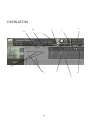
OSTINATUM
2a.
10.
8.
4.
7.
1.
2.
3.
5.
9.
6.
23.
OSTINATUM FRONT PANEL A.K.A. “Your Orchestrator’s Next Headache”.
This tool can be used in a very scientific manner so you can very carefully design your ostinati, or in a random
manner that will, we’re sure, provide you with acres of inspiration.
This tool is designed primarily for short articulations. Producing anything from a structured melodic Ostinato
to a shimmering tremolando effect.
KEY:
1. Note length.
Click on the notes or rests you want to produce a micro rhythmic sequence.
2. Key Order
Use this to select how “note numbers” are assigned (if at all) to each of the keys you’ve depressed. You can then
use these note numbers in any order to form your ostinato. Simply pull down the menu arrow and select one of these
options:
Order pressed - This will assign note numbers to your key strokes in the order you play them.
Ascending - This selection will assign note numbers from lowest in pitch first through to highest last.
Descending - This selection will assign note numbers from highest in pitch first through to lowest last.
Chords - This selection will ignore assigning any note numbers and will simply play the chord you’re playing in
unison at the frequency determined and with the dynamics you have programmed.
2a Chord Short Cut
A quick short cut button to switch to chord mode detailed above. This mode is excellent when used with fast
rhythms to create interesting shimmering effects but also very believable measured trems.
3. Keys Held
Simply displays the keys you have depressed and how the engine has assigned the note numbers.
4. Sequence Notation Display
A notation display of the note frequency selected and the length of the sequence/ ostinato.
5. Note Number Assignments
Selects which notes you wish to be played in the sequence. You do this by scrolling up or down. Scrolling down
all the way produces a hyphen which denotes tacit for this step in the sequence. Enabling you to make dotted and more
complex rhythmic phrases.
6. Velocity Dynamic Controls
As with the Note Number Assignments, scroll up or down to vary the velocity, volume or accent your sequence.
Please note, on all short articulations (ie non Ostinatum patches) you also have velocity control as per usual, ie by hitting
your keyboard louder or softer. These dynamic controls will alter micro velocities in relation to the dynamic you’re playing at.
7. Trash Can
This acts like a backspace tool for the sequence notation display.
8. Ostinato Settings
Use this to get even deeper into your Ostinato.
9. Ostinato Playlists
Toggle between your favorite ostinati.
10. Load/ Save
Once you have created your masterpiece make sure you have saved it!
For tutorials on how to get the best out of Ostinatum please visit our you tube channel:
http://www.youtube.com/user/spitfireaudiollp
24.
THE ALBION FX SEQUENCER
3.
1.
5.
2.
6.
7.
4.
8.
9.
25.
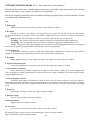
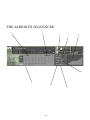
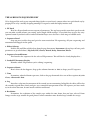
THE ALBION FX SEQUENCER KEY
We’ve designed this tool so you can punk things further to your heart’s content either in a quick brash way by
pinging FX in or by carefully designing amazing FX sequences with this highly intuitive tool.
1. FX Panel
Here lies all your hands-on non sequenced parameters. The top layer provides some basic patch tweaks
you can make, overall volume, pan, tuning, and a simple ADSR envelope. So you don’t have to press the scary
spanner button if you don’t want to and our Kontakt Player users also have a wide range of editable tools.
2. Sequencer Panel
Strap on your jewellers loop and go in for some meticulous FX sequencing. All your sequencing and
automation will happen in this panel.
3. Effects Selector
Pick the FX you’d like to dial in here from the pop down menu: Instrument (the top layer of basic patch
parameters as pictured above), EQ, LoFi, LPF, Chorus, Reverb, Delay, Distortion, Phaser.
4. Sequencer Launch Buttons
This launches the sequencer for the selected FX parameter. This will then be clearly displayed in.....
5. Loaded FX Parameter Display
Identifies which FX parameter you’re editing/ sequencing.
6. Sequencer Matrix
Here’s where the fun happens, drag up the columns from 0% to 100% to shape your FX sequence.
7. Time
Determines what the Matrix represents, click on the pop down and select one of these options: 4,3,2 &
1 bars, 2 beats and 1 beat.
8. Lag
Introduces a lag into the movement of the control you are automating. In English, the effect will be that
the controls respond more slowly and give you a smoother interpretation of the FX sequence you have made
or, in the other direction, become much crunchier and brutal.
9. Resolution
Determines the resolution of the sample steps within the time frame that you have selected. From
lumpy crotchet steps suitable for gated phrases to finer smoother more detailed steps suitable for sweeps.
26.
SURROUND USE:
If you are lucky enough to work in 5.1 you will be delighted by how Albion works in this respect and with the
number of mic combinations, there’s a number of different ways of doing it.
The basic principal is to load in several instances of the same patch routed to the same MIDI channel with different mics selected and each instance routed to a different out, or panning selection on your surround panner.
Each, and all microphone samples have been edited to sample accuracy together, so provided you give each
instance identical MIDI information, or indeed the same channel, everything will remain true as recorded. If
you are concerned that a round robin cycle may be out of sync, hit C0 on your keyboard controller to reset.
Here’s some suggestions:
Basic Quad (2 instances):
Output an instance with T(ree) to your L&R, A(mbient) to your Ls & Rs. If you need a slightly less widescreen
surround image swap out your A(mbient) for O(utrigger).
Intermediate 5.0 (3 instances)
Output an instance with T(ree) to your L&R, A(mbient) to your Ls & Rs. Bus a slightly smaller amount of Tree
into your C alongside a final instance with C(lose).
Business Class 5.0 (4 instances):
Output an instance with T(ree) to your L&R, A(mbient) to your Ls & Rs. Bus a slightly smaller amount of Tree
into your C alongside your 3rd instance with C(lose). Use your surround panner to output the O(utrigger)
mics to a point directly between L&R and Ls&Rs as pictured:
Posh 5.1 (4 instances + some clever routing):
It would be easy for us to suggest you simply pull up the LFE fader as found in Logic (pictured above) on one
of your 4 instances. Indeed, the C(lose) mic would be a nice focussed signal for this task. But your dubbing
engineer wont like your for it, and 9 times out of 10, he’ll simply cut all of your LFE tracks.
You can make his life easier by understanding the much misunderstood roll of the LFE track in cinemas. This
is, as the title suggests, an “effects” track. It is for intermittent use (albeit these-days, often used!). This should
never be part of your bass management and should be used in a selective manner. If you give them continuous
program, they’ll strip it out as it will interfere with their room tones, nice bangs and thuds. And with a 60 piece
orchestra all sorts of info gets into the sub range if you simply route your mix to it, even with instruments playing in a pitch range well clear of the sub.
Your C(lose) signal is a good starting point. Route this to a sub bass synthesizer, the Waves MaxxBass is a great
plug, alongside many free plugs bundled with DAWs. But the DBX 120A is very much the industry standard,
and inexpensive bit of outboard kit for this purpose. Send your C(lose) into this but also make sure you noise
gate it. Judge a point that you feel is a loud peak, and set the threshold to that, with a nice slow attack and release. Hey presto, you just made friends with a dubbing engineer.
Oh, and don’t forget to introduce your Darwin “Subs” and “Easter Island Hits” to the LFE........
27.
AFAQs (Anticipated FAQs)
Our first comment is to remind everyone that this is a manual to accompany v1.0 of a totally new line for
Spitfire. With a totally new set of arrangements, samples, scripts, and UI. But more importantly a totally new
selection of non-orchestral sounds and tools. We have used our experience as busy film composers to deliver
something that we’d like. Certain areas may need expansion, certain areas may need improvements, and certain
areas may prove to be “best left alone” as quirky ideas that no one used!
It is our hope that you keep in touch with us to let us know how you’re getting on, how you’re using Albion, how
you’re finding it, and, if we were to consider looking at areas in the future, what you’d like us to look at. From
this we’ll form a consensus and wholeheartedly pledge that we will act upon it wherever possible or practicle.
Our private library is what we often refer to as a “living” library, that has embraced true legato among and other
scripting technologies and will no doubt find new life in experiences we have earned in making Albion. We
hope that Albion too can enjoy this kind of fluid feedback that will keep our tool-sets fresh and vibrant.
See you at v10!
• This library really isn’t behaving how I’d expect. - OK, so we’re now officially blue in the face. But before you
go ANY further please check you are using the ABSOLUTE latest version of Kontakt. Visit your trusty service
centre and we hope this page remains relatively under-thumbed.
• My instrument or patch seems to be playing just bits of sound, some keys are missing, and there’s lots of
clicks and crackles. - Make sure that your patch is fully loaded (detailed on the front panel, page 16). Some of
these are biggies so can take a while. But if problems persist make sure Kontakt memory manager is activated:
then:
You’ll have to restart this instance of Kontakt to feel it’s benefits.
Another reason your system may be struggling is that you’re using too many mics live for the spec of your
machine. Try cutting the mics as detailed on the front panel to see if this cures your problem. If it does, don’t
worry you can still use these mics, just play in your parts with one active (we recommend the T(ree)) and then
activate multiple mics and render down (eg. freeze function in Logic Studio).
If you’re still suffering may we suggest you try and manage your pre-load buffer. Kontakt pre-loads some samples into memory so that when you hit a note Kontakt plays it out from RAM whilst addressing the rest of your
samples from your hard drive(s). The slower your drives, the more you may want to rely on RAM, the faster
the drives, or smaller RAM available, the more you may want to rely or your drives. If you’re using the latest
generation of SSDs you’ll find you can radically reduce your pre-load buffer. Referring to the plate above tick
the “Instruments Default Pre-Load Buffer Size” and drag the fader to the right to a setting you’re happy with.
28.
A QUICK THANKS
Christian & Paul would like to thank the cabal of genius assembled herein. To Dominic Kelly and the searing
talents of the English Session Orchestra, to Alison Burton and the whole of the Air-Studios team. To Jake Jackson for brushing the dust off the Studer and making everything sound so marvellous. To James Bellamy, Ben
Foskett, and the remarkable talents, immense intellect and invention of Stanley Gabriel, Stu Kennedy, Andrew
Blaney and Blake Robinson.
Most of all we’d like to thank the amazing support and loyalty of our user-base, our Facebook friends and everyone on VI Control.
We are in the same boat as all of you. We’re not software developers by trade, so appreciate your honesty in paying your way to be a part of our family and not distributing this illegally. But more importantly, if you have any
ideas or criticism please let us know directly via our website and in a constructive manner . You never know,
you just may have thought of something that we hadn’t considered. We want to make our entire range the best
there is, and we rely on you to help us achieve that..... With thanks.
C & P.
COPYRIGHT SPITFIRE AUDIO LLP 2012
www.spitfireaudio.com