1
GENERAL CONTROLS
OPTIONS
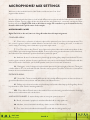
PRESETS - This allows you to load predetermined sets of articulations affectionately called articulation sets (see page 5) quickly
and easily to optimise your system quickly for essential articulations or to start building templates using empty “shells”.
PURGE UNUSED - This control keeps unloading any samples you are not using to keep your memory usage as low as possible.
TRANSPOSE - Toggle this on and tweak the number to the right to transpose your instrument. Note this is not the same as
tuning, the instrument will actually offset the samples to the selected pitch. A great way to “track up” BML and make it sound
bigger!
CC1 MAPPED VEL(OCITY) - Click this to have velocity controlled dynamics (for the shorts for instance) mapped to CC1 as
it is with the longs.
FP HALL TRIGGER - This new feature cleverly tracks your dynamic use of the instrument any sudden
reductions in dynamic don’t “suck” the hall out with it. Great for forte-piano moments, but only use if
you’re sure you’re going to need it as it uses more voices than in standard operation.
ROUND ROBINS & LEGATO
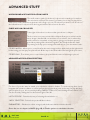
ROUND ROBINS - This refers to the number of round robins (multiple recordings of the same notes that cycle around as you
repeatedly play a note) your instrument uses, the number can be dragged up and down (1-8) to save you memory.
RESET FROM F0 - This enables you to control the round robin cycle (so it sounds identical every time you play) toggle on &
play the key selected (default F0) to reset.
RESET ON TRANSPORT - As above but resets every time you press play! Genius!
NO EXTRA FUNCTIONALITY (NEIGHBOURING ZONES)- Next to this lies a pop-down menu with some amazing new
functions:
• “No extra Functionality” - Is the standard default where round robins are used as they were intended.
• “Neighbouring Zones” - pulls from neighbouring zones, so for an ‘8RR’ instrument, you effectively cycle through up to 24
different sounding notes when pressing a key. It’s still just playing the one RR at a time, though giving you more of them. In
legato mode this also alternates between 3 legato intervals to give a fake round robin.
• “2x Round Robin With Skip” - plays two RR simultaneously, so you get a thicker sound, it’s the equivalent of plopping two
notes on top of each other in your DAW (and it drops the overall volume ~6db so that the levels remain the same but it just
sounds thicker). NB THIS IS NOT AVAILABLE TO LEGATO TRANSITIONS. This plays the pairs and moves ahead by 2 RR.
In this mode RR is effectively halved. eg, if you press a note it would play RR1/RR2 then RR3/RR4 ,etc.
• “Layer 2x Round Robins With No Skip” - As above but this plays a pair but doesn’t move ahead by 2 so that RR isn’t halved.
So if you press a note it would play RR1/RR2, then RR2/RR3, then RR3/RR4.
EXPRESSION CONTROLS
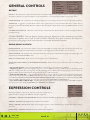
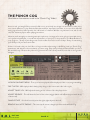
Visual representation of the various expression controllers available to you
right/ ctrl click to reassign/ learn different controller assignments.
DYNAMICS - (DEFAULT CC1 MOD WHEEL) Control and xFade the different dynamic layers recorded.
VIBRATO - (DEFAULT CC 21) Controls and xFades level of vibrato.
SPEED - (DEFAULT CC 16) Controls the speed of legato transitions, reduce when playing in, expand when playing back for
ease of use.
EXPRESSION - (DEFAULT CC11) Controls the volume of the articulation.
BM L
C A T. 2 0 1
THE B R I T ISH MODUL A R LI BRA RY
PA G E 1 0
H O R N
S E C T I O N
1