1
The Fusion-5 Booster by Cellphone-Mate, Inc. provides significantly increased cellular signal strength and
quality. You will see the difference in the number ofbars on your display and hear the difference during
your conversations.
Complete Kit Option:
Complete kit includes outdoor and indoor antennas as well as two pieces of CM400 cable as required for
full operation. Please consult the Cellphone-Mate website (www.surecall.com) or call toll free at
888-365-MATE.
1. Fusion-5 Booster with Power Supply
(5dB or 10dB attenuator incl. with amplifier)
2. CM001-30: 30ft CM400 Cable
3. CM001-75: 75ft CM400 Cable
4. CM222W: Dome Indoor Antenna
5. CM288W: Fiber Glass Outdoor Antenna
Mounting & Connecting the Booster
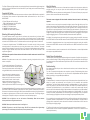
The outside antenna receives a signal from the cell tower and passes them to the booster, which
amplifies the signal and transmits it to your cell phone via the internal antenna. The inside antenna
receives the outgoing signal from your cell phone and passes it to the booster, which amplifies the signal
and sends it to the outside antenna. The outside antenna transmits the signal back to the cell tower.
1. Connect the Outside Antenna: The CM288W antenna is for outside use only. Select an outside
mounting location. For best performance, try to keep the antenna on top of the house. The outside
antenna should be located in an area with at least a 12” radius clear of obstructions, and other radiating
elements. Using the CM400 cable, connect the outside antenna to the “OUTSIDE” connector of the
amplifier and tighten it.
NOTE: Keep the separation distance between the inside and outside antennas at least 60-70 feet
apart if possible.
WARNING: The outside antenna must not be co-located or operating in conjunction with any other
antenna or amplifier.
2. Connect the Inside Antenna: The inside dome
antenna is recommended over the patch antenna.
First mount the dome antenna on the ceiling, and
using the CM400 cable, connect the dome antenna
If the patch antenna is selected over dome
antenna: The patch antenna is intended for
indoors use only. Do not mount on a surface
within 4 inches of metal. Screw the patch
antenna to the booster connector marked
“INDOOR” and make sure to tighten it. to the
side of amplifier marked “INSIDE”. Be sure to tighten it.
3. Connect the Power Cord: To prevent damage to the bosster before plugging in the booster to an AC
power outlet, make sure the Booster’s power switch is in the OFF position. Connect the power cords to
the booster, and then connect the plug to 110V AC power outlet. Make sure that all of the connections to
the booster are tight and secure, and then turn on the booster’s power switch. The LED light will glow,
indicating that the Amplifier is ready to use the booster as an indoor desktop system.
WARNING: If the red light turns on, turn the booster off immediately. Move the two antennas
furtherapart before turning the booster back on.
WARNING: Never operate the booster when the red light is on.
WARNING: The booster is rated for 9V input voltage. DO NOT use the booster with a higher-voltage
power supply. This could damage the booster and/or cause personal injury.
Using the Booster
The booster is ready for use as soon as all connections are made and the unit powers up without the
red light coming on. You may now place and receive cellular phone calls with powerful signal
amplification.
Note: The booster case may become warm during operation. This is normal. Press any key on your cell
phone to refresh communication with the base station
This booster comes equipped with the automatic shutdown feature that works in the following
sequence:
If oscillation occurs on any band, the respective band light(s) and the Power light will turn red, If the
problem is not resolved, the affected band will shut down after 30 seconds. The amplifier will wake
back up in 15-20 seconds. When this occurs, the power light will be red. If oscillation resumes, the
lights will flash as previously described. These 30-second cycles will continue for 15 minutes or until
the problem is resolved. If the problem is not resolved within 15 minutes, the amplifier will shut down
(all lights off) except the Power light, and the amplifier must be reset by unplugging it from the power
supply and plugging it back in. To resolve oscillation, increase the antenna separation.
If oscillation is happening because the outside signal is too strong, unplug the amplifier, disconnect
the OUTSIDE cable and attach the 5dB attenuator to the OUTSIDE connector and re-connect the cable.
If oscillation is happening because there is not enough antenna separation, unplug the amplifier,
disconnect the INSIDE cable and attach the 5dB attenuator to the INSIDE connector and re-connect
the cable.
If oscillation continues, repeat the procedure with the 10dB attenuator or contact Cellphone-Mate
tech support at [email protected]
Output Power Considerations
The rated output power of this booster applies to single-carrier operation. If multiple carrier signals are
present, reduce the rating 3.5 dB by reducing input power or gain, especially where the output signal
is re-radiated and can cause interference to adjacent band users. Do not connect an attenuator to the
booster output.
Troubleshooting
If the booster interferes with your radio or other electronic receivers, move the booster further away
from those devices.
For a list of Frequently Asked Questions and a complete, up-to-date Troubleshooting Guide, please
visit our website at: www.surecall.com. You may also consult a Cellphone-Mate technical specialist
directly by emailing us at [email protected].
Warranty
1. Cellphone-Mate, Inc. warrants to the buyer that each of its products, when shipped will be free from
defects in material and workmanship and will perform in full accordance with applicable
specifications. The limit of liability under this warranty is, at Cellphone-Mate, Inc.’s option, to repair or
replace any product or part thereof which shall within TWO YEARS of purchaseas determined by
examination by Cellphone-Mate, Inc., prove defective in material and/or workmanship. Warranty
returns must first be authorized in writing by Cellphone-Mate, Inc. Disassembly of any Cellphone-Mate,
Inc. product by anyone other than an authorized representative of Cellphone-Mate, Inc. voids this
warranty in its entirety. Cellphone-Mate, Inc. reserves the right to make changes in any of its products
without incurring any obligation to make the same changes on previously delivered products.
2. As a condition to the warranties provided for herein, the Buyer will prepay the shipping charges for
all products returned to Cellphone-Mate, Inc. for repair, and Cellphone-Mate, Inc. will pay the return
shipping with the exception of product returned from outside the United States in which case the
Buyer will pay the shipping charges.
3. The Buyer will pay the cost of inspecting and testing any goods returned under the warranty or
otherwise which are found to meet the applicable specifications or which are not defective or not
covered by this warranty.