1
ADDITIONAL INFORMATION
TROUBLESHOOTING
Refer to the chart below if this unit does not function properly. If the problem you are experiencing is not listed below or
if the instructions below do not help, set this unit to standby mode, disconnect the power cable, and then contact the
nearest authorized Yamaha dealer or service center.
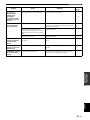
■ General
Problem
Cause
Remedy
See
page
The power cable is not connected or the
plug is not completely inserted.
Connect the power cable firmly.
The impedance setting of the connected
speaker is too small.
Use speaker(s) with proper speaker impedance.
The protection circuitry has been activated
because of a short circuit, etc.
Check that the speaker wires are not touching each
other and then turn the power of this unit back on.
9
This unit has been exposed to a strong
external electric shock (such as lightning
or strong static electricity).
Set this unit to standby mode, disconnect the power
cable, plug it back in after 30 seconds, then use it
normally.
—
Incorrect input or output cable
connections.
Connect the cables properly. If the problem persists,
the cables may be defective.
9
No appropriate input source has been
selected.
Select an appropriate input source by pressing one of
the Input selector buttons on the remote control
(INPUT l / h or FM/AM on the front panel).
12
The SPEAKERS A/B switches are not set
properly.
Turn on the corresponding SPEAKERS A or
SPEAKERS B.
12
Speaker connections are not secure.
Secure the connections.
9
Output has been muted.
Deactivate the mute function.
6
The MAX VOL or INITIAL VOLUME
setting is set too low.
Set the setting to a higher value.
The component corresponding to the
selected input source is turned off or is not
playing.
Turn the component on and make sure it is playing.
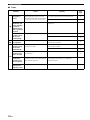
The protection circuitry has been activated
because of a short circuit, etc.
Check that the speaker wires are not touching each
other and then turn the power of this unit back on.
9
This unit has become too hot.
Make sure the openings on the top panel are not
blocked.
—
The AUTO POWER STANDBY or
SLEEP function has set this unit to
standby mode.
Change the AUTO POWER STANDBY setting to a
longer setting or OFF from the Option menu by
pressing MENU.
19
Incorrect cable connections.
Connect the cables properly. If the problem persists,
the cables may be defective.
9
Incorrect setting for the BALANCE L/R
setting.
Set the BALANCE L/R setting to the appropriate
position.
6
There is a lack of bass
and no ambience.
The + and – wires are connected in
reverse at the amplifier or the speakers.
Connect the speaker wires to the correct + and –
phase.
9
A “humming” sound
can be heard.
Incorrect cable connections.
Connect the audio plugs firmly. If the problem
persists, the cables may be defective.
9
The volume level
cannot be increased,
or the sound is
distorted.
The component connected to the LINE 3
PB/REC jacks of this unit is turned off.
Turn on the power of the component.
This unit fails to turn
on.
No sound
The sound suddenly
goes off.
Only the speaker on
one side can be
heard.
20 En
—
10
19
—
—