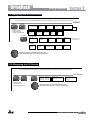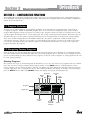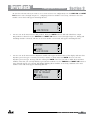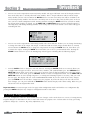
1
DriveRack
Complete Equalization & Loudspeaker Management System
®
260
Featuring
Custom Tunings
User Manual
DriveRack
®
Table of Contents
TABLE OF CONTENTS
Introduction
4.9 Compressor/Limiter ..........................................................33
0.1 Defining the DriveRack 260 System ..................................1
4.10 Alignment Delay .............................................................36
0.2 Service Contact Info ...........................................................2
4.11 Input Routing (IN) ..........................................................36
0.3 Warranty ..............................................................................3
4.12 Output .............................................................................37
Section 1 – Getting Started
Section 5 – Utilities/Meters
1.1 Rear Panel Connections .....................................................4
5.1 LCD Contrast/Auto EQ Plot .............................................38
1.2 Front Panel .........................................................................5
5.2 PUP Program/Mute ...........................................................38
1.3 Quick Start ..........................................................................6
5.3 ZC Setup ...........................................................................39
5.4 Security ..............................................................................41
Section 2 – Editing Functions
2.1 Basic Navigation Modes ...................................................15
2.2 Effect Button Array Overview .........................................15
2.3 Navigating the Pre-EQ Section (GEQ and PEQ) ............16
5.5 Program List/Program Change .........................................43
5.6 Meters ................................................................................44
Section 6 – Remote Control
2.4 Navigating the CROSSOVER Section ...............................16
6.1 DriveWare™ PC Software GUI ........................................46
2.5 Navigating the Other Section ...........................................17
6.2 ZC-Zone Controllers .......................................................50
2.6 Navigating the Dynamics Section ....................................17
2.7 Navigating the Delay Section ..........................................18
Section 7 – Application Guide
2.8 Navigating the Utility/Meters Section ..............................18
7.1 Mono 4-Way w/ Two Aux Zones ...................................55
2.9 Navigating the Wizard Section ........................................19
7.2 Stereo Tri-amp ..................................................................56
2.10 Navigating the I/O Section ............................................19
7.3 Stereo w/ four Aux Zones ...............................................57
7.4 Stereo Bi-amp w/ Dual Delay .........................................58
Section 3 – Configuration Functions
3.1 Program Definition ...........................................................20
Appendix
3.2 Navigating Factory Programs ...........................................20
A.1 Factory Reset ....................................................................59
3.3 Editing Factory Programs .................................................21
A.2 Power Up Quick Key Options ........................................59
3.4 Saving Factory Program Changes ....................................22
A.3 Specifications ....................................................................60
3.5 Creating a User Configuration .........................................23
A.4 Auto EQ Optimization Tips .............................................61
3.6 Saving Configuration Changes ........................................26
A.5 Crossover Diagrams .........................................................62
A.6 Program List .....................................................................63
Section 4 – Detailed Parameters
A.7 Block Diagram .................................................................64
4.1 Pre-Crossover EQ (28-Band GEQ or 9-Band PEQ) .......27
A.8 Input and Output Diagrams ............................................65
4.2 Feedback Eliminator .........................................................28
A.9 Gain Level Jumpers .........................................................66
4.3 Subharmonic Synthesizer .................................................29
A.10 System Setup and Gain Structure .................................66
4.4 Gate ...................................................................................30
4.5 Automatic Gain Control (AGC) .......................................31
4.6 Notch Filters ......................................................................32
4.7 Crossover ..........................................................................32
4.8 Post-Crossover PEQ ..........................................................32
DriveRack® 260 User Manual
DriveRack
®
Introduction
INTRODUCTION
Congratulations on your purchase of the dbx® DriveRack® 260 Complete Equalization and Loudspeaker Management
System! For over 30 years, dbx has been the industry leader in dynamics processing. With the DriveRack 260, dbx
Professional Products has redefined the standard by which all other loudspeaker management processors will be
compared.
The DriveRack 260 continues the legacy of the DriveRack® family. The DriveRack 260 was designed with the purpose
and vision of providing state-of-the-art signal processing, while utilizing a simple and intuitive user interface. For more
information, please visit: www.driverack.com or www.dbxpro.com.
This manual will be your guide to understanding the full functionality of the powerful DriveRack 260 . By combining
the different components, the configuration possibilities are limitless. After you have become familiar with the unit, we
encourage you to experiment and find the most effective and efficient way to run your system by utilizing the powerful
processing of the DriveRack 260.
0.1 Defining the DriveRack 260 System
The dbx DriveRack 260 is the most effective way to manage all aspects of post mixer processing and signal routing.
The DriveRack 260 essentially becomes the only device that you will need between the mixer and the power amps. The
following are just some of the features of the DriveRack 260.
DriveRack® 260 Features:
•
Advanced Feedback Suppression
•
2.7 Seconds of Alignment and Zone Delay
•
RS-232 PC GUI control
•
Classic dbx® Compression and Limiting
•
Graphic and Parametric EQ
•
Independent Input and Output Processing
•
Auto EQ Function
•
Full Bandpass, Crossover, and Routing Configurations
•
Auto Gain Control
•
Pink Noise Generator and full-time RTA
•
Setup Wizard with JBL® and Crown® Components
•
Security Lockout
•
Wall Panel Control Inputs
DriveRack® 260 User Manual
1
DriveRack
®
Introduction
In addition to the amazing menu of processors available, the 260 also affords you the luxury of utilizing dbx ZoneController series wall-mounted control panels that will allow you to remotely control various parameters of the 260.
The ZC-1 offers remote programmable Volume control to any installation using the DriveRack 260. The ZC-2 provides
programmable Volume and Mute control. Both the ZC-1 and ZC-2 can be programmed for up to six outputs of the
DriveRack 260. The ZC-3 allows Program Selection on the 260. The ZC-4 also offers Program Selection via Contact
Closure inputs for Room Combining applications. Up to six Zone Controllers can be used with a single DriveRack 260,
and can either be wired in series or parallel. The ZC-BOB was created to accommodate “home-run” or parallel wiring
to the unit. With a maximum length of 1,000 ft. for each home run (maximum length for series cabling varies), the Zone
Controllers offer a simple way to create a simple yet elegant solution to many installation applications.
ZC-BOB
ZC-1
ZC-2
ZC-3
ZC-4
0.2 Service Contact Info
If you require technical support, contact dbx Technical Support. Be prepared to accurately describe the problem. Know
the serial number of your device – this is printed on a sticker attached to the chassis.
Before you return a product to the factory for service, we recommend you refer to this manual. Make sure you have
correctly followed installation steps and operating procedures. For further technical assistance or service, please contact
our Technical Support Department at (801) 566-8800 or visit dbxpro.com. If you need to return a product to the factory
for service, you MUST first contact our Technical Support Department to obtain a Return Authorization Number.
NO RETURNED PRODUCTS WILL BE ACCEPTED AT THE FACTORY WITHOUT A RETURN AUTHORIZATION NUMBER.
Please refer to the Warranty information, which extends to the first end-user. After expiration of the warranty, a
reasonable charge will be made for parts, labor, and packing if you choose to use the factory service facility. In all cases,
you are responsible for transportation charges to the factory. If the product is still under warranty, dbx will pay the
return shipping.
Use the original packing material if it is available. Mark the package with the name of the shipper and with these words
in red: DELICATE INSTRUMENT, FRAGILE! Insure the package properly. Ship prepaid, not collect. Do not ship parcel
post.
2
DriveRack® 260 User Manual
DriveRack
®
Introduction
0.3 Warranty
1. Please register your product online at dbxpro.com. Proof-of-purchase is considered to be the responsibility of the
consumer. A copy of the original purchase receipt must be provided for any warranty service.
2. dbx warrants this product, when purchased new from an authorized U.S. dbx dealer and used solely within the
U.S., to be free from defects in materials and workmanship under normal use and service. This warranty is valid to the
original purchaser only and is non-transferable.
3. dbx liability under this warranty is limited to repairing or, at our discretion, replacing defective materials that show
evidence of defect, provided the product is returned to dbx WITH RETURN AUTHORIZATION from the factory, where
all parts and labor will be covered up to a period of two years. A Return Authorization Number must first be obtained
from dbx. The company shall not be liable for any consequential damage as a result of the product’s use in any circuit
or assembly.
4. dbx reserves the right to make changes in design or make additions to or improvements upon this product without
incurring any obligation to install the same additions or improvements on products previously manufactured.
5. The foregoing is in lieu of all other warranties, expressed or implied, and dbx neither assumes nor authorizes any
person to assume on its behalf any obligation or liability in connection with the sale of this product. In no event shall
dbx or its dealers be liable for special or consequential damages or from any delay in the performance of this warranty
due to causes beyond their control.
DriveRack® 260 User Manual
3
Section 1
DriveRack
®
Getting Started
SECTION 1 – GETTING STARTED
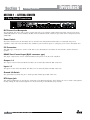
1.1 Rear Panel Connections
IEC Power Cord Receptacle
The DriveRack 260 comes with a power supply that will accept voltages ranging from 100V-120V at frequencies from
50Hz-60Hz (domestic version model). An IEC cord is included. The EU version accepts 220V-240V at frequencies from
50Hz-60Hz.
Power Switch
The Power Switch turns the DriveRack 260 on and off. Note: dbx Professional Products recommends that power
amplifiers connected to the DriveRack 260, should be powered down prior to cycling the power on the DriveRack 260.
PC Connection
This DB-9 type connection is used to send and receive information to and from the GUI interface and for firmware
updates.
RS485 Zone Control Input (RJ-45 connector type)
This input connection is used to send information and power to the ZC wall controllers.
Outputs 1-6
The output section of the DriveRack 260 offers six electronically balanced XLR connectors.
Inputs 1-2
The input section of the DriveRack 260 offers two electronically balanced XLR connectors.
Ground Lift Switch
The ground lift switch lifts the pin 1 chassis ground of both input XLR connectors.
RTA Input Jack
This balanced XLR input is used for the connection of an RTA microphone, which allows the user to “Pink” and optimize
the EQ settings of any room through the use of the Auto EQ in the Wizard setup assistant.
4
DriveRack® 260 User Manual
DriveRack
®
Getting Started
Section 1
1.2 Front Panel
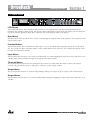
LCD Display
The backlit LCD display of the DriveRack 260 provides the user with all of the vital processing information of the
DriveRack 260 including: signal routing, effect block editing and Wizard Setup functions. The display will also notify the
user if any internal clipping is taking place within the unit by displaying “CLIP” in the display.
Data Wheel
The Data wheel of the DriveRack 260 is used to scroll through the program menu, load programs, select parameters and
edit parameter values.
Function Buttons
The function buttons of the DriveRack 260 allow direct access to all editing and navigating functions of the DriveRack
260. See sections 2.1 “Basic Navigation Modes” and 2.2 “Effect Button Array Overview” for a detailed description on the
functions of each of these buttons.
Input Meters
The DriveRack 260 provides the user with two independent, six segment Lightpipe™ input meters that range from -30 to
+22 dBu. These meters monitor the signal level right after the input module.
Threshold Meters
The threshold meters indicate that the threshold level has been exceeded within the Limiter or Auto Gain Control
sections, and gain reduction may be taking place within the specific output channel.
Output Mutes
The six output mute buttons are used for independently muting each output on all six outputs of the DriveRack 260.
Output Meters
The DriveRack 260 provides the user with six independent six-segment Lightpipe™ output meters that range from -30 to
+22 dBu.
DriveRack® 260 User Manual
5
Section 1
DriveRack
®
Getting Started
1.3 Quick Start
For those of you that wish to jump right in, the following information has been provided to act as a quick start guide for
optimizing performance of the DriveRack 260.
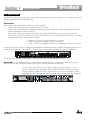
Connections
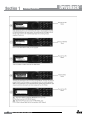
When setting up the DriveRack 260, make connections as follows: • Always make connections prior to applying power to the unit.
• C
onnect the output(s) from the sending device (mixer) to the Ch. 1 XLR input connector (mono) or both, Ch. 1
and Ch. 2 XLR input connectors (stereo).
• Make output connections from the output XLR connector(s), shown below, to the input connector(s) of the
selected power amps. For customers new to the DriveRack 260, we recommended starting with output 1 and then
working up from there. Here are some examples:
• Full Range - Outputs 1 & 2 (all frequencies are passed)
• 2-Way - Outputs 1 & 2 (highs), Outputs 3 & 4 (lows)
• 3-Way - Outputs 1 & 2 (highs), Outputs 3 & 4 (midrange), Outputs 5 & 6 (lows)
Of course you do have options to configure the DriveRack 260 differently than the examples listed above. However, for
the novice user, adhering to the above connection examples will lower the probability of improper configuration.
If you have the optional RTA microphone, connect the microphone to the XLR RTA Mic Input.
IMPORTANT: It is recommended that the power amps are turned off prior to cycling power to the Driverack 260.
Always make sure that your power amps are the last item turned on and the first turned off.
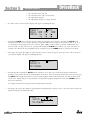
nce all of the connections have been made, and the unit is powered up, you can
O
navigate through the entire signal path of the DriveRack 260 from the front panel of the
unit. The display provides you with a clear and concise overview of each aspect of the
signal path from the input (left side of display) to the output section (right side of display).
6
DriveRack® 260 User Manual
DriveRack
®
Getting Started
Section 1
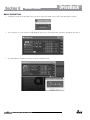
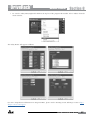
Step-by-step Setup Procedure
DriveRack® 260 User Manual
7
Section 1
8
DriveRack
®
Getting Started
DriveRack® 260 User Manual
DriveRack
®
Getting Started
Section 1
DriveRack® 260 User Manual
9
Section 1
10
DriveRack
®
Getting Started
DriveRack® 260 User Manual
DriveRack
®
Getting Started
Section 1
DriveRack® 260 User Manual
11
Section 1
12
DriveRack
®
Getting Started
DriveRack® 260 User Manual
DriveRack
®
Getting Started
Section 1
DriveRack® 260 User Manual
13
Section 1
14
DriveRack
®
Getting Started
DriveRack® 260 User Manual
DriveRack
®
Editing Functions
Section 2
SECTION 2 – EDITING FUNCTIONS
2.1 Basic Navigation Modes
Navigational aspects of the DriveRack 260 are simple and as follows. 1. FX buttons - This array of 12 FX buttons is
your primary mode of directly accessing any effect module. 2. NEXT PG & PREV PG buttons - Successive presses
of the NEXT PG or PREV PG buttons will move the user between pages within an effect block. 3. DATA WHEEL
- Pressing the DATA wheel will toggle between the available parameters on any selected page within the currently
selected effect block. The DATA wheel, when rotated, is then used to change the values of the selected parameter.
2.2 Effect Button Array Overview
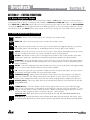
PREV PG - Moves to the previous page in the currently selected effect menu.
NEXT PG - Moves to the next page in the currently selected effect menu.
EQ - Selects the EQ effect menu. Successive presses of this button will toggle through the pre-crossover
EQ module (either a 28 band GEQ or 9-band PEQ) and post-crossover PEQ section modules.
XOVER - Selects the Crossover section. Successive presses of this button will toggle between the various
crossover modules if more than one crossover module has been pre-programmed.
OTHER - This button is used to move to the Input Insert module section, which includes: Notch filter,
Subharmonic Synthesizer, AFS (Advanced Feedback Suppression) and Wire (no effect) modules.
DYNAMICS - Selects the Dynamics effect sections. Successive presses of this button will toggle through
the pre-crossover dynamics modules (Compressor, Gate or AGC), and post-crossover dynamics modules
(AGCs or Limiters).
DELAY - Selects the Alignment Delay effect module. Successive presses of this button will toggle through
the pre-crossover Delay modules and post-crossover Delay modules.
I/O - Selects the input and output parameter editing section for all inputs and outputs. Successive presses
of this button will toggle through each input and output module.
PROGRAM (Config) - When pressed, this button is used to get back to the Program screen from any
other menu within the unit. Think of this button as the ‘Home’ or ‘Panic’ button. Press and hold this
button to enter Configuration mode, where the more advanced programming configuration takes place.
UTILITY (Meter) - Selects the Utility menu of the DriveRack 260. When pressed and held, the 260 will
enter METER mode.
STORE (Delete) - The Store button is used to store program edits. You must press this button four
times to store a program. Here’s a breakdown of what happens each time you press this button: 1st press
- Allows selection of Store or Delete mode, 2nd press - Allows renaming of Program, 3rd Press - Allows
selection of which program location to overwrite, 4th press - Stores program.
Important Note: When this button is pressed and held, the 260 will enter PROGRAM DELETE mode.
RTA (Wizard) - Pressing this button enters the RTA mode. When pressed and held, this button enters
the DriveRack 260 Wizard menu which includes: System Setup Wizard, Auto EQ Wizard and AFS Wizard.
DriveRack® 260 User Manual
15
DriveRack
®
Section 2
Editing Functions
Navigating
the
"EQ Section
Section"
2.3
Navigating the
Pre-EQ
(GEQ and PEQ)
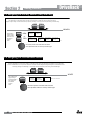
To edit the parameters of the EQs used in a selected program, simply use the following procedure. From program mode,
press the EQ button to reach the EQ module to be edited. Successive presses of the EQ button will move through each channel.
Navigate through the Pages of the selected EQ section by depressing "Next Page" or "Prev Page" successively until arriving at the desired Page.
GEQ/PEQ
EQ
The EQ button
toggles through
the EQs used in
each channel of
the selected
program
menu.
GEQ
or
EQ
PEQ
GEQ On/Off
Flatten/Restore
PEQ On/Off
Freq- 31.5Hz-18kHz
Gain -12dB to12dB
Flatten/Restore
Bell,HSelf, LShelf, LHShelf,
B1 Freq- 20Hz-20kHz
Gain -12dB to12dB
Q .20 to 16.0
B2 Freq- 20Hz-20kHz
Gain -12dB to12dB
B2 Freq- 20Hz-20kHz
Gain -12dB to12dB
Q .20 to 16.0
Q .20 to 16.0
...
Successive presses of the Data wheel will select
effect parameters within the currently selected page.
2.4 Navigating the CROSSOVER Section
To edit the parameters of the Crossover used in a selected program, simply use the following procedure. From program mode,
press the X-OVER button. Once you have reached the Crossover module, Navigate through the Pages of the selected Crossover
module by pressing the "Next Page" or "Prev Page" buttons successively until arriving at the desired Page.
The XOVER button
toggles through
the XOVER used in
each channel of
the selected
program
menu.
16
XOVER
Low Pass
High Pass
Freq- 19.7kHz to Out
Slope - BS, BW, LR
(6,12,18,24,36,48)
Freq- 20.kHz to Out
Slope - BS, BW, LR
(6,12,18,24,36,48)
XOVER
Gain- -20 to 20dB
Repeat, for each crossover band
Successive presses of the Data wheel will select
effect parameters within the currently selected page.
DriveRack® 260 User Manual
DriveRack
®
Editing Functions
Section 2
2.5
Navigatingthe
the Other
Navigating
OtherSection
Section
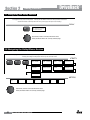
From program mode, press the Other button. Successive presses of the Other button will move you to each of the various insert modules available.
Pressing the Data Wheel will select the effect parameter to be edited.
<PREV PG
NE T PG
OTHER
OTHER
Subharmonic Synthesi er
Subharmonic - -On/Off
Subharmonics
The NE T and PREV
buttons scroll through
the pages of selected module.
OTHER
6- 6H Level - 6- 6H
Advanced Feedbac Suppression AFS
AFS On/Off
AFS Clear
OTHER
2 - 6H Level - 2 - 6H
0-100
Mode - Fixed/Live
Type- Speech, Low,Med and High
Number of filters 0-12
Number of filters fixed 0-12
Live filter Lift - On/Off
Lift After - 0-60
Notch Filter
NotchOn - Off
Flatten/Restore
Fre 1-6
Gain-
1 . H -20.2 H
- 6d - 6d
16, 2,6 ,12
Successive presses of the Data wheel will select
effect parameters within the currently selected page.
2.6 Navigating
the Dynamics
Section
Navigating
the Dynamics
Section
From program mode, press the comp/limiter button to move to eithter the Dynamics module. Once you have reached the Dynamics module,
successive presses of Dynamics button will move through each channel that utilizes either a C
Navigate through the Pages of the selected compressor or Limiter module by pressing the "Next Page" or "Prev
DYNAMICS
COMP
DYNAMICS
The Comp/Limiter button
toggles through the AGC
Compressor or
Limiter modules used in
each channel of
the selected
program.
GATE
AGC(Pre)
LIMITER
AGC(Post)
Comp On/Off
Auto On/Off
Over Easy Off, 1-10
Threshold -40 to-20dB
Ratio 1:1 to Inf:1
Gain -20 to 20dB
Attack 0.1 to 200ms
Hold 30 to 200ms
Release 360 to 5.0dB/s
Gate On/Off
Attack 0.1 to 200ms
Max Atten o to Inf
AGC On/Off
Target -20-20dBu
Window 1 to 10dB
Hold 30 to 200ms
Attack .20 to 5 sec
Release 30 to 1.0dB/s
Limiter On/Off
Over Easy Off, 1-10
Threshold -40-20dB
PeakStop On/Off
Auto On/Off
Overshoot 2 to 6dB
Attack 0.1 to 200ms
Hold 30 to 200ms
Release 360 to 5.0dB/s
AGC On/Off
Target -20-20dBu
Gain 1 to 20dB
Window 1 to 10dB
Hold 30 to 200ms
Low Thresh -60to-30dB
Attack .20 to 5 sec
Release 30 to 1.0dB/s
Ratio 1:1 to Inf:1
Threshold -50-22dB
Gain 1 to 20dB
Hold 30 to 200ms
Release 360 to 5.0dB/s
Low Thresh -60to-30dB
Successive presses of the Data wheel will select
effect parameters within the currently selected page.
DriveRack® 260 User Manual
17
effect parameters within the currently selected page.
DriveRack
®
Section 2the Editing
Navigating
DelayFunctions
Section
2.7 Navigating the
Section
Navigating
theDelay
Delay
Section
From program mode, press the Delay button. Pressing the Data Wheel will select the effect parameter to be edited.
Successive Presses of the Delay button will move you through pre and post crossover delays.
From program mode, press the Delay button. Pressing the Data Wheel will select the effect parameter to be edited.
DELAY
Successive Presses of the Delay button will move you through pre and post crossover delays.
DELAY
Delay - On/Off
Length - Delay Time - Course, Fine
DELAY
DELAY
Units - Seconds,Feet,Meters
Delay - On/Off
Length - Delay Time - Course, Fine
Units - Seconds,Feet,Meters
Successive presses of the Data wheel will select
effect parameters within the currently selected page.
Successive presses of the Data wheel will select
effect parameters within the currently selected page.
2.8 Navigating the Utility/Meters Section
Navigating the Utility/Meters Section
From program mode, press the UT L TY utton.
b
Pressing the Data Wheel will select the effect parameter to be edited.
Pressing and holding the Utility button will enter you into the meter mennu
Navigating the Utility/Meters Section
<PREV PG
NE T PG
UT L TY
UT L TY
NE T PG
UT L TY
UT L TY
From program mode, press the UT L TYLCD
utton.
b Contrast
Pressing
the Data
Wheel will select the effect
parameter
to be edited.
Security Level - Module Select
1-16
PUP Prog. - Current/Stored
C Panel 1-6
Pressing and holding
button will PUP
enter
into the meter mennu
Security Level- Low, Med, High
AE the
PlotUtility
- RTA/GE
Muteyou
- Current/Stored
Store Edit P
a nel
<PREV PG
Noise gateAGC-
Limiter 1-
Limiter -6
Noise gateAGC-
Limiter 1-
Limiter -6
LCD Contrast 1-16
260 Device LevelAE Plot - RTA/GE
Low, Med, High
PUP Prog. - Current/Stored
Edit High Password
PUP Mute - Current/Stored
Edit Medium Password
C Panel 1-6
Program List Si e- 1-10
Store Edit P
a nel
List ndex 1-10
Security Level - Module Select
Program Change mode
Security Level- Low, Med, High
Normal/Program
Program Number Loc 1-2
260 Device LevelOutputMed,
umpers
1-6
Low,
HighSetting - 1 , 22, 0d
Edit High Password
Edit Medium Password
Program List Si e- 1-10
List ndex 1-10
Program Change mode
Normal/Program
Program Number Loc 1-2
Output umpers 1-6
Setting - 1 one
, 22,Controller0d
1-
one Controller1-
one Controller-6
Output Trims
1-
Output Trims
-6
one Controller-
Output Trims
1-
Output Trims
-6
-6
Successive presses of the Data wheel will select
effect parameters within the currently selected page.
Successive presses of the Data wheel will select
effect parameters within the currently selected page.
18
DriveRack® 260 User Manual
Navigating the WIZARD Section
METERS
METERS
DriveRack
Navigating the WIZARD Section
®
Section 2
Editing Functions
2.9
Navigating
the
Wizard
Section Section
Navigating
WIZARD
From program the
mode, press
the RTA/W ARD button. Pressing
the Data Wheel will select the effect parameter to be edited.
<PREV PG
NE T PG
ARD button. Pressing the Data Wheel will select the effect parameter to be edited.
GE Setup-Dual Mono
nsert 1 Setup-
or Stereo Lin ed
<PREV PG
The NE T and PREV
buttons scroll through
the pages of selected module.
The NE T and PREV
RTA/W
buttons scroll through
the pages of selected module.
RTA/W
Select
Sub Spea er Select-
Main Spea er Select-
nsert 2 Setup-
See list
See list
Select
SYSTEM SETUP
NE T PG
ARD
W
SYSTEM SETUP
From program mode, press the RTA/W
GE Setup-Dual Mono
or Stereo
Amp
Select-Lin ed
High, Mid, Low
See list
nsert 1 Setup-
AmpSelect
SensitivityHigh, Mid, Low
High, Mid, Low
ARD Amp SelectAmp Level
Amp SensitivityAUTO E W ARD
High, Mid, Low
High, Mid, Low
High, Mid, Low
Connect Mic
Pin Noise Level
See list
- nf to 20d
AUTO E
W
Connect Mic
AFS W
Low Amp
ridged/
Normal-
See listLoad New
Program-
Low Amp
ARD
ARD
Mixer gain turn
down prompt
See list
Load New
ridged/
Auto E - L
Normal-
ProgramAuto E - R
Auto E - L-R
Left and Right when using
Lin ed Graphic E
Pin Noise Level
- nf to 20d
Select Number of
Fixed Filters
- 0-12
Select Number of
ARD
Sub Spea er Select-
ARD
Mixer gain turn
down prompt
AFS W
Main Spea er Select-
nsert 2 Setup-
AmpSelect
Level
W
ARD
Auto E - L
Auto E - R
Select Type Low, Med, High mode
Select Type -
Fixed Filters
Low, Med, High mode
Successive presses of the Data
wheel will select
- 0-12
effect parameters within the currently selected page.
Auto E - L-R
Mixer Gain Ad ust-
Mixer Gain Ad ust-
Left and Right when using
Lin ed Graphic E
Fixed Filter Setup
Done-
Fixed Filter Setup
Done-
Successive presses of the Data wheel will select
effect parameters within the currently selected page.
2.10
Navigating the
the I/O
Navigating
I/OSection
Section
Navigating the I/O Section
From program mode, press the /O button. Pressing the Data Wheel will select the effect parameter to be edited.
<PREV PGFrom
nput Level 1 - nf to 20d
nput Level 2 - nf to 20d
Master Level - nf to 20d
<PREV PG
/O Section
NE T PG
program
mode, press theFEED
/O bAC
utton. Pressing the Data Wheel will select the effect parameter to be edited.
NE T PG
The NE T and PREV
buttons scroll through
the pages of selected module.
Pin Noise On/Off
Pin Noise Level -10 to 10d
Output Channel 1-6 On/Off
Polarity /Phase -1 0 to 0
/O Section
FEED AC
nput Level 1 - nf to 20d
nput Level 2 - nf to 20d
Master Level - nf to 20d
Pin Noise On/Off
Output Channel 1-6 On/Off
-10 to
10d
Successive pressesPinof Noise
the Level
Data
wheel
will Polarity
select/Phase -1 0 to 0
effect parameters within the currently selected
page.
The NE T and PREV
buttons scroll through
the pages of selected module.
Successive presses of the Data wheel will select
effect parameters within the currently selected page.
Navigating the Other Section
From program mode, press the Other button. Successive presses of the Other button will move you to each of the various insert modules available.
Pressing the Data Wheel will select the effect parameter to DriveRack®
be edited.
260 User Manual
Navigating the Other Section
<PREV PG
NE T PG
OTHER
Subharmonic Synthesi er
OTHER
From program mode, press the Other button. Successive presses of the Other button will move you to each of the various insert modules available.
Subharmonic - -On/Off
2 - 6H Level - 2 - 6H
Pressing the Data WheelSubharmonics
will select the
effect parameter
to be edited.
0-100
6- 6H Level - 6- 6H
19
Section 3
DriveRack
®
Configuration Functions
SECTION 3 – CONFIGURATION FUNCTIONS
The Configuring section of the DriveRack 260 will be your key to successful navigation of the configuration functions
of the DriveRack. The following information provides, descriptions about program functions and in depth configuration
options of the DriveRack 260.
3.1 Program Definition
The first step in understanding the programming capabilities of the DriveRack is to understand the components of
a complete “program.” Within an individual program, there are several levels of editing that make up the complete
program. When initially entering a program, you will be at the “program” mode level. This level supplies the user with
current program information such as: current signal path, effect usage, and program name/number. From this point, the
DriveRack 260 gives you the option of entering subsequent levels of operation that are dedicated to program editing.
These levels include Configuration mode and Effect Edit mode. All of these components combined, make up the
conventional “program”, and they are all unique to each individual program. The exception is the Utility menu which
is accessed via the Utility button and contains a global set of parameters and therefore, is not part of one particular
program, but rather all programs.
3.2 Navigating Factory Programs
From the factory, the 260 DriveRack ships with 25 factory programs that have been designed to accommodate virtually
any sound reinforcement and installation application. The factory programs offer a clear and concise explanatory title to
get you up and running in a timely manner. These programs can also be used as templates or starting points for the user
to create custom programs.
Selecting Programs:
The quickest way to get up and running with the DriveRack is to use any one of the factory programs that are available
in the box. To select a factory program, (from program mode), use the DATA wheel to scroll through the various
factory programs. As each factory program is selected, the display will clearly indicate the title that is directly related to
a specific application. Once a program is selected, ‘Not Loaded’ will flash in the display. To load this selected program,
press the DATA wheel in (this is the SELECT button). The display will appear something like this:
Compressor
Graphic
EQ
Gate
Mixer
Program #
Program Type
33
FACT
M
M
Pre
XOVER
Delay
GEQ G C
20
DriveRack® 260 User Manual
Post
XOVER
Delay
D A 2x2 P L D 1 2
D B 2x2 P L DD 3 4
STw/2Delays
Program
Name
Parametric
EQ
2x2 P L DD 5 6
XOVER
Output
Routing
Input
Processing
Limiter
Chain A/B
Indicators
LR
-0+
COMP THR
Compressor
Over Easy
EQ G C
DriveRack
®
Configuration Functions
Section 3
Navigation Modes
Once you have selected a program with a configuration that accommodates your application, the DriveRack offers
instant access to edit effect types within the configuration.
To instantly access an effect module, simply press the corresponding button in the button array for the desired module.
3.3 Editing Factory Programs
Once you have reached the module that you wish to edit, use the PREV PG and NEXT PG buttons to move through
the pages within the module. The DATA wheel is used to edit parameter values. The following illustration shows an
example of the Compressor module in edit mode:
Note: The cursor indicates the currently selected parameter for editing. To select parameters to edit from the current
page, press the DATA wheel until the cursor is next to the parameter that you wish to edit.
D A 2x2 P L D 1 2
D B 2x2 P L DD 3 4
Delays
2x2 P L DD 5 6
LR
NAME: ROCK V
-0+
COMP THR
Compressor
Over Easy
-50 -30 -12 -5 0
ON
OFF
<DATA> - SELECTS
<PREV/NEXTPG> PRESS <STORE> TO
DriveRack® 260 User Manual
21
Section 3
DriveRack
®
Configuration Functions
3.4 Saving Factory Program Changes
Once you are satisfied with the changes that have been made to a factory or user program, the DriveRack allows you to
save these changes to the program as a custom USER program by pressing the STORE button. The first time you press
the STORE button the DriveRack 260 will ask you if you want to store or delete the program. Just press the STORE
button a second time to advance and store the program. The display will now appear something like this:
NAME: ROCK VENUE
+
R
-50 -30 -12 -5 0
sor
sy
ON
OFF
<DATA> - SELECTS CHARACTER
<PREV/NEXTPG> - LEFT/RIGHT:
PRESS <STORE> TO ADVANCE
STORE: Program 1
Replacing:
U 1 Program 1
PRESS <STORE> TO ADVANCE
• Rotating the DATA wheel will change the characters in the currently selected position.
• Pressing the DATA wheel in successively will toggle between uppercase letters, lowercase letters, numbers or
symbols/blank space.
• Use the PREV PG and NEXT PG button to move character positions (left and right).
• Once the desired title has been written, press the STORE button. The display will now appear something like
this:
E: ROCK VENUE
A> - SELECTS CHARACTER
V/NEXTPG> - LEFT/RIGHT:
S <STORE> TO ADVANCE
STORE: Program 1
Replacing:
U 1 Program 1
INSERT:
U6
SR4725+sSub
SR4725+sSub
PRESS <STORE> TO ADVANCE
• Rotate the DATA wheel to select the program to be replaced and press the STORE button and the existing
program will be replaced with the new program. All edits will be saved.
The DriveRack 260 will store up to 25 user programs (1-25) in addition to the 25 factory programs (26-50).
Note: Factory programs cannot be over-written. From the factory, programs 1-25 (User) are the same programs as 26-50
(Factory). The difference is that users can overwrite programs 1-25. However, the factory programs will always reside
in program locations 26-50. If a user attempts to overwrite a factory program (26-50), the DriveRack 260 will move the
program index to the user program location equivalent. For example if trying to store a program to Factory program
location 50, the DriveRack will automatically change the store location to User program location 25. Of course, the user
can then change the user location if desired.
22
DriveRack® 260 User Manual
DriveRack
®
Configuration Functions
Section 3
3.5 Creating a User Configuration
The 260 has 25 Factory Presets in which to choose from. For some configurations, you may be able to simply select
one of these presets as a starting point and edit the program from there. In the Quick Start section of this manual,
you saw how you can use the Wizards to configure basic programs (i.e. stereo Full Range, stereo 2-Way and stereo
3-Way programs with mono or stereo subs). The Wizard works especially well if your speakers and amps are in the
list. However, there may be times when the routing in your configuration may need to be changed, you want to
link/unlink processing modules or select different DSP inserts in the signal chain. This is where the Driverack 260’s
User Configuration mode comes in. User Configuration is an ideal feature available in the DriveRack 260. Even with
the versatility of the Factory Preset configurations within the DriveRack, there may be an application that requires a
unique “custom” program configuration. The DriveRack gives you the ability to create a custom routing configuration
by selecting and modifying the modules including: Inputs, pre-crossover EQ, an insert section which includes: Notch
Filter, Compressor, Gates, AGC, Subharmonics Synthesizer and AFS (Advanced Feedback Suppression), Crossovers, postcrossover Parametric EQ, Dynamics, post Delay, Output Gain and Phase. The following information contain a standard
block diagram of the signal path in the DriveRack 260 which can be used as a reference map, as well as step-by-step
instructions for creating custom user configurations.
260 Signal Path
260 Signal Path
WIRE
RTA
MIXER
8
RTA
ROUTING
A
B
A+B
FACT
M G C N D A
65
M G F S D B 2X6 P P P 4 3
Program1
21
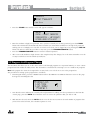
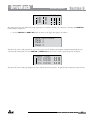
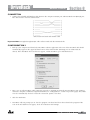
• From Program mode, press and hold the PROGRAM/CONFIG button until the bottom left-hand corner of
display reads: “Configure”
• At this point, you can either press the button of the module that you wish to edit (i.e. DYNAMICS, EQ, DELAY,
etc.), or if you wish to change every module within the signal path, you can use the PREV PG and NEXT PG
buttons to navigate through every module within the signal path. The following information will make a basic
touch on every module. The first page in configuration mode will appear as follows: GEQ
Select
Link/Unlink
GEQ A
GEQ B
COMP
Select
Link/Unlink
C N
A
F C
1 2
B
ou are now in the Pre-Crossover EQ module. The upper left-hand corner of the display indicates what EQ type
• Y
is currently selected. The A and B indicators indicate which input is currently selected. Rotate the DATA wheel
to select either the 9-band Parametric EQ (PEQ) or 28 band Graphic EQ (GEQ). Pressing and then rotating the
DATA wheel lets you link or unlink the input EQ modules as desired. Note that the same EQ types must be
DriveRack® 260 User Manual
23
8
65
M G C N D A
FACT
M G F S D B 2X6 P P P 4 3
Section 3
DriveRack
®
2
Program1 Configuration 1Functions
selected to link. If you plan to use the Auto EQ feature, you must select a GEQ type EQ here. Use the PREV PG
and NEXT PG buttons to move through A and B and then to the next module screen which will appear
something like this:
EQ
Select
65
ink/Unlink
GEQ A
GEQ B
P P P 43
COMP
Select
Link/Unlink
C N
A
F C
1 2
B
MONODLY1.3
10msUnused
Select
Link/Unlink
D
A
D
B
2 1• You are now in the Pre-Crossover Insert module. The upper left-hand corner of the display indicates what
Insert type is currently selected. The A and B indicators indicate which input is currently selected. The 1 and 2
indicators indicate which module block is currently selected (i.e. Insert 1 or Insert 2). Rotate the DATA wheel to
select either Wire (no effect), AGC, Compressor, AFS, Noise Gate or Subharmonic Synthesizer. Pressing and then
rotating the DATA wheel lets you link or unlink the A and B modules. Note that the same Effect types must be
selected to link. Use the PREV PG and NEXT PG buttons to move through A and B, 1 and 2 and then to the
next module screen which will appear something like this:
MP
C N
F C
1 2
elect
nk/Unlink
A
B
MONODLY1.3
10msUnused
Select
Link/Unlink
D
D
1X1FILTER
Select
Route
A
B
A
B
A
A
2
A
3
A
5
2
4
6
• You are now in the Input (Pre-Crossover) Delay module. The upper left-hand corner of the display indicates how
much delay time is currently allocated to this module. The A and B indicators indicate which input is currently
selected. Rotate the DATA wheel to set how much delay time will be available to the selected Input Delay
module. Note that the actual delay time is not set at this point; the delay time can be set once you have exited
Configuration mode. Pressing and then rotating the DATA wheel lets you link or unlink the Input Delay modules
as desired. Use the PREV PG and NEXT PG buttons to move through A and B, and then to the next module
screen which will appear something like this:
NODLY1.3
msUnused
elect
nk/Unlink
D
A
D
B
1X1FILTER
Select
Route
A
B
A
A
2
A
3
A
5
2
4
6
POSTEQ
Link/Unlink
• Y
ou are now in the Crossover module. The upper left-hand corner of the display indicates what Crossover type
is currently selected. Rotate the DATA wheel to select the Crossover type. The letters ‘A’ or ‘B’ to the left of the
crossover indicate a mono crossover, ‘A+B’ indicates a mono summed crossover, and the letters ‘ST” indicate a
stereo crossover. Pressing and then rotating the DATA wheel lets you select the route path (i.e. which inputs will
be routed to the selected Crossover module). You can route either Input A, Input B or a sum of the Inputs (A+B)
to any mono input crossover. As previously mentioned, a stereo crossover selection is indicated with the letters
24
DriveRack® 260 User Manual
P2
P 2
P3
P 4
P5
P 6
DriveRack
®
Configuration Functions
Section 3
‘ST’ (use this selection when you want to use a stereo in/stereo out configuration). Use the PREV PG and NEXT
PG buttons to move through Outputs 1-6, configuring Crossover modules as necessary, and then to the next
module screen which will appear something like this:
1X1FILTER
Select
Route
•
A
B
A
A
2
A
3
A
5
POSTEQ
Link/Unlink
2
4
6
LIMITER
Select
Link/Unlink
ou are now in the Post-Crossover PEQ module. Rotate the DATA wheel to link and unlink these output
Y
PEQ modules as desired. Use the PREV PG and NEXT PG buttons to move through outputs 1-6, linking and
unlinking modules as desired, and then to the next module screen which will appear something like this:
P2
P 2
P3
P 4
P5
P 6
OSTEQ
Link/Unlink
•
P2
P 2
P3
P 4
P5
P 6
LIMITER
Select
Link/Unlink
L2
L 2
L3
L 4
L5
L 6
MONODLY20MS
810msUnused
Select
Link/Unlink
ou are now in the Post-Crossover Dynamics module. The upper left-hand corner of the display indicates what
Y
Dynamics processor type is currently selected (i.e. Limiter or AGC). Rotate the DATA wheel to select the
Dynamics processor type. Pressing and then rotating the DATA wheel lets you link or unlink these Dynamics
modules. Note that you can only link like type Dynamics modules. Use the PREV PG and NEXT PG buttons to
move through outputs 1-6, selecting and linking/unlinking these modules as necessary, and then to the next
module screen which will appear something like this:
IMITER
Select
Link/Unlink
L2
L 2
L3
L 4
L5
L 6
MONODLY20MS
810msUnused
Select
Link/Unlink
D2
D 2
D3
D 4
D5
D 6
OUTPUTCH2
Route
NAMEOutputCh2
<STORE>-EDITNAME
DriveRack® 260 User Manual
25
Section 3
DriveRack
®
Configuration Functions
• Y
ou are now in the Output (Post-Crossover) Delay module. The upper left-hand corner of the display indicates
how much delay time is currently allocated to this module. The 1-6 Output indicators indicate which Output
Delay module you have selected. Rotate the DATA wheel to set how much delay time will be available to the
selected Output Delay module. Note that the actual delay time is not set at this point; the delay time can be set
once you have exited Configuration mode. Pressing and then rotating the DATA wheel lets you link or unlink
the Output Delay modules as desired. Use the PREV PG and NEXT PG buttons to move through outputs 1-6,
allocating delay and linking/unlinking modules as necessary, then to the next module screen which will appear
something like this:
D2
D 2
D3
D 4
D5
D 6
DLY20MS
sUnused
ct
/Unlink
OUTPUTCH2
Route
NAMEOutputCh2
<STORE>-EDITNAME
2
3
5
2
4
6
NAME:OutputCh2
<DATA>-SELECTCHARACTER
<PREV/NEXTPG>-LEFT/RIGHT
<STORE>-EDIT/<UTIL>-EXIT
• You are now in the Output Route and Naming module. The arrow indicates whether you can change the Routing
or change the Name of the output. The output 1-6 indicators indicate which Output module block is currently
selected. Rotate the DATA wheel to change the Output Route. Pressing the DATA wheel in, then allows you
to rename the output. Turning the DATA wheel will allow you to select a predetermined name. Pressing the
STORE button will move you to the Naming Page which appears something like the following display:
UTCH2
te
OutputCh2
E>-EDITNAME
2
3
5
2
4
6
NAME:OutputCh2
<DATA>-SELECTCHARACTER
<PREV/NEXTPG>-LEFT/RIGHT
<STORE>-EDIT/<UTIL>-EXIT
CONFIGURATIONERROR
Oneormoreoutputs
haveduplicated
channels.
• Turn the DATA wheel to change the selected character. Pressing the DATA wheel in successively allows you
to toggle between uppercase letters, lowercase letters, numbers, and symbols/blank space. The PREV PG and
NEXT PG buttons allow you to move to the next or previous character (left and right). Once all of the naming
assignments have been made, press the UTILITY button to return to Configuration mode. Use the PREV PG and
NEXT PG buttons to move through outputs 1-6, re-routing and renaming outputs as necessary, until you reach
the next page. The display will now read ‘CONFIGURATION DONE’. If you have made all necessary changes,
press the DATA wheel to load these changes into your program. If you decide that you do not want to load
these changes, you can press and hold the CONFIG button until the display reads ‘Abort Config’. Either way you
will now be back in Program Edit mode.
Important Note! You must navigate to the last page within Configuration mode and load the new configuration (by
pressing the DATA wheel) for any changes in Configuration mode to take effect.
3.6 Saving Configuration Changes
Once your Configuration edits have been loaded, these new changes can be saved. Please see section 3.4 ‘Saving Factory
Program Changes’ for information on how to store and rename the program. You can then make necessary processing
parameter changes (i.e. crossover, EQ, Delay adjustments, etc.).
26
DriveRack® 260 User Manual
DriveRack
®
Detailed Parameters
Section 4
SECTION 4 – DETAILED PARAMETERS
The DriveRack 260 offers complete editing flexibility, by offering in-depth control over every parameter within each
effect module. The following section will provide you with descriptions and explanations of all parameters within the
DriveRack 260.
4.1 Pre-Crossover EQ (28-Band GEQ or 9-Band PEQ)
The DriveRack 260’s Pre-Crossover EQ section may be configured as a single or linkable 28 band graphic EQ or 9-Band
Parametric EQ.
GEQ
EQ On/Off
Turns the EQ on and off.
Flatten/Restore
This parameter either flattens the GEQ settings (sets all bands to 0 dB) or restores (think of this as ‘undo’) the GEQ to
the last settings before flattening. The DriveRack unit allows you to leave the EQ edit window and return without losing
the edited EQ settings.
Frequency (F) 31.5Hz to 16.0kHz
This parameter allows you to select any one of the 28 available frequency bands.
Gain (G) -12 to +12 dB
This parameter allows you to adjust the level of any one of the 28 bands of the GEQ in .5 dB increments.
PEQ
EQ On/Off
Turns the PEQ on and off.
Flat Set/Undo
This parameter either flattens (sets all bands to 0 dB) or restores (think of this as ‘undo’) all bands to their original
settings.
Band 1 Frequency 20 to 20kHz (Low Shelf)
Selects the frequency of the low pass shelf parametric EQ.
Slope 1 3-12dB/Octave
Sets the slope of the low shelf parametric EQ.
Level 1 -12 to 12 dB
Sets the overall gain of the shelf EQ.
Band (2-8) Frequency 20 to 20k
Selects the frequency of the selected band of the parametric EQ.
Q (2-8) 0.20 to 16.0
Adjusts the Q of the selected band of the parametric EQ.
DriveRack® 260 User Manual
27
Section 4
DriveRack
®
Detailed Parameters
Level (2-8) -12 to 12 dB
Sets the overall level of the selected parametric EQ frequency.
Band 9 Frequency 20 to 20k (High Shelf)
Selects the frequency of the high shelf parametric EQ.
Slope 9 3-12dB/Octave
Sets the slope of the high shelf parametric EQ.
Level 9 -12 to 12 dB
Sets the overall gain of the high shelf parametric
4.2 Feedback Eliminator
The DriveRack 260 offers the exclusive patent pending AFS (Advanced Feedback Suppression) feedback elimination
module. Feedback is caused when a microphonic signal such as a guitar pickup or microphone is reproduced with
amplification and is repeatedly picked up in phase. The AFS uses Precision Frequency Detection and state-of-the-art
processing to determine the exact portions of a given frequency of your feedback that need to be removed (instead
of taking out large sections of your sound). The AFS module of the DriveRack 260 allows the user to optimize the
elimination of feedback. In the past, graphic equalizers were used to eliminate feedback from a system. This was an
acceptable method for eliminating feedback, but when this method was precision tested, the result clearly showed that
a single 1/3 octave EQ slider was removing approximately half of the signal power. With AFS, the module removes the
feedback automatically and the proprietary, precision AFS filters remove only a fraction of the frequency spectrum. The
following diagram shows AFS as opposed to competing, competitive feedback eliminators and conventional graphic EQs:
AFS On/Off
Turns the AFS module on and off. If AFS is Off, the filters are bypassed, and the algorithm is halted (the filters are not
updated). If AFS is On, the filters are active, and the they are updated according to the current selected mode (Fixed or
Live).
Clear Live/All
This parameter clears the filters. If Clear Live is selected, then (if invoked) the live filters are reset. If Clear All is selected,
then (if invoked) all of the filters are reset. When either Clear Live or Clear All is selected, the third parameter row
displays “Clear w/ Data Wheel.” If the Clear field is blank, then nothing is displayed on this row. To clear filters move
the cursor down to the ‘Clear w/ Data Wheel’ row, then turn the Data Wheel. ‘Clearing Filters...’ will appear in the
display.
Mode - Live or Fixed
When the mode is set to Fixed, the algorithm updates only the fixed filters. When the mode is set to Live, the algorithm
updates only the live filters. In FIXED mode, the system is forced into feedback by the user and filters are automatically
assigned to a frequency which is
28
DriveRack® 260 User Manual
DriveRack
®
Detailed Parameters
Section 4
creating feedback. FIXED mode is used before the performance without any input signal. In LIVE mode, the live filters
automatically detect and remove feedback during the performance. When all of the live filters have been used, they
begin to round robin. Essentially this means that the first filter set is replaced where a new feedback is detected and
notched out. This mode is useful because feedback frequencies may change as the microphone is moved, and/or as the
characteristics of the venue change. Note that only the fixed filter settings will be stored with the new program. Live
filters clear whenever the unit power cycled, the user loads a different program, or the user clears the filters using the
‘Clear all Filters’ function.
Type - Speech, Low Music, Medium Music and High Music
If Fixed or Live mode is chosen, the text will read “Type.” The options will be Speech, Music Low, Music Medium and
Music High. These types pertain to the Q, sensitivity, and algorithm type. Values are; Speech (Bandwidth = 1/5 octave
and Q=7.25) Music Low (Bandwidth = 1/10 octave and Q=14.5) Music Medium (Bandwidth = 1/20 octave and Q=29)
Music High (Bandwidth = 1/80 octave and Q=116). Note: To guarantee that feedback is suppressed at lower frequencies,
the AFS may place wider notch filters at these lower frequencies (below 700 Hz).
Number Fixed - 0-12
This will range from values 0-12. The total number of filters is the total number of filters available, and the number of
live filters will be = Total Num Filters – Num Fixed. If this is changed before the filters are reset, then the filters will
be reset one by one as the number changes. For example, if the number of Fixed filters goes down, then the last fixed
filter set will be reset. Likewise, if the number of Fixed filters goes up (and thus the number of live filters goes down),
then the last live filter set will be reset. The Fixed/Live filter usage will be indicated at the bottom of each page of the
feedback elimination effect. ‘F’ indicates an available fixed filter, and ‘L’ indicates an available live filter. A blocked out F
or L indicates a filter that is set, or in use.
Live Filter Lift (On/Off)
This parameter turns the Live Filter Lift on and off.
Lift After - 5 sec to 60 min
This parameter allows the user to setup the box so that the Live filters will automatically be removed after a set time (as
indicated by the “Lift After” parameter). It ranges from 5 seconds to 60 minutes. This feature is useful if the microphone
being used is moved or the characteristics of the venue change over time. As example; a filter placed minutes ago will
not be presently preventing feedback. This feature removes unnecessary filters from the spectrum to increase sonic
quality. If the feedback is still there (after the filter is removed), it will catch it and notch it out the same.
Total Number of Filters 1-12
This parameter selects the number of filters being used
4.3 Subharmonic Synthesizer
The Subharmonic Synthesizer module has been specifically optimized to enhance Bass audio material for use in a
variety of professional applications, including nightclub and dance DJ mixing, theatre and film sound, music recording,
live music performance and broadcasting. The Subharmonic Synthesizer module’s two separate bands of subharmonic
synthesis provide the best combination of smoothness and control.
Sub-Harmonic Synth - On/Off
Turns the Subharmonic Synth module on and off.
Sub-Harmonics Synth - 0 to 100%
This parameter sets the overall level of the Subharmonic Synthesizer.
DriveRack® 260 User Manual
29
Section 4
DriveRack
®
Detailed Parameters
24-36Hz and 36-56Hz (Subharmonic Synthesis) Level - 0 to 100%
These controls individually let you customize the amount of the respective synthesized frequencies to be added in,
tuning the ultimate bass response of your system to taste. For example, if the sound is too woofy or growly, try turning
down the 36Hz-56Hz level. If your
woofers are bottoming out (making a ticking, popping sound), try turning down the 24Hz-36Hz level. You may find
that a setting produces fine results in one room, but produces too much boominess in another. If this occurs, adjust the
controls as needed, (e.g., decrease one or the other of the band levels). Experimentation will pay off with smooth, full,
deeply extended bass. Remember, you are not selecting a frequency. You are controlling the overall level of each band.
4.4 Gate
Gate On/Off
Local (per band control) or global on and off.
Threshold -50 to 20 dBu
The threshold is the volume level at which the gate opens. Anything above the threshold passes, while signal that is
lower than the threshold is attenuated. Beware, setting the threshold to high can cut off the tail end of signals as they
fade out (the sustain of a guitar note, a held piano chord, a reverb tail, etc.).
Ratio 1:1.0 to 1:15
This is where you decide how much downward expansion you want. This ratio works opposite from that of the
compressor or limiter. If a ratio of 1:4 is selected, a signal that is 1dB below the threshold will be reduced in gain so that
it becomes 4dB below the threshold.
Attack 0.1 to 200 m Sec
As the signal reaches the threshold area, the Attack control sets the speed at which the gate opens. Use very fast attack
times to catch the fronts of transient signals.
Hold 0 to 500 m Sec
The Hold control sets the amount of time the gate is held open after the signal passes below the threshold point.
Release 360 to 5 dB
Release sets the speed at which the gate “closes” or attenuates when the end of the Hold time is reached.
Max ATT 0 to Inf. dB
This sets the maximum amount of attenuation for the gate.
30
DriveRack® 260 User Manual
DriveRack
®
Detailed Parameters
Section 4
4.5 Automatic Gain Control (AGC)
The AGC is used to keep the average level of a signal at a constant level. This is done by selecting a desired Target
output level and Window. The AGC keeps the signal within the Window about the selected Target by slowly adjusting
the gain. The maximum gain that can be applied to the signal is selected by the Gain parameter. When the input signal
falls below the Low Threshold the AGC releases the gain and returns to unity. This prevents the AGC from adding gain
when there is no signal present and raising the system noise floor. High level signals are reduced by a fast limiter to
prevent distortion by clipping. The AGC Threshold meters show what region of the AGC the input signal is in. The T
(yellow) indicates the signal is within the Window. A + (red) indicates the signal is going into the Limiter. A – (green)
indicates the AGC is adding maximum Gain and is at or below the Window. When the Threshold meter is off the signal
is below the Low Threshold.
AGC: On/Off
Turns the AGC module On and Off.
Target: (Targ) -20 to 20 dB
The Target parameter defines where you would like the average level of the AGC output to be. If the average level of
the signal rises above the Target the gain will be reduced. For signals with an average level below the Target the gain
will be increased.
Gain: 1 to 20dB
This adjusts the maximum amount of gain that can be added by the AGC.
Window: 1 to 10dB
This adjusts the amount of variation in the output
Low Threshold: -60 to -30dB
The Low Threshold sets a lower limit to the AGC. This prevents the AGC from adding gain to low level signals or noise.
Attack: 0.20 to 5 Seconds
Adjusts how fast AGC will reduce gain when the signal level is above target.
Release: 30.0 to 1 dB/Second
Adjusts the rate of gain increase when the signal level drops below target.
DriveRack® 260 User Manual
31
Section 4
DriveRack
®
Detailed Parameters
4.6 Notch Filters
The notch filter is the perfect tool for dropping out undesirable frequencies that may appear in the input signal. Up to
six Notch filters are available for all six outputs.
Notch On/Off
Turns the notch filters on and off.
Frequency (1 to 6) 20 to 20K
Selects the desired notch filter frequency of the selected notch filter.
Gain -36 to 6 dB
Sets the level of the selected notch filter. Set to +6dB to help find unwanted feedback, then set to -3dB to -36dB to
remove.
Q 16 to 128
Selects the Q of the selected notch filter.
4.7 Crossover
The Crossover is used to divide the input signal into several frequency bands. This allows the user to drive the speaker
in its optimum frequency range and send each output separately for more efficient use of amplifier power. The
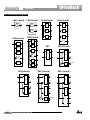
DriveRack 260 Crossover can be configured as a 2x2, 3, 4, 5, or 6 (stereo configurations) or 1x1, 2, 3, 4, 5 or 6 (mono
configurations). Appendix A.5 illustrates each of the available crossovers. The High-Pass or Low-Pass filter being edited
is indicated by the highlighted edge in the graphical display.
Frequency
Adjusts the frequency of the Low Pass or High Pass filter from 20Hz to 20KHz.
Type
Selects the crossover filter type. Selections are:
• BS (Bessel) with a slope of 6, 12, 18, or 24 dB/Octave.
• BW (Butterworth ) with a slope of 6, 12, 18, or 24 dB/Octave.
• LR (Linkwitz-Riley) with a slope of 12, 24, 36, or 48 dB/Octave.
Gain
Sets the level of the selected output(s). Range is from -Infinity to +20dB.
4.8 Post-Crossover PEQ
In addition to the pre-crossover EQ options within the signal path, the DriveRack 260 also offers a 4-band parametric EQ
after the crossover section. The parameters for the post-crossover EQ are as follows and are user adjustable.
PEQ On/Off
Turns the PEQ module on and off.
32
DriveRack® 260 User Manual
DriveRack
®
Detailed Parameters
Section 4
Flatten/Restore
This parameter either flattens the PEQ or restores the PEQ to its original shape.
Type
This parameter selects the PEQ band type. Types include:
• Bell - All bands are bell-shaped.
• HShelf - One band is a high shelf, while all others are bell.
• LShelf - One band is a low shelf, while all others are bell.
• LHShelf - One band is a low shelf, one is a high shelf, and all others are bell.
Band (1-4) Frequency 20Hz to 20kHz
Selects the frequency of the selected band of the parametric EQ.
Level (1-4) -12dB to 12dB
Sets the level (gain) of the selected parametric EQ.
Q (1-4) 0.20 to 16 dB
Sets the Q or Bandwidth of the selected Parametric EQ.
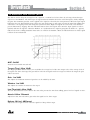
The following figure shows the constant Q parametric filter.
S (1 and 4, shelf type filters only) 3, 4.5, 6, 9, and 12 dB/Octave
Sets the slope rate when using a low or high shelf type filter.
4.9 Compressor/Limiter
The DriveRack 260 also offers Compression and Limiting modules. The Compressor is a full bandwidth Stereo
Compressor inserted prior to the Crossover. The Compressor is the perfect tool for tightening uneven signal sources,
providing a more even mix. The Limiters are located
on each output channel and have been strategically placed for speaker and amplifier protection. Note that Compressor/
Limiter threshold metering can be observed in the Meter section by pressing and holding the UTILITY button. The
parameters for the Compressor/Limiter are as follows and are user adjustable.
COMPRESSOR
Compressor On/Off
Turns the Compressor module on and off.
OverEasy (O) Off to 10
There are ten levels of OverEasy® that can be used for the compressor. The point when the compressor starts to
compress is the “knee.” When the compressor starts to reduce the level of a signal abruptly as it passes over the
threshold, this is called “hard knee” compression. OverEasy® (soft knee as it is sometimes called) is when the volume
DriveRack® 260 User Manual
33
Section 4
DriveRack
®
Detailed Parameters
of the sound is compressed gradually. OverEasy® compression starts to compress before the level of the signal reaches
the threshold and reaches full compression after the level has gone above the threshold. OverEasy® compression, by its
very nature, sounds much smoother and more natural and will be used for most applications. When it is gentle (natural
sounding or light) compression that you are looking for, the compressor offers VariKnee™. VariKnee™ gives you ten
levels of OverEasy®
compression to choose from (1 being almost hard knee and 10 being the softest (most gradual) knee). This lets you
choose the exact knee that is needed for the dynamic effect you are looking for. If you are unsure where to set this
parameter, a setting of 4 is a great place to start.
Threshold (T) -40 to +20dBu
Threshold is the signal level at which the unit starts to compress the signal. If the level is set to -10 dBu, than any signal
larger than -10 dBu is compressed while any signal that has a level that is lower than -10dBu is left at the same signal
level. Light compression is where only the loudest parts of the signal go over the threshold. Very heavy compression can
be achieved by setting the threshold low enough that almost the entire signal content is over the threshold. For most
signals the most natural compression is achieved when most of the signal content remains just below the threshold and
only the peaks cross the threshold.
Ratio (R) 1.0 to Inf:1
Ratio is the amount the unit reduces the signal level of the sound that is above the threshold. A 2:1 ratio means that
if the incoming signal is 2dB over the threshold the unit will compress the signal, and outputs a signal that only goes
1dB over the threshold. For light compression choose a lower ratio, while heavy compression requires a higher ratio. A
setting of Inf:1 makes the compressor act as a limiter.
Gain (G) -20 to +20 dB
This parameter is used to compensate for the gain lost during compression. By using heavy compression on a signal and
then boosting the signal with the output gain, the user can create a signal that sounds much louder than it actually is.
Auto On/Off
When Auto Mode is on, the 260 automatically sets the Attack, Hold, and Release times for the signal. The auto mode
constantly adjusts these parameters in real time for optimum performance. You will find that for most applications, not
only is using the auto mode faster and easier but by letting the unit constantly tweak these parameters for you will result
in a better end result (try and hit a snare exactly the same for three minutes).
Attack 0.1 m Sec to 200 m Sec
Attack is how fast the compressor starts to compress the signal after it passes the threshold. Fast attack is useful when
dealing with lots of fast transients. The attack control is not active when in auto mode.
Hold 0 to 500 m Sec
Hold is the time the 260 remains in compression after the signal has dropped below the threshold. A longer hold time is
useful in smoothing out the sound when compressing several fast peaks that are fairly close together in time. In general
some hold time helps to make the compression sound more natural but too much can over compress your signal
making for an unwanted drop in level. The hold control is not active while in auto mode.
Release 360 dB / Sec to 5 dB / Sec
Release is how fast the 260 comes out of compression. The release is in dB per second. For example, if release is set to
5 dB /sec, and the signal is at 10dB of gain reduction, the release time is 2 seconds. Too fast a release time can result in
an audible volume jump, while too slow a release time can result in compression of signal that is not above threshold.
This can cause volume drops in your signal that may not be desired. The release control is not active while in auto
mode.
34
DriveRack® 260 User Manual
DriveRack
®
Detailed Parameters
Section 4
LIMITER
Limiter On/Off
Turns the Limiter module on and off.
OverEasy (O) Off to 10
There are ten levels of OverEasy® that can be used for the limiters. The point when the limiter starts to limit is the
“knee.” “Hard knee” limiting is when the limiter starts to reduce the level of a signal abruptly as it passes over the
threshold. OverEasy® (soft knee as it is sometimes called) is when the volume of the sound is limited gradually.
OverEasy® limiting starts to limit before the level of the signal reaches the threshold and reaches full limiting after the
level has gone above the threshold. This OverEasy® limiting, by its very nature sounds much smoother and more natural
and will be used for most applications. When it is gentle (natural sounding or light) limiting that you are looking for,
the limiter offers VariKnee™. VariKnee™ gives you ten levels of OverEasy® limiting to choose from (1 being almost hard
knee and 10 being the softest (most gradual) knee). This lets you choose the exact knee that is needed for the dynamic
effect you are looking for. If you are unsure where to set this parameter, a setting of 4 is a great place to start.
Threshold (T) -40 to +20dBu
Threshold is the signal level at which the unit starts to limit the signal. If the level is set to -10 dBu, any signal larger
than -10 dBu is limited while any signal that has a level that is lower than -10dBu is left at the same signal level. Light
limiting is where only the loudest parts of the signal go over the threshold. Very heavy limiting can be achieved by
setting the threshold low enough that almost the entire signal content is over the threshold. For most signals, the most
natural limiting is achieved when most of the signal content remains just below the threshold and only the peaks cross
the threshold.
Auto On/Off/
When auto is turned on, the 260 will override the manual attack, hold and release parameters and continuously adjust
these parameters automatically.
Attack .01 to 200 m Sec (per band or global)
This is the speed at which the 260 limiter starts to limit the signal once it has crossed the threshold. Set the attack time
longer for lower frequency bands, and shorter for higher frequency bands.
Hold 0 to 500 m Sec (per band or global)
Hold is the time the limiter stays in gain reduction after the signal level has dropped below threshold. Hold is useful
when you want the limiter to function for a period of time after it has been triggered. Be careful not to set the hold time
too long as it will not release in time.
Release 360 to 5 dB / Sec (per band or global)
Just like the release time on the compressor, the limiter’s release time controls how fast the limiter releases from gain
reduction after the signal drops below the threshold. Set the release times longer for lower frequency bands and shorter
for higher frequency bands.
Peakstop+™ On/Off and 1-6
This parameter turns the PeakStop+ limiting on and off. PeakStop+ involves a two-stage process of dynamic limiting. The
first stage of PeakStop+ is the Instantaneous Transient Clamp™ whichclamps the signal with a soft logarithmic clamp
function. This logarithmic function ensures that the signal will not exceed the level set by the PeakStop+™ OVERSHOOT
control by more than the overshoot amount, and that it will not introduce harsh artifacts. The second stage is a unique
program limiter featuring Intelligent Predictive Limiting™. Its function is to monitor the input signal and intelligently
predict the amount of gain reduction needed to keep the output signal below the ceiling set by the Instantaneous
Transient Clamp™. Note that since the PeakStop+™ limiter is a fail-safe limiter, it must come after the OUTPUT GAIN
control.
DriveRack® 260 User Manual
35
Section 4
DriveRack
®
Detailed Parameters
Overshoot 1-6
This parameter sets the amount of overshoot for the Instantaneous Transient Clamp™ when PeakStop+ is turned on.
4.10 Alignment Delay
The DriveRack 260 offers pre-crosssover and post-crossover alignment delay. The post-crossover Delay modules can
be used for delay compensation when speaker drivers are offset from one another, compensation for the difference in
high and low frequency speed, and delay fills. The pre-crossover Delay modules can be used for delaying the system
as a whole, without having to readjust each post-crossover delay module. The parameters for the alignment delay are as
follows and are user adjustable:
Delay On/Off
Turns the Delay module on and off.
Delay Time
Sets the amount of speaker alignment delay time. Delay times include:
• Seconds - 0.00 to 1.3
• Feet - 0 to 1465.1
• Meters - 0 to 445.9
Note: The delay time must be allocated to be available. See section 3.5 “Creating a User Configuration” for information
on allocating delay.
Units - Seconds, Feet or Meters
Selects the unit of measurement for the delay.
4.11 Input Routing (IN)
The signal routing begins at the INPUT ROUTING block of the 260. There are two input routing mixers; they are ‘A’ and
‘B’. These input routing mixers allow you to mix any combination of input channels, 1 and 2, for greater flexibility in
routing. Generally, by default, input Ch. 1 corresponds to input mixer ‘A’ and input Ch. 2 corresponds to input mixer ‘B’,
however this can be changed. For example, inputs 1 and 2 could be mono summed to the ‘A’ mixer for a mono front
of house system, while the ‘B’ mixer also receives a mono summed signal, from inputs 1 and 2, but feeds a delay or
balcony fill. The power in such a setup is that each input routing mixer, ‘A’ and ‘B’, could have completely independent
input signal processing chains and parameters. Therefore, in such a configuration, the user could Auto EQ the front
of house system (input mixer ‘A’ chain) independently from the delay fills (input mixer ‘B chain) and apply feedback
suppression to only the front of house system, while not affecting the delay fills. Each input routing mixer (‘A’ and ‘B’)
contains the following parameters, which are user adjustable on all programs.
Input 1 Level -Inf to 20dB
Adjusts the input level of input 1.
Input 2 Level -Inf to 20dB
Adjusts the input level of input 2.
Master level -Inf to 20dB
This parameter is used to control the overall level of the mixed input signals.
36
DriveRack® 260 User Manual
DriveRack
®
Detailed Parameters
Section 4
Pink Noise On/Off
Turns the pink noise generator on and off.
Noise Level -20 to 20
Adjusts the overall level of the pink noise generator.
4.12 Output
The output section of the DriveRack 260 provides the user with the ability to control output levels of the unit and
adjust phase compensation of loudspeakers within the signal path. The output level control is located in the signal path
before the limiters; this means that the limiter directly affects the output level. The parameters for the Phase/Polarity
Compensation effect are as follows and are user adjustable. Please refer to section A.7 of the Appendix for a complete
output signal routing diagram.
Shift On/Off
This parameter is used to turn the selected output phase parameters on or off. When Shift is off, phase is 00 and polarity
is positive (+).
Polarity +/This parameter is used to reverse the polarity of the output signal.
Phase 0 to -175 Degrees
This parameter is variable in 5 degree increments and sets the amount of phase shift within the selected output path.
The phase is referenced to the upper frequency of the selected output crossover band.
DriveRack® 260 User Manual
37
Section 5
DriveRack
®
Utilities/Meters
SECTION 5 – UTILITIES/METERS
The Utility section of the DriveRack 260 gives you the ability to perform several key operational functions to the
DriveRack including: Security settings, Power-up features, Program list visibility, Auto EQ plotting and Display contrast
settings. Additionally, pressing and holding the Utility button will allow you to enter the metering section of the 260. This
section lets you monitor aspects of the unit including: Compression, Limiting, AGC, Zone Controller levels and Output
trims. Use this section of the manual to make yourself familiar with all aspects of the DriveRack 260’s Utility menu.
5.1 LCD Contrast/Auto EQ Plot
Page 1 of the Utility menu offers LCD contrast control and Auto EQ Plot selection. Since venues and applications vary,
the DriveRack 260 provides you with the option of changing the contrast of the LCD display. To make any adjustments
to the display contrast, press the UTILITY button and the page will appear as follows:
Utility
LCDContrast
AutoEQPlot
10
RTA
PowerUpModes
PUPProgramStored
PUPMute Current
• S elect the Contrast adjustment by pressing the DATA wheel until the Contrast parameter is selected. Once the
Contrast parameter has been selected, proceed to rotate the DATA wheel until the desired contrast has been
established. Contrast adjustments range from 01 to 16.
• To select the RTA or GEQ option for the Auto EQ plot, press the DATA wheel until the Auto EQ Plot parameter
is selected. Rotate the DATA wheel to select either RTA or GEQ. The RTA option will display the Real Time
Analyzer when running the Auto EQ Wizard. The GEQ option will display the adjustments made to the GEQ
bands when running the Auto EQ Wizard. To exit, press the PROGRAM/CONFIG button.
5.2 PUP Program/Mute
The Utility menu of the DriveRack 260 offers a PUP (Power Up) Program option and PUP (Power Up) Mute option.
The PUP Program option provides two selectable parameters:
• Current - When this option is selected, the 260 will power up with the same settings as when the unit was
powered down.
• Stored - When this option is selected, the 260 will power up with the last stored settings, this includes all
parameters within the currently loaded program including any adjustments made to any effect modules including:
delays, EQs, etc.
The PUP Mute option provides two selectable parameters:
• Current - With this option selected the 260 will power up with all output mutes set to the same state as they
were when the unit was powered down..
• Mute All - With this option selected the 260 will power up with all outputs muted, regardless of how they were
set when the unit was powered down.
38
DriveRack® 260 User Manual
DriveRack
®
Utilities/Meters
Section 5
To set the PUP Program option use the following procedure:
• From Program mode, press the UTILITY button and use the PREV PG or NEXT PG buttons to move to the
page that appears as follows:
Utility
LCDContrast
AutoEQPlot
10
RTA
PowerUpModes
PUPProgramStored
PUPMute Current
ZCSetup
Panel1None
(STORE)-EDITPANEL
• With the arrow next to the PUP Program option, turn the DATA wheel to make the desired selection.
To change the PUP Mute setup, use the following procedure:
Panel1
ZC-2
• From Program mode, press the UTILITY button and use the PREV PG or NEXT PG
button to move to the
Boost0dBCut0d
page that appears as follows:
135
Output
Utility
LCDContrast
AutoEQPlot
•
246
ZCSetup
Panel1None
Panel1
ZC-3
(STORE)-EDITPANEL
SelectA
Select the PUP Mute option by pressing the DATA wheel until PUP Mute is selected.
Once the PUP Mute option
NoChange
10
RTA
PowerUpModes
PUPProgramStored
PUPMute Current
has been selected, proceed to rotate the DATA wheel until the desired mute setting is selected. To exit, press
the PROGRAM/CONFIG button.
Panel1
ZC-2
Boost0dBCut0d
Panel1
ZC-4
5.3 ZC Setup
135
Output
1
2 3 4
Switch246
A unique feature of the DriveRack 260 is its ability to interface with dbx proprietary Zone Controller wall-panels.
NoChange
This feature gives you the ability to control various parameters of the 260 such as Output Levels, Mute and Program
Changes. Up to six ZC panels can be connected to a DriveRack 260. To program a ZC panel, proceed with the following
instructions.
Panel1
ZC-3
• From Program mode, press the UTILITY button and use the PREV PG or NEXT PG button to move to the
SelectA
page that appears as follows:
NoChange
PowerUpModes
PUPProgramStored
PUPMute Current
ZCSetup
Panel1None
SetSecurityLevel
PreEQ
Low
Panel1
ZC-4
(STORE)-EDITPANEL
1
2 3 4
Switch
Important Note: The dip switches on the ZC panel(s) must match the Panel (ID) number NoChange
displayed in this page.
• If any ZCs are currently connected and their dip switches properly set, the display will read ‘Panel Detected’ for
any such corresponding Panel (ID)
numbers. Rotate theZC-2
DATA wheel to select the desired Panel (ID) number
Panel1
(options are 1-6). Once the panel Boost0dBCut0dB
to edit has been selected, press the STORE button. The display will now give
you the option of selecting one ofOutput
the following135
by rotating the DATA wheel:
246
DriveRack® 260 User Manual
Panel1
ZC-3
39
Section 5
owerUpModes
UPProgramStored
UPMute Current
DriveRack
®
Utilities/Meters
•
•
•
•
ZC-1 (volume boost and cut)
ZCSetup
ZC-2
(volume boost and cut with mute)
ZC-3
(program change)
Panel1None
ZC-4 (program change via contact closure)
(STORE)-EDITPANEL
SetSecurityLevel
PreEQ
Low
• If a ZC-1 or ZC-2 is selected, the display will appear something like this:
owerUpModes
UPProgramStored
UPMute Current
Panel1
ZC-2
ZCSetup
Boost0dBCut0dB
135
Panel1None
Output
246
(STORE)-EDITPANEL
SetSecurityLevel
PreEQ
Low
• Pressing the DATA wheel will give you the option of setting the range of boost. Pressing the DATA wheel
again will now allow you to set the desired cut range (for full boost/cut range, set boost to 10 and cut to 40; it
is a good idea to then bring downPanel1
your crossover gainsZC-3
10dB in order to make up for this 10dB boost). Once
the boost and cut range has been SelectA
set,
pressing
and
rotating
the DATA wheel will let you select any of the six
Panel1
ZC-2
outputs to be affected by the programmed level controller. Press the STORE button to get back to ZC Setup.
NoChange
Boost0dBCut0dB
Output
135
• Selecting a ZC-3 gives the ability to assign switches
A-D to call up any preset in the 260. Once a ZC-3 has been
246
selected,
the
display
will
appear
something
like
this:
owerUpModes
ZCSetup
SetSecurityLevel
UPProgramStored
UPMute Current
•
Panel1None
Panel1
ZC-4
1
2 3 4
Switch
(STORE)-EDITPANEL
Panel1
ZC-3
NoChange
SelectA
NoChange
Panel1
ZC-2
Boost0dBCut0dB
Pressing and then rotating the DATA wheel will allow you to first select the desired position (A-D). These
Output
positions correspond to the rotary Panel1
position labels135
on the
ZC-3. Once the desired position has been selected, press
ZC-4
246
the DATA wheel again and rotateSwitch
it to select which
program
1 2 3 will
4 be loaded when this selection (A-D) is made
on the ZC-3. Repeat this process for all other switch position/program assignments. Press the STORE button to
NoChange
get back to ZC Setup
No change means that no program will be loaded for that selection.
•
PreEQ
Low
Panel1
ZC-3
SelectA
Selecting a ZC-4 gives the ability toNoChange
load programs using SPDT type switches. Once a ZC-4 has been selected, the
display will appear something like this:
Panel1
ZC-4
Switch 1 2 3 4
NoChange
40
DriveRack® 260 User Manual
DriveRack
®
Section 5
Utilities/Meters
• P
ressing and then rotating the DATA wheel will allow you to first select the latch switch combination in binary.
Pressing the DATA wheel again and rotating it then allows you to assign this binary switch combination to a
program to be loaded. Repeat this process for all other binary switch combination/program assignments. Press the
STORE button to get back to ZC Setup
• When done, press the PROGRAM/CONFIG button to return to the main Program Screen.
For more information regarding Zone Controllers, including wiring and dip switch settings, please see section 6.2
“ZC-Zone Controllers”.
5.4 Security
The DriveRack 260 does provide a quick front panel System Lockout feature (see Appendix A.2 “Power Up Quick Key
Options” for information on this feature). However, this System Lockout feature requires that the processor be power
cycled to lock/unlock the device. Therefore, the DriveRack 260 also provides you with an additional password protected
security feature to protect all detailed parameter editing and configuration modification settings of your DriveRack unit.
The Utility menu of the DriveRack system includes a complete security system set-up. This security system allows you
to set security access to unit features including: Program List, Store, Mutes, Inputs, Pre EQ, Inserts, Pre Delay, Crossover,
Post EQ, Dynamics, Post Delay, Outputs, RTA and Program Lock, with security levels that vary from low to high (low
having little or no access, medium having some access and high having full access). By providing different levels of
access, this ensures limited access to different users. This security system also allows you to create unique passwords
which will limit/prevent any other users from accessing system parameters. The following information is provided to
help you set all security parameters.
Prior to setting security passwords you will access the security menu by pressing the UTILITY button. Then use the
PREV PG or NEXT PG buttons to move to the first page of the security/password pages of the Utility section. The
display will appear as follows:
ZCSetup
Panel1None
(STORE)-EDITPANEL
SetSecurityLevel
PreEQ
Low
Set260DeviceLeve
High
• N
ote that the arrow indicates the currently selected parameter for editing. To select parameters to edit from the
current page, press the DATA wheel until the arrow is next to the parameter that you wish to edit.
• When
the Security Level function parameter is selected, rotating the DATA wheel is used to select which
Panel1
ZC-2
function you would like to set the security for. Items include: Program Changes, Program List, Mutes, Store,
Boost0dBCut0dB
Inputs, Pre EQ, Insert 1, Insert 2, Pre Delay, Crossover, Post EQ, Dynamics, Post DelayPassword
and Outputs.
Output 135
EnterPassword
•246
Once the function is selected, press the DATA wheel to set the security level for the selected function. The
security level is selected by rotating the DATA wheel, which is used to select either the High, Medium or Low
PressStore
level of security for the currently selected function. Repeat the steps from the three previous paragraphs until
security levels are properly set for all Security Level functions.
• Now that security levels have been set for the various functions in the unit, you need to create your passwords.
Panel1
ZC-3
Press the NEXT PG button twice to move to the Edit Password page of the Security section, which will appear
SelectA as follows:
NoChange
NAME:
Panel1
ZC-4
Switch 1 2 3 4
NoChange
<DATA>-SELECTCHARACT
<PREV/NEXTPG>-LEFT/RI
<STORE>-SAVE/<UTIL>-EXI
DriveRack® 260 User Manual
41
Section 5
t260DeviceLevel
igh
260DeviceLevel
gh
DriveRack
®
Utilities/Meters
Password
EditHighPassword
Password
EditMedPassword
EditHighPassword
PressStoretoChange
EditMedPassword
ProgramList
ListSize10
ProgramList
ListIndex1
ListSize10
Program1
ListIndex1
Program1
PressStoretoChange
• Press the DATA wheel to select the password to edit. When the password level has been selected, press the
STORE button to set the password. Please note that the default passwords, from the factory, are SRV (High
password) and Hendrix (Medium password). The display will now appear similar to this:
ssword
nterPassword
sword
terPassword
sStore
sStore
NAME:ROCKVENUE
<DATA>-SELECTCHARACTER
NAME:ROCKVENUE
<PREV/NEXTPG>-LEFT/RIGHT:
<DATA>-SELECTCHARACTER
<STORE>-SAVE/<UTIL>-EXIT
<PREV/NEXTPG>-LEFT/RIGHT:
<STORE>-SAVE/<UTIL>-EXIT
• E
nter the characters which you would like to use as your password. Turn the DATA wheel to change the
selected character. Pressing the DATA wheel in successively allows you to toggle between uppercase letters,
AME: lowercase letters, numbers, and symbols/blank space. The PREV PG and NEXT PG buttons allow you to move
to the next or previous character (left and right).
ATA>-SELECTCHARACTER
ME:
REV/NEXTPG>-LEFT/RIGHT:
ATA>-SELECTCHARACTER
• Once the password has been entered, press the STORE button to save it. You can now repeat the previous steps
TORE>-SAVE/<UTIL>-EXIT
REV/NEXTPG>-LEFT/RIGHT:
for the other password level if required. Since the security system has three levels (high, med and low), there can
TORE>-SAVE/<UTIL>-EXIT
be three different levels of user access. High level users always have full access to the box. Typically, the device
would be programmed to allow the medium level users minimal access, and the low level users very limited or
no access. However, if you simply require full access and no access, you do not need to set the medium level
password. Just make sure to set all of your Security Level functions to high, meaning one must be logged in as a
high level user to have any access to the processor’s parameters.
To now lock out the box you must log in as a low level access user (or essentially log out as a high level access
user). Follow this procedure to lock out the device:
• Use the PREV PG or NEXT PG buttons to move to the security page that appears as follows:
tSecurityLevel
reEQ
ow
Set260DeviceLevel
High
Password
EditHighPassword
EditMedPassword
PressStoretoChange
• Turn the DATA wheel until ‘Low’ is selected. Press the STORE button to change the overall device level to low.
The DriveRack 260 should now be locked out.
To log back in to a particular access level, please follow this procedure:
• From Program mode, press the UTILITY button. Use the PREV PG or NEXT PG buttons
to move to the
NAME:ROCKVENUE
Password
security page that appears as follows:
<DATA>-SELECTCHARACTER
EnterPassword
PressStore
42
DriveRack® 260 User Manual
NAME:
<PREV/NEXTPG>-LEFT/RIGHT:
<STORE>-SAVE/<UTIL>-EXIT
SetSecurityLevel
PreEQ
PreEQ
Low
Low
DriveRack
®
Set260DeviceLevel
High
High
Utilities/Meters
Password
EditHighPassword
EditHighPassword
EditMedPassword
EditMedPassword
PressStoretoChange
PressStoretoChange
Section 5
NAME:ROCKVENUE
NAME:ROCKVENUE
Password
Password
EnterPassword
EnterPassword
<DATA>-SELECTCHARACT
<DATA>-SELECTCHARACT
<PREV/NEXTPG>-LEFT/RI
<PREV/NEXTPG>-LEFT/RI
<STORE>-SAVE/<UTIL>-EXI
<STORE>-SAVE/<UTIL>-EXI
PressStore
PressStore
• Press the STORE button and the screen will appear as follows:
NAME:
NAME:
<DATA>-SELECTCHARACTER
<DATA>-SELECTCHARACTER
<PREV/NEXTPG>-LEFT/RIGHT:
<PREV/NEXTPG>-LEFT/RIGHT:
<STORE>-SAVE/<UTIL>-EXIT
<STORE>-SAVE/<UTIL>-EXIT
• E
nter the medium or high level password. Once you have entered your security password, press the STORE
button. The DriveRack will automatically detect whether you entered the medium level or high level password
and log you in accordingly. You can now see which access level you are logged in as by pressing the PREV PG
button one time. To abort this procedure at any time, press the PROGRAM/CONFIG button.
• Press the PROGRAM/CONFIG button to return to normal operation.
• After a user with medium or high clearance has completed any edit changes, he or she must remember to set the
security level back to low for normal (secured) use.
5.5 Program List/Program Change
The DriveRack 260 allows you to set the unit to either scroll through programs in a sequential manner, or create custom
program lists from within the Utility menu. This list makes it convenient for restricting access to a small list of programs.
Note: The program list cannot be changed if the security level is set to lock out access to the program list.
The procedure for setting up the program list is as follows.
• From Program mode, press the UTILITY button and use the PREV PG or NEXT PG buttons to move to the page
that appears something like this:
Password
EditHighPassword
EditMedPassword
PressStoretoChange
ProgramList
ListSize10
ListIndex1
Program1
ProgChangeMode
ProgramList
ProgLock
• N
ote that the arrow indicates the currently selected parameter for editing. To select parameters to edit from the
current page, press the DATA wheel until the arrow is next to the parameter that you wish to edit.
NAME:ROCKVENUE
• With List Size selected, rotate the DATA wheel to set the list size. List Size is the total number of programs that
you need to select between; the selectable options are 1-10.
<DATA>-SELECTCHARACTER
<PREV/NEXTPG>-LEFT/RIGHT:
<STORE>-SAVE/<UTIL>-EXIT
DriveRack® 260 User Manual
43
Section 5
DriveRack
®
Utilities/Meters
• Once the list size has been selected, press the DATA wheel. Rotate the DATA wheel to select Index 1, if it is
not already selected. Press the DATA wheel in again to move down to the program selection parameter. Rotate
the DATA wheel to select the program which you would like to appear first in your custom program list. Press
the DATA wheel twice to move back to the List Index parameter and rotate the DATA wheel to set this to
List Index number 2. Press the DATA wheel again, then rotate the DATA wheel to select which program you
would like to appear second in your custom program list. Repeat this process for all programs which you want to
appear in your custom program list.
• Once you are done creating your custom Program List you need to turn Program List Mode on. To do this press
the NEXT PG button. The display will appear something like this:
gramList
stSize10
stIndex1
rogram1
ProgChangeMode
ProgramList
ProgLock24
OutputJumpers
Output1
Setting30
• Turn the DATA wheel to change the Program Change Mode from ‘Normal’ to ‘Program List’.
• O
nce your program list has been built and Program Change Mode turned on, press the PROGRAM/CONFIG
button to exit.
• Now as you turn the DATA wheel, you should see only the programs which you assigned in your custom
program list. If at any time you would like to set the Program List Mode back to normal, simply press the
UTILITY button, go back to the ‘Prog Change Mode’ page and switch the mode from ‘Program List’ to ‘Normal’.
Note: The Program Lock parameter shown in the above screen shot allows you to prevent overwriting of certain User
Programs. All program numbers from the set number and below will be locked and cannot be overwritten.
5.6 Meters
To meter various aspects of the 260, press and hold the UTILITY button until the display enters the Metering section.
• Use the PREV PG or NEXT PG button to move to the page that appears as follows:
A
INSCOMPo+
-30-200+20
1 B
INS A
2 B
-30-200+2
1 LIM - 0+
2 LIM - 0+
3 LIM - 0+
This page meters the gain reduction of any Dynamic block configured in the Insert 1 or Insert 2 block.
• Use the PREV PG or NEXT PG button to move to the page that appears as follows:
44
DriveRack® 260 User Manual
DriveRack
®
A
INSCOMPo+
-30-200+20
1 B
INS A
2 B
Utilities/Meters
Section 5
-30-200+20
1 LIM - 0+
2 LIM - 0+
3 LIM - 0+
-30-200
4 LIM - 0+
5 LIM - 0+
6 LIM - 0+
his page meters the gain reduction being applied by the Dynamics modules on outputs 1-3. Pressing the NEXT PG
T
button displays outputs 4-6.
• Use the PREV PG or NEXT PG button to move to the page that appears as follows:
-30-200+20
4 LIM - 0+
5 LIM - 0+
6 LIM - 0+
ZoneControllers
Panel1
Panel2
Panel3
ZoneControllers
Panel4
Panel5
Panel6
his (as well as the next) page shows any activity (such as level changes and program changes) being made by any
T
connected ZC wall panels. Use the PREV PG or NEXT PG button to move to the page that appears as follows:
ZoneControllers
Panel4
Panel5
Panel6
OutputTrims
1 Trim0.0Net0.0dB
2 Trim0.0Net0.0dB
3 Trim0.0Net0.0dB
OutputTrims
4 Trim0.0Net
5 Trim0.0Net
6 Trim0.0Net
This (as well as the next) page displays the Trim and Net (Crossover gains + ZC gains) levels within the output section.
DriveRack® 260 User Manual
45
Section 6
DriveRack
®
Remote Control
SECTION 6 – REMOTE CONTROL
To make operation of the DriveRack 260 even more convenient, dbx includes the option of using the DriveRack PC GUI
software (DriveWare™) and/or Zone Controllers (sold separately). The following section contains some basic information
regarding the utilization of the DriveWare™ software including: install, system requirements, cable specifications, basic
operation and setup for dbx Zone Controllers.
6.1 DriveWare™ PC Software GUI
MINIMUM SYSTEM REQUIREMENTS
• 266mhz PC processor
• 16 bit color monitor
• 64 meg RAM
• Windows™ 95 OS R2 or newer - Windows™ NT 4.0 or newer
• Baud Rate (fixed) 38400
Note: The COM (communication) port must be consistent. This means that when the GUI is in use, any other software
applications that use the RS-232 COM port must be closed. If your computer does not have a physical RS-232 COM
connection, there are aftermarket USB to RS-232 adapters and PCMCIA cards which will work. However, not all such
peripheral devices are compatible. Please visit www.dbxpro.com for the latest information on compatible peripherals.
INSTALLATION
• Download the DriveWare software GUI from http://dbxpro.com/en-US/products/driverack-260#downloads.
• Once the software is downloaded, double click the DriveWare Setup file.
• The application will proceed to ask you where you want the program installed. The default location is advised,
but if you do prefer to install the software in a different location, select it here.
CONFIGURATION I
• O
nce the software installation has completed, go into Window’s Device Manager>Ports. Take note of which COM
port number your COM port is assigned to (you may need to change DriveWare’s preferences to match this COM
port assignment number). Double left click on your COM port from the Device Manager list and set your COM
Port’s Properties as shown below:
• It is recommended that you now shut down your computer.
46
DriveRack® 260 User Manual
DriveRack
®
Remote Control
Section 6
CONNECTION
• Connect the included Null Modem cable between the computer’s RS-232 port and DriveRack’s PC (RS-232) port.
The cable must be wired as shown below.
DB-9 female-to-female null modem cable
Important Note! A straight through RS-232 cable will not work with the DriveRack 260.
CONFIGURATION 2
• Boot up your computer and launch the DriveWare software application. The icon of the DriveRack 260 should
automatically appear in the upper left-hand corner of the main window (meaning you are online with the
device). If the DriveRack 260 icon does not appear, within DriveWare, go to File>Preferences.
• Here, you can tell DriveWare which COM port it needs to communicate through. Set DriveWare’s Port setting to
match the computer’s COM Port assignment number (see “Configuration 1” section on previous page). Also, make
sure the ‘Automatically check for a network connection’ option is checked.
• Click the OK button.
• DriveWare will now prompt you to close the program. Go ahead and close then relaunch the program. If the
icon of the 260 still does not appear, check all connections and settings.
DriveRack® 260 User Manual
47
Section 6
DriveRack
®
Remote Control
BASIC OPERATION
• Double left click on the DriveRack 260 icon in the upper left-hand corner of the main DriveWare window.
• You will now see your 260 device Edit Window where you can program and control the DriveRack 260 device.
• To edit modules, double-left-click on the desired module block.
48
DriveRack® 260 User Manual
DriveRack
®
Remote Control
Section 6
• To enter the Utility Menu, Right-Click-hold on the top bar of the program edit window. Select ‘Utilities’ from the
menu items list.
The Utility Menus will appear as follows:
For more comprehensive information on using DriveWare, please visit the Training section and FAQs section at http://
dbxpro.com/en-US/support.
DriveRack® 260 User Manual
49
Section 6
DriveRack
®
Remote Control
6.2 ZC-Zone Controllers
ZONE CONTROLLER INSTALLATION
The installation of the Zone Controllers MUST be accomplished with the use of cable which is rated VW-1 or higher.
Common NEC designations which meet this rating include: CMP, CMR, CMG, CM and CMX.
The Zone Controllers offer additional utility to the DriveRack 260. They allow real-time adjustment of output levels,
mutes and program changes from simple wall panel interfaces. On the 260, a maximum number of six Zone Controllers
may be used and they may be nested, in other words, one controller may be used for a single zone and then another
controller may be used for the entire venue or system. With a maximum distance of up to 1000 ft. on CAT5 cable with
RJ-45 connectors, the Zone Controllers offer an easy to program and use remote control surface.
ZC REMOTE DESCRIPTION
The following describes the functions of each dbx ZC remote wall panel.
ZC-1
The ZC-1 is a programmable zone controller that allows output volume level control from a wall panel.
ZC-2
The ZC-2 is a programmable zone controller that allows output volume level and mute control from a wall panel.
ZC-3
The ZC-3 allows wall panel program selection for the 260.
ZC-4
The ZC-4 provides contact closure program selection for room combining applications.
ZC-BOB
The ZC-BOB allows parallel or home run cabling of the Zone Controllers.
PROGRAMMING
To be programmed, each Zone Controller must have its ID number set using the DIP switches on each ZC. The Zone
Controllers are programmed from the Utility Menu, which can be accessed either from the front panel of the DriveRack
260 or from DriveWare (the software GUI).
The diagrams on the following page show screen shots from the DriveWare GUI, as well as a description on how to
program each Zone Controller.
50
DriveRack® 260 User Manual
DriveRack
®
ZC-1 & ZC-2
1. Select the ‘Panel’ number (this must match
the Dip Switch setting (ID#) set on the ZC
wall panel).
2. Select a ZC-1 (or ZC-2 if using a ZC-2) as
the ‘Type’.
3. Set the maximum amount of ‘Boost’ that will
be applied (0 dB typical).
Remote Control
Section 6
1.
3.
5.
2.
4.
1.
3.
2.
1.
3.
2.
4. Set the maximum amount of ‘Cut’ that will
be applied (40 dB typical).
5. Select which ‘Output(s)’ you would like this
ZC to control.
ZC-3
1. Select the ‘Panel’ number (this must match
the Dip Switch setting (ID#) set on the ZC
wall panel).
2. Select a ZC-3 as the ‘Type’.
3. Select which ‘Program’ will be loaded when
selecting each corresponding position (A-D)
on the ZC wall panel.
ZC-4
1. Select the ‘Panel’ number (this must match
the Dip Switch setting (ID#) set on the
ZC-4).
2. Select a ZC-4 as the ‘Type’.
4.
3. Select which ‘Switch Combination’ (binary #)
you would like to program.
4. After the correct Switch Combination
number is selected, select which
‘Program’ will be loaded when this Switch
Combination is triggered from the custom
switches, which are connected to the ZC-4
5. Repeat steps 3 and 4 for all remaining
Switch Combinations.
DriveRack® 260 User Manual
51
DriveRack
®
Section 6
Remote Control
ZONE CONTROLLER WIRING
The DriveRack 260 Zone Controllers, (ZC-1, ZC-2, ZC-3, ZC-4) can be wired serially or in parallel. To wire in series each
Zone Controller must have an identification or zone number chosen using the DIP switches on the side of the controller
(see diagram A). Each controller must have a unique number chosen, although there may be multiple Zone Controllers
controlling a single zone, or a single Zone Controller that controls multiple outputs. The Zone Controllers can then be
wired together and connected to the DriveRack 260 (see diagram B).
The Zone Controllers may also be wired in parallel with the use of the ZC-BOB. To wire in parallel (home run cabling),
each controller must have a unique identification or number chosen using the DIP switches on the rear of the panel (see
diagram A). It is good practice to match the ID # of each ZC with the corresponding numbered port on the ZC-BOB. To
wire in parallel, each controller must be wired into a port of the ZC-BOB with a connecting wire going to the DriveRack
260 (see diagram C).
Diagram A
Diagram B
ID# 1
80-1342- A
RJ45
CONNECT ONLY TO
ZONE CONTROLLER
INPUT
.
RJ45
CONNECT ONLY TO
ZONE CONTROLLER
INPUT
.
IEC6006 5
IEC6006 5
52
UL-650 0
UL-650 0
80-1342- A
ID# 4
DriveRack® 260 User Manual
18 WA TTS
OUTPUTS
A HARMAN INTERNA TIONAL
COMP ANY SAL T LAKE CITY , U TA H
MADE IN USA
MODEL DriveRack TM 260
COMPLETE E Q & LOUDSPEAKER
MANAGEMENT SYSTEM
PIN
LIF
Use only with a 250V fuse
Employer uniquement avao
un fusible de 250V
POWER
100V -120V
50/60H z
PC
ZON E C ONTROLLER
CH 6
CH 5
CH 4
CH 3
CH 2
CH 1
DriveRack
®
Remote Control
Section 6
Diagram C
ZC-BOB
ZC-1
ZC-2
ZC-3
ZC-4
DriveRack® 260 User Manual
53
Section 6
DriveRack
®
Remote Control
When connecting Zone Controllers, in series, the following cable length restrictions apply:
• If using a single ZC, the ZC may be connected directly to the DriveRack 260. The maximum cable length for a
single ZC connected to the DriveRack 260 cannot exceed 1000 feet.
• As shown in Diagram A, any (3) Zone Controllers may be wired in series as long as the total cable length does
not exceed 600 feet.
• Any (6) Zone Controllers may be wired in series as long as the total cable length does not exceed 300 feet. Refer
to Diagram B.
• Cable runs of up to 1,000 feet may be achieved using “Home Run” wiring. An example of this is shown in
Diagram C. A dbx Zone Controller Break Out Box (dbx ZC-BOB) is used to parallel several cable runs (up to
six).
Note: The preceding cable lengths were achieved using Cat5 Enhanced cable exhibiting a maximum D.C. resistance of
29 Ohms per 1,000 feet. Daisy chaining ZCs off the ZC-BOB is not recommended or supported.
Diagram A
Diagram B
Diagram C
54
DriveRack® 260 User Manual
DriveRack
®
Application Guide
Section 7
SECTION 7 – APPLICATION GUIDE
This Application guide section is provided to offer suggested installation applications of the DriveRack 260 that will
allow you to optimize peak performance of the processor. Note that the six included applications represent the extensive
flexibility of the DriveRack units. These applications can be used verbatim, or as sample reference guide templates for
designing countless audio applications.
7.1 Mono 4-Way w/ Two Aux Zones
Hardware
1.
2.
3.
4.
Connect the outputs from the mixer to the inputs of the DriveRack.
Connect the outputs of the DriveRack and run to the selected speaker amplifier.
Making sure that all outputs are muted, apply power to the mixer and amplifiers.
Make connections between the Zone Controllers (see Section 6.2 “ZC-Zone Controllers”) and the 260.
Software
1.
2.
3.
4.
Select a program (Factory: 2x4 w/ 2 Zones) as a template.
Load the program by pressing the PROG/CONFIG button.
Adjust the individual parameters for the system by pressing the Processing Module buttons.
Using the Utility Menu, select the ID for each ZC-1 and ZC-2 Zone Controller and program its output level boost
and cut parameters.
Left
2
Right
3
4
5
JBL AE Series
AC2215/64
dbx ZC-1
JBL Control 26C
Ceiling Speaker
JBL AE Series
ASB 6128
Zone A
Lobby
dbx ZC-2
JBL Control 26C
Ceiling Speaker
Zone B
Cry Room
DriveRack® 260 User Manual
55
Section 7
DriveRack
®
Application Guide
7.2 Stereo Tri-amp
Hardware
1. Connect the outputs from the mixer to the inputs of the DriveRack.
2. Connect the outputs of the DriveRack and run to the selected speaker amplifier.
3. Making sure that all outputs are muted, apply power to the mixer and amplifiers.
Software
1. Select a program (Factory: 2x6 Stereo) as a template.
2. Load the program by pressing the PROG/CONFIG button.
3. Adjust the individual parameters for the system by pressing the Processing Module buttons
Left
2
3
MA-5002VZ
JBL SR4731X
JBL 4719X
56
Right
DriveRack® 260 User Manual
4
5
DriveRack
®
Application Guide
Section 7
7.3 Stereo w/ four Aux Zones
Hardware
1.
2.
3.
4.
Connect the outputs from the mixer to the inputs of the DriveRack.
Connect the outputs of the DriveRack and run to the selected speaker amplifier.
Making sure that all outputs are muted, apply power to the mixer and amplifiers.
Make connections between the Zone Controllers (see Section 6.2 “ZC-Zone Controllers”) and the 260.
Software
1.
2.
3.
4.
5.
Select a program (Factory: 2x2 w/ 4 Zones) as a template.
Load the program by pressing the PROG/CONFIG button.
Save multiple copies of this program to be recalled by the ZC-3 Controller.
Adjust the individual parameters for each of the programs by pressing the Processing Module buttons.
Using the Utility Menu, select the ID for each ZC-1 and ZC-2 Zone Controller and program its output level boost
and cut parameters.
6. Using the Utility Menu, select the ID for the ZC-3 Zone Controller and select the programs that the ZC-3 will load
from each of its positions.
Left
2
Right
3
4
5
dbx ZC-3
MA-5002VZ
dbx ZC-1
dbx ZC-2
dbx ZC-1
dbx ZC-2
JBL AE Series
AC2215/64
JBL Control 26C
Ceiling Speaker
JBL Control 26C
Ceiling Speaker
JBL Control 26C
Ceiling Speaker
JBL Control 26C
Ceiling Speaker
Zone A
Zone B
Zone C
Zone D
DriveRack® 260 User Manual
57
Section 7
DriveRack
®
Application Guide
7.4 Stereo Bi-amp w/ Dual Delay
Hardware
1.
2.
3.
4.
Connect the outputs from the mixer to the inputs of the DriveRack.
Connect the outputs of the DriveRack and run to the selected speaker amplifier.
Making sure that all outputs are muted, apply power to the mixer and amplifiers.
Make connections between the Zone Controllers (see section “6.2 ZC-Zone Controllers”) and the 260.
Software
1.
2.
3.
4.
Select a program (Factory: 1x4 w/ 2 Zones) as a template.
Load the program by pressing the PROG/CONFIG button.
Adjust the individual parameters for the system by pressing the Processing Module buttons.
Using the Utility Menu, select the ID for each ZC-1 and ZC-2 Zone Controller and program its output level boost and
cut parameters.
Left
2
Right
3
4
5
dbx ZC-2
MA-5002VZ
JBL Control 25
Zone A
JBL AE Series
AM6315/95
JBL AE Series
AC2212/95
JBL AE Series
ASB6128
58
DriveRack® 260 User Manual
dbx ZC-1
Zone B
DriveRack
®
Appendix
Appendix
APPENDIX
A.1 Factory Reset
In the event that a reset is required, the DriveRack 260 offers you the option of performing a “Soft” or “Hard” reset. The
Soft Reset resets all operating parameters except user programs. The Hard Reset Procedure will reset all programmable
information back to the factory defaults.
All Power-Up Functions require a button(s) to be pressed and held as the unit power is turned on.
DriveRack 260 Power-Up Button Functions
Factory (“Hard”) Reset.
Press and hold the <STORE> button at power-up until the following message appears:
“! HARD RESET?”
“Yes <PREV PAGE>”
“No <PROGRAM>”
• Pressing the <PREV PAGE> button will start a Factory Reset (All User Programs will become copies of the Factory
Programs, all Utility settings will be defaulted, and all Security settings will be defaulted).
• Pressing the <PROGRAM> button will abort the Factory Reset sequence and the unit will reset normally.
System (“SOFT”) Reset
• Press and hold the <UTILITY> button at power-up until the following message appears:
“! SOFT RESET?”
“Yes <PREV PAGE>”
“No <PROGRAM>”
• Pressing the <PREV PAGE> button will start a System Reset (All Utility settings will be defaulted.)
• Pressing the <PROGRAM> button will abort the System Reset sequence and the unit will reset normally.
A.2 Power Up Quick Key Options
The DriveRack 260 offer several “Quick Key” options for initial power up and are as follow:
Change Initial Program Number
•T
o change the initial power program number, Press and hold the <PROGRAM> button at power-up until the
following message appears:
Use Wheel to”Change Restart”Program Number”
• Turning the <DATA> wheel will select the program you wish to load at initial reset.
• Press the <PROGRAM> button again when the selection is complete. Normal resetting will continue.
System Lock Out
• Press and hold <RTA> at power-up until one of the following messages appears:
System Unlocked All user input will be accepted
or
System Locked No user input will be accepted
• Rotating the <DATA> wheel to select either Lock, Unlock or Filter Unlocked the system.
• Pressing <PREV PAGE> will unlock the system if it were locked or it will lock the system if it were unlocked.
• If you wish to leave the system locked with the exception of being able to clear the feedback filters, follow the same
procedure on power up and then rotate the <DATA> wheel to select the feedback filter unlock feature.
• Pressing any other button will abort the System Lockout sequence and the unit will reset normally.
DriveRack® 260 User Manual
59
DriveRack
®
Appendix
Appendix
A.3 Specifications
Analog Inputs:
Number of Inputs:
(2) Line inputs. (1) RTA Mic input
Connectors:(2) Female XLR line inputs, XLR RTA Mic input
Type:Electronically balanced/RF filtered
Impedance:
> 40k Ω
Max input line level:
+30dBu with input jumpers in +30 position (+22dBu from factory)
CMRR:> 45dB
RTA Mic Phantom Voltage:
+15VDC
RTA Mic EIN:
<-110 dBu, 22 Hz - 22 kHz, 150 ohm
Analog Outputs:
Number of Outputs:
(6) Line Outputs
Connectors:
Male XLR
Type:Electronically balanced, RF filtered
Impedance:
120 ohms
Max Output Level:
+22dBu
Alignment Delay:
Total of 2.7 seconds available for allocation amongst all delay modules (1.3 seconds maximum delay time)
A/D Performance:
Type:
dbx Type IV conversion system
Dynamic Range:>107 dB unweighted, >110 dB A-weighted
Type IV dynamic range:123 dB with transient material, A-weighted, 22kHz BW 121 dB with transient material, unweighted, 22kHz BW 115 dB
typical with program material, A-weighted, 22kHz BW
Sample Rate:
48kHz
D/A Performance:
Dynamic Range:112 dB A-weighted, 110dB unweighted
System Performance:
Dynamic Range:110 dB unweighted, >107dB weighted,
THD+N:0.002% typical at +4dBu, 1kHz, 0dB input gain
Frequency Response:
20Hz – 20kHz, +/- 0.5dB
Interchannel Crosstalk:
>110dB, 120dB typical
Crosstalk input to output:
>100dB
Power Supply:
Operating Voltage:
Power Requirements:
Domestic Model: 100-120VAC 50/60 Hz - EU Model: 220-240 VAC 56/60 Hz,
25 Watts
Physical:
Weight:
Dimensions:
5.5 lbs.(2.5 kg) Shipping weight 7 lbs. (3.18 kg)
1.75” H x 7.875” D x 19” W
60
DriveRack® 260 User Manual
DriveRack
®
Appendix
Appendix
A.4 Auto EQ Optimization Tips
By using the System Setup Wizard, crossover parameters, post-crossover parametric EQ and, in some cases, driver
alignment delay settings are set to match your system. The Auto EQ can be used to adjust your system to compensate
for room effects, and adjust the response of the entire system to your liking. After allowing Auto EQ to “pink the room”
your system will sound tighter. The low end will have more definition, the mids will be more intelligible, and the highs
can be tamed. Here are two things to look for to get the best performance from the Auto EQ.
Look out for Modes
Some speaker and RTA microphone positions will result in certain frequencies canceling out. The resulting modes can
not be corrected with equalization. The Auto EQ does not detect modes in the frequency response, so may try to boost
a band to compensate for a mode without positive affect. You may be able to see if a lifted band is a mode by manually
adjusting a lifted EQ band - if no change in the EQ is perceived, you probably are seeing a mode in your frequency
response. To reduce the effect of this mode, try different microphone positions and adjust the location of your speakers,
then re-pink the room for a more effectual Graphic EQ adjustment.
Adjust Crossover Output Gains (gain structure)
If your system setup or the response you have chosen results in the Auto EQ lifting or cutting a number of consecutive
bands of the Graphic EQ, you can adjust the level of the associated crossover output gain to match the average boost
or cut in the graphic EQ and re-pink your room. This time, the adjustment of the Graphic EQ bands will be less “heavy
handed” and the system will sound better having fewer phase problems and a lower noise floor than a more aggressively
adjusted Graphic EQ. With the rest of your system properly adjusted, the Auto EQ can compensate for room resonance
and adjust to suit personal taste without large excursions in the Graphic EQ bands.
Note: If using a ‘Custom’ configuration, meaning any of your amplifiers/and or speakers were not selectable in the
System Setup Wizard, it is recommend to properly tune some of the parameters within the DriveRack 260 before using
the Auto EQ feature. Failing to do so could yield undesirable results. Therefore, it is highly recommended that the
parameters contained in the following effect modules should be tuned in the DriveRack 260 before using the Auto EQ
feature:
• Crossover
• Output Limiters (including calibrating the systems gain structure - see section “A.10 System Setup and Gain
Structure”)
• Output PEQ(s), if applicable
• Output Delay(s) (driver alignment delay), if applicable
DriveRack® 260 User Manual
61
DriveRack
®
Appendix
Appendix
A.5 Crossover Diagrams
1X1(1-band)
1X2(2-band)
BP
BP
BP
BP
BP
BP
BP
BP
BP
BP
H
L
2X3(2-band)
L
L
L
BP
R
L
BP
+
LH
R
LL
BP
BP
RH
R
LH
L
BP
RH
RH
R
LM
BP
RL
RM
+
BP
LM
BP
DriveRack® 260 User Manual
RM
LL
L Mono
BP
62
L Mono
BP
2X6 (3-band)
LH
L
BP
RH
R
2X5 (3-band)
2X4(2-band)
L
BP
L
BP
LH
L
R
L
L
BP
ML
BP
L
ML
BP
2X2
BP
ML
L
BP
MH
BP
MH
BP
MH
M
BP
H
BP
H
BP
H
H
BP
1X6(4-band)
1X5(4-band)
1X4(4-band)
1X3(3-band)
RL
DriveRack
®
Appendix
Appendix
A.6 Program List
User
Factory
Program Name
1
26
2x3w/3Zones
2
27
LCRw/Cluster
3
28
1x4w/2Zones
4
29
2x5w/1Zone
5
30
2x4Tri-Amped
6
31
2x4w/2Zones
7
32
LCRw/Monitor
8
33
STw/2Delays
9
34
Multi-Zone
10
35
2x3w/Bal&Dly
11
36
AM4315/64
12
37
AC2215/64
13
38
SRX738
14
39
AM6340/95
15
40
EON15G2
16
41
AM4212/95
17
42
MRX512M
18
43
PRX525
19
44
AC2212/00
20
45
AM6315/64
21
46
AC2215/00
22
47
JRX125
23
48
SRX712M
24
49
AC2212/95
25
50
AM6212/64 1
DriveRack® 260 User Manual
63
Appendix
DriveRack
®
Appendix
RTA
MIXER
RTA
WIRE
ROUTING
A
B
A+B
260 Signal Path
A.7 Block Diagram
64
DriveRack® 260 User Manual
DriveRack
®
Appendix
Appendix
A.8 Input and Output Diagrams
DSP
XLR 1
Input 1 Gain
DSP Input 1
Input 2 Gain
XLR 2
Input 1 Gain
DSP Input 2
Input 2 Gain
5
6
1-4
Euroblock
DriveRack® 260 User Manual
65
DriveRack
®
Appendix
Appendix
A.9 Gain Level Jumpers
CAUTION: These servicing instructions are for use by qualified service
personnel only. To reduce the risk of electric shock, do not perform any
servicing other than that contained in the operating instructions unless you
are qualified to do so. Refer all servicing to qualified service personnel.
Disconnect mains power before servicing.
The DriveRack 260 gives you the option of changing the input gain level settings. There are 3 hardware configurable
gain settings. They are: +14 dBu, +22 dBu and +30 dBu. For these cases, use the following procedure to change the
gain level settings. Please be advised however, that once the gain level has been changed from the factory settings, the
output meters will no longer be calibrated correctly.
To
1.
2.
3.
change the gain level, move the jumpers to the pins that are marked with the desired gain setting.
First, make sure that the unit has been shut off and unplugged prior to opening the unit.
Ground yourself prior to opening the DriveRack chassis to prevent ESD damage.
Open the chassis by removing five screws on each side of the chassis and the top two center screws on the rear
panel, as well as the top center allen screw located on the front panel
4. Locate the jumper block shown in the illustration below:
240/241 Main Board
Ch1
+14dBu
Ch1
Ch2
+14dBu
+22dBu
+14dBu
+22dBu
+22dBu
+30dBu
+30dBu
+30dBu
Ch2
+14dBu
+22dBu
Ch3
+14dBu
+22dBu
+30dBu
+30dBu
+30dBu
Ch
+14dBu
+22dBu
+30dBu
Ch
+14dBu
+22dBu
+30dBu
Output Jumpers
Input Jumpers
A.10 System Setup and Gain Structure
+14dBu
+22dBu
+30dBu
Ch4
+14dBu
+22dBu
+14dBu
+22dBu
+30dBu
+14dBu
+22dBu
+30dBu
+14dBu
+22dBu
+30dBu
+14dBu
+22dBu
+30dBu
+14dBu
+22dBu
+30dBu
+14dBu
+22dBu
+30dBu
+14dBu
+22dBu
+30dBu
Input Jumpers
The DriveRack 260 offers
a wide range of tools for sound system design and setup. These tools can make your system
more efficient and better sounding, but to get the best possible sound it is important to use these tools properly. In
the DriveRack 260 we have included a Wizard setup tool to help in system setup. If you use the Wizard to set up your
DriveRack 260 it will automatically set the limiters for some amplifier selections. If your amplifiers are not available in
the Wizard, you should choose the Custom setting. The following section explains how to maximize system gain and
how to use the limiters to protect your amplifiers from clipping.
In traditional system design, the output of your console would be routed to a system EQ, a compressor, and a crossover
with output level control. From the crossover, there may be additional filters that are employed to improve the response
of your speakers. There may also be limiters set up to keep your amplifiers from going into clipping and protect your
speakers from the hazards of a clipped signal. Your amplifiers play a vital role in system setup, because they are last
item in the chain before your speakers and offer the greatest amount of gain (that is their job after all). If your amplifiers
are incorrectly setup you will not be using your system to its fullest potential and could be harming your speakers.
One thing that is critical to system setup is maximizing gain structure. Gain structure refers to aligning the gain of each
device so that they all clip at the same point, and the noise floor of the entire system is at its absolute minimum. Quite
often PA systems are setup with the amplifier input controls turned all the way up in the incorrect assumption that this
is the only way to get the maximum output level. Amplifiers are fixed gain devices, turning down the amplifier input
66
DriveRack® 260 User Manual
DriveRack
®
Appendix
Appendix
attenuators does not change the potential output of the amplifier; it only requires more input voltage to get full output
power. Many amplifiers will clip with an input level greater than +6 dBu when the input attenuators are turned all the
way up. Most mixing consoles can deliver over +18 dBu of output level before clipping. This means that with your amps
tuned all the way up you are sacrificing 12 dB of headroom, resulting in poorer noise performance and the potential of
system clipping. By adjusting the amplifier controls properly, you can maximize your system performance.
A way to set up your amplifiers for maximum gain structure is to use the clip indicators of the console and amplifiers
themselves. Disconnect the output of the amplifier from the speakers. Run a continuous signal (pink noise or sine
waves – many test CDs are available that have these types of signals) through your console. Turn up the output of the
console until it begins clipping. If there is no clip indicator on the console then use the output meters; most reputable
console manufacturers use red LEDs at the top of the meters to show the onset of clipping. Once the console is clipping,
back the output gain down slightly until the clip indicator turns off. Run this signal through the DriveRack 260 and into
the amplifiers with the crossovers and output gain section in the DriveRack 260 set for your particular speakers. Make
sure that the output limiters are turned off. Run this signal into the amplifiers and turn up the input attenuators until
the amplifier clip indicator begins to turn on. Turn the attenuators down slightly, so the clip indicator no longer is on.
You have just maximized the gain through your system. This amplifier setting should give you maximum gain without
clipping, another way of say this is that when the output of your console is clipping you will also be at the clip point of
your amplifiers.
Once you have found the clip point of your amplifiers, you can mark this position and turn the amplifiers back up to
the point where they are clipping. You can now use the output limiters in the DriveRack 260 to protect the amplifier
from clipping no matter what you do at the console. With the amplifiers clipping, now go to the Limiter page of the
DriveRack 260 and turn the limiter for each output band on. Make sure that the threshold is all the way up to +20dB.
Now slowly reduce the threshold until the clip indicator of the amplifier turns off. You have successfully set the output
limiter up and the amplifier will not be able to go into clipping no matter what the input is. You should now proceed to
the next output band and go through the same process. If you are using a sine wave to create clipping in your amplifier
you should make sure that the sine wave is within the frequency range of the output band that your are working
with. Once all the limiters are set up you can now turn the amplifiers back down to the gain maximized position. The
Wizard will automatically set your limiters based on your choice of amplifier. Because of component variances within
the amplifier circuitry, you may need to adjust the limiter settings by a few dB after running the Wizard to ensure that
they are set correctly. Once all the limiters are set up and the gain is maximized, reduce the output of your console and
reconnect your speakers. Now for the fun part, sit back and send your favorite music through the system. If your system
is not loud enough, you may want to consider an amplifier or amplifiers with greater output power. Most loudspeaker
manufacturers recommend an amplifier that can provide 1.5 to 2 times the rated RMS power of the speaker. If this setting
is too loud when your speakers are reconnected you can turn down the amplifier input attenuators even more.
DriveRack® 260 User Manual
67
Phone: (801) 566-8800
Website: dbxpro.com
Support: dbxpro.com/en-US/support
dbx Professional Products
is a registered trademark of Harman
© 2015 Harman
All rights reserved
DriverRack® 260 Owner’s Manual
PN: 5059585-A