1
Steam cabin Delta/Multi
user manual
Steam cabin Delta/Multi User manual
ENG
SAFETY REQUIREMENTS
During installation all appropriate official regulations and requirements of the installation
manual should be followed. Before installing and using the cabin, carefully read through this
manual. The manufacturer is not liable when an accident or damage is caused by negligence
or failure to fulfil the requirements presented in this manual, or by use of the cabin in conditions different from those indicated on the data plate (located on the cover of the electronic
unit). The manufacturer is also not liable for damage caused by unpurposeful use of the
cabin and violation of conditions of transportation and storage.
NOTE! Separate electrical appliances producing steam or humidity are not to be used inside
the cabinet
NOTE! If the supply cord of the appliance is damaged, it must be replaced by the qualified
persons in order to avoid hazard.
NOTE! In case of malfunction or abnormal functioning of any device, the unit should be
disconnected from the mains and a specialist of technical maintenance to be called in. The
use of the cabin in case of malfunction is strictly forbidden. When the power is on it is strictly
forbidden to open the devices of the unit, incl. the panel, or to use the unit.
NOTE! After using the cabin, make sure that the mixer and the water flow are safely
turned off.
WARNING: Only allow children to use the appliance without supervision when adequate
instructions have been given so that the child is able to use the appliance in a safe way and
understands the hazards of improper use.
WARNING: The appliance is not to be used by children or persons with reduced physical,
sensory or mental capabilities, or lack of experience and knowledge, unless they have been
given supervision or instruction.
WARNING: Children being supervised not to play with the appliance.
CONDITIONS OF USE
The cabin is designed for installation in sanitary and maintenance premises of public buildings and small enterprises, private homes, hotels and other facilities with ambient air temperatures ranging from +15°C to +40°C and relative humidity of up to 85%.
Installation and maintenance is to be conducted by persons authorised by the manufacturer,
or by specialists, the cabin may be operated by regular staff.
The cabin, its devices, switching and control systems consist of materials and units which
have passed type tests.
The cabin is designed in accordance with requirements of installation class II, and is intended
for connection as a fixed installation to a grounded low voltage 230 V general power network
with permitted voltage fluctuations ranging from -10% to +5%.
For normal operation the cabin needs input water at pressure from 2 to 4 bar (200-400kPa).
In case of a thermal mixer the pressure difference between cold and hot water should not
exceed 2 bar, a cabin with a thermal mixer needs input temperature of cold water from 10°C
to 15°C and input temperature of hot water from 50°C to 60°C.
The new hose-sets supplied with the appliance are to be used and that old hose-sets should
not be reused.
The cabin has passed functional and dielectric unit tests. On installation to facilities under
state supervision (or at the customer’s request), pre-delivery and acceptance tests are carried out by a third party in accordance with the requirements of IEC364-7-701.
The cabin should be stored and transported, following the handling markings on the package,
transportation can be carried out in a closed standard vehicle, with packages loaded tightly
side by side. The temperature in the storage room should not be below -25°C and above
+60°C at average humidity level up to 95%.
Steam cabin Delta/Multi User manual
ENG
USING THE STEAM CABIN
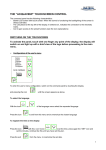
The child safety lock, lighting, steam, fragrance and
vertical massage functions are controlled with the switch
indicated on the figure. When the unit is connected to
the mains, indicator 5b and the number display are lightning. Pressing any of the buttons on the switch gives
a short beep, incorrect pressing givs a long beep. The
time of continuous operation of the steam cabin after
last switching is automatically limited to 2 hours. For
further use the functions should be switched on again.
Child safety lock control
9A
9
7A
7
5
5A
1A
45°C
8A
8
6A
6B
5B
Push button 8 of the switch, and hold it down until the
4A
display starts to blink and indicator 6a will light up. Now
2A
3A
press the “–” button, until dashes “- - -” appear on the
display. In a moment the blinking stops, the lit indicators
will go off and the switch becomes locked.
To unlock, press again button 8 and hold it down until
the display starts to blink and indicator 6a will light up.
Press the “+” button, until numbers appear on the display and indicator 5b will light up. In a moment the display will stop blinking and the indicator
6a will go off.
Chromotherapy control
Chromotherapy is operated from button 9 indicated on the figure. You can switch between
different colours by pushing the button repeatedly. If the period between two consecutive
pushes is longer than 2.5 seconds, the system is switched off. If holding down the button for
2.5 seconds, all colours start to alternate slowly and indicator 9A lights up. A short push on
the button stops the colours from changing, and indicator 9A starts to blink. With another
short push the colours will continue to change, and the indicator stops from blinking. If you
hold the button down for a while, the system is switched off. The system works for 30 consecutive minutes and will be then switched off automatically.
Steam control
After connection to the mains the display will show the temperature in the cabin (starts from
20°C). To change the default maximum (max 50°C), press button 8 of the switch and hold
it down until the temperature reading on the display will start to blink and indicator 6a lights
up. Now select a new temperature, using “+” and “-” buttons. In a moment the display stops
blinking, indicator 6a turns off, and the display will show again the temperature in the cabin.
(The selected temperature will be retained for next times of use, until a new temperature is
entered, the child safety lock is used or the cabin is disconnected from the mains.)
To switch on the steam function press button 8, indicator 8a lights up. In approximately one
minute, when the selected temperature exceeds the temperature in the cabin, indicator 8a
will change colour and the steam function switches on. The cabin is ready for use upon the
achievement of the selected temperature or in about 30 minutes after switching on (even if
the selected temperature is not achieved). To switch off the steam function, press again button 8, indicator 8a turns off.
The selected temperature can also be changed while the steam function is switched on. For
this press button “+” or “-”, the display will start to blink and indicator 6a will light up. Now use
“+” and “-” buttons to select a new temperature on the display. In a moment the display stops
Steam cabin Delta/Multi User manual
ENG
blinking, indicator 6a turn off and the display will again show the temperature in the cabin.
Note. Depending on the conditions in the premises, there may be situations where the actual
temperature can somewhat differ from the selected value.
Scottish shower function
Press button 7 on the panel. Cold water will start to run from the ceiling shower. The function is
active only as long as you hold button 7 down.
Note! It is not possible to adjust water temperature, since the function uses the input
water temperature of the cold water in your water system!
Vertical massage control
Open the mixer and use the water guide to direct water to vertical massage jets. By pressing button 5 of the switch you can select either sitting-position jets, indicator 5a lights up, or
standing position jets, indicator 5b lights up.
Functions:
1. By pressing button 1, indicators 1a and 6b light up - the pairs of jets work in turns from
bottom to top. To switch off the mode, press the button of some other mode or press again
button 1, indicators 1a and 6b go out.
2. By pressing button 2, indicators 2a and 6b light up - the pairs of jets work in turns from
bottom to top and from top to bottom. To switch off the mode, press the button of some other
mode or press again button 2, indicators 2a and 6b go out.
3. By pressing button 3, indicators 3a and 6b light up - two pairs of jets work intermittently. To
switch off the mode, press the button of some other mode or press again button 3, indicators
3a and 6b go out.
4. By pressing button 4, indicators 4a and 6b light up - all four pairs of jets work simultaneously. To switch off the mode, press the a button of some other mode or press again button
4, indicators 4a and 6b go out.
The speeds of massage modes 1, 2 and 3 may be adjusted with “-” and “+” buttons.
Note! Before turning off the thermal mixer make sure that you have turned off the vertical
massage.
Mixer control
Water temperature can be adjusted by turning the mixer handle C. You can open and adjust
the amount of water by lifting the handle. While the mixer is open, you can close water flow
or adjust the amount of water, using the diverter B knob to the extent provided by the mixer.
Pressing the diverter knob to the bottom, turning it counter clockwise until the chosen pictogram is pointing to index A, you can divert water as follows:
A
Cascade
Hand shower
Foot shower Vertical massage Roof shower
B
D
C
Steam cabin Delta/Multi User manual
ENG
You can choose between 3 different shower functions by turning the shower head.
If the steam cabin is fitted with a thermostatic mixer, you can adjust water temperature with
button C. The temperature of discharged water is visible above the button.
Aroma system
To use the aroma system, fi ll the cup under the steam jet with aroma emulsion, and turn the
aroma system on.
ADDITIONAL DEVICES
Radio control
To switch on the radio, push button A on the switch panel.
Numbers or “--- ” will appear on the number display, showA
ing the frequency to which the radio is currently tuned in.
Push C or D button. A short push will change the selected
frequency by small steps. When holding down the button
B
for more than a second, the radio will start searching the
C
next radio station with a sufficiently strong signal. Repeat
the procedure until you have found a station.
D
M
NOTE! Once you have reached either the upper or lower
frequency limit, the numbers will no longer increase. To
E
move back, press the opposite frequency direction switch.
The found station can be saved in memory by pushing button M. A corresponding indicator will light up under M. Now
press the button of memory slot E 1...4, and the station will
F
be saved in the respective memory slot. This way you can
save up to 4 stations. When using the cabin at some later
point, simply push the button of the respective memory slot
and you will hear the preselected station.
Volume is controlled with two F buttons located on the lower part of the switch panel.
The sound booster system can also be connected to an audio system located outside the
cabin. This can be a CD-player, tape recorder etc., which has a standard line output with ø
3,5 mm plug. Connect a 3,5 mm cable plug which comes out from the feed-amplifier block
(marked AUDIO INPUT) to the line output of your musical equipment.
NOTE! Connection to other outputs (intended for loudspeakers and others) can damage the
booster. To reverse from Balteco radio to external sound instrument it is necessary to push
simultaneously the volume buttons on the radio panel. “Aud” should light up on the display.
Volume is controlled similarly as when listening to the radio.
Maintenance
During use, the temperature of water may not exceed 60°C. For cleaning the cabin use a soft
cloth and liquid detergents, if necessary. Washing powder, abrasive cleaning agents, rough
materials and solvents are not suitable for cleaning. During mechanical maintenance works
the cabin must be electrically disconnected.
Steam cabin Delta/Multi User manual
ENG
Anti scale treatment
After approximately 40 hours of using the steam cabin, it is necessary to maintain the steam
generator with an anti-limescale product. You may use the special anti-limescale product
by Balteco, or any other analogous product available on the market. For maintenance,
fill the special bottle (Pos. 3) in the product kit with the anti-limescale product. Remove the cap
(Pos. 1) from the maintenance opening (Pos. 2). Pour the bottle ingredients (ca. 0.5 litres)
carefully into the opening and close the cap. Let the product function for at least 2 hours.
Then, briefly switch on the steam function. If steam is expelled, turn the steam function off.
The steam cabin is again ready for use.
DELTA
MULTI
1
1
2
2
TECHNICAL SPECIFICATIONS
Electrical equipment
Delta:
Multi:
Voltage
230 V
230 V
www.balteco.com
Jälgimäe, 76401, Harjumaa, Estonia
Phone: +372 6 718 237
Fax: +372 6 718 236
Frequency
50 Hz
50 Hz
Rated power
3150 W
3150 W
Rated current
13,7 A
13,7 A