1
Steam cabin Delta/Multi User manual
ENG
USING THE STEAM CABIN
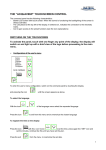
The child safety lock, lighting, steam, fragrance and
vertical massage functions are controlled with the switch
indicated on the figure. When the unit is connected to
the mains, indicator 5b and the number display are lightning. Pressing any of the buttons on the switch gives
a short beep, incorrect pressing givs a long beep. The
time of continuous operation of the steam cabin after
last switching is automatically limited to 2 hours. For
further use the functions should be switched on again.
Child safety lock control
9A
9
7A
7
5
5A
1A
45°C
8A
8
6A
6B
5B
Push button 8 of the switch, and hold it down until the
4A
display starts to blink and indicator 6a will light up. Now
2A
3A
press the “–” button, until dashes “- - -” appear on the
display. In a moment the blinking stops, the lit indicators
will go off and the switch becomes locked.
To unlock, press again button 8 and hold it down until
the display starts to blink and indicator 6a will light up.
Press the “+” button, until numbers appear on the display and indicator 5b will light up. In a moment the display will stop blinking and the indicator
6a will go off.
Chromotherapy control
Chromotherapy is operated from button 9 indicated on the figure. You can switch between
different colours by pushing the button repeatedly. If the period between two consecutive
pushes is longer than 2.5 seconds, the system is switched off. If holding down the button for
2.5 seconds, all colours start to alternate slowly and indicator 9A lights up. A short push on
the button stops the colours from changing, and indicator 9A starts to blink. With another
short push the colours will continue to change, and the indicator stops from blinking. If you
hold the button down for a while, the system is switched off. The system works for 30 consecutive minutes and will be then switched off automatically.
Steam control
After connection to the mains the display will show the temperature in the cabin (starts from
20°C). To change the default maximum (max 50°C), press button 8 of the switch and hold
it down until the temperature reading on the display will start to blink and indicator 6a lights
up. Now select a new temperature, using “+” and “-” buttons. In a moment the display stops
blinking, indicator 6a turns off, and the display will show again the temperature in the cabin.
(The selected temperature will be retained for next times of use, until a new temperature is
entered, the child safety lock is used or the cabin is disconnected from the mains.)
To switch on the steam function press button 8, indicator 8a lights up. In approximately one
minute, when the selected temperature exceeds the temperature in the cabin, indicator 8a
will change colour and the steam function switches on. The cabin is ready for use upon the
achievement of the selected temperature or in about 30 minutes after switching on (even if
the selected temperature is not achieved). To switch off the steam function, press again button 8, indicator 8a turns off.
The selected temperature can also be changed while the steam function is switched on. For
this press button “+” or “-”, the display will start to blink and indicator 6a will light up. Now use
“+” and “-” buttons to select a new temperature on the display. In a moment the display stops