1
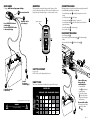
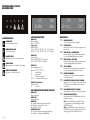
To charge, with last used program settings
5
4
Turn on mains switch
When permanently mounting the charger, mount the charger on a firm
surface. Fix the charger with screws in the four holes. Use suitable screws or
fixings. Allow space around the charger to not interfere with air cooling.
1
Press START/STOP-button to
start charging
Press the START/STOP-button
to interrupt charging
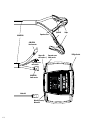
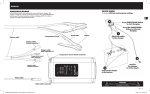
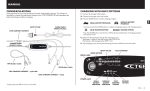
Attach the cables
to the charger
USB TYPE B CONTACT
MXTS 40
12V/40A
24V/20A
1
2
3
4
5
6
7
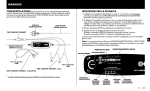
• Turn off mains switch 6 .
• Disconnect the charger from the mains supply 5 before disconnecting the
battery.
• Disconnect the black clamp 4 before the red clamp 3 .
SET
MODE
Ca/Ca
BOOST
STOP
If the battery clamps are incorrectly connected, the reverse polarity protection will
ensure that the battery and charger are not damaged.
• Connect the battery cables 1 , including the temperature sensor, to the
charger.
• Connect the mains cable 2 to the charger.
• Connect the red clamp 3 to the battery´s positive pole.
• Connect the black clamp 4 to the vehicle chassis remote from the fuel
pipe and the battery.
• Connect the charger 5 to the mains supply.
• Turn on mains switch 6 .
DISCOnnect the cables
8
NORMAL
AGM
COnnect the cables
START
STOP
SUPPLY
6
–
2
+
3
USB TYPE B CONTACT
For service only.
NOTE: Not to be used to charge mobile phones etc.
1
Connect
the charger
to mains supply*
2
Some vehicles may
have positively
earthed batteries
• Connect the black
clamp 3 to the battery´s
negative terminal.
• Connect the red clamp
4 to the vehicle chassis
remote from the fuel pipe
and the battery.
READY TO USE
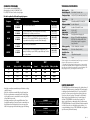
Table shows estimated time to take battery from empty to 80% charged.
BATTERY SIZE
Connect the charger
to the battery
10Ah 20Ah 50Ah 100Ah 600Ah 1200Ah
*Supply plugs may differ to suit your mains supply.
WARNING!
Batteries and electronics will be damaged if 12V batteries
are charged in 24V-setting.
CHARGING
CURRENT
5A
3h
8h
2h
4h
8h
2h
4h
24h
30A
3h
16h
40A
2h
12h
10A
20A
2h
3
24h
4
Disconnect the cables
• Disconnect the red clamp
4 before the black
clamp 3 .
5
EN • 5
EN
MOUNTING
QUICK GUIDE