1
Contents
Safety Notice
iii
1 Product Overview
1
1-1 Package Content
1-2 Structure Diagram
1-3 Dimensions & Weight
2 Installation
2-1
2-2
2-3
2-4
2-5
2-6
Before Installation
Unpacking
How To Clean Your LCD Monitor
How To Install
Connecting to a PS/2 or USB Server
Connecting to an External KVM Switch
3 Basic Operation
3-1 Opening the Drawer
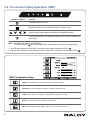
3-2 On-screen Display Operation (OSD)
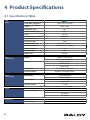
4 Product Specifications
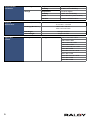
4-1 Specifications Table
4-2 Keyboard / Mouse Specifications
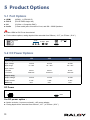
5 Product Options
1
1
2
3
3
3
3
4
5
5
6
6
7
8
8
10
11
5-1 Port Options
5-2 DC Power Options
11
11
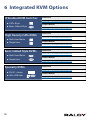
6 Integrated KVM Options
12
IP Enabled KVM Switches
High Density CATx KVMs
Basic Cabled Style KVMs
Specialty KVMs
12
12
12
12
7 Important Information
13
Warranty Information
What the Warranty Does Not Cover
Regulatory Notices Federal Communications Commission (FCC)
Legal Information
ii
13
14
14
14