1
www.pce-industrial-needs.com
Tursdale Technical Services Ltd
Unit N12B
Tursdale Business Park
Co. Durham
DH6 5PG
United Kingdom
Phone: +44 ( 0 ) 191 377 3398
Fax: +44 ( 0 ) 191 377 3357
[email protected]
http://www.industrial-needs.com/
Manual
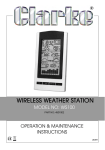
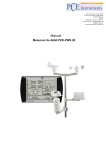
Touch Screen Weather Station
PCE-FWS 20
[email protected]
Manual ..................................................................................................................................... 1
Touch Screen Weather Station ................................................................................................ 1
PCE-FWS 20 ........................................................................................................................... 1
Operation Manual .................................................................................................................... 3
About this manual .................................................................................................................... 3
Glossary of Common Terms .................................................................................................... 3
DCF/WWVB ......................................................................................................................... 3
LCD ...................................................................................................................................... 3
BAROMETER & BAROMETRIC PRESSURE ..................................................................... 3
RELATIVE AIR PRESSURE ................................................................................................ 3
ABSOLUTE AIR PRESSURE .............................................................................................. 3
INCHES OF MERCURY (inHg) ............................................................................................ 3
HECTOPASCALS ................................................................................................................ 3
Getting Started ........................................................................................................................ 4
Setup Sensors ..................................................................................................................... 5
System Start ............................................................................................................................ 7
Positioning ............................................................................................................................... 8
Setting Up ................................................................................................................................ 8
indoor temperature ............................................................................................................... 8
outdoor temperature............................................................................................................. 9
Indoor humidity .................................................................................................................. 10
Outdoor humidity ................................................................................................................ 11
Wind speed ........................................................................................................................ 11
Rain.................................................................................................................................... 12
Weather forecast ................................................................................................................ 13
Pressure ............................................................................................................................. 13
Pressure bar graph ............................................................................................................ 14
Time ................................................................................................................................... 14
Date ................................................................................................................................... 15
Memory .............................................................................................................................. 16
PC Connection ...................................................................................................................... 16
Data Storage ...................................................................................................................... 16
Data Recall ........................................................................................................................ 16
Connections and Software ................................................................................................. 16
PC software installation ......................................................................................................... 16
Specifications ........................................................................................................................ 18
Outdoor data ...................................................................................................................... 18
Indoor data ......................................................................................................................... 19
PC Software User Manual ..................................................................................................... 19
General Information ............................................................................................................... 19
System Requirements ........................................................................................................... 20
Installation of the “EasyWeather” Software............................................................................ 20
Basic Settings of the “EasyWeather” Software ...................................................................... 21
Function button: ................................................................................................................. 22
2
[email protected]
Operation Manual
About this manual
Thank you and congratulations on selecting this professional weather station! We are
positive you will enjoy the benefits of accurate weather readings and the precise radio
controlled time information that our instruments offer.
This manual will guide you step-by-step through setting up your PCE-FWS 20 device. Use
this manual to become familiar with your professional weather station, and save it for future
reference.
Glossary of Common Terms
DCF/WWVB
The DCF or WWVB time signal is an AM modulated time-of-day signal broadcasted by the
Federal Government of Germany or NIST from USA. The time base is generated from an
atomic time generator which is accurate to 10 billions of one second.
LCD
“LCD” is an acronym for ”Liquid Crystal Display”. This is a common type of display screen
used in televisions, computers, watches, and digital clocks.
BAROMETER & BAROMETRIC PRESSURE
A barometer is a device that measures the pressure of the air pushing on it—this
measurement is called the barometric pressure. We don’t actually feel the barometric
pressure because the air pressure is pushing equally in every direction.
RELATIVE AIR PRESSURE
Relative air pressure is the same as the barometric pressure. The calculation of relative air
pressure is a combination of the absolute air pressure and the altitude.
ABSOLUTE AIR PRESSURE
Absolute air pressure is the actual air pressure on the barometer without regard to altitude.
INCHES OF MERCURY (inHg)
Inches of Mercury is the common unit of measurement for air pressure in the United States.
HECTOPASCALS (hPa)
Hectopascals are the common units of measurement for air pressure in the International
System (SI) of measurement. The hectopascal holds the same value Important Note:
Before inserting batteries, please carefully read the operation manual.
The touch screen weather station PCE-FWS 20 includes a base station (receiver), a
transmitter unit, one wind direction sensor, one wind speed sensor, one rain gauge, USB
cable and a PC software package on CD-ROM.
3
[email protected]
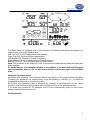
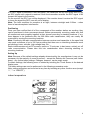
The Base Station is equipped with a Touch Screen LCD Monitor and allows the display of a
large variety of time and weather data.
Left Top LCD: IN-OUT temperature and humidity
Right Top LCD: Wind and Rain measurement
Left Middle LCD: Weather Forecast (Tendency)
Right Middle LCD: Air Pressure and Air Pressure History
Bottom Line LCD: Time and Date, Memory Data Usage
Note: The presence of the "Alarm-On icon" in the section means that the particular alarm has
been enabled.
An added feature of the Weather Station is the readout of all measured and displayed
time and weather data on a PC as well as the ability to upload the data to Internet Web
Sites.
Important Operation Notes
All actions and functions of the weather station are started on the touch screen by slightly
Touching (not pressing!) the related areas, touch the flashing +, ON/OFF or – to make the
corresponding selection or increase the value.
Every time a programming step is activated by touching a switching area on the Touch
Screen a tone will sound, and the back light is switched on for a few seconds as well.
If no areas are pressed for 30 seconds, the LCD will automatically revert to the normal
display mode (automatic time out).
Getting Started
4
[email protected]
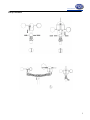
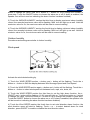
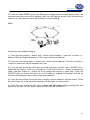
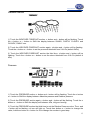
Setup Sensors
5
[email protected]
6
[email protected]
Important Notes:
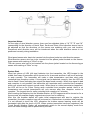
On the edge of wind direction sensor, there are four alphabet letter of “N”,”E”,”S” and “W”
representing for the direction of North, East, South and West. Wind direction sensor has to
be adjusted so that the directions on the sensor are matching with your real location.
Permanent wind direction error will be introduced when the wind direction sensor is not
positioned correctly during installation.
Wind speed sensor wire has to be inserted into the phone jacket on wind direction sensor.
Wind direction sensor wire has to be inserted into the phone jacket located on the thermohygro sensor with marking of “Wind” on top.
The rain sensor wire has to be inserted into the phone jacket located on the thermo-hygro
sensor with marking of “Rain” on top.
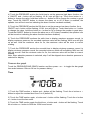
System Start
Insert two pieces of LR6 (AA size) batteries into the transmitter, the LED located in the
middle front case of transmitter will be turned on for 4 seconds and then it will be off and start
to work normally. The transmitter will make a data transmission and then start radio
controlled time reception routine. If time signal can be detected correctly, then the LED will
start to flash 5 times indicating time signal has been found correctly. When time signal is bad
and reception is not possible, the transmitter will terminate radio controlled time reception
within one minute and resume normal mode. When there is a data transmission happened,
the LED will be on for 20ms. During radio controlled time reception period, there is no
transmission and normal transmission will only resume after time reception routine is
complete. The longest time for radio controlled time reception is 5 minutes.
After inserting the batteries into the Weather Station, all LCD segments will be turned on for a
few seconds, all possible display segments are turned on for checking.
After this, the weather station will make initial measurement and start to register the
transmitter ( the radio reception icon will be turned on). Before there is outdoor data received,
it is not allowed to touch the LCD, otherwise the outdoor sensor learning mode will be
terminated right after the touch of LCD. When outdoor transmitter has been registered, the
Touch Screen Weather Station will automatically switch to the normal display mode from
which all further settings can be performed by the user.
7
[email protected]
If no RCC signal is detected in the initial setup, the transmitter will try once every hour to get
an RCC signal until a signal is received. Once the transmitter receives the RCC signal it will
transmit the signal to the monitor.
On the monitor the RCC icon will be displayed, if the monitor doesn’t receive the RCC signal
or loses the signal the RCC icon will not be display.
Note: The best condition for reception is at night, between midnight and 6:00am – when
there is less atmospheric interference.
Positioning
Once you have verified that all of the components of the weather station are working, they
can be positioned in their permanent places. Before permanently mounting, make sure that
all components work properly together at their chosen mounting or standing locations. If e.g.
there appear to be problems with the 868 MHz radio transmission, they can mostly be
overcome by moving the mounting locations.
Note: Commonly the radio communication between receiver and transmitter in the open field
can reach a distance of up to 330 feet providing that there are no interfering obstacles such
as buildings, trees, vehicles, high voltage lines, etc.
Radio interferences such as PC screens, radios or TV sets can, in bad cases, entirely cut off
radio communication. Please take this into consideration when choosing standing or
mounting locations.
Setting Up
Note: Because of the default settings already determined by the manufacturer it may not be
necessary for the majority of users to perform – except the Relative Air Pressure (see further
down) - any further basic settings. Changes, however, can be easily made.
For basic settings, the following menu is started by touching the Touch Screen in the desired
display area.
The basic settings can now be performed in the following successive order:
Note: setting procedure can be exited at any time by touching any other function area (except
“+”, “-” or “ON/OFF”).
indoor temperature
8
[email protected]
Activate the indoor temperature related setting by
1) Touch the INDOOR TEMPERATURE section, + button and – button will be flashing.
Touch the + button or – button to Shift the display unit between C and F
2) Touch the INDOOR TEMPERATURE section again to set the indoor temperature high
alarm function, the +, ON/OFF and – button will be flashing, HI AL icon will light up. Touch
the + button or – button to change the value, hold the + button or – button for 3s to change
the number in great step. Touch the ON/OFF button to choose the alarm on or off (if alarm is
enabled, the speaker icon will be turned on indicating the alarm function has been enabled).
3) Touch the INDOOR TEMPERATURE section the third time to set the indoor temperature
low alarm function, the +, ON/OFF and – button will be flashing, LO AL icon will light up.
Touch the + button or – button to change the value, hold the + button or – button for 3s to
change the number in great step. Touch the ON/OFF button to choose the alarm on or off (if
alarm is enabled, the speaker icon will be turned on indicating the alarm function has been
enabled).
4) Touch the INDOOR TEMPERATURE section the fourth time to display maximum indoor
temperature record, the maximum records will be flashing, MAX icon will light up as well.
Hold the flashing max value for 3s, the maximum value will be reset to current reading.
5) Touch the INDOOR TEMPERATURE section the fifth time to display minimum indoor
temperature record, the minimum records will be flashing, MIN icon will light up as well. Hold
the flashing min value for 3s, the minimum value will be reset to current reading.
outdoor temperature
Activate the outdoor temperature related setting by
1) Touch the OUTDOOR TEMPERATURE section, + button and – button will be flashing.
Touch the + button or – button to Shift the display between Outdoor Temperature, Wind Chill
and Dew Point.
2) Touch the OUTDOOR TEMPERATURE section again, + button and – button will be
flashing. Touch the + button or – button to Shift the display unit between C and F
9
[email protected]
3) Touch the OUTDOOR TEMPERATURE section the third time to set the outdoor
temperature high alarm function, the +, ON/OFF and – button will be flashing, HI AL icon will
light up. Touch the+ button or – button to change the value, hold the+ button or – button for
3s to change the number in great step. Touch the ON/OFF button to choose the alarm on or
off (if alarm is enabled, the speaker icon will be turned on indicating the alarm function has
been enabled).
4) Touch the OUTDOOR TEMPERATURE section the fourth time to set the outdoor
temperature low alarm function, the +, ON/OFF and – button will be flashing, LO AL icon will
light up. Touch the+ button or – button to change the value, hold the+ button or – button for
3s to change the number in great step. Touch the ON/OFF button to choose the alarm on or
off (if alarm is enabled, the speaker icon will be turned on indicating the alarm function has
been enabled).
5) Touch the OUTDOOR TEMPERATURE section the fifth time to display maximum outdoor
temperature record, the recorded maximum value will be flashing, MAX icon will light up.
Hold the flashing max value for 3s, the maximum value will be reset to current reading.
6) Touch the OUTDOOR TEMPERATURE section the sixth time to display minimum outdoor
temperature record, the recorded minimum value will be flashing, MIN icon will light up as
well. Hold the minimum value for 3s, the minimum value will be reset to current reading.
Indoor humidity
Activate the indoor humidity related setting by
1) Touch the INDOOR HUMIDITY section again to set the indoor humidity high alarm
function, the +, ON/OFF and – button will be flashing, HI AL icon will light up. Touch the +
button or – button to change the value, hold the + button or – button for 3s to change the
number in great step. Touch the ON/OFF button to choose the alarm on or off (if alarm is
enabled, the speaker icon will be turned on indicating the alarm function has been enabled).
2)Touch the INDOOR HUMIDITY section again to set the indoor humidity low alarm function,
the +, ON/OFF and – button will be flashing, LO AL icon will light up. Touch the+ button or –
10
[email protected]
button to change the value, hold the + button or – button for 3s to change the number in
great step. Touch the ON/OFF button to choose the alarm on or off (if alarm is enabled, the
speaker icon will be turned on indicating the alarm function has been enabled).
3) Touch the INDOOR HUMIDITY section the third time to display maximum indoor humidity
record, the recorded maximum value will be flashing, MAX icon will light up as well. Hold the
maximum value for 3s, the maximum value will be reset to current reading.
4) Touch the INDOOR HUMIDITY section the fourth time to display minimum indoor humidity
record, the recorded minimum value will be flashing, MIN icon will light up as well. Hold the
minimum value for 3s, the minimum value will be reset to current reading.
Outdoor humidity
Procedures and settings are similar to Indoor humidity
Wind speed
Activate the wind related setting by
1) Touch the WIND SPEED section, + button and – button will be flashing. Touch the +
button or – button to Shift the display between Wind Average Speed and Gust Speed.
2) Touch the WIND SPEED section again, + button and – button will be flashing. Touch the +
button or – button to select wind speed unit between km/h, mph, m/s, knots, bft.
3) Touch the WIND SPEED section the third time to set the high alarm function, the +,
ON/OFF and – button will be flashing, HI AL icon will light up. Touch the+ button or – button
to change the value, hold the+ button or – button for 3s to change the number in great step.
Touch the ON/OFF button to choose the alarm on or off (if alarm is enabled, the speaker icon
will be turned on indicating the alarm function has been enabled).
4) Touch the Wind SPEED section the fourth time to set wind direction alarm function, the
wind direction arrow will start to flashing. Touch + or – to select desired alarm for wind
direction, press ON/OFF to enable or disable the wind direction alarm.
11
[email protected]
5) Touch the Wind SPEED section the fifth time to display maximum wind speed record, the
recorded maximum value will be flashing, MAX icon will light up as well. Hold the maximum
value for 3s, the maximum value will be reset to current reading.
Rain
Activate the rain related setting by
1) Touch the rain section, + button and – button will be flashing. Touch the + button or –
button to Shift the display between 1h, 24h, week, month and total rain.
2) Touch the rain section again, + button and – button will be flashing. Touch the + button or
– button to select rain fall unit between mm, inch.
3) Touch the rain section the third time to set the high alarm function, the +, ON/OFF and –
button will be flashing, HI AL icon will light up. Touch the+ button or – button to change the
value, hold the+ button or – button for 3s to change the number in great step. Touch the
ON/OFF button to choose the alarm on or off (if alarm is enabled, the speaker icon will be
turned on indicating the alarm function has been enabled).
4) Touch the rain section the fourth time to display current maximum rain fall record. Touch
the rain section for 3s will reset the maximum rain fall value to current value.
5) Touch the rain section the fifth time to reset rain fall value to 0 by pressing the rain
section for 3s, then 1h, 24h, week, month and total rain will be reset to 0.
12
[email protected]
Weather forecast
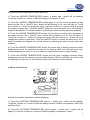
1) Touch the WEATHER FORECAST section, + button and – button will be flashing. Touch
the + button or – button to Shift the display between SUNNY, PARTLY CLOUDY and
CLOUDY, RAINY icon.
2) Touch the WEATHER FORECAST section again, + button and – button will be flashing.
Touch the + button or – button to set the pressure threshold from 2-4h Pa (default 2hPa)
3) Touch the WEATHER FORECAST section the third time, + button and – button will be
flashing. Touch the + button or – button to set the storm threshold from 3-9h Pa (default 4
hPa)
Pressure
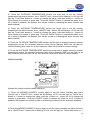
1) Touch the PRESSURE section, + button and – button will be flashing. Touch the + button
or – button to Shift the display between Absolute pressure and Relative pressure.
2) Touch the PRESSURE section again, + button and – button will be flashing. Touch the +
button or – button to Shift the display unit between hPa, inHg and mmHg.
3) Touch the PRESSURE section the third time to set the Relative Pressure value. The + and
– button will be flashing, rel icon will light up. Touch the+ button or – button to change the
value, hold the+ button or – button for 3s to change the number in great step.
13
[email protected]
4) Touch the PRESSURE section the forth time to set the pressure high alarm function, the
+, ON/OFF and – button will be flashing, HI AL icon will light up. Touch the+ button or –
button to change the value, hold the+ button or – button for 3s to change the number in great
step. Touch the ON/OFF button to choose the alarm on or off (if alarm is enabled, the
speaker icon will be turned on indicating the alarm function has been enabled).
5) Touch the PRESSURE section the fifth time to set the pressure low alarm function, the +,
ON/OFF and – button will be flashing, LO AL icon will light up. Touch the+ button or – button
to change the value, hold the+ button or – button for 3s to change the number in great step.
Touch the ON/OFF button to choose the alarm on or off (if alarm is enabled, the speaker icon
will be turned on indicating the alarm function has been enabled).
6) Touch the PRESSURE sections the sixth time to display maximum pressure record, to
display maximum pressure, the recorded maximum value will be flashing, MAX icon will light
up as well. Hold the maximum value for 3s, the maximum value will be reset to current
reading.
7) Touch the PRESSURE section the seventh time to display minimum pressure record, to
display minimum pressure record, the recorded minimum value will be flashing, MIN icon will
light up as well. Hold the minimum value for 3s, the minimum value will be reset to current
reading.
Note: when absolute pressure is selected, step 3 will be skipped since absolute pressure is
selected for display.
Pressure bar graph
Touch the PRESSURE BAR GRAPH section and then press + or – to toggle the bar graph
time scale between 12hrs or 24 hrs for pressure history.
Time
1) Touch the TIME section, + button and – button will be flashing. Touch the + button or –
button to adjust the contrast level from 0 to 8.(default 5).
2) Touch the TIME section again, + button and – button will be flashing. Touch the + button
or – button to set the time zone.
3) Touch the TIME section again the third time, + button and – button will be flashing. Touch
the + button or – button to Shift the 12/24 hours format.
14
[email protected]
4) Touch the TIME section the fourth time, + button and – button will be flashing.
Touch the + button or – button to set the DST ON or OFF (this function is only available for
WWVB version, while for DCF version, this feature is not activated).
Note: “DST OFF” indicates that the feature is off and the internal real time clock will not
change times automatically. “DST ON” indicates that the feature is on and the internal real
time clock will change times according to the DST time schedule automatically. Some
locations (Arizona and parts of Indiana) do not follow Daylight Saving Time, and should
select “DST OFF”.
Date
1) Touch the DATE section, + button and – button will be flashing. Touch the + button or –
button to shift between alarm time, date and week date.
2) Touch the DATE section again, + button and – button will be flashing. Touch the + button
or – button to Shift between DD-MM format and MM-DD format for the date.
3) Touch the DATE section the third time, + button and – button will be flashing. Touch the +
button or – button to set the year. Hold the+ button or – button for 3s to change the number
in great step.
4) Touch the DATE section the fourth time, + button and – button will be flashing. Touch the
+ button or – button to set the month. Hold the+ button or – button for 3s to change the
number in great step.
5) Touch the DATE section the fifth time, + button and – button will be flashing. Touch the +
button or – button to set the day. Hold the+ button or – button for 3s to change the number in
great step.
6) Touch the DATE section the sixth time, + button and – button will be flashing. Touch the +
button or – button to set the alarm hour. Hold the+ button or – button for 3s to change the
number in great step.
7) Touch the DATE section the seventh time, + button and – button will be flashing. Touch
the + button or – button to set alarm minute. Hold the+ button or – button for 3s to change the
number in great step. Touch ON/OFF to enable or disable time alarm function.
15
[email protected]
Memory
1) Touch Memory section to activate history data toggle display, + button and – button will be
flashing. Press – to toggle forward to see earlier weather history data together time stamp,
press + to see later history weather data. When history data displayed, the corresponding
time will be displayed at the time section area (History data saving interval can only be
changed using the PC software that comes with this product, the default history data saving
time interval is preset to 30 minutes prior to shipment).
2) Touch Memory section again will trigger the memory clear procedure: the word of
“CLEAR” will be flashing, the full memory usage icon will be flashing. Press and hold the
memory full icon for 3 seconds will clear the memory.
PC Connection
As an important feature in addition to the display on the Touch Screen, the Weather
Station allows the read-out of all measured and displayed time and weather data in
form of complete history data sets on a PC.
Data Storage
For a comprehensive weather history, the Base Station allows the internal storage of up to
4080 complete sets of weather data with time and date. These data sets are being stored in
non-volatile ring buffer memory (EEPROM) and will not be lost even in case of an interruption
of power supply (e. g. change of batteries).
In case the memory capacity of the Weather Station is exhausted the oldest data sets stored
will be overwritten by the new ones entered.
Data Recall
Certain weather data or setting values can only be read out, processed, and displayed by
means of a PC. Also the settings of the storing intervals from 5 minutes to 250 minutes for
the storage of data sets can only be performed by means of a PC.
Connections and Software
The wiring between Weather Station and PC takes place by means of an included USB
cable. The Easy Weather software package, also included in the shipping contents, must be
installed on the PC.
This software allows the display of all present weather data with graphic symbols. It also
allows the display, storage, and printing of history data sets, whose volume exceeding the
maximum 4080 data sets of the Weather Station is only limited by the capacity of the PC’s
main memory.
PC software installation
The installation of PCE-FWS 20 software is very simple: double click the setup.exe file and
follow the steps popped up.
Make sure you are running the program under the administrator accounts of your windows
PC platform.
16
[email protected]
Otherwise the graphic function might not be working when graph display mode is needed to
display all history data.
If you run the program for the first time, the current weather display will be displayed and at
the sub line of the window, the program will show related information regarding the read of all
history data into the PC. Please note however, when there is large amount of data is being
uploaded, it will take a few minutes time before the system can respond to your setup
settings. Otherwise it will display “read weather data fail” error message since the USB port is
reading the data from the memory and the system is not able to respond any further job
tasks.
17
[email protected]
When memory is full, it will take about two minutes to upload all history data into PC and it
takes another two minutes to process all history data for graphic display.
Further detailed PC software user manual can be found from the help menu.
Specifications
Outdoor data
Transmission distance in open field: 100m (330 feet)
Frequency: 868MHZ (Europe) / 915MHz (North America)
Temperature range: -40°C--65°C (-40℉ to +149℉)
Resolution: 0.1°C (0.2℉)
Measuring range rel. humidity: 10%~99%
Rain volume display: 0 – 9999mm (show --- if outside range)
Resolution: 0.3mm (if rain volume < 1000mm)
1mm (if rain volume > 1000mm)
Wind speed: 0-160km/h (0~100mph) (show --- if outside range)
Measuring interval thermo-hygro sensor: 48 sec
Water proof level: IPX3
18
[email protected]
Indoor data
Measuring interval pressure / temperature: 48 sec
Indoor temperature range: 0°C--50°C (32℉ to + 122℉) (show --- if outside range)
Resolution: 0.1°C (0.2℉)
Measuring range rel. humidity: 10%~99%
Resolution: 1%
Measuring range air pressure: 700-1100hpa (27.13inHg – 31.89inHg)
Resolution: 0.1hpa (0.01inHg)
Alarm duration: 120 sec
Power consumption
Base station: 3XAA 1.5V LR6 Alkaline batteries
Remote sensor: 2xAA 1.5V LR6 Alkaline batteries
Battery life: Minimum 12 months for base station
Minimum 24 months for thermo-hygro sensor
Remark: where outdoor temperature is lower than -20°C, make sure proper type of batteries
to be used to assure that the device can get enough power to maintain its function properly.
Normal alkaline batteries is not allow to be used since when outdoor temperature is lower
than -20 °C, the battery’s discharging capability is greatly reduced.
Please help in the preservation of the environment and return used batteries to an
authorized depot.
All rights reserved. This handbook must not be reproduced in any form, even in excerpts, or
duplicated or processed using electronic, mechanical or chemical procedures without written
permission of the publisher.
This handbook may contain mistakes and printing errors. The information in this handbook is
regularly checked and corrections made in the next issue. We accept no liability for technical
mistakes or printing errors, or their consequences.
All trademarks and patents are acknowledged.
PC Software User Manual
General Information
This Weather Station is a high quality, easy to use weather monitoring system that reads,
displays and records the weather data from internal as well as external sensors. Besides the
internally measured values for indoor temperature, indoor humidity and air pressure the
outdoor sensor will take data for temperature and humidity, wind and rainfall. Operation of
these units is by wireless transmission to the Base Station.
After installing the “EasyWeather” program on this CD-ROM, your PC can display all indoor
data as well as the weather data from the Base Station received from the external sensors.
For operation, simply use the USB cable supplied and connect the Base Station to the PC.
From now on you can start to track current and history weather information at your finger tips.
19
[email protected]
System Requirements
To install the "EasyWeather" software onto your PC, the minimum requirements are as
follows:
Operating System: Windows NT4 (Service Pack >= 6a), Windows 2000, Windows XP,
Windows Vista.
Internet Explorer 6.0 or above
Processor: Pentium III 500 MHz or above
Memory: at least 128MB, 256MB recommended
CD-ROM Drive
Base Station and PC must be connected by USB cable
Installation of the “EasyWeather” Software
Firstly, the Base Station and the Outdoor Sensors should be connected and checked for
correct function (see Operation Manual for PCE-FWS 20 Touch Screen Weather Station
for setting up the Weather Station).
After successful checking, install the “EasyWeather” software as follows:
1. Switch on your PC and insert the CD-ROM into the CD-ROM Drive.
2. Double click “Setup.exe”
3. Select the installation process language option and click next
4. Click next and select the destination folder (change directory when needed)
5. Click next and the software will be installed automatically
6. Press ok to finish the installation process
7. From “Start—All Programs—EasyWeahter” path and double click the “EasyWeather” icon
to start application.
Note: The graphic function needs the software to be installed under the administrator
account. If it is installed under limited user accounts, the graphic function of the software
might not be working correctly.
20
[email protected]
Basic Settings of the “EasyWeather” Software
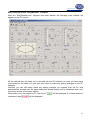
After the “EasyWeather.exe” program has been started, the following main window will
appear on the PC screen:
All the settings from the base unit is mirrored into the PC software, so once you have done
your setting on the base unit, then you don’t need to make any setting changes on the PC
software.
However you can still easily make any setting changes you wanted from the PC and
download the changes into the base station(the setting change will be refreshed when next
full minute arrives on the base station).
When base unit is connected to PC, the icon of
connected, then
will be displayed.
will be displayed. If no base station is
21
[email protected]
Function button:
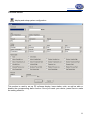
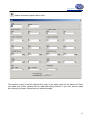
: display and setup system configuration
This section is used to set up PC software display, base station units, as well as able or
disable the corresponding alarm function. Once you made your choice, press Save to make
the setting effective.
22
[email protected]
: display and setup system alarm value
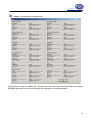
This section is used to set the desired time, high or low alarm value for the base unit. Once
you made your choice, choose Save to make the setting effective. If you don’t want to make
any change, just press Cancel and exit without change.
23
[email protected]
: display min and max recorded value
This section is used to display the recorded min and max value recorded with time stamp.
Min/Max reset can only be done through key operation on the base station.
24
[email protected]
: display
listed history data
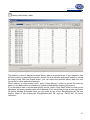
This section is used to display recorded history data in a spread sheet. If you wanted to see
all history data in a desired time period, choose the time duration and press Search to reload
the history data. With the Export button, you can export the selected history data into text
format file for other application purpose.
When memory on base station is full, press “Clear Memory” button to refresh the memory
space on the base station (remember to upload all data before pressing this button).
If you wanted to start a new weather history record, press “Clear Data” button to clear up the
data base, all history weather data will be deleted (if you would like to keep a back up history
file before deleting all weather data, you can make a copy of the “EasyWeather.dat” file into
another folder or just rename the “EasyWeather.dat” file, such as “Jan-07.dat”, for future
reference.
25
[email protected]
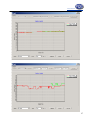
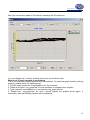
: display history data in graph mode
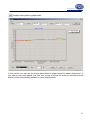
In this section, you can see the history data plotted in graph format for easier observation. If
you want to see more details, just use your mouse to select the area you wanted and the
display will be automatically updated in more detailed scale:
26
[email protected]
27
[email protected]
Also you can see the graph in 3D mode by selecting the 3D check box:
You can change the Y axel by scrolling the mouse up and down roller.
What to do if graph function is not working
This is the most encountered problem with this software. To make the graph function working
properly, please check the following step:
1. Find the folder where the “EasyWeahter.exe” file is located
2. Create a file name “reg_graph.bat” file with wordpad or notepad editor program
3. Type “regsvr32 easyweather.ocx” and save the reg_graph.bat file
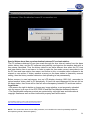
4. Double click “reg_graph.bat” file and it should register the graphic driver again. If
successful, then the following window will be displayed:
28
[email protected]
Special Notes about time synchronization between PC and sub-station:
The PC software obtained its own time scale through the time interval marker from the base
station history data, and the PC software automatically synchronizes the weather data with a
time stamp calculated. Thus the history data file can have different time when the PC time
and base station time is not same. In order to make the time scale correct, remember to set
the PC time and base station time same, and further to this, no weather data is allowed to be
missed or over-written. If history weather memory on the base station is cleared by manual
setting, then the history weather data since last uploading is lost permanently.
Before memory is used up(memory icon on LCD display showing 100% full), remember to
upload weather history data to PC periodically. If there is a reset happened for the rain fall on
the base station, then there will be rain fall value discrepancy between PC and base station.
Legal Notes
• We reserve the right to delete or change any image whether or not purposely uploaded
onto the server by a user of the PCE-FWS 20 and the EasyWeather software products.
• The EasyWeather software products are protected by copyright laws and international
copyright treaties as well as other intellectual property laws and treaties.
In this direction will find a vision of the measurement technique:
http://www.industrial-needs.com/measuring-instruments.htm
NOTE: "This instrument doesn’t have ATEX protection, so it should not be used in potentially explosive
atmospheres (powder, flammable gases)."
29